Ksenia Kartamysheva
 Let’s be honest. A lot of architecture firms in Canada run projects with a patchwork of tools that were never designed to cooperate. Time lives in one system. Budgets live in spreadsheets. Resource planning is mostly guesswork and crossed fingers. That setup doesn’t just feel messy. It creates blind spots that hit profitability, staffing, and delivery quality. The right project management software brings projects, phases, fees, and capacity into one place. You stop playing detective and start managing with clarity.
For Canadian firms, there’s also the Canada factor. Local support, clearer answers on privacy and data residency, and vendors who understand Canadian business realities can make day-to-day operations smoother. In this guide, we compare the top architecture project management tools used by Canadian teams in 2026: Birdview PSA (Toronto HQ), Function Point, Deltek Vantagepoint, Monograph, BQE Core, and ArchiOffice, and explain how to choose the best fit.
Quick comparison: best architecture project management tools in Canada
For a broader market view, compare leading software solutions made in Canada across business categories.
| Tool | Made in Canada? | Best for | Project financials? | Capacity planning? |
| Birdview PSA | Yes (Toronto HQ, Canadian data hosting available) | Mid-sized and larger architecture and A&E firms needing visibility across projects, resource capacity, and profitability | Yes, advanced (Phase budgets, billing, EAC, profitability, rate cards and $CAD) | Yes (AI-assisted resource matching, skills and availability matching, workload & capacity planning) |
| Function Point | Yes (Vancouver HQ) | Canadian architecture and professional services firms wanting a balanced PSA | Yes, comprehensive | Limited |
| WorkflowMax | No (Melbourne, Australia) | Smaller architecture studios needing simple job tracking, time, and billing | Limited | No |
| Deltek Ajera | No (US-based) | Firms prioritizing project accounting, budgeting, and AEC financial controls | Yes | Limited |
| BQE Core | No (US-based) | Architecture firms focused on time tracking, billing accuracy, and project accounting | Yes | Limited |
What to look for in the best architecture project management software in Canada
Project and phase-based planning
Architecture projects move through phases. That’s non-negotiable. Each phase has its own schedule, budget, and deliverables, and your software needs to reflect that. You should be able to see how phases depend on each other and track progress across long, multi-month projects without losing context.
Resource planning and capacity management
If you can’t clearly see who’s available and who’s overloaded, problems show up too late. Good software shows workload and capacity by role and by person, so you can spot conflicts early, balance workloads, and make informed decisions about timelines and new work.
AI-assisted planning and forecasting
AI in architecture project management helps reduce blind spots. The right tools use historical project data to forecast schedule risks, flag budget overruns earlier, and highlight resource conflicts before they turn into real problems.
Project financial management and fee control
This is where many firms feel pressure. You need to track budgets by phase, not just at the project level. Burn rate and utilization should be visible in real time, so you can adjust scope or staffing while there’s still room to act, not after margins are gone.
Billing in Canadian dollars (CAD)
Billing and compliance also add complexity. Canadian firms often need support for CAD billing, GST/HST handling, and public-sector procurement requirements, along with clear answers around data residency and privacy. Tools that can address these questions upfront tend to create fewer operational and compliance headaches later.
Reporting and dashboards for firm leadership
Principals need to see project health quickly (schedules, budgets, and resource load) without waiting for custom reports. Portfolio-level visibility across all projects supports better strategic decisions, especially when capacity and profitability are on the line.
Data security, compliance, and Canadian considerations
You need proper access controls and real security measures. Client confidentiality and regulatory compliance matter. For Canadian firms specifically, think about whether the tool offers Canadian data residency, has support teams who get Canadian business practices, or actually has an office in Canada.
How we picked the best architecture project management tools
We focused on tools that either started in Canada, have headquarters here, or maintain a real Canadian presence. We also looked specifically at platforms suited for architecture and design workflows rather than just generic project management tools that could work for anyone.
Our evaluation considered:
- Core functionality and feature depth specific to architecture workflows
- Ease of adoption for architecture teams without extensive training requirements
- Fit for architectural project lifecycles, including phase-based planning and fee management
- Trial or demo availability to test before committing
- Product maturity and market reputation for long-term reliability
- Canadian presence through data residency, support teams, or local offices
- User ratings and reviews from actual architecture and professional services firms
Why non-Canadian-based tools still appear on Canadian “best” lists
While Canadian-built software is often preferred, the reality is that many architecture firms in Canada rely on tools developed elsewhere. In some cases, these platforms have strong adoption across Canadian firms and meet local requirements just as effectively as domestic options.
Non-Canadian tools still appear on Canadian “best” lists for practical reasons, including:
- Established use among Canadian architecture firms
- Canadian offices or local customer support
- Compliance with recognized security and audit standards
- Alignment with Canadian privacy requirements
- Strong functionality in specific areas, such as project accounting or document management
- Limited availability of full-scope Canadian alternatives
- Proven ability to scale for complex, long-term architecture projects
Including these tools reflects how architecture firms in Canada actually operate today, not an idealized market that doesn’t exist in practice.
5 best architecture project management tools in Canada
1. Birdview PSA
Headquarters: Toronto, Ontario, Canada
Best for:
Mid-sized and larger architecture and A&E firms needing visibility across phase budgets, resource capacity, and project profitability.
Architecture teams can test capacity before committing to new work, plan resources across upcoming projects, and track budget burn across design phases. Project schedules, time, resource allocations, and financial data stay connected instead of being managed across separate tools and spreadsheets. See how Birdview for architecture firms brings this together in practice.
For Canadian firms, Birdview also offers Canadian data hosting, enterprise security, and support from a Toronto-headquartered company.
Key features:
Security & Canadian data residency: SOC 2 Type II, Canadian data hosting, SSO/SAML, 2FA, and granular role-based permissions
- Project and phase planning
Birdview lets you structure projects around real architectural phases, each with its own timeline, budget, and deliverables. Phase dependencies are easy to see, so you understand how delays in one stage affect the rest of the project instead of managing disconnected task lists.
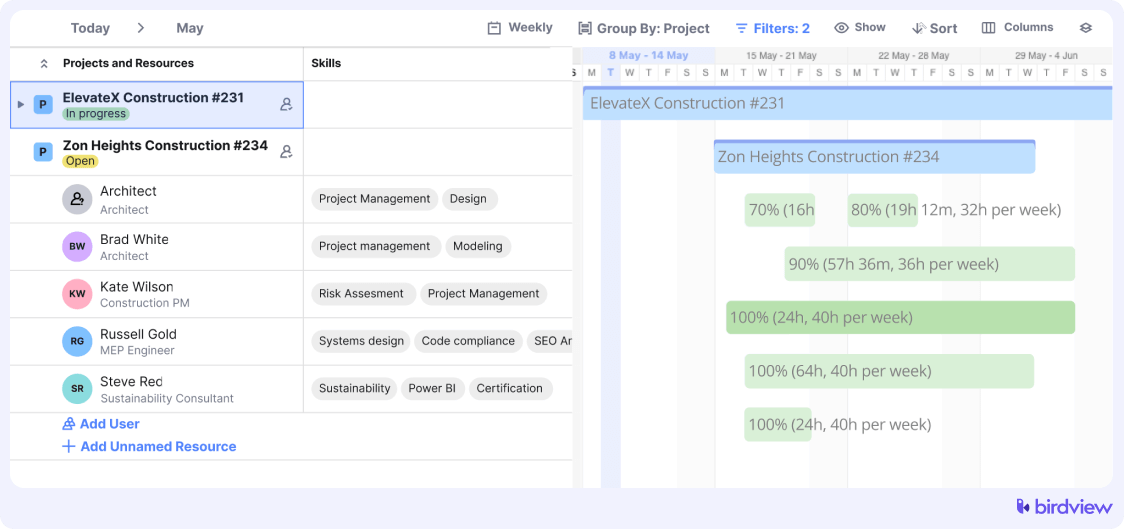
- Resource capacity planning
You can see availability and workload across all projects by person, role, or team. Visual capacity views make resource conflicts obvious, helping you plan staffing, timelines, and new work without relying on guesswork or spreadsheets.
- Time tracking
Time entry fits into daily work, with hours logged by project, phase, and task. Planned versus actual comparisons give you clear insight into estimation accuracy, and time data flows directly into financials and billing without rework.
- Project financials and fee control
Birdview shows budget burn, utilization, and cost-to-revenue at both the phase and project levels. Early warnings help you spot fee overruns in time to adjust scope, staffing, or client expectations before margins disappear.
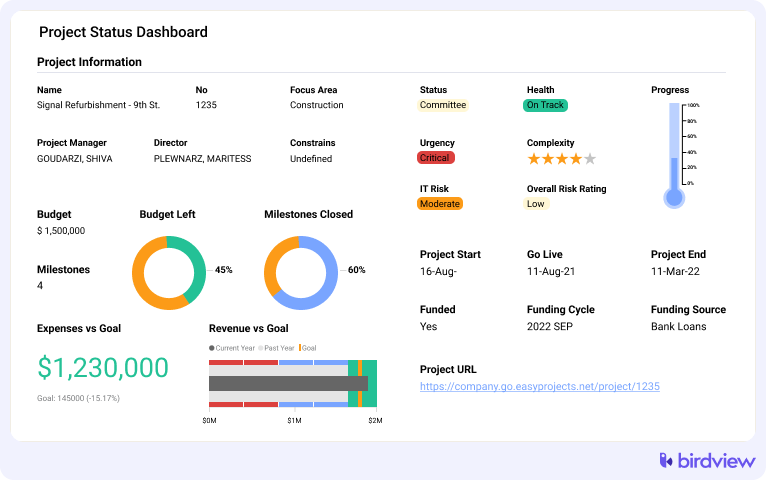
- Reporting dashboards
Real-time dashboards give project managers and principals instant visibility into schedules, budgets, and resource load. Views are customizable, so leadership can track portfolio health while teams stay focused on delivery.
- Invoicing and billing
Invoicing pulls directly from time tracking and project financial data, supporting hourly, milestone-based, or fixed-fee billing. Customizable templates simplify billing and reduce the monthly scramble to pull numbers from multiple systems.
Trial info: 14-day trial (extendable to 28 days)
Pros:
- A Canadian company with an understanding of local market requirements
- Complete project, resource, and financial visibility in one platform
- Phase-based planning matches architectural workflows
- Strong resource capacity planning prevents overallocation
- Real-time financial tracking and budget alerts help maintain fee control
- Scalable from mid-sized firms to large practices with multiple offices
Cons:
- Learning curve for teams used to simpler tools
- More than small firms may need
2. Function Point
Headquarters: Canada (Vancouver, British Columbia)
Best for: professional services firms, including architecture practices, wanting local support and solid core PSA functionality
Function Point is a Canadian-based PSA platform serving professional services teams, including architecture, creative agencies, and consulting firms. Being made in Canada, it offers local support and understands Canadian business practices and compliance requirements without you having to explain everything.
Key features: Project management, resource planning, time tracking, billing and invoicing, reporting, client management, workflow automation
Trial info: 14-day free trial
Pros:
- Good balance of features and usability
- Reasonable pricing for mid-sized firms
Cons:
- Interface feels dated
- Less architecture-specific than specialized tools
- Basic resource planning capabilities
- Limited advanced forecasting
3. WorkflowMax
Headquarters: Melbourne, Australia
Best for: Smaller architecture firms and studios wanting straightforward job management without enterprise complexity
WorkflowMax takes a straightforward, job-based approach to project management for creative and professional services firms. It focuses on essential job tracking, time capture, and billing without all the complexity of enterprise platforms.
Key features: Job management and tracking, time tracking, quoting and billing, expense tracking, document management, basic reporting
Trial info: 14-day free trial
Pros:
- Simple job structure, easy to adopt
- Minimal learning curve and training
- Good for smaller firms
- Affordable entry-level pricing
Cons:
- Limited resource planning and forecasting
- Basic features may feel too simple as you grow
- Not ideal for long, multi-phase projects
4. Deltek Ajera
Headquarters: United States (Reston, Virginia)
Best for: Architecture and engineering firms prioritizing deep project accounting, financial controls, and AEC-specific firm management
Deltek Ajera was built specifically for architecture, engineering, and construction firms. It’s been around for decades in the AEC space and really emphasizes project accounting and firm management alongside project delivery. The platform handles all the back-office stuff that architecture firms need, from project budgeting to general ledger accounting.
Key features: Project accounting, comprehensive time and expense tracking, detailed budgeting capabilities, extensive reporting options, firm management tools, billing and invoicing
Trial info: Demo available
Pros:
- Deep AEC-specific accounting and financial tools
- Handles complex fee structures and billing
Cons:
- Steep learning curve and significant training needed
- Interface feels dated
- Limited workflow customization
- Rigid if processes don’t match AEC standards
5. BQE Core
Headquarters: United States (Los Angeles, California)
Best for: Architecture and engineering firms focused on accurate time tracking, billing precision, and project accounting
BQE Core positions itself squarely in the architecture and engineering market with a strong focus on time tracking, billing accuracy, and project accounting. The platform is really focused on helping firms capture every billable hour and keep tight control over project finances.
Key features: Detailed time tracking, comprehensive billing capabilities, project accounting tools, resource planning functionality, expense tracking, reporting options
Trial info: 15-day free trial
Pros:
- Clear project profitability visibility
- Good mobile apps for on-the-go tracking
Cons:
- Specialized toward financial workflows only
- Limited resource planning compared to PSA platforms
- The interface can feel cluttered
- Less flexible for non-financial needs
How to choose the best architecture project management software in Canada
Finding the right project management software really comes down to being honest about your firm’s needs and priorities. Here’s what actually matters:
- Start with firm size and complexity: A five-person studio needs different tools than a fifty-person firm with multiple offices. Don’t pay for enterprise features you’ll never use, but also don’t pick something you’ll outgrow in a year.
- Evaluate architecture-specific workflow support: Does the platform understand project phases? Can it handle how you structure fees and track work? Generic tools often miss the crucial architecture-specific stuff that makes or breaks your workflow.
- Prioritize visibility into resources, fees, and project health: These metrics determine whether your projects are profitable and your firm is healthy. If a platform can’t clearly show you resource conflicts, budget burn rates, and project status, it’s not really serving your core needs.
- Test with real project data: Use trials and demos with actual projects, not just polished sales demonstrations. Get the people who will actually use the software every day involved in testing. Their experience matters way more than what looks good in a vendor’s slide deck.
- Consider both immediate adoption and long-term scalability: Your team needs to be able to learn the system without spending months in training. But you also want something that grows with your firm as processes evolve and project complexity increases.
- Factor in Canadian considerations: Local support teams, Canadian data residency, and understanding of Canadian business practices can make real practical differences in daily operations and compliance.
- Compare total cost beyond subscription fees: Think about implementation time, training requirements, and whether you’ll need consultants to get the system working properly. Sometimes the cheaper option costs more in the long run.
FAQ: Architecture project management software in Canada
Do Canadian architecture firms need Canadian data residency?
It depends on your clients and contracts. Government projects and some corporate clients may require data stored in Canada. Even without strict requirements, Canadian data residency simplifies compliance with PIPEDA and gives clients confidence about privacy. Ask vendors about their Canadian data centers and whether you can choose where your data lives.
What’s the difference between PSA and PM software for architecture firms?
PM (project management) tools focus on tasks, schedules, and collaboration. PSA (professional services automation) platforms add resource planning, time tracking, financial management, and billing. Architecture firms typically benefit more from PSA platforms because they need to manage fees, track utilization, and handle complex resource allocation across multiple projects simultaneously.
How important is phase-based planning versus task management?
Phase-based planning is crucial for architecture firms. Your projects move through distinct phases with different budgets, timelines, and staffing needs. Generic task management doesn’t give you visibility into phase-level budgets or how delays in schematic design impact construction documents. Look for tools that treat phases as first-class features, not workarounds.
What should we prioritize: resource capacity or project financials?
Both matter, but resource capacity often causes more immediate pain. Overallocated architects burn out, and projects slip. However, poor financial visibility quietly erodes profitability. The best approach is to choose a platform that integrates both. Resource decisions affect project costs, and budget constraints influence staffing, so managing them separately creates blind spots.