Arkady Katcherovski
 We analyzed platforms designed for professional services and selected 7 tools that stand out in 2026. This guide highlights what each tool is best at, where it falls short, and how to choose based on real delivery needs.
How we picked these tools
We prioritized platforms that support the everyday reality of service delivery and relied on Capterra ratings and customer reviews.:
- Resource planning and utilization visibility
- Time and expense workflows
- Billing and invoicing support
- Project financials (budgets, cost, margin)
- Reporting and BI readiness
- Integrations with CRM, accounting, and delivery tools
- Fit by firm size and delivery complexity
Quick comparison table of the top PSA tools for professional services in 2026
| Platform | Capterra rating | Best use case for | Key strengths |
|---|---|---|---|
| Birdview PSA | ★ 4.5 | Mid-to-large firms (consulting, IT, engineering) | End-to-end PSA, resource planning, financial visibility |
| Kantata | ★ 4.3 | Global consultancies, IT, digital agencies | Forecasting, resource scenarios, margin analysis |
| Accelo | ★ 4.3 | SMB agencies and IT firms | All-in-one, easy setup, built-in CRM |
| BigTime | ★ 4.6 | Accounting, legal, AEC | Precise time tracking, DCAA-compliant, strong billing |
| Scoro | ★ 4.6 | Agencies, consultants, business services | Visual dashboards, quoting, KPIs |
| Wrike | ★ 4.3 | Large enterprises with cross-team collaboration | Flexible PM, automation, powerful analytics |
| Productive | ★ 4.6 | Agencies, finance, IT | Financial visibility, time tracking and billing |
| Smartsheet | ★ 4.5 | Construction, finance, public sector | Excel-style interface, compliance, strong reporting |
Best for:
- End-to-end PSA with resource planning + financial visibility: Birdview PSA, Kantata
- SMB services teams that want client lifecycle workflows: Accelo
- Time, billing, and compliance-first firms (hourly heavy): BigTime
- Quote-to-cash plus CRM and executive dashboards: Scoro
- Enterprise work management used as a PSA alternative: Wrike
- Spreadsheet-style governance with strong reporting (PSA alternative): Smartsheet
1. Birdview PSA
Best for: Mid-to-large professional service firms, engineering, consulting, and IT.
Birdview PSA is designed for firms that have outgrown generic project tools and need a financial backbone for their delivery. It connects your project plans directly to your bottom line, ensuring that every resource assignment reflects actual cost and margin. In 2026, Birdview stands out for its ability to simulate “what-if” scenarios, helping leaders see how a new project will impact their global capacity before they even sign the contract.
Key features
Work management: Dependencies, Gantt, workload views
Resource Planning: Real-time visibility into team capacity and workload. AI-powered tools forecast demand, optimize allocations, and identify underused or overbooked resources. Supports skills matching and role-based scheduling.
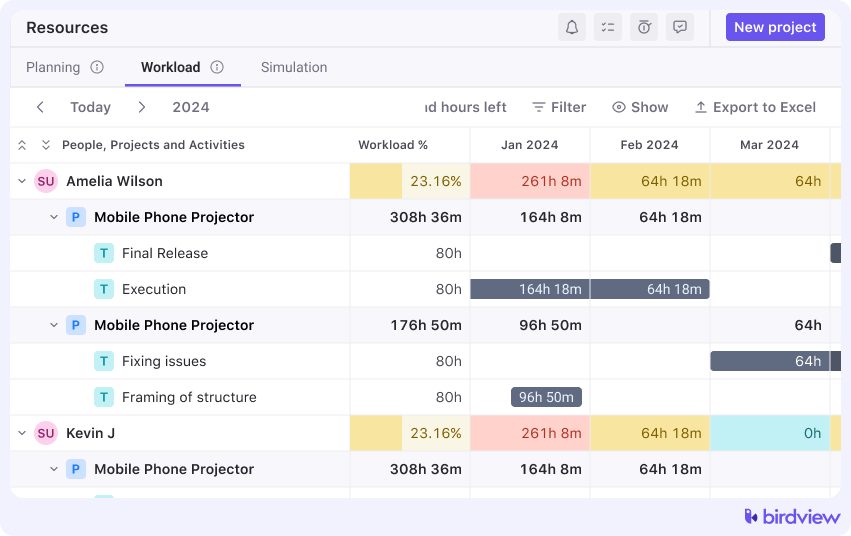
Time and Expense Tracking: Provides flexible time logging and mobile time tracking, with approvals. Expense capture and policy-based validation help teams stay compliant and accurate.
Financial Management: Integrated budgeting, rate cards, cost control, and automated invoicing. Tracks profitability at task, project, and client level. Includes revenue recognition and margin analysis.
Billing & Invoicing: Automate billing cycles. Supports prepayment, subscriptions, and hourly billing.
Reporting and Dashboards: Customizable dashboards for project health, utilization, and financial KPIs. Executives, PMs, and clients can get the data they need in real-time.
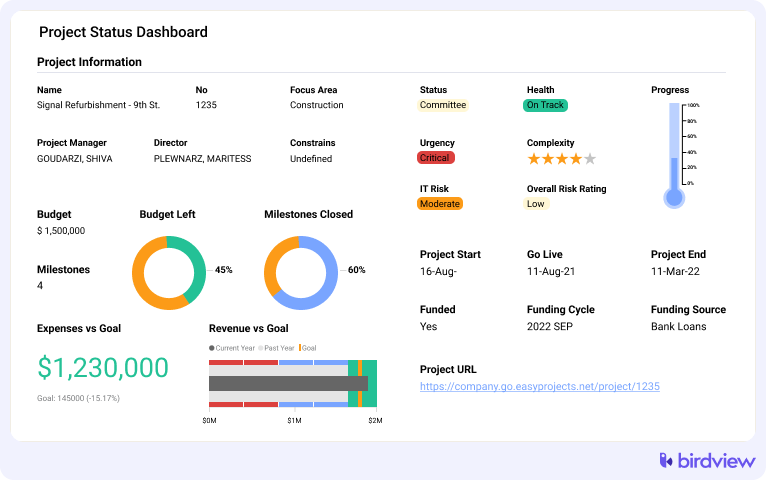
Client Collaboration: Branded portals for clients to view timelines, deliverables, and comment on progress. Enables secure file sharing and transparent communication.
Integrations and Automation: Native connections with Salesforce, Jira, HubSpot, and QuickBooks. Automates routine processes like project intake and timesheet reminders.
What’s New in 2026
AI-Powered Scenario Planning: Predict the margin impact of potential new projects on your global capacity before signing the contract.
Advanced Rate Card Engine: Flexible billing models now include tiered rates, blended pricing, and multi-currency support–great for international or complex client agreements.
Smart Automation Library: Prebuilt automation templates for onboarding, approvals, timesheet reminders, and status updates help teams save time without coding.
Enhanced Jira Integration: Now supports two-way sync with custom workflows, ideal for technical teams collaborating with PMOs or finance.
Portfolio-level Profitability Views: Visualize margin trends across programs and clients with new executive-level dashboards.
Time Billing & Invoicing: Automate billing cycles. Supports prepayment, subscriptions, and hourly billing.
Pros
- Built for services delivery with utilization and financial visibility at the core
- Combines project delivery, resource planning, and financial controls in one system
- Dashboards are configurable for delivery leaders and finance stakeholders
Cons
- Can be too feature-rich for small teams with simple needs
- Setup and rollout require planning to get the best results
💬 Client Reviews
⭐ “The all-in-one PSA we needed”
“We switched from juggling 3 tools to using Birdview PSA, and it’s been a game-changer. We now track resources, time, and budgets all in one place. The dashboards make it easy to spot issues before they spiral.”
– COO, Mid-sized IT Services Company
⭐ “Perfect fit for our engineering workflows”
“Birdview PSA’s resource planning and financial tracking have made it easier to manage overlapping engineering projects with different billing structures. It’s the visibility we didn’t know we were missing.”
– Director of Project Delivery, Engineering Firm
⭐ “Great support, powerful features”
“Setup took some effort, but the Birdview team was very hands-on during onboarding. Now our consultants love how much time they save on status reports and timesheets.”
– Project Manager, Consulting Firm
2. Kantata
Best for: Consulting firms, digital agencies, IT providers, and global service organizations
Capterra rating: ★ 4.3 / 5
Overview
Kantata is a mature PSA platform for resource-centric delivery. It is designed for firms that need strong forecasting and margin visibility across portfolios, not just project tracking. Kantata is often chosen when leadership wants to model scenarios, understand profitability drivers, and standardize reporting across business units.
If your business runs on forecasting and portfolio performance, Kantata is built for that mindset.
Key features
Resource management: Role and skill assignment, capacity vs demand, internal and external teams
Financial management: Budgeting, forecasting, project accounting, billing, revenue recognition
Business intelligence: Large set of service-centric reports and dashboard options
Collaboration: Stakeholder visibility, role-based access, threaded updates
Feedback signals: Delivery health inputs tied to project tracking
Integrations: Connectors for CRM, ERP, collaboration, and delivery tooling
2026 highlights to look for
- Predictive resource recommendations tied to profitability signals
- Centralized reporting layers for cross-project rollups
- Visual margin modeling that shows impact of roles, rates, and scope changes
- Faster mobile time and expense workflows for distributed teams
Pros
- Sophisticated forecasting and margin analysis
- Strong portfolio and planning depth for larger firms
- Scales across teams, regions, and business units
Cons
- UI can feel less intuitive than newer tools
- Steeper learning curve, especially for teams new to PSA.
💬 Client Reviews
⭐ “Robust and finance-first PSA”
“Kantata gives us more control over project margins and forecasting than any other tool we’ve used. It’s not the simplest platform, but it’s extremely powerful once set up.”
– Finance Director, Global Consulting Group
3. Accelo
Best for: SMB professional services, IT, creative, and marketing firms
Capterra rating: ★ 4.3 / 5
Overview
Accelo is a PSA-style platform for smaller service firms that want client lifecycle workflows in one place. It focuses on connecting client work, communication, time tracking, and billing without requiring heavyweight enterprise setup. For agencies and SMB consultancies, that “one system for client work” approach reduces admin overhead.
It is a practical choice when the team wants structure and automation, but does not need deep portfolio forecasting.
Key features
Client and project management: CRM-like client records, kickoff workflows, progress tracking
Time and billing: Time-to-invoice flow, retainers, recurring billing patterns
Workflow automation: Templates and triggers for task routing, invoicing, status updates
Service desk: Ticketing for support workflows tied to client work
Reporting: Utilization and project health basics
Integrations: Email and calendar ecosystems plus finance and CRM connections
2026 highlights to look for
- Smarter task routing based on workload and priority
- Basic revenue forecasting tied to ongoing work and pipeline signals
- AI-assisted email and follow-up suggestions for client communications
- Easier workflow creation with visual builders
Pros
- All-in-one approach works well for small service teams
- Faster to implement than heavier PSA suites
- Strong client communication tracking for day-to-day delivery
Cons
- Limited advanced resource modeling for complex staffing scenarios
- Interface can feel dated for some teams
💬 Client Reviews
⭐ “Helpful automation, basic analytics”
“It’s great for managing recurring clients and routine work, but if you want in-depth resource forecasting or portfolio reporting, you may need another tool.”
– Founder, Web Development Studio
4. BigTime
Best for: Accounting, AEC, legal, and consulting firms that bill by time
Capterra rating: ★ 4.6 / 5
Overview
BigTime is built for firms that live and die by accurate time tracking, expense control, and invoicing. It is popular in accounting, architecture, engineering, and legal services because it supports structured billing rules and audit-friendly workflows.
If your biggest risk is losing billable time or missing billing details, BigTime is built to reduce that leakage.
For firms weighing structured billing against resource visibility, see how Birdview compares with BigTime.
Key features
Time tracking: Web and mobile entry, reminders, approvals, client and role rules
Expense management: Capture, approval trails, client billing categories
Project budgeting: Burn tracking, cost vs budget, margin indicators
Compliance reporting: Audit and access controls for regulated workflows
Integrations: Accounting and finance stack compatibility
2026 highlights to look for
- Real-time budget risk alerts based on burn patterns
- Better mobile workflows for field and travel-heavy teams
- More interactive financial widgets for utilization and write-offs
- Templates for billing-heavy verticals (phase billing, markups, rules)
Pros
- Excellent time and billing focus
- Strong for hourly tracking and invoicing accuracy
- Compliance-friendly reporting posture
Cons
- Not a full project delivery platform for complex collaboration
- Portfolio delivery and resource planning depth can be lighter than PSA-first tools
💬 Client Reviews
⭐ “Billing made easy and accurate”
“We deal with complex retainers and hourly billing, and BigTime handles it with ease. Their templated invoices save us hours each month.”
– Managing Partner, Legal Services Firm
5. Scoro
Best for: Agencies, consultancies, and business services teams that want quote-to-cash
Capterra rating: ★ 4.6 / 5
Overview
Scoro is an all-in-one platform that ties together quoting, project delivery, invoicing, and business KPIs. It is especially attractive for agency leaders and operations teams that want executive visibility and a strong quote-to-project flow.
Scoro works best when teams follow structured processes and want one platform to connect sales and delivery.
Key features
Work and project management: Phases, milestones, timelines, workload views
Sales and quoting: Quotes with service items, hours, pricing, conversion into projects
Time billing and invoicing: Prepayment patterns, subscriptions, hourly billing, branded templates
Dashboards and KPIs: Utilization, project profitability, client revenue views
Integrations: Common productivity and finance integrations
2026 highlights to look for
- Faster proposal building via reusable templates and past patterns
- Profitability simulation for staffing and pricing scenarios
- Unified activity feeds across delivery and invoicing events
- More granular role permissions for control and governance
Pros
- Strong quote-to-cash flow with executive dashboards
- Highly visual and customizable for operations teams
- Combines business and project workflows in one system
Cons
- Not ideal for highly complex technical delivery environments
- Works best with disciplined process adoption
💬 Client Reviews
⭐ “Structured, sleek, and scalable”
“We love Scoro’s clean interface and the ability to configure workflows to fit our needs. It’s perfect for service firms that want both structure and flexibility.”
– Operations Lead, Marketing Agency
6. Wrike
Best for: Large organizations needing cross-team work management, approvals, and reporting
Capterra rating: ★ 4.3 / 5
Overview
Wrike is a work management platform, not a classic PSA. Services organizations choose it when they need enterprise-scale collaboration, approvals, request forms, and reporting across multiple departments. It can support time and resource tracking, but PSA financials usually require additional tooling.
Wrike is best when the delivery organization looks like many teams, many workflows, lots of approvals, and a need for scalable governance.
Key features
Work management: Dependencies, Gantt, workload views
Request forms: Structured intake and routing
Time and resource tracking: Allocation views, billable vs non-billable tracking
Proofing and approvals: Markup and approval workflows for creative work
Dashboards and analytics: Cross-team reports and KPI tracking
Integrations: Broad app marketplace and enterprise integrations
2026 highlights to look for
- Smarter intake routing and classification for requests
- Bigger template libraries for common service workflows
- Stronger proofing for media-heavy delivery
- Enterprise compliance controls like data residency options
Pros
- Scales well across departments and workflows
- Strong reporting and automation for approvals-heavy organizations
Cons
- Not a PSA suite, billing and financial workflows require add-ons
- Can feel heavy for smaller service teams
💬 Client Reviews
⭐ “Takes time to set up, but worth it”
“The learning curve was real, but once configured, Wrike replaced at least three other tools. Just be ready to invest some time upfront.”
– Creative Director, Marketing Agency
7. Productive
Best for: Digital agencies, consultancies, and professional service firms that want delivery, resourcing, and financials in one platform
Capterra rating: ★ 4.6 / 5
Overview
Productive is a PSA platform built for agencies and professional service teams. It connects the full delivery lifecycle – from pipeline and resourcing through time tracking, budgeting, and invoicing – so firms see profitability at the project, client, and portfolio level without stitching tools together. PMs see real-time budget burn and margin while they work, not after the fact in a monthly report.
Key features
Resource planning: Capacity and utilization views, skill-based scheduling, placeholder resourcing for pipeline work
Time tracking and budgeting: Time logged on tasks flows into budgets, margins, and invoicing
Invoicing: Generate invoices from tracked time and expenses, sync with QuickBooks or Xero
Sales pipeline: Lightweight CRM tied to delivery, so resourcing starts before contracts close
Reporting: Dashboards for utilization, profitability, revenue forecasting, and team performance
2026 highlights to look for
- AI Notetaker that converts meetings into summaries and action items
- AI Agents that automate repetitive operational tasks
- Portfolio-level margin trend analysis across clients and business units
Pros
- Purpose-built for agencies, not retrofitted from generic PM
- Financial visibility embedded in delivery workflows
- Full quote-to-cash cycle without add-ons for billing or CRM
Cons
- Less suited for regulated verticals needing DCAA-compliant billing
- No free plan; 14-day trial available
💬 Client Reviews
⭐ “Good visibility, but not a PSA”
“Overall, Productive has been a reliable and powerful tool for managing projects, budgets, and time tracking. It allows us to track resources, costs, and progress in one place, giving us full control over our projects and saving significant time compared to using separate tools. With API integrations, we can seamlessly connect data from our HR system and deliver detailed timesheets to clients, further improving efficiency and transparency. Even though we don’t use every feature, the core functions we rely on work smoothly and provide us with confidence in our project and budget management.”
– Technical Director, Marketing Agency
8. Smartsheet
Best for: Teams that want structured delivery, compliance, and reporting with spreadsheet-style control
Capterra rating: ★ 4.5 / 5
Overview
Smartsheet sits between spreadsheets and full project tools. It is used heavily in regulated industries and operations-heavy environments where governance, audit trails, and reporting matter. It can track budgets and project health, but it is not a PSA suite with native time and billing.
Smartsheet is a good PSA alternative when your organization values structured reporting and controlled workflows more than native professional services billing.
Key features
Project planning: Grid, Gantt, cards, calendars, dependencies
Budget tracking: Planned vs actuals with formulas and dashboards
Compliance and control: Permissions, approvals, audit trails
Automation: Alerts, approvals, recurring workflows
Collaboration: Comments, attachments, stakeholder visibility
Integrations: Microsoft and Google ecosystems, delivery tool connections
2026 highlights to look for
- Better portfolio rollups for KPI visibility across programs
- AI assistance for formulas, summaries, and report building
- Expanded compliance configurations for regulated workflows
- More powerful cross-sheet automation logic
Pros
- Easy adoption for Excel-native teams
- Strong reporting and governance patterns
Cons
- Not a true PSA tool
- Lacks native time and billing workflows
💬 Client Reviews
⭐ “Good visibility, but not a PSA”
“It’s not a full PSA suite, but for structured projects where compliance and reporting matter, it does the job really well.”
– Director of Operations, Construction Services
How to choose the right PSA: A 3-step decision framework
Choosing a PSA is not just about features; it is about solving the specific bottleneck that is holding back your growth. Follow this framework to narrow down your choice.
Step 1: Identify your primary bottleneck
What is the “leaky bucket” in your firm right now? Pick the challenge that costs you the most revenue:
- Utilization and capacity: If you are constantly guessing who is available or losing money on bench time, you need a Resource-First PSA like Birdview PSA or Kantata.
- Billing and time leakage: If you are losing billable hours because of manual entries or complex multi-rate structures, a Finance-First PSA like BigTime or Birdview PSA is your best bet.
- Administrative overhead: If your project managers spend 20% of their week just updating statuses and chasing emails, an Automation-First PSA like Accelo, Birdview PSA or Scoro will save you the most time.
Step 2: Match the tool to your firm’s complexity
Complexity is not just about headcount; it is about how you deliver work.
- The Boutique firm: If you have 10 to 30 employees and need a single tool to handle sales, projects, and simple billing, choose a Generalist PSA (Scoro or Accelo).
- The Scaling firm: If you have 30 to 500+ employees and manage shared specialists across multiple complex projects, you need a Specialized PSA (Birdview PSA or Kantata). These tools handle the “What-if” resource scenarios that generalists cannot.
- The Cross-functional firm: If your delivery requires heavy creative proofing or deep collaboration with internal non-billable departments, an Enterprise Work Manager (Wrike or Smartsheet) with PSA add-ons may be the better cultural fit.
Step 3: Test for adoption and ecosystem fit
Even the most powerful system will fail if your team finds it too difficult to use.
- Check your stack: Does the tool live where your team already works? For Microsoft-centric teams, Birdview PSA offers the most native experience. For Adobe-heavy creative teams, Wrike is often more intuitive.
- The “At-a-glance” test: During a demo, ask to see the resource heatmap and the project P&L. If it takes more than three clicks to find these, your team may struggle with daily adoption.
- Scale for 2027 and beyond: Do not just buy for the problems you have today. Choose a platform that offers modular features you can “turn on” as your financial reporting and AI needs become more sophisticated.
Final take: Which path are you on?
The Path to Profitability: If you need to stop the “guessing game” around utilization and margins, Birdview PSA is the strongest choice for engineering and IT consultancies. It provides the deep financial visibility that generic tools lack.
The Path to Efficiency: If you want to consolidate your CRM, quotes, and tasks into one sleek interface, Scoro or Accelo will modernize your boutique agency.
Ready to see the difference in your own data? The best way to validate this framework is with a tailored walkthrough. [Schedule a demo with Birdview PSA] to see how your specific resource and financial workflows would look in a specialized environment.
Ready to streamline your service delivery?
or