Ksenia Kartamysheva
 - Bench time is not inherently bad. Most consulting firms need some available capacity to support future projects, staffing flexibility, and delivery readiness.
- Excessive bench time is often caused by forecasting gaps, limited visibility into future demand, or disconnected planning processes, rather than a lack of available work.
- Consulting firms can experience both idle consultants and staffing shortages at the same time when sales forecasts, project plans, and resource schedules are managed separately.
- Billable utilization should be balanced with delivery readiness. Teams operating near 100% utilization often struggle to support new opportunities, respond to project changes, or invest in skills development.
- Forecasting and staffing decisions work best when future demand, consultant availability, and skills requirements are reviewed together rather than in separate planning processes.
- Tracking metrics such as bench duration, utilization, time-to-assignment, and forecast accuracy helps identify staffing risks before they affect profitability or project delivery.
- As consulting firms grow, spreadsheet-based resource planning becomes increasingly difficult to maintain and can contribute to bench time, resource conflicts, and forecasting errors.
Bench management in consulting firms is the practice of managing consultants who are not currently assigned to billable work while ensuring they remain available for future project demand. The objective is to balance billable utilization with delivery readiness, keeping consultants productive without creating staffing shortages.
Many consulting firms face a common challenge: some consultants sit on the bench while project managers struggle to find the right people for upcoming work. Effective bench management connects resource availability, project demand, and forecasting so leaders can identify staffing risks before they affect profitability or project delivery.
Closing those forecasting gaps is what consulting software for client project delivery is for.
What is bench management in consulting firms?
Bench management is the process of managing consultants who are temporarily unassigned to billable client work while ensuring they remain available for future project demand.
In consulting firms, some level of bench time is unavoidable. Projects end, hiring often happens ahead of demand, and specialized consultants may need to wait for suitable assignments.
The objective is not to drive bench utilization to zero. The objective is to keep bench time short, predictable, and aligned with future demand.
Well-managed firms know:
- Who is becoming available
- When will they become available
- What skills they have
- Which upcoming projects may require them
Without this visibility, staffing becomes reactive and utilization suffers.
Bench time exists for many reasons, including gaps between projects, seasonal demand fluctuations, hiring ahead of expected growth, and specialized skill requirements. The goal is not to eliminate bench time completely but to prevent it from becoming excessive or unpredictable.
When bench time becomes a problem
Not all bench time requires action. Most consulting firms experience short periods between projects, and some excess capacity is often necessary to support growth. The challenge is identifying when temporary downtime turns into a recurring operational issue.
Many firms focus only on utilization percentages. By the time utilization declines significantly, the underlying problems have often been building for months. Poor forecasting, delayed staffing decisions, and limited visibility into future demand usually appear before financial results begin to suffer.
- Utilization falls below targets: Extended bench periods reduce billable utilization and make labor costs harder to recover.
- Revenue growth slows: Unassigned consultants represent payroll costs without corresponding revenue.
- Forecast accuracy declines: Persistent bench time often indicates demand forecasts no longer reflect reality.
- High-value specialists remain unassigned: Bench time becomes particularly expensive when senior consultants remain idle.
- Staffing decisions become reactive: Teams begin staffing projects based on availability rather than fit.
The financial impact of excessive bench time
Excessive bench time affects more than utilization. It increases labor costs, reduces billable revenue, creates forecasting uncertainty, and puts pressure on project margins.
For example, a consultant earning $120,000 annually costs approximately $10,000 per month before overhead. If that consultant remains unassigned for two months, the firm absorbs roughly $20,000 in cost without generating revenue. Across multiple consultants, the impact quickly becomes significant.
SPI Research’s 2026 Professional Services Maturity Benchmark (509 professional service organizations) reports Level 5 firms with 42% more billable utilization than Level 2 peers [1]. Unused bench is one place that gap shows up first.
How consulting firms measure bench performance
Firms that track only billable utilization often miss the root causes of bench growth until profitability is already affected. Looking only at utilization can hide underlying staffing and forecasting problems. Consulting firms should track a combination of utilization, forecasting, and assignment metrics to understand whether bench time is improving or becoming a growing business risk.
| Metric | What it measures | Why it matters |
| Bench utilization rate | Percentage of available consultant capacity that is currently unassigned | Helps identify whether excess bench capacity is growing over time |
| Average bench duration | Average number of days or weeks consultants remain unassigned | Reveals how efficiently the firm moves resources between projects |
| Billable utilization | Percentage of available time spent on billable client work | Directly impacts revenue generation and profitability |
| Time-to-assignment | Time between project completion and the next assignment | Indicates how effective staffing and resource planning processes are |
| Forecasted vs. actual demand | Difference between expected project demand and actual demand | Measures forecasting accuracy and highlights planning gaps |
| Skills coverage | Availability of required skills for upcoming projects | Helps identify staffing risks before project delivery is affected |
Common causes of excessive bench time
Excessive bench time is usually the result of planning and visibility problems rather than a lack of work. In most consulting firms, idle consultants can be traced back to forecasting gaps, limited visibility into future demand, or disconnected planning processes.
Poor demand forecasting
Many firms build staffing plans around opportunities that are delayed, resized, or never close. When forecasts change but staffing plans do not, consultants can end up on the bench unexpectedly.
This is particularly common when sales forecasts and resource plans are maintained separately and updated on different schedules.
Limited visibility into upcoming work
Resource managers often know who is available, while sales teams know which opportunities are likely to close. When these views are disconnected, staffing discussions happen too late and consultants may remain unassigned between projects.
Disconnected planning tools
Many consulting firms still manage resource plans, sales forecasts, and project schedules in separate spreadsheets. As the business grows, keeping this information aligned becomes difficult, making it harder to identify future staffing needs and utilization risks.
How to reduce bench time without creating staffing risk
Many consulting firms respond to rising bench costs by pushing for higher utilization targets. While this may improve short-term metrics, it often creates new staffing problems later.
Sustainable bench management focuses on improving visibility, forecasting accuracy, and staffing decisions. The goal is to reduce unnecessary downtime while preserving enough capacity to support new opportunities and delivery commitments.
Improve demand forecasting
Effective forecasting is not a quarterly exercise. Most consulting firms see project timelines, deal close dates, and resource requirements change regularly.
The firms that reduce bench time most successfully review demand forecasts continuously and update staffing plans as conditions change. This allows them to identify potential utilization gaps before consultants become unassigned.
Use skills-based staffing
Skills inventories become increasingly important as firms grow. When expertise is tracked centrally, resource managers can identify qualified consultants faster and reduce the time resources spend waiting for suitable assignments. A consultant who matches project requirements is far more likely to contribute successfully than the first available person. A usable skills matrix names the role, the person, a proficiency level, their last project of that type, and their next available date, so a match takes minutes, not a manager’s memory.
Plan capacity proactively
Capacity planning is particularly valuable because it highlights future problems while there is still time to respond. Leaders can adjust hiring plans, training priorities, subcontractor usage, or project start dates before staffing issues affect delivery. See strategic resource capacity planning for the multi-month version of this same discipline.
Increase visibility into upcoming projects
Visibility into upcoming work allows staffing decisions to happen earlier. Instead of waiting for a project contract to be signed, firms can begin evaluating likely resource requirements while opportunities are still moving through the pipeline.
This does not mean assigning consultants prematurely. It means understanding future demand well enough to identify potential staffing risks, hiring needs, or bench exposure before they affect utilization.
Create staffing scenarios in advance
Leading firms often model multiple demand scenarios. They prepare staffing plans for optimistic, expected, and conservative growth assumptions. This approach reduces surprises and improves resource forecasting for consulting firms.
Why over-optimizing utilization creates new problems
Utilization is one of the most closely watched metrics in consulting, but higher utilization does not always lead to better business performance. Organizations that consistently operate near 100% utilization often become less flexible and less prepared for future demand.
Over-optimizing utilization can create several risks:
- No buffer for new opportunities. New projects may be delayed because no qualified consultants are available to begin work.
- Consultant burnout. High utilization leaves less time for training, mentoring, internal initiatives, and professional development.
- Delivery quality issues. Teams operating at full capacity have less time for documentation, knowledge sharing, and quality assurance activities.
- Reduced flexibility. Changes in project priorities become harder to accommodate, increasing the likelihood of resource conflicts and delivery delays.
For most consulting firms, sustainable utilization is a more effective goal than maximum utilization.
The role of systems in bench management
Bench management is fundamentally a visibility problem. Leaders need to understand current utilization, future demand, consultant availability, skills coverage, and upcoming project needs at the same time.
As consulting firms grow, this information becomes increasingly difficult to manage through spreadsheets and disconnected systems. Resource managers often spend more time gathering data than making staffing decisions.
Modern resource planning systems support bench management through:
- resource forecasting
- capacity planning
- skills visibility
- cross-project staffing
- utilization reporting
Together, these capabilities help leaders identify bench risks before consultants become unassigned.
For example, Birdview PSA allows organizations to combine resource forecasting, capacity planning, utilization reporting, and project demand visibility in one environment. This gives operations leaders a clearer view of future staffing needs than separate spreadsheets and disconnected planning tools.
A PSA run only helps when it reads current availability and demand, not a static export. See professional services operations for how this data model sits inside the wider operating rhythm.
Example: from reactive staffing to proactive bench management
Consider a consulting firm where project managers maintain resource plans in spreadsheets, sales forecasts live in the CRM, and operations teams update utilization reports separately.
As projects finish, consultants frequently spend time on the bench because staffing decisions happen after availability becomes visible.
After implementing a forecast-driven planning process, leadership begins reviewing demand, availability, and skills requirements together. Staffing discussions start before projects end, reducing bench duration and improving utilization visibility.
Bench management
Bench management is how a consulting firm treats people who are not on billable work this week: who they are, when they free up, what they can do next, and what unused time costs. Matching named availability to named demand is the work; payroll sitting idle next to an overallocated senior is the failure.
Live sections above already cover why some bench is healthy and why too much of it is expensive. This heading exists so a staffing model can cite the practice by name.
On Birdview implementations, the same mid-size consulting week often shows a senior stacked above 100 percent and a named person with a related skill on the bench. That pair is the pattern this page is written from.
Unused bench and consulting margin
Unused bench hurts margin because salary, benefits, and overhead continue while billed hours stop. That $120,000 / two-month example above is the unit cost. Margin feels it when several names sit there in the same period, or when the idle names are seniors.
SPI’s Level 5 vs Level 2 utilization gap is a billed-hours system, not a busier calendar [1]. A firm can look “staffed” on a headcount chart and still leak margin if those heads are not on sold work.
AICPA & CIMA PCPS treats staffing and utilization as US professional services practice-management issues, not as a side spreadsheet [2]. Bench cost belongs in that same conversation: it is a practice number, not a project footnote.
Bench in a PSA staffing model
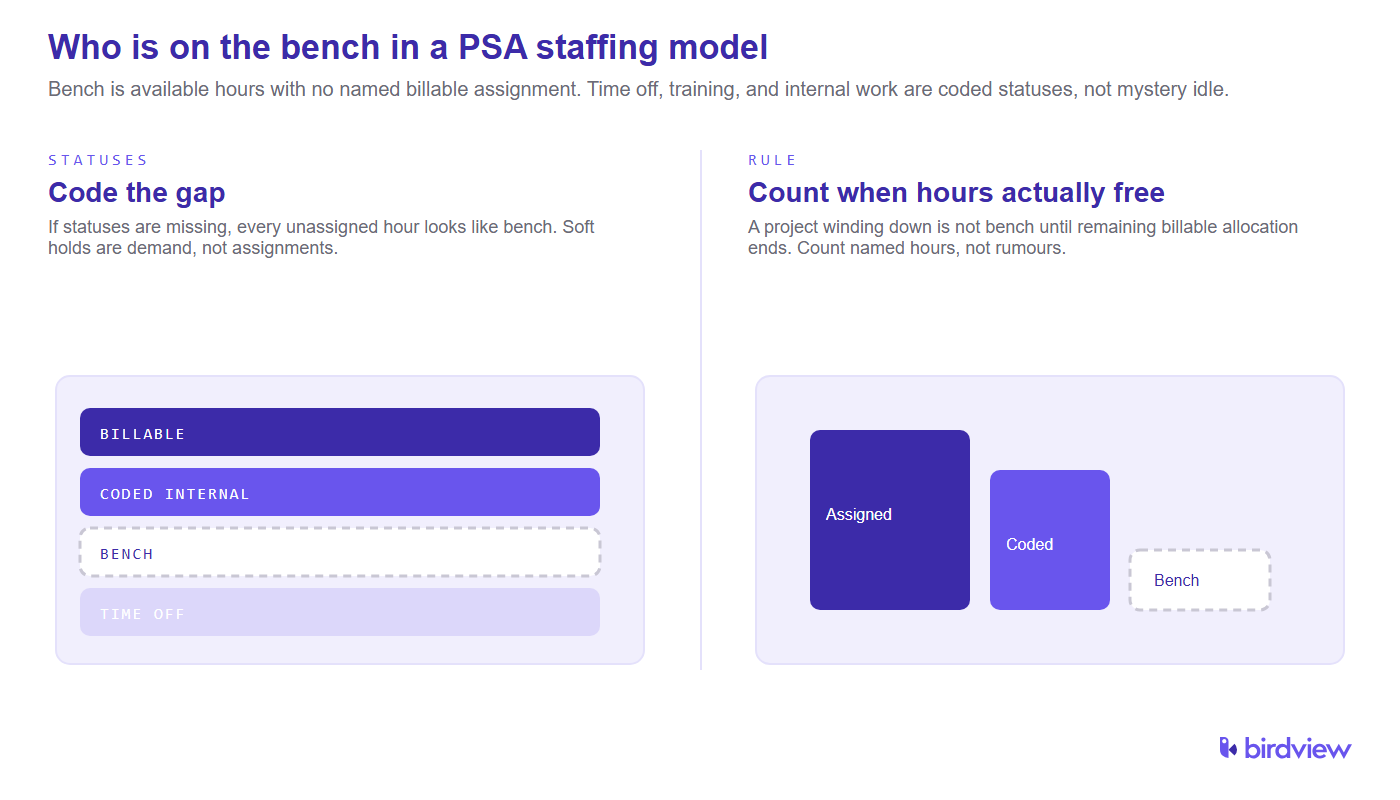
In a PSA staffing model, someone is on the bench when they have remaining available hours in the window and no named billable assignment covering those hours. Time off, training, internal initiatives, and pre-sales support are not “mystery idle.” They are coded statuses. If those statuses are missing, every gap looks like bench.
Do not count a person as bench because their current project is winding down. Count them when the remaining billable allocation actually ends. Soft holds and “probably that deal” are demand, not assignments.
Roll-off visibility for operations
Ops sees upcoming bench before people roll off when remaining work, end dates, and named assignments are in one view. Waiting for a timesheet that says “project finished” is how a name appears on the bench on Monday with no next assignment.
A 2 to 4 week roll-off list is enough for most mid-size firms: who frees, which skill, which likely demand. Predictive resource forecasting is the horizon layer; this list is the near-term names.
PMI frames the same tension as matching capacity to resource requirements: unused hours and unmet demand are one planning problem [3]. If ops only sees today’s heatmap, roll-off is always a surprise.
Faster redeployment onto billable work
Redeploying bench people faster is a staffing meeting with a named next assignment, not a broadcast that “someone is free.” Start with sold work that is understaffed, then likely-to-close work that can take a named person without a premature hard booking, then a coded internal or training status so the person is not fake-idle.
Time-to-assignment in the metrics table is the score. If it stretches, the delay is usually missing skills, missing remaining-work dates, or a manager who will not release a soft hold.
Skills matrix for bench decisions
A skills matrix helps bench management when it answers “who can take this sold work this week” without opening ten CVs. Rows are people. Columns are skills that actually get sold. Cells are proficiency plus recency.
It does not need to be a talent-HR product. It needs to be current enough that a resource manager can move a bench name onto billable work instead of defaulting to the already-overallocated senior.
Huge bench and overallocation in the same week
A huge bench and overallocation show up together when staffing is by project, not by named person across the portfolio. One client team hoards a senior. Another team has juniors waiting. Headcount looks fine. The heatmap does not.
Resource leveling is the conflict tool when the same name is over 100 percent. Bench management is the unused-hours tool. Run them in the same meeting or you will delay the senior and leave the junior idle.
Cost of bench time
Measure bench cost as available hours without a billable assignment, times loaded cost for that person, in a defined window (week or month). Do not use list salary alone if benefits and overhead are how finance loads the P&L.
Average bench duration times loaded daily cost is the second cut: a short bench on many juniors is a different problem than a long bench on two principals. Live $10,000 / month illustration is the unit. This section is the method so the unit can be rolled up.
Weekly bench management routine
A resource manager should run a weekly bench routine against live assignments, not against last Friday’s export.
- List names with available hours this week and next.
- Match those names to understaffed sold work using the skills matrix.
- Flag roll-offs in the next two to four weeks.
- Record a next status for every bench name: billable assignment, coded internal, training, or time off.
- Send overallocation conflicts to the leveling conversation instead of hiding them in the bench list.
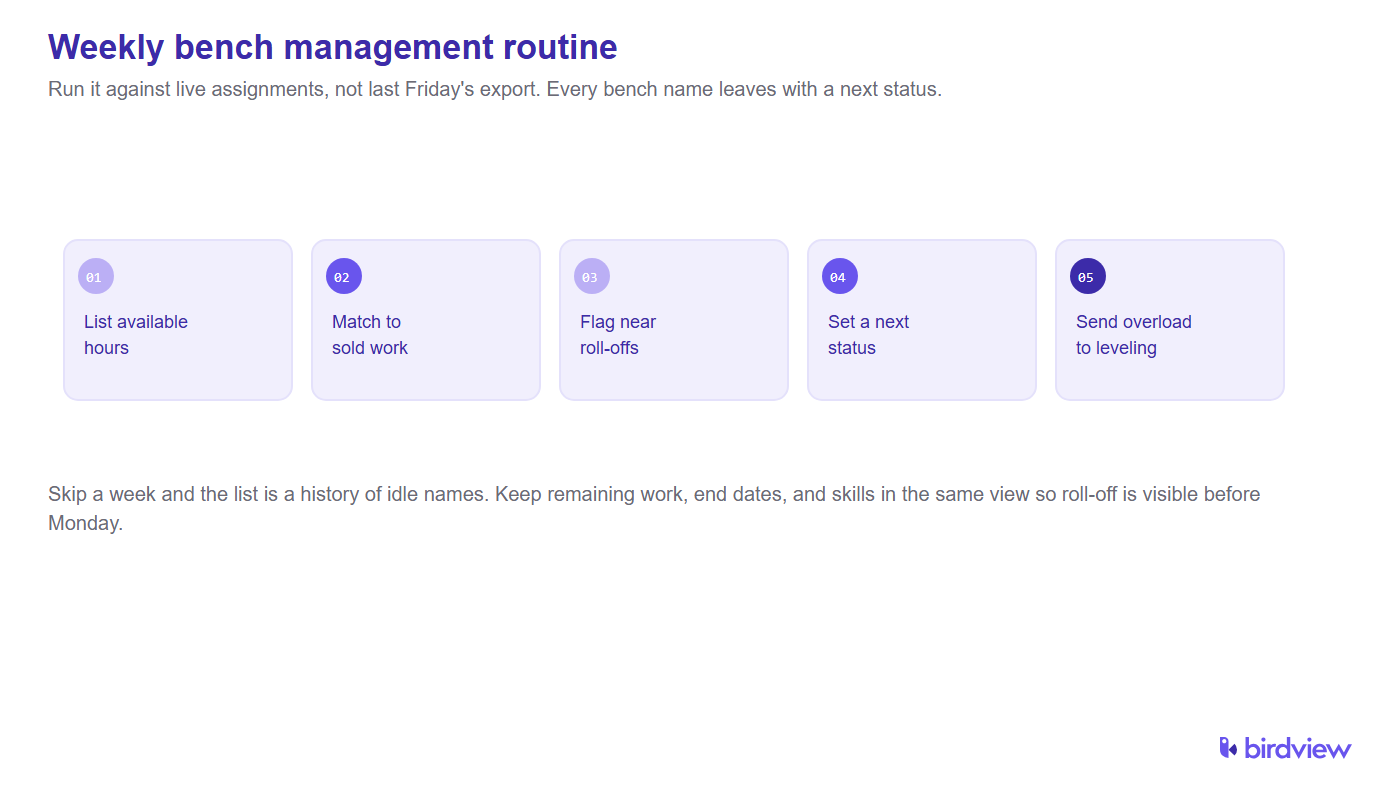
Skip a week and the list is a history of idle names. Keep the meeting short by keeping the data current. Rebuild-from-export is what makes it long.
Live availability and project demand in PSA
PSA can help manage bench when live availability, remaining work, time off, skills, and project demand sit in one model. Birdview PSA already combines forecasting, capacity, utilization, and demand on this page. A dashboard that cannot name who is free next Tuesday is reporting, not bench management.
If demand lives only in CRM and availability lives only in a sheet, the system is still two lists. The example section above is that failure mode. Connecting them is the fix.
FAQ
What is bench time in consulting?
Bench time is the period when a consultant is not assigned to billable client work. It typically occurs between projects, during demand slowdowns, or while waiting for work that matches specific skills.
Is all bench time bad?
No. Some bench capacity is necessary to support delivery readiness, onboarding, training, and future project demand. Problems arise when bench time becomes excessive or unpredictable.
What is a healthy utilization target?
Targets vary by consulting model, but many firms aim for billable utilization rates between 70% and 85%. The right target depends on service mix, project complexity, and growth objectives.
How do consulting firms reduce bench time?
The most effective approaches include demand forecasting, capacity planning, skills-based staffing, better sales-to-delivery visibility, and proactive resource management.
What metrics should firms track?
Key metrics include bench utilization rate, average bench duration, billable utilization, time-to-assignment, forecast accuracy, and projected versus actual demand.
How do you define who is on the bench in a PSA staffing model?
Someone is on the bench when they have available hours in the window and no named billable assignment covering those hours. Time off, training, and internal work are coded statuses, not mystery idle. A project that is winding down is not bench until remaining billable allocation actually ends.
How can ops see upcoming bench before people roll off projects?
Read remaining work and named end dates before the last timesheet. A 2 to 4 week roll-off list (who frees, which skill, which likely demand) is the ops view. If you wait until the project is “closed,” the name is already idle.
What weekly bench management routine should a resource manager run?
Against live data: list available hours, match to understaffed sold work, flag near roll-offs, give every bench name a next status, and send overallocation to leveling. Rebuild-from-export is not a routine.
Can PSA help manage bench with live availability and project demand?
Yes, when availability, remaining work, time off, skills, and demand are in one model. Birdview PSA already puts forecasting, capacity, utilization, and demand in one environment on this page. Two exports compared by hand are not live bench management.
Sources
- SPI Research. 2026 Professional Services Maturity Benchmark (509 professional service organizations; Level 5 vs Level 2 billable utilization). https://spiresearch.com/reports/2026-ps-maturity-benchmark/
- AICPA & CIMA. PCPS Firm Survey (US professional services practice management, including staffing and utilization as practice issues). https://www.aicpa-cima.com/resources/landing/pcps-firm-survey
- Project Management Institute. Matching capacity to resource requirements (unused capacity and unmet demand as one planning problem). https://www.pmi.org/learning/library/matching-capacity-resources-requirements-7843