Ksenia Kartamysheva
 - Project management software helps accounting firms manage client engagements, deadlines, and billable work, while PSA platforms add resource planning, financial management, and portfolio visibility.
- Choose software based on operational complexity, not firm size. As firms expand into advisory, CAS, consulting, or outsourced CFO services, resource planning and profitability tracking become increasingly important.
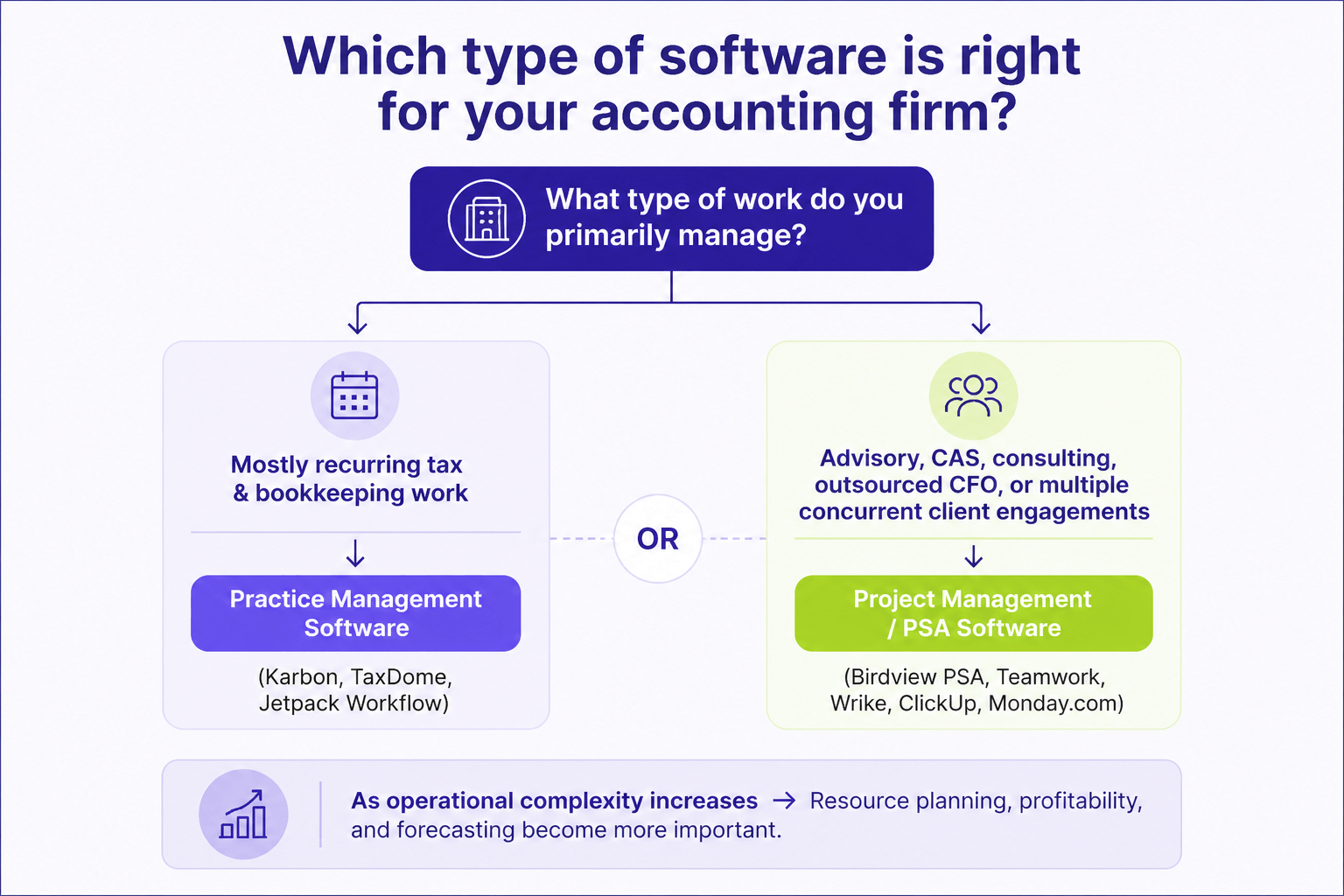
- Accounting practice management software and project management software solve different problems. Practice management platforms focus on tax workflows, documents, and client communication, while project management and PSA software optimize project delivery and operational performance.
- Growing firms often outgrow spreadsheets and basic task management tools when they can no longer accurately forecast capacity, balance workloads, or report on project profitability.
- The best solution depends on your firm’s service mix and future growth plans. Firms managing multiple concurrent engagements should prioritize resource planning, portfolio reporting, and financial visibility alongside project management capabilities.
Project management software for accounting firms helps firms plan client engagements, assign work, manage deadlines, track billable time, and monitor profitability across multiple projects. The right platform does more than organize tasks. It gives firm leaders visibility into workload, capacity, budgets, and delivery performance, making it easier to grow without losing operational control.
Many accounting firms start with spreadsheets, Outlook calendars, or lightweight task management tools. Those systems work when the team is small and engagements are straightforward. As advisory services expand, recurring work increases, and more people become involved, firms often discover they lack a reliable way to answer simple operational questions.
Questions such as: Who has capacity next month? Which engagements are over budget? Are we utilizing our staff effectively? Can we take on another client? become difficult to answer without manually combining data from several systems.
This guide compares the best project management software for accounting firms, explains which type of solution fits different operational needs, and helps you determine when it’s time to move beyond basic task management.
Why accounting firms need project management software
Accounting firms manage projects whether they use that term or not. Tax returns, audits, advisory engagements, bookkeeping services, and outsourced CFO work all involve deadlines, budgets, assigned staff, and billable work. As firms grow, coordinating dozens of engagements becomes harder than completing the work itself.
The biggest operational challenges usually include:
- seasonal workload peaks
- balancing staff across multiple engagements
- tracking billable hours
- forecasting future capacity
- limited visibility into project profitability
Many firms initially manage these processes with spreadsheets and separate applications. That approach works until partners need answers to questions like:
- Who has capacity next month?
- Which engagements are over budget?
- Can we accept another advisory project?
- Which clients are least profitable?
Finding those answers often requires combining information from several systems. Birdview’s customer research shows this is one of the most common reasons professional services firms begin evaluating PSA software. The biggest buying triggers include outgrowing spreadsheets, fragmented tools, manual reporting, and limited resource visibility.
Good project management software brings project schedules, workloads, budgets, and time tracking into one place. Instead of spending hours preparing reports, managers can identify resource conflicts earlier, monitor engagement performance, and make staffing decisions using current data rather than outdated spreadsheets.
What to look for in project management software for accounting firms
The best project management software supports the way your firm delivers services, not just how it manages tasks. As your client base grows, visibility into workloads, profitability, and future capacity becomes just as important as tracking deadlines.
Project and task management
Every engagement should follow a standardized workflow. Look for reusable project templates, task dependencies, milestones, and multiple project views. Standardized workflows reduce manual setup and help teams deliver work consistently.
Recurring workflows
Most accounting work is recurring. Monthly bookkeeping, payroll, tax filings, audits, and advisory meetings should be generated automatically from templates instead of being recreated every cycle. This reduces administrative work and lowers the risk of missed deadlines.
Resource planning
Resource planning is often what separates general project management software from platforms built for professional services.
Task management tells you who owns the work. Resource planning tells you who has capacity to take on new work.
Look for software that helps you forecast demand, balance workloads, prevent over-allocation, and identify hiring needs before they affect client delivery.
Time tracking
Time tracking should support both billing and operational reporting. The best solutions include billable and non-billable time, approval workflows, and integrations with payroll or accounting software. Accurate time data also improves forecasting and profitability reporting.
Budgeting and profitability
Project budgets should update automatically as time is logged. This allows managers to compare planned versus actual hours, monitor margins, and identify engagements that are becoming unprofitable before work is completed.
Reporting and dashboards
Reporting should help managers make faster decisions, not create more work. Look for dashboards that provide visibility into project status, team utilization, future capacity, and financial performance. If your firm relies on Power BI, choose software that integrates with it.
Client collaboration
Many firms benefit from secure client collaboration for status updates, approvals, and document requests. The right level of client visibility depends on your service model, but reducing unnecessary email improves both client experience and internal efficiency.
Integrations
Project management software should integrate with the rest of your technology stack. Common integrations include QuickBooks, Xero, Microsoft 365, Salesforce, HubSpot, and Power BI. Strong integrations reduce duplicate data entry and eliminate many manual reporting processes.
Best project management software for accounting firms
The best project management software depends less on firm size than on how your firm delivers services. A bookkeeping practice managing recurring compliance work has different needs than an advisory firm balancing consultants across dozens of concurrent engagements.
Rather than comparing feature lists, focus on which solution best supports your firm’s operational maturity, resource planning requirements, and financial visibility.
Birdview PSA
Best for: Growing accounting firms that need resource planning, project financials, and portfolio visibility.
Birdview PSA is built for professional services organizations managing multiple client engagements. It combines project management, resource planning, project financials, capacity forecasting, and portfolio reporting in one platform, helping firms replace spreadsheet-based resource planning with real-time operational visibility.
It’s particularly well suited for accounting firms expanding into advisory, CAS, outsourced CFO, or consulting services where balancing workloads and monitoring profitability become increasingly important.
Unlike accounting practice management software, Birdview focuses on operational execution rather than tax workflows or document management.
Pricing: Custom.
Karbon
Best for: Accounting firms focused on practice management and client communication.
Karbon is one of the leading accounting practice management platforms, combining email, workflow automation, task management, and client collaboration. It’s an excellent choice for managing recurring accounting workflows, but firms needing advanced resource planning, project profitability, or portfolio reporting may eventually require a dedicated PSA platform.
Pricing: Custom.
Asana
Best for: Teams looking for straightforward project and task management.
Asana is easy to implement and works well for internal collaboration and smaller client projects. As firms grow, many outgrow Asana because it offers limited visibility into capacity planning, utilization, and project profitability, often leading teams back to spreadsheets for operational reporting.
Pricing: Free and paid plans.
TaxDome
Best for: Tax-focused accounting firms looking for an all-in-one practice management platform.
TaxDome is a practice management platform built specifically for accounting, tax, and bookkeeping firms. It combines client management, document collection, workflow automation, billing, e-signatures, secure messaging, and a client portal in a single system. It’s particularly well suited for firms that want to centralize client-facing workflows and reduce the number of applications they use.
One differentiator is the TaxDome Account & Advisor Finder, which allows participating firms to be listed in TaxDome’s directory, helping prospective clients discover their services.
Pricing: Essentials from $700 per user/year, Pro from $900 per user/year, and Business from $1,100 per user/year (three-year commitment).
Monday.com
Best for: Firms that need highly customizable workflows.
Monday.com provides flexible boards, dashboards, and automation that adapt to a wide range of business processes. It works well for project coordination, but firms with complex resource planning or financial reporting requirements often supplement it with additional tools.
Pricing: Paid plans.
ClickUp
Best for: Small firms seeking an affordable all-in-one workspace.
ClickUp combines tasks, documents, dashboards, collaboration, and time tracking at a competitive price. It’s a strong option for growing teams, but many professional services firms eventually outgrow it when they need resource forecasting, portfolio reporting, and deeper financial visibility.
Pricing: Free and paid plans.
Wrike
Best for: Organizations with structured project management processes.
Wrike offers strong workflow automation, request management, and reporting capabilities. It suits organizations running complex projects, although some accounting firms find it more complex than necessary for standardized client engagements.
Pricing: Custom.
Smartsheet
Best for: Teams transitioning from spreadsheets.
Smartsheet extends the familiar spreadsheet model with automation, collaboration, and dashboards, making adoption relatively easy. Growing firms often outgrow it once resource planning and portfolio visibility become operational priorities.
Pricing: Paid plans.
Teamwork
Best for: Client service and advisory firms.
Teamwork combines project management, budgeting, time tracking, and client collaboration in an intuitive platform. It offers stronger financial capabilities than many task management tools, although its resource forecasting isn’t as advanced as dedicated PSA software.
Pricing: Paid plans.
Comparison table
| Software | Best for | Resource planning | Time tracking | Reporting | Billing | Starting price |
| Birdview PSA | Growing professional services firms | ✅ Advanced | ✅ | ✅ Advanced | ✅ | $37/user/month |
| Karbon | Accounting practice management | Basic | Limited | Good | Basic | Custom |
| Asana | General task management | Limited | Add-on | Good | No | Free / Paid |
| TaxDome | Tax practices | Limited | Basic | Good | ✅ | Custom |
| Monday.com | Workflow customization | Moderate | Basic | Good | Limited | Paid |
| ClickUp | Small growing firms | Moderate | ✅ | Good | Limited | Free / Paid |
| Wrike | Enterprise collaboration | Moderate | ✅ | Advanced | Limited | Custom |
| Smartsheet | Spreadsheet users | Moderate | Basic | Good | No | Paid |
| Teamwork | Client service firms | Good | ✅ | Good | ✅ | Paid |
If you’re still unsure which category fits your firm, the next section explains how software requirements change as accounting practices become more operationally complex.
Accounting and advisory firms with heavy client loads often compare a Teamwork alternative for client-heavy firms.
Which solution is right for your firm?
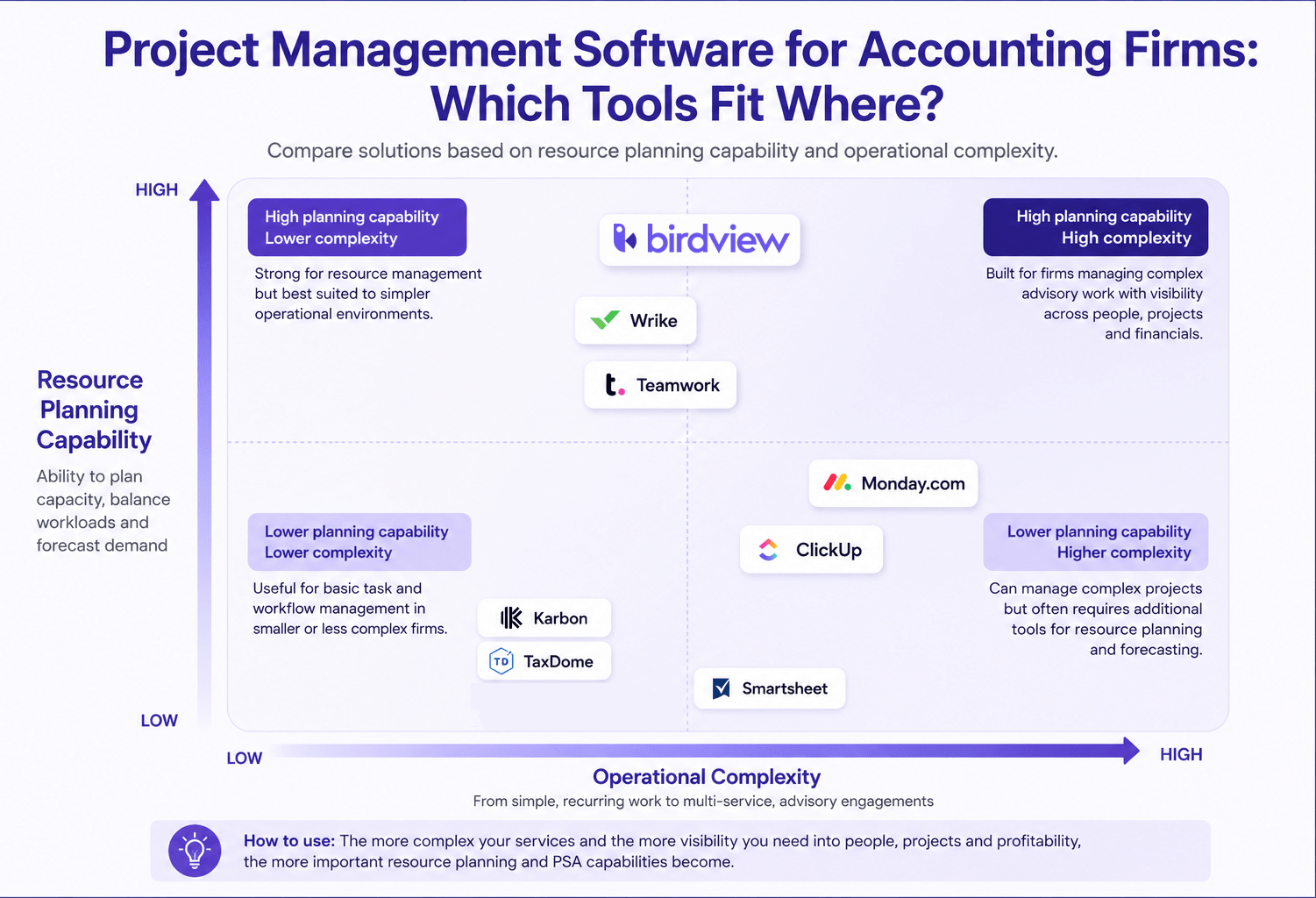
The best project management software depends less on your firm’s size than on how you deliver services. As firms add more engagements, service lines, and shared resources, operational visibility becomes more important than task management alone.
Small bookkeeping firms
Firms focused on recurring bookkeeping, payroll, and compliance work usually benefit most from simple workflow automation. Solutions like Jetpack Workflow or TaxDome help standardize recurring engagements, manage deadlines, and improve client communication without unnecessary complexity.
Growing accounting practices
As firms expand, coordinating work across multiple managers becomes more challenging. If partners regularly ask who has capacity or struggle to balance workloads, look for software with resource planning, time tracking, recurring templates, and project dashboards. These capabilities help distribute work more evenly and reduce last-minute staffing conflicts.
Advisory and consulting teams
Advisory engagements are typically longer, more variable, and more resource-intensive than compliance work. Firms delivering consulting, CAS, or outsourced CFO services benefit from software that supports resource forecasting, utilization tracking, project budgeting, and profitability reporting, allowing managers to make staffing decisions before projects become overcommitted.
Mid-sized firms with multiple service lines
Firms managing tax, audit, advisory, bookkeeping, and consulting need visibility across the entire practice, not just individual projects. At this stage, platforms that combine project management, resource planning, financial management, and executive reporting provide a much stronger operational foundation than standalone task management tools.
Common reasons accounting firms outgrow basic task management tools
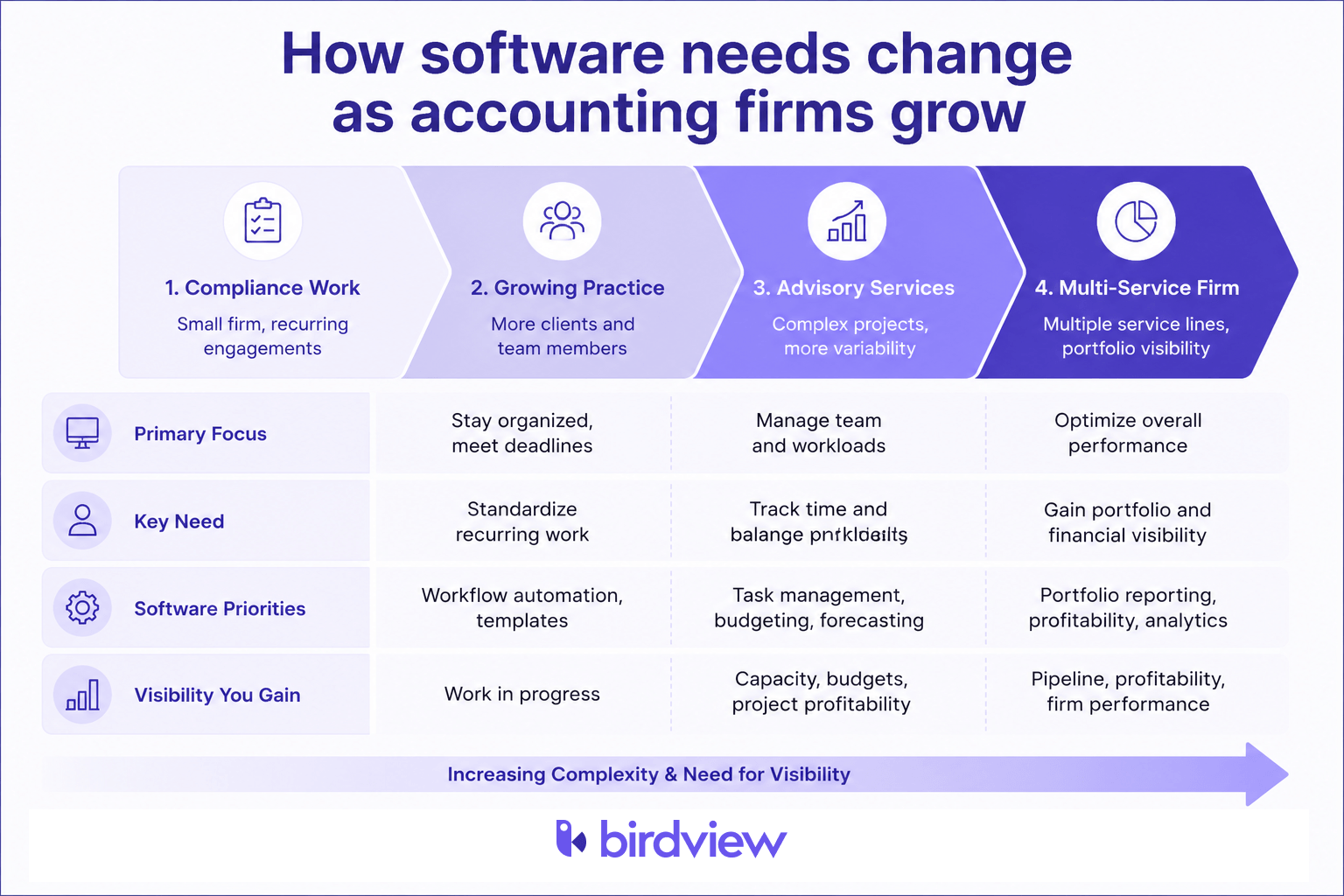
Task management software helps teams organize work. As accounting firms grow, the challenge shifts from managing tasks to managing people, capacity, and profitability. That’s often when firms realize their existing tools no longer provide the visibility needed to run the business effectively.
According to Birdview’s customer research, the most common buying triggers are outgrowing spreadsheets, fragmented tools, manual reporting, and limited resource visibility. These challenges appear consistently across professional services firms as operational complexity increases.
No visibility into workloads and future capacity
Basic project management tools show who owns a task but rarely show whether that person has time for another engagement. As a result, managers often discover resource conflicts only after deadlines begin slipping.
Without capacity planning, it’s also difficult to answer strategic questions such as Can we take on another client? Do we need to hire before next quarter? Modern PSA platforms provide those answers using real-time workload data instead of spreadsheets.
Profitability is difficult to measure
Many firms know project revenue but have limited visibility into actual profitability. If planned hours, labor costs, write-offs, and billable time aren’t connected, managers often discover budget overruns only after work is complete. Project profitability reporting helps identify underperforming engagements while there is still time to adjust staffing or scope.
Spreadsheets and disconnected systems slow decision making
Growing firms frequently manage projects in one system, time in another, accounting in a third, and reporting in Excel. Every management report requires exporting and reconciling data before leaders can answer questions about utilization, profitability, or future revenue.
Eventually, the software isn’t the bottleneck. The disconnected workflow is.
When project schedules, resource planning, financials, and reporting are connected, managers spend less time building reports and more time making informed operational decisions.
When should accounting firms consider PSA instead of traditional project management software?
Project management software helps teams organize work. Professional Services Automation (PSA) software helps firms manage the business of delivering client services by combining project management with resource planning, financial management, and operational reporting.
Many accounting firms don’t need PSA immediately. General project management software is often sufficient while teams are small and engagements are straightforward.
PSA becomes valuable when firm leaders need answers to operational questions such as:
- Do we have capacity to take on new clients?
- Which engagements are most profitable?
- Where are we over or underutilized?
- How much revenue is already committed?
- Which projects are likely to exceed budget?
These questions require connected data from projects, resources, time tracking, and financials, something traditional task management platforms aren’t designed to provide.
For firms expanding into advisory, consulting, outsourced CFO, or other project-based services, PSA platforms provide visibility across the entire practice instead of individual projects.
For example, some firms continue using Karbon or TaxDome for client communication and tax workflows while using Birdview PSA for resource planning, project financials, capacity forecasting, portfolio reporting, and QuickBooks or Power BI integration. The two systems solve different operational problems and can complement each other rather than compete.
FAQ
What is project management software for accounting firms?
Project management software helps accounting firms organize client engagements, assign work, track deadlines, monitor progress, and collaborate across teams. More advanced platforms also support resource planning, time tracking, budgeting, and profitability reporting, giving firm leaders better visibility into how work is delivered.
What’s the difference between project management software and accounting practice management software?
The two categories solve different operational problems.
Accounting practice management software focuses on accounting-specific workflows such as client communication, document management, tax workflows, e-signatures, and compliance processes.
Project management software focuses on planning, scheduling, resource allocation, collaboration, and project execution.
Some firms use only one category, but growing practices often combine both. For example, an accounting practice management platform may handle tax workflows and client communication, while a PSA platform manages resource planning, project financials, and portfolio reporting across the business.
Can accounting firms use general project management tools?
Yes. Many accounting firms successfully use platforms such as Asana, Monday.com, ClickUp, or Wrike, particularly when they are small or primarily need task management.
However, as firms grow, these tools often require additional spreadsheets or manual reporting to answer operational questions about capacity, utilization, profitability, and future staffing. That’s typically the point where firms begin evaluating software built specifically for professional services.
When does a firm need PSA software?
A firm should consider PSA software when project delivery becomes difficult to manage across multiple teams, service lines, or concurrent engagements.
Common indicators include:
- Managers maintain separate resource planning spreadsheets.
- Leadership cannot accurately forecast future capacity.
- Profitability is calculated only after projects finish.
- Time approvals delay invoicing.
- Executive reporting requires exporting data from several systems.
- Different departments use disconnected tools that don’t provide a portfolio-level view.
These are consistent buying triggers identified in Birdview’s customer research across professional services organizations.
Which features matter most for accounting firms?
While every firm has different priorities, the most valuable capabilities typically include:
- Recurring project templates for standardized engagements
- Resource planning to balance workloads
- Billable time tracking with approval workflows
- Project budgeting and profitability reporting
- Executive dashboards for portfolio visibility
- QuickBooks or Xero integrations
- Business intelligence integrations, such as Power BI, for advanced reporting
The right combination depends on your firm’s service mix and operational maturity rather than the number of employees.
Final thoughts
The right software depends on your firm’s operational maturity, not just its size. If you’re primarily managing recurring compliance work, accounting practice management software may be enough. As advisory services grow and resource planning, profitability, and forecasting become more important, many firms benefit from a PSA platform that connects projects, people, and financials.
If your firm has outgrown spreadsheets or basic task management tools, explore how Birdview PSA helps professional services organizations manage projects from planning through billing.