Ksenia Kartamysheva
 Evaluating a vendor’s Canadian claims means checking three separate things: who owns the company, which country’s laws govern data access, and where the data is actually stored. Most procurement checklists only cover the third one. This checklist walks through all three, plus the practical step most buyers skip: verifying ownership through public records rather than taking a vendor’s word for it.
Why this checklist goes beyond a residency check
If you’ve already read our breakdown of Canadian-hosted vs. Canadian-owned PSA software, you know these are different questions. This checklist is built to be used during actual vendor evaluation, whether you’re comparing Canadian PSA software or any other category, not just as background reading. Where residency verification is the deepest and most technical step, it also has its own dedicated walkthrough; this checklist references it rather than repeating it, and spends more time on the ownership check, since that’s the step most procurement processes currently skip entirely.
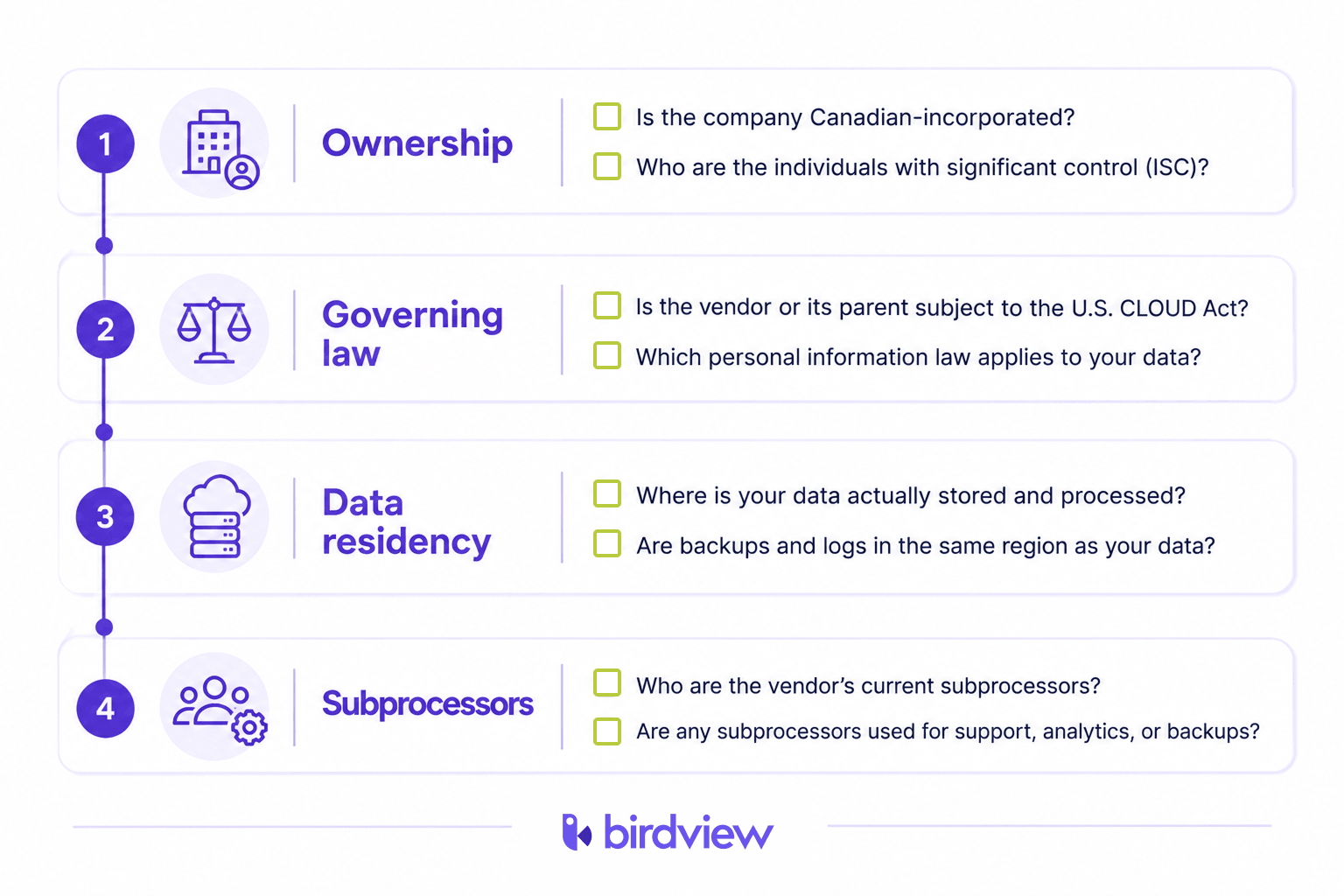
Step 1: Verify incorporation and ownership through public records
Don’t rely on a vendor’s “About Us” page. Check the record directly.
- Search the federal corporate registry. Since January 22, 2024, corporations under the Canada Business Corporations Act must file beneficial ownership information, known as Individuals with Significant Control (ISC), with Corporations Canada. An ISC is anyone who owns, controls, or directs at least 25% of the company’s shares. Corporations Canada’s online search makes this filing publicly searchable by company name or business number.
- Check whether the vendor is federally or provincially incorporated. Only federally incorporated companies are covered by the CBCA’s ISC registry. Most Canadian companies are incorporated provincially, and provinces have inconsistent disclosure rules: Quebec has publicly disclosed ultimate beneficiaries since March 2023, while Alberta requires only a list of the top five shareholders in the annual return. If a vendor is provincially incorporated, check that province’s specific registry rather than assuming the federal registry covers it.
- Trace the parent entity, not just the operating subsidiary. A Canadian-incorporated subsidiary of a foreign parent will still show a Canadian corporate record. The ISC filing should reveal the individuals with significant control, which is what tells you whether that control sits in Canada or elsewhere.
Step 2: Confirm which country’s laws govern data access
Ownership and hosting don’t fully answer this question either. Governing law is a distinct, third axis.
- Ask directly whether the vendor or its parent is subject to the U.S. CLOUD Act. Under the CLOUD Act, U.S.-based companies can be compelled to produce data in their possession or control regardless of where that data is physically stored. This applies even to data stored in a Canadian region if the company itself is U.S.-controlled.
- Ask what personal information law applies to your data. For most commercial Canadian data, that’s PIPEDA. PIPEDA doesn’t forbid cross-border data transfers, but it does make your organization accountable for protecting personal information even after it’s handed to a vendor, which makes the vendor’s own legal exposure your problem too.
- Ask if the vendor has ever received a foreign government data request, and how it responded. A vendor with nothing to hide will typically have a documented process for this.
Canada’s own Treasury Board has acknowledged this distinction matters at the federal level too: its Digital Sovereignty Framework defines digital sovereignty as the capacity to manage and protect data and systems “regardless of where technologies are developed, hosted, or supported,” explicitly separating control from location.
Step 3: Check data residency configuration, not just the marketing claim
This is where most vendor evaluations start and stop, which is exactly why it’s the one step with an existing dedicated guide. Rather than repeat it here, the short version: confirm the specific data center region configured for your account, ask whether backups and logs are stored in the same region as production data, and ask what happens to your data during failover. For the full verification walkthrough, including the difference between storage and processing, see our guide to verifying Canadian data residency.
Step 4: Ask about subprocessors and third-party dependencies
A vendor can be Canadian-owned, Canadian-governed, and Canadian-hosted, and still route part of your data through a third-party subprocessor that isn’t any of those things.
- Request the vendor’s current subprocessor list. Reputable vendors maintain one and update it when subprocessors change.
- Ask whether any subprocessor is used for support, analytics, or backups, since these are the most common places foreign third parties enter an otherwise Canadian data flow.
- Check for SOC 2 certification, which requires an independent auditor to verify a vendor’s security, availability, and confidentiality controls, including how it manages third-party subprocessors. It doesn’t guarantee Canadian jurisdiction on its own, but it’s evidence the vendor has documented its actual data flow rather than just described it in marketing terms.
A worked example
| Vendor A | Vendor B | |
| Incorporation | Canadian subsidiary of a US parent | Canadian-incorporated, ISC filing shows Canadian individuals |
| Governing law exposure | Subject to CLOUD Act via US parent | Governed by Canadian law only |
| Hosting region | Canada (configured) | Canada (configured) |
| Subprocessors | Includes a US-based support and analytics subprocessor | Subprocessors are Canadian-based |
Both vendors would pass a residency-only check. Only the ownership, governing law, and subprocessor checks reveal the difference between them.
Frequently Asked Questions
Is checking a vendor’s website enough to confirm Canadian ownership?
No. A website can state Canadian ownership without it being verifiable. Cross-check against the federal or relevant provincial corporate registry directly.
What if a vendor won’t share its subprocessor list?
Treat that as a red flag. Vendors with nothing to hide typically maintain and share subprocessor documentation as part of standard due diligence.
Does SOC 2 certification confirm data residency?
No. SOC 2 verifies security and operational controls, including how subprocessors are managed, but it doesn’t specify jurisdiction or hosting location on its own. Use it alongside the other checks, not as a substitute for them.
How often should this checklist be revisited for an existing vendor?
Ownership structures, subprocessor lists, and hosting configurations can all change after a contract is signed. Revisiting this checklist at renewal, and after any vendor acquisition announcement, is a reasonable minimum.
See how Birdview approaches ownership, governing law, and hosting together on our Canadian data residency page.
Sources
- Innovation, Science and Economic Development Canada, “How to find information about individuals with significant control,” https://ised-isde.canada.ca/site/corporations-canada/en/how-find-information-about-individuals-significant-control
- Government of Canada, “Minister Champagne announces federal corporations need to begin filing their beneficial ownership information,” January 22, 2024, https://www.canada.ca/en/innovation-science-economic-development/news/2024/01/minister-champagne-announces-federal-corporations-need-to-begin-filing-their-beneficial-ownership-information.html
- U.S. Department of Justice, “CLOUD Act Resources,” https://www.justice.gov/criminal/cloud-act-resources
- Government of Canada, Personal Information Protection and Electronic Documents Act (PIPEDA), https://laws-lois.justice.gc.ca/eng/acts/p-8.6/
- Government of Canada, “Digital Sovereignty: A Framework to improve digital readiness of the Government of Canada,” https://www.canada.ca/en/government/system/digital-government/digital-government-innovations/cloud-services/digital-sovereignty/digital-sovereignty-framework-improve-digital-readiness.html