Ksenia Kartamysheva
 With many tools on the market, finding a solution that fits your workflow can be challenging. This guide compares seven billing solutions for professional services, focusing on:
- Best fit (who it’s for)
- Billing strengths (time- and project-based billing, retainers, multi-currency, automation)
- Tradeoffs (because every tool has them)
The goal is to help you choose a billing tool that supports your current processes without adding unnecessary complexity.
| Tool | Best for | Billing features | Free plan / free trial |
| Birdview PSA | Service-based teams needing integrated project delivery and billing | Project-linked invoicing, time & expense tracking, customizable invoices, multi-currency, automated invoice generation tied to project data | Free trial (up to 28 days) and demo are available |
| Paymo | Small businesses, freelancers, and agencies that want time tracking + invoicing in one | Convert timesheets/expenses to invoices, recurring invoices, estimates, online payments, and multi-currency support via integrations | Free plan available (limited clients/projects) + paid plan options; free trial on paid plans |
| Younium | B2B subscription businesses needing recurring and usage-based billing | Subscription & recurring billing, contract/quote management, automated billing, revenue recognition, multi-currency support | Free trial / demo usually offered; pricing on request |
| Zoho Invoice | Small to mid-sized businesses needing simple invoicing | Professional invoices, expense tracking, payment reminders, estimates, and online payments | Free plan available with core invoicing features |
| QuickBooks Online | Small businesses needing accounting + full invoicing | Custom invoices, payment tracking, reminders, and accounting integration | 30-day free trial (no ongoing free plan) |
| FreshBooks | Freelancers and small service firms focused on billing and time tracking | Professional invoices, automatic billing reminders, time/expense tracking, and online payments | 30-day free trial (no ongoing free plan) |
| Xero | Growing small businesses that want accounting + billing | Online invoicing, payment tracking, multi-currency support, recurring invoices (via add-ons or plan features), and financial reporting | 30-day free trial (no ongoing free plan) |
What is a billing software for professional services?
Billing software for professional services helps service-based businesses create invoices, accept payments, and track financial activity tied directly to client work. These tools reduce manual effort by connecting billing with billable time, project budgets, expenses, retainers, and tax handling.
Most billing platforms for professional services integrate with accounting and CRM systems, keeping financial and client records in sync. Whether you’re billing hourly, by project, or on a recurring basis, billing software helps ensure your work is accurately captured and billed without unnecessary friction.
Key features to look for in a billing solution
🔄 Automation
Manual invoicing can slow things down and lead to mistakes. Look for software that can handle recurring billing, automatic reminders, and the ability to generate invoices from approved time and expenses. The more it does on its own, the more time your team saves.
⏱ Time and expense tracking
For professional services, billing lives and dies by accurate inputs. The tool should capture billable hours, expenses, and rates cleanly, then push them into invoices without copy-paste drama.
✅ Approvals and controls
Timesheets and expenses should be reviewable before they hit the invoice. Approvals, permissions, and audit trails help avoid awkward client conversations later.
⚙️ Customization options
Your invoices should reflect your brand. A good billing system lets you tweak layouts, add your logo, adjust tax settings, and include any custom fields you need. The flexibility to tailor invoices makes a difference.
💳 Built-in invoicing
A strong billing solution should let you handle invoicing without needing extra tools. With built-in invoicing, you can create, send, and track invoices all in one place. It saves time and keeps everything organized.
💱 Multi-currency and multi-language support
If you work with international clients, this feature is essential. The right tool should let you bill in different currencies and communicate in multiple languages, helping you avoid confusion and simplify global transactions.
💲 Payments and gateways
Getting paid should be easy for both sides. Billing software that connects with a flexible payment gateway solution allows customers to pay online, securely, and quickly. For example, integration with QuickBooks helps shorten the payment cycle and improves the customer experience.
📊 Reporting and analytics
You’ll want insight into how your billing is performing. Look for software that provides clear reports and dashboards on revenue, outstanding payments, payment history, and more. These insights can help you spot trends and improve cash flow.
🛡 Security and compliance
Billing involves sensitive financial data, so your software should follow current security standards and comply with regulations like GDPR and PCI DSS. This protects your business and builds trust with clients.
📈 Scalability
As your business grows, your billing software should be able to keep up. Whether it’s managing a higher volume of invoices or offering more advanced features, make sure the solution can support your future needs without friction.
Why service teams need project management software with a built-in billing solution
For service-based teams, billing is rarely separate from delivery. You are billing time, expenses, retainers, or milestones, all of which live inside projects. When project work and invoicing sit in different systems, teams end up doing manual exports, fixing mismatched data, and delaying invoices.
A project-based platform with built-in billing can help when you need:
- Cleaner time and expense capture, so billable work does not slip through the cracks
- Approvals before invoicing, to reduce disputes and write-offs
- Faster invoicing, by generating invoices from approved time, expenses, or milestones
- Better visibility into profitability, linking invoices to budgets, burn, and margins
- Fewer tools to maintain, which cuts admin overhead
If your work is mostly simple one-off invoicing, an invoicing-first tool may be enough. But for teams managing ongoing client work, project-based billing often saves time and protects revenue. ScienceSoft’s project experience shows that billing automation can bring an up to 400% ROI with a payback period of less than 3 months.
7 best billing solutions 2026
Choosing billing software in 2026 is less about finding a tool that can send invoices and more about finding one that matches how your business actually works. Professional services teams have very different needs depending on whether they bill by time, project, subscription, or a mix of all three.
This comparison covers seven billing solutions commonly used by professional services firms in 2026. The tools range from:
- All-in-one PSA for professional services: Birdview PSA
- Freelancers and small service teams: FreshBooks, Paymo
- Accounting first option: QuickBooks Online, Xero
- Subscription style recurring billing and contract-based revenue: Younium
- Budget-friendly stack: Zoho Invoice (simple invoicing), Zoho Billing (recurring and subscriptions)
1. Birdview PSA
Birdview PSA is an all-in-one professional services automation tool designed to streamline operations for service-based businesses, particularly those in project management and consulting. Born from the need to simplify project management and billing processes, Birdview PSA combines powerful invoicing tools with robust project and resource management capabilities, making it ideal for growing businesses. It helps teams manage project costs, track time, and automate invoicing, ensuring smooth billing cycles and better financial control.
Key features:
- Invoice creation and customization:
Birdview PSA invoicing feature allows you to create and customize professional invoices with ease. You can adjust layouts, add logos, modify tax settings, and set up recurring billing for ongoing services, ensuring timely and accurate invoicing.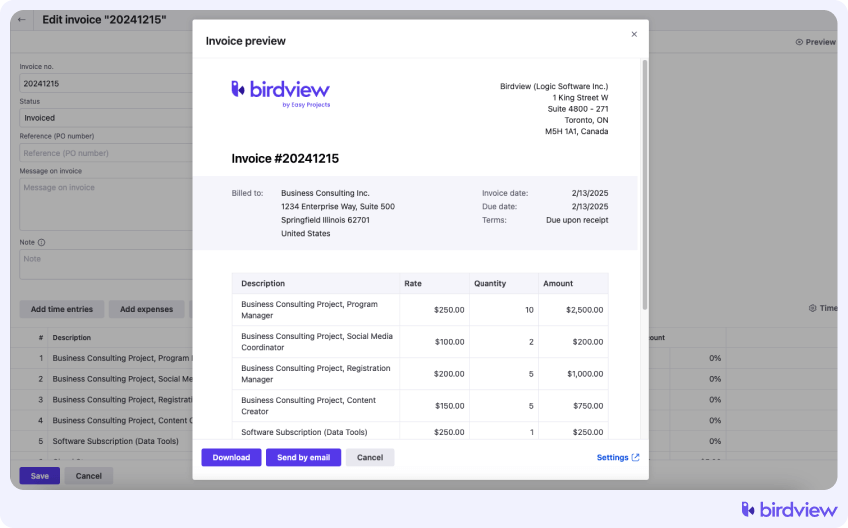
![]()
- Time tracking and expense management:
With built-in time tracking and expense management, Birdview PSA lets you easily capture billable hours and log project expenses. This ensures accurate invoicing and helps keep track of project profitability.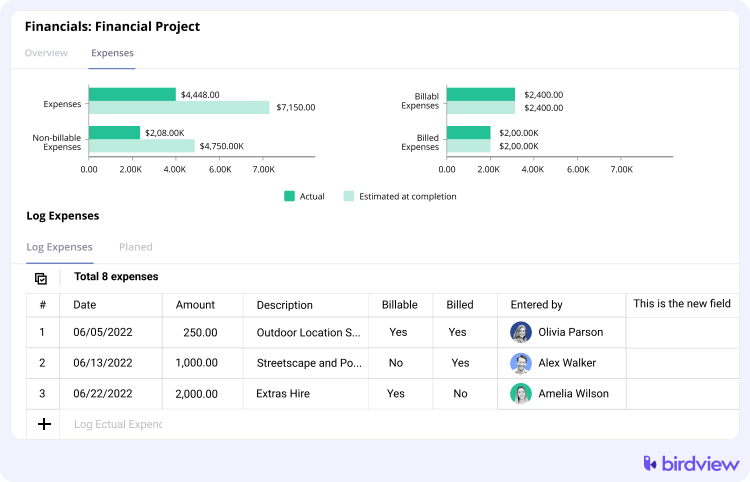
![]()
- Customizable reporting and financial dashboards:
Birdview PSA offers customizable reports and dashboards to track key financial metrics like revenue, billable hours, and overdue invoices, helping teams make informed business decisions. - Multi-currency support:
Birdview PSA supports multi-currency billing, making it easy to manage international projects and generate invoices in different currencies, simplifying global financial operations. - Integration with CRM and accounting software, including QuickBooks:
With integrations to CRM and accounting systems like QuickBooks, Birdview PSA syncs your project and financial data, reducing manual work and ensuring accurate invoicing and reporting.
Trial: A free 14-day trial is available, which may be extended to 28 days.
Pros:
- Strong fit for professional services workflows, projects, time, budgets, and billing in one place
- Easy to invoice from time, expenses, milestones, and fewer manual handoffs
- Good visibility into project financials, burn, margins, overdue invoices
- Helpful if you need resource planning plus billing, not just invoicing
Cons:
- Can feel heavy if you just need simple invoices and payment links
- Pricing can be harder to justify for solo operators
2. Paymo
Founded in 2008, Paymo is a project management and billing solution built to help teams track time, bill clients, and manage projects. Paymo is especially popular among freelancers and small businesses, offering simple yet powerful invoicing tools alongside project management features.
Key features:
- Time tracking with timesheet management
- Recurring billing
- Customizable invoices and estimates
- Client collaboration features
- Integration with various tools (e.g., Slack, Google Calendar)
Trial: A free 15-day trial is available.
Pros:
- Great for small teams that need time tracking plus invoicing without complexity
- Solid timesheets and client-facing workflows for basic services billing
- Good balance of features vs learning curve for freelancers and small agencies
Cons:
- Limited depth for larger orgs with complex approvals, multi-team governance
- Profitability reporting is often not as advanced as PSA focused tools
- Can become restrictive as you scale into more complex billing models
3. Younium
Younium is a subscription management and billing solution designed for B2B companies, especially SaaS businesses with complex recurring revenue models. It streamlines the entire subscription lifecycle–from quoting and contract management to billing, revenue recognition, and reporting–helping businesses automate processes and scale efficiently.
Key features:
- Subscription management and recurring billing
- Revenue recognition
- Multi-currency and multi-entity support
- Integration with CRM and ERP systems
- Audit trail and change tracking
Trial: A free demo is available upon request.
Pros:
- Excellent for subscription or retainer-style billing, especially B2B contracts
- Strong recurring revenue operations, lifecycle management, and auditability
- Good for companies that care about revenue recognition and structured contracts
Cons:
- Often overkill for classic hourly project billing and simple service invoices
- Implementation and onboarding can be heavier than SMB tools
- Less intuitive if your team thinks in projects and timesheets first
4. Zoho Billing
Zoho Billing is a cloud-based billing solution designed for small to medium-sized businesses. Part of the Zoho suite of products, it originated from the need to provide affordable and scalable billing and invoicing tools to growing businesses. Zoho Billing allows users to create professional invoices, set up subscription billing, and automate their billing process.
Key features:
- Subscription billing and recurring invoicing
- Multi-currency and multi-language support
- Payment gateway integrations
- Automated reminders and late fee handling
- Customizable invoices and reporting tools
Trial: A 14-day free trial is available.
Pros:
- Strong value for SMBs, especially if you already use Zoho products
- Good subscription and recurring billing support
- Automation features like reminders and late fees are practical
Cons:
- The best experience usually depends on staying inside the Zoho ecosystem
- Project-based billing may require extra Zoho apps or a tighter setup
- Some teams find the UI and settings dense at first
5. QuickBooks Online
QuickBooks Online, developed by Intuit, is one of the most well-known accounting and billing solutions globally. Launched in 2001, QuickBooks Online is designed to help businesses of all sizes manage their finances, from invoicing to payroll, with ease. Its billing features are robust and suitable for both small businesses and larger enterprises.
Key features:
- Customizable invoices
- Automated payment reminders
- Recurring billing
- Integration with bank accounts for automatic transaction import
- Powerful financial reporting
Trial: A free 30-day trial is available.
Pros:
- Very strong accounting foundation with solid invoicing capabilities
- Recurring invoices and payment reminders are straightforward
- Reporting is strong for finance basics and cash flow
- Works well if your finance team lives in QuickBooks
Cons:
- Professional services workflows, time tracking, approvals, and project controls may need add-ons
- Can feel accounting first, not delivery first
- Advanced profitability by project can take extra configuration or tools
6. FreshBooks
FreshBooks is a cloud-based accounting and billing solution designed specifically for small businesses and freelancers. Founded in 2003, it focuses on simplifying invoicing and time tracking, making it a go-to for service-based industries. FreshBooks has grown to offer an easy-to-use, mobile-friendly platform for managing finances on the go.
Key features:
- Time tracking and automatic invoicing
- Recurring billing and payment reminders
- Expense tracking and reporting
- Client collaboration and project management tools
- Mobile app for billing on the go
Trial: A free 30-day trial is available.
Pros:
- Very easy to use for freelancers and small service businesses
- Great time to invoice flow, simple expense handling
- Client-friendly invoices, reminders, and payment experience
- Good for retainers and ongoing client work when the setup is simple
Cons:
- Can feel lightweight for multi-team operations and complex approvals
- Reporting depth is limited compared to PSA or accounting-heavy tools
- Scaling to advanced project financial management can be difficult
7. Xero
Xero, founded in New Zealand in 2006, is an award-winning accounting platform designed for small and medium-sized businesses. Xero’s billing features are integrated with its accounting tools, making it a comprehensive solution for managing finances, invoicing, and payments in one platform. It’s known for its intuitive interface and powerful functionality, often recommended for growing businesses.
Key features:
- Customizable invoices and quotes
- Recurring billing and payment reminders
- Integration with over 800 apps
- Multi-currency support
- Bank reconciliation and financial reporting
Trial: A free 30-day trial is available.
Pros:
- Strong accounting platform with a big integrations ecosystem
- Clean invoicing and payments workflow for many SMBs
- Good bank reconciliation and financial reporting
Cons:
- Professional services billing often needs companion apps for time tracking and projects
- Billing models like multi-rate services can require workarounds or add-ons
- More moving parts, more integrations to maintain
How to choose the right billing solution
Choosing the right billing solution is a critical decision that can impact your business’s cash flow, operational efficiency, and client relationships. With so many billing software options on the market, it’s essential to consider what features align best with your business goals and processes. To help you navigate the selection process, here are four key factors to consider when choosing the ideal billing software for your needs:
- Start with your actual needs: Think about what you need the software to handle, whether that’s recurring billing, support for multiple currencies, or integrations with tools you already use. A solution that matches your workflow will make everything easier from the start. For example, healthcare providers can boost accuracy and efficiency with the right medical billing software.
- Look for ease of use: The platform should be simple for your team to navigate and easy for your clients to interact with. A clean, intuitive interface means fewer mistakes and less time spent figuring things out.
- Make sure it can grow with you: As your business evolves, your billing needs will too. Choose a system that’s flexible enough to scale, whether that means handling more invoices, offering new features, or adapting to different workflows over time.
- Check support and pricing: Reliable customer service is a must, especially when dealing with payments. Look for clear pricing, no hidden costs, and support that’s responsive when you need help.
Unify project delivery and billing with Birdview PSA
Birdview PSA helps service teams streamline both project delivery and billing in one connected platform. Track time, manage budgets, and generate accurate invoices without switching tools. Eliminate manual work, reduce errors, and get paid faster, all while keeping your projects on schedule and under control.