Blog
Blog

Many project teams are drawn to Accelo because it promises structure, such as ticketing, timesheets, quotes, and invoices all flowing through a unified system. But software that works at one stage doesn’t always scale gracefully. As teams grow, their needs shift. This guide walks through the alternatives worth considering if Accelo no longer fits. You’ll get a clear sense of what each platform does well, where it pulls ahead, and who it’s actually built for. No fluff, just the details that matter when you’re evaluating a switch.
What users often outgrow in Accelo
Not every platform ages well with your business. What works for a 10-person team hitting straightforward deliverables often buckles under the weight of 50 people managing complex, overlapping projects. Accelo handles the basics well enough, but as organizations mature, certain limitations start surfacing repeatedly. Here’s where teams typically hit walls.
- Resource planning lacks depth: Accelo handles task assignments, but it falls short when you need real capacity forecasting. Seeing who will be overloaded in a few weeks or testing different staffing scenarios is difficult. Most teams end up relying on spreadsheets to fill the gaps.
- Project structures feel restricted: The platform works for simple client work, but complex projects with phases, dependencies or parallel workstreams feel cramped. Advanced hierarchies are limited, and larger initiatives often need workarounds to fit the system.
- Billing options are not flexible enough: Accelo is fine for straightforward billing, but it struggles with mixed models like milestones, variable rates, or multi-currency invoices. When many teams export data for manual adjustments, it is a sign that the billing tools do not go far enough.
- Reporting feels too rigid: Built-in reports cover the basics, but deeper analysis is tough. If you want utilization by role, margin insights or customized profitability views, the reporting engine feels restrictive. Executives often need dashboards the platform cannot natively provide.
- Support can be inconsistent: Some issues are handled well, but others linger. When billing or integration problems need quick resolution, slow or uneven support can create real delays.
- Onboarding requires effort: Accelo is not a plug-and-play tool. Training takes time, configuration is detailed, and ongoing maintenance is required to keep everything aligned. Teams without strong operations support may struggle to adopt it fully.
6 best Accelo alternatives for service firms
Before diving deep into each platform, it helps to see how they compare side by side. The table below gives you a snapshot of what each tool prioritizes, what it does best, and how steep the learning curve is. Use this as your starting point, then dig into the sections that match your specific pain points.
| Tool | Best for | Key features | Ease of use |
| Birdview PSA | Smarter resource planning, clear financial visibility, and higher team utilization | Advanced capacity planning, real-time budget tracking, custom BI dashboards, portfolio financial visibility, and invoicing | Intuitive interface with moderate learning curve; comprehensive onboarding support |
| Ravetree | All-in-one PSA without CRM overhead | Project planning with Gantt charts, time tracking, workload balancing, expense management, and invoicing | Very user-friendly; minimal training required |
| Certinia | Salesforce-native enterprise PSA | Native Salesforce integration, resource management, project accounting, revenue recognition, professional services automation | Complex setup; best for teams already familiar with Salesforce |
| HaloPSA | IT service providers and MSPs | Advanced ticketing, SLA management, contract billing, asset management, client portals | Moderate learning curve; tailored for IT workflows |
| Scoro | End-to-end business management | Project management, CRM, quoting, invoicing, financial dashboards, team collaboration | Straightforward interface; quick adoption |
| Wrike | Flexible collaboration without PSA weight | Customizable workflows, Gantt and Kanban views, workload management, automation, and real-time collaboration | Highly intuitive; users adapt quickly |
1. Birdview PSA – best for resource planning and project financials
Birdview PSA emerged from a clear recognition that professional services organizations live or die by two things: how well they deploy their people and how accurately they track project economics. While many PSA platforms treat these as secondary features bolted onto project management, Birdview built its entire foundation around them. The result is a platform that doesn’t just schedule resources – it optimizes them. It doesn’t just track budgets – it forecasts outcomes and flags risks before they materialize. The platform shines brightest for consulting firms, creative agencies, IT services companies, and any professional services organization where margins are tight and resource utilization directly impacts profitability.
Another differentiator is how Birdview handles growth. The system scales gracefully from small teams to multi-office operations without requiring a complete reconfiguration. Custom dashboards adapt to different stakeholder needs – project managers see delivery metrics, finance teams see revenue and margin data, executives get portfolio-level strategy views. Everyone’s working from the same data, just filtered to what matters for their role.
What sets Birdview apart from Accelo: Where Accelo treats resource management as a scheduling feature, Birdview makes it the core of the platform. You get capacity planning that actually works – heat maps, utilization forecasts, scenario modeling. Financial tracking goes deeper too, with real-time budget versus actual comparisons, portfolio-level P&L views, and forecasting tools that help you see problems before they cost you money. The interface is cleaner, the dashboards are more flexible, and the system doesn’t fight you when your workflows don’t fit a preset template.
Key features
- Project and portfolio management
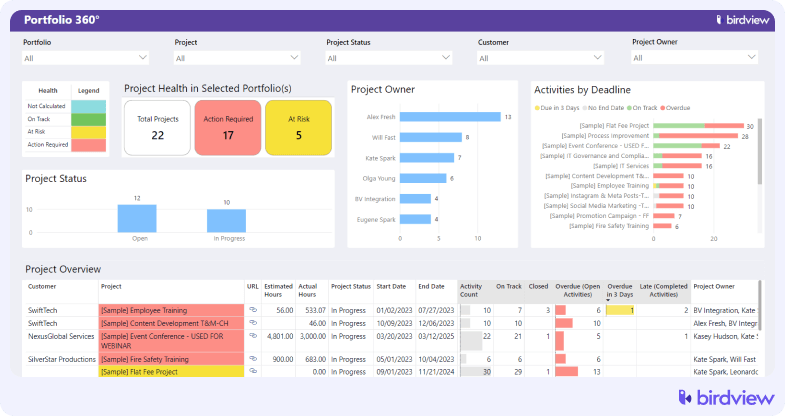
Birdview supports detailed project structures without locking you into rigid templates. You can map phases, dependencies, and milestones the way your team actually works. Portfolio views help you track progress, identify risks early, and shift resources before problems grow.
- Resource capacity planning
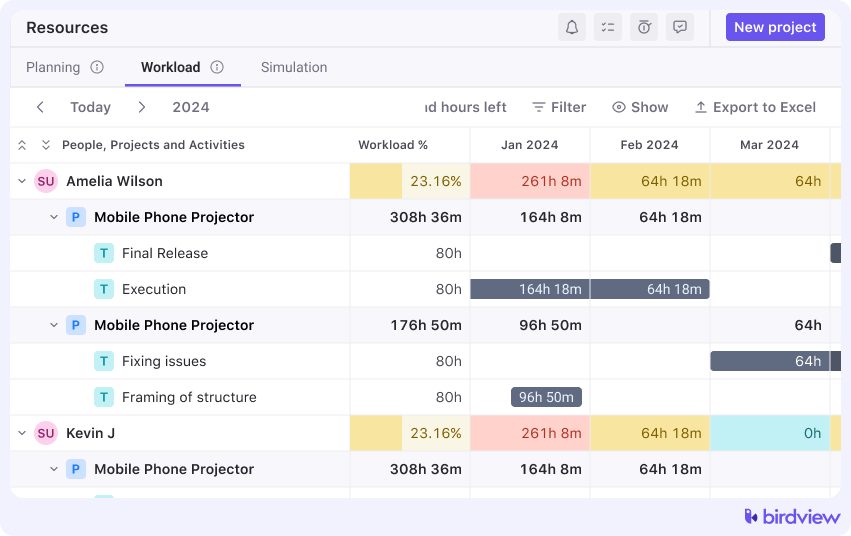
This is Birdview‘s strongest advantage. You can see real availability, spot overloads and identify skill gaps in real time. Drag and drop scheduling makes adjustments simple. The system also accounts for part time schedules, time off and other real world constraints.
- Workload and scheduling views
Birdview offers timeline views, calendars, workload charts, and heat maps. Project managers get clear schedules, resource managers get capacity insight, and leadership gets high-level summaries. Everyone works from the same data, just filtered for their role.
- Invoicing and financials
Birdview supports milestone billing, T&M, fixed fee, and retainers. Invoices pull directly from approved time and expenses. Approvals route easily, and accounting integrations reduce manual work. It is more flexible than what Accelo can handle out of the box.
- Custom BI dashboards and reporting
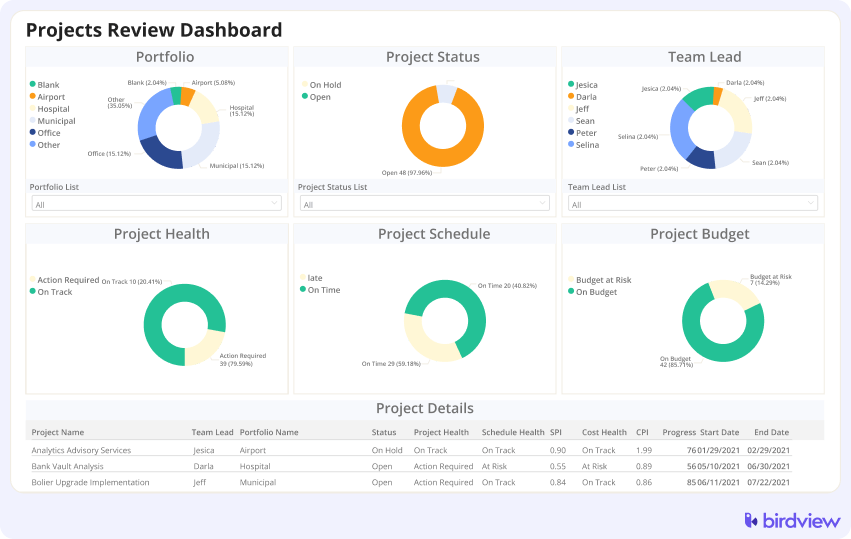
You can build custom reports and dashboards for the metrics that matter most. Revenue by client, utilization by team, project profitability, and forecasted margins are all available without exporting data. Reports stay real-time and fully customizable.
- Integrations with accounting and CRM systems
Birdview connects with tools like QuickBooks, Xero, Salesforce, and HubSpot. Data stays synchronized across teams, so billing, financials, and client records align without manual cleanup.
Trial: 14-day free trial with full access. No credit card required to start.
2. Ravetree – best for teams wanting an all-in-one PSA without CRM-heavy workflows
Ravetree positions itself as the practical middle ground for service teams that need PSA functionality without the bloat of enterprise CRM workflows. It’s built for organizations where the sales cycle is already handled elsewhere and the real need is coordinating delivery, tracking time accurately, and billing cleanly.
What sets it apart from Accelo: Ravetree strips out the CRM complexity that bogs down Accelo and focuses on what service teams actually need: project delivery, time tracking, resource management, and invoicing. It’s lighter, faster to set up, and easier for teams to adopt. If your sales process lives elsewhere and you just need a solid PSA core, Ravetree makes sense.
Key features: project planning, time tracking tied directly to billing, workload balancing across team members, expense management, and invoicing.
Trial: 14-day free trial available.
3. Certinia (formerly FinancialForce) – best for enterprises using Salesforce
For organizations already running their business on Salesforce, Certinia represents the path of least resistance for adding professional services automation. Because it’s built natively on the Salesforce platform rather than integrated through APIs, there’s no data syncing, no middleware to maintain, and no version compatibility headaches.
What sets it apart from Accelo: If your organization runs on Salesforce, Certinia is the natural PSA extension. It’s built natively on the Salesforce platform, so integration is seamless – no middleware, no syncing delays. That means your CRM data, project work, and financials all live in the same ecosystem. For large enterprises already invested in Salesforce, this eliminates the friction of trying to make standalone tools play nice together.
Key features: resource management with skills-based matching, project accounting with revenue recognition, advanced billing and invoicing, time and expense tracking, professional services automation workflows, and deep financial reporting.
Trial: Demo available.
📚 Read more: Top FinancialForce (now Certinia) alternatives
4. HaloPSA – best for IT service providers and MSPs
HaloPSA speaks the language of managed service providers and IT support teams because it was built specifically for them. Where general-purpose PSA tools try to accommodate IT workflows as an afterthought, HaloPSA starts with the assumption that your business revolves around tickets, SLAs, recurring contracts, and client portals.
What sets it apart from Accelo: HaloPSA is purpose-built for managed service providers and IT support teams. Where Accelo tries to serve a broad range of service businesses, HaloPSA zeroes in on the specific workflows that IT teams deal with – ticketing, SLA tracking, client portals, and recurring service contracts. It understands the difference between project work and ongoing support, and it handles both without forcing you into awkward compromises.
Key features: ticketing and service desk, SLA management with automated escalation, contract and subscription billing, asset and configuration management, client portals for ticket submission and status updates
Trial: 14-day free trial.
5. Scoro – best for all-in-one business management
Scoro takes a different approach than most PSA tools by trying to run the entire business from a single platform. For small to mid-sized service businesses drowning in subscriptions and tired of data living in six different places, Scoro offers an appealing consolidation.
What sets it apart from Accelo: Scoro goes beyond PSA and tries to run the entire business – projects, billing, CRM, quoting, reporting, and even team collaboration. It’s ambitious, and for small to mid-sized service businesses that want everything in one place, it can work. The trade-off is that no single feature is as deep as a specialized tool, but the breadth of functionality means fewer integrations and less context-switching.
Key features: project management with task tracking, time tracking and timesheets, CRM and sales pipeline management, quoting and invoicing, financial dashboards, team collaboration tools, and custom reporting.
Trial: 14-day free trial.
6. Wrike – best for flexible collaboration without PSA complexity
Wrike is a project management and collaboration platform that bends to fit your workflows instead of forcing you into predefined structures. You won’t get native invoicing or deep resource planning, but for teams that primarily need better project execution and coordination, that trade-off often makes sense.
What sets it apart from Accelo: If your pain point with Accelo is that it feels too rigid and process-heavy, Wrike goes the opposite direction. It’s flexible, visual, and built for teams that value adaptability over enforced structure. You won’t get built-in invoicing or resource planning at the same depth, but for project execution and team coordination, it’s hard to beat.
Key features: customizable workflows and project views, Gantt charts and Kanban boards, workload management and resource allocation, time tracking, automation and integrations, real-time collaboration and file sharing, and robust reporting.
Trial: 14-day free trial.
📚 Read more: Top Wrike alternatives 2026
Birdview compared to other Accelo alternatives
If you’ve narrowed your search to a few finalists, this comparison cuts through the marketing speak and shows you exactly where Birdview stands against each alternative. The table focuses on limitations you’ll actually encounter and how Birdview addresses them differently. Use this to spot dealbreakers early and make a faster, more confident decision.
| Tool | Limitation | Birdview advantage |
| Accelo | Resource planning is surface-level; financial tracking lacks depth; rigid project structures | Birdview offers advanced capacity planning, real-time financial visibility, and flexible project structures that scale with complexity |
| Ravetree | Limited financial forecasting; basic reporting; lacks portfolio-level insights | Birdview provides scenario planning, custom BI dashboards, and consolidated portfolio financial views |
| Certinia | Enterprise-grade pricing; heavy Salesforce dependency; steep learning curve | Birdview delivers similar depth at a lower cost, works independently of CRM, and onboards faster |
| HaloPSA | Built specifically for IT/MSP workflows; less versatile for other service types | Birdview serves a broader range of professional services with equal rigor in resource and financial management |
| Scoro | A jack-of-all-trades approach means no single feature excels; resource planning is basic | Birdview specializes in what matters most – resource optimization and project financials – with tools that go deeper |
| Wrike | Not a true PSA; lacks native invoicing and financial management | Birdview combines project execution with full PSA capabilities – billing, budgeting, and financial reporting included |
How to choose the right Accelo alternative
Picking software based on feature lists and sales demos is how teams end up replacing one set of problems with another. The platforms that look perfect in a polished presentation often reveal their limitations only after you’ve migrated data and trained your team. Smart evaluation means testing real scenarios and asking direct, practical questions. It also means being honest about what your team will actually use, not just what looks impressive in a demo or on paper.
Accelo works for plenty of teams, but it’s not the endgame for everyone. As your business grows, your tools need to keep pace. The alternatives outlined here each solve different problems. Some specialize in resource planning, others in financial control, and a few in simplicity and speed.
The right choice depends on where your current pain points are and what kind of growth you’re planning for. If resource optimization and financial visibility are what’s holding you back, Birdview PSA is worth a serious look. If you need something lighter or more specialized, the other options here have their place.
Whatever you choose, make sure it’s a decision based on real testing, not just feature checklists. Try it Birdview PSA today with your data, your team, your workflows. That’s the only way to know if it’s actually an upgrade or just a different set of compromises.