Ksenia Kartamysheva
 Any implementation-failed article is really about one question: is the tool broken, or has your team outgrown what task management can handle? For many growing service teams, ClickUp works well at first because it helps organize work fast. The problems start when you need resource planning, portfolio visibility, standardized workflows, and financial tracking across multiple projects.
Most teams do not fail because they picked the wrong tool on day one. They run into trouble because the system that worked for task tracking no longer supports the way the business now operates.
Has your ClickUp implementation failed? Here’s the real answer
Most ClickUp implementations do not fail, they stop fitting the business. As teams grow, project delivery gets more complex. More clients, more shared resources, more deadlines, and more reporting needs expose gaps that were easy to ignore earlier.
At that point, leaders stop asking task-level questions like “what is due today?” and start asking business-level questions like “Who is available next month?”, “Which projects are at risk?”, “Are we overcommitting the team?”, and “Which accounts are profitable?”
If your current setup cannot answer those questions without spreadsheets, exports, and manual interpretation, the issue is not just bad adoption. It is often a mismatch between the tool design and the team’s maturity.
Why ClickUp works at first
ClickUp works well in early stages because it solves the first problem teams face: getting work out of chaos and into one place. It gives structure quickly, without requiring a full operating model. That is exactly what small and growing teams need at the beginning.
Easy to start and flexible
ClickUp is quick to set up and easy to adapt.
You can create spaces, lists, statuses, and fields without long planning or technical setup. Teams can shape the tool around how they already work instead of changing their process first.
This makes adoption fast. It removes friction at the start.
Good for small teams and task tracking
ClickUp works best when the main need is task coordination.
Small teams can manage work effectively when:
- projects are simple
- ownership is clear
- people are not split across many projects
In this setup, task views and due dates are enough to understand progress.
Quick setup without structure
ClickUp does not require a strict structure to get started.
That helps teams move fast early on. But it also means each team builds workflows differently.
Over time, this leads to inconsistent processes and data, which becomes a problem as the organization grows.
Where ClickUp implementations start to break down
ClickUp setups usually break down when teams move from managing tasks to managing delivery across projects, people, and timelines.
The tool still works, but it no longer answers the questions the business needs.
No real resource planning
ClickUp can show assignments, but not true capacity or availability.
You cannot easily answer:
- Who is actually available
- Who is overbooked
- Whether new work can be staffed
As a result, teams rely on spreadsheets or meetings. This leads to overbooking and reactive planning.
Projects become disconnected
Tasks are tracked well, but projects are not connected at a portfolio level.
Each project looks fine on its own. The problems that appear across projects are competing priorities, shared resources, and overlapping deadlines
Without a portfolio view, leaders cannot see the full picture.
Reporting becomes manual
Reporting often requires exports and cleanup.
This happens when data is inconsistent, structures vary across teams, and required fields are missing
The result is slow reporting and less reliable decision-making.
Too much flexibility creates chaos
ClickUp allows teams to build workflows their own way.
Without strong standards, this leads to:
- different statuses across teams
- inconsistent structures
- unclear data definitions
Over time, the system loses consistency, and data becomes hard to trust.
No connection to financials
ClickUp does not connect tasks to project financials.
Teams cannot easily track budgets vs actuals, billable work, and project profitability.
This creates a gap between delivery data and financial performance, which limits control over projects.
Signs your team has outgrown ClickUp
You have likely outgrown ClickUp when the main issue is no longer task organization, but operational control.
Use this checklist as a practical test:
- You do not know the real team capacity without asking managers manually.
- You manage resources in spreadsheets because the system cannot show availability clearly.
- Reporting takes too long and depends on exports or cleanup work.
- Projects are tracked individually, but leadership cannot see the portfolio clearly.
- Finance data is separate, so project health and project economics are disconnected.
- Teams use multiple tools alongside ClickUp to fill planning, staffing, or reporting gaps.
- Different teams use different structures, which makes reporting unreliable.
- Work is assigned, but no one knows whether those assignments are realistic.
- Delivery decisions rely on meetings and memory, not on trusted system data.
- Leadership has stopped trusting dashboards and asks for manual updates instead.
One or two of these issues can be fixed with a better setup. When several are happening at once, the problem is usually bigger than the configuration.
What growing teams actually need
As teams grow, they need systems that connect projects, people, and money, not just task lists.
The shift is important. A growing service organization is no longer trying only to answer “what needs to get done?” It also needs to answer:
- Can we deliver this with current capacity?
- Which projects need attention first?
- Are we staffing the right people on the right work?
- Are projects staying within budget?
- Which work is helping or hurting profitability?
That requires structure.
Resource planning
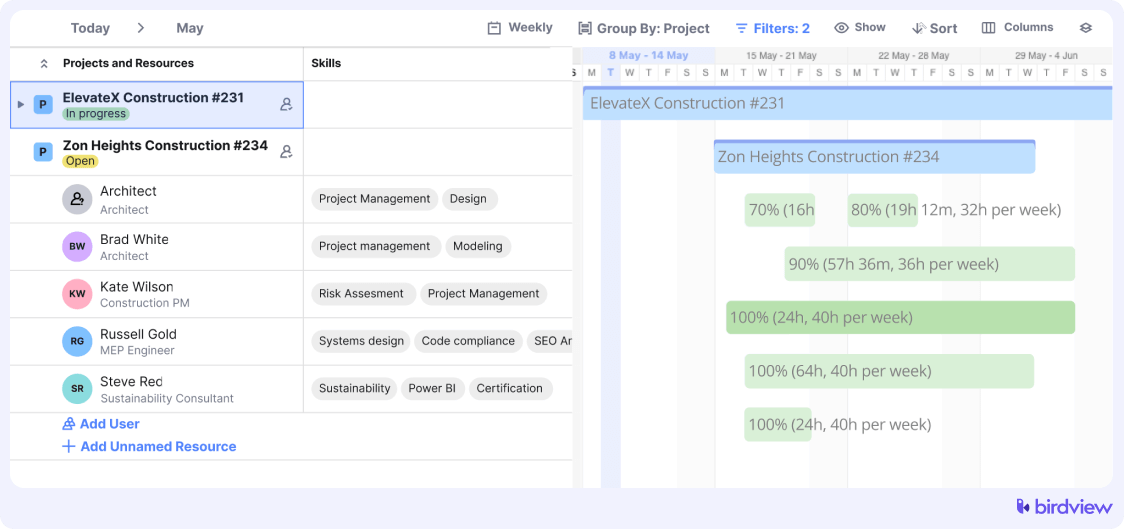
Growing teams need a reliable view of who is available, who is overloaded, and what demand is coming next. Without that, sales commitments, delivery planning, and staffing decisions stay disconnected.
Portfolio visibility
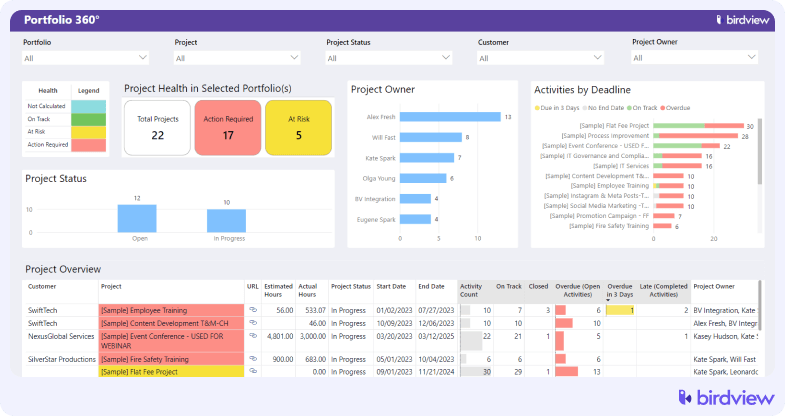
Leaders need to see all active work in one place, not just one project at a time. That includes priorities, deadlines, dependencies, risk signals, and capacity conflicts across the portfolio.
Financial tracking
Service organizations need project management data tied to time, budgets, costs, and profitability. Without that connection, project status can look healthy while the economics are quietly getting worse.
Standardized workflows
As headcount grows, consistency matters more than flexibility. The system should make it easier to run projects the same way, capture comparable data, and produce reports leadership can trust.
Task management vs PSA software: what’s the difference
This comparison is the heart of the decision. Task management tools help teams organize work. PSA software helps service organizations run delivery as a system.
| Area | ClickUp | PSA |
| Tasks | ✔ | ✔ |
| Resource planning | Limited | Core |
| Financial tracking | No | Yes |
| Portfolio view | Limited | Built-in |
This does not mean task tools are bad. It means they solve a different problem.
A task tool is usually best when work coordination is the main challenge. A PSA system becomes more relevant when the business needs to manage delivery capacity, portfolio tradeoffs, utilization, budgets, and project outcomes together.
What to do when ClickUp is no longer enough
If your ClickUp implementation failed, do not assume you need a new tool right away. The first step is to understand whether the issue is setup, process, or system fit.
Step 1: Identify what’s not working
Start with specific, recurring problems.
Focus on what slows your team down or creates risk. Common patterns include missed deadlines due to hidden capacity issues, slow reporting cycles, or a lack of visibility across projects.
The goal is to move from general frustration to clear operational gaps.
Step 2: Map your workflows
Write down how work actually moves through your organization, from intake to delivery to reporting.
In many cases, this reveals the real issue. The problem is not task tracking, but everything around it, such as planning, staffing, or financial tracking.
If your workflow extends beyond what ClickUp supports, gaps will continue to appear.
Step 3: Define requirements
Translate your problems into clear system requirements.
Focus on what the business needs to operate effectively:
- visibility into resource capacity
- portfolio-level project tracking
- consistent reporting across teams
- connection between delivery and financial data
This keeps the evaluation grounded in real needs, not features.
Step 4: Evaluate alternatives
Now compare your requirements with what your current system can realistically support.
Some teams can fix their setup with better structure and governance. Others need a system designed for resource planning and portfolio management.
This is where teams start exploring ClickUp alternatives. For example, platforms like Birdview PSA are built to connect projects, resources, and financials in one place. The key point is the shift in system type, not the tool name.
Step 5: Start with a pilot
Avoid a full rollout immediately.
Test the new approach with one team or workflow. This helps validate reporting, adoption, and planning accuracy before scaling.
Use the pilot to confirm that the system actually solves the problems you identified earlier.
Typical transition: from ClickUp to structured systems
The move from ClickUp usually follows a predictable pattern.
At first, the team manages work with tasks, statuses, and boards. Capacity is handled in spreadsheets. Reporting lives partly in exports and partly in manager updates. Finance is somewhere else. It works, but only because people compensate for system gaps manually.
Then the team grows.
Now, several project managers are sharing the same delivery pool. Priorities conflict. Utilization matters. Leadership wants portfolio visibility. Finance wants clearer project-level data. Suddenly, the old setup creates more work than it saves.
After the transition, the goal is not to track more tasks. The goal is to run delivery with more control.
A more structured system usually changes the operating model in these ways:
- projects follow more consistent workflows
- resources are planned across projects, not inside one list at a time
- portfolio views become part of regular decision-making
- reporting becomes faster because data is structured more consistently
- financial visibility improves because project data connects to budgets, time, and cost
That is the real shift.
It is not “basic tool” versus “advanced tool.” It is local task management versus connected service operations.
If your team is living in the gap between those two, that is why the current setup feels broken.
The real question is not whether ClickUp failed
The better question is this: what type of system does your business need now?
If your work is still mostly about task coordination, ClickUp can remain useful.
If your work now depends on shared resources, portfolio decisions, delivery forecasting, and financial control, then trying to force a task-first tool to manage all of that usually creates more friction over time.
That is why many teams end up searching for alternatives. They are not abandoning discipline. They are trying to match the system to the business they have become.
A good next step is to review your workflows, identify where manual work keeps reappearing, and decide whether you need a better setup or a more structured operating platform.
FAQ: ClickUp implementation and limitations
1. Why do ClickUp implementations fail?
Most ClickUp implementations do not fail because the tool is unusable. They fail because the team grows beyond what a task management setup can support. The most common breaking points are resource planning, cross-project visibility, reporting consistency, and financial tracking.
2. Is ClickUp good for project management?
Yes, for many teams it is. ClickUp is useful for task organization, workflow tracking, and team coordination. The limits usually appear when project management also requires portfolio oversight, staffing decisions, and delivery economics.
3. What are the main limitations of ClickUp?
The biggest ClickUp limitations for growing service teams are usually limited resource planning, weak portfolio control, manual reporting needs, inconsistent structures across teams, and no strong connection to financial management.
4. When should you move from ClickUp?
You should consider moving from ClickUp when the system no longer helps you make delivery decisions. A common sign is that the real planning happens outside the tool, while ClickUp is only used to document tasks after the fact.
5. What should you use instead of ClickUp?
That depends on the problem you are solving. If the issue is workflow consistency, a better setup may be enough. If the issue is capacity planning, portfolio visibility, and project financial control, you should look at systems built for structured service delivery, including PSA platforms.