Blog
Blog

Professional services firms operate in a unique reality. Unlike product companies shipping features, you are selling expertise, time, and outcomes. In this environment, every project decision impacts your capacity, revenue, and margins simultaneously.
Most general project portfolio management (PPM) tools fail because they treat projects as simple checklists. They track tasks but ignore the cost of the people performing them. For a services business, time is your inventory. Managing that inventory requires more than just a “green or red” status light.
In 2026, effective portfolio management is about answering high-stakes commercial questions. Do you have the right skills available for next quarter‘s pipeline? Are you prioritizing the work that actually supports your growth strategy? Where are your margins quietly slipping away?
The tools below are built specifically to help professional services firms manage portfolios with these questions in mind. They bridge the gap between simple task tracking and true commercial delivery.
Quick comparison: best PPM software for professional services
| Tool | Headquarters | Best for | Key PPM features |
| Birdview PSA | Canada (Toronto, Ontario) | PSA and PPM in one platform | portfolio dashboards, capacity planning, scenario modeling, project financials, time tracking |
| Kantata | United States (Irvine, CA) | services operations and financial control | resource planning, revenue forecasting, portfolio analytics, margin tracking |
| Planview AdaptiveWork | United States (Austin, TX) | enterprise portfolio governance | strategic portfolio planning, scenario modeling, capacity planning, advanced reporting |
| Adobe Workfront | United States (Lehi, UT) | large enterprise workflow alignment | enterprise intake, workflow automation, portfolio prioritization, reporting |
| Wrike | United States (San Jose, CA) | mid-size service teams | portfolio dashboards, workload views, automation, custom reports |
| Smartsheet | United States (Bellevue, WA) | spreadsheet-style PMOs | portfolio roll-ups, dashboards, automation workflows, reporting |
| Teamwork | Ireland (Cork) | agencies and client delivery teams | time tracking, budgeting, portfolio overview, client collaboration |
| Productive | Croatia (Zagreb) | agencies & consultancies | budgeting, resource planning, profitability forecasting, reporting |
| Scoro | Estonia (Tallinn) | services firms needing business management | project financials, quoting, billing, portfolio dashboards |
Who this guide is for
This guide is designed for leaders in consulting, engineering, and IT services who have outgrown basic project tracking tools. It is for PMO directors and resource managers who need a unified view of team capacity and project health. If you are a finance leader seeking to bridge the gap between delivery and profit, these insights are for you. We focus on firms managing complex portfolios that require real-time visibility into financial and operational performance.
Expert insights: mastering your portfolio strategy
PPM vs PSA: what is the difference?
PPM helps you decide which projects deserve time and budget, and how they rank against each other. PSA helps you deliver work profitably with time tracking, billing, utilization, and margin control. Professional services teams usually need both to avoid delivery chaos and profit surprises.
The biggest PPM mistake in professional services
Buying powerful software and then letting data discipline slide. If requests come in without required fields and timesheets are always “tomorrow,” your portfolio view looks polished but tells the wrong story.
How to shortlist fast
Start with the pain that costs you the most money.
- Capacity chaos: choose tools with resource forecasting and skills-based planning.
- Margin leakage: prioritize budgets, rates, and profitability reporting.
- Executive visibility: focus on portfolio dashboards, cross-project reporting, and governance.
What to look for in PPM software for professional services
Before comparing tools, it helps to know what actually matters. Here are five capabilities that separate good PPM software from great PPM software for services firms.
1. Integrated resource capacity and forecasting
You need to know not just who’s busy now, but who’ll be available next month. Real-time utilization tracking paired with forward-looking capacity planning is non-negotiable if you’re trying to staff projects without burning people out or leaving revenue on the table.
2. Strong financial management
Budget tracking, margin analysis, and revenue forecasting should live inside the same tool you use to manage delivery. When finance and operations are siloed, things fall through the cracks. Look for cost-vs-actuals visibility at the portfolio level, not just per project.
3. Portfolio-level visibility and governance
Executive dashboards, strategic alignment tracking, and portfolio prioritization frameworks let leadership make smarter decisions. If you can only see projects one at a time, you’re missing the big picture.
4. AI-powered forecasting and automation
In 2026, AI capabilities have moved from “nice to have” to genuinely useful. Predictive risk alerts, intelligent workload balancing, and automated reporting cut down on manual work and help catch problems earlier.
5. Integration with CRM and accounting systems
A closed loop between sales and delivery matters. Syncing with tools like Salesforce, HubSpot, or QuickBooks gives you visibility from the moment a deal closes through the final invoice
Shortlisting criteria: how we selected PPM tools
To build this list, we focused on tools that:
- Support portfolio-level visibility, not just task management
- Offer resource planning and financial tracking
- Are used by professional services firms
- Include AI capabilities relevant to forecasting or risk
- Provide trial access or demos
- Have a solid reputation in the market
This is not a ranking from best to worst. It is a practical overview to help you shortlist faster.
Top-rated PPM solutions for professional services delivery
Choosing project portfolio management software for a professional services firm is rarely straightforward. Some teams need tight financial control. Others care more about capacity forecasting or governance. And in many cases, you are trying to balance it all at once without overcomplicating your tech stack.
Quick picks
- Best PSA + PPM combo: Birdview PSA
- Best PSA and PPM hybrid for services operations: Birdview PSA
- Best for services operations and financial control: Kantata
- Best for portfolio governance at scale: Planview AdaptiveWork
- Best for enterprise intake and workflows: Adobe Workfront
- Best for agencies that want a clean client delivery tool: Teamwork
1. Birdview PSA
Birdview PSA combines project portfolio management with professional services automation. It is designed for firms that want to see strategy, delivery, resources, and financials in one place. Instead of stitching together separate systems, you manage portfolios and operations inside the same platform.
Key features:
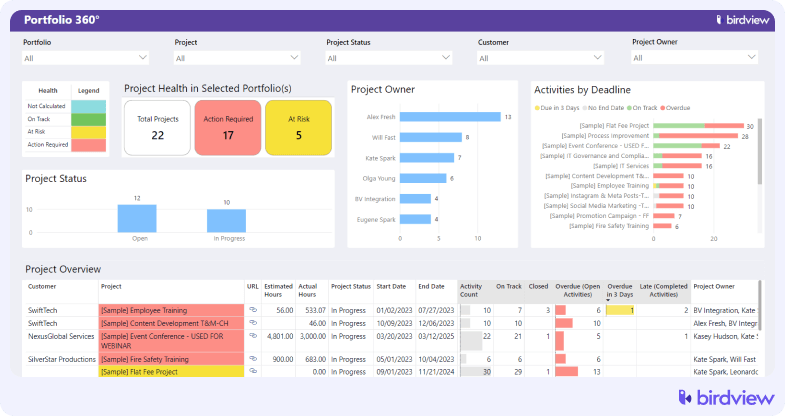
- Portfolio dashboards
Portfolio dashboards give service leaders a consolidated view of active projects, pipeline work, utilization rates, revenue forecasts, and margin performance so they can balance strategic priorities with financial reality.
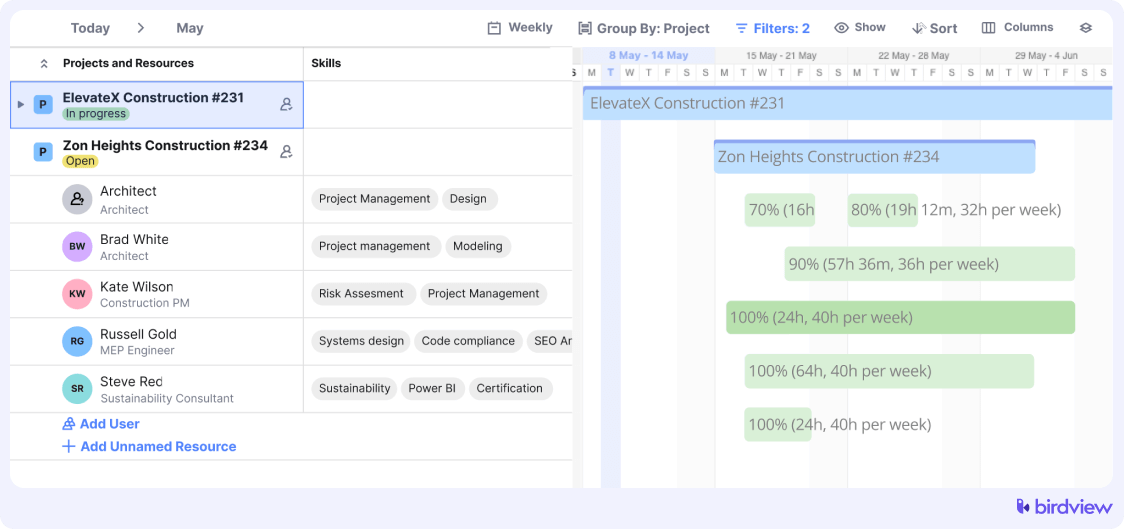
- Capacity planning by role and skill
Capacity planning helps you see availability across consultants, engineers, and specialists by skill set and billable role, making it easier to decide whether to accept new work, redistribute assignments, or hire.
- Scenario modeling
Scenario modeling allows you to test how potential deals or scope changes will affect team workload, revenue projections, and delivery timelines before you commit, reducing overbooking and margin erosion.
- Portfolio financial management
Portfolio-level financial management connects budgets, actual costs, billable time, and revenue forecasts across all projects so you can track profitability not just per project, but across entire service lines.
- Utilization and margin tracking
Built-in utilization and margin tracking shows how effectively your teams are converting time into revenue, helping leadership spot underused capacity or projects that are quietly eating into profit.
- Integrated time and billing visibility
Time tracking and billing data feed directly into portfolio insights, ensuring financial forecasts reflect actual work performed rather than estimates alone.
- Custom executive reporting
Customizable executive dashboards allow service leaders to monitor KPIs such as billable utilization, revenue per consultant, backlog health, and forecast accuracy in a format aligned with business goals.

AI capabilities:
Birdview‘s built-in AI tools reduce manual planning effort, improve forecasting accuracy, and strengthen communication across teams.
- You can generate complete project plans automatically, including structured tasks and subtasks based on project type.
- AI recommends suitable team members based on skills, availability, and role fit.
- Machine learning models forecast likely completion timelines using real delivery data.
- It also enhances communication with AI-powered message suggestions, summaries, and clarity improvements.
Trial info: 14-day free trial, extendable to 28 days
Pros:
- Deep visibility into financial and resource data
- Built specifically for professional services
- Strong scenario planning capabilities
Cons:
- More features than very small teams may need
- Requires a structured setup to unlock full value
2. Kantata
Kantata focuses on services operations. It blends resource management, financial tracking, and portfolio oversight. Many consulting and IT services firms use it to keep revenue forecasts and delivery aligned.
Key features: Revenue forecasting, margin tracking, resource planning, portfolio analytics, billing management
AI capabilities: AI-enhanced forecasting and visibility into outcomes; resource and performance insights across project
Trial info: Demo available upon request
Pros:
- Strong focus on financial control
- Good revenue visibility
Cons:
- Can feel complex during onboarding
- Pricing may be high for smaller firms
3. Planview AdaptiveWork
Planview AdaptiveWork is geared toward large enterprises that need structured portfolio governance. It supports complex approval processes and strategic alignment at scale. If you are managing dozens or hundreds of concurrent initiatives, this type of control can be critical.
Key features: Strategic portfolio planning, scenario modeling, capacity planning, governance workflows, advanced reporting
AI capabilities: Intelligent portfolio analytics and predictive insights for risks and performance
Trial info: Demo available upon request
Pros:
- Strong governance and compliance support
- Advanced portfolio modeling
Cons:
- Implementation can take time
- Better suited to large organizations
4. Adobe Workfront
Adobe Workfront is known for enterprise work management. It shines in structured intake, cross-department workflows, and portfolio alignment. For large organizations with layered approvals and complex collaboration, it offers strong control.
Key features: Enterprise intake forms, workflow automation, portfolio prioritization, reporting dashboards, integrations with Adobe ecosystem
AI capabilities: AI Assistant for summaries and suggestions; AI-driven workflow automation and automation of briefs and planning content
Trial info: Demo available upon request
Pros:
- Powerful workflow engine
- Strong integration with enterprise systems
Cons:
- Steeper learning curve
- Premium pricing
5. Wrike
Wrike sits somewhere between project management and portfolio oversight. It is flexible and customizable, which makes it appealing for mid-size service teams. You can build portfolio views without heavy configuration.
Key features: Portfolio dashboards, workload views, automation rules, custom reports, time tracking
AI capabilities: AI-powered risk prediction, task prioritization, inbox summary, and content refinements
Trial info: Free trial available
Pros:
- User-friendly interface
- Flexible setup options
Cons:
- Financial management is less advanced than PSA-focused tools
6. Smartsheet
Smartsheet feels familiar to anyone who has worked extensively in spreadsheets. It adds structure and automation to that experience. Many PMOs appreciate its flexibility and reporting capabilities.
Key features: Portfolio roll-ups, dashboards, automation workflows, reporting tools, integrations
AI capabilities: Auto formula and workflow automation suggestions (rule-based, sometimes described as AI support)
Trial info: Free trial available
Pros:
- Easy adoption for spreadsheet users
- Strong reporting features
Cons:
- Limited built-in financial depth for services firms
7. Teamwork
Teamwork is popular among agencies and client service teams. It focuses on clean project delivery, time tracking, and budgeting. While not a heavy governance tool, it supports portfolio visibility for growing firms.
Key features: Time tracking, budgeting, workload management, portfolio overview, client collaboration
AI capabilities: AI writing assistant and workload insights within project planning
Trial info: Free trial available
Pros:
- Clean interface
- Agency-friendly features
Cons:
- Limited advanced portfolio controls
8. Productive
Productive is built with agencies in mind. It blends budgeting, resourcing, and profitability tracking. For firms that care deeply about project margins and utilization, it offers practical tools.
Key features: Budget tracking, resource planning, profitability forecasting, time tracking, reporting
AI capabilities: Automations from simple prompts, assist inside Slack, and task automation
Trial info: Free trial available
Pros:
- Strong agency financial tracking
- Simple resource planning
Cons:
- Less suited for large enterprise portfolios
9. Scoro
Scoro combines project management with broader business management. It includes quoting, billing, CRM features, and portfolio dashboards. For firms that want to manage much of their operations in one system, it can be attractive.
Key features: Project financials, quoting, billing, portfolio dashboards, CRM features
AI capabilities: Forecasting automation, reporting insights
Trial info: Free trial available
Pros:
- All-in-one business management approach
- Strong financial controls
Cons:
- Can feel complex due to wide scope
- Not a pure PPM specialist
How to choose the best PPM software for professional services
Start with clarity about what problem you are solving. Some firms need tighter financial control. Others struggle with resource forecasting. A few need enterprise governance.
Ask yourself:
- Do we need a standalone PPM tool or a combined PSA and PPM platform?
- How important is deep financial visibility?
- Are we managing ten projects or a hundred?
- Do we need scenario planning for pipeline growth?
- What systems must this tool integrate with?
Then test the software. Run a real scenario. Load sample projects. Model upcoming demand. Look at the reports your executives care about.
In the end, the best PPM software is the one that helps you make better decisions before problems become expensive. Tools cannot replace judgment. But the right one can give you the clarity to act sooner, with more confidence.