Blog
Blog

Data quality in PSA is the consistency, completeness, and accuracy of the data used to plan projects, allocate resources, and forecast outcomes. When this data is outdated or inconsistent, the forecast no longer reflects what is actually happening across delivery, capacity, and revenue.
Teams often blame the software when forecasts miss the mark. In reality, the bigger issue is weak operational inputs: delayed time entries, stale allocations, inconsistent definitions, and no routine validation.
What professional services automation does for IT consultancies
Professional services automation systems connect project plans, resource allocations, time tracking, and financial data into one operating model. They are used to generate planning signals for workload, delivery timelines, and revenue.
In IT consultancies, PSA tools support:
- Resource forecasting: who will be needed and when
- Capacity planning: how much work teams can handle
- Financial tracking: revenue, cost, and margin by project
- Project reporting: status, risks, and delivery progress
When inputs are clean, PSA works as a planning system. When inputs degrade, it becomes a reporting archive that teams do not trust.
Why project forecasts are often wrong
Forecasts fail when the underlying data is inconsistent, incomplete, or outdated. The system may calculate correctly, but it is calculating from the wrong baseline.
The cost of poor PSA data quality
| Symptom | Root cause | Business impact |
| “Ghost” capacity | Stale resource allocations | Lost revenue (bench time) |
| Margin erosion | Inconsistent time tracking | Unprofitable projects |
| Forecast drift | No plan vs. actual reconciliation | Missed quarterly targets |
| Team burnout | Inaccurate workload views | High employee turnover |
| “Dead” projects | Failure to clean inactive work | Overstated pipeline/revenue |
In practice, most issues fall into a few patterns:
Inconsistent time tracking
Teams log time differently across projects or departments. Some log daily, others weekly, some estimate hours.
Example: One team logs meetings as billable, another does not. Margin and effort reports become distorted.
Stale resource allocations
Allocations are rarely updated after initial planning. People remain assigned to work they already completed.
Example: A team appears fully booked in the system, but in reality has available capacity that is not reflected in the plan.
No clear data ownership
No one is responsible for keeping project and resource data current.
Example: Project managers assume resource managers will update allocations. Resource managers assume project managers will do it. Updates never happen.
No reconciliation between plan and actuals
Plans are not compared with actual execution on a regular basis.
Example: A project shows as “on track” in the plan, while actual logged hours already exceed the estimate.
These issues break forecast accuracy, capacity visibility, and reporting integrity at the same time.
15 data hygiene rules that fix forecasts
Forecast accuracy does not improve because teams analyze harder. It improves when they maintain a cleaner operating model.
In practice, that comes down to four things:
- Capture the right data
- Assign clear ownership
- Keep plans current
- Validate assumptions against actuals
Capture consistent data at the start
This group ensures every project starts from a clear and usable baseline.
1. Define mandatory project inputs
Every project must include:
- Start and end dates
- Planned hours or budget
- Assigned roles or resources
- Key phases or milestones
Without this, resource planning is based on partial data.
2. Standardize time entry definitions
Define:
- Billable vs non-billable work
- Time entry format (daily, task-based, etc.)
- Whether estimates are allowed
Without shared definitions, actuals cannot be compared across projects.
3. Use standardized project structures
Projects should follow:
- Consistent phases
Similar task breakdowns
This improves comparability and reporting clarity.
Assign ownership and control changes
This group ensures data stays accountable and traceable.
4. Assign clear data ownership
Define responsibility:
- Project plans: project managers
- Allocations: resource managers
- Time entries: team members
Each dataset must have one owner.
5. Enforce change request discipline
Any change to scope, timeline, or budget must be logged and approved.
Without this, planning signals shift without explanation.
6. Maintain a single source of truth
The PSA system must be the operational baseline.
Parallel spreadsheets create conflicting data and break reporting consistency.
Keep data current
This group focuses on keeping plans aligned with actual execution.
7. Enforce near real-time time logging
Time should be logged within 24 to 48 hours.
Late entries reduce accuracy and distort progress tracking.
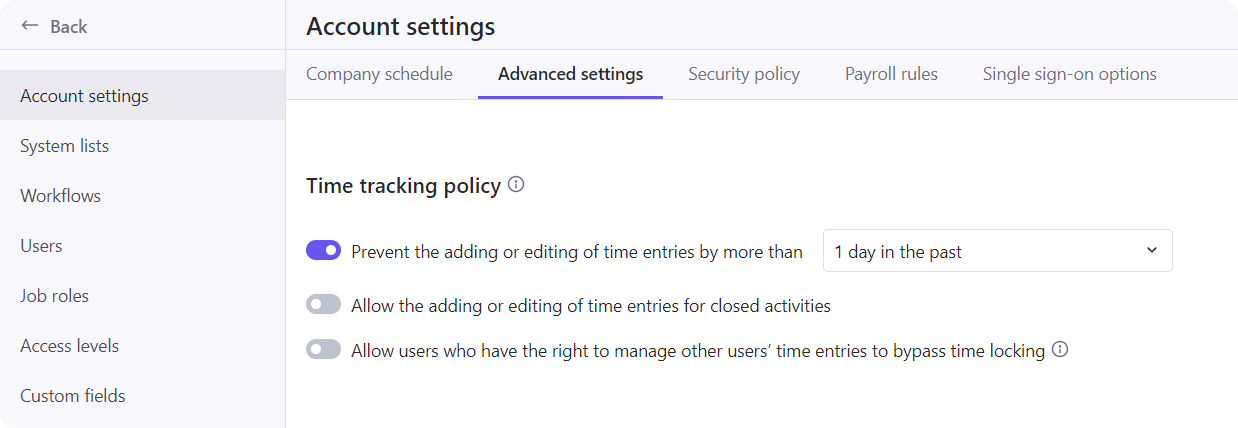
8. Lock approved historical data
Once time is reviewed, it should not be freely edited.
Example: In Birdview PSA, approved time entries are locked to protect reporting integrity.
9. Update allocations weekly
Review and adjust assignments every week.
This prevents “ghost allocations” that distort capacity planning.
10. Clean inactive work regularly
Remove:
- Completed assignments
Inactive tasks
This keeps workload views aligned with actual delivery.
Validate and improve continuously
This group keeps forecasts aligned with reality over time.
11. Reconcile planned vs actual weekly
Compare planned and actual hours:
- Identify deviations
- Adjust forecasts
This keeps planning grounded in execution.
12. Track remaining work explicitly
Remaining effort should be updated manually based on progress.
Example: A task estimated at 40 hours has 30 hours logged. That does not mean 10 hours remain. It may require 20 more hours. In Birdview PSA, the remaining hours fields allow teams to adjust forecasts independently from actual time.
13. Separate planned, booked, and actual work
Clearly distinguish:
- Planned work: initial estimate
- Booked work: scheduled allocation
- Actual work: logged time
Mixing these creates misleading reports.
14. Align financial and operational data
Ensure:
- Time tracking aligns with billing
- Costs reflect actual effort
Misalignment leads to incorrect margin analysis.
15. Run monthly data quality checks
Review:
- Missing inputs
- Outdated allocations
- Inconsistent entries
This acts as a simple health check for the system.
What changes when the data gets cleaner
When data becomes consistent and current, the system starts producing usable planning signals.
The impact shows up in three areas:
| Area | Before | After |
| Capacity planning | Overbooked or unclear workload | Realistic availability and utilization |
| Project delivery | Frequent surprises and delays | Predictable timelines and progress tracking |
| Financial visibility | Revenue drift and unclear margins | Stable projections and clearer profitability |
The key change is trust. Teams stop questioning the numbers and start acting on them.
How Birdview PSA supports data discipline
In tools like Birdview PSA, these rules are implemented through features such as:
- Required fields in project setup
- Time tracking policies and approvals
- Workload views that highlight outdated allocations
- Reports comparing planned vs actual hours
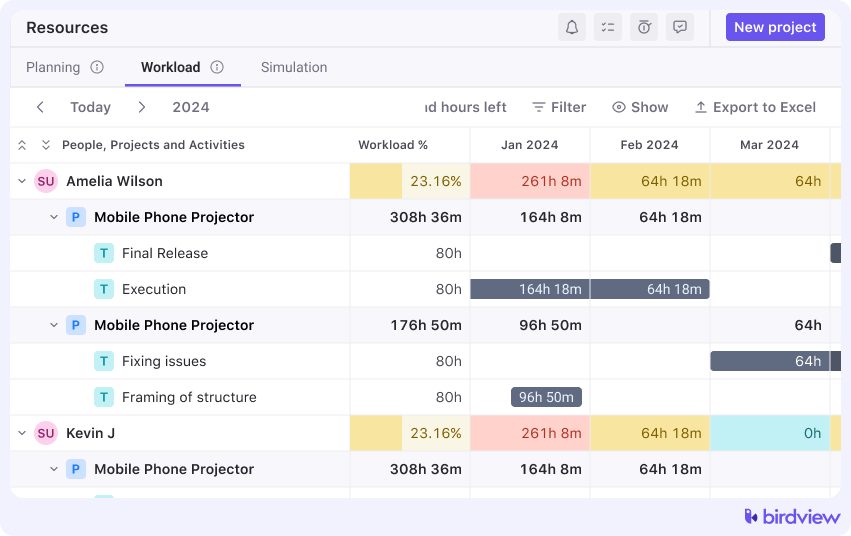
For example, a team using Birdview PSA noticed that future workload looked fully booked. After applying weekly allocation updates, they found that 20 percent of capacity was actually free due to outdated assignments.
The system did not change. The data did.
Final thoughts: forecasts reflect behavior, not tools
Forecasts are only as reliable as the data behind them.
Most resource forecasting errors come from inconsistent habits, not technical limitations. When teams apply simple, enforced rules, forecast accuracy improves quickly.
You do not need perfect data. You need consistent, current, and owned data.
FAQ
1. Why do PSA forecasts become inaccurate over time?
They degrade when data is not updated regularly. Stale allocations, inconsistent time tracking, and untracked changes break the connection between plan and execution.
2. What is the fastest way to improve forecast accuracy?
Start with three actions: enforce consistent time tracking, update allocations weekly, and compare planned vs actuals on a regular basis.
3. Can PSA tools fix data quality issues automatically?
No. PSA systems depend on input data. They can enforce structure and visibility, but data discipline must come from the team.
Further reading: