Blog
Blog

Scoro has become a go-to choice for professional services firms, agencies, and consultancies. But here’s the thing: what works brilliantly for one organization might feel like overkill for another. As we move into 2026, more teams are questioning whether Scoro’s comprehensive feature set truly matches their day-to-day needs. This guide explores the best Scoro alternatives for 2026, helping you find a platform that aligns with your team’s size, budget, and priorities.
Why look for a Scoro alternative?
Scoro does a lot of things well, but that doesn’t mean it’s the right fit for everyone. Here are the most common reasons teams start exploring other options:
- The interface can feel overwhelming. Scoro packs in so many features that the learning curve becomes a real hurdle. New team members often need weeks of training before they feel comfortable, and even experienced users sometimes struggle to find what they need quickly.
- Pricing adds up quickly. Scoro’s cost structure can be tough on smaller teams or growing agencies. As you add more users or need access to advanced features, expenses climb fast.
- Customization hits walls. Despite offering numerous features, Scoro can be surprisingly rigid when you want to adapt it to your specific workflows. Teams often find themselves working around the tool’s limitations rather than having the tool work around theirs.
- Integration setup isn’t always smooth. Some integrations lack the depth you’d expect, and maintaining them over time can become another ongoing task on your plate.
- Features come bundled together. Because Scoro is so integrated, using one module often means engaging with others. This interconnectedness can create unnecessary friction when you just want to log time or check a project budget.
6 best Scoro alternatives in 2026
We’ve rounded up six platforms that stand out as genuine alternatives to Scoro in 2026. Some offer similar all-in-one PSA capabilities but with different approaches to usability and pricing. Others take a more focused approach, excelling in specific areas like project collaboration, visual workflows, or financial management.
| Tool | Best for | Key features | Ease of use |
| Birdview PSA | Professional services firms needing comprehensive project delivery, intelligent resource planning, and integrated financial management | Complete PSA suite, resource optimization, time and expense tracking, financial analytics, customizable dashboards, native integrations, enterprise security | Highly intuitive with rapid deployment |
| Productive | Agencies requiring deep profitability insights and streamlined financial operations | Budget management, sales tracking, utilization metrics, profitability analysis, time tracking, invoicing | High – built around agency needs |
| Monday.com | Teams valuing visual project management and workflow customization | Flexible boards, extensive integrations, automation builder, visual dashboards, templates, mobile apps | Very High – intuitive drag-and-drop interface |
| Wrike | Enterprise organizations handling complex, multi-departmental initiatives | Advanced workflows, enterprise automation, comprehensive resource tools, Gantt charts, integrations, reporting | Medium – powerful but requires learning investment |
| Teamwork | Client-facing teams managing diverse project portfolios | Project and task management, client collaboration, billing, resource planning, templates, chat | High – designed for client service workflows |
| Bonsai | Freelancers and boutique agencies | Streamlined project management, client proposals, contracts, invoicing, expense tracking, and tax tools | Very High – optimized for simplicity |
1. Birdview PSA – best for professional service teams
Birdview PSA is built specifically for professional services teams that need the full package: project management, resource planning, time tracking, and financial oversight–all working together seamlessly. Unlike tools that bolt on PSA features as an afterthought, Birdview was designed from the ground up with consultancies and agencies in mind.
Best for: Professional services firms, consultancies, and agencies (20-500+ employees) that need comprehensive project-to-payment visibility without the complexity that typically comes with enterprise PSA tools.
Key features
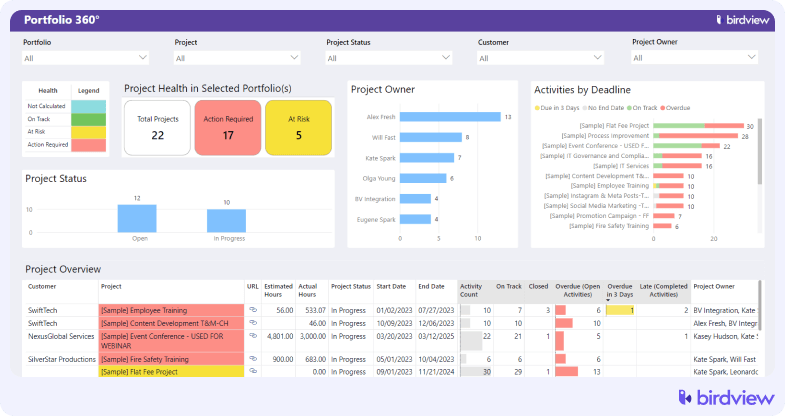
- End-to-end project management with portfolio-level visibility
Birdview connects every stage of project delivery into a unified system. From initial planning through execution and closeout, teams get complete visibility across their entire project portfolio.
- Smart resource allocation based on skills, availability, and capacity
The platform’s intelligent resource management considers multiple factors simultaneously. Resource managers can quickly identify the best person for each assignment while avoiding overallocation.
- Integrated time tracking with mobile offline capabilities
Birdview’s timesheet system captures billable and non-billable hours with flexible approval workflows. Time data flows directly into project budgets and invoicing without manual transfers.
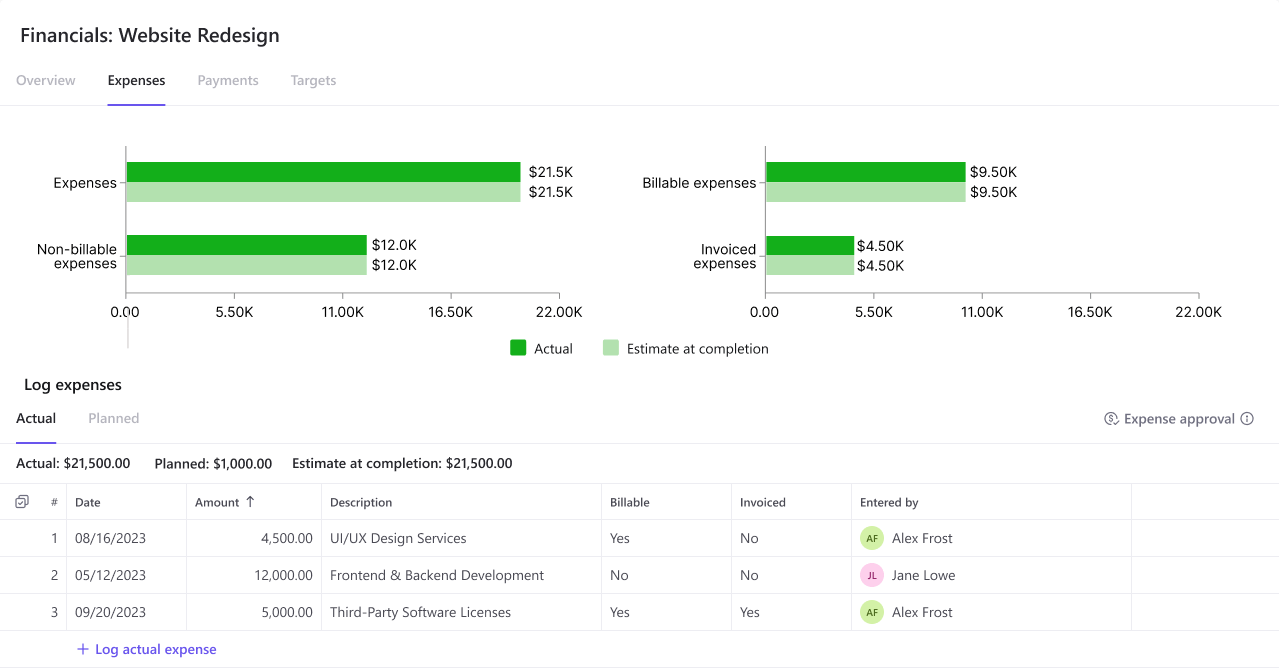
- Project accounting and profitability tracking in real-time
Financial tracking happens automatically as projects progress. The platform monitors actual costs against budgets and calculates project profitability in real-time. Financial data integrates seamlessly with time tracking and resource allocation for accurate, up-to-the-minute insights.
- Customizable dashboards that don’t require IT support to build
Users can create personalized dashboards tailored to their specific role and information needs without technical expertise. The intuitive drag-and-drop interface lets project managers, resource leads, and executives build exactly the views they need to make quick decisions.
- Integrations with major business tools
Pre-built integrations connect Birdview with the tools your team already uses. Integration setup is straightforward and typically completed in hours rather than days.
- Role-based permissions and SOC 2 Type II security
Enterprise-grade security features protect sensitive project and financial data. Granular permission controls let administrators define access at project, portfolio, and data field levels. SOC 2 Type II certification, comprehensive audit trails, and data encryption ensure compliance with enterprise security standards.
How it compares to Scoro: Where Scoro can feel feature-heavy and complex, Birdview delivers similar PSA depth with a cleaner, more intuitive interface. Teams get up to speed faster, typically within days rather than weeks. Resource scheduling is more visual and easier to adjust on the fly. Dashboard customization gives users more freedom to create the views they actually need without workarounds. Implementation timelines run 2-4 weeks instead of months, getting you to ROI faster.
Trial: A free 14-day trial is available, with the possibility of extending to 28 days.
2. Productive – best for agencies focused on profitability
Productive targets agencies and consultancies that live and breathe profitability metrics. It’s less about managing every business function and more about zeroing in on what matters most to agencies: Are we making money? Which projects are performing? How efficiently are we using our people?
Best for: Marketing agencies, creative studios, and consulting firms (10-200 employees) where financial visibility drives decision-making.
Key features: Real-time budget tracking and burn rate monitoring, sales pipeline management with revenue forecasting, time tracking connected directly to profitability analysis, resource scheduling with utilization reporting.
Trial: A free 14-day trial is available, no credit card required.
3. Monday.com – best for visual, flexible workflows
Monday.com takes a fundamentally different approach than Scoro. Instead of prescribing how you should work, it gives you flexible building blocks to create exactly the workflows your team needs. It’s visual, colorful, and built around the idea that no two teams work exactly the same way.
Best for: Teams of any size (5-1000+ employees) that value flexibility and want to design their own processes without technical expertise.
Key features: Customizable boards and views (Kanban, Timeline, Calendar, Gantt), 200+ pre-built integrations and custom automation builder, visual resource management and workload views, time tracking, and budget tracking capabilities.
Trial: A free trial is available for up to 14 days on paid plans; a free plan available for up to 2 users.
4. Wrike – best for complex enterprise projects
Wrike is the choice for larger teams managing complex, interconnected projects. It offers enterprise-grade project management with the customization capabilities and security features that bigger organizations demand. Think of it as project management that scales up, not just out.
Best for: Mid-sized to enterprise teams (50-10,000+ employees) handling cross-departmental initiatives and complex project portfolios.
Key features: Custom workflows and request forms, advanced automation and approval processes, enterprise resource management and workload balancing, Gantt charts, dependencies, and critical path analysis.
Trial: A free 14-day trial is available on all paid plans.
📚 Read more: Top Wrike alternatives compared
5. Teamwork – best for client-service teams
Teamwork is purpose-built for agencies and client-service teams juggling multiple projects with different stakeholders. It strikes a balance between project management capabilities and client collaboration features, recognizing that managing the work and managing the client relationship go hand in hand.
Best for: Client-focused agencies and service providers (5-100 employees) that need to deliver projects while keeping clients informed and involved.
Key features: Project and task management with dependencies and milestones, time tracking with billable/non-billable designations, client access portals and permissions, invoicing and expense tracking, and profitability and budget tracking.
Trial: A free 30-day trial is available with no credit card required; a free plan is available for up to 5 users.
📚 Read more: Top 12 Teamwork alternatives
6. Bonsai – best for freelancers and small agencies
Bonsai is designed for freelancers and small agencies that need to manage the entire client lifecycle without unnecessary complexity. It’s about getting the essentials right rather than offering everything under the sun.
Best for: Freelancers, solo consultants, and small agencies (1-10 people) that want an affordable, all-in-one solution for client work.
Key features: Project tracking with tasks and time tracking, professional proposals and contracts with e-signatures, customizable invoice templates and automated reminders, client portal for document sharing.
Trial: A free 14-day trial is available on all plans.
How Birdview compares to Scoro alternatives
| Tool | Limitations | Where Birdview wins |
| Scoro | Complex interface, high implementation cost, rigid workflows, long setup (2–3+ months), limited dashboard flexibility | Faster setup (2–4 weeks), intuitive interface, customizable dashboards without IT help, clearer resource scheduling, transparent pricing |
| Productive | Limited dashboard and automation options, fewer integrations, mainly agency-focused | More flexible BI and reporting, broader integrations, stronger enterprise security (SOC 2 Type II), advanced forecasting and capacity planning, fits multiple service industries |
| Monday.com | No native PSA or financial tools, heavy setup for profitability tracking, limited resource management | Complete PSA suite with built-in accounting and billing, advanced resource planning, detailed financial tracking, purpose-built for services |
| Wrike | Complex UI, long onboarding, confusing pricing tiers, weak PSA focus | Cleaner, easier-to-learn interface, simpler pricing, faster adoption, stronger PSA capabilities for financials and billing |
| Teamwork | Basic reporting and resource planning, limited portfolio visibility, simple financials | Advanced BI and reporting, robust resource and capacity management, full portfolio visibility, detailed financial tracking |
| Bonsai | Limited scalability, basic collaboration, no resource or portfolio management, minimal reports | Scalable PSA platform with advanced collaboration, resource and portfolio management, and strong analytics for mid-size to large teams |
*Data based on public docs and hands-on testing; verify pricing and features before purchase.
How to choose the right Scoro alternative
Start with your non-negotiables. Define your implementation timeline, budget, security and compliance requirements, and the must-have PSA capabilities: resource planning depth, project accounting, billing, business intelligence (BI), integrations, and client access.
Run a focused two-week pilot with two live projects. Measure:
- Time to build a template with roles and rate cards
- Speed to staff via role placeholders, then soft-to-hard allocations
Compare the total cost of ownership: licenses, implementation, training, and admin effort. Confirm migration support, SOC 2 Type II, data residency, and a clear product roadmap.
Finish with a decision checklist: must-haves, nice-to-haves, deal breakers. If one platform covers your must-haves and hits the pilot metrics with fewer clicks, you‘ve found your Scoro alternative.
If you need full PSA capabilities with better usability, Birdview PSA delivers similar depth with more intuitive interfaces and faster onboarding. Birdview particularly shines for mid-sized professional services firms, while Productive targets agencies focused on profitability. Try Birdview PSA to see how it can fit your business.