Ksenia Kartamysheva
 Service businesses in 2026 face a real paradox in client communication. Clients want more transparency than ever. They want to see where the budget goes and whether milestones will land on time. But giving clients unrestricted access to your internal project tools often backfires. It creates confusion, invites micromanagement, and slowly erodes trust. Clients see raw work and guess what it means.
Finding this balance requires a deliberate strategy for workspace structure. It is not enough to simply add a client to your project board and hope for the best. A client portal is the clean middle ground. It gives clients a read-only view of milestones, status, risks, and approvals. Your team still gets a private space to debate, draft, and solve problems without turning every update into a discussion.
Internal vs external visibility: what belongs where
True client visibility is about clarity of status rather than a front-row seat to the messy production process. While many teams believe transparency means showing everything, full access is often a service failure because it exposes clients to raw and unfinished work that creates anxiety rather than confidence. When clients share your team’s view, they lack the context to interpret what they are seeing.
Internal project visibility (for delivery teams)
Internal visibility is designed to help teams execute work efficiently, not to explain progress to external stakeholders.
Internal views typically include:
- Detailed task breakdowns and dependencies
- Early-stage or unfinished work
- Internal discussions and comment threads
- Temporary blockers and shifting intermediate dates
- Technical context that only the delivery team understands
This level of detail is essential for coordination and problem-solving, but it is also messy by nature. Without proper context, it is easy to misread what is happening at any given moment.
External project visibility (for clients)
Client-facing visibility should focus on outcomes, progress, and confidence, not on internal mechanics.
A well-designed external view usually shows:
- Overall project status and milestones
- What is completed, in progress, or at risk
- Clear timelines and agreed delivery dates
- High-level risks with context and next steps
- Decisions or approvals required from the client
Instead of exposing every internal update, this curated view helps clients quickly understand where the project stands and what, if anything, they need to act on.
The visibility wall: What they see vs. what you see
Here’s the simplest way to think about it: same project, two views.
| Area | What clients see | What your team sees |
| Goal | Confidence and status | Execution and coordination |
| Scope | Milestones + deliverables | Tasks + dependencies |
| Timeline | Approved dates | Intermediate shifts |
| Work-in-progress | Review-ready items | Drafts and iterations |
| Risks | High-level + next steps | Full risk log + edge cases |
| Discussion | Decisions/approvals | Internal debate and notes |
| Resources | Not shown (or high-level) | Capacity and staffing |
| Access | Read-only/limited | Full control |
What clients need to see (and what stays internal)
We know how exhausting it is to constantly explain to a nervous client that a task isn’t late just because it hasn’t been started yet. Seeing unfinished tasks, internal debates, or shifting intermediate dates often makes clients feel like the project is moving in the wrong direction.
This creates operational drag, where:
- More time is spent managing client anxiety
- Less time is spent managing the project itself
- Trust erodes despite solid delivery performance
What clients need to see
Clients primarily need visibility into delivery progress, milestones, and outcomes that confirm their investment is yielding results. They are looking for reassurance that:
- the timeline is holding
- the budget is being respected
- the quality meets their standards
When clients log into a portal, they want to see:
- completed deliverables
- upcoming milestones
- approval deadlines
What should stay internal
Approved plans should be visible, but work in progress generally belongs in a private view until it is ready for review. There is a clear difference between:
- drafts
- internal iterations
- final deliverables
When clients see early drafts or unfinished work, they often provide feedback on elements the team already knows need fixing. This wastes the client’s time and frustrates team members, who then have to respond to feedback on work that is not yet complete.
📚 Read more: Client project management: 9 tips and tricks to follow
Structuring workspaces for clients and teams: best practices and steps
Structuring your workspace for dual visibility means intentionally separating client-facing information from internal operations. The most effective setups follow a front-of-house and back-of-house mindset: clients see progress and outcomes, while teams retain full visibility into how the work gets done. The goal is transparent project tracking for clients without exposing backend noise.
Teams typically use one of three approaches to keep client views clean and controlled.
- Mirrored boards
This method involves maintaining a separate client-facing project board alongside an internal master board. It provides the highest level of control over what clients see, but it also requires significant manual effort to keep both boards aligned and up to date.
- Filtered shared boards
The filter method relies on tags or permissions to hide internal tasks within a shared workspace. While this approach is efficient and reduces duplication, it carries risk. If filters or permissions fail, internal tasks and discussions can accidentally become visible to clients.
- Dedicated client portals
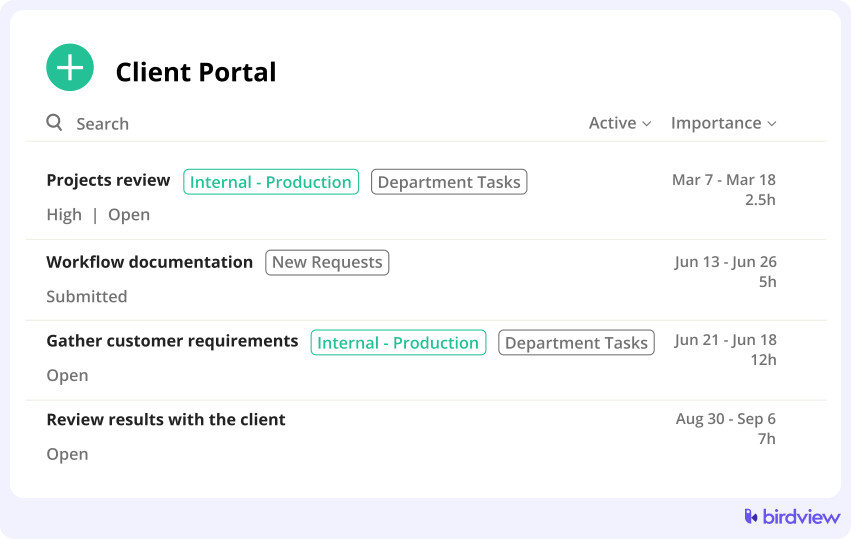
A portal-based approach uses a dedicated client view that automatically pulls selected data points from the internal workspace. A client portal is generally the safest and most balanced option, as it minimizes manual work while reducing the risk of accidental data exposure.
Step-by-step: set visibility rules and portals safely
Follow these six steps to give clients clarity without exposing drafts, financials, or internal debates.
Step 1: Define visibility rules before inviting clients
Decide what is client-facing before sending any portal invitations. Visibility rules should be defined upfront, not improvised. Set clear boundaries around which project phases are visible and which remain internal. For example, making discovery and delivery public while keeping QA and resourcing private.
Explicitly list what always stays internal, such as drafts, rough estimates, and internal notes. Your team needs a safe space to explore ideas and flag risks without client scrutiny. Without clear rules, even a well-meaning comment can accidentally trigger confusion or conflict.
Step 2: Separate internal planning from client-facing delivery views
Keep planning and resourcing work in internal phases, tasks, or projects. How you allocate people and adjust staffing is an internal decision that does not need to be visible to clients as long as delivery quality and timelines are met.
Expose only approved milestones and deliverables to clients. Highlighting major achievements reinforces a sense of progress, while exposing every sub-task makes the project feel slow and cluttered. Clients respond better to visible momentum than operational detail.
Step 3: Use a client portal instead of shared internal workspaces
Provide clients with a clean, read-only portal focused on progress and outcomes rather than access to your active workspace. A portal acts as a curated stream of information without the risk of accidental edits or interference.
Share milestones, status updates, and deliverables without internal noise. When key data like timeline, health, and open approvals is easy to find, clients can self-serve updates and rely less on status emails for reassurance.
📚 Read more: Best project management software with client portal
Step 4: Control task- and field-level visibility
Use task names and statuses that make sense to a non-technical audience. Internal labels may be precise, but client-facing descriptions should be outcome-oriented to avoid confusion and unnecessary questions.
Hide internal fields such as effort estimates, costs, and internal notes. Whether you bill hourly or by fixed price, exposing this data often leads to negotiations or misinterpretation. Field-level control ensures clients see what matters without revealing financial mechanics.
Step 5: Apply role-based visibility in PSA
Use role-based visibility to assign permissions by function rather than individual users. Internal roles like PMs, delivery teams, and finance need broad access to manage budgets, time logs, and communication effectively.
Client roles should have limited permissions as viewers or commenters. Defining a dedicated client role enforces consistent access rules and aligns with standard security practices that reduce the risk of unintended data exposure.
Step 6: Review visibility before key client moments
Review visibility before project kickoffs to ensure the stage is set correctly. Check visibility before status reviews and steering meetings. If you are about to present a slide deck that says the project is green, make sure the portal doesn’t show a string of overdue red tasks that you haven’t updated yet. Consistency between your reporting and the portal is key to maintaining trust.
How Birdview PSA supports secure client portals
Managing project data access in Birdview PSA is about ensuring the right people see the right information at the right time. This applies not only to clients, but also to internal teams who need different levels of access depending on their role and responsibilities.
1. Control access with role-based permissions across teams and clients
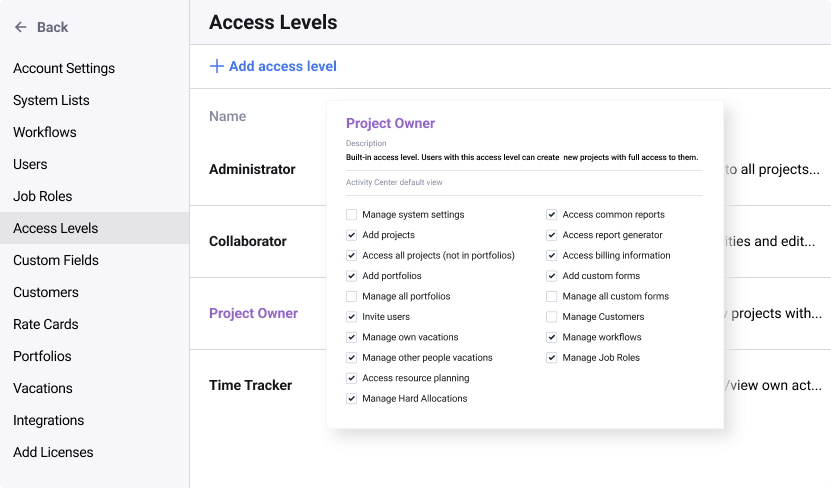
Role-based permissions in Birdview allow you to define visibility rules by function rather than by individual user. This helps structure access consistently across internal teams and external stakeholders.
Internal roles such as project managers, delivery teams, executives, and finance staff can be granted access aligned with their needs. External roles, including clients and reviewers, receive a more limited permission set focused on progress and approved outcomes.
2. Lock and separate sensitive planning and operational data
Birdview lets you lock down sensitive project data so it is only visible to those who need it. This applies to both internal segmentation and external access control.
Data that typically requires restricted visibility includes:
- budgets, billable rates, and cost data
- internal comments, notes, and discussions
- workload, resourcing, and capacity views
- unassigned backlog tasks and internal buffers
Separating planning and operational views helps internal teams work freely without overexposing unfinished or contextual data.
3. Share progress with clients through a dedicated client portal
Instead of inviting clients into internal workspaces, Birdview lets you present project information through a dedicated client portal. The portal provides a clean, read-only view focused on progress and outcomes rather than day-to-day execution.
Clients can see:
- current project status
- milestones and timelines
- delivered or approved work
- items that require their review or approval
This curated experience keeps clients informed without exposing internal discussions or planning mechanics. It also reduces status update emails, since clients can check progress on their own without disrupting the delivery team.
How Birdview PSA balances transparency and control
Birdview PSA balances transparency and control with a dedicated guest portal and flexible permissions. This lets service teams share real-time updates, files, and status without exposing profit margins or internal conversations.
It also supports role-based access across projects and tasks, so you can control exactly who sees what. Instead of a simple public-or-private switch, you can tailor access to match your delivery model.
With one source of truth, your team can work in detail internally while clients see a clean, client-ready view. That reduces duplication and lowers the risk of accidental oversharing.
FAQ
Many service teams struggle with finding the right level of transparency for their clients. Common concerns revolve around how much detail to show in Gantt charts, how to handle internal discussions, and whether to use automated portals versus static reports. The following answers address these frequent issues to help you structure a secure and transparent workspace.
Q: Should we give clients access to our Gantt charts?
A: You should only give clients access to Gantt charts if the chart is simplified for high-level milestones. Detailed internal dependencies often confuse non-technical stakeholders and lead to panic over minor schedule shifts that don’t impact the final delivery.
Q: How do we prevent clients from seeing internal discussions?
A: You prevent clients from seeing internal discussions by using tools that offer distinct internal vs public comment threads or by maintaining separate communication channels for team deliberation. This allows your team to problem-solve freely without worrying about client perception.
Q: Is it better to send reports or give login access?
A: Giving login access via portals is generally better than sending reports because it builds trust and enables real-time self-service. This reduces the email overhead of manually generating and sending static reports every week.
Q: How to manage client visibility in projects without increasing admin work?
A: You manage client visibility without increasing admin work by using a PSA tool that automates the view. Setting up a client portal pulls live data from your active project. By filtering by permission, you eliminate the need to double-enter data into separate spreadsheets.
Q: What if a client notices a delay in the portal before we report it?
A: You should treat this as an opportunity for proactive transparency. Acknowledge it immediately rather than trying to hide it, as this builds trust and proves that the portal is a truthful source of information.