Ksenia Kartamysheva
 At first glance, an internal project and a client project can look almost identical. They both have tasks, timelines, people, and deadlines. They both compete for the same time and attention. So it is tempting to manage them the same way.
That’s where service teams start tripping over their own shoelaces.
Internal work and client delivery live under very different rules. When those differences are ignored, projects slow down, teams get frustrated, and priorities blur. This article breaks down where the two types of projects truly diverge and how to manage each without overcomplicating your process.
Key takeaways: Internal vs client projects (6 points)
Here’s the quick version before we go deeper.
- Client projects focus on delivery outcomes and profitability now (efficiency gains are a bonus).
- Internal projects focus on efficiency, capability, and scalability over time (with an indirect but real financial impact).
- Client work needs tight scope control and formal change management to prevent unpaid work and margin loss.
- Internal work can evolve, but still needs clear boundaries and a definition of done to avoid endless “work in progress.”
- Time tracking matters for both billing and margin control, as well as capacity and cost visibility.
- One system can run both, but with different templates, views, and permissions (team planning ≠ client-facing visibility).
Why internal and client project management fail when managed in the same way
At the root of most problems is a simple assumption: if both are projects, they should follow the same rules. That assumption usually backfires.
Different goals create different risks
Client projects exist to deliver something specific for someone outside the organization. They are tied to revenue, contracts, and reputation.
Internal projects exist to improve how the business runs. They support future delivery, not immediate income.
That difference shapes risk:
- Client project risk shows up quickly and visibly
- Internal project risk builds quietly over time
We’ve seen internal tooling projects drag for nine months because no one protected capacity or defined what “done” meant. Both matter. They just surface in different ways.
Why “a project is a project” doesn’t hold in service firms
Service teams operate under constant capacity pressure. Client work gets attention by default because it is billable and visible. Internal work competes for what is left.
When both are managed identically, one of two things happens:
- Internal projects get pushed aside repeatedly
- Client projects lose discipline and control
Neither outcome is sustainable.
The cost of applying client rules to internal work (and vice versa)
Applying strict client-style controls to internal projects can slow them to a crawl. Endless approvals, heavy reporting, and rigid scope rules drain momentum. People stop engaging.
Applying informal internal habits to client projects is even riskier. Loose scope, vague tracking, and unclear ownership lead to missed deadlines and margin erosion. Neither approach works outside its proper context.
What actually distinguishes internal projects from client projects
Before comparing details, it helps to ground the conversation in simple definitions.
An internal project is work done to improve how the organization operates. This can include process improvements, system implementations, internal tools, onboarding programs, or compliance initiatives. The value is real, but it is usually indirect and realized over time.
A client project is work delivered to an external customer under agreed terms. It is tied to revenue, contracts, timelines, and clear expectations. Success is visible, measurable, and often time-bound.
While both require planning, coordination, and delivery discipline, they behave very differently once work begins.
Quick comparison: Internal vs. client projects
| Area | Internal projects | Client projects |
| Primary purpose | Improve operations, efficiency, or capability | Deliver agreed outcomes for a paying customer |
| Who the customer is | Internal teams, leadership, or the organization | External client with formal expectations |
| Success definition | Adoption, impact, improvement over time | Scope delivered, deadlines met, client satisfied |
| Urgency level | Often flexible and easier to delay | Typically fixed and highly visible |
| Visibility | Limited unless intentionally shared | High by default through client reporting |
| Accountability | Can be diffused across teams | Clearly assigned and externally reinforced |
| Timeline behavior | Adjustable, often extended | Usually fixed or contract-driven |
| Scope flexibility | Evolves informally unless constrained | Requires formal change control |
| Budget clarity | Often implicit or loosely defined | Explicit and contractually agreed |
| Time tracking purpose | Understand effort and capacity impact | Support billing, utilization, and margin control |
| Reporting style | Internal alignment and progress signals | Structured, outcome-focused client updates |
| Risk exposure | Operational and long-term efficiency risk | Financial, reputational, and contractual risk |
When teams apply the same expectations, controls, and reporting to both, friction builds quickly. When they acknowledge these differences and plan for them, both internal initiatives and client delivery become far easier to manage.
📚 Read more: Client vs internal visibility: how to share progress without risk
Key differences between internal and client projects
Scope and change control
Client projects require formal scope management
With a client, what you agreed to deliver is what you get paid for. Any addition or change needs to be documented, priced, and signed off. Without that discipline, you end up doing unpaid work while the client assumes it was always part of the deal.
Internal projects evolve more informally, but still need boundaries
Internal work can flex, but that’s different from having no scope at all. Even a loosely structured internal project needs a clear goal and a rough sense of what’s in or out. Otherwise, it absorbs effort indefinitely without actually finishing.
Budget and cost visibility
Client budgets are contractual
Every hour logged on a client project has potential billing implications. You track it because the contract requires accountability. Budget overruns mean you either absorb the cost or have a difficult conversation with the client.
Internal budgets are often implicit and easily ignored
Internal projects often don’t have an explicit budget assigned. The cost is hidden in the time that was “available.” But that time isn’t free. It has an opportunity cost. If you spend twenty hours on an internal tool that could have been billable, that trade-off should be visible and intentional.
Time tracking and utilization expectations
Billable accountability vs. internal effort tracking
On client work, time tracking is standard. It feeds invoicing and shows whether a project is on budget. On internal work, teams often skip it entirely, partly because it feels like busywork and partly because there’s no invoice to generate.
📚 Read more: How to track billable and non-billable hours
Why internal work still needs visibility
Tracking internal effort isn’t about policing output. It’s about understanding what things actually cost. If your team spends sixty hours a month on internal work and you can’t see it anywhere, you’re making resourcing and pricing decisions with incomplete information.
Stakeholder communication: internal alignment vs client reporting
External reporting vs. internal alignment
Clients need structured updates. Status reports, milestone summaries, progress against the plan. The format matters because it reflects how seriously you take the engagement. Internal stakeholders need something different: clear decisions, blockers surfaced early, trade-offs made visible.
Different update cadences and formats
A weekly client status email looks nothing like an internal Slack update. That’s fine. What matters is that both are intentional. The mistake is when teams over-communicate on client work and stay totally silent on internal projects until something breaks.
Internal project management: practical steps (Birdview examples)
Internal projects need clarity and protection more than a heavy process. The goal is to give them enough structure to move forward without turning them into pseudo-client work.
Step 1. Set clear goals and success criteria
Before an internal project starts, define the problem it is meant to solve. Not the output. The problem.
For example, “create a new onboarding checklist” describes an activity. “New hires take weeks to become productive because expectations are unclear,” describes a problem. The second framing keeps the work grounded and makes decisions easier along the way.
Completion also needs a definition. Even a loose one. A goal like “improve onboarding” has no natural end. A goal like “reduce time to first billable task from two weeks to five days” gives the team a finish line.
Example: In Birdview, teams often capture this directly in the project brief or custom fields. That way, the goal stays visible long after kickoff, not buried in a kickoff doc no one revisits.
Step 2. Track effort without over-policing
Internal work still consumes real capacity. The only way to understand its cost is to track it.
Ask teams to log time on internal projects just as they would on client work, but with a different expectation. The purpose is not to optimize utilization. It is to see where effort actually goes. That insight helps leaders decide which initiatives are worth continuing and which ones quietly cost more than expected.
Step 3. Prioritize internal work explicitly
Internal projects fail most often because they are treated as optional. If work has no external deadline, it will always lose to something that does.
Protect internal work by reserving real capacity for it. Put it on the schedule. Treat it as a commitment, not a placeholder.
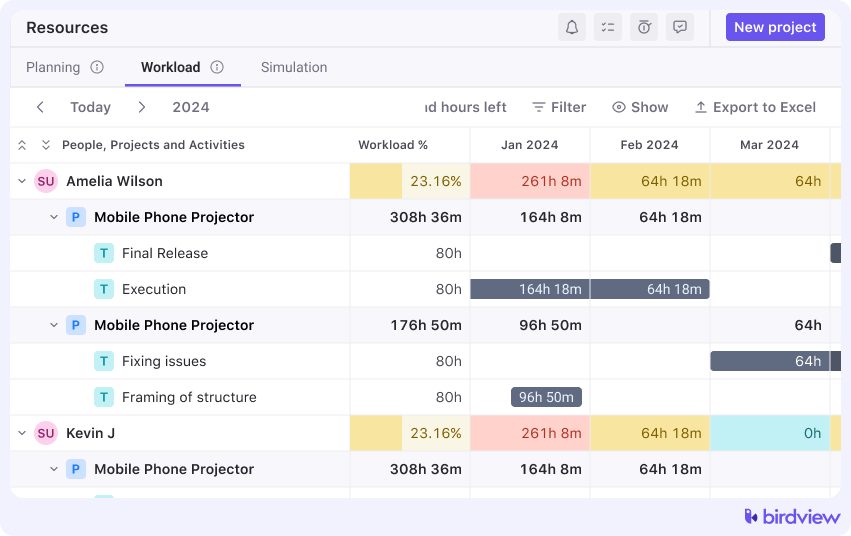
When client work needs to take precedence, call it out openly. Saying “we’re pausing the internal knowledge base this week to handle a client escalation” keeps priorities clear and avoids the slow erosion of internal initiatives.
Example: In Birdview, workload views make these trade-offs visible. Teams can see when internal projects are being pushed aside and why, instead of wondering where the time went.
Client project management: practical steps (Birdview examples)
Client projects succeed or fail on predictability. Clear rules early reduce friction later.
Step 1. Establish clear scope and change rules early
Scope creep rarely shows up as a big request. It arrives quietly. One small addition. One quick revision.
The solution is not rigidity. It is clarity. When clients know that changes trigger a conversation about impact, they become more thoughtful about what they ask for.
Example: In Birdview, teams often link scope changes directly to tasks or change requests, making the impact on timeline and effort visible before work begins.
Step 2. Tie changes to the timeline and cost impact
Every change affects something. Time, cost, or both.
When a request comes in, address the impact immediately. “Yes, we can add this, and here’s what it means for the schedule and budget” is far easier than absorbing the work and explaining overruns later. Making that connection early keeps control where it belongs.
Step 3. Maintain predictable visibility for clients
Clients want reassurance, not task-level noise.
They care about three things:
- Are we on track?
- What is coming next?
- Is anything at risk?
Share milestones and progress against outcomes. Avoid exposing raw task boards or internal replanning. That level of detail often creates confusion rather than confidence.
Example: Birdview’s client-facing views and Client Portal allow teams to share progress without exposing internal task churn or resourcing adjustments.
Step 4. Separate internal planning from client-facing views
Your delivery team needs full visibility. Your client does not.
Internal plans include dependencies, rescheduling, and contingency work. Clients seeing that level of detail often leads to micromanagement or unnecessary concern. Using different views and permissions keeps communication clean and focused.
Step 5. Protect margins during delivery
Margin issues rarely appear out of nowhere at the end. The signals show up earlier.
Check effort against budget weekly, not at project close. If you are halfway through the timeline but most of the budget is gone, that is a conversation worth having immediately.
📚 Read more: Client project management: 9 tips and tricks to follow
How Birdview supports both internal and client project management
Birdview is built to handle both project types within a single workspace, without forcing teams to choose between flexibility and structure.
- Separate project types with shared structure
You can configure projects as internal or client-facing, with different templates and workflows for each. The underlying platform stays consistent, so data can be reported across both types when needed.
- Role-based visibility and permissions
Birdview lets you control who sees what down to the project level. Team members see everything relevant to their work. Clients only see what you’ve chosen to share with them.
- Time tracking for billable and non-billable work
Time entries can be marked as billable or non-billable, so your utilization and financial reports stay clean. You get visibility into both without mixing the two.
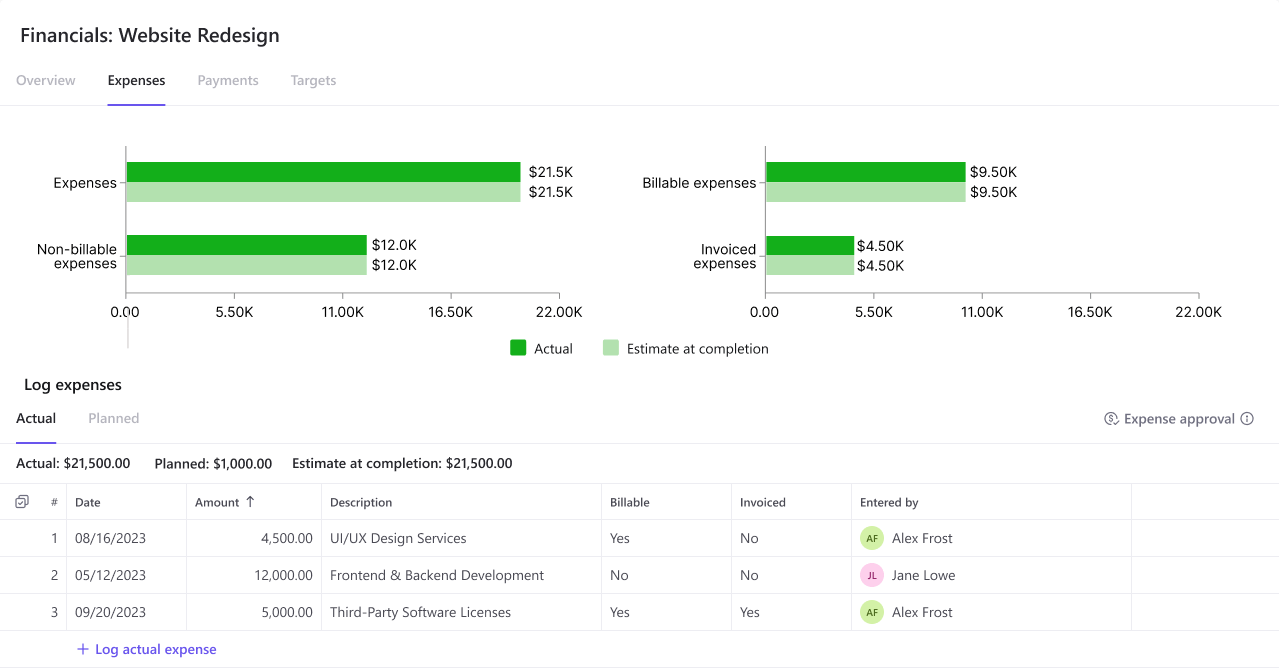
- Financial and workload reporting across both project types
Reports can be scoped to show client revenue, internal effort, or both. You can see the total team load without losing the distinction between where that load is coming from.
- Client Portal for controlled external visibility
The Client Portal gives external stakeholders a curated view of project progress without exposing internal planning. Clients can check in, see milestones, and stay informed without needing access to your full workspace.
4 signs your internal vs. client setup needs adjustment
A few patterns worth watching for:
- Internal projects are constantly delayed or quietly shelved in favour of client work
- Client projects are regularly absorbing more capacity than planned, with no one catching it early
- Your reports mix billable and non-billable hours in ways that make utilization data unreliable
- Team members aren’t sure whether to prioritize client requests or internal commitments when both compete for the same time
Any one of these is worth addressing. All four together suggest the distinction between project types has broken down completely.
How to structure your workspace to support both project types
The goal isn’t two completely separate systems. It’s one system with the flexibility to handle different rules for different work.
1. Separate internal and client project templates
Use different templates for each project type. A client project template might include scope documentation, a change log, and client update sections. An internal one might be simpler, with a goal statement, effort log, and a decision record.
2. Different visibility and permission rules
Who can see what should differ between project types. Internal projects are usually visible only to your team. Client projects might have a controlled external view for specific stakeholders. Setting this up as a default prevents accidental oversharing.
3. Shared data model, different views
The underlying data, tasks, time entries, and team members should sit in one place. What changes is how you look at it. A report showing billable utilization needs to filter out internal work. A workload report needs to show both. One data model, filtered appropriately, beats maintaining two disconnected systems.
Final thoughts: clarity beats complexity
The goal isn’t to make internal project management more complicated. It’s to give each type of work the framework it actually needs. Client projects need structure and accountability because real consequences ride on them. Internal projects need clarity and protection because they’re competing against everything else for attention.
When both types are managed deliberately, teams spend less time reacting and more time delivering. The work gets done, the margins stay intact, and internal improvements actually happen instead of living on a backlog forever.
FAQ: internal and client project management
Do internal projects need time tracking?
Yes, though the purpose is different from client work. Tracking internal effort helps you understand what things actually cost, balance capacity across your team, and make informed decisions about whether internal investments are worth continuing.
How do I stop internal projects from always losing to client work?
Allocate real capacity to internal work and protect it on the schedule. When a conflict comes up, name the trade-off explicitly rather than just silently pushing the internal work back. Teams that treat internal projects as optional commitments rarely finish them.
Should internal and client projects be managed in the same tool?
Generally, yes, with different configurations for each type. Using separate tools creates data silos and makes it harder to see the total team workload. One tool with separate templates, permissions, and reporting filters gives you the flexibility you need without fragmentation.
How do I keep client-facing reports separate from internal planning?
Use role-based permissions or a dedicated client portal to control what external stakeholders can see. Your internal task board and planning data should never be directly visible to clients. Share progress summaries and milestone updates instead.
What’s the biggest mistake teams make with client projects?
Underdocumented scope. Most client project problems, whether scope creep, margin erosion, or billing disputes, trace back to a scope that was never clearly defined or documented. Setting clear boundaries early, with a process for handling changes, prevents most of these problems before they start.