Blog
Blog

Resource overbooking is a silent threat in professional services. It begins with small overlaps and optimistic timelines. Then it snowballs into team burnout, missed deadlines, and hidden delivery risks. It often comes from good intentions, like maximizing utilization or handling urgent client requests. The result is lower profitability and weaker morale. Chronic overallocation is not a sign of a hard-working team. It is a sign of a broken planning process.
- Resource overbooking starts small, then turns into burnout and missed deadlines.
- Plan around true capacity, not calendar availability.
- Keep buffer time for meetings, support work, and context switching.
- Watch for high utilization with slowing output and constant bottlenecks.
- Use capacity checks, weekly workload reviews, and role-based planning.
- Add real-time capacity views and forecasting to spot conflicts early.
This guide provides a practical framework for preventing resource overbooking. We move beyond theory and focus on workflows and habits. You will learn how to spot early warning signs and build a resilient planning process. You will also learn what tools help you keep real-time visibility. The goal is a system that protects team well-being and supports predictable, high-quality delivery.
Why resource overbooking persists (even in high-performing teams)
Resource overbooking persists because it is often a symptom of ambition, poor visibility, and disconnected processes common in growing service teams. The most frequent culprits include shifting project scopes, intense pressure to increase billable hours, and a fundamental lack of real-time insight into who is available versus who is already at capacity. These common resource planning mistakes lead managers to make decisions in a vacuum, inadvertently assigning work to people who are already fully committed. Many teams still rely on disconnected spreadsheets, creating “silent overallocation” where conflicts across projects are not visible until a deadline is already at risk.
📚 Read more: 5 common resource allocation problems and how to solve them
The real cost of overbooking: Beyond missed deadlines
The true cost of resource overbooking extends far beyond project timelines, creating significant human and financial damage. Chronically overloading teams leads directly to missed deadlines and a noticeable degradation in work quality as people rush to meet impossible expectations. This pressure also fuels hidden scope creep and project write-offs, as teams perform extra work without proper billing to appease clients. Over time, this practice corrupts the data needed for future planning, making all subsequent estimates and timelines unreliable. Ultimately, the constant stress drives higher employee turnover, resulting in the costly loss of key team members and their institutional knowledge.
📚 Read more: Resource leveling and resource smoothing: What are the differences
7 ways to prevent overbooking (checklist)
☐ Plan work based on true capacity, not just calendar availability
☐ Reserve 15–25% buffer time for meetings, support work, and context switching
☐ Confirm resource capacity before approving new projects or scope changes
☐ Run a weekly workload review to rebalance before problems escalate
☐ Plan demand by role or skill first, then assign people closer to the start date
☐ Set clear rules for urgent work and define what gets deprioritized
☐ Use real-time capacity dashboards and forecasting to spot conflicts early
Spotting the early warning signs of resource overload
Spotting resource overload early requires looking for both quantitative data signals and qualitative behavioral changes within your team. Before schedules completely break down, teams often show subtle but consistent signs of strain in their project metrics and daily interactions. The key is to detect these issues before they escalate into critical problems that jeopardize projects and burn out your team.
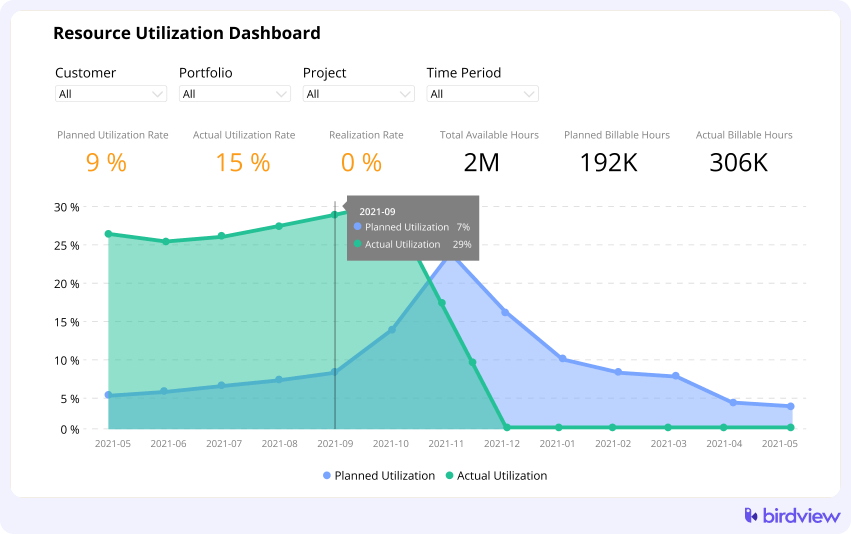
- Utilization stays high, but output drops: A key warning sign is when billable utilization rates look strong on paper, but actual progress on tasks slows down. This paradox occurs because team members are busy but not effective. Constant context-switching between too many projects creates inefficiency, meaning tasks still take longer than planned despite everyone logging full hours.
- The same people are always “critical”: When a small number of specialists become constant bottlenecks for multiple projects, it signals a lack of backup capacity and a critical dependency risk. If the project plan relies entirely on one or two “heroes” to succeed, the entire portfolio is fragile.
- Plans keep changing week to week: A healthy project plan should have a degree of stability. If you find yourself constantly reassigning tasks, shuffling priorities, and pushing work forward without re-estimating timelines, it‘s a sign that your initial plan was disconnected from reality. This weekly chaos is a direct result of reacting to overload.
To get ahead of these issues, managers should actively monitor project metrics for consistent delays and observe team behavior for signs of burnout, like working late or disengagement. A decline in deliverable quality is another strong indicator of overload. Using dashboards that provide a live view of team availability and setting up tools that provide automated forecasting for utilization spikes allows you to intervene proactively before a small problem becomes a major crisis.
Principles for preventing resource overbooking
Preventing resource overbooking requires moving from a reactive to a proactive mindset, supported by consistent principles and structured workflows. These practices create a framework for making smarter allocation decisions and building resilience into your planning process.
Adopting a few core principles is the first step toward building a sustainable resource management process. These guiding rules help create consistency and clarity, ensuring that planning decisions protect both project outcomes and team well-being.
Plan based on realistic capacity, not availability
There’s a critical difference between a team member being “available” and having actual capacity to take on work. Someone may be in the office for 40 hours a week, but their realistic productive capacity for project work is significantly lower once you account for meetings, emails, and administrative tasks. Effective resource planning starts by defining each person’s true capacity and treating that number as a hard limit, not a suggestion.
Leave space for meetings, support, and context switching
Even the most focused team members don’t work in a vacuum. Every workday includes time spent in status meetings, responding to client questions, helping colleagues, and the mental overhead of moving between different tasks. If you schedule people at 100% capacity for project work alone, you’re setting them up to fail. A good rule of thumb is to assume that 15-25% of someone’s week will be consumed by non-project activities, and plan accordingly.
Treat overbooking as a planning issue, not a performance issue
When team members miss deadlines or struggle to complete assigned work, the instinct is often to question their productivity. But in most cases, overbooking is a planning failure, not a people problem. Reframing overbooking as a systemic issue rather than an individual failure creates a healthier culture and focuses attention on fixing the root cause: better forecasting, clearer prioritization, and more disciplined resource allocation.
Make the workload visible to everyone involved
Hidden workloads create silent overallocation. When project managers and team members can’t see the full picture of who is working on what, it becomes impossible to make informed decisions about new assignments. Use shared dashboards or visual capacity maps that allow everyone to see current allocations and upcoming commitments in real time. This visibility enables teams to self-regulate, empowers individuals to raise concerns before they’re overwhelmed, and helps managers spot conflicts before they escalate.
Practical workflows that actually prevent overbooking
Beyond principles, implementing structured, repeatable workflows can hardwire good resource management habits into your team’s daily operations. These workflows turn theory into practice, creating clear steps for handling common planning challenges.
Workflow 1: Capacity-first planning before committing work
This workflow ensures you never sell work you don’t have the capacity to deliver. For example, before any new project in Birdview is approved, the project manager must validate resource availability. It means checking the required hours and roles against the team’s available hours for the proposed timeline. A project should not get a green light until resource capacity is confirmed.
Workflow 2: Weekly workload review and adjustment
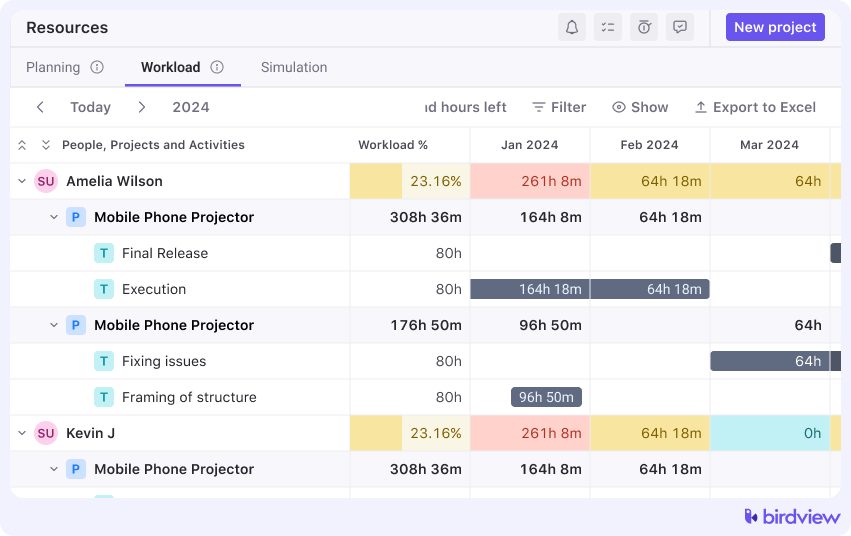
This is a proactive, forward-looking meeting, not a reactive status update. The team lead reviews the workload for the next one to two weeks, looking specifically for individuals approaching or exceeding their capacity. The goal is to identify potential overloads early and rebalance the work before the week begins.
Example: Using Birdview‘s Workload tab, the team lead reviews the timeline for the upcoming one to two weeks with a weekly or daily view enabled. Color-coded workload indicators make it easy to spot team members nearing or exceeding capacity, while vacation markers and balance hours add important context. From the same screen, the lead can shift activities, adjust durations, or redistribute hours to balance workloads before the week begins.
Workflow 3: Role-based planning instead of person-based planning
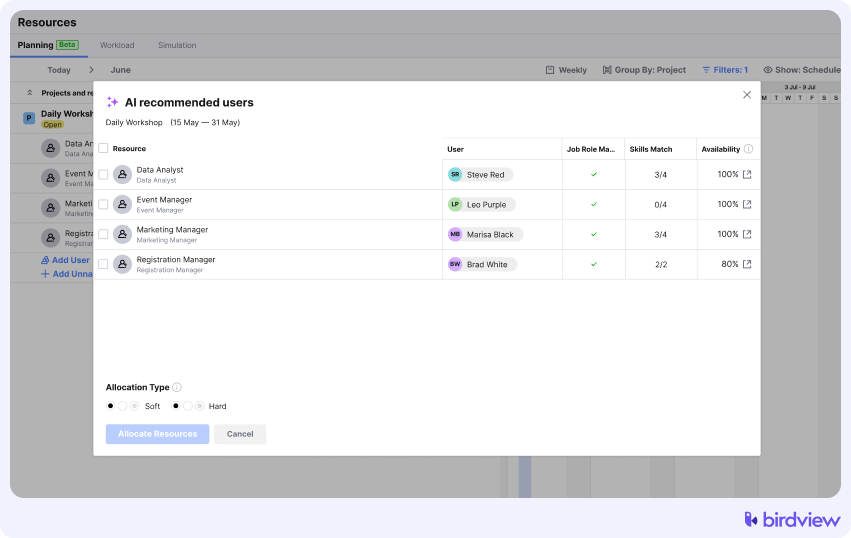
Instead of immediately assigning projects to specific individuals, plan initial resource needs by skills and roles first (e.g., “Senior Developer,” “UX Designer”). This provides greater flexibility. Once demand is clear and the project is closer to starting, you can assign the best-fit individual from the available pool.
Example: In Birdview, the team starts by planning work at the role level rather than assigning it to specific people right away. Using the Find the candidate feature, they define the required roles and skills for the project and review a list of available resources that match those criteria, along with their capacity and cost. As the project start date approaches, the team lead can then select and book the most suitable individual based on availability and fit.
Workflow 4: Clear rules for adding “urgent” work
This workflow establishes clear rules for adding urgent work by creating a formal gatekeeping process that requires a trade-off. If urgent work is approved, the project manager and stakeholder must agree on what planned work will be delayed or de-prioritized to make room for it. This eliminates silent overload.
How real-time capacity planning and predictive forecasting prevent future overloads
Real-time capacity planning and predictive forecasting prevent future overloads by giving managers immediate visibility into current workloads and data-driven insight into future demand. Real-time visibility solves today’s scheduling puzzles, while predictive forecasting prevents tomorrow’s crises.
Real-time capacity maps
A centralized, real-time view of your team’s workload is the single most effective tool for preventing overbooking. This dynamic capacity map shows who is working on what, when they are scheduled, and their remaining availability. As guides on resource planning explain, this view must update instantly so decisions are always based on the latest information. With this live visibility, managers can quickly see who is available, who is nearing their limit, and who is already overallocated, allowing them to make smart assignments without guesswork.
Predictive forecasting & what-if scenarios
Modern PSA tools like Birdview PSA use predictive algorithms and historical project data to forecast future demand, utilization rates, and potential resource gaps. This allows managers to move from reactive problem-solving to proactive planning, identifying likely bottlenecks months in advance. While tools focused on IT infrastructure use predictive analytics to manage cloud and server resources, PSA platforms apply similar principles to human capital. The goal is to forecast project needs, not just system load. What-if scenario planning enables you to model the impact of new projects on your team’s capacity, helping you confidently commit to new work, justify hiring decisions, and protect your team from being overcommitted.
Streamlining operations: Integrating systems to eliminate overbooking conflicts
Integrating disconnected tools for project management, time tracking, and HR calendars into a single, unified system is critical for eliminating the data conflicts and manual errors that cause accidental resource overbooking. When these systems operate in silos, they create conflicting versions of reality, making it impossible to get a clear picture of true availability.
When all your operational systems are connected, they create one undisputed source of truth for all resource data. For example, when a team member‘s vacation is approved, their project availability should update automatically across all project plans. This integrated approach is a key differentiator from older, standalone resource planning tools like 10,000ft by Smartsheet, which often lack deep connections to project financials and time tracking. By using platforms that can bring all your data together, you reduce manual effort and lower the chance of human error.
How Birdview PSA helps teams prevent resource overbooking
Birdview PSA is an end-to-end platform designed to help professional services teams eliminate resource overbooking and achieve predictable delivery. It replaces disconnected spreadsheets with a single source of truth for planning, tracking, and managing all project work. Birdview PSA provides an interactive, real-time capacity map in its Resource planning view, so you always know who has availability.
With drag-and-drop scheduling and advanced role/skill matching, you can find the right person for the job and make safe reassignments in seconds. The platform supports proactive planning through placeholders and soft/hard allocations, allowing you to forecast the impact of tentative projects without creating immediate conflicts.
Furthermore, the AI Assistant analyzes historical data to help create more accurate estimates, while custom dashboards and alerts provide early warnings for utilization spikes or double-bookings. By unifying project management, resource planning, time tracking, and billing, Birdview PSA eliminates data silos and ensures your decisions are based on accurate information.
Final thoughts
Preventing overload is less about working harder and more about planning smarter. By shifting to capacity-based planning, building in buffer time, reviewing workloads regularly, and making trade-offs visible, teams can protect both delivery quality and morale. When supported by real-time visibility and forecasting, these habits turn resource management into a repeatable, reliable process. Ultimately, preventing resource overbooking comes down to creating systems that reflect real capacity, not just good intentions.
FAQs
Here are answers to some common questions about managing and preventing resource overbooking.
Q: How can I identify resource overbooking in my team early on?
A: Look for consistent project delays, team members frequently working overtime, noticeable dips in work quality, and increased stress among staff. Real-time capacity dashboards and automated alerts for allocation conflicts are also key early warning systems.
Q: What is the ideal utilization rate to avoid overbooking while remaining productive?
A: While it varies by industry, many professional services firms aim for a healthy utilization rate between 70-85%. This range typically allows for billable work, administrative tasks, professional development, and some buffer for unexpected issues without leading to burnout.
Q: Can predictive resource forecasting truly prevent overbooking?
A: Yes, when coupled with real-time data, predictive forecasting uses historical trends and algorithms to anticipate future demand and resource availability. This allows managers to identify potential bottlenecks and overallocations in advance, enabling proactive adjustments like rescheduling, reassigning tasks, or planning for additional hires.
Q: Our team uses multiple tools for projects and time tracking. How does this impact resource overbooking?
A: Disconnected tools often create data silos, leading to an incomplete or inaccurate view of resource availability. This fragmentation makes it easy for accidental double-bookings or overallocations to occur. Integrating these systems into a unified platform ensures a single source of truth, dramatically reducing conflicts and improving planning accuracy.
Q: What role does communication play in preventing resource overbooking?
A: Open and transparent communication is vital. Managers need to clearly set expectations, discuss workloads with team members, and encourage staff to voice concerns about their capacity. Regular check-ins and a culture that supports honest feedback about workload are essential alongside robust planning tools.