Ksenia Kartamysheva
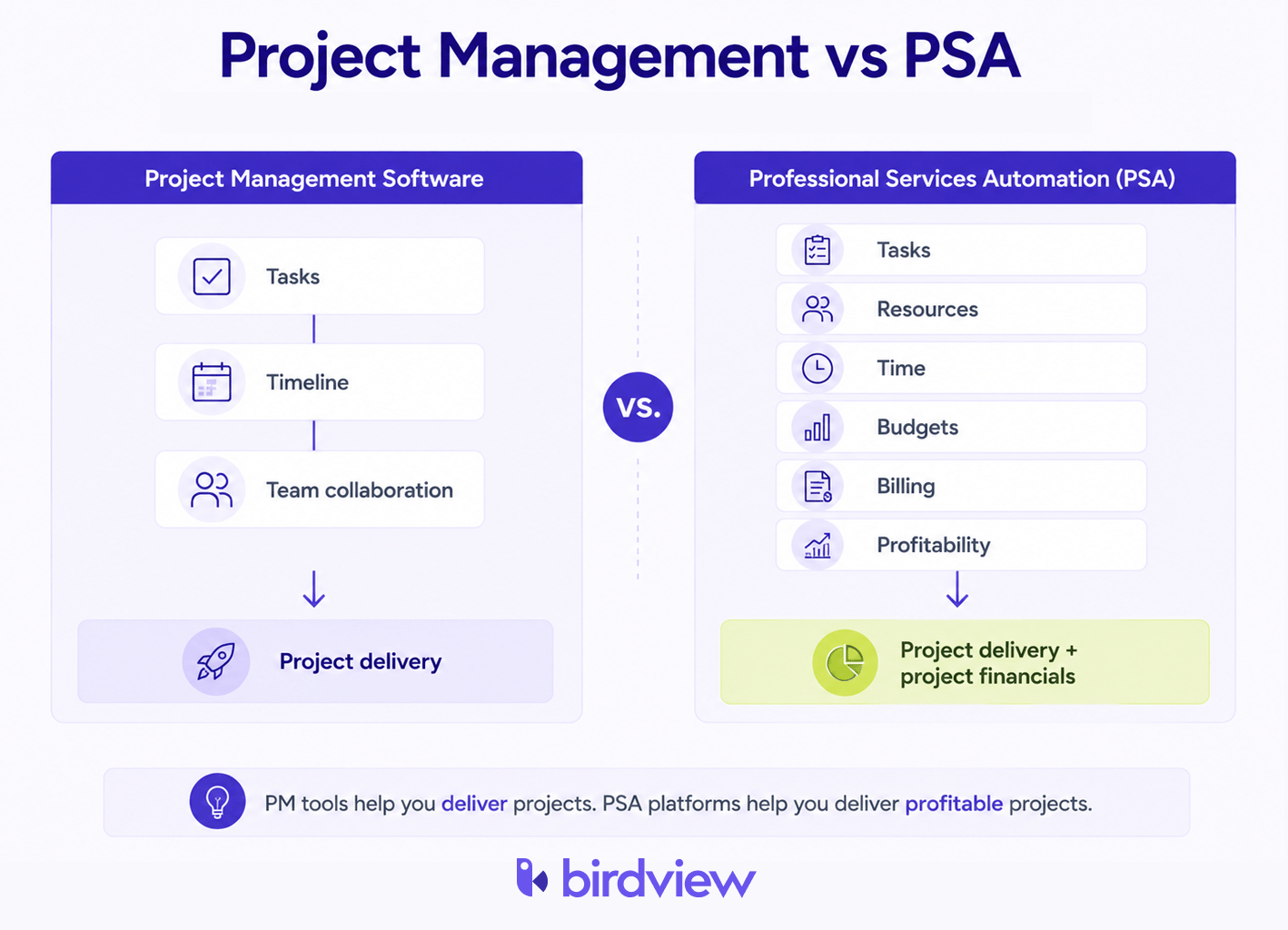
 The PSA software vs project management software call is really about system of record. PM products orchestrate assignments and dates. PSA products bind assignments to bill rates, bench capacity, approval chains, and invoice lines in one ledger. Firms billing by the hour discover the gap at close, not when the Gantt chart looks green. Margin, not milestones.
The spread is real: SPI Research’s 2026 Professional Services Maturity Benchmark puts Level 5 billable utilization at 81.2%, against an industry average of 66.4% [1] – a margin problem, not a deadline one.
What is PSA software? (And what it is not)
Professional Services Automation (PSA) software keeps delivery, staffing, timesheets, billing, and margin on one ledger. When a senior consultant’s rate changes mid-engagement, the record that holds tasks also holds the rate card. The approved hours sit there too.
Birdview PSA fits organizations of 15–200 people that need that depth without a year-long enterprise rollout. Kantata (Mavenlink plus Kimble) serves larger operators: multi-entity books, multi-currency contracts, heavier revenue-recognition rules.
SPI Research’s 2026 benchmark ties PSA use to a 2.9-point utilization lift over non-users (66.4% vs 63.5%) [1]. At a 60-person firm billing $150/hour, recovered utilization is payroll you already funded but never put on an invoice.
What is project management software? Strengths and structural limits
Mainstream PM tools shine on kanban views, reminders, client status pages, and chat integrations. Monday.com, Asana, and ClickUp top G2’s 2024 project-management rankings [2]. A 40-person consultancy running a dozen accounts still benefits from that layer.
Friction starts when the CFO asks for engagement-level margin. Those platforms do not answer inside the UI; someone exports tasks or hours and rebuilds revenue in Excel. Each manual pass introduces a new snapshot, not one shared operating record.
A mid-week pattern we see inside services firms: delivery reports 60% task completion. Finance sees 80% of budget spent. Two seniors are double-booked on other accounts. The board looks healthy; overload stays invisible until ops builds a side spreadsheet.
The 6 features that separate true PSA from PM with add-ons
- Bill and cost rates inside the product. Birdview PSA holds client-specific rates per person. Monday.com and its mainstream peers park rates in spreadsheets or accounting tools.
- Scheduling against hours, not task counts. Birdview PSA compares contracted availability to bookings firm-wide. Monday.com Workload highlights open tasks–it does not net billable hours already promised elsewhere.
- Signed hours reaching billing without a detour. PSA routes approved entries into draft invoices. Asana exports hours to a separate billing app; so does ClickUp.
- Budget consumed vs remaining, not percent bars. PSA tracks cash leaving the engagement. PM completion percentages do not mirror financial burn.
- Utilization by person, team, practice. SPI Research 2023 treats utilization discipline as a profitability lever for services firms [1]. Mainstream PM tools lack a native utilization denominator.
- WIP and revenue recognition controls. Kantata supports milestone and percent-complete recognition at enterprise scale. Generic PM needs bespoke integrations for the same control.
Why general PM tools fall short for consulting firms needing resource and financial visibility
Many services firms on general PM tools still maintain a shadow spreadsheet for money. Parallel books for one client engagement mean duplicate entry, stale versions, and finance reconciling last week’s delivery story.
In practice, this plays out with a delivery lead on ClickUp fielding a six-week staffing question. They exit the tool, rebuild allocations in Excel, and email a guess. By the time leadership acts, bookings shifted again.
Monday.com and Asana chart workload as open assignments, not contracted billable hours already promised. The breaking point often lands between 20 and 50 employees–when active client load exceeds what leadership can track from memory.
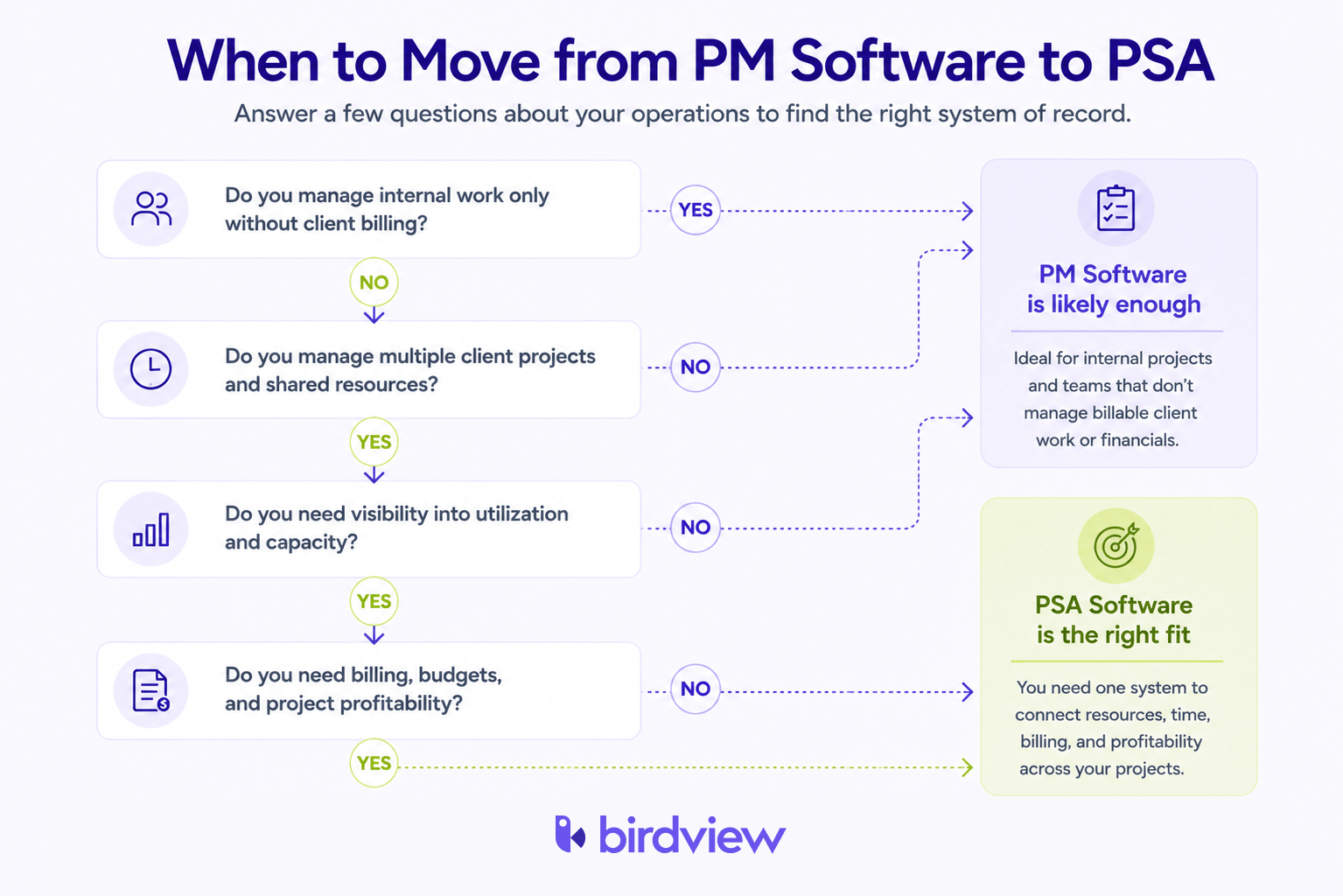
When a services firm should consolidate point solutions into one PSA platform
Our team treats the list below as operational tripwires. Three or more checked boxes mean a PM tool should stop being your system of record.
- Project tracking, time capture, and invoicing live in three-plus tools reconciled manually each month.
- Delivery and finance quote different numbers because the PM stack and GL never share one timeline.
- Utilization lives in Excel after close instead of on a live dashboard.
- Invoice cutoff passes with hours still sitting in draft timesheets.
- Staffing a new engagement takes 30+ minutes of cross-tool detective work.
Birdview PSA markets to 15–200 employee shops that want one record for execution, scheduling, time, and billing. Wait until blind spots surface in month-end packs, and unbilled hours have already cleared the approval window.
Enterprise PSA vs basic project management: Choosing the right tier
Pricing spans orders of magnitude. ClickUp’s 2024 Free and Business tiers land at $7–$12 per seat for teams that bill lightly [2]. Kantata’s enterprise PSA line serves 100+ employee organizations with layered entities and currencies–implementation cost matches that scope.
Birdview PSA sits between those poles: PSA-grade finance for mid-market services without Kantata-scale deployment.
Size alone does not decide the category. Suppose more than 70% of hours are client-billable and you invoice 20+ accounts each quarter. Then a general PM core fights your revenue model, no matter how many Zapier bridges you add. Each bridge is another reconciliation surface, not a fix to the architecture.
PSA software vs project management software: Side-by-side comparison
| Capability | PSA Software (Birdview PSA, Kantata) | PM Software (Monday.com, Asana, ClickUp) |
|---|---|---|
| Main purpose | One record for delivery, resourcing, billing, and financial reporting | Plan and track tasks and timelines across teams |
| Primary users | COOs, delivery leads, finance at billable services firms | PMs and cross-functional teams in any industry |
| Resource scheduling | Hours booked vs contracted availability across engagements | Task counts; not calibrated to billable capacity |
| Time and billing | Native rates; timesheets feed draft invoices | Time exports; manual billing re-entry |
| Financial reporting | Budget burn, client margin, WIP in product | Task completion %; no native burn view |
| Utilization tracking | Live by person, team, practice | Requires external model or export |
| Typical price range | Mid-market through enterprise (tier-dependent) | Often $0–$12/user/month on PM tiers |
| Best-fit firm size | 15–200 staff (Birdview PSA); 100+ (Kantata) | Under 15 staff or fewer than five concurrent clients |
Table data sources: SPI Research 2023 Professional Services Maturity Benchmark [1]; G2 2024 Project Management Software Category Rankings [2].
FAQ
What does SPI Research say about PSA adoption and profitability? SPI Research 2023 puts PSA-mature firms above 78% billable utilization [1]. The industry average sits near 71% [1]. Firms using PSA report 66.4% billable utilization against 63.5% for non-users – a 2.9-point gap, per SPI Research’s 2026 Professional Services Maturity Benchmark [1]. For billable services, that spread maps directly to revenue capacity–not just reporting hygiene.
Can I use Monday.com or Asana as a PSA tool if I add integrations? No – integrations do not replace a unified PSA data model. They bolt on time tracking and basic invoicing. Bill rates in one system, time in another, and invoices in a third still require manual reconciliation. PSA keeps those numbers in one model by default.
Is Birdview PSA a project management tool or a PSA platform? Birdview PSA is a PSA platform with project management inside it. Resource scheduling, time tracking, billing, and financial reporting share one system.
When does a consulting firm outgrow a PM tool? Often at 20–50 employees and 10+ concurrent engagements. The tell: financial reconciliation across tools exceeding 10 hours per month.
How does Kantata differ from Birdview PSA? Kantata targets enterprise firms above 100 employees with multi-entity and multi-currency billing. Birdview PSA fits mid-market firms of 15–200 employees that need PSA depth without enterprise implementation overhead.
Does ClickUp have PSA features? ClickUp has time tracking and basic reporting, but no native bill-rate engine, utilization dashboards, or invoice generation [2].
What is the financial layer in PSA software? PSA software combines bill rates, cost rates, budget tracking, WIP reporting, and invoice generation on one data model. Task and resource data feed the same numbers. General PM tools lack that layer: 61% of services firms on them still run a parallel spreadsheet for finances [1].
Sources
[1] SPI Research 2026 Professional Services Maturity Benchmark – https://spiresearch.com/psmaturitymodel/
[2] G2 2024 Project Management Software Category Rankings – https://www.g2.com/categories/project-management