Ksenia Kartamysheva
 - A skills matrix maps people against required skills on a defined proficiency scale, so staffing decisions don’t default to whoever comes to mind first.
- It answers who can do the work, not who’s free; availability is a separate resource planning question.
- Keep the skills list to 15–30 entries. Beyond that, the matrix becomes too heavy to maintain and gets abandoned.
- Score on a 4-point scale with real anchors (aware, supervised, independent, lead), not a checkmark.
- Self-score first, then have managers calibrate with the person present, rather than scoring alone in either direction.
- Add a development-interest column so staffing decisions can favor growth, not just the safest, most-proven person.
- At staffing time, filter in three steps: who’s qualified, who’s qualified and available, who’s qualified, available, and ready to stretch.
- Refresh it quarterly with light updates, not a full re-score, and name one owner or the update quietly stops happening.
A skills matrix maps every team member against the skills and competencies your engagements require, scored on a defined proficiency scale. Used at staffing time, it replaces “who comes to mind first” with a filterable answer to who’s actually qualified, who’s qualified and available, and who’s qualified but hasn’t had the chance yet.
Most staffing decisions in professional services firms are made the same way: the ops lead thinks of a name, usually one of the same three or four senior people, and assigns the work. The rest of the team sits under-stretched and effectively invisible, not because they lack the skill but because nobody wrote down that they have it.
In our discovery calls with professional services firms, one director of PS at an IT consulting firm described the staffing gap this way: “I just don’t have a handle on it. I see 10 opportunities. I don’t know who’s available.” That’s usually read as a capacity problem. Just as often, it’s a skills visibility problem. The ops lead doesn’t only not know who’s free. They don’t have a fast way to know who’s qualified in the first place.
This article covers how to build a skills matrix, how to score it honestly, how to use it as a staffing filter rather than a static document, how to keep it current, and the mistakes that get most matrices abandoned within a quarter.
What is a skills matrix (and what it isn’t)?
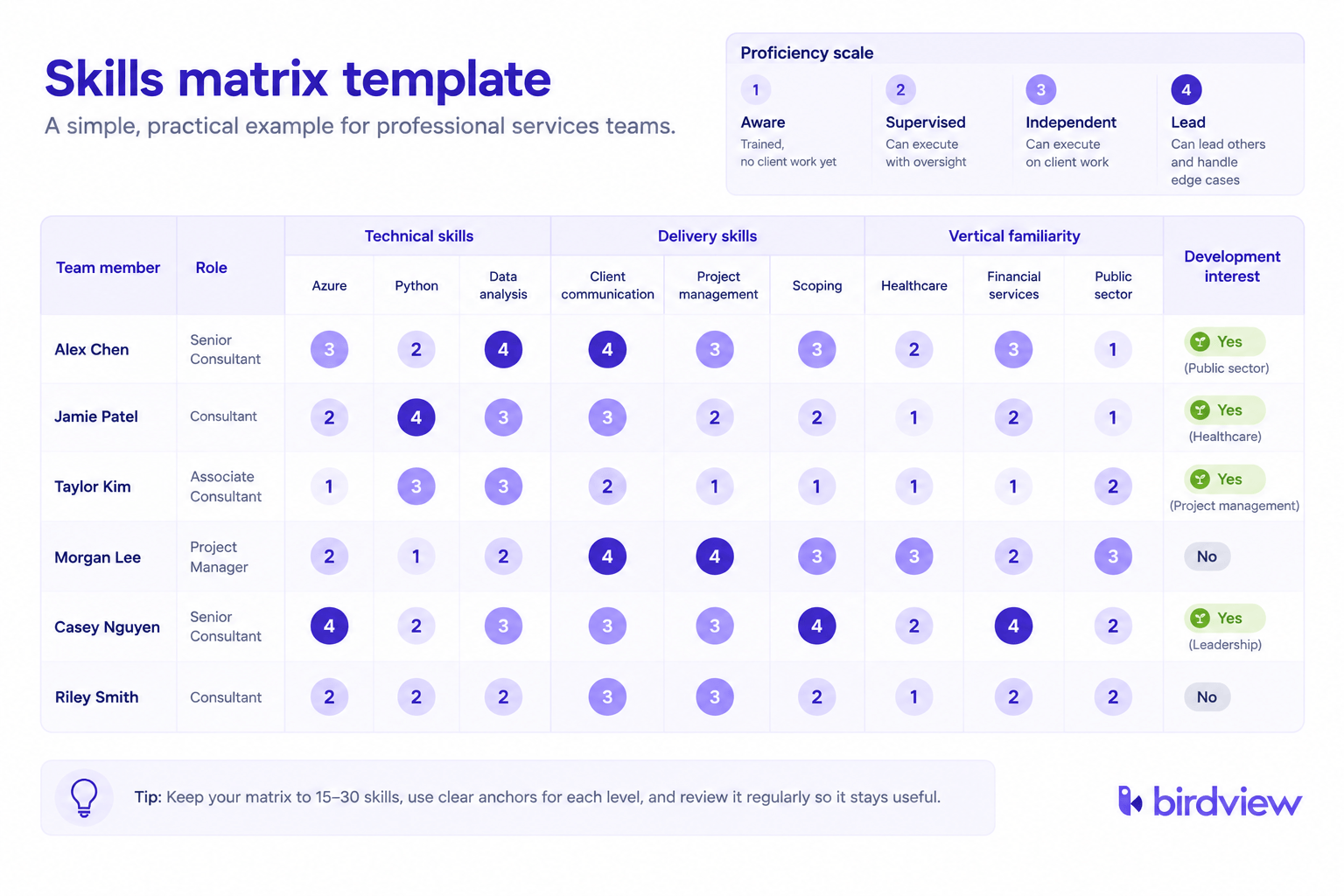
A skills matrix is a table: people as rows, the skills your engagements actually require as columns, and a proficiency score in each cell. At staffing time, it turns “who can do this” from a memory exercise into a lookup.
A skills matrix answers who can do the work. It does not answer who’s free to do it. Availability and capacity forecasting are a separate, related discipline that sits downstream of the matrix, not inside it. Trying to make one tool do both jobs is how skills matrices turn into bloated resource-planning spreadsheets that nobody maintains.
It also doesn’t need to be a formal HR competency framework tied to annual reviews and compensation bands to be useful. A lightweight version, built and owned by operations rather than HR, delivers most of the staffing value without the organizational weight of a company-wide initiative. If the matrix answers “who should I put on this engagement” faster than a hallway poll, it’s doing its job – which is really the mechanics underneath skills-based staffing: assigning people by capability rather than by title or whoever happens to be top of mind.
How to build a skills matrix
Three components, built in this order: the skills list, the proficiency scale, and the people. Get the first two wrong and the third one is wasted effort.
Step 1: List the skills that actually matter to staffing
Pull the skills list from real engagement requirements, not a generic competency dictionary. Three categories cover most professional services firms:
- Technical skills – specific platforms, methodologies, or domain tools your engagements require.
- Delivery skills – client-facing communication, project leadership, scoping.
- Vertical familiarity – industry or regulatory context that changes how work gets staffed, where it applies.
Keep the list to what someone would actually search for when staffing, not everything a person could theoretically know. Fifteen to thirty skills is typically enough for a mid-size professional services firm. A matrix with eighty columns becomes unmaintainable and gets abandoned inside a quarter, because nobody wants to re-score eighty rows every time something changes.
Step 2: Define a proficiency scale with real anchors
A simple checkmark, has this skill or doesn’t, is close to useless for staffing. It doesn’t distinguish someone who did it once from someone who could lead it. A working four-point scale needs concrete anchors, not just numbers:
| Level | Label | What it means |
| 1 | Aware | Trained on the skill, hasn’t yet applied it on client work |
| 2 | Supervised | Can execute with oversight from someone more senior |
| 3 | Independent | Can execute the skill unsupervised on client engagements |
| 4 | Lead | Can lead others through it and handle edge cases |
The anchors matter more than the number of points. A scale without them just moves the “who comes to mind first” bias into a number instead of removing it.
Step 3: Populate it, and decide who scores
Self-scoring is fast but inflates. Manager-only scoring is more accurate but slower, and it can feel like a grade handed down if nobody explains why. The workable middle path: the person self-scores first, then their manager reviews and adjusts with the person in the room, treated as a two-way conversation rather than a verdict. This also surfaces the development-interest signal in step 4 naturally, because the conversation about “where are you a 2 versus a 3” leads directly into “where do you want to be a 3.”
Step 4: Add a development-interest column
This captures not just current proficiency, but who wants to grow into a given skill. Without it, a skills matrix quietly reinforces the same pattern it was built to fix: work keeps routing to whoever already scores highest, because that’s the safest choice, and nobody below level 3 ever gets the assignment that would move them there. The development flag is the mechanism that counteracts that, by giving the matrix a second axis to break ties on besides current proficiency.
Using the matrix as a staffing filter
At staffing time, run three questions in sequence instead of jumping straight to the name that comes to mind first.
Filter 1: who’s qualified? Query the matrix for level 2 or above on the skills the engagement requires. This alone widens the candidate pool past the usual three or four names, because it surfaces people whose proficiency was never visible outside their own project team.
Filter 2: who’s qualified and available? Cross-reference the qualified list against the current resource plan. This is the exact point where the matrix hands off to capacity planning: the matrix answers “can,” the resource view answers “free.” Birdview’s job-role and skills matrix view exists for this handoff specifically, letting an ops lead filter by role and skill and see availability in the same pass instead of manually cross-referencing two separate spreadsheets.
Filter 3: who’s qualified, available, and would benefit from the stretch? The development-interest column breaks the remaining tie in favor of growth rather than defaulting to the safest, most-proven choice every time.
A worked example: a project needs a specific integration skill at level 3 or above. Running the three filters surfaces two names nobody would have named off the top of their head, one of whom flagged development interest in exactly that area six months earlier. That’s the filter doing real work, not a theoretical exercise.
Keeping the matrix current
A skills matrix built once and never updated becomes actively misleading within two quarters, and stale data is worse than no data because people trust it anyway.
The practical cadence is lighter than most firms expect. A quarterly refresh doesn’t mean re-scoring everyone from scratch. It means flagging changes: new skills gained, proficiency shifts, new development interests. Pair that with an update trigger tied to major engagements ending, since that’s a natural moment to capture what someone just proved they could do that wasn’t on the matrix before.
Name a single owner, usually the ops or resource lead, responsible for the refresh cadence. Without a named owner, the update quietly becomes nobody’s job and the matrix ages out the same way an unmaintained spreadsheet does.
Common mistakes
| Mistake | Cost |
| Building it too granular (80+ skills) | Abandoned within a quarter because nobody wants to re-score that many rows |
| No proficiency anchors, just checkmarks | The matrix doesn’t discriminate between a level-1 and a level-4 person |
| Self-score only, no manager calibration | Scores inflate and staffing decisions based on them lose accuracy |
| Treating it as a one-time project | Becomes actively misleading within two quarters |
| Using it to gatekeep instead of develop | The highest scorer always gets staffed; nobody ready to stretch ever gets the chance |
Where the matrix fits in resource planning
The matrix is one input feeding staffing decisions, not the whole discipline. Capacity forecasting, demand-versus-capacity views, and bench management are the broader resource planning function it plugs into.
Firms running a skills matrix alongside a live resource plan can filter by skill and availability in the same pass, rather than manually cross-referencing two separate documents every time a role needs filling. That’s the mechanism behind Birdview’s resource-matching workflow: skill, role, and availability queried together instead of sequentially.
Build it lean, use it as a filter
A skills matrix works when it’s lean enough to maintain and structured enough to filter on. Build the skills list from real engagement requirements, score it on a four-point scale with real anchors, run staffing decisions through the three-question filter, and assign someone to keep it current. Skip any of those and it becomes another document nobody opens.
Want the working spreadsheet, with the proficiency scale and development-interest column already built in? Book a walkthrough of how Birdview PSA handles skills-based staffing and resource planning together.
FAQ
What is a skills matrix used for in professional services? A skills matrix tracks who on your team can do what, at what proficiency level. Professional services firms use it at staffing time to widen the candidate pool past the usual three or four names people think of first, and to make sure work isn’t only ever routed to the most senior or most visible person.
How many skills should a skills matrix include? Fifteen to thirty skills is typically enough for a mid-size professional services firm. Going much beyond that turns the matrix into an eighty-column spreadsheet that takes too long to score and update, and most firms abandon it within a quarter.
Who should score a skills matrix, employees or managers? The most reliable approach is a middle path: employees self-score first, then managers review and adjust with the person present. Self-scoring alone tends to inflate; manager-only scoring is more accurate but slower and can feel like a grade handed down without context.
How often should a skills matrix be updated? A light quarterly refresh, flagging changes rather than re-scoring everyone from scratch, keeps the matrix accurate. Pair that with an update whenever a major engagement wraps, since that’s a natural moment to capture new proficiency that wasn’t visible before.