Ksenia Kartamysheva
 - Standalone time tracking tools such as Toggl Track, Harvest, and Clockify are excellent for capturing billable hours but do not connect time entries to resource planning, project budgets, utilization, or profitability.
- As consulting firms grow, manual billing reconciliation between time tracking, project management, and accounting systems often becomes a significant operational cost that exceeds the software subscription savings.
- Professional Services Automation (PSA) software connects time tracking with project financials, resource scheduling, utilization, billing, and project profitability in a single operational platform, reducing manual handoffs and improving financial visibility.
- Firms with fewer than approximately 15–20 billable employees and a simple time-and-materials billing model can often operate successfully with standalone time tracking software, while growing firms with multiple billing models typically benefit from PSA.
- Rather than comparing features alone, firms should evaluate the total cost of their billing workflow by measuring reconciliation time, utilization reporting effort, billing complexity, and future operational growth.
Standalone time tracking software logs hours against tasks or clients. PSA (Professional Services Automation) connects those same hours to project budgets, utilization, billing rules, and margin in one data model. SPI Research’s 2026 Professional Services Maturity Benchmark, covering 509 organizations, put industry-wide billable utilization at 66.4% in 2025, the lowest level in the survey’s history, against a 75% target for high-performing firms [1]. That gap is not a timer problem. It is a data-handoff problem between time, projects, and invoices.
This article compares Toggl Track, Harvest, and Clockify against PSA platforms such as Birdview PSA. It is written for COOs and finance leaders at 15–200 person firms. The goal: show when a standalone timer is enough, and when billing reconstruction starts eating the week.
What is standalone time tracking software? (Toggl, Harvest, Clockify defined)
Standalone tools do one job well: capture time. They do not own project financials, resource schedules, or contract ceilings.
Toggl Track is strong at cross-device logging and integrates with 100+ PM tools, but invoicing lives in accounting software. It feeds data; it does not run billing.
Harvest bundles time tracking with invoice generation and QuickBooks/Xero sync. Setup is measured in hours, not weeks. Birdview PSA’s practitioner notes position Harvest as a fit for practices under ~20 staff with straightforward T&M billing.
Clockify offers a functional free tier. Paid tiers add billing rates and utilization views, but reaching a billing-ready setup takes more configuration than Harvest.
Clockify makes sense when budget is the binding constraint and the team can absorb setup time on paid tiers. Once billing models multiply, configuration time catches up with PSA onboarding cost.
Shared limit: time entries sit in a silo. Project scope, assignments, and contract value live elsewhere, so month-end becomes export, reconcile, invoice.
Where billing reconstruction hides margin
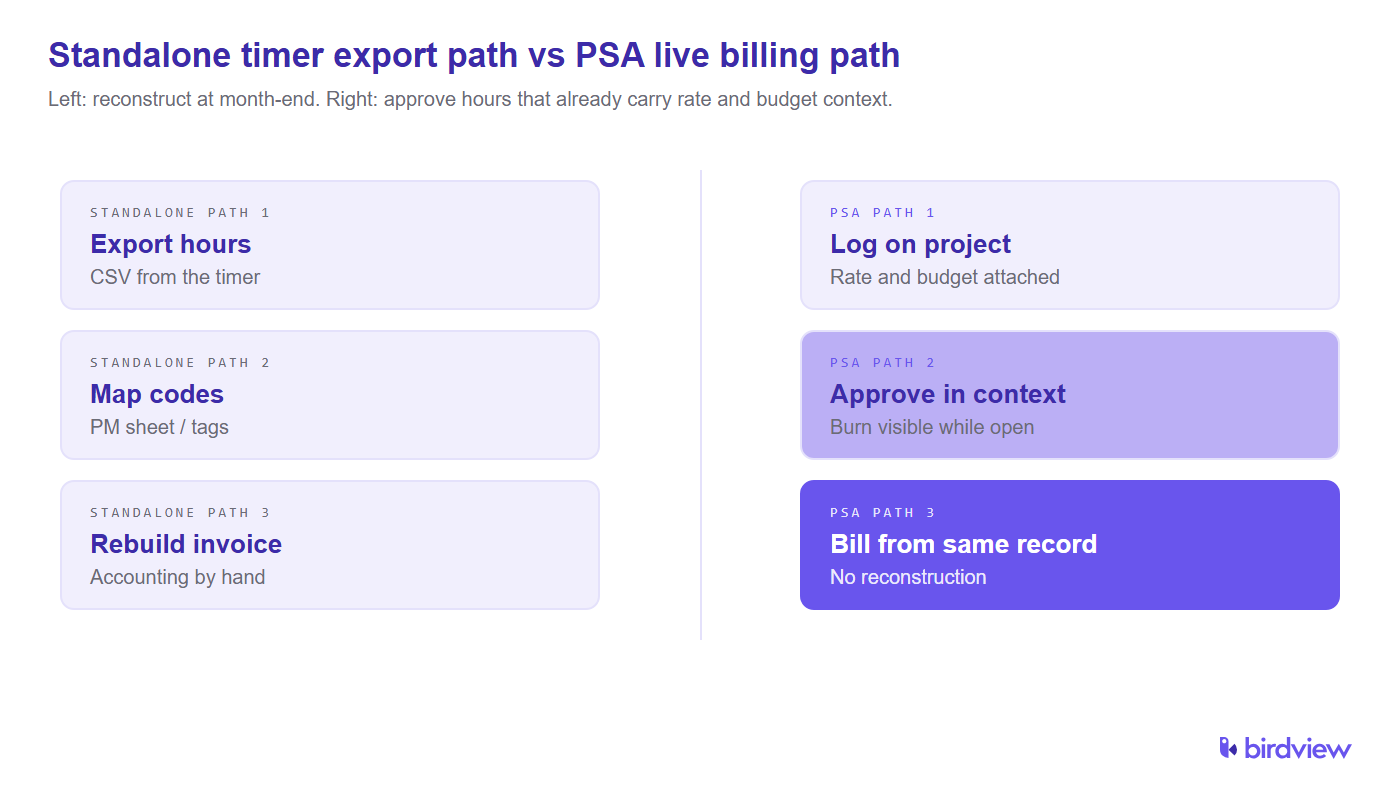
Standalone stacks look cheap on subscription lines. The hidden cost is labor at month-end. Every single cycle.
We see the same routine across our clients’ month-end closes. Finance pulls a Toggl or Harvest export and maps hours to project codes kept in a PM tool or spreadsheet. Rates get checked against the SOW. Invoices get rebuilt in QuickBooks or Xero. Every handoff is a place margin leaks: missing 20-minute calls, wrong role code, duplicate client tags.
PSA does not remove approval work. It moves validation earlier. Project managers see budget burn while work is still open, not after the client questions an invoice.
Take a 30-person firm billing $4M annually. One lost billable hour per consultant per week is roughly $200K–$350K in annual revenue at typical consulting rates. Timer accuracy alone does not close that gap if the billing path still rebuilds data by hand. That math is why COOs discover the standalone stack is expensive only after utilization targets slip.
Those rebuilt invoices also leave finance with weak inputs for revenue schedules under IFRS 15 / ASC 606 [2]. If the hour feed is hand-shaped every cycle, recognition and collections inherit the same reconstruction risk. Pair the billing close with CFO financial oversight for services firms when month-end still depends on spreadsheet mapping.
What is PSA software and how does its time tracking work?
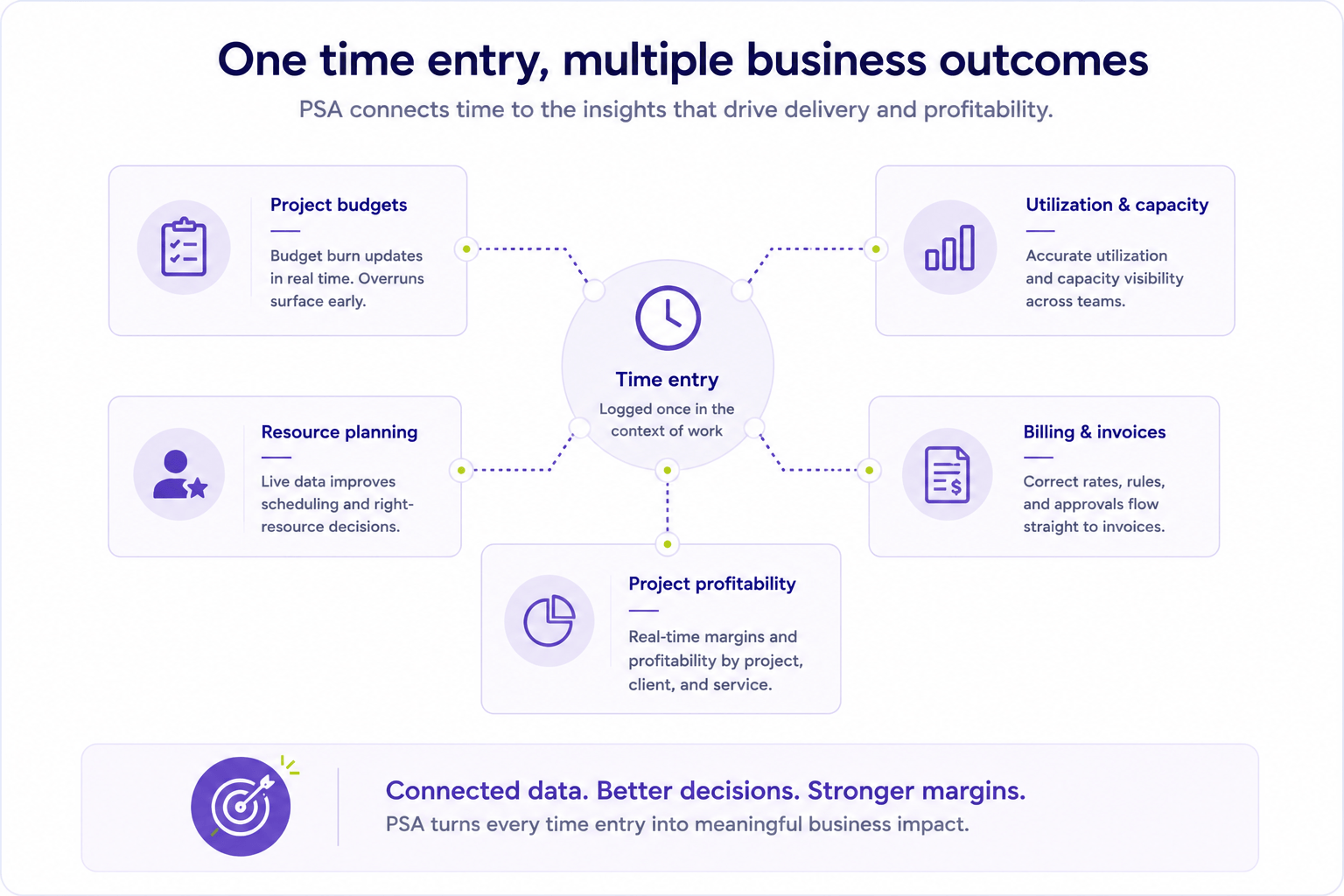
PSA software is a unified platform for time capture, resource scheduling, project economics, and billing events. In Birdview PSA, a time log posts against a project activity; cost, remaining budget, and utilization update without an export step.
Contrast the billing close:
- Standalone stack: pull hours from Toggl or Harvest, match project codes in a spreadsheet, fix rate errors, then build invoices.
- PSA stack: managers review and approve time that already carries the correct rate and budget context.
A 31-person professional services firm from our client work tracked project financials in one tool and time in another (Birdview PSA knowledge base). When we measured the close, billing reconciliation took four to five hours per cycle, with recurring invoice discrepancies. After consolidating into Birdview PSA, close became review-and-approval, not reconstruction.
PSA also tightens accuracy at entry. Tasks carry billing rates and budget ceilings, so overruns surface during the week, not after the client receives the PDF.
Another case from our client work: a 19-person strategy consulting firm ran resource planning in a spreadsheet (same knowledge base). During simultaneous scope changes, that sheet lagged live assignments by three days. A senior consultant double-booking surfaced at a client kickoff, visible only because PSA tied scheduling to the same project record as time.
What PSA adds beyond timesheets is the shared data model. The same hour drives utilization, remaining budget, staffing conflict flags, and the billing event finance later posts under IFRS 15 / ASC 606 controls [2]. A timer records the hour. PSA keeps the hour attached to the engagement while work is still open.
Birdview PSA targets mid-market services firms that want time, allocations, and billing events in one operational layer. Not a timer plus three exports. Enterprise PSA options exist for larger portfolios; standalone timers remain valid at the low end when billing stays simple.
For how delivery systems sit next to the ledger, see PSA vs ERP for professional services.
Head-to-head comparison: PSA vs standalone time tracking software
| Capability | Toggl Track | Harvest | Clockify | Birdview PSA |
|---|---|---|---|---|
| Time logging | Strong | Strong | Strong (free tier) | Strong |
| Invoice generation | No (export) | Yes | Paid tier | Yes |
| Project budget burn | No | Basic | Basic | Real-time |
| Resource scheduling | No | No | No | Yes |
| Utilization vs 75%+ target | Manual CSV | Manual | Manual | Native dashboards |
| Mixed billing (T&M + milestone) | Workarounds | Limited | Limited | Contract-level rules |
| Setup complexity | Low | Low–medium | Medium (paid) | Higher, 4–6 weeks typical |
| Ideal firm size (billable staff) | Solo–15 | Under ~20 | Budget-constrained small teams | ~15–200 |
This is not a quality ranking. Toggl and Harvest are well-built for their scope. The question is whether your billing model still fits that scope.
Utilization reporting is where the gap shows up first. SPI’s 2026 benchmark sets the high-performer target above 75% billable utilization, against a 66.4% industry average [1]. Standalone tools can export hours; showing which consultants are under-allocated next week takes a spreadsheet layer. PSA dashboards tie logged time to planned capacity so partners can act before utilization drifts.
Mixed billing is the second breakpoint. A milestone phase plus T&M support on the same engagement needs contract objects that understand both event types. Harvest and Clockify handle straight T&M; PSA carries rate rules at the contract and activity level.
5 signs your firm has outgrown standalone time tracking
- Billing reconciliation exceeds two hours per cycle. The 31-person firm above spent four to five hours before PSA, well past the two-hour pain line.
- Utilization reports require a fresh spreadsheet every week. SPI’s 2026 benchmark sets the high-performer target above 75% billable utilization, tracked weekly [1]. CSV exports make that cadence impractical.
- Staffing decisions use data more than 24 hours stale. The 19-person firm’s three-day lag caused a kickoff conflict PSA would have flagged earlier.
- Invoice discrepancies trigger client follow-up quarterly or more. Disputes delay cash and erode trust, not just admin time.
- You run multiple billing models on active engagements (T&M plus milestones, or several rate tiers on one project). Harvest handles simple T&M well; mixed contracts need PSA-level contract objects.
If three or more signs match, treat standalone tooling as a bridge, not a long-term operating model.

When standalone time tracking is still the right choice
Standalone tools win when complexity is low.
- Fewer than ~15 billable staff and one dominant billing model (pure T&M).
- QuickBooks/Xero + Harvest already covers invoicing with minimal reconciliation.
- Toggl feeds a PM tool that already owns project structure; accounting stays separate by design.
Above ~20 billable staff, unplanned staffing gaps and over-committed teams appear regularly. At that point, PSA investment pays back in reconciliation time alone.
Toggl remains the right call when consultants live inside Asana or Jira and finance only needs a clean hour feed. Harvest remains the right call when invoices are simple and the team is small. PSA enters when profitability and utilization must be visible before month-end, not reconstructed after it.
Resource scheduling: when a timer is not enough
Resource scheduling is the cluster question timers answer badly. A standalone tracker can show who logged hours last week. It does not show who is free next Monday against named allocations, soft bookings, and skill constraints.
If staffing still lives in a sheet beside Toggl or Harvest, you do not “just need time tracking.” You need one project record that owns the assignment and the timesheet. That is the failure mode. Three-day lag. Double-booked senior. Conflict at kickoff.
Buy a timer first only when one person can staff the week from memory. Mid-size firms that already fight over the bench should buy PSA (or a PSA scheduling module) before another logger.
What breaks when time tracking is not connected to projects and finance
Disconnected time creates four recurring breaks, the same pattern every time.
Project codes drift from the live SOW, so exports need a mapping table nobody trusts after the third revision. Utilization becomes a month-end artifact instead of a weekly control, the opposite of the discipline SPI’s high-performer benchmark rewards [1]. Billing events arrive late, and incomplete. Finance then rebuilds invoices and recognition inputs under IFRS 15 / ASC 606 [2]. Staffing conflicts stay invisible until kickoff or overtime, because the schedule and timesheet do not share one project object.
None of those breaks mean the timer failed at logging. They mean logging was never connected to the systems that turn hours into margin and cash.
What happens if you replace PSA with standalone time tracking
Firms sometimes “simplify” by dropping PSA and keeping a popular timer plus spreadsheets. The short-term win is a lower subscription line. The operating cost returns as reconstruction.
In mid-market Birdview implementations we see the same pattern after a PSA teardown. Utilization dashboards become CSV packs within two cycles. Mixed billing rules move back into finance email. The four-to-five-hour reconciliation load from the 31-person case returns once project financials and time live apart again.
Replacing PSA with standalone time tracking does not remove PSA work. It relocates that work into month-end labor and shadow staffing sheets. Keep a timer only when the firm still fits the low-complexity checklist above. Otherwise treat a teardown as a reversible experiment with a measured close-time baseline, not a permanent architecture.
How to choose: A decision framework for COOs and finance leaders
- Time the billing close. If reconciliation exceeds two hours or produces client-facing discrepancies, standalone tools are creating measurable cost.
- Test utilization reporting speed. Can you produce staff-level utilization in under 30 minutes without a spreadsheet? If not, the model is fragmented.
- Count active billing models. One model favors standalone; two or more favor PSA.
- Project headcount 12 months out. Scheduling pain compounds non-linearly past roughly 20 billable staff. Switch before the crunch, not after.
- Price integration maintenance. Toggl’s 100+ integrations help, but each connector needs upkeep as your stack changes. PSA carries project, time, and billing in one place.
Run the framework quarterly as headcount grows. The switch is cheaper before a bad quarter exposes utilization blind spots in a board deck.
FAQ
What separates PSA from basic time tracking tools like Toggl or Clockify?
In PSA, a time entry links to project budget, resource schedule, and contract value at once. In Toggl or Clockify, entries link to a client or tag, and billing context is rebuilt later.
How does PSA ensure time tracking accuracy?
Task-level rates, budget ceilings, and manager approval catch wrong codes before invoicing. The 31-person firm case eliminated recurring invoice discrepancies after consolidating time and project financials in Birdview PSA.
What problem does PSA solve that standalone time trackers cannot?
The reconstruction problem at billing close. In the consolidation case above, four to five hours of manual reconciliation per cycle dropped to review-and-approval after PSA adoption.
What is the best time tracking software for consulting firms?
Under ~20 staff with simple T&M: Harvest. At 20–200 staff with mixed billing or weekly utilization needs: PSA such as Birdview PSA. When a PM tool already owns project structure: Toggl Track as a logger feeding accounting.
What project time tracking software is best for billing and productivity analytics?
Tools that connect hours to margin and utilization without CSV rebuilds. SPI’s 2026 benchmark sets the high-performer target above 75% utilization, against a 66.4% industry average [1]; PSA surfaces that metric natively, standalone tools need manual math.
How do you choose between PM built-in time tracking vs standalone tools?
Weigh three variables. Billing-model complexity, headcount trajectory past ~20 staff, and reconciliation hours per billing cycle.
Can Harvest replace a PSA for a 30-person consulting firm?
Harvest covers logging and invoicing but not resource scheduling or real-time budget burn. The same consolidation case shows the gap when project financials and time live in separate systems.
Do you need PSA or just time tracking for resource scheduling?
If Monday staffing still depends on a spreadsheet beside the timer, you need PSA, or a delivery system that owns allocations. A timer alone cannot hold named bookings against open work.
Bottom line
Standalone time tracking answers one question: were hours logged? PSA answers a harder one: were those hours profitable, on the right project, and billable at the correct rate? Firms under ~20 staff with one billing model can stay on Harvest or Toggl for years. Firms crossing mixed contracts, weekly utilization reviews, or multi-hour billing closes should plan PSA earlier. Waiting means margin slips show up only in a rear-view P&L.
Sources
- SPI Research, 2026 Professional Services Maturity Benchmark (509 organizations): https://spiresearch.com/reports/2026-ps-maturity-benchmark/
- IFRS Foundation, IFRS 15 Revenue from Contracts with Customers: https://www.ifrs.org/issued-standards/list-of-standards/ifrs-15-revenue-from-contracts-with-customers/