Ksenia Kartamysheva
 - Professional Services Automation (PSA) and Enterprise Resource Planning (ERP) software serve different purposes: PSA manages project delivery, resources, time tracking, and billing, while ERP manages accounting, financial reporting, payroll, and compliance.
- The most effective architecture for professional services firms is typically not PSA or ERP, but a combination of both, with clearly defined ownership of operational and financial data.
- Consulting firms that struggle with resource planning, utilization reporting, project profitability, or manual billing processes should generally implement PSA before expanding into ERP capabilities.
- ERP becomes increasingly important as organizations add multiple legal entities, complex payroll, revenue recognition requirements, statutory reporting, and financial consolidation across the business.
- Successful PSA–ERP integrations depend on establishing clear data ownership before connecting systems, ensuring that project delivery data remains in the PSA while financial records and accounting controls remain in the ERP.
The fastest way to waste a year in a services firm is to buy the wrong “system of record” first. SPI Research’s 2026 Professional Services Maturity Benchmark, covering 509 organizations, put industry-wide billable utilization at 66.4% in 2025, the lowest level in the survey’s history, against a 75% target for high-performing firms [1]. That gap is made of real hours that were never scheduled correctly, never captured cleanly, or never invoiced on time. You don’t fix that by starting with a bigger ledger. You fix it by making delivery data trustworthy.
This article uses one rule: PSA runs work. ERP runs books. The two can overlap on invoices. But they do not answer the same questions, and they should not “own” the same fields.
PSA vs ERP for professional services firms
PSA fits professional services when you need live utilization, staffing, and project margin while work is open. ERP fits when you need the general ledger, multi-entity consolidation, payroll scope, and controlled revenue recognition. Most mid-size firms eventually need both: PSA owns delivery fields, ERP owns the books, and invoices move one way from approved time into finance.
When does a consulting firm need PSA instead of only ERP
A consulting firm needs PSA instead of only ERP when Monday capacity, billable utilization by team, or project margin still requires spreadsheet exports. ERP can post costs and close the books; it does not replace day-to-day allocations, billing exceptions, or staffing boards. If delivery answers stay outside the ledger, add PSA before you expand ERP project modules.
Do professional services firms need both PSA and ERP
Yes, once multi-entity close, formal recognition schedules, or payroll complexity outgrows QuickBooks/Xero. Until then, PSA plus a light ledger can work. Need both means clear owners: PSA for projects, time, and billing events; ERP for GL, receivables, and statements. One tool should not pretend to do both jobs.
How to choose between PSA vs ERP first for a growing services firm
Choose PSA first when utilization and staffing are the bottleneck. Choose ERP next when consolidation, statutory reporting, or recognition controls become the bottleneck. Do not buy NetSuite (or any ERP) as a delivery strategy. Run the two-question split: delivery truth first, finance controls second, then integrate on Pattern 2.
The two-question split (COO vs CFO)
You want a clean decision? Ask one question to delivery and one to finance:
- Delivery: who is free next Monday, and what is billable utilization by team today?
- Finance: what is recognized revenue this month by entity, and where is the audit trail?
If the delivery answer requires a spreadsheet export, you need PSA. If the finance answer requires stitching statements across legal entities, you need ERP. If both are true, you need both, but you still must decide which one owns which data.
Those two questions also explain why buyers keep mixing the products. A demo that shows project billing inside an ERP can look like “PSA coverage” until Monday staffing still lives in a sheet. Pair this split with why professional services need more than ERP when finance already bought the ledger and delivery still cannot answer utilization without exports.
PSA vs ERP in one sentence (then in one table)
PSA (Professional Services Automation) is where services teams plan capacity and log time and expenses with billing rules. It is also where they watch project economics while the work is still open.
ERP (Enterprise Resource Planning) is where finance owns the general ledger, payroll, statutory reporting, consolidation, and revenue recognition controls under ASC 606 / IFRS 15 [2].
| Topic | PSA (Birdview PSA / Kantata) | ERP (NetSuite / SAP Business ByDesign) |
|---|---|---|
| Primary users | delivery leaders, resourcing, PMO | finance, accounting, payroll |
| What it must be “right” about | allocations, timesheets, billing rules | GL balances, audit trail, consolidation |
| Where margin is visible | per project, live | after posting/close (unless fed by PSA) |
| Revenue recognition (ASC 606 / IFRS 15) | signals + milestones | controlled schedules + reporting |
Small firms run QuickBooks/Xero + PSA for a while. That works until multi-entity consolidation or automated recognition becomes mandatory. Then ERP arrives, but PSA still stays the delivery owner.
The mistake that creates “ERP-first pain”
ERP-first rollouts fail for services firms for one reason: ERP project modules don’t carry delivery nuance by default.
Delivery nuance is the stuff that changes invoices.
- billable vs non-billable rules by role.
- caps, retainers, and exceptions.
- milestone acceptance that doesn’t match “percent complete”.
- rework time that should not hit the client.
If your process is “export hours → rename categories in finance → rebuild the invoice,” you’re not dealing with a billing problem. You’re dealing with “delivery truth lives outside the system that is producing invoices.”
In mid-market Birdview implementations we see the same failure mode. When staffing boards update only after ERP time import, bench decisions land days late versus daily PSA allocations. That delay is not an accounting defect. It is delivery ownership parked in the wrong system.
A data ownership map (do this before you integrate)
Integration doesn’t fix confusion. It amplifies it. Before you connect systems, decide who owns what.
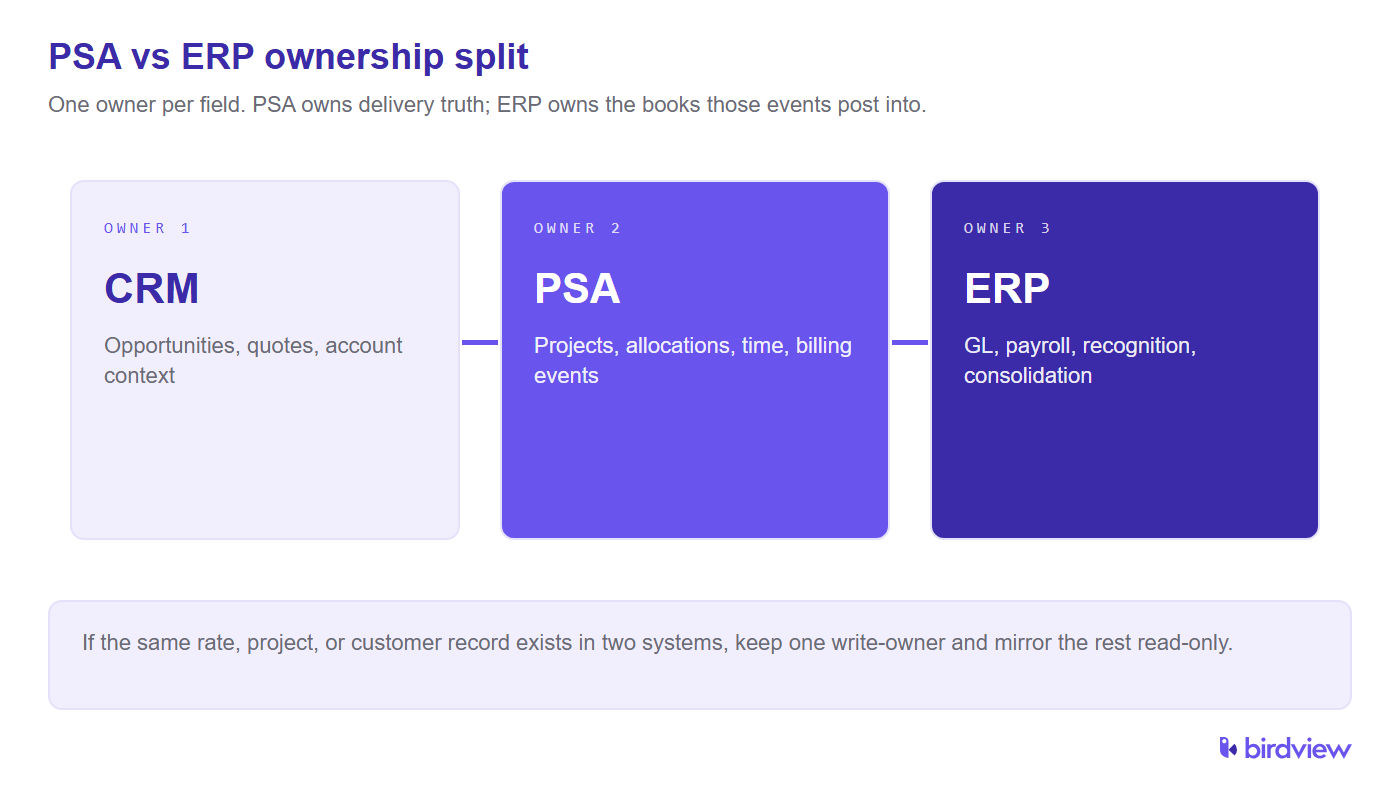
- CRM owns: opportunities, quotes, account context.
- PSA owns: projects, WBS, allocations, timesheets, billing events.
- ERP owns: GL balances, receivables/payables, payroll, consolidated statements.
If the same field exists in two systems, pick one owner and make the other a read-only mirror. Most invoice disputes aren’t math mistakes. They are two tools both thinking they own the same “rate,” “project,” or “customer” record.
Which one should you implement first?
- If delivery cannot produce a clean utilization number, start with PSA. SPI’s 2026 benchmark shows industry utilization at 66.4%, well below the 75% high-performer target, a gap of nearly 9 points [1]. If your firm lives below that and calculates utilization in spreadsheets, PSA is the highest-ROI operational change.
- If finance complexity is your bottleneck, add ERP next. Multi-entity consolidation, payroll scale, statutory reporting, and controlled recognition schedules are ERP territory.
- Don’t use “we’re buying NetSuite anyway” as your delivery strategy. NetSuite can be the finance backbone. Services delivery still needs day-to-day allocation, time capture, and project economics owned by a delivery system of record.
Track the decision against service delivery KPIs for professional services. “PSA first” should mean utilization, margin, and on-time staffing, not another software logo on the stack slide.

Enterprise PSA vs ERP (different upgrade triggers)
Buyer comparisons confuse “enterprise PSA” with “ERP.” They are different upgrades.
Enterprise PSA is a delivery upgrade: portfolio forecasting, multi-practice governance, deeper resourcing analytics, and enterprise reporting (Power BI-style dashboards). Kantata competes in this “enterprise PSA” segment; Birdview PSA Enterprise can play here with reporting and governance.
ERP is a finance upgrade: multi-entity close, payroll scope, audit demands, statutory reporting, and formal ASC 606 / IFRS 15 controls [2].
A firm can need enterprise PSA at 80 billable staff and still run a light ledger if it remains single-entity. A different firm can need ERP at 40 people if it has multiple legal entities and complex payroll.
When ERP becomes mandatory (add it, don’t replace PSA)
ERP is no longer optional when you hit conditions like:
- multiple legal entities require consolidated statements.
- ASC 606 / IFRS 15 schedules must be controlled in the system of record [2].
- payroll spans complex jurisdictions.
- audit trail requirements exceed what accounting tools can provide.
- inventory/asset management is part of your model.
- the close process is too slow for leadership decisions.
These are “add ERP” triggers. None of them are “drop PSA” triggers.
One more practical trigger. Finance needs “one view” of revenue recognition and cash across entities, while delivery still needs daily resourcing and time-capture discipline. Splitting ownership is not a compromise, it is the only way to keep both layers accurate. The goal is not fewer tools. The goal is fewer re-keys.
What breaks if ERP replaces PSA for utilization and staffing
Replacing PSA with “ERP projects” for utilization and staffing usually breaks four operating loops at once.
Staffing moves from role-and-skill boards to cost centers and job codes. That is fine for payroll. It is weak for “who can start Tuesday on a fixed-fee workstream.” Utilization becomes a period report after time posts, not a live signal while managers still have options. Soft bookings and named allocations disappear into vague project assignments. Overbooking then shows up as overtime or missed milestones instead of a conflict flag. Billable vs non-billable flags that lived next to the timesheet become ledger categories delivery leads do not trust. People keep a shadow sheet “just to staff the week.”
None of that proves ERP failed. It proves utilization and staffing were never ERP’s primary job. Keep PSA as the system that answers Monday capacity; let ERP consume approved time and billing events for books.
Can ERP alone handle project accounting for professional services
ERP can post project costs, hold WIP, run revenue schedules, and produce entity statements. That is real project accounting for the close. What ERP alone rarely owns cleanly is the upstream truth that feeds those postings. That includes role rates with exceptions, retainers and caps, milestone acceptance that is not percent-complete, and rework that must stay non-billable.
If finance rebuilds invoices from renamed hour exports every month, ERP is doing project accounting on delayed, hand-shaped inputs. Mid-size consulting teams that need both books and live delivery economics keep PSA as the owner of billing events. ERP then owns recognition schedules and receivables under IFRS 15 / ASC 606 controls [2].
Why buyers confuse PSA with ERP when buying software for services
Confusion is predictable. Vendors put “projects,” “time,” and “billing” on both slides. Procurement hears one “system of record” requirement and maps it to whichever demo closes the RFP first. Enterprise PSA marketing can sound like finance consolidation; ERP project modules can sound like resourcing.
Separate the buy with the two-question split above. If the must-win outcome is utilization, staffing, and project margin while work is open, shortlist PSA. If the must-win outcome is multi-entity close, payroll scope, and controlled recognition, shortlist ERP. If both outcomes are mandatory, budget for Pattern 2 integration, not for a single product that quietly deletes one of the jobs.
Three integration patterns that actually hold up
Pattern 1 – PSA + accounting (entry). PSA drives projects and billing events; invoices post into QuickBooks/Xero. Finance stays simple; delivery stays clean.
Pattern 2 – PSA + mid-market ERP. PSA (Birdview PSA / Kantata) feeds NetSuite. PSA owns allocations, time, and billing logic. ERP owns receivables, recognition schedules, and the close. This is common once firms move past “single-entity + simple payroll.”
Pattern 3 – converged platform. Certinia (rebranded 2023 from FinancialForce) runs on Salesforce. Microsoft Dynamics 365 Project Operations runs in a Microsoft-first environment. Fewer moving parts, but higher lock-in and heavier setup.
One variable matters as much as vendor selection: integration ownership. Decide who owns mapping, exception queues, and rate change rules before go-live. Without a named owner, “the integration” becomes a permanent blame target.
How to think about NetSuite, Certinia, and Kantata (without a feature dump)
NetSuite (SuiteProjects) is finance-first. It can help with project billing, but services firms still need delivery discipline, allocations, utilization, and project economics, to be owned somewhere.
Certinia is Salesforce-native convergence; it can be compelling when Salesforce is already the anchor, expensive when it is not.
Kantata is an enterprise PSA created by the 2022 merger of Mavenlink and Kimble. It typically expects a separate ERP for GL and statutory reporting, classic Pattern 2 architecture.
Birdview PSA focuses on mid-market services delivery operations, allocations, time, and billing events, while integrating into the finance stack rather than replacing it.
Phased rollout (avoid the “big bang” trap)
Most services firms should not deploy PSA and ERP in one quarter.
Phase A – make PSA the delivery home. Implement allocations, time capture with billable flags, and project economics. Export invoices to the ledger if needed. Goal: utilization and margin visible without spreadsheet rituals.
Phase B – harden finance controls in ERP. Add consolidation and recognition rules (ASC 606 / IFRS 15 where required) [2]. Map dimensions so project economics reconcile across systems.
Phase C – upgrade tiers when triggers fire. Move to enterprise PSA when portfolio complexity demands it; move to a converged platform when standardization outweighs flexibility.
If you want a low-risk pilot, run one live engagement through PSA as the delivery home for two weeks. Track three outcomes. One: how quickly you can answer utilization by team without exports. Two: how many billing exceptions are caught before invoicing. Three: whether project margin stays consistent between PSA reporting and the ledger after invoices post. If those three improve, you have the correct ownership split.
FAQ
Which fits a professional services firm better, PSA or ERP?
PSA fits live utilization, staffing, and project margin. ERP fits GL, consolidation, payroll, and recognition controls. Most mid-size firms need both with PSA owning delivery fields and ERP owning the books.
When does a consulting firm need PSA if it already has ERP?
When Monday capacity, utilization by team, or project margin still needs spreadsheet exports. Keep ERP for the close; add PSA for allocations, time, and billing events that feed finance.
Do growing services firms need PSA and ERP together?
Often yes after multi-entity close or formal recognition arrives. Until then PSA plus a light ledger can work. Need both means clear owners, not one product replacing the other.
Can a PSA replace an ERP for a professional services firm?
No. PSA replaces delivery tooling, not the general ledger. Single-entity firms can run PSA + QuickBooks/Xero temporarily, but multi-entity consolidation or ASC 606 / IFRS 15 automation requires ERP alongside PSA [2].
What is the difference between NetSuite and a PSA like Birdview PSA or Kantata?
NetSuite is a finance system of record (GL, consolidation, recognition). PSA is a delivery system of record (allocations, utilization, billing events). SuiteProjects can help with project billing, but it doesn’t solve resourcing and utilization visibility on its own.
What utilization rate signals that PSA is urgent?
If utilization sits well below the 75% high-performer benchmark cited above and still needs spreadsheet work to calculate, PSA is the faster ROI lever [1].
How does PSA-ERP integration work in practice?
Approved time and milestones in PSA drive billing events. Invoices and allocations post into ERP for receivables, recognition schedules, and the close. The key is clear ownership: PSA owns delivery fields, ERP owns financial statements, and a named role owns mapping and exceptions.
Does Microsoft Dynamics 365 Project Operations eliminate the need for a separate PSA?
For Microsoft-centric enterprises it can. Many mid-market firms under ~150 seats find dedicated PSA + mid-market ERP cheaper and easier to maintain than a full D365 rollout.
When should a firm move from team PSA to enterprise PSA tier?
Move when portfolio forecasting, multi-practice governance, or deeper resourcing analytics outgrow team PSA. Do not move only because you want a bigger ledger. Enterprise PSA is a delivery upgrade. ERP remains the finance upgrade for multi-entity close and recognition controls.
Sources
- SPI Research, 2026 Professional Services Maturity Benchmark (509 organizations): https://spiresearch.com/reports/2026-ps-maturity-benchmark/
- IFRS Foundation, IFRS 15 Revenue from Contracts with Customers: https://www.ifrs.org/issued-standards/list-of-standards/ifrs-15-revenue-from-contracts-with-customers/