Ksenia Kartamysheva
 QuickBooks integration connects your delivery system with your accounting platform, so time, expenses, and invoices move between systems without manual re-entry. It ensures that the work your team completes turns into accurate financial data.
When this connection works properly, you stop dealing with mismatched reports, delayed invoicing, and duplicate data. When it does not, finance and delivery drift apart, and you lose control over revenue.
What QuickBooks integration means for service firms
QuickBooks integration connects a project management or PSA system with QuickBooks so time, expenses, invoice data, clients, and financial records can move between systems with less manual work.
For service firms, the main value is simple: work completed in the project system can become cleaner billing and accounting data in QuickBooks. This reduces duplicate entry, billing delays, reporting mismatches, and manual reconciliation.
What is QuickBooks integration with project management?
QuickBooks project management integration is the connection between a project management or PSA tool and QuickBooks, where operational and financial data flows between systems.
In simple terms:
- Project management or PSA software handles delivery
- QuickBooks handles accounting and financial records
- Integration connects them through controlled data sync
This setup creates a clean flow from work completed to revenue recognized. Time logs become billable records, invoices reflect actual delivery, and financial reports stay consistent.
Without this structure, teams often rely on exports, spreadsheets, and manual updates. That is where errors and inconsistencies start.
Why QuickBooks integration matters for service teams
Integration matters because service businesses depend on accurate translation of work into revenue. If that translation breaks, everything downstream becomes unreliable.
Eliminates manual data entry
Manual entry is one of the most common sources of error.
Without integration, teams copy time logs into invoices or re-enter data into accounting systems. This creates duplication and increases the chance of mistakes.
With integration, data is entered once and reused, which reduces effort and improves accuracy.
Aligns delivery and financial data
Disconnected systems lead to different versions of the truth.
Project teams track time and progress in one tool. Finance tracks revenue in another. Without integration, these numbers rarely match.
Integration ensures that what is delivered matches what is billed, which builds trust in reports.
Speeds up invoicing
Delayed invoicing often comes from fragmented workflows.
Time logs sit in one system. Finance waits for exports. Approvals take longer than expected.
With integration, billing data is ready as soon as work is completed, which shortens billing cycles and improves cash flow.
Improves financial visibility
When delivery and accounting are connected, you can see performance in real time.
You do not need to wait for month-end reconciliation to understand revenue or margins.
This directly addresses a common issue in service firms, where teams see two different aging AR reports depending on the system they check.
What happens without QuickBooks integration
When project management and accounting are not connected, problems don’t show up as one big issue. They show up as small inconsistencies that keep repeating across projects and reports.
Duplicate data across systems
The same information starts living in multiple places.
A project manager logs time in one tool. Finance exports that data and rebuilds it somewhere else. Then someone updates an invoice manually. At that point, you already have three versions of the same data.
Over time, no one is fully sure which version is correct.
Inconsistent financial reports
This is where teams usually feel the impact first.
Operations looks at project progress and expects a certain revenue number. Finance checks QuickBooks and sees something different. Both sides are working with valid data, but the systems are not aligned.
That’s how you end up with two versions of AR, two revenue numbers, and constant back-and-forth to explain the gap.
Delayed invoicing
Invoicing slows down when data has to be prepared manually.
Before finance can send an invoice, they often need to:
- collect time logs
- validate rates
- check what has already been billed
- fix missing or inconsistent entries
Even small delays at each step add up. By the time the invoice goes out, the work may already be weeks old.
Manual reconciliation
At some point, everything has to be reconciled.
This usually happens at the end of the month, when discrepancies become impossible to ignore. Teams compare reports, trace differences, and adjust data to make numbers match.
It is repetitive work, and it does not improve the process. It only fixes the outcome after the fact.
How QuickBooks integration works (simple workflow)
A QuickBooks integration follows a simple idea: work completed in your project system becomes financial data in your accounting system.
In practice, this is not a single action. It is a sequence of steps that move data from delivery to billing, with validation in between to keep everything accurate.
Using QuickBooks integration with Birdview PSA as an example, here is how that flow typically works.
Step 1: Track work in the project system
Everything starts with how work is captured.
Teams log:
- time entries tied to projects and tasks
- billable and non-billable hours
- project-related expenses
This creates a structured record of delivery. At this stage, the data is operational, not financial, but it needs to be clean. If time tracking is inconsistent here, it will show up later as billing issues.
Step 2: Sync data to QuickBooks
Once the data is ready, it moves to QuickBooks.
This step is more than just clicking export. It is where data is checked before it becomes financial. In Birdview PSA, for example, you select time logs from history, filter them by project or status, and prepare a clean batch.
The system then runs validation. It excludes entries that were already billed and flags missing rates. You also get a summary view with totals and breakdowns.
These checks matter because they catch issues early, before they affect invoices or financial reports.
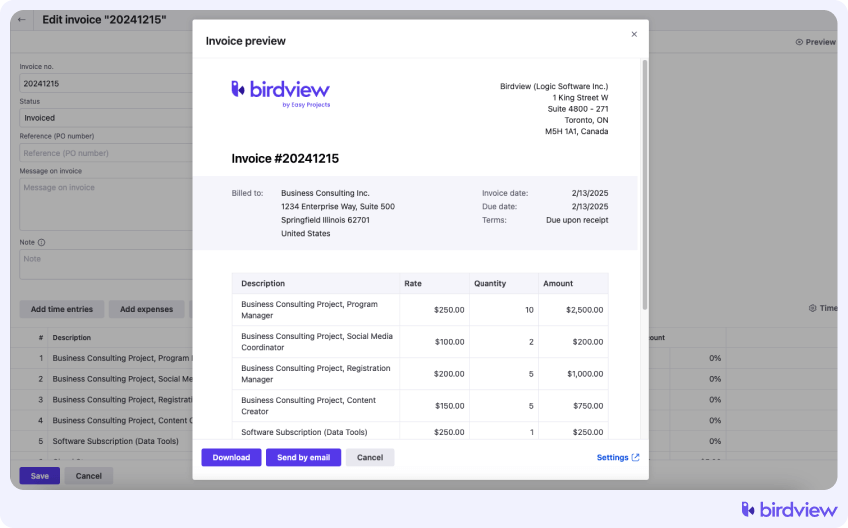
Step 3: Generate invoices
Once the data reaches QuickBooks, billing becomes much simpler.
Instead of building invoices manually, finance works with data that already reflects what was delivered. Time, rates, and project context are aligned before the invoice is even created.
That changes the workflow. Invoicing becomes a confirmation step rather than a reconstruction process. It reduces errors and makes billing cycles more predictable.
Step 4: Track payments and financials
After invoicing, QuickBooks becomes the system of record for financial outcomes.
It handles:
- invoices and payment tracking
- accounts receivable
- financial reporting
At this stage, the focus shifts from delivery to results. The key advantage is traceability. You can connect each invoice back to the work that generated it, which makes reporting and audits much easier.
The most common problems happen when time entries are incomplete, rates are missing, billed entries are exported again, or invoices are adjusted manually after sync. That is why validation and clear system ownership are just as important as the technical connection itself.
What data should be synced between systems
Integration works best when data flow is intentional and limited to what is necessary. Sending too much data creates duplication. Sending too little creates gaps.
Here is a simple breakdown.
| Data flow direction | What to sync | Why it matters |
| PM or PSA → QuickBooks | Time entries, expenses, invoices | Converts delivery into billable data |
| QuickBooks → PM or PSA (optional) | Payment status, client details | Adds financial context to projects |
The key rule is simple: each piece of data should have one clear owner.
Time tracking belongs in the project system. Financial records belong in QuickBooks.
What to look for in a QuickBooks integration
Not all integrations are equal. The difference is usually not technical, it is operational.
Automated invoice syncing
Look for the ability to sync invoices without manual intervention. This reduces delays and ensures consistency between systems.
Flexible mapping of data
You need control over how data is mapped.
This includes:
- users and roles
- clients and projects
- billing rates and services
Without proper mapping, data will not align correctly.
Support for billing models
Service firms use different billing models.
A good integration supports:
- time and materials
- fixed fee projects
- retainers
This ensures accurate billing regardless of how work is structured.
Real-time or scheduled sync
Some teams need real-time updates. Others prefer scheduled syncs.
The important part is predictability. You should know when data moves and what triggers it.
Clear system ownership
The integration should reinforce system roles. If both systems try to manage the same data, conflicts will happen.
Best practices for connecting QuickBooks and project management
A successful QuickBooks project management integration is less about the tool and more about how you design the workflow. Most issues come from unclear ownership, unnecessary complexity, or trying to sync too much data. A good setup keeps things simple, defines clear boundaries, and reflects how your team actually works.
Define a system of record
The first step is deciding where each type of data should live.
If this is not clear, both systems will start doing the same job, and conflicts will follow. Teams end up editing invoices in two places or adjusting data after it has already been synced.
A clean setup usually looks like this:
| Data type | Best system owner |
| Tasks and project work | Project management or PSA system |
| Time entries and expenses | Project management or PSA system |
| Billing rates and billable records | PSA system, with sync to QuickBooks |
| Invoices and payments | QuickBooks |
| Accounting records | QuickBooks |
This separation keeps each system focused and prevents overlap between delivery and financial data.
Keep data flow simple
Integration should support your process, not complicate it.
It is tempting to sync everything available, but that usually creates noise and increases the risk of errors. The more data you push between systems, the harder it becomes to control and validate.
Avoid duplicating data
Duplication is one of the fastest ways to break an integration.
If the same data is edited in multiple systems, it will eventually drift. This often happens with invoices or client records, where both tools allow updates.
To avoid that, teams should:
- choose one system where each data type can be edited
- limit updates in the secondary system
- avoid manual overrides after sync
This keeps your data consistent over time.
Validate with real scenarios
Even a well-designed integration can fail if it is not tested properly.
Basic tests are not enough. You need to simulate real situations your team deals with daily, especially edge cases that tend to break workflows.
Testing different scenarios early helps you catch issues before they affect real invoices or financial reports.
Example: from time tracking to invoice
Consider a simple scenario.
A consultant logs 40 hours on a project in the project management system.
That data is reviewed and exported to QuickBooks. During export:
- billed entries are excluded
- missing rates are flagged
- totals are verified
The data appears in QuickBooks as billable work. An invoice is created based on that data. It reflects actual hours and agreed rates.
The client pays the invoice. Payment status is tracked in QuickBooks.
At this point, the full billing flow is complete:
Work → billable data → invoice → payment
This is what a clean integration looks like in practice.
When you need QuickBooks integration
Not every team needs integration from day one. But certain signals make it necessary.
You likely need it when:
- Your team is growing and managing multiple projects
- Invoicing requires manual effort or spreadsheets
- Financial reports do not match project data
- You see delays between work completed and revenue recorded
- Reconciliation takes too much time
These are signs that your systems are no longer aligned.
FAQ: QuickBooks project management integration
What is QuickBooks integration with project management software?
It is a setup where project data, such as time and expenses, flows into QuickBooks to support invoicing and financial tracking. It connects delivery and accounting into one process.
Why is integration important?
It removes manual steps, aligns data across systems, and reduces errors in billing and reporting. Without it, teams often rely on spreadsheets and duplicate data.
What data should be synced?
Only essential data, such as time entries, expenses, and invoices. Some teams also sync payment status back to the project system for visibility.
Can integration be automated?
Yes. Most integrations allow automated or semi-automated sync based on triggers, schedules, or manual approval steps.
Is exporting data to QuickBooks the same as integration?
Not always. Exporting moves data between systems, but integration should create a more controlled workflow with validation, ownership, and less manual re-entry. A good integration helps ensure approved time, expenses, and invoice data move accurately between project delivery and accounting.
Which system should own the financial data?
QuickBooks should own financial records, including invoices and payments. The project system should manage delivery data such as time and resources.