Arkady Katcherovski
Best PSA software at a glance
- Birdview PSA for consulting, engineering, architecture, and IT services firms that need resource planning, project delivery, time approvals, and invoicing.
- Kantata for larger firms that need deep resource forecasting and are ready for a heavier rollout.
- Certinia for firms that run their business on Salesforce.
- BigTime for firms where time capture, invoicing, and payments matter most.
- Scoro for firms that want quoting, delivery, and invoicing in one workflow.
- Productive for agencies and consultancies focused on budgets and profitability.
- Rocketlane for teams that run customer onboarding and software implementation projects.
- Accelo for smaller agencies and consultancies with many retainers.
How we compared PSA software
We reviewed official product pages, documentation, and pricing, alongside selected customer reviews on G2 and Capterra. This is a documentation-based comparison, not a hands-on test of every platform.
This guide is published by Birdview, whose PSA is included. We explain its strengths, plan requirements, and the situations where another platform may fit better.
We compared each platform against six criteria:
- Resource planning: availability, workload, staffing, and future demand.
- Project delivery: tasks, dependencies, schedules, and progress across client projects.
- Time and expenses: recording, approvals, and how entries support project costing and billing.
- Financials and billing: budgets, rates, profitability, and support for different billing models.
- Fit and rollout: company requirements, integrations, configuration, and implementation.
- AI assistance: supported tasks, underlying data, human oversight, and plan availability.
Customer reviews provide context on usability, implementation, reporting, and support. Official documentation confirms features and plan availability. We separate recurring observations from individual experiences.
Sources were reviewed on November 5, 2026. Prices and features may change.
What counts as PSA software
This list covers PSA for firms that sell project work: consulting, engineering, architecture, IT services, and agencies. Three adjacent categories are outside this comparison:
- General work management tools, such as Workfront, Wrike, and Smartsheet. This comparison focuses on platforms that connect project delivery with resource planning, time, and billing.
- Client work management tools, such as Teamwork.com, which combine projects, time tracking, and client collaboration for agencies. Consider them when projects are small and client collaboration matters more than planning shared specialists across many projects.
- MSP-focused PSA tools, such as ConnectWise PSA and Autotask PSA. Compare these separately when ticketing, SLAs, and managed services contracts are central to your business.
PSA software comparison table
| Tool | Best fit | Main reason to shortlist | Pricing |
| Birdview PSA | Consulting, engineering, architecture, and IT services firms | Resource planning, project delivery, time approvals, and invoicing | Team from $37/user/mo billed annually (promotional), 5-user minimum; allocation-based resource planning on Enterprise, by quote |
| Kantata | Mid-size and large services firms | Resource forecasting and complex staffing | Custom quote |
| Certinia | Salesforce-centric services organizations | Projects, resources, and financials within Salesforce | Custom quote; confirm Salesforce licensing requirements |
| BigTime | Firms focused on time tracking and billing | Time and expense tracking, invoicing, and payments | From $20/user/mo (Essentials); resource management is a separate module |
| Scoro | Consultancies and agencies | Quoting, resource planning, project delivery, and invoicing | From $17/user/mo (Time-billing); Projects & Resources $29; 5-user minimum; 13–17% off with annual billing |
| Productive | Agencies and consultancies | Resource scheduling, client budgets, and profitability | About $10–$12/user/mo (Essential) and $25–$29 (Professional), depending on billing period; 3-seat minimum |
| Rocketlane | Onboarding and implementation teams | Client-facing implementation projects | From $49/user/mo billed annually (Standard); resource and financial management on Premium ($69); 5-seat minimum |
| Accelo | Services firms with retainers and recurring client work | Retainer management | Custom quote |
Prices are in USD. Confirm current pricing, billing terms, and included features with each vendor. Once you have a shortlist, evaluate your shortlist with the PSA vendor scorecard.
Our pick: We recommend Birdview PSA for consulting, engineering, architecture, and IT services firms that share specialists across client projects. It connects resource planning, project delivery, time approvals, and invoicing. It connects resource planning, project delivery, time approvals, and invoicing. Consider Kantata for complex staffing and forecasting, Certinia for Salesforce-native operations, and Rocketlane for software onboarding and implementation.
The 8 best PSA software tools in 2027
1. Birdview PSA
Best for: consulting, engineering, architecture, and IT services firms managing multiple client projects and shared specialists.
Why shortlist it: shared specialists are where most services firms lose margin. Birdview plans them across every project from the same data that drives time approvals, budgets, and invoices. The Team plan covers workload management, time approvals, budgets, and invoicing. Enterprise adds allocation-based resource planning.
Key strengths:
- Resource planning across all projects: workload, capacity, skills, and resource loading simulation to test capacity and financial scenarios.
- Full project delivery: tasks, Gantt, dependencies across projects, baselines, and critical path.
- Time tracking with approvals and multi-step approvals; invoices from approved time, expenses, and flat-fee items.
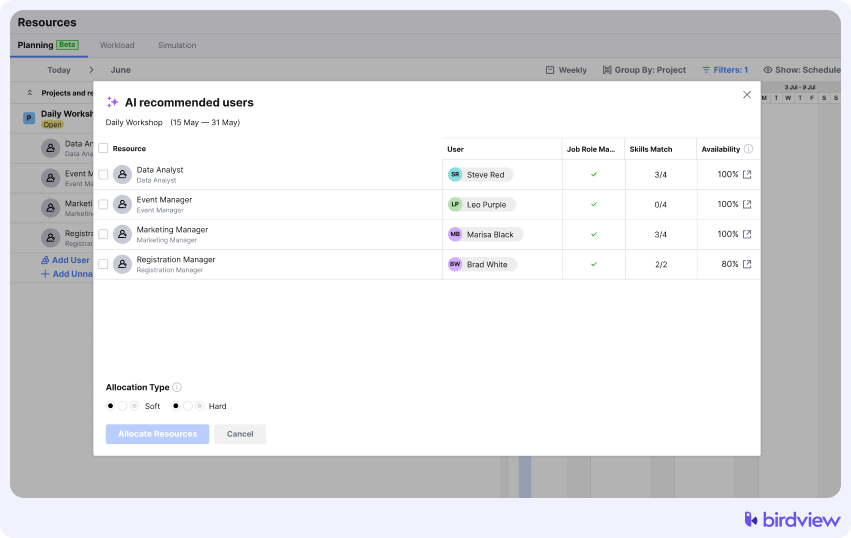
- Built-in AI for planning and delivery: draft project structures, recommend resources, forecast completion dates, and answer questions about project data.
- Reporting with a report generator plus 250+ BI reports and dashboards, and a client portal with 20 free guest users on Team.
- Hosting in the US, Canada, or Europe, SOC 2 Type II, and an on-premise option.
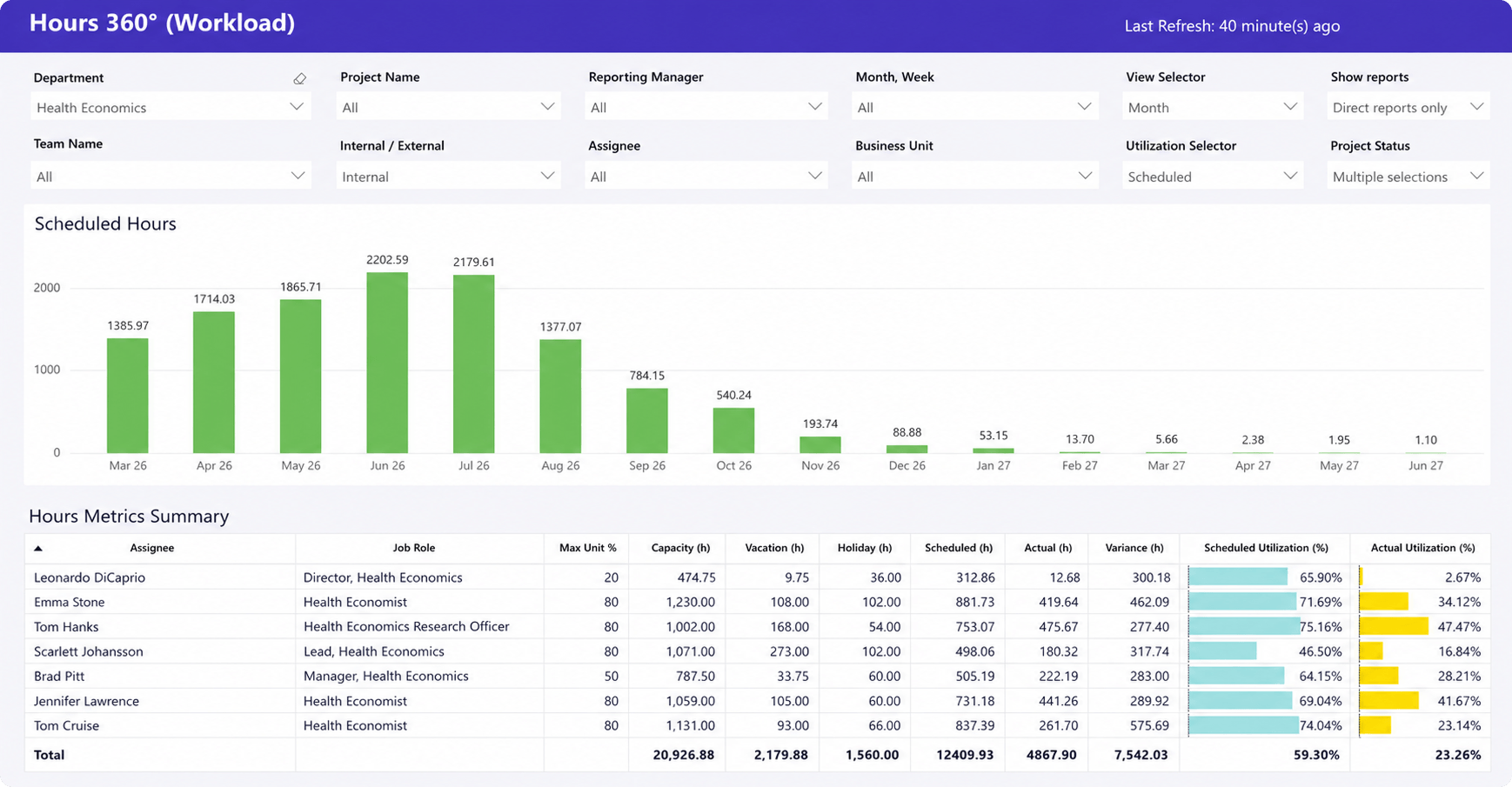
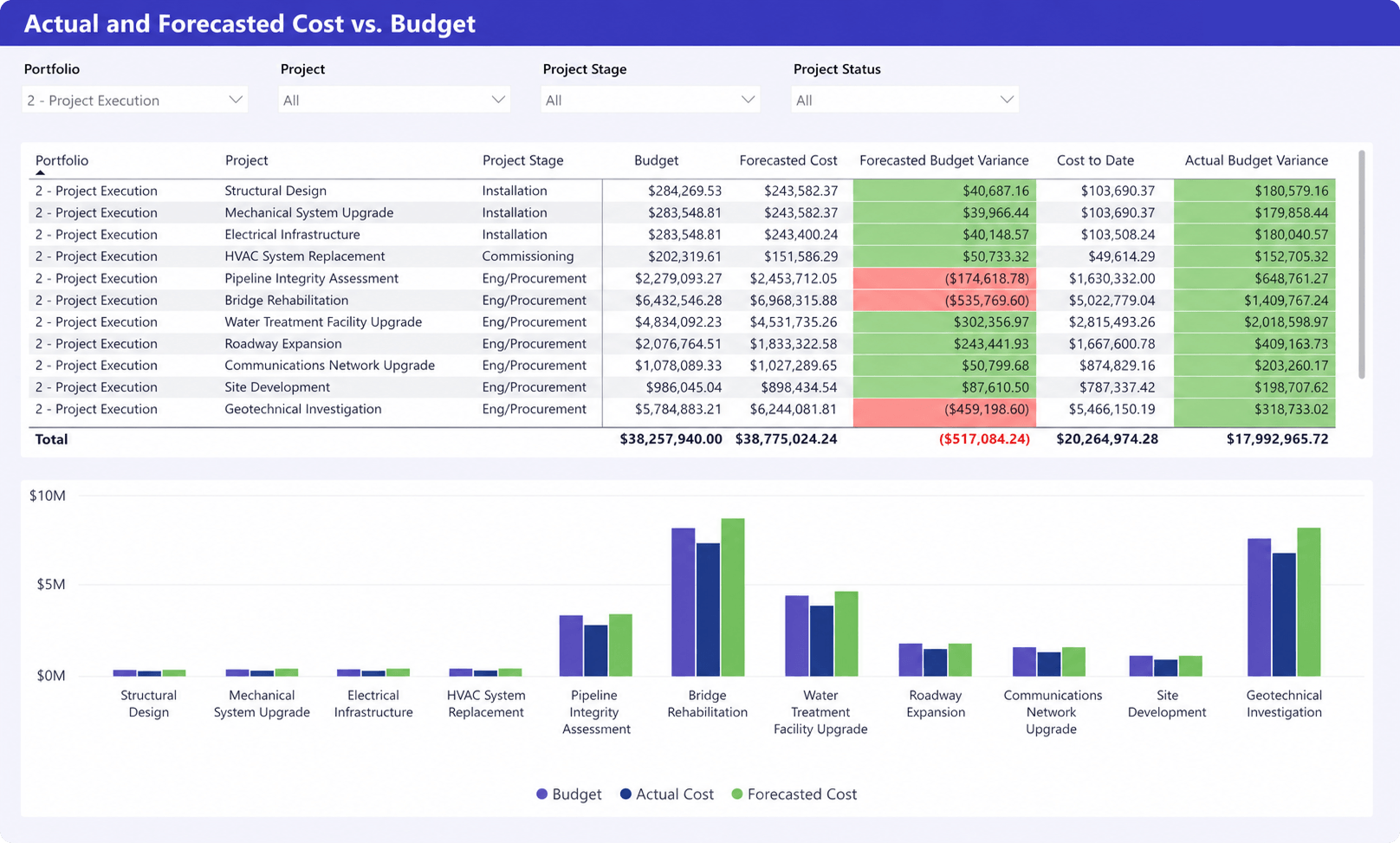
Example workflow: a consulting firm wins a fixed-fee engagement while its specialists are already busy with other clients. In Birdview, the delivery lead checks availability, builds the project plan, and tracks actual effort against the budget. Finance follows the agreed billing schedule, and approved time feeds cost and margin reporting.
What to check:
- Allocation-based resource planning requires Enterprise.
- AI availability varies by plan: Team includes the Project Plan and Message Assistants; Enterprise adds the Resource Assistant and AI Project Completion Forecast. Check applicable AI credit limits.
- Typical go-live takes 3–6 weeks with guided implementation.
- The Jira integration imports projects, issues, and estimates one way, from Jira to Birdview.
What reviewers say: 4.5/5 from 475 reviews on Capterra. Capterra’s review summary highlights visibility across projects and responsive support, and flags occasional slow loading. Reviewers also note that configuring custom views and workflows takes time.
Customer example: in a Birdview-published case study, SES Consulting reported 10% higher annual revenue and 15% higher profits. The engineering firm used project profitability reporting and resource visibility to manage delivery. These are customer-specific results, not a promised outcome. Read the SES Consulting case study.
Pricing: Team starts at a promotional $37 per user per month, billed annually, with a five-user minimum. Enterprise is priced by quote. Explore Birdview PSA features.
2. Kantata
Best for: mid-size and large professional services organizations with complex staffing and forecasting needs.
Why shortlist it: compare Kantata when you staff large teams across many concurrent projects and resource forecasting is the core decision your operations team makes every week.
Key strengths:
- Resource management and forecasting built for large teams.
- Project financials, time, and billing in the same platform.
- Integrations with ERP and accounting systems for larger finance teams.
What to check: ask for the expected scope of setup and ongoing administration for a firm your size, and which forecasting features are in the edition you are quoted.
What reviewers say: 4.2/5 from 628 reviews on Capterra. Reviewers value integrated project tracking and resource management built for services work. Some describe task management as cumbersome and mention a learning curve for new users.
Pricing: custom quote. See how Birdview compares with Kantata.
3. Certinia Professional Services Cloud
Best for: services organizations that already run sales and customer data on Salesforce.
Why shortlist it: if your sales team already works in Salesforce, evaluate how opportunities, staffing requests, and projects connect within that environment.
Key strengths:
- Native to Salesforce, so opportunities move into projects without a separate integration.
- Skills-based staffing, time, expenses, and billing on the same platform as CRM.
- Can be combined with Certinia Financial Management Cloud for broader financial management.
What to check: compare the full cost of Salesforce, PSA licensing, implementation, and ongoing administration, and decide who on your team will own configuration.
What reviewers say: reviewers on G2 value the deep Salesforce integration and end-to-end delivery and billing. Complaints include complex usability and a steep setup and learning curve.
Pricing: custom quote. Confirm which Salesforce licenses and Certinia applications are included.
4. BigTime
Best for: consulting, accounting, engineering, and IT firms where time capture and billing are the main priorities.
Why shortlist it: compare BigTime when unbilled hours and slow invoicing are your biggest leaks and you want a tool designed around billable time.
Key strengths:
- Time and expense tracking designed for billable work.
- Invoicing and payment collection.
- Project budgeting on the Premier plan; resource management as a separate module with AI staffing recommendations.
What to check: test the project planning features your delivery team needs, including dependencies, baselines, and cross-project visibility, in the plan you are quoted. BigTime lists an AI Assistant, with a Resourcing Agent in beta and further agents announced as coming soon; confirm which are released and included in your plan.
What reviewers say: 4.6/5 from 658 reviews on Capterra. Reviewers praise easy time entry, the QuickBooks integration, and support. Some find reporting generic and project management features less intuitive.
Pricing: Essentials starts at $20 per user per month. Confirm pricing for higher plans, resource management, implementation, and additional modules directly with BigTime. See how Birdview compares with BigTime.
5. Scoro
Best for: consultancies and agencies that want quoting, delivery, and invoicing in one connected workflow.
Why shortlist it: compare Scoro when your main friction sits between quoting and delivery, and finance keeps rebuilding scope and budgets after a deal is signed.
Key strengths:
- Quotes and contracts turn into projects and budgets.
- Resource planning, time tracking, and utilization reporting.
- Invoicing and financial reporting alongside sales tracking.
What to check: test whether an accepted quote carries the right scope, budget, and billing information into the project, and which features require higher tiers.
What reviewers say: 4.5/5 from 263 reviews on Capterra. Reviewers like having quoting, time tracking, resourcing, and invoicing in one place. Some mention limited customization and mixed experiences with support response times.
Pricing: combinations start at $17 per user per month (Time-billing). Projects & Resources and Quote to Cash are $29; End-to-end, which combines resource planning, estimating, and invoicing, is $57. Minimum five users. Annual billing is discounted 13–17%, so confirm which billing period a quote uses.
6. Productive
Best for: agencies and consultancies that manage work around budgets and profitability.
Why shortlist it: compare Productive when your leadership reviews profitability by client and budget burn every week and wants forecasting tied to those numbers.
Key strengths:
- Budgets, profitability, and revenue forecasting tied to projects.
- Resource scheduling, capacity planning, and scenario planning.
- Time tracking and invoicing in the same tool.
What to check: for engineering or architecture work, test phase budgets, dependencies, change control, and the reporting your contracts require. The AI Assistant is on every plan; agents are on Ultimate.
What reviewers say: 4.6/5 from 108 reviews on Capterra. Reviewers credit it with replacing several tools and showing profitability by client and project. Some report gaps in specific financial reports and a basic sales module.
Pricing: Essential costs about $10–$12 per user per month and Professional about $25–$29, depending on the billing period. Rate cards and billable time approvals are on Professional; Ultimate is priced by quote. Minimum three seats. See our Productive vs. Birdview PSA comparison.
7. Rocketlane
Best for: customer onboarding and software implementation teams that deliver client-facing projects.
Why shortlist it: compare Rocketlane when most of your projects are implementations or onboarding for a software product and the client works in the plan with you.
Key strengths:
- Built around implementation projects, with client collaboration and shared plans.
- Resource management, time tracking, and project financials.
- AI-assisted delivery: Rocketlane positions its Nitro agents around project execution, resourcing, and delivery governance.
What to check: if you also run consulting, engineering, or architecture work, check coverage of those delivery and billing models. Ask which AI actions are in your plan and which require human approval; Rocketlane lists its Resourcing Agents as coming soon.
What reviewers say: 4.7/5 from 127 reviews on Capterra. Reviewers praise client-facing visibility and easy collaboration during onboarding projects. Some mention slow-loading pages and a learning curve during setup.
Pricing: Standard is $49 and Premium $69 per team member per month, billed annually, with a five-member minimum. Resource and financial management start on Premium; Enterprise is priced by quote. Implementation packages are priced separately.
8. Accelo
Best for: smaller agencies and consultancies with many retainers and recurring client work.
Why shortlist it: compare Accelo when retainers are a large share of your revenue and you need allowances, periods, and overages handled without spreadsheets.
Key strengths:
- Retainer management with flexible periods and allowances.
- Client work in one place: sales, projects, tickets, time, and billing.
- Automations for recurring client work.
What to check: test forward staffing, tentative work, and portfolio reporting against your planning horizon. Accelo acquired Forecast in 2025; confirm which resource planning and AI capabilities are available in the product and package you are evaluating.
What reviewers say: 4.5/5 from 178 reviews on Capterra. Reviewers like centralizing client work, time, and billing in one system. Ease of use is its lowest-rated area (4.2/5), and some smaller firms find it expensive.
Pricing: custom quote based on team size and requirements. Confirm implementation costs and the modules included in your proposal. See how Birdview compares with Accelo.
AI capabilities to compare in PSA software
AI features deserve a place in your evaluation, but an “AI-powered” label tells you little. Compare the work each feature performs, the data behind its answers, and the control your team keeps.
| Use case | What to ask the vendor to demonstrate |
| Project planning | Create a draft plan, then show how a project manager reviews and changes it. |
| Resource recommendations | Explain which skills, availability, assignments, and rates influence a recommendation. |
| Delivery forecasting | Show the data behind a forecast and how it changes when project conditions change. |
| Reporting and project questions | Trace an answer or summary back to the underlying project records. |
Confirm what is available today, which subscription includes it, and whether usage requires credits or an add-on. Separate suggestions that need approval from actions the system performs automatically.
How to choose PSA software for your firm
Start from the problem you need to solve, then narrow the list by firm type and size. If you need the full evaluation process rather than a shortlist, follow our step-by-step guide on how to choose PSA software.
By the problem you need to solve
| If your main problem is... | Start with |
| Overbooked people and no view of next month’s capacity | Birdview PSA, Kantata |
| Hours that never reach an invoice | BigTime, Birdview PSA |
| Quotes, delivery, and invoices in separate tools | Scoro, Birdview PSA |
| Agency budgets and profitability by client | Productive, Accelo |
| Everything already lives in Salesforce | Certinia |
| Customer onboarding and implementation projects | Rocketlane |
By firm type
- IT consulting and IT services: look for capacity planning across clients, time approvals, and an integration with the tools engineers already use, such as Jira. Compare Birdview PSA, Kantata, and Rocketlane (for implementation-heavy teams).
- Engineering consulting: prioritize phase budgets, shared specialists, dependencies, and changes against the baseline. Include Birdview when project planning and resource coordination need to stay connected to actual effort and project costs; compare BigTime if your work is mostly time and billing driven. Our guide to PSA software for engineering firms covers these workflows in more detail.
- Management and HR consulting: compare how each platform handles fixed-fee engagements, retainers, and consultant utilization. Consider Birdview when shared staffing and project delivery are central, Scoro when quoting drives the workflow, and Accelo when recurring client work dominates.
- Environmental and compliance consulting: look for project budgets, document-heavy phases, and reliable time capture across many small projects. Compare Birdview PSA and BigTime.
- Architecture firms: look for fees by design phase, revision tracking, and project margin. Birdview PSA and Productive are worth comparing.
By firm size
- Under 20 people: prioritize fast setup, simple billing, and published pricing. Check minimum seats before you compare rates: Productive starts at 3 seats, while Birdview, Scoro, and Rocketlane start at 5. If one or two people run most projects, a lighter client work tool such as Teamwork.com or Accelo may be enough for now.
- 20 to 50 people: this is where spreadsheets usually break. Prioritize resource planning across projects and time approvals tied to billing.
- 50 to 200 people: prioritize forecasting, role-based permissions, and reporting finance can trust. Plan for a guided rollout of several weeks.
- 200+ people: prioritize integrations with ERP or CRM, multiple entities and currencies, and security requirements such as SSO and regional hosting. See our comparison of enterprise PSA software, and for Canadian data residency, our Canadian PSA roundup.
When Birdview PSA is not the best fit
- Your team is under five people. Birdview’s Team plan has a five-user minimum, so a smaller team pays for seats it does not use.
- You only need capacity forecasting. If your project, time, and billing tools already work, a lighter resource planning tool may cost less.
- You want to be live this week. Birdview typically goes live in 3–6 weeks because time, rate cards, and invoicing need setup.
- You run a managed services help desk. Ticketing, SLAs, and RMM are better served by MSP-focused PSA tools.
- Your company runs entirely on Salesforce. A Salesforce-native PSA such as Certinia may fit your admin team and data model better.
Questions to ask in every PSA demo
- Show me how a won deal becomes a staffed project, step by step.
- How do you see capacity across all projects for the next 8 weeks?
- Show how approved time supports time-and-materials invoicing, and how fixed-fee milestones and retainers are billed and tracked.
- Which integrations are native, which run through Zapier or an API, and which direction does data flow?
- What is typical time to go live for a firm of our size, and who does the setup?
- Which features in this demo are on the plan you are quoting?
- Show one AI recommendation using our project data. Explain its inputs, approval controls, plan requirements, and usage costs.
One project to test in every PSA demo
Bring a fixed-fee project with three delivery phases, shared specialists, a scope change, and milestone billing. Ask each vendor to show how the system handles the same workflow:
| Test | Evidence to request |
| Staff the project | Available specialists and existing commitments across client projects |
| Scope increases | Revised effort, budget, and approval record |
| Actual hours exceed the estimate | Updated cost and margin view |
| A milestone is completed | Invoice prepared under the agreed billing schedule |
| Check the plan | Which of the capabilities shown are included in the plan you’re quoted |
Running the same project through every demo shows the differences between tools in a way feature lists don’t.
Signs your current setup no longer works
- Resource planning still depends on spreadsheets outside the PSA.
- Project progress, recorded hours, and billing data need manual reconciliation.
- Utilization and margin reports arrive too late to guide decisions.
- Teams work around the system in spreadsheets and chat.
Switching to Birdview: a practical rollout plan
Birdview typically targets guided go-live in 3–6 weeks. This example covers active projects and essential workflows; complex integrations and historical migration may take longer.
| Phase | Focus |
| Preparation | Agree on scope, owners, billing models, and success criteria. |
| Configuration and migration | Set up users, approvals, and rates. Import supported data and validate it. |
| Pilot and training | Test staffing, time entry, reporting, and invoicing with a small project group. |
| Go-live | Expand access, validate the first billing cycle, and retire previous workflows when ready. |
Switching from an existing PSA: separate the data needed for active delivery from records you can archive. Confirm supported imports, map billing rules, and validate assignments, hours, and financial totals. Agree on a cutover date after testing the first reporting and billing cycle, and keep access to historical records.
The right PSA for your firm
Choose a PSA around your delivery model, resource needs, and billing requirements. Compare the plan you will actually use, including implementation, integrations, and ongoing administration.
Birdview PSA connects resource planning, project delivery, time approvals, and invoicing for firms managing shared specialists across client projects. Its built-in AI supports planning, staffing, and completion forecasting, with capabilities varying by plan.
The next step is to test your own workflow. Bring one active project, your staffing constraints, and a billing example to see how Birdview fits your firm.
Frequently asked questions
What is the best PSA software for professional services firms in 2027?
It depends on where your work gets stuck. For consulting, engineering, architecture, and IT services firms that share specialists across many client projects, we recommend Birdview PSA. Firms staffing very large teams should also evaluate Kantata, Salesforce-centric organizations Certinia, and software implementation teams Rocketlane. Shortlist two or three and run the same test project through each demo.
How is PSA software different from project management software?
Project management software focuses on planning and coordinating work. PSA connects delivery with resource availability, billable time, project costs, and invoicing. The distinction is the depth of the commercial workflow, although some project management platforms also offer resource and financial features.
Which PSA features matter most for consulting and engineering firms?
Prioritize resource planning across projects, task dependencies, time approvals, phase budgets, and profitability reporting. Check support for your billing models: time and materials, fixed fee, milestones, or retainers. Test these workflows in the quoted plan, including the integrations your delivery and finance teams need.
Which AI capabilities should I compare in PSA software?
Compare specific tasks: drafting project plans, recommending specialists, forecasting completion dates, and answering questions about project data. Ask what information each feature uses, how results are checked, and which actions require approval. Confirm plan requirements, usage limits, and whether features are available, in beta, or only announced.
How much does PSA software cost?
Compare the cost of the plan that supports your workflows, not the lowest advertised price. Include licenses, implementation, integrations, additional modules, AI usage, and ongoing administration. For Birdview, separate Team pricing from Enterprise pricing when you need allocation-based resource planning. Our breakdown of PSA costs for mid-size firms shows the full calculation.
How long does PSA implementation take?
Implementation timelines depend on data migration, billing rules, integrations, reporting, and training. Birdview typically targets go-live in 4–6 weeks for a focused rollout with guided onboarding. Complex deployments may take several months. Ask each vendor what their timeline includes and what your team needs to complete before go-live.
When is Birdview PSA not the best fit?
Birdview PSA is a weaker fit for teams under five people, firms that only need a capacity forecasting tool, and managed services providers whose work runs on tickets, SLAs, and device management. If you need to be live within days rather than weeks, or your operations must stay inside Salesforce, compare lighter tools or a Salesforce-native PSA such as Certinia.
How should I measure the ROI of PSA software?
Establish a baseline for billable utilization, unbilled hours, invoicing effort, and project margin before implementation. Compare results after adoption, accounting for changes in staffing and demand. Include the full ownership cost and avoid counting the same recovered hours under several benefits.