Ksenia Kartamysheva
 If you’ve worked in education for any length of time, you know that “project management” means something different on a campus than it does in most industries. You’re not just tracking deliverables. You’re coordinating across siloed departments, managing faculty schedules that shift every semester, and keeping IT, facilities, communications, and research teams all moving in roughly the same direction.
The reality has pushed many education teams to rethink their tools. Simple task trackers are no longer enough. In 2026, schools are looking for systems that bring structure without adding friction, and visibility without overwhelming users. In this article, we look at five project management tools with strong Canadian roots that work well in education settings.
Quick comparison: 5 best Canadian project management software for education
| Tool | Canadian HQ | Best for | Has portfolios? | Has resource management? |
| Birdview PSA | Toronto, ON | PMOs / campus-wide project delivery + reporting | Yes | Yes |
| Cerri Project | Montreal, QC | Enterprise portfolio governance | Yes | Yes |
| Function Point | Vancouver, BC | Creative/operations teams (communications/advancement) | Limited¹ | Yes |
| AceProject | Quebec City, QC | Small-to-mid education teams needing core PM | Basic | Limited |
| Nutcache | Laval, QC | Small operational teams needing simple time/cost tracking | Basic | Limited |
What to look for in 2026 (beyond basic PM features)
Educational institutions have different needs than software startups or consulting firms. At the same time, most education teams already know the basics. Tasks, deadlines, and shared files are expected. What matters more now is how the system supports real-world academic work.
Easy adoption across mixed roles
Not everyone in a school is a project professional. Faculty members, administrators, and support staff all interact with projects differently. Tools need to feel approachable. If people avoid logging in, the system will fail no matter how powerful it is.
Portfolio visibility for leadership
Leadership teams need to see the full picture. Not just one project, but how everything fits together. Which initiatives are at risk. Where capacity is stretched. What can wait.
Resource and workload awareness
Education teams often share people across projects. Teaching schedules, research time, and administrative work all overlap. Tools that show workloads clearly help avoid burnout and unrealistic plans.
Security, privacy, and governance controls
Student data, research IP, donor information. You can’t mess around with access controls or audit trails.
Reporting that reduces manual effort
If teams still rely on spreadsheets for status updates, something is missing. Good reporting saves time and supports better decisions.
Integrations with everyday systems
Single sign-on, productivity tools, and finance systems matter. The less duplicate work, the better.
How we picked the best project management tools
We evaluated tools based on several key criteria:
- Canadian footprint: Headquarters or formal Canadian presence with dedicated support
- Education readiness: Ability to handle education-specific workflows and mixed user groups
- Portfolio and resource strength: Capabilities beyond basic task tracking
- Security and compliance: Access controls, audit trails, and data protection features
- Onboarding and support: Quality of implementation help and ongoing assistance
- Value and trial access: Pricing transparency and ability to test before committing
📚 Read more: Top software solutions made in Canada (2026)
5 best project management tools for education in Canada
1. Birdview PSA
Headquarters: Toronto, Ontario, Canada
Best for: PMOs and institutional teams needing portfolio and resource visibility
Birdview PSA is a Canadian project management software (developed by a Toronto-based company) and serves as the “heavy lifter” in the Canadian educational landscape. It is specifically designed for Project Management Offices (PMOs) and large-scale institutional departments that have outgrown basic task trackers. Instead of just managing individual to-do lists, Birdview allows university administrators to oversee hundreds of complex projects, including campus-wide IT upgrades, large research grants, and facility expansions, all from a single dashboard.
The platform focuses on portfolio visibility and resource planning, allowing education leaders to track work across departments and identify staff capacity constraints without relying on multiple spreadsheets. Birdview balances task-level execution for teams with high-level oversight for leadership, eliminating the need for separate tools for planning, tracking, and reporting. This makes it an ideal fit for universities and colleges managing complex, multi-departmental initiatives.
Key features:
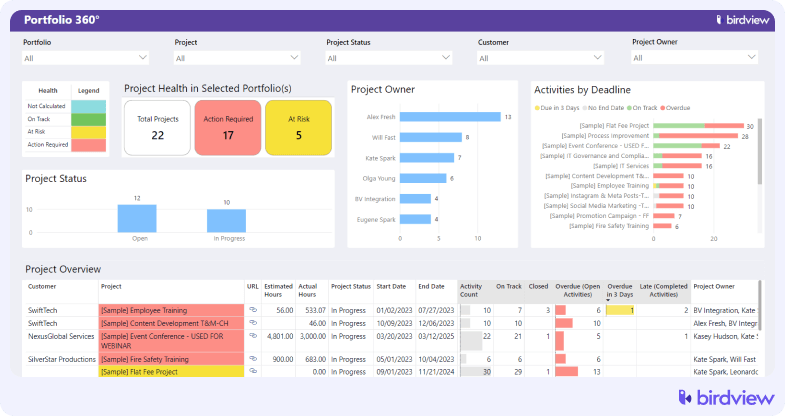
Group related projects together (like all facility upgrades or all enrollment initiatives) so leadership can see progress, budgets, and risks across entire programs rather than hunting through individual project files.
- Project templates
Create standardized workflows for recurring projects like semester planning, course launches, or annual campaigns. Project templates ensure nothing gets missed and new project managers don’t have to reinvent the wheel.
- Resource capacity planning and workload management
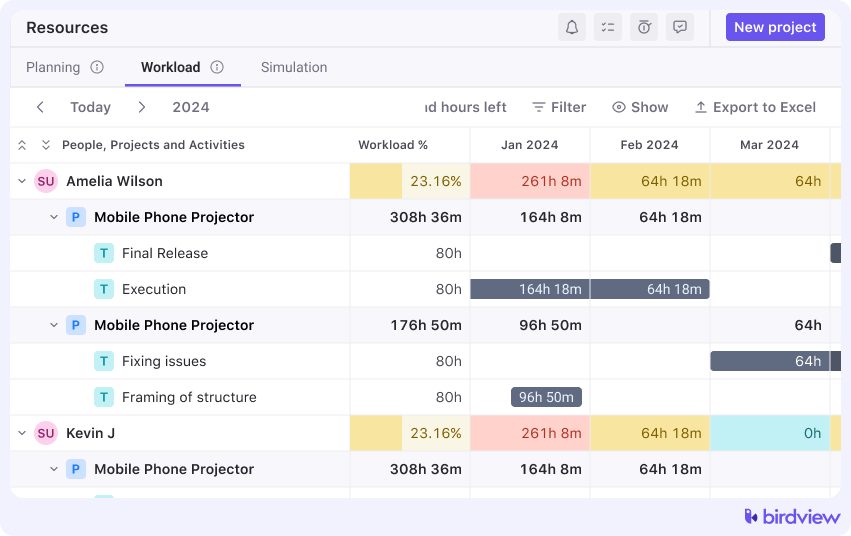
See exactly how much work each team member has scheduled across all projects. Spot overallocation before it becomes burnout. Distribute work evenly across your team based on actual availability, skills, and current commitments. Prevent the common problem of star performers getting overloaded while others have capacity.
- Budget tracking
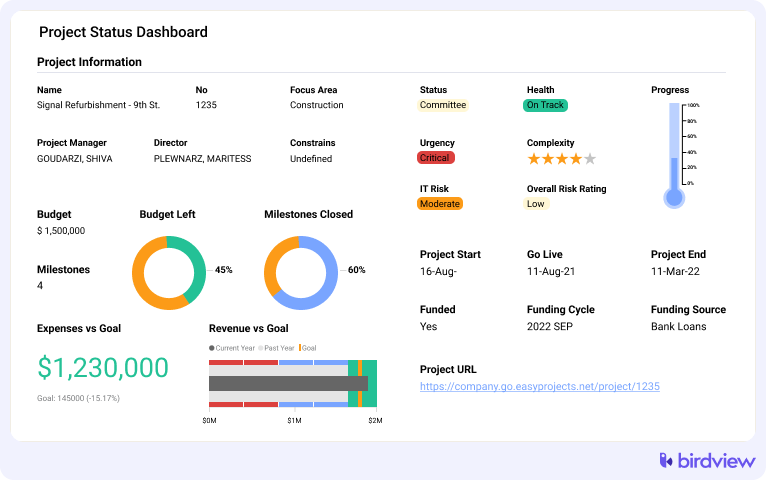
Monitor project spending against approved budgets in real time. Essential for grant-funded work, capital projects, or any initiative where financial accountability matters.
- Dashboards and BI reporting
Build custom dashboards for different audiences. Executives see portfolio health. Department heads see their team’s workload. Project managers see task completion rates. Everyone gets the view they need.
- Role-based permissions
Control who can view, edit, or approve different aspects of projects. Critical for institutions managing sensitive research, donor information, or projects spanning multiple departments with different access requirements.
- APIs and integrations
Connect to campus systems like SSO, productivity suites, and finance platforms. Reduces duplicate data entry and keeps information synchronized across tools.
Trial: 14-day free trial, extendable to 28 days
Pros:
- Strong enterprise-ready portfolio and resource capabilities
- Excellent executive dashboards and reporting
Cons:
- May require more setup than lightweight apps
- More than some small departments need
2. Cerri Project
Headquarters: Montreal, Quebec, Canada
Best for: Enterprise governance and structured portfolio oversight
Cerri Project (previously called Genius Project) is designed for organizations that need rigorous governance and cross-portfolio oversight. Think large universities managing capital projects, research portfolios, and operational initiatives all under one roof.
Key features: Portfolio management, governance workflows, resource planning, dashboards and reporting, risk and issue tracking, role-based access, configurable processes
Trial: demo and trial options available on request
Pros:
- Deep portfolio governance and oversight
- Strong resource planning features
Cons:
- Heavier implementation than lightweight tools
- Not as intuitive for casual users
3. Function Point
Headquarters: Vancouver, British Columbia, Canada
Best for: Communications, creative, and internal services teams
Function Point supports project planning with time tracking, resource scheduling, and operations dashboards. It’s particularly useful for creative and communications departments within education (marketing teams, advancement offices, internal design groups).
Key features: Task workflows, resource scheduling, estimating and budgeting, time tracking, reporting and analytics, approval workflows, collaboration tools
Trial: A limited 14 to 30-day trial is typically available
Pros:
- Good for “service team” workflows
- Strong resource scheduling features
Cons:
- Agency-focused concepts may need some adaptation
- Portfolio controls lighter than PMO-centered tools
4. AceProject
Headquarters: Quebec City, Quebec, Canada
Best for: Small to mid-sized education departments needing straightforward PM
AceProject offers basic project and task management with timesheets, Gantt charts, calendars, and collaboration features. It’s ideal for mid-sized academic teams that don’t need enterprise complexity but want more structure than a shared spreadsheet.
Key features: Task management, Gantt and timeline views, file sharing, timesheets, calendars, project workspaces, basic reporting
Trial: A free plan is available
Pros:
- Easy to adopt for smaller teams
- Core PM features included
Cons:
- Limited portfolio capabilities
- Resource planning is basic
5. Nutcache
Headquarters: Laval, Quebec, Canada
Best for: Small teams needing lightweight PM with time and budget tracking
Nutcache is a lightweight PM app with task boards, time tracking, budget monitoring, and simple dashboards. It’s best suited for smaller operational teams or research groups that need to track work and costs without a lot of overhead.
Key features: Task management, time tracking, expense tracking, project budgets, dashboards, invoicing and estimates
Trial: A free plan is available
Pros:
- Low barrier to entry (free tier)
- Useful time and budget tracking
Cons:
- Portfolio and advanced resource features are limited
- Not ideal for enterprise-scale PMO use
How to choose the best project management software for education in Canada (checklist)
Picking the right tool isn’t just about features. It’s about finding something that actually fits your institution’s reality. Use this checklist to work through your decision systematically:
☐ Define your core users
- Who will use this daily? (PMO staff, faculty, administrators, multiple departments)
- What’s their technical comfort level?
- How many total users do you expect?
☐ Map your key workflows
- How do projects currently get approved?
- Who needs sign-off authority?
- What reports does leadership expect and how often?
- Where do handoffs typically break down?
☐ Prioritize portfolio and resource needs
- Are you managing multiple concurrent projects?
- Do projects share resources across departments?
- Do you need visibility into workload distribution?
- Is portfolio-level reporting critical for leadership?
☐ Assess security and compliance requirements
- What data protection regulations apply to your institution?
- Do you need SSO integration?
- Are detailed audit trails required?
- Do you have data residency requirements?
☐ Run pilot tests with real projects
- Select 2-3 actual ongoing projects for testing
- Involve real users, not just evaluators
- Test for at least two weeks
- Document what works and what doesn’t
☐ Compare total cost of ownership
- License fees per user
- Implementation and setup costs
- Training time and resources
- Ongoing administration burden
- Support and maintenance fees
☐ Evaluate support and onboarding
- What training is included?
- How responsive is customer support?
- Are there Canadian support hours?
- What happens after the trial period?
FAQ
Q: What’s the difference between project and portfolio management in education?
A: Project management handles individual initiatives like a website redesign or research grant. Portfolio management gives you a bird’s-eye view of all projects, helping you balance resources and decide what to prioritize. Most institutions need both once they’re juggling multiple projects.
Q: Do education teams need resource management or just task tracking?
A: Small teams with a few projects can manage with task tracking. Once you’re running multiple projects with shared staff, resource management becomes essential. It’s the difference between guessing at workloads and actually knowing who’s available.
Q: How should schools consider data residency and privacy requirements?
A: First, identify what regulations apply to your institution and any specific research grant requirements. Then ask vendors directly where data is stored, how it’s protected, and what compliance certifications they hold.
Q: What integrations matter most (SSO, productivity suites, HR/finance)?
A: SSO is essential to avoid password fatigue. Productivity suite integration (Google Workspace, Microsoft 365) improves collaboration. HR and finance connections matter if you need to sync resource availability or budget data automatically.
Q: How do you drive adoption across departments?
A: Identify champions in each area and involve them early. Provide actual training, not just documentation links. Show quick wins that solve real problems. Be patient. Change takes time in academic environments.
Q: What should pilots measure to make confident decisions?
A: Track user adoption rates and time saved on reporting or resource allocation. Gather honest feedback on what’s easier versus harder. Confirm the dashboards show the data you need for decisions. Test how quickly support responds when issues come up.