Ksenia Kartamysheva
 Project work becomes harder to manage when plans, documents, schedules, budgets, and updates live in different places. A Project Management Information System, or PMIS, helps teams bring that information together so they can plan, track, and control projects with more confidence.
Instead of switching between spreadsheets, emails, shared folders, chat messages, and disconnected reports, a PMIS gives project managers one structured place to manage project information. It helps teams organize work, monitor progress, manage resources, and keep stakeholders informed.
In this article, you’ll learn what PMIS means, how it works, which features matter most, how project managers use it in daily work, and which PMIS trends matter in 2026, including AI-assisted project visibility, resource planning, and connected reporting.
Quick answer: What is a PMIS?
A Project Management Information System, or PMIS, is a centralized system that helps teams plan, manage, monitor, and report on projects. It brings project schedules, tasks, resources, documents, communication, budgets, and performance data into one place.
For project managers, a modern PMIS acts as a working system for project control. It helps them understand what is happening, what has changed, where risks are appearing, and what needs attention next.
PMIS meaning: What does PMIS stand for?
PMIS stands for Project Management Information System. It refers to the tools, processes, and project data used to support project planning, execution, monitoring, reporting, and control.
In simple terms, a PMIS helps project teams keep project information organized and usable. Instead of managing work through scattered spreadsheets, emails, documents, and status meetings, teams use a PMIS as a central source of project information.
A PMIS is not just a place to store files. A good PMIS helps project managers turn project data into decisions, such as which tasks need attention, where resources are overloaded, whether the project is on budget, and what stakeholders need to know.
What is a PMIS used for in project management?
A PMIS is used to give project managers and teams one reliable place to plan, track, and control project work.
In daily project management, information changes constantly. Tasks move, deadlines shift, approvals wait, budgets change, and stakeholders ask for updates. Without a connected system, project managers often spend too much time chasing information instead of managing the project.
A PMIS helps teams bring that information together. It can be used to:
- Plan project tasks, milestones, timelines, and dependencies
- Store project documents, decisions, and approvals
- Track progress against schedules, budgets, and goals
- Manage resources, workload, and availability
- Monitor risks, issues, and changes
- Create dashboards and project reports
- Support communication between teams and stakeholders
- Use current and historical project data to make better decisions
For project managers, the value of a PMIS is not just better organization. The real value is being able to understand project status faster, identify issues earlier, and communicate with stakeholders using more reliable information.
How project managers use a PMIS day-to-day
In daily work, a PMIS helps project managers move from chasing updates to managing work with better visibility.
At the start of the day, a project manager can review project status, overdue tasks, upcoming milestones, workload, budget changes, and open risks in one place. During the day, they can update schedules, assign work, review approvals, check resource availability, and communicate changes to the team. Before stakeholder meetings, they can use dashboards and reports instead of rebuilding status updates manually.
A PMIS helps project managers answer practical questions faster:
- What changed since the last update?
- Which tasks are late or blocked?
- Are we still on schedule and within budget?
- Who is overloaded or available?
- Which risks need attention this week?
- What should be included in the next status report?
This is where a PMIS becomes more than a project database. It becomes a working system for planning, tracking, communicating, and making decisions.
PMIS trends to watch in 2026
In 2026, PMIS tools are becoming more connected, data-driven, and practical for daily project control. The most important trends include AI-assisted project visibility, stronger resource and capacity planning, connected reporting, and better support for both internal and client-facing project work.
For project managers, this means a PMIS is no longer just a place to store project information. It is becoming a system that helps teams understand what changed, what is at risk, who is overloaded, and what needs action next.
How an AI assistant makes a PMIS more useful
An AI assistant can make a PMIS more useful by helping project managers work with project data faster.
Instead of manually checking several dashboards, task lists, and reports, a project manager can ask questions such as:
- Which projects need attention this week?
- Which tasks are overdue?
- What changed since the last status update?
- Which team members may be overloaded?
- What should be included in the next stakeholder report?
The AI assistant does not replace project management judgment. It helps project managers find signals faster, summarize information more clearly, and spend less time preparing updates manually.
Key features of a PMIS
When you’re handling multiple timelines, stakeholders, resources, and deliverables, you need more than a task list. A Project Management Information System brings the main parts of project work into one connected system.
Most PMIS platforms include features for project planning, time tracking, resource management, budget control, document management, reporting, risk tracking, and collaboration.
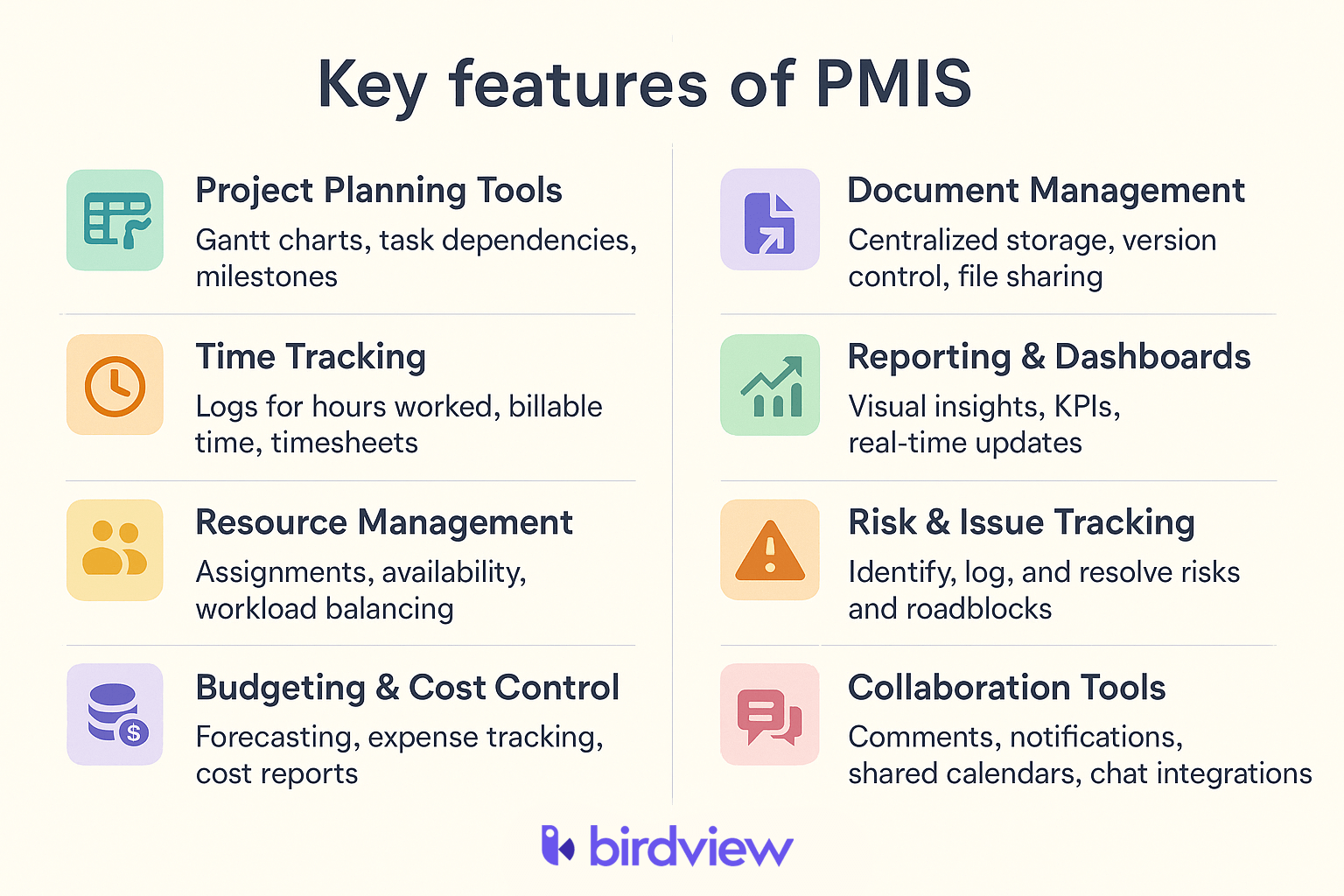
The best PMIS is not the one with the longest feature list. It is the one that helps project managers answer practical questions faster: what changed, what is late, who is overloaded, what is at risk, and what needs action next.
Benefits of using a PMIS for project managers
So why do project managers and teams use a Project Management Information System in the first place?
A PMIS helps simplify the day-to-day work of managing projects by bringing everything into one structured space. It supports teams with better organization, faster communication, and a clearer view of progress and priorities. Here are some of the key benefits:
- Greater visibility: Everyone involved in the project can see updates, deadlines, and performance metrics without needing to search for information. It’s easier to stay aligned when everything is in one place.
- Smarter decisions: With real-time data available, project managers can make informed choices based on accurate information, rather than relying on guesswork or outdated reports.
- Time saved through automation: Routine tasks, such as tracking time, generating reports, or updating project status, can be handled automatically, allowing teams to spend more time on work that moves the project forward.
- Easier team collaboration: Built-in tools for messaging, file sharing, and commenting make it simpler for people to work together and stay up to date, even if they’re not in the same location.
- Room to grow: As your team or project list expands, a PMIS can scale with you. It’s flexible enough to support more users, more data, and more complex workflows without needing a major overhaul.
- Fewer surprises: Early warnings about risks or delays give teams time to respond before issues get out of hand. Monitoring key indicators helps prevent problems rather than just reacting to them.
- Clearer accountability: When tasks, deadlines, and responsibilities are visible to the whole team, it’s easier to stay on track and hold everyone accountable for their part in the project.
How a PMIS supports the project life cycle
A Project Management Information System (PMIS) supports every stage of the project life cycle, from early planning to final closeout. It gives project managers one place to manage goals, tasks, resources, budgets, documents, communication, and reporting as the project moves forward.
Here’s how a PMIS supports each stage.
1. Initiation
At the start of a project, a PMIS helps teams capture the basic information needed to move forward: goals, business justification, early requirements, stakeholders, risks, and approvals.
Instead of working from scattered notes and email threads, project managers can create a clearer foundation for the project from the beginning.
2. Planning
During planning, a PMIS helps teams break work into tasks, define milestones, estimate timelines and budgets, assign responsibilities, and plan resources.
This gives project managers a clearer view of how the project should unfold, where dependencies exist, and which resources are needed to deliver the work.
3. Execution
During execution, teams use a PMIS to assign tasks, update progress, share files, communicate changes, and manage daily project activity.
When priorities shift or deadlines change, updates can be reflected in the system, helping everyone work from the same information.
4. Monitoring and controlling
As work progresses, a PMIS helps project managers track schedule, budget, workload, risks, and performance.
Dashboards and reports make it easier to see whether the project is on track. If a delay, budget issue, or resourcing problem appears, the project manager can respond earlier instead of waiting for a manual status update.
5. Closing
At the end of the project, a PMIS helps teams organize final deliverables, close outstanding tasks, document approvals, and capture lessons learned.
This creates a cleaner project closeout and gives the team useful historical data for future planning.
Challenges of implementing a PMIS
A Project Management Information System (PMIS) can bring structure, visibility, and better control to project work. But the value does not appear automatically after the system is launched. Teams need the right setup, clean data, clear workflows, and consistent adoption.
Here are the most common challenges project managers should prepare for.
1. Change can be uncomfortable
Switching to a new system means asking people to move away from familiar tools and habits. If the PMIS feels too complicated or the benefits are not clear, adoption can be slow.
Project managers can reduce resistance by explaining why the change matters, showing how the system helps daily work, and giving the team practical support during the transition.
2. Choosing the wrong tool
A PMIS that is too complex can slow teams down. A PMIS that is too limited may not support reporting, resource planning, budgets, approvals, or long-term growth.
Before choosing a system, teams should define what they need to manage: tasks, timelines, resources, budgets, documents, risks, clients, reports, or all of these together. The right PMIS should match the way the team actually works.
3. Rushed or incomplete setup
Skipping setup steps can create problems later. If permissions, workflows, templates, dashboards, and approval paths are not configured properly, the system may not reflect real project processes.
A thoughtful setup helps the PMIS become part of daily work, not just another tool sitting next to spreadsheets and email.
4. Not enough training
Even a strong PMIS will not help if people do not know how to use it. Without training, team members may return to old habits or use only a small part of the system.
Training should be practical and role-based. Project managers, team members, executives, and finance users do not need the same level of detail. Each group should understand the parts of the PMIS they will use most often.
5. Trouble moving existing data
Migrating project data can be difficult, especially when information is spread across spreadsheets, email threads, shared folders, and older tools.
Before moving data, teams should clean up outdated records, remove duplicates, and decide what information is worth migrating. Poor data migration can make the new PMIS harder to trust from day one.
6. No clear ownership after launch
A PMIS needs ongoing ownership. Project structures, workflows, users, reports, and business needs will change over time.
If nobody owns system updates, the PMIS can become outdated. Assigning an internal owner helps keep templates, dashboards, permissions, and processes aligned with how the team works.
7. Treating the PMIS as a reporting tool only
One common mistake is using the PMIS only before status meetings or leadership reviews. If updates happen only once a week or once a month, the system will always show an outdated version of reality.
A PMIS is most useful when it becomes part of daily project management. Teams should use it to update work, track decisions, manage risks, review workload, and communicate changes as they happen.
PMIS implementation process
Once a team chooses a Project Management Information System (PMIS), the next challenge is making it part of daily project work. Implementation is not just a software setup. It requires clear ownership, clean data, practical workflows, training, and regular improvement after launch.
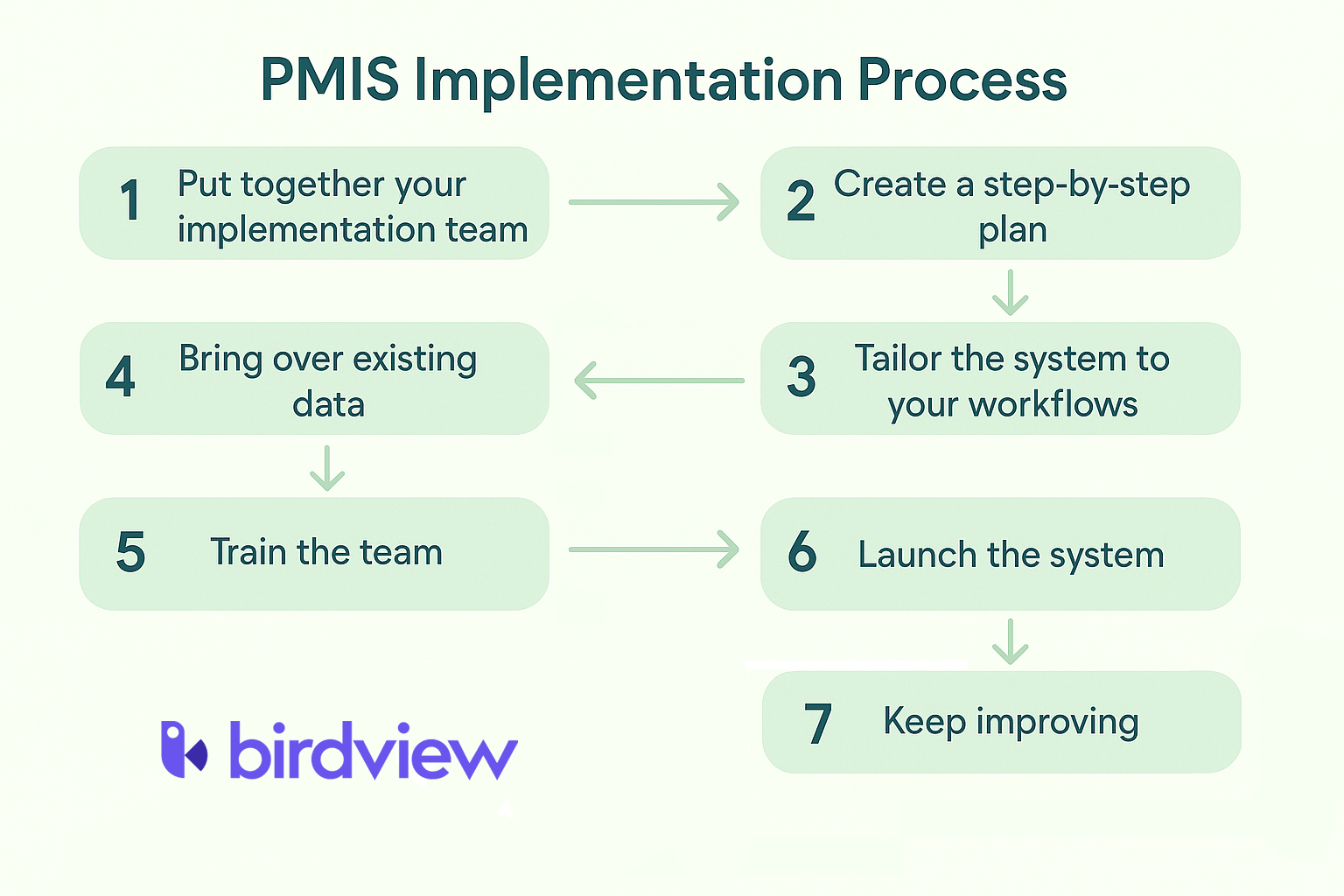
Here is a simple implementation process project managers can follow.
1. Build the implementation team
Start by assigning clear roles. Most teams need a project owner, a technical lead from IT or operations, and several project users who understand how the team actually works.
This group should support setup, answer questions, test workflows, and help the rest of the team adopt the system.
2. Create a rollout plan
Define the main implementation steps, such as configuration, data migration, training, testing, and launch.
For larger teams, a phased rollout may work better than launching everything at once. This gives the team time to test the system, collect feedback, and adjust before expanding usage.
3. Configure the PMIS around real workflows
A PMIS should reflect how the team manages projects, not an ideal process that nobody follows.
Set up project templates, user roles, permissions, dashboards, approval flows, reporting views, and integrations with tools the team already uses. The closer the PMIS matches daily work, the easier adoption becomes.
4. Clean and migrate project data
Before moving data into the PMIS, review what should actually be migrated. Old schedules, duplicate files, outdated tasks, and incomplete records can create confusion in the new system.
Focus on moving useful project information, such as schedules, task lists, documents, resource assignments, budgets, risks, and active project history.
5. Train users by role
Training should match how different people use the system.
Project managers may need deeper training on planning, reporting, resources, and budgets. Team members may only need to know how to update tasks, log time, upload files, or respond to approvals. Executives may mainly need dashboards and portfolio views.
Role-based training helps people learn what matters for their work instead of overwhelming them with every feature.
6. Launch and monitor adoption
After setup and training, launch the system and watch how people use it. Early feedback is important because small workflow problems can quickly push teams back to spreadsheets, email, or chat.
Project managers should monitor whether tasks are updated, reports are trusted, documents are stored correctly, and teams are using the PMIS as the main source of project information.
7. Keep improving after launch
PMIS implementation does not end on launch day. Project structures, reporting needs, workflows, and teams will change over time.
Review the system regularly, update templates, improve dashboards, remove unused fields, and continue training new users. A PMIS stays useful only when someone owns it and keeps it aligned with how the team works.
PMIS examples
There is no one-size-fits-all Project Management Information System. The right PMIS depends on the type of projects a team manages, how much reporting is needed, how resources are assigned, and whether the team also needs budget, time, or client visibility.
Common PMIS examples include enterprise project portfolio management platforms, professional services automation software, construction project management systems, IT project management systems, and internal PMO platforms.
For professional services teams, a PSA platform can often work as a practical PMIS because it connects project planning, resource management, time tracking, reporting, and financial visibility in one system.
Birdview PSA as a PMIS example
Birdview PSA is one example of a PMIS for professional services and project-based teams. It helps teams manage project planning, execution, resources, budgets, time tracking, reporting, and collaboration in one connected platform.
This matters because service-based teams often manage many moving parts at the same time: client projects, shared resources, billable and non-billable time, budgets, approvals, and stakeholder updates. When this information lives in separate tools, project managers spend more time chasing updates and less time managing delivery.
For teams in consulting, IT services, engineering, agencies, and other service-based industries, Birdview PSA functions as more than a task management tool. It works as a project information system that connects delivery work with resource and business visibility.
How Birdview PSA supports PMIS needs
For professional services and project-based teams, a PMIS needs to do more than store project information. It should connect planning, resources, time and expenses, financial visibility, reporting, and collaboration in one working system.
Birdview PSA brings these areas together, giving project managers a clearer view of delivery work and reducing the need to manage projects across spreadsheets, emails, disconnected reports, and separate tools
Centralized project planning and execution
Teams can manage project timelines, tasks, milestones, budgets, and responsibilities in one place. Project managers can plan work, assign owners, monitor progress, and keep project information connected as delivery moves forward.
This makes day-to-day execution easier to control because schedules, responsibilities, and updates are not spread across multiple systems
Resource management
Resource planning is built into the project workflow. Managers can review capacity, understand workload, and assign work based on availability, roles, and skills.
This is especially useful when the same people are shared across multiple projects and small resource conflicts can quickly affect delivery.
Reporting and project visibility
Dashboards and reports give teams a clearer view of project health, timelines, budgets, workload, and performance.
Instead of rebuilding status updates manually, project managers can use current project data to understand what is on track, what has changed, and what needs attention.
AI assistant
Birdview PSA’s AI assistant helps project managers work with project information faster. Instead of manually checking tasks, timelines, workload, reports, and updates, managers can use AI-assisted insights to summarize what is happening and identify where attention may be needed.
The AI assistant can support daily project work by helping teams review project status, surface overdue tasks, spot workload pressure, and prepare stakeholder updates more efficiently.
This does not replace project management judgment. It gives project managers a faster way to work with project data, understand signals earlier, and spend less time pulling information together manually.
Time and expense tracking
Teams can track billable and non-billable time, capture project-related expenses, compare planned and actual work, and connect time and expense data with budgets and project finances.
This gives project managers and finance teams a clearer view of how delivery work affects cost, revenue, and profitability.
Cross-functional collaboration
Sales, delivery, finance, and project teams can work from shared project information. This reduces tool switching, improves handoffs, and keeps communication connected to the work being delivered.
For service-based teams, this matters because project delivery often depends on several departments working from the same facts.
Client portal and approvals
A secure client portal gives clients a controlled way to review progress, access documents, and provide approvals.
This improves transparency and reduces delays caused by unclear communication, scattered feedback, or missing approvals
Scalability for project-based teams
Birdview PSA can support teams managing a few projects or a larger portfolio of client and internal work. It is especially relevant for consulting firms, IT service providers, engineering teams, agencies, and other service-based organizations that need stronger control over projects, resources, time, and reporting.
The main value is not just having another project tool. It is having a connected PMIS that helps project managers control delivery, understand resource pressure, track financial impact, and communicate progress with more confidence
Bring project information into one connected system
Birdview PSA helps project-based teams manage project plans, resources, time, budgets, reporting, and collaboration in one place. Teams can reduce tool switching, improve visibility, and keep project work easier to track from start to finish.
Further reading:
FAQ: PMIS
What does PMIS stand for?
PMIS stands for Project Management Information System. It is a system used to plan, manage, monitor, and report on project work.
What is a PMIS in project management?
A PMIS is a centralized system that helps project managers organize project schedules, tasks, resources, documents, budgets, communication, and reporting in one place.
What is the main purpose of a PMIS?
The main purpose of a PMIS is to give project managers reliable project information so they can track progress, manage resources, identify risks, and make better decisions.
What are the key features of a PMIS?
Common PMIS features include project planning, task management, resource management, time tracking, budgeting, document management, reporting, dashboards, and collaboration tools.
How does a PMIS help project managers?
A PMIS helps project managers reduce manual tracking, improve visibility, prepare reports faster, manage resources, monitor risks, and keep stakeholders aligned.
Is PMIS the same as project management software?
Not always. Project management software may focus mainly on tasks, timelines, and collaboration. A PMIS is usually broader because it connects project data, resources, documents, budgets, reporting, and control processes.
Can PSA software work as a PMIS?
Yes. For professional services teams, PSA software can work as a PMIS because it connects project planning, resource management, time tracking, financial visibility, reporting, and client collaboration.