Arkady Katcherovski
 - ERP systems are designed to manage financial operations such as accounting, payroll, procurement, and compliance, but they are not built to manage the day-to-day delivery of client projects.
- As professional services firms grow, operational work often moves outside the ERP into spreadsheets, disconnected project tools, and manual reporting processes, creating visibility gaps across delivery and finance.
- Common signs that an ERP-only approach is no longer sufficient include manual resource planning, delayed utilization reporting, disconnected project financials, manual invoice preparation, and limited portfolio visibility.
- Professional Services Automation (PSA) software complements ERP by connecting project management, resource planning, time tracking, utilization, budgeting, billing, and project profitability into a single operational system.
- The most effective technology architecture for professional services firms combines ERP for financial management with PSA for service delivery, giving each platform clear ownership of the data and processes it manages best.
Your ERP can close the books, process payroll, and report revenue accurately. It can still leave your delivery team unable to answer three basic questions:
- Who is available for the next project?
- Which active engagement is consuming budget too quickly?
- Are we still making money on the work being delivered?
That gap does not mean the ERP has failed. It means the business is asking a finance system to manage a delivery operation.
Enterprise Resource Planning systems are built to manage accounting, human resources, procurement, payroll, compliance, and other back-office functions. Professional services firms also need to manage client projects, resource capacity, time, billing, utilization, and project profitability while work is still in progress.
The distinction matters as a firm grows. Delivery teams start creating resource spreadsheets. Project managers maintain separate budget trackers. Finance exports timesheets before preparing invoices. Leadership spends the first part of every operating review reconciling different versions of the same project.
The ERP remains the financial system of record. What is missing is a delivery system of record.
This article explains the operational signs that an ERP-only model is no longer sufficient, why adding more ERP modules rarely closes the gap, and how Professional Services Automation software complements ERP without replacing it.
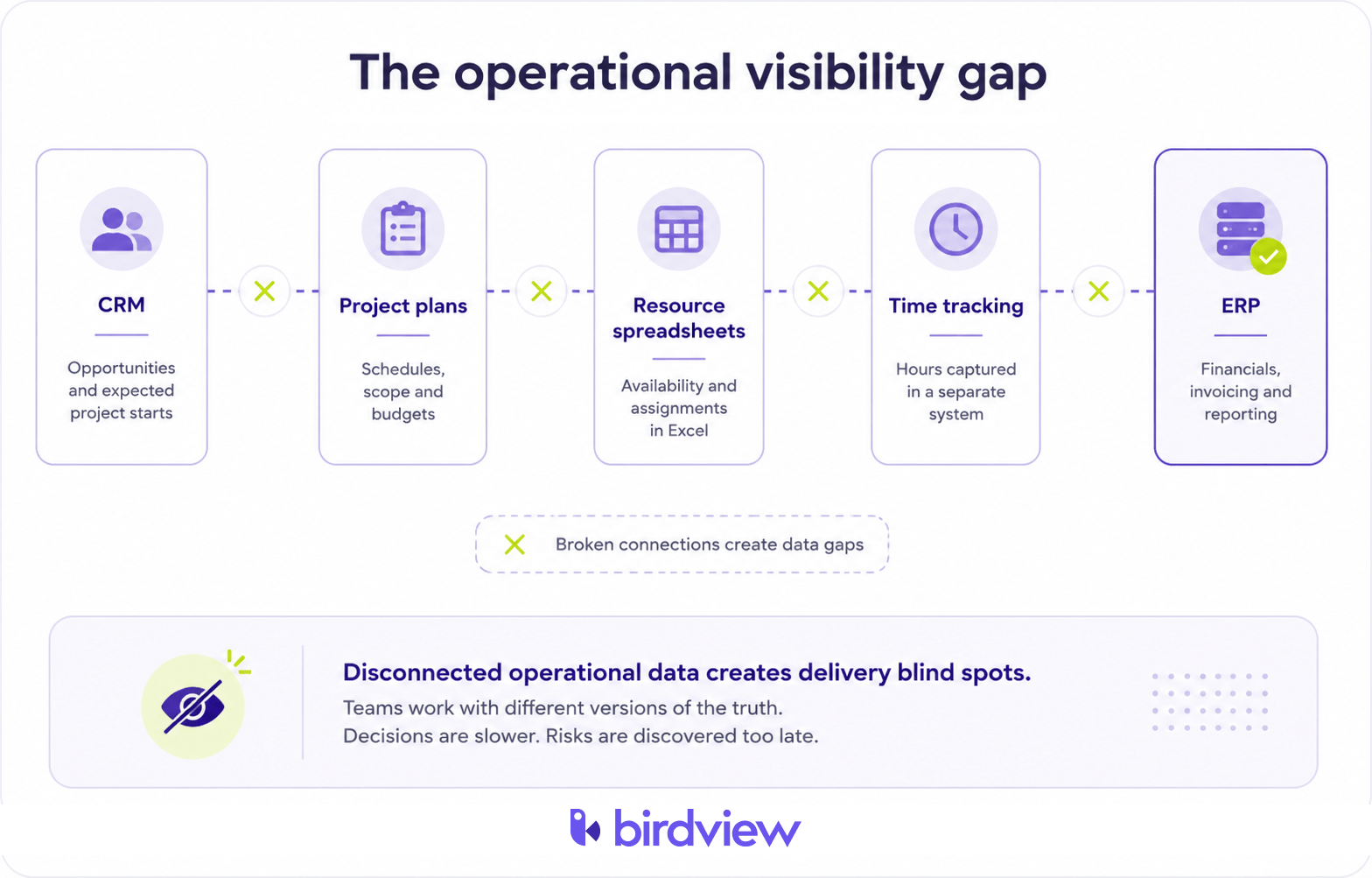
ERP runs the business, but it does not run every client engagement
An Enterprise Resource Planning system is a suite of applications used to manage and automate core business functions such as finance, human resources, payroll, procurement, supply chain, and reporting.
Its job is to keep financial and administrative records accurate.
ERP is designed to answer questions such as:
- What revenue was posted this month?
- What is the current accounts receivable balance?
- What did the business spend on payroll and operating costs?
- How should revenue be consolidated across entities?
- What financial records are required for audit or compliance?
Professional services delivery operates on a different timeline.
Delivery leaders need to know:
- Who is available over the next 30, 60, or 90 days?
- Which consultants are already committed across several engagements?
- How much budget remains before the next phase begins?
- Which projects are trending toward a margin problem?
- Which completed hours are approved and ready to invoice?
Those questions depend on live project, resource, time, and budget data. They cannot wait until transactions reach the general ledger. The ERP tells finance what has been posted. Delivery needs to know what is happening now and what is likely to happen next.
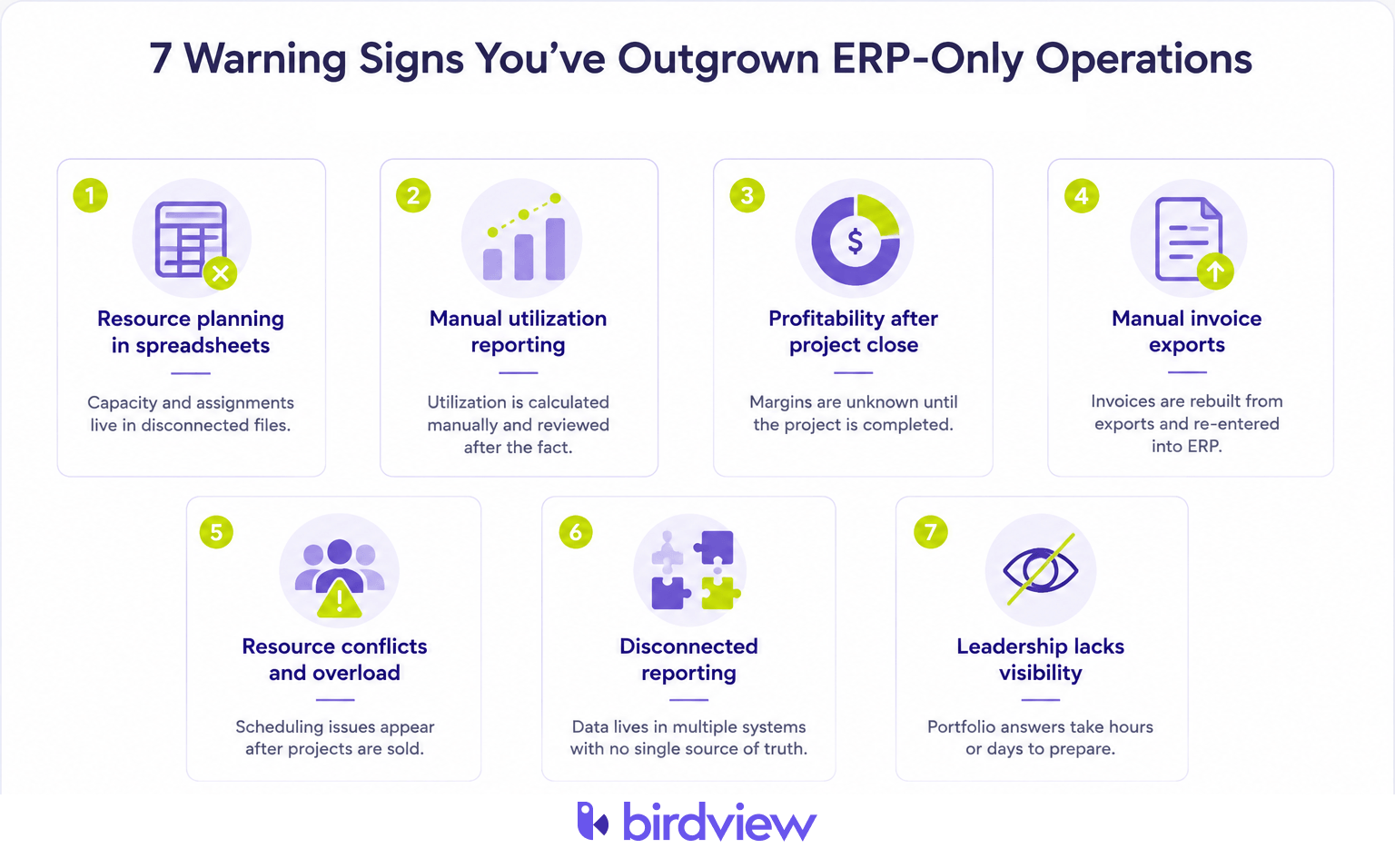
Seven signs your ERP-only model is creating a delivery bottleneck
1. Resource planning happens in a spreadsheet
The first workaround usually looks harmless.
A project manager creates a spreadsheet showing who is assigned to which engagement. Another team builds its own version. Sales keeps expected project starts in the CRM. None of the systems can see the full demand picture.
The spreadsheet may be accurate on Monday morning. By Wednesday, a start date has changed, a consultant has been reassigned, and a new opportunity has moved closer to delivery. The resource plan is stale before the next planning meeting begins.
This is how double-booking happens without anyone making an obvious mistake. Each project plan is locally correct. The portfolio is not.
Warning signal: answering “Who is available next month?” requires messages, meetings, or checks across multiple files.
2. Delivery and finance report different project numbers
Finance works from posted costs, approved time, and issued invoices. Delivery works from planned hours, current assignments, project status, and work that has not yet reached accounting.
Both views may be valid, but they describe different moments in the project lifecycle.
A project manager may report that an engagement is 65% complete. Finance may see that 82% of the labor budget has already been consumed. The project board looks healthy. The financial trend does not.
When these numbers live in separate systems, the operating meeting becomes a reconciliation session. The real problem is not the dashboard. It is data ownership. No single delivery record connects progress, resource effort, project cost, and billing status.
Warning signal: project reviews begin with a debate over whose report is correct.
3. Utilization becomes visible after the period closes
Professional services firms depend on utilization, but ERP systems usually hold only part of the calculation.
A useful utilization rate requires:
- Accurate billable and non-billable time
- Realistic capacity by person or role
- Holidays and approved leave
- Internal responsibilities
- Current and future project allocations
If operations exports time from one system, adjusts capacity in Excel, and calculates utilization after month-end, leadership receives a historical scorecard. That number can explain why the firm missed its target. It cannot help managers change assignments while the month is still open.
Live utilization is not simply a reporting feature. It is a staffing control. It helps leaders identify overloaded specialists, unused capacity, and demand gaps before they affect revenue or delivery.
Warning signal: utilization requires a spreadsheet and is reviewed monthly rather than used during weekly staffing decisions. Related reading: utilization benchmarks for service firms.
4. Project profitability appears after the work is delivered
An ERP can produce reliable financial results after time, expenses, invoices, and adjustments have been posted.
For project delivery, that may be too late. Consider a fixed-fee engagement that appears on schedule. A senior consultant spends additional time resolving client issues. A junior consultant needs more review than expected. The team absorbs a small scope change to protect the relationship.
Each decision makes sense in isolation. Together, they can eliminate the project margin. If project managers cannot see budget burn, actual labor cost, remaining hours, and expected completion cost in the same workflow, the problem surfaces during invoicing or after the project closes.
At that point, the firm can document the loss. It can no longer change the outcome.
Warning signal: project managers must ask finance whether an active engagement is still profitable.
5. Invoices are rebuilt from exports
Professional services billing is rarely one simple rate multiplied by one set of hours.
Firms may manage:
- Time and materials
- Fixed-fee engagements
- Milestone billing
- Retainers
- Role-based or client-specific rates
- Expenses and subcontractor costs
- Change orders and billing caps
When delivery data lives outside the finance system, invoice preparation becomes a reconstruction exercise.
- Time is exported from the tracking tool.
- Project codes and billing categories are checked manually.
- Rates are matched from another file.
- Budget limits and contract exceptions are reviewed.
- The final amount is re-entered into the accounting platform.
Every handoff creates a place where hours can disappear, rates can be applied incorrectly, or invoices can be delayed. The ERP is receiving the final answer, but it does not own the delivery workflow that produced it.
Warning signal: finance cannot prepare an invoice without consulting project managers or reconciling multiple exports.
6. Capacity conflicts appear after a project has been sold
Sales may see expected demand in the CRM. Project managers may see current delivery work. HR may see headcount. None may see whether the right skills are available on the promised start date.
This creates a predictable sequence:
Opportunity closes → delivery confirms capacity manually → a key specialist is already committed → the kickoff moves or the team absorbs overload.
ERP employee records do not automatically provide forward-looking resource planning. Services firms need to compare upcoming project demand with available capacity by role, skill, person, team, and time period.
Without that view, senior employees become overloaded while available mid-level staff remain underused. Hiring decisions are made from anecdotal demand rather than portfolio data.
Warning signal: resource availability is confirmed after commercial commitments have already been made.
7. Executives cannot answer portfolio questions without manual reporting
Leadership should not need a multi-day reporting cycle to understand the health of the delivery portfolio.
Operational questions should have operational answers:
- Which engagements are at risk?
- Where is budget burn accelerating?
- Which teams have available capacity?
- What work has been delivered but not invoiced?
- Which clients or service lines produce the strongest margins?
- Where will demand exceed available resources?
If those answers require data from ERP, project management software, a resource spreadsheet, a time tracker, and the CRM, no one owns the complete operating picture. Leadership receives a report, but only after someone has rebuilt the business by hand.
Warning signal: portfolio questions take hours or days to answer because data must be assembled from multiple systems.
Where firms go wrong: adding more ERP instead of fixing delivery ownership
When these symptoms appear, many firms assume the ERP needs another module, report, or customization. Sometimes that helps. Often it makes the underlying problem harder to see.
The delivery gap is not always caused by missing functionality. It is frequently caused by asking the wrong system to own operational work.
ERP is optimized for:
- Posted transactions
- General ledger accuracy
- Accounts receivable and payable
- Payroll and procurement
- Financial controls
- Audit and statutory reporting
Services delivery is optimized around:
- Future capacity
- Project schedules and dependencies
- Assignments and workloads
- Time and expense capture
- Budget consumption
- Utilization and project margin
A custom ERP project module may technically store some of this data. That does not guarantee project managers and consultants will use it as their daily working environment.
The common outcome is an expensive customization layered underneath the same spreadsheets teams were already using. The issue is not that ERP lacks value. It is that delivery truth needs a dedicated operational owner.
What professional services firms add instead
Professional Services Automation software is designed to manage and optimize service delivery.
It integrates project management, resource planning, time tracking, project financials, billing preparation, and operational reporting into one connected system.
A PSA platform helps firms:
- Allocate resources across multiple projects
- Forecast demand and available capacity
- Track billable and non-billable time
- Monitor workload and utilization
- Track project budgets and remaining hours
- Identify margin and delivery risks while work is active
- Support multiple billing models
- Prepare accurate invoice data
- Report on portfolio performance in real time
For example, an engineering firm can use PSA software to forecast resource requirements across upcoming projects and identify when additional employees or contractors may be needed.
A consulting firm can monitor project profitability while delivery is still underway, rather than waiting until final reconciliation. An architecture firm can track billable time, revisions, expenses, and project budgets before sending approved billing information to finance.
The PSA does not replace the ERP’s financial responsibilities. It creates a cleaner delivery record for the ERP to receive.
ERP and PSA solve different problems–and work better together
Professional services firms rarely need to choose between ERP and PSA. They need to decide which system owns which information.
| System | Primary responsibility | Examples of owned data |
|---|---|---|
| CRM | Sales pipeline and client context | Accounts, opportunities, quotes, expected project starts |
| PSA | Project and service delivery | Projects, activities, resource allocations, time, expenses, budgets, billing events |
| ERP or accounting system | Financial records and controls | General ledger, receivables, payables, payroll, tax, financial statements |
A typical connected workflow looks like this:
- A won opportunity moves from CRM into PSA.
- Delivery creates the project, confirms the schedule, and assigns resources.
- Consultants record time and expenses against the project.
- Project managers monitor budget burn, utilization, and remaining work.
- Approved billing information moves into ERP or accounting software.
- Finance owns receivables, revenue recognition, the general ledger, and statutory reporting.
This creates one continuous flow without forcing ERP to become a delivery tool or PSA to become a general ledger. The goal is not one platform at any cost. The goal is one owner for every important record and fewer manual handoffs between delivery and finance.
A quick readiness check: Is ERP alone still enough?
Answer the following questions based on how the business operates today.
- Can delivery identify available resources for the next 30 to 90 days without a spreadsheet?
- Can project managers see current budget burn and remaining hours?
- Can utilization be reviewed weekly without exporting and rebuilding data?
- Can finance generate invoices from approved delivery records without re-entry?
- Can leadership see project status, resource health, and financial performance in one portfolio view?
- Do finance and delivery use the same project identifiers and budget figures?
- Can the firm identify unbilled time and invoice delays before month-end?
If several answers are “no,” replacing the ERP is probably not the first move.
The larger gap may be the absence of a system designed to manage professional services delivery.
How to add PSA without disrupting the finance stack
A phased rollout is usually safer than attempting to replace every process at once.
Phase 1: Map the current handoffs
Document where project, resource, time, expense, billing, and accounting data live today. Count the exports, duplicate entries, reconciliation steps, approval delays, and spreadsheets required to move completed work into an invoice.
Phase 2: Pilot live delivery work
Run two or three active projects through PSA using real resource allocations, time entries, project budgets, and billing rules.
The pilot should answer practical questions:
- Can managers identify resource conflicts earlier?
- Can utilization be viewed without manual calculations?
- Can delivery see budget and margin trends during the project?
- Can approved time move into billing with fewer corrections?
Phase 3: Connect PSA to ERP or accounting
Move approved time, expenses, and billing events into the financial platform. Confirm that projects, customers, rates, and invoice data have one clearly defined owner. Avoid allowing both systems to edit the same operational field.
Phase 4: Expand after the data reconciles
Run the new workflow in parallel with the legacy process until project and billing figures reconcile consistently. Then expand PSA across more teams and retire the spreadsheets or point tools it replaces.
Your ERP is not failing–it is doing a different job
Professional services firms do not need more than ERP because accounting becomes less important.
They need more than ERP because successful delivery depends on operational questions the general ledger was never designed to answer. Who is available? Where is workload becoming unsustainable? Which project is consuming its budget too quickly? What completed work is ready to invoice? Which engagement is losing margin while there is still time to act?
ERP remains essential for financial control, reporting, payroll, compliance, and the books. PSA provides the delivery layer connecting projects, resources, time, budgets, and billing preparation.
The strongest architecture does not force one platform to manage everything. It gives each system ownership of what it does best.
The goal is fewer spreadsheets, fewer reconciliations, and a trusted operational record before delivery data reaches finance.
FAQ
Why isn’t ERP enough for professional services firms?
ERP systems are designed to manage financial and administrative operations such as accounting, payroll, procurement, and compliance. Professional services firms also need to manage projects, resource planning, utilization, time tracking, billing, and project profitability in real time. Those operational workflows typically require Professional Services Automation (PSA) software alongside ERP.
What are the first signs that a firm has outgrown ERP-only operations?
Common warning signs include managing resource plans in spreadsheets, manually calculating utilization, rebuilding invoices from exported timesheets, and waiting until projects finish to understand profitability. When delivery teams and finance rely on different data sources, operational visibility begins to decline.
Can ERP manage project resources and capacity planning?
Most ERP systems provide employee and financial information but are not designed for dynamic project resource planning. Professional services organizations typically need dedicated tools to forecast capacity, allocate resources across multiple projects, identify scheduling conflicts, and balance workloads in real time.
Should professional services firms replace ERP with PSA?
Usually not. ERP and PSA serve different purposes. ERP remains the financial system of record for accounting, payroll, and compliance, while PSA manages project delivery, resource planning, time tracking, utilization, billing, and project financials. Most firms benefit from integrating the two systems rather than replacing one with the other.
When should a professional services firm consider adding PSA software?
Many firms begin evaluating PSA when managing approximately 20 to 50 employees or multiple concurrent client projects. However, operational complexity is often a better indicator than company size. Frequent manual reporting, disconnected project and financial data, and increasing resource conflicts usually signal that a dedicated PSA platform should be considered.
What benefits does PSA provide alongside ERP?
Professional Services Automation software connects project management, resource planning, time tracking, utilization, budgets, billing, and project profitability in one operational platform. When integrated with ERP, it improves delivery visibility, reduces manual reconciliation, accelerates billing, and provides more accurate operational reporting while allowing ERP to remain focused on financial management.