Ksenia Kartamysheva
 Time tracking shouldn’t feel like a second job. Yet for most service teams, it does. Endless manual entries, forgotten hours, approval bottlenecks, and tools that seem designed to interrupt rather than help. The irony is that accurate time data matters enormously. It determines billing accuracy, reveals project profitability, guides resource planning, and helps forecast capacity. But when the process feels clunky, teams resist. The solution is building systems where time tracking becomes nearly invisible. Good time tracking software should feel almost invisible. People just work, and accurate time data appears in the system
1. Start with a clear, minimal time-tracking policy
Most teams don’t resist time tracking because they’re lazy. They resist because nobody’s told them exactly what’s expected.
Should they log that 10-minute Slack conversation with a client? Do internal meetings count? How detailed should task descriptions be? When is the deadline for submitting entries?
Without clear answers, people either over-log (wasting time on unnecessary detail) or under-log (leaving managers with incomplete data). Both outcomes erode trust in the system.
A solid policy answers four questions:
- What to log: Define billable versus non-billable work. Specify whether internal meetings, admin time, and professional development should be tracked.
- How granular: Some teams need 15-minute increments. Others are fine with half-day blocks. Match the level of detail to how you actually bill clients.
- When to submit: Daily logging beats end-of-week memory exercises. Set a consistent deadline.
- Who reviews and when: Weekly reviews work better than sporadic check-ins. Assign clear ownership.
In Birdview: In Birdview, you turn your time-tracking policy into clear product rules. In the Time Tracking Policy settings (Company settings → Advanced settings) you define how and when people can log or edit time. You decide how far back users can change entries, whether closed activities accept new logs, and whether managers with elevated permissions can override those limits.
At the activity level you set estimated hours so people see a clear baseline. Birdview then calculates Hours Left and Personal Hours Left automatically and keeps progress tracking consistent. If you need categories, you add custom fields on time entries and tag work as billable, non-billable, internal, or client-facing in the same way across all projects.
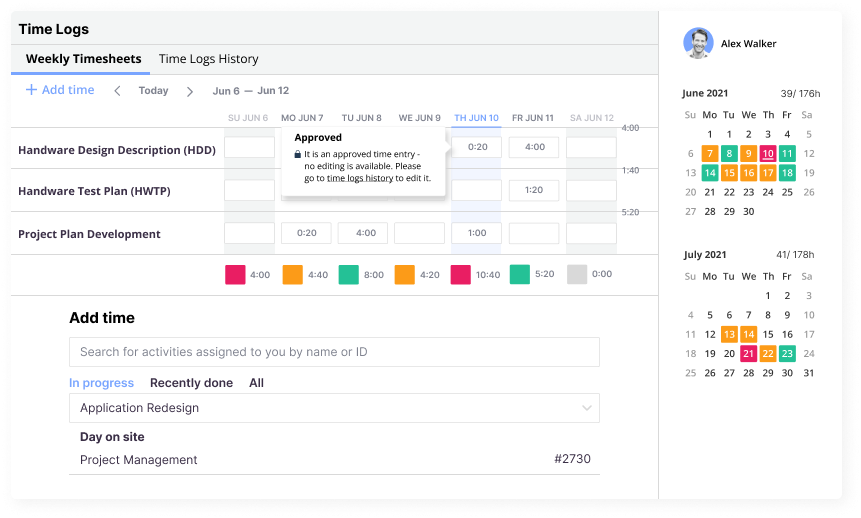
Weekly Timesheets give the team one place to enter, review, and adjust time during the week, and approvals and invoiced flags lock records once they are ready for finance. When expectations live inside Birdview’s rules and forms, accurate logging becomes the default, not a heroic effort.
📚 Read more: How to track billable and non-billable hours
2. Embed tracking into daily workflows, not outside them
The biggest friction point in time tracking is the context switch. When people are deep in design work, development, or client calls, they have to stop, open a different tool, remember what they did three hours ago, and manually log it. Every additional click is an invitation to procrastinate.
The fix is simple: bring time tracking to where the work already happens. If your team lives in a project management tool, that’s where time entries should live too.
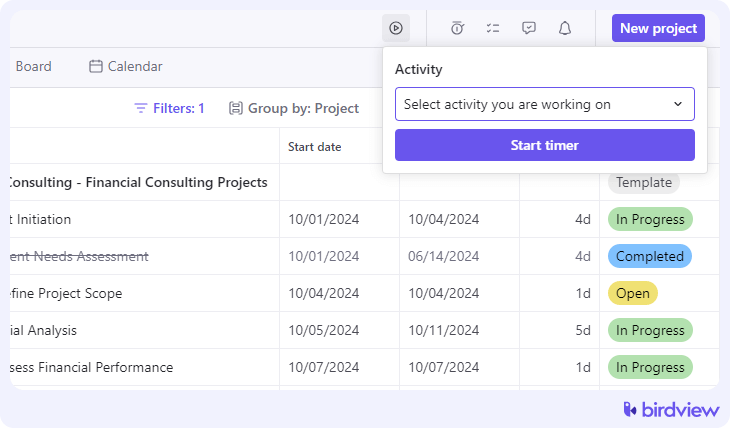
In Birdview: Team members can log time directly from the My assignments screen, right next to the activities they’re already working on. They can add time manually in one click or start a built-in stopwatch that runs in the background and records the exact duration when they hit Add. For users who prefer structured weekly logging, the Weekly timesheets view lets them enter, edit, and review time without leaving the core workspace. And because Birdview ties time tracking to activities, tasks never require a separate window or tool. With time entry options embedded throughout Activity center, My assignments, and Timesheets, the workflow stays natural, and the context switching disappears.
3. Automate recurring and predictable entries
Sometimes entries happen every week: Monday standups, Friday retrospectives, recurring client check-ins, and QA blocks that follow every dev task. Asking people to manually log these over and over is busywork.
Automation handles the predictable stuff so your team can focus on logging the exceptions.
In Birdview: Use project templates to pre-load activities with estimated hours, default assignees, and billable settings. When a new project is created from a template, Birdview automatically copies every activity, along with its duration, dependencies, and time estimates. As a result, recurring work such as weekly check-ins, kickoff tasks, reviews, or phase-based steps appears instantly without anyone having to re-enter it. Templates let you define the typical structure of your projects (discovery → design → development → launch) and preserve the expected hours for each activity. After the project is created, team members only need to adjust Hours Left or log actual time; the repetitive setup is already in place. This reduces manual entry and ensures predictable work shows up the same way every time.
4. Streamline approvals so they don’t become bottlenecks
Managers need to review time entries for accuracy and budget tracking. But complicated approval chains slow everything down. When team members submit entries and hear nothing for two weeks, they stop caring whether the data is accurate.
The goal is simple: predictable review cycles that keep data clean without creating interruptions.
In Birdview: Managers can review and approve entries directly from the Time logs history tab, where user, project, activity, billable status, or approval state can filter all logs across projects. The Approved column makes it easy to spot entries that still need review, and managers can approve multiple entries quickly using batch operations. Approved logs lock automatically, preventing accidental edits and keeping financial data clean. Weekly Timesheets also highlight missing or incomplete entries, making it easy to identify gaps before the week closes. With clear filters and a simple Yes/No approval action, reviews stay fast, predictable, and easy to manage.
5. Make time data valuable for employees, not just managers
Here’s the uncomfortable truth: most team members see time tracking as something done to them, not for them. It feels like surveillance, not support.
That changes when the data helps them understand their own workload, avoid burnout, and see how their contributions drive results.
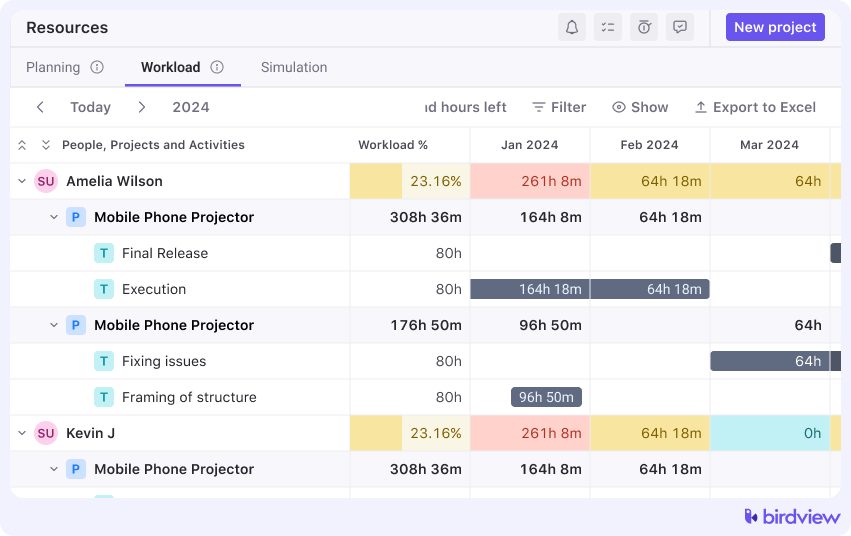
In Birdview: Team members can use their Weekly timesheets and Time logs history to review their own logged hours, spot weekly patterns, and see whether they’re consistently working above or below their expected schedule. Birdview’s Workload tab also gives individuals visibility into their upcoming allocation, showing actual hours, hours left, balance hours, and even vacation markers. When users see how their assignments compare to others’, it becomes clear how work is distributed across the team. And with BI dashboards connecting logged hours to delivery timelines and project performance, employees understand how accurate time data leads to better scoping, less overcommitment, and more predictable workloads. Instead of feeling monitored, people see their time data being used to protect focus, set fair expectations, and support healthier work rhythms.
📚 Read more: 4 essential time log and time tracking reports
6. Train with short workflows, not long manuals
Time tracking systems fail when training is overwhelming. Nobody’s reading a 20-page PDF on how to log hours. They need quick, visual guidance at the moment they’re trying to do the task.
Create a Team Training Manual that includes:
- Quick reference steps: “How to start a timer,” “How to edit an entry,” “How to log from mobile.”
- Short video tutorials: Embed 2-3 minute clips from Birdview’s tutorial library showing common actions
- A quarterly refresh reminder: Time tracking habits drift. A brief refresher every quarter keeps the system top of mind without being intrusive.
The best training happens in context. When someone’s logging time for the first time, a tooltip or brief overlay can walk them through it. After that, they’ve learned by doing, not by reading.
The real goal: make it routine, not painful
The best time-tracking systems rely on good design. These are tools that fit into existing workflows, automation that handles repetitive tasks, and feedback loops that help rather than punish.
Start by picking some of these methods and implementing them well. A clear policy and embedded workflows will get you 80% of the way there. Add approvals, training, and employee-facing reports as you refine the system.
Time tracking will never be anyone’s favorite part of the job. But it also doesn’t have to be the thing everyone dreads. When it’s simple, fast, and occasionally useful for the people doing the logging, compliance stops being a battle.