Blog
Blog

Professional services teams don’t have time for busywork. You’re already juggling projects, managing resources, keeping clients happy, and trying to stay profitable. The last thing you need is another layer of admin work disguised as innovation.
That’s why the conversation around AI in PSA software has shifted. In 2026, useful AI isn’t about flashy chatbots or gimmicky features. It’s about getting real work done. Think automated status updates, smarter resource allocation, faster reporting, and better forecasting. All using your actual project data, not generic templates.
This guide walks through six PSA platforms that are doing AI in practical ways. We’ll look at what works, what doesn’t, and how to figure out which one fits your team.
Quick comparison: top 6 PSA tools with AI features
| Tool | Headquarters | AI features | Best for |
| Birdview PSA | Toronto, Canada | AI project plan generation, AI resource matching, ML-based timeline forecasting, AI message assistant, in-app AI chatbot assistant | services teams that need project + resource + financial visibility in one place |
| Kantata | Irvine, CA, USA | agent-style AI for projects, status reporting, and resourcing | mid-market services orgs focused on resourcing and delivery governance |
| BigTime | Chicago, IL, USA | BigTime AI (assistant + AI report building + analytics layer) | firms where time, billing, and reporting are the core workflow |
| Scoro | London, UK | “ELI” AI companion for natural-language queries and insights | agencies/consultancies that want PSA + work management + reporting tightly connected |
| Productive | Claymont, DE, USA | Productive AI for summaries, writing help, filters, and reporting assistance | agencies/consultancies that want sales → delivery → profitability tracking |
| ConnectWise PSA | Tampa, FL, USA | Sidekick for PSA: ticket summarization, assignment help, sentiment scoring, Teams surface | MSPs / IT service providers running service desk + projects + billing |
Key benefits of Artificial Intelligence in PSA software
Before we get into the tools, let’s talk about what “AI” should mean in this context. Because not all AI features are created equal.
Reduce manual admin work
A good PSA already centralizes data. AI should build on that. It should help summarize project status, turn activity data into updates, or prepare reports without starting from scratch. Less copy-pasting. Less rewording. Fewer late nights writing status emails.
Support better planning decisions
AI should surface risk early. Overloaded people. Slipping timelines. Budgets are drifting off course. It does not need to decide for you. But it should highlight patterns that are easy to miss when you are busy.
Make reporting easier, not flashier
Executives usually want clear answers to the questions: What is on track? What is not? Why? AI can help generate summaries or guide report creation, especially for managers who are not analysts.
Stay grounded in real data
The most important part. AI should work with your actual project, resource, and financial data. Not generic advice. And it should be transparent enough that you can double-check the output.
6 best PSA tools with AI features
Each platform on this list takes a different approach to AI. Some focus on planning and resourcing. Others emphasize reporting or ticket management. The best choice depends on where your team spends the most time and what problems you’re actually trying to solve.
Here’s how they break down:
- Best for service delivery projects, plus resourcing and forecasting: Birdview PSA
- Best for enterprise professional services AI platform direction: Kantata
- Best for finance and ops leaders who live in time and billing: BigTime
- Best PSA with an explicit AI roadmap for agencies and consultancies: Scoro
- Best for agencies that want AI to summarize and find information fast: Productive
- Best for MSP ticket-heavy operations inside PSA: ConnectWise PSA
1. Birdview PSA
Birdview PSA puts AI to work by reducing the friction found in everyday planning, delivery, and financial tracking. The platform combines project management, resource planning, and budget control into a single system, giving teams a unified view of work and capacity. This foundation allows AI to help teams plan faster, assign work more confidently, and forecast timelines with actual data.
Instead of generic suggestions, Birdview‘s AI works directly with live project, resource, and workload data already in the system. This means plans, forecasts, and recommendations are grounded in actual capacity, skills, and past delivery patterns. The result is a PSA tool that supports both day-to-day execution and longer-term decision-making, without adding extra layers of complexity.
Key features:
- AI project plan assistant
Helps teams kick off projects faster by generating a complete work breakdown structure from just a project name. Tasks and sub-tasks are created automatically, giving teams a solid starting point instead of a blank screen.
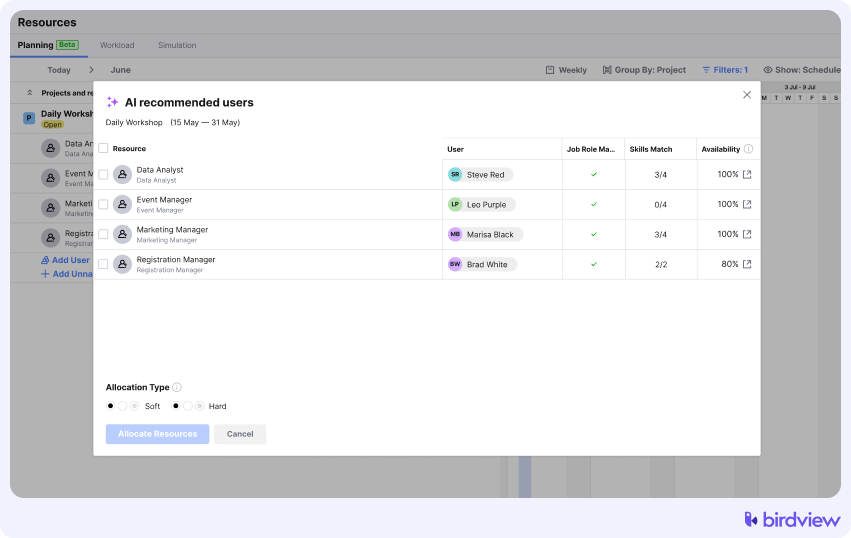
- AI resource assistant
Matches the right people to work based on roles, skills, availability, and cost. It supports both early planning and last-minute adjustments, with the option to start with soft allocations and confirm them later.
- AI timeline forecasting
Uses machine learning to predict likely project completion dates based on real capacity and past project data. Teams can simulate different scenarios and see where timelines are most likely to land, even with limited inputs.
- AI message assistant
Helps users write clearer and more consistent messages. It can summarize long threads, improve clarity, fix grammar, and adjust tone depending on the context.
- AI assistant chatbot
Birdview’s AI assistant provides quick access to project, task, and knowledge base information through natural language questions. It supports filtering, user-specific queries, message lookups, and follow-up questions without switching screens.
- Enterprise-grade security
Birdview PSA maintains strict data isolation. Your project data and financial records are never used to train public AI models. Your proprietary insights remain strictly yours.
Trial info: 14-day free trial, extendable to 28 days
Pros:
- Strong project and resource visibility in one place
- AI geared toward planning and delivery support
- Supports finance-minded workflows with budget and profit tracking
Cons:
- May be more than you need if you only want time and invoicing
- Set up and structure matter to get clean reporting
2. Kantata
Kantata is a tool for professional services that emphasizes delivery operations, resourcing, and project governance. If your biggest constraint is staffing the right people on the right projects, this one’s worth looking at.
Kantata AI agents are mapped to real PSA jobs. Status reporting, resourcing decisions, project work. The agents are designed to handle specific tasks instead of being a generic assistant.
Key features: Project management, resource management, utilization tracking, forecasting, reporting and analytics, integrations and ecosystem.
Trial info: Free trial is available, typically accessed after a demo.
Pros:
- AI agents mapped to real PSA jobs-to-be-done like status and resourcing
- Good fit for orgs where staffing is the main constraint
Cons:
- Pricing is quote-based, harder to self-serve compare
- Trial may require a guided or demo flow
3. BigTime
BigTime is a PSA tool focused on time, billing, and operational visibility for professional services firms. If your firm lives and dies by billable hours and accurate invoicing, BigTime is built for that workflow.
BigTime AI is positioned as built-in assistance, an AI report building an analytics layer. The emphasis is on productivity and making it easier to create the reports you need without manual data wrangling.
Key features: Time tracking, expense tracking, invoicing and billing, project budgeting, utilization and performance reporting, integrations.
Trial info: Free trial available with vendor-led trial and onboarding.
Pros:
- Solid for time and billing-first organizations
- AI emphasis on productivity and reporting creation
Cons:
- May be less portfolio-oriented than broader PSA suites
- Trial and onboarding may be more guided than self-serve
4. Scoro
Scoro is an end-to-end PSA and work management for agencies and consultancies. It connects projects, resources, and financial outcomes in one system. The goal is to see how delivery work translates into financial performance without jumping between tools.
Scoro AI comes via “ELI,” a natural language interface for insights and queries. ELI is evolving toward more actions over time, but right now, it’s focused on helping you understand your data faster.
Key features: Project planning, resource planning, time tracking, budgeting and invoicing, dashboards and KPIs, workflow automation.
Trial info: 14-day free trial, no credit card required.
Pros:
- Clear link between delivery work and financial outcomes
- ELI is built into the product for insights and Q&A
Cons:
- Can feel all-in-one heavy for smaller teams
- Best results require consistent data hygiene
5. Productive
Productive is a PSA platform for agencies and consultancies that ties together pipeline, delivery, resourcing, and profitability tracking. It’s designed to give you visibility from the moment a deal enters your pipeline through project delivery and final profitability analysis.
Productive AI helps with catching up on work, finding account data, and improving writing. It supports summaries, filters, docs, and reports. The focus is on making it faster to navigate your data and communicate what’s happening.
Key features: Sales pipeline, project management, resource planning, time tracking, budgeting and profitability, reporting.
Trial info: Free 14-day trial, no credit card required.
Pros:
- Strong agency-friendly workflow from sales to delivery
- AI useful for summaries and faster navigation and reporting tasks
Cons:
- AI value depends on how much you live in docs, summaries, and reporting
- Some advanced features may be plan-gated, so compare tiers
6. ConnectWise PSA
ConnectWise PSA is built for IT service providers and MSPs. Service desk, projects, billing, and operations all in one system. If you’re managing a high volume of tickets alongside project work, this platform is designed for that reality.
Sidekick is ConnectWise‘s AI layer that supports ticket understanding and summarization, faster assignment, sentiment scoring, and surfacing insights in Microsoft Teams. The AI is practical for ticket-heavy environments where you need to triage and route work quickly.
Key features: Service desk and ticketing, project management, procurement, invoicing, asset and ops management, integrations ecosystem.
Trial info: PSA is promoted primarily via demos. No clear self-serve PSA trial listed on the PSA page.
Pros:
- Very MSP-centric workflows and ecosystem fit
- AI is practical for ticket-heavy environments with summaries and sentiment
Cons:
- Complexity can be high for non-MSP use cases
- Trial experience may be less self-serve than others
How to choose the best PSA software with AI
Before comparing features, it helps to step back and ask a simple question: where do you actually want AI to save time first? Not every team struggles in the same areas, and AI delivers the most value when it targets real friction points.
- Where do you want AI to save time first?
Project setup, resource planning, forecasting, reporting, communication, or ticket handling. Start with the areas that slow your team down most.
- Does the AI support real, day-to-day workflows?
Look for help with planning, resourcing, reporting, or service operations, not generic suggestions.
- Is the AI grounded in your actual data?
The system should use your real project, resource, and financial data, not generic models or assumptions.
- Can people stay in control?
AI outputs should be easy to review, adjust, and override. Managers should always have the final say.
- Does it save time consistently?
Useful AI shows up in daily work. If it only helps once in a while, it is probably not worth the cost.
- Does it fit your delivery model?
Agencies, consulting firms, and MSPs work differently. AI should adapt to how your team actually delivers services.
- Are data privacy and permissions clear?
Client data should stay isolated, with clear rules around access, usage, and training.
- Is pricing transparent?
Understand whether AI is included in your plan or locked behind higher tiers or add-ons.
By 2026, AI in PSA software is no longer optional, but it is also no longer impressive on its own. The best tools treat AI as support, not spectacle. They help teams think more clearly, plan with more confidence, and spend less time on routine work.
The right choice depends on how your team delivers services. Projects, tickets, retainers, or a mix of everything. AI should adapt to that reality, not force you into a new one.
FAQs: PSA tools with AI
1. What does AI actually do in PSA software?
In most PSA tools, AI helps with planning, forecasting, reporting, and communication. The best systems use AI to reduce manual work, not just generate text.
2. Do I need AI in PSA software to manage projects effectively?
No, but it can help. AI is most useful when it removes repetitive tasks or highlights risks early, especially in planning and reporting.
3. Is AI in PSA tools reliable for forecasting timelines?
It can be, if it uses real project and resource data. Forecasts work best when historical data and capacity information are kept up to date.
4. Will AI replace project managers or resource managers?
No. AI supports decision-making, but people still make the final calls. Think of AI as an assistant, not a replacement.
5. How do I know if AI features are worth paying for?
Ask where you want AI to save time first. If it clearly reduces effort in areas like project setup, staffing, or reporting, it is likely adding real value.
Further reading