Blog
Blog

BigTime has earned its place as a go-to PSA and time-billing platform for service firms. But not every firm fits the same mold. Maybe your team has outgrown BigTime’s reporting capabilities, or you’re struggling with resource planning that doesn’t quite align with how you actually schedule people. This guide walks through seven BigTime alternatives that address those gaps in different ways. We’ll cover what each tool does well, who it’s built for, and how to think through which one makes sense for your particular setup.
Where BigTime falls short: common pain points
Before diving into alternatives, it helps to understand what actually drives teams away from BigTime. These are frustrations that come up repeatedly in user reviews and real-world implementations.
- The mobile app is unreliable
BigTime‘s mobile experience often crashes, feels limited, and struggles with consistency across devices. For teams logging time or checking project details in the field, this becomes a constant hurdle.
- Pricing climbs quickly.
Plans start low but get expensive once you move beyond Essentials. Many core features sit behind higher tiers or add-ons, so firms often end up paying more than expected just to get the functionality they actually need.
- Billing flexibility is limited.
Complex setups, like mixing fixed-fee, T&M, retainers, or milestone billing, tend to require workarounds. You can get there, but not without extra manual steps or compromises.
- Scheduling is too constrained.
Only two task levels are supported, which makes detailed project structures hard to manage. Teams running multi-layered or technical projects often feel boxed in.
- Customization is shallow.
BigTime allows some configuration, but not enough for firms with unique workflows. Many teams end up adjusting their processes to fit the tool instead of the other way around.
- QuickBooks sync can be hit or miss.
Users frequently report sync errors or broken connections. Regardless of which platform is at fault, accounting teams are left with manual reconciliation.
- Support response times vary.
Some users have good experiences, but others report long waits and slow resolutions, frustrating when you’re trying to fix billing or invoicing issues under a deadline.
- Onboarding can feel heavy.
Implementation requires effort, and some teams say the guidance fell short. When onboarding doesn‘t go well, you‘re left figuring out a complicated setup on your own.
Top 7 BigTime alternatives
The information below gives you a high-level snapshot of the top seven BigTime alternatives. It should help you quickly rule out poor fits and identify which ones deserve a closer look.
| Tool | Best for | Resource management depth | Integrations | Trial |
| Birdview PSA | Service firms that need smarter project planning, clear financial visibility, and higher team utilization | Advanced | QuickBooks Online, CRMs, and accounting | 14-day free trial |
| Accelo | Client-heavy services with CRM, retainers, ticketing | Strong | CRMs, accounting, support tools | 7-day free trial |
| BQE CORE | A/E/C firms prioritizing project accounting | Strong | Accounting, industry-specific tools | 15-day free trial |
| Scoro | All-in-one business management (projects + CRM + billing) | Strong | CRMs, accounting, productivity tools | 14-day free trial |
| Kantata | Enterprise services firms with complex resource and financial needs | Advanced | ERPs, CRMs, enterprise systems | Demo-based trial |
| Wrike | Cross-functional teams needing flexibility, not full PSA | Basic | Salesforce, cloud storage, and many apps | 14-day free trial + free plan |
| Monday.com | Teams wanting flexible, visual workflows over PSA depth | Basic | Many integrations, customizable | 14-day free trial + free plan |
1. Birdview PSA – Best for resource planning and project financials
Birdview PSA is built for professional services organizations that need visibility across the entire project lifecycle, from resource planning and capacity forecasting to project budgets, time tracking, and financial reporting. It’s used by consulting, IT services, engineering, and creative firms that want one integrated platform instead of stitching together separate tools.
What sets it apart from BigTime: Birdview gives you workload views, capacity planning, and portfolio-level visibility that make it easier to answer questions like “Do we have bandwidth to take on this project?” or “Which team members are underutilized next quarter?” The financial side is equally robust. Project budgets, actuals, margin tracking, and customizable BI dashboards all live in one place.
Key features:
- Project and portfolio management: Manage everything from day-to-day project tasks to high-level portfolios in one place. Birdview gives you instant visibility into progress, dependencies, risks, and overall portfolio health, helping teams stay aligned whether you’re running five projects or fifty.

- Resource capacity planning: See your team‘s true availability before making commitments. Birdview helps you forecast demand, spot staffing gaps early, and understand the impact of new work on existing workloads, so you can plan with confidence instead of reacting to overload.
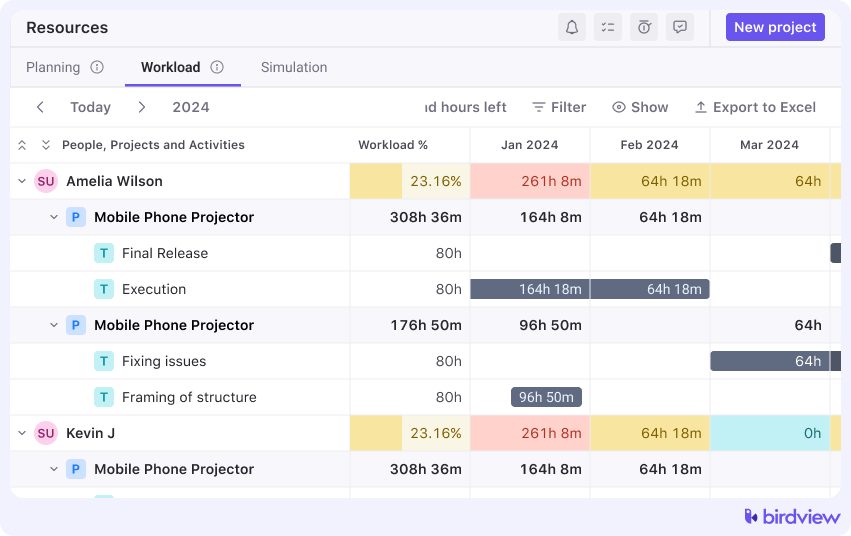
- Workload and scheduling views: Visual, drag-and-drop workload dashboards show exactly who‘s working on what and when. These views make it easy to rebalance assignments, predict bottlenecks, and keep workloads fair across your team.
- Invoicing and financials: Create accurate invoices based on approved hours, expenses, retainers, or project milestones. With built-in tracking for billing status and payment updates, teams get a clearer view of cash flow and financial performance.
- Custom BI dashboards and reports: Build tailored dashboards that highlight the KPIs that matter to your business, like utilization, margins, profitability, revenue forecasts, and more. These visual insights help leaders make informed decisions without digging through spreadsheets.

- Integrations with QuickBooks Online, accounting, and CRM tools: Birdview connects seamlessly with 5000+ tools and your existing ecosystem, so project, financial, and customer data stay in sync. No more duplicate entries, scattered records, or manual reconciliation.
Trial: Birdview offers a 14-day free trial with no commitment. You can get started through their “Get started for free” flow on their website.
2. Accelo – Best for client lifecycle management and retainers
Accelo positions itself as a full client lifecycle platform. It starts with sales and CRM, flows into project delivery, handles support tickets and retainer work, and wraps up with billing and client reporting.
How it stands out from BigTime: You win a deal, and it automatically becomes a project with the right team members, budget, and milestones already in place. Retainer management is also a strength; if you bill clients monthly for a set number of hours or manage recurring support agreements, Accelo handles that natively. The automation features help reduce manual admin work, especially around recurring billing and status updates.
Key features: sales and CRM pipeline, project and task management, time and expense capture, retainer tracking, ticketing and support, automated billing and invoicing, and client account and profitability reporting.
Trial: Accelo offers a 7-day free trial, fully functional, with no credit card required. After that, it’s a per-user subscription model.
3. BQE CORE – Best for architecture and consulting firm accounting
BQE CORE is about job costing, budgeting, forecasting, and managing the financial side of practice operations with precision.
What sets it apart from BigTime: CORE goes deeper on accounting workflows. You get more granular control over accounts receivable and payable, project-level financial performance, and industry-specific workflows tailored to A/E firms. If your firm treats financial management as seriously as project delivery, CORE makes that easier to execute.
Key features: time and expense tracking, project job costing, billing and invoicing, accounts receivable and payable, budgeting and forecasting, business intelligence dashboards, and industry-specific workflows for A/E firms.
Trial: BQE CORE offers a 15-day free trial with no credit card required, giving you access to the full platform. They also provide guided demos during the evaluation process to help you map the tool to your specific workflows.
4. Scoro – Best for all-in-one business management
Scoro brands itself as an all-in-one work management platform. It spans sales (CRM and quotes), execution (projects and tasks), and finances (invoicing and reporting). The idea is to run your entire services business from one system instead of jumping between tools.
What sets it apart from BigTime: Scoro doesn’t just manage projects; it manages the sales pipeline that feeds them and the KPIs that measure overall business health. The dashboards are strong, surfacing productivity metrics, utilization, and financial performance in real time. It’s a good fit for smaller to mid-sized firms that want simplicity and visibility without needing enterprise-grade complexity.
Key features: project and task management, contact management and CRM, quotes and sales pipeline, time tracking, resource planning, invoicing and recurring billing, and company-wide dashboards and KPIs.
Trial: Scoro offers a 14-day free trial with full feature access, typically with no credit card required. There’s no permanent free plan, so after the trial, you’ll move to a paid subscription.
📚 Read more: Best Scoro alternatives compared in 2026
5. Kantata – Best for enterprise services firms
Kantata is what you look at when you’ve outgrown mid-market tools. It’s built for larger professional services firms with complex resource forecasting needs, multi-project portfolios, and financial planning that spans quarters or years. Kantata merged Mavenlink and Kimble, so it carries the DNA of both high-end PSA platforms.
How it‘s different from BigTime: Kantata is designed for scale and governance. You get advanced resource forecasting across dozens or hundreds of projects, portfolio-level visibility, and financial planning tools that let you model margins, revenue, and capacity well in advance. It also integrates with enterprise systems like ERPs and CRMs, and includes AI-assisted planning features that help optimize resource allocation.
Key features: multi-project resource forecasting, capacity and utilization planning, project financial forecasting, margin and revenue analysis, portfolio and program management, integrations with ERP and CRM systems, and AI-assisted planning and insights.
Trial: Kantata doesn’t offer a self-service free trial. You’ll typically go through a sales and demo process, and they may set up a pilot or proof-of-concept based on your specific needs. The length and structure vary depending on the engagement.
📚 Read more: Best Kantata alternatives 2026
6. Wrike – Best for flexible project collaboration without full PSA depth
Wrike is a flexible project management and collaboration tool. But a lot of service teams use it because it’s easy to adopt, highly customizable, and plays well with other tools in your stack. If you don’t need deep time-and-billing features, Wrike might give you 80% of what you need without the PSA overhead.
How it stands out from BigTime: you get Gantt charts, Kanban boards, custom dashboards, and automations that reduce repetitive work. Time tracking exists, but it’s an add-on on paid plans. Billing and invoicing? Not really. You’d need to integrate with another tool. Wrike is best for teams that care more about delivering projects efficiently than tracking every billable hour in a PSA system.
Key features: task and project management, Gantt charts and timelines, custom dashboards, time tracking (on paid plans), workload charts, automations, integrations with tools like Salesforce and cloud storage, and a free plan for small teams.
Trial: Wrike offers a 14-day free trial of paid plans with no credit card required, plus an ongoing free plan with limited features and users.
📚 Read more: Top Wrike alternatives 2026
7. Monday.com – Best for visual, customizable workflows
Monday.com calls itself a “Work OS,” and that’s pretty accurate. It’s a visual, flexible platform where you can build workflows for almost anything. The catch is that flexibility cuts both ways: you can make it work for professional services, but you’ll need to configure it yourself.
What sets it apart from BigTime: Monday.com is much easier to adopt, but it is far less specialized. You won’t get deep project accounting or resource forecasting out of the box. What you do get is beautiful visual boards, automations, integrations with numerous apps, and a platform that non-technical users can actually understand. Time tracking exists through built-in features or third-party apps, but billing is basic at best.
Key features: custom boards and workflows, Kanban, timeline and calendar views, time tracking (via built-in or apps), automations and integrations, dashboards, templates for projects, CRM, and more, and a free plan for small teams.
Trial: Monday.com offers a 14-day free trial of the Pro plan with no credit card required, plus a free plan with limited users and features.
Birdview vs. BigTime alternatives comparison table
Now that we’ve covered the alternatives to BigTime, here’s how Birdview PSA stacks up directly against the other six tools. This table highlights where each platform has limitations and where Birdview offers advantages.
| Platform | Limitation | Where Birdview wins |
| BigTime | Mobile app issues, limited task hierarchy (only 2 levels), pricing escalates quickly for advanced features, and inflexible customization | More flexible task structures, stronger resource forecasting with visual workload views, advanced BI dashboards included without add-ons, and better portfolio-level visibility |
| Accelo | Primarily designed around the client lifecycle and CRM, resource planning is less sophisticated compared to dedicated PSA tools | Deeper resource capacity planning and utilization tracking, more advanced project-level financial forecasting, stronger portfolio management for firms managing many concurrent projects |
| BQE CORE | Strong on accounting but less emphasis on collaborative project management and resource optimization; steeper learning curve for non-finance users | More intuitive interface for project managers, stronger visual resource scheduling, better cross-team collaboration features, and easier adoption for teams beyond finance |
| Scoro | A broad feature set can feel overwhelming; resource management is not as deep as specialized PSA platforms | More advanced resource forecasting and capacity planning, deeper project-level financial controls, better suited for firms where resource optimization drives profitability |
| Kantata | Enterprise-focused with corresponding complexity and cost; can be overkill for mid-sized firms; implementation requires significant commitment | Right-sized for mid-market without enterprise complexity, faster implementation, more approachable pricing, and still offers advanced resource and financial features |
| Wrike | Not built for PSA; limited financial management, basic time tracking (add-on only), no native billing or invoicing | Full PSA capabilities built in, integrated time tracking and project financials, native invoicing, resource capacity planning, margin and utilization tracking |
| Monday.com | Requires heavy customization for PSA use cases; lacks native project accounting, resource forecasting, and financial management depth | Purpose-built for professional services with native resource management, project budgeting, financial tracking, utilization reporting, and billing. No configuration required |
How to decide what’s right for your team
At this point, you’ve got a sense of what each tool does and where it fits. The trick now is narrowing down to two or three finalists and actually testing them in a way that tells you something real.
Start by filtering based on your must-haves. Once you have a short list, approach trials and demos intentionally. Don’t just click around the interface. Import real data, test actual workflows, and involve the people who’ll use the tool daily. Can your project managers easily see resource availability? Can your finance team pull margin reports without help from support? Can your team log time without groaning? Those are the questions that matter.
Also, think about change management. Even the best tool creates friction if your team doesn’t adopt it. How much onboarding effort will this require? What kind of support does the vendor offer? How steep is the learning curve for your least tech-savvy team members? Sometimes a slightly less powerful tool that people actually use beats a feature-rich platform that sits half-empty.
If you‘d like to see how a more unified, service-focused platform can support your projects from estimation to invoicing, Birdview PSA is easy to explore. You can try it hands-on, see how it fits your workflows, and decide if it‘s the right next step for your team.