Ksenia Kartamysheva
 As professional services businesses grow, the tools that worked perfectly for solo operations often start showing their limits. This guide examines six leading alternatives to Bonsai in 2026, focusing on platforms that serve agencies, consultancies, creative studios, and growing teams. We’ve evaluated each option based on pricing transparency, flexibility, features designed specifically for service businesses, usability, scalability, and support quality.
What is Bonsai and who is it for?
Bonsai has built a solid reputation as an all-in-one business management platform aimed squarely at freelancers and solo entrepreneurs. It bundles client management, contracts, invoicing, and basic project tracking into one accessible package. For independent consultants, designers, writers, and other creative professionals just starting to formalize their business operations, Bonsai offers an appealing entry point.
Why 2026 is a good moment to reassess your tool stack
The landscape for business management software keeps shifting. Over the past couple of years, we’ve seen established players add new capabilities, fresh competitors emerge with innovative approaches, and pricing models evolve. What worked perfectly for your business two years ago might not be the best fit anymore.
Maybe your client roster has expanded beyond what you can comfortably manage solo. Perhaps you’ve brought on team members or subcontractors and discovered that tools built for individuals don’t scale gracefully. Or you’re simply finding that your needs have matured–you want deeper financial visibility, better resource planning, or more sophisticated reporting than your current platform provides.
Taking stock of your tools at the start of a new year makes sense. You’re planning budgets, setting goals, and thinking about how to work more efficiently. If Bonsai has started to feel limiting, you’re not alone, and you’ve got plenty of alternatives worth considering.
Why look for a Bonsai alternative?
While Bonsai serves freelancers well, businesses that evolve beyond solo operations often discover that what once felt streamlined now feels constraining. The platform’s simplicity becomes a limitation when you’re managing teams, tracking complex projects, or need sophisticated financial visibility. Understanding these constraints helps you recognize when it’s time to explore alternatives that match your current stage of growth.
No platform is perfect for everyone, and Bonsai is no exception. As businesses grow or their needs evolve, certain limitations start to surface.
- Pricing vs. value for growing teams
Bonsai’s pricing model works well when you’re solo, but it can get expensive quickly once you add team members. Some users find that the per-user costs don’t align with the value they’re getting, especially if team members only need access to specific features like time tracking or basic project visibility.
- Limited depth for resource and capacity planning
If you’re managing multiple projects with several team members, you need to see who’s available, who’s overbooked, and where you can allocate resources efficiently. Bonsai’s capabilities in this area are fairly basic.
- Gaps in project accounting or reporting
Bonsai offers some reporting, but users working on complex projects or managing multiple clients simultaneously often find the financial insights insufficient. Getting a clear picture of which projects are profitable and which are draining resources becomes difficult.
- Workflows that don’t fit non-freelancer teams, agencies, or multi-department firms
Bonsai was built with the independent professional in mind. Once you have account managers, project managers, designers, and developers all working together, the platform starts to feel rigid. Agencies with client-facing teams and internal operations teams discover that Bonsai doesn’t accommodate their organizational complexity very well.
Signs Bonsai may no longer fit your business
- You’re adding more team members and departments
Growth is exciting, but it also exposes the cracks in tools that weren’t designed to scale. If you’ve hired your first few employees or structured your business into distinct departments, you’ll quickly notice whether your software supports that evolution. When onboarding a new team member becomes complicated it’s a sign your platform wasn’t built for this stage.
- You need advanced project/resource/financial visibility
Solo freelancers can often keep everything in their head or track it in simple lists. Teams can’t. As soon as you’re managing multiple concurrent projects with shared resources, you need dashboards that show capacity, utilization, project health, and financial performance. If you’re exporting data to spreadsheets just to get the insights you need, or if leadership keeps asking questions your current tool can’t answer, that’s a clear indicator you’ve outgrown what Bonsai provides.
- You’re juggling multiple tools for invoicing, project management, and reporting
One of the main reasons people choose all-in-one platforms is to avoid tool sprawl. But if Bonsai’s limitations have forced you to add separate tools for resource management, detailed financial reporting, or advanced project planning, you’ve lost that benefit. At that point, you’re paying for Bonsai plus subscriptions to other services, and you’re dealing with the hassle of keeping data synchronized across platforms. It might be time to consolidate onto a platform that handles everything you need without the add-ons.
6 best Bonsai alternatives in 2026
We didn’t just compile every tool with invoicing and project management features. Instead, we focused on platforms that genuinely serve professional services businesses. The criteria included:
- pricing transparency (no hidden costs or surprise charges)
- flexibility to adapt to different workflows
- features specifically designed for service businesses rather than generic productivity tools
- usability that doesn’t require weeks of training
- scalability as your team grows
- reliable customer support when you need help
Each alternative on this list excels in particular areas where Bonsai users commonly hit limitations. Some are better for teams, others for automation-heavy workflows, and a few offer enterprise-grade capabilities for firms with complex requirements.
| Tool | Best for | Core focus | Free plan / free trial |
| Birdview PSA | Growing professional services, engineering, IT and consulting firms | PSA with resource planning and financials | Free trial available |
| HoneyBook | Creative professionals and small studios | Client management and branded workflows | Free trial available |
| Dubsado | Automation-focused freelancers and agencies | Customizable workflows and client onboarding | Free trial (limited projects) |
| FreshBooks | Accounting-first small businesses | Invoicing and bookkeeping | 30-day free trial |
| ClickUp | Teams needing flexible work management | All-in-one project and task management | Free forever plan |
| Accelo | Agencies with retainer clients | End-to-end PSA and recurring work | Free trial available |
1. Birdview PSA – best for growing professional services firms
Birdview PSA is a professional services automation platform built for agencies, consultancies, IT services firms, and other teams that sell expertise and time. Unlike tools aimed at solo freelancers, it is designed for growing teams that need to manage multiple client projects, plan resources, and keep a close eye on profitability.
If you have moved beyond one person working in Bonsai and now run a team of 10 to 500 people, Birdview is a strong Bonsai alternative. It gives you more depth than freelancer tools without the heavy complexity of legacy enterprise software.
What sets Birdview PSA apart from Bonsai
Bonsai works well for individuals, but it has limited capacity planning and project accounting. Birdview PSA focuses on team based work. It gives you resource availability, utilization, and workload views across the whole company, plus project budgets and profitability tracking in one place.
It connects project planning, delivery, time tracking, costs, and revenue into a single PSA system, so you are not managing each part in isolation. Portfolio level dashboards and advanced reporting help leaders see which clients and project types are most profitable and where risks are emerging. Birdview also integrates with tools like QuickBooks and popular CRMs, so financial and sales data can flow without manual re entry.
Key features
- Project and portfolio management
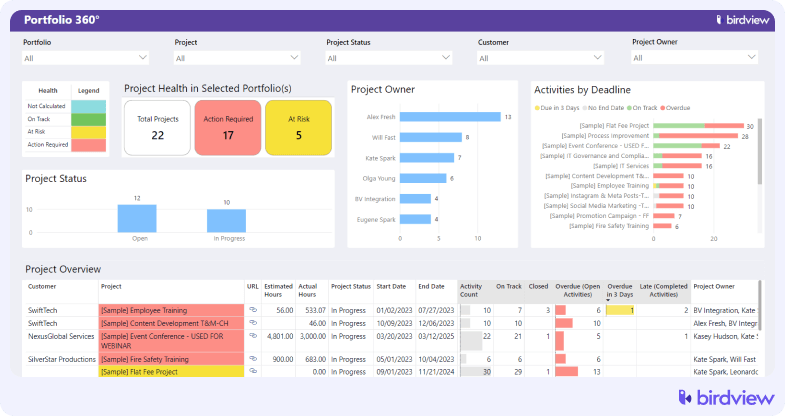
Birdview lets you plan and manage individual projects while also providing a portfolio view so you can see how everything fits together. You can set up project templates, define phases and milestones, establish dependencies between tasks, and track progress against baseline plans. The portfolio dashboard gives you a birds-eye view of all active projects, their health status, and key metrics.
- Advanced resource capacity planning and workload management
The resource management module shows you who’s available, who’s assigned to what, and how workloads are distributed. You can forecast future resource needs, identify bottlenecks before they cause delays, and balance work across your team to prevent burnout. Heat maps and utilization charts make it easy to spot overallocation or underutilization at a glance.
- Time tracking and project accounting (budgets, costs, profitability)
Time tracking integrates directly with projects and tasks, allowing team members to log hours against specific activities. That time data feeds into project accounting, where you can compare budgeted hours and costs against actuals, track burn rates, and calculate profitability. You’ll know whether a project is on track financially long before it’s complete.
- BI reports and dashboards
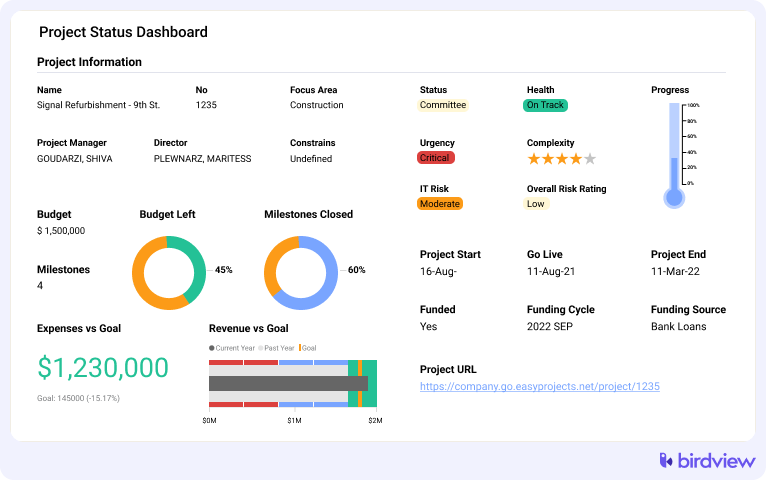
Birdview includes business intelligence capabilities with customizable dashboards and reports. You can create views tailored to different roles. The reporting engine lets you drill down into specifics or stay at a high level depending on what you need.
- Integrations with tools like QuickBooks and popular CRMs
Native integrations mean your project data, time entries, and invoices can sync with your accounting system, while sales and client information flows in from your CRM. This eliminates duplicate data entry and ensures consistency across your business systems.
- Enterprise-grade security and permissions
As your team grows, you need granular control over who can see and do what. Birdview offers role-based permissions, allowing you to define exactly what each user or user group can access. Security features meet the standards that enterprise clients expect, which matters if you’re working with larger organizations that have strict vendor requirements.
Trial: Birdview offers a free 14-day trial that can be extended to 28 days, so you can test the platform with your actual data and workflows before committing. The trial gives you access to the full feature set, letting you evaluate whether the advanced capabilities justify the investment for your specific situation.
2. HoneyBook – best Bonsai alternative for client-centric creatives and small studios
HoneyBook has carved out a strong position among creative professionals. Such as photographers, event planners, designers, consultants, and small agencies that prioritize client experience. It’s fundamentally a clientflow platform that combines CRM functionality with invoicing, contracts, and project management, all wrapped in an interface that emphasizes branded client interactions.
How HoneyBook differentiates itself from Bonsai
HoneyBook focuses heavily on polished client experiences. Its branded client portals, simple pipelines, and automated onboarding workflows offer a more client-centric approach than Bonsai. It’s ideal for creatives who want a smoother, more visual way to manage inquiries, proposals, and payments.
Key features: Lead capture and client pipeline management, proposals and contracts with e-signatures, invoicing and online payments, automated emails and workflows, client portal and scheduling tools.
Trial: HoneyBook offers a free trial or introductory discount for new users.
3. Dubsado – best for customizable workflows and automations
Dubsado serves freelancers, studios, and small agencies that have specific processes they want to automate and aren’t satisfied with one-size-fits-all solutions. If you’re the type of person who wants to engineer your business operations precisely rather than adapt to a platform’s predefined structure, Dubsado is worth a close look.
Why Dubsado takes a different approach
Dubsado excels in workflow and form customization, offering automation depth Bonsai doesn’t match. Its conditional logic, branching workflows, and detailed intake forms are designed for users who want highly personalized, automated client journeys beyond basic templates.
Key features: Custom workflows and automation rules, forms and questionnaires with conditional logic, proposals and contracts with e-signatures, client portals, invoicing and payment schedules, basic project and task tracking, scheduling tools.
Trial: Dubsado offers a free trial that’s either time-limited or limited to a certain number of projects.
4. FreshBooks – best Bonsai alternative for accounting-first workflows
FreshBooks started as an invoicing and accounting solution and has evolved to include light project management and time tracking features. It’s designed for small businesses and self-employed professionals who prioritize financial management.
What sets FreshBooks apart from Bonsai
FreshBooks delivers stronger accounting and bookkeeping features than Bonsai. With mature invoicing, billable expense tracking, proper double-entry bookkeeping, and accountant-friendly reporting, it’s the better fit for businesses that prioritize financial management over project depth.
Key features: Invoicing and recurring billing, expense tracking with receipt capture, time tracking and simple projects, estimates and proposals, basic reporting and tax-related tools, integrations with payment processors and accounting apps.
Trial: FreshBooks offers a 30-day free trial with full feature access.
5. ClickUp – best all-in-one work hub alternative to Bonsai
ClickUp takes a different approach than most tools on this list. Rather than focusing specifically on client work or professional services, it positions itself as a flexible work hub that can adapt to virtually any workflow. Teams use it for client projects, internal operations, product development, marketing campaigns, and HR processes.
How is ClickUp different from Bonsai
ClickUp stands out through flexibility. Its customizable views, fields, dashboards, and automations let teams structure work however they prefer well beyond Bonsai’s more standardized workflow. It supports both client projects and internal operations in one adaptable platform.
Key features: Tasks with subtasks and dependencies, multiple views (list, board, Gantt, calendar, workload), time tracking and basic billing, docs and whiteboards for collaboration, customizable dashboards and reporting widgets, extensive integrations and automation, template library.
Trial: ClickUp offers a free forever plan with unlimited tasks, unlimited members, and many core features.
6. Accelo – best Bonsai alternative for end-to-end PSA and retainer management
Accelo positions itself as a complete professional services automation platform designed specifically for agencies, IT services companies, and consultancies. What distinguishes it from other PSA platforms is its particular strength in managing recurring client work and retainers alongside project-based engagements.
What makes Accelo different
Accelo provides end-to-end PSA coverage, like sales, projects, tickets, retainers, and billing, in one system, which Bonsai does not attempt to offer. It’s especially strong for recurring work and retainer management, with detailed time, billing, and utilization tools for service teams.
Key features: Sales and opportunity management with revenue forecasting, project management with time tracking and budgets, ticketing and support workflows, retainers and recurring work management, invoicing with accounting tool integrations, utilization and profitability reporting.
Trial: Accelo offers a free trial with full platform access to explore all capabilities.
📚 Read more: Top 6 Accelo alternatives in 2026
Birdview compared to other Bonsai alternatives
What makes Birdview particularly valuable is how it connects the dots between resource planning, project delivery, and financial performance. Everything flows together, so you can see how staffing decisions impact project profitability, or how portfolio mix affects team utilization.
Here’s how Birdview PSA stacks up against the other tools we’ve covered:
| Tool | Key limitation | Birdview advantage |
| Bonsai | Limited resource planning and team scalability; basic financial reporting | Full PSA capabilities with advanced resource management, portfolio visibility, and enterprise-grade project accounting |
| HoneyBook | Focused on client experience over project depth; limited for technical services teams | Comprehensive project management with dependencies, baselines, and complex project structures |
| Dubsado | Strong on automation but lacks resource planning and portfolio-level insights | Resource capacity planning, utilization tracking, and executive dashboards for managing multiple projects |
| FreshBooks | Accounting-first with limited project management depth | Integrated project, resource, and financial management designed specifically for professional services |
| ClickUp | General-purpose tool requiring extensive customization; not PSA-focused | Purpose-built PSA platform with features specifically for services businesses, agencies, and consultancies |
| Accelo | Comparable PSA platform but can feel complex with module-based pricing | More intuitive interface with transparent pricing; strong BI and reporting capabilities out of the box |
How to choose the right tool
Reading about features and capabilities only gets you so far. The real test is whether a platform handles your actual workflows, integrates with your existing tools, and feels intuitive to your team.
Most of the platforms we’ve covered offer free trials, and you should take advantage of them. Import real project data, have team members log actual time, run the reports you need for management reviews, and test the integrations with your accounting or CRM systems. You’ll discover friction points or workflow gaps that aren’t apparent from marketing materials or feature lists.
Questions to guide the evaluation
As you test alternatives, keep these questions in mind:
- Does this platform support how we actually work, or will we need to change our processes to fit it? Some flexibility is fine, but if you’re forcing major workflow changes just to accommodate the tool’s limitations, that’s a red flag.
- Can we see the information we need without constant manual effort? The dashboards and reports should surface insights automatically. If you’re still exporting to spreadsheets for analysis, the tool isn’t solving the problem.
- Will this scale with us over the next 2-3 years? Consider not just where you are today but where you’re headed. Switching tools is disruptive, so you want something that can grow with you.
- How reliable are the integrations we need? If the platform claims to integrate with your accounting software or CRM, test it thoroughly. Broken or limited integrations create ongoing headaches.
- What does onboarding and training actually look like? Some platforms are intuitive enough that teams can be productive quickly; others require extensive training. Be realistic about how much time you can invest in getting people up to speed.
- What happens when we need help? Check what support options are available at the plan tier you’re considering. Can you reach a human when something breaks, or are you limited to documentation and forums?
Choosing business management software comes down to matching the tool to your actual needs rather than chasing the most features or the lowest price.
If you’re leading a growing professional services firm and feeling the limitations of tools built for freelancers, Birdview PSA is worth exploring. The platform brings together resource planning, project management, and financial tracking in a way that’s designed specifically for agencies and consultancies.
You can start with a free trial to see how Birdview handles your actual projects and workflows. Import your current project data, have your team test the resource planning features, and check whether the financial reporting gives you the insights you’ve been missing. There’s no obligation, and you’ll get a clear sense of whether it’s the right fit for your business.