Blog
Blog

Capacity planning used to be a spreadsheet exercise. You checked who was available, made a best guess, and hoped nothing major changed. In 2026, that approach does not hold up because delivery expectations are tighter, hiring is expensive, and staffing decisions directly affect margins.
Modern capacity planning software goes beyond basic scheduling. The best tools combine demand vs. capacity forecasting, resource loading simulation, and financial visibility, with AI-driven insights as an added layer. Some platforms prioritize quick adoption. Others are built for global teams and overlapping project portfolios.
What this guide covers:
- We compare 11 capacity planning tools for 2026.
- We explain which tool fits best.
- We list the capacity planning capabilities that matter most in 2026.
Best capacity planning tools in 2026 by use case
Not every team needs the same type of capacity planning. Some teams need tight financial alignment. Others just need to stop overbooking people. Use these quick picks to match the tool to your scenario.
- Best for project visibility and financial alignment: Birdview PSA, Productive
- Best for complex multi-project environments: Epicflow, Saviom
- Best for simple resource scheduling: Resource Guru, Float
- Best for agencies and billable teams: Productive, Float
- Best for global enterprises: Kantata, Saviom
- Best for long-term workforce forecasting: Runn, Meisterplan, Birdview PSA
- Best for portfolio and strategic alignment: Meisterplan, Birdview PSA
- Best for AI-powered capacity planning: Birdview PSA, ClickUp, Epicflow
- Best for flexible work management environments: Monday.com, ClickUp
- Best for utilization optimization: Saviom, Productive
What is the primary benefit of capacity planning software?
The primary benefit of capacity planning software is preventing resource shortages and bottlenecks before they impact delivery. By tracking both current assignments and future pipeline work, these tools identify capacity gaps months in advance. This allows leaders to hire or redistribute work early, avoiding financial losses and team burnout.
Core capacity planning capabilities (must-have)
These are the non-negotiables. If a tool does not support these capabilities, it is scheduling software, not capacity planning software.
- Demand vs. capacity forecasting: The tool should forecast future workload and compare it to available capacity by week or month. It should highlight shortages early and show where you will have unused capacity.
- Resource loading view: You need a clear view of how work is loaded across people or roles over time. The system should surface overload and underload without manual spreadsheet work.
- Skill- and role-based capacity: Capacity is not just hours. It is hours plus skills. The tool should let you plan by role (for example, “backend engineer”) and match work to the right competencies.
- Resource loading simulation: You should be able to test changes without breaking the live plan. Examples include adding a new project, shifting dates, hiring, or losing a key specialist. The tool should show the impact on capacity gaps and utilization.
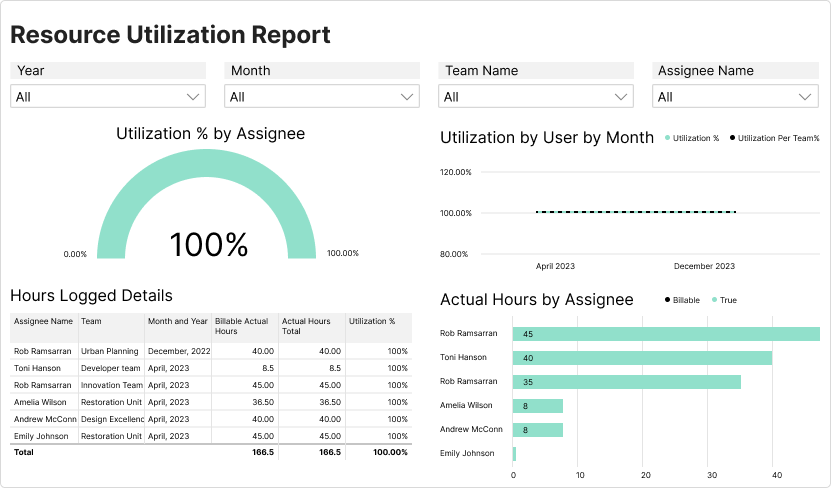
- Utilization visibility: The tool should show planned utilization clearly, including persistent overload risks and underused capacity, so managers can rebalance work before delivery slips.
Quick comparison: best capacity planning software
| Tool | Best for | Capacity planning features | Trial | Best team size |
| Birdview PSA | Project visibility and financial alignment | Resource loading simulation, demand vs. capacity forecasting, skill-based allocation, utilization, and billable planning | Yes (14 days), extendable to 28 | Mid-market / enterprise |
| Epicflow | Complex multi-project environments | AI bottleneck prediction, multi-project synchronization | Demo only | Mid-market / enterprise |
| Resource Guru | Simple resource scheduling | Clash management, equipment booking | Yes (30 days) | SME |
| Float | High-growth creative teams | Drag-and-drop scheduling, real-time availability | Yes (trial available; days not specified) | SME / mid-market |
| Productive | Agencies and profitability | Billable forecasting, profit tracking | Yes (trial available; days not specified) | SME / mid-market |
| Kantata | Global enterprises | Expertise matching, global resource pools | Demo only | Enterprise |
| Runn | Long-term workforce planning | Scenario modeling, pipeline forecasting | Yes (14 days) | SME / mid-market |
| Monday.com | Flexible work management | Workload widget, customizable dashboards | Yes (free plan + trial options; days not specified) | SME / mid-market / enterprise |
| Saviom | Strategic utilization | Demand forecasting, utilization heatmaps | Demo only | Enterprise |
| Meisterplan | Portfolio alignment | Project ranking, strategic allocation | Yes (trial available; days not specified) | Mid-market / enterprise |
| ClickUp | AI support for small teams | AI task estimation, workload view | Yes (free plan; trial days not specified) | SME |
How we shortlisted the best capacity planning tools
We shortlisted tools that support real capacity planning: forecasting demand vs. capacity, simulating resource loading, and helping teams prevent bottlenecks before they hit delivery.
We reviewed platforms that plan future capacity, not just track today‘s schedule. We used the same criteria for every tool.
Selection criteria:
- Published rankings and independent reports (to cross-check market credibility and common use cases)
- Capacity planning depth (forecasting, role/skill planning, utilization visibility)
- Resource loading simulation (to test staffing and timeline changes without rewriting the plan)
- Financial visibility (to connect capacity decisions to cost and margin when applicable)
- Usability (clear enough for managers, readable enough for executives)
- Access for evaluation (free trial, sandbox, or a live demo)
- Fit across team sizes (SMEs, agencies, and enterprise environments)
We did not select tools based on brand recognition. We excluded platforms where capacity planning is a secondary add-on and cannot support forecasting and resource loading decisions.
11 best capacity planning software in 2026
1. Birdview PSA
Best for: project visibility and AI insights
Birdview PSA is built for professional services teams that need to connect resource planning with financial performance. It consistently ranks in the top 10 lists for 2026, particularly for AI-powered forecasting.
What makes it different is the way it bridges operations and finance. When you reassign a resource, you immediately see the impact on margins. That kind of visibility changes decision-making.
Key features:
- Advanced capacity planning: Combines historical utilization data, confirmed pipeline, and active project demand to forecast future capacity needs with clarity, helping leaders anticipate hiring or rebalancing decisions months ahead.
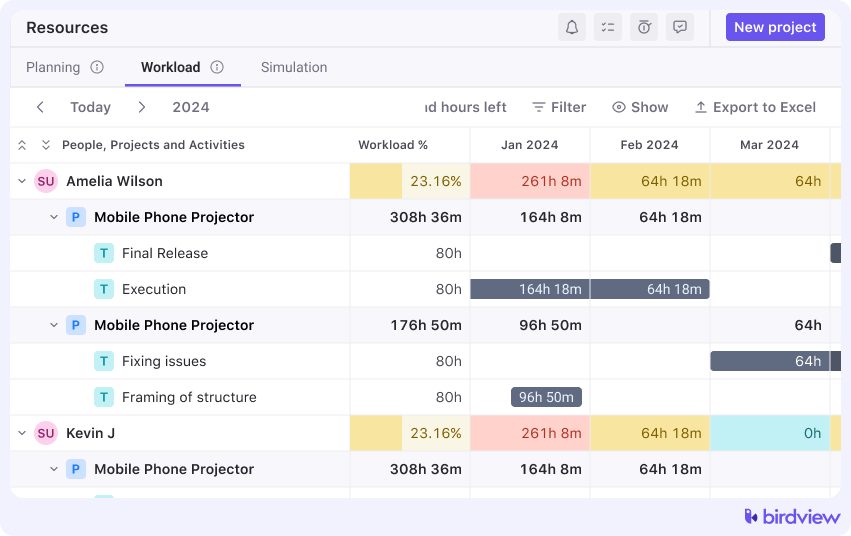
- Utilization tracking: Provides real-time visibility into billable and non-billable allocation, making it easier to identify both overload risks and underused talent.
- Skill-based planning: Matches tasks to specific competencies and proficiency levels, ensuring that highly specialized expertise is assigned strategically rather than by availability alone.
- Portfolio dashboards: Offers a consolidated, real-time view of project health, workload distribution, and financial performance across the entire organization.
- Financial forecasting: Connects planned resource allocation directly to revenue projections and margin analysis, helping managers understand the financial consequences of staffing decisions instantly.
AI capabilities:
- Birdview‘s AI resource planning assistant that suggests best-fit employees based on skills, availability, and rate
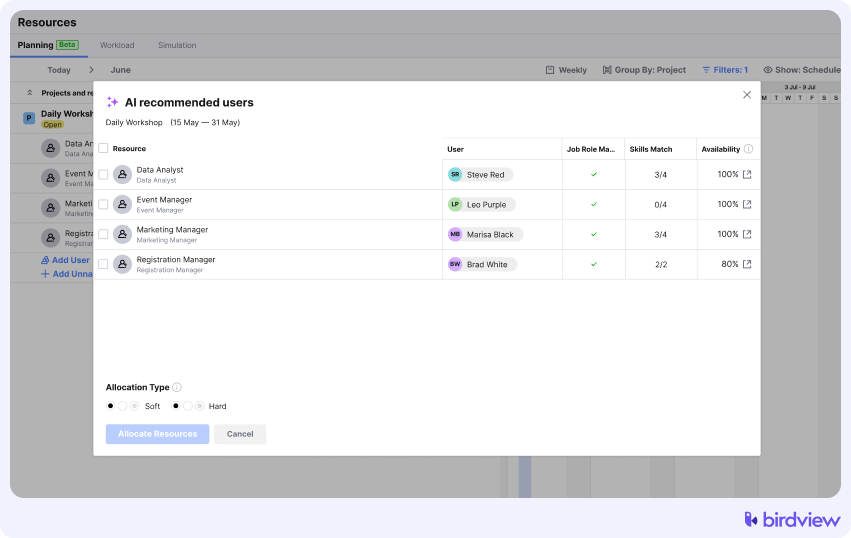
- Built-in forecasting uses real project data to predict likely completion dates.
- You can generate organized project plans with ready-made tasks and subtasks tailored to the project type.
- The AI assistant also helps improve communication by offering message suggestions, creating summaries, and refining wording for better clarity.
Trial info: 14-day free trial, extendable to 28 days
Pros:
- Strong financial alignment
- Advanced forecasting
- End-to-end PSA functionality
- Great for engineering and high-tech
Cons:
- More than small teams may need
- Setup requires structured onboarding
2. Epicflow
Best for: complex multi-project environments
Epicflow is designed for organizations juggling dozens of interconnected projects. Engineering and manufacturing teams often gravitate toward it.
Its strength lies in bottleneck detection. Instead of reacting to overload, managers see pressure building weeks in advance.
Key features: multi-project synchronization, CCPM-based planning, skill-based allocation, workload balancing
AI capabilities:
- AI bottleneck prediction
- Automated workload prioritization
Trial info: Demo available
Pros:
- Excellent for complex portfolios
- Strong predictive engine
- Reduces firefighting
Cons:
- Technical interface
- Not ideal for simple scheduling needs
3. Resource Guru
Best for: simple resource scheduling
If spreadsheets are causing overbooking and confusion, Resource Guru offers a straightforward alternative.
It focuses on clarity. The clash management feature prevents double-booking automatically. It feels practical and direct.
Key features: clash management, equipment booking, leave tracking, utilization reports
AI capabilities:
- Basic alerts
- Limited predictive AI
Trial info: 30-day free trial
Pros:
- Easy to use
- Quick setup
- Prevents overbooking
Cons:
- Minimal financial planning
- Not built for portfolio strategy
4. Float
Best for: high-growth creative teams
Float is visual. Drag and drop scheduling feels natural. Marketing and creative agencies often prefer it because it mirrors how they think about workloads.
It is particularly strong for daily and weekly planning.
Key features: drag-and-drop scheduling, budget tracking, time tracking, availability heatmaps
AI capabilities:
- Automated workload adjustments
- Smart rebalance suggestions
Trial info: Free trial available
Pros:
- Clean interface
- Fast updates
- Good short-term visibility
Cons:
- Limited deep forecasting
- Not enterprise-focused
5. Productive
Best for: agencies and profitability
Productive blends capacity planning with financial performance. Agencies use it to understand how billable hours translate into revenue.
It feels grounded in real numbers, not just availability.
Key features: profit forecasting, billable utilization tracking, project budgeting, scenario planning
AI capabilities:
- Revenue prediction models
- Billable capacity forecasting
Trial info: Free trial available
Pros:
- Strong financial insights
- Clear agency focus
- Connects scheduling to profit
Cons:
- Less flexible outside agency model
- Reporting setup takes time
6. Kantata
Best for: global enterprises
Kantata, formerly Mavenlink, targets large global firms. It supports massive resource pools and complex compliance requirements.
This is not lightweight software. It is built for scale.
Key features: Expertise Engine, global tax handling, enterprise integrations, advanced analytics
AI capabilities:
- AI-based talent matching
- Predictive staffing analytics
Trial info: Demo required
Pros:
- Enterprise-ready
- Handles global complexity
- Deep integration ecosystem
Cons:
- Higher cost
- Implementation can be long
7. Runn
Best for: long-term workforce planning
Runn focuses on forecasting six to twelve months ahead. It is less about task management and more about strategic planning.
Executives often use it to test hiring scenarios before committing to headcount.
Key features: scenario modeling, pipeline forecasting, role-based planning, utilization tracking
AI capabilities:
- Predictive headcount modeling
- Contract win impact simulation
Trial info: 14-day free trial
Pros:
- Clear long-range visibility
- Easy to understand forecasts
- Clean interface
Cons:
- Limited task tracking
- Not a full PSA platform
8. Monday.com
Best for: flexible work management
Monday.com is a broad work management platform. Capacity planning lives inside customizable boards and workload widgets.
It is flexible, though that flexibility sometimes means extra configuration.
Key features: workload widget, dashboards, automations, CRM integrations
AI capabilities:
- AI workflow automation
- Smart workload insights
Trial info: Free plan and trial options
Pros:
- Highly customizable
- Easy adoption
- Large integration library
Cons:
- Capacity planning not core
- Requires setup effort
9. Saviom
Best for: strategic utilization
Saviom centers on utilization rates. Large organizations use it to ensure experts are deployed effectively.
Its forecasting tools help identify when hiring or retraining is necessary.
Key features: demand forecasting, capacity heatmaps, skill tracking, utilization analytics
AI capabilities:
- Predictive utilization alerts
- Advanced forecasting algorithms
Trial info: Demo available
Pros:
- Strong utilization focus
- Good enterprise visibility
- Detailed reporting
Cons:
- Interface feels dated
- Learning curve
10. Meisterplan
Best for: portfolio alignment
Meisterplan helps executives prioritize projects based on available capacity. It answers a difficult question: which projects should we actually pursue?
Its ranking system allocates resources to the highest strategic goals first.
Key features: project ranking, portfolio scenarios, capacity allocation, roadmap visualization
AI capabilities:
- Portfolio simulation engine
- Priority-based resource allocation
Trial info: Free trial available
Pros:
- Strong executive view
- Clear portfolio alignment
- Scenario flexibility
Cons:
- Not built for daily scheduling
- Limited time tracking
11. ClickUp
Best for: AI support for small teams
ClickUp is an all-in-one workspace. Its AI assistant, ClickUp Brain, answers questions like “who is overloaded today?” and suggests redistribution.
For smaller teams, that kind of help can save real time.
Key features: workload view, AI task estimation, time tracking, dashboards
AI capabilities:
- AI task estimation
- Automated task redistribution
- Natural language queries
Trial info: Free plan available
Pros:
- Feature-rich
- Affordable
- Strong AI assistant
Cons:
- Can feel overwhelming
- Capacity planning not deeply specialized
Conclusion
The best capacity planning software in 2026 is the one that helps you prevent delivery surprises before they happen. Focus on tools that forecast demand vs. capacity, support resource loading simulation, and give a clear view of utilization by role and skill. If financial outcomes matter, choose a platform that links staffing decisions to budgets, billable work, and margin. Use the quick picks to match a tool to your use case, then validate your shortlist by testing real scenarios: a new project, a delayed milestone, a key hire, and a sudden capacity loss. If the tool can‘t model those changes and show the impact clearly, it‘s scheduling software, not capacity planning.
FAQ: capacity planning software in 2026
What is capacity planning software?
Capacity planning software helps teams compare future workload to available capacity. It forecasts demand, shows who is overloaded or underused, and supports decisions like hiring, reprioritizing, or moving timelines.
What is the primary benefit of capacity planning software?
The primary benefit is preventing resource shortages and bottlenecks before they impact delivery. These tools reveal capacity gaps months ahead, which helps teams rebalance work early and avoid financial losses and burnout.
What is the difference between resource scheduling and capacity planning?
Resource scheduling shows who is booked today. Capacity planning forecasts future demand vs. supply, highlights upcoming gaps, and supports decisions like hiring, shifting scope, or changing timelines.
What capacity planning capabilities matter most in 2026?
The must-haves are demand vs. capacity forecasting, a resource loading view, skill- and role-based planning, resource loading simulation, and utilization visibility. Integrations and financial visibility improve accuracy and decision quality.
How far ahead should you plan capacity in 2026?
Most teams should plan at least 3–6 months ahead. If hiring lead times are long or projects are complex, 6–12 months is more realistic.
Which tools are best for agencies and billable teams?
Productive and Float are strong choices for agencies. Productive is better when you need profitability tracking, while Float is better for fast-moving scheduling with clear visibility.
Which tools are best for complex multi-project environments?
Epicflow and Saviom are better suited for multi-project environments. They help detect bottlenecks across portfolios and manage constraints when many projects compete for the same roles.
Which tools are best for financial alignment?
Birdview PSA and Productive are the best fits when you need staffing decisions tied to budgets, rates, and margin impact.
Do you need AI for capacity planning?
No. AI helps spot patterns and suggest allocations faster, but the core value still comes from forecasting, resource loading simulation, and accurate capacity data.
What data do you need for accurate capacity planning?
You need three inputs: project demand (plans and backlog), availability (roles, skills, leave), and actuals (time tracking and delivery history). Pipeline data from a CRM improves forecasting accuracy.