Blog
Blog

Engineering teams across Canada are under real pressure. Technical talent is scarce, privacy expectations and data residency questions keep getting tougher, and more teams are replacing manual tracking with AI-assisted delivery. At this point, generic project management tools just don‘t cut it.
If you‘re juggling complex timelines, limited specialist capacity, and a portfolio of projects, you need software built for how engineering work actually runs. In this article, we compare five project management tools used by Canadian teams and help you choose the best fit for your organization.
Quick comparison: 5 best engineering project management tools in Canada
| Tool | Made in Canada? | Best for | Has project financials? | Has capacity planning? |
| Birdview PSA | Yes (Toronto HQ) | Engineering consulting & professional services | Yes | Yes |
| CMiC | Yes (Canadian HQ) | Large-scale construction & infrastructure | Yes | Limited |
| Jonas Construction Software | Yes (Canadian company) | Construction-focused engineering | Yes | Limited |
| Newforma | No (US-based, strong Canadian presence) | Design & architecture firms | No | No |
| Procore | No (US-based, major Canadian adoption) | Construction engineering with distributed teams | Yes | Limited |
What to look for in 2026: Beyond task lists and timelines
In 2026, engineering project management software isn’t just about tracking tasks and deadlines. It’s about connecting execution to outcomes. For Canadian engineering firms, the baseline has shifted. Here’s what matters now:
Resource intelligence, not just resource tracking
Can the tool forecast capacity conflicts before they derail projects? Engineering firms need software that shows not just current assignments, but predicted bottlenecks based on pipeline work, skill availability, and historical utilization patterns. Static resource charts don’t cut it anymore.
AI-driven forecasting and insights
AI in project management has moved beyond hype into practical application. Look for tools that use AI to forecast project completion dates based on historical performance, flag budget overruns before they happen, and surface risks that human review might miss. The key isn’t whether a tool has AI, it’s whether the AI actually improves decision-making or just adds complexity.
Compliance, security, and governance
Canadian privacy regulations continue to evolve. For Canadian engineering firms, this often includes:
- Role-based access control and audit logs
- Support for standards like ISO and SOC 2
- Approval workflows for budgets, changes, and time
- Alignment with Canadian privacy requirements (such as PIPEDA)
- Options or transparency around data residency
Portfolio control, not just project control
Engineering organizations run multiple projects simultaneously. The software needs to surface conflicts, dependencies, and priority clashes across the entire portfolio. Project-by-project visibility without portfolio context leads to resource collisions and missed opportunities.
Integration depth with business systems
Disconnected tools create manual work and data inconsistencies. In 2026, engineering firms expect deep integrations with accounting systems, CRMs, and document management platforms. API availability matters less than pre-built, maintained integrations that actually work.
How we picked the best engineering project management tools for Canadian teams
We focused on tools that understand engineering workflows, not just generic project tracking. Our evaluation considered several key factors:
- Canadian presence: Prioritized vendors headquartered in Canada, built by Canadian companies, or with a meaningful presence through offices, customers, or data hosting in Canada
- Functionality depth: Evaluated how well each tool handles complex engineering workflows, resource management, and financial tracking
- Ease of use: Considered learning curves and how quickly teams can get value from the platform
- Flexibility: Assessed how well each tool adapts to different engineering workflows and project types
- User feedback: Reviewed ratings and feedback from engineering and professional services organizations
- Trial availability: Noted whether vendors offer hands-on trials or only demos, which affects your ability to test before buying
Why non-Canadian-based tools still appear on Canadian “best” lists
While Canadian-built software is often preferred, non-Canadian tools continue to appear on “best” lists for practical and operational reasons. In many cases, these platforms meet the needs of Canadian engineering firms just as effectively.
Non-Canadian tools often appear on Canadian “best” lists for practical reasons, including:
- established adoption among Canadian engineering firms
- Canadian offices or local customer support
- compliance with recognized security and audit standards
- alignment with Canadian privacy requirements
- strong functionality in specific areas (e.g., documents or field work)
- limited availability of full-scope Canadian alternatives
- proven scalability for complex engineering projects
5 best engineering project management tools in Canada
1. Birdview PSA
Headquarters: Toronto, Ontario, Canada
Best for: Engineering consulting firms and professional services organizations needing end-to-end visibility across resource planning, project financials, and portfolio management
Birdview PSA has evolved into the “Control Center” for Canadian engineering firms. It connects the dots between your sales pipeline, your talent pool, and your bank account. It handles the complete project lifecycle, from initial opportunity through delivery and invoicing. The platform brings together project management, resource planning, financial tracking, and business intelligence into a single system.
Key features:
- Advanced project planning: Create detailed project plans with tasks, milestones, and dependencies. Supports both waterfall and agile approaches, with templates to standardize and speed up project setup.
- Resource capacity planning: Get real-time visibility into team capacity, assignments, and skills. Spot bottlenecks early and make better staffing and timing decisions.
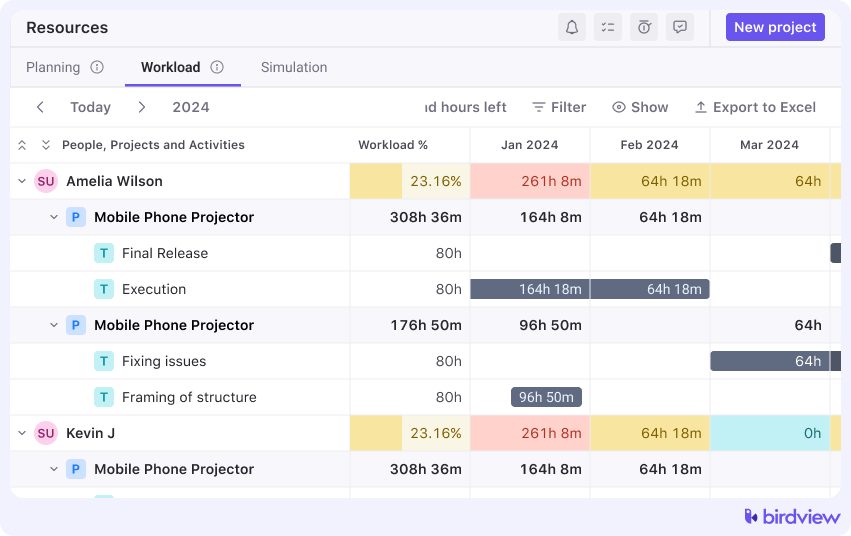
- Workload management: Balance work across the team using visual workload views that highlight over- and under-allocation. Adjust assignments and see the impact immediately.
- Time tracking: Track billable and non-billable hours by project and task. Built-in timesheets and approvals support utilization reporting and invoicing.
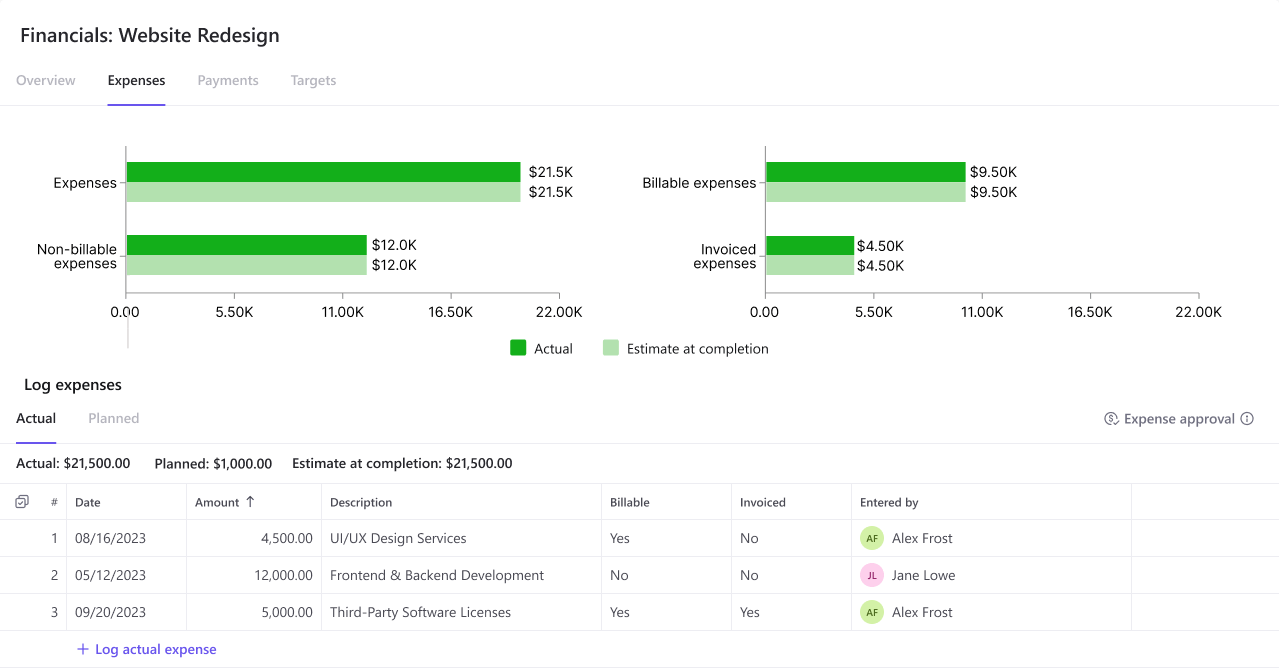
- Project financials: Monitor budgets, actuals, and forecasts in real time. Track project profitability and support multiple billing models, including fixed fee and time and materials.
- Billing and invoicing: Generate invoices from approved time and expenses. Customizable templates and multi-currency support help reduce errors and speed up billing.
- Business intelligence dashboards: Use pre-built or custom dashboards to track portfolio health, utilization, and financial performance in real time.
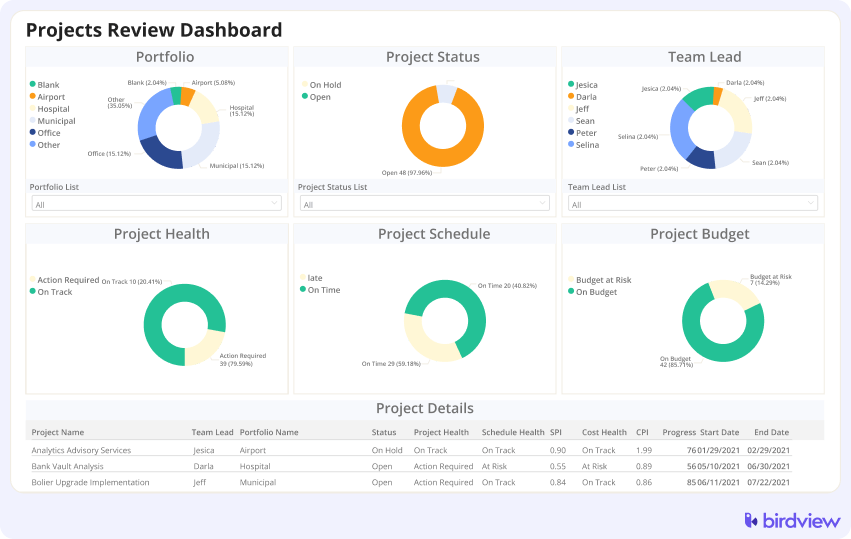
- Portfolio management: View and manage all projects in one place. Filter and report across projects to support prioritization and strategic decision-making.
Trial info: 14-day free trial, extendable to 28 days
Pros:
- A Canadian company with an understanding of local market requirements
- Strong resource and capacity planning capabilities designed for managing specialized technical talent
- Comprehensive financial visibility at both project and portfolio levels
- Built specifically for engineering and consulting workflows, so features align with how these teams work
- Business intelligence dashboards provide executive visibility without manual reporting
- Integrated billing streamlines the path from project delivery to payment
Cons:
- A feature-rich platform may feel overwhelming for very small teams initially
- Learning curve exists, though training resources help mitigate this
“We now have transparency around budgets and profitability, and we developed a target profitability metric for project teams to work towards. This way, they can easily see how the project is progressing and make changes throughout to keep it on track, rather than finding out after the fact that too many hours were spent.”
Nicole Cook, Director of Operations at SES Consulting
2. CMiC
Headquarters: Toronto, Ontario, Canada
Best for: Large-scale construction and infrastructure engineering projects requiring enterprise-grade ERP capabilities and complex financial controls
CMiC comes out of Canada and has built a reputation around complex, large-scale engineering and construction projects. It’s more than project management software. It’s closer to a full ERP system designed for the construction and engineering space.
Key features: Project controls, cost management, scheduling, document management, reporting, ERP capabilities
Trial info: Demo-based, no self-serve trial
Pros:
- Robust financial and project controls suitable for multi-entity projects
- Deep ERP capabilities handle complex accounting requirements
- Designed specifically for large, intricate engineering and construction work
Cons:
- A steep learning curve requires significant training investment
- Can be overkill for smaller engineering teams or simpler project structures
- Less flexible if workflows don’t align with CMiC’s expected processes
- Higher total cost of ownership compared to lighter alternatives
3. Jonas Construction Software
Headquarters: Markham, Ontario, Canada
Best for: Construction-focused engineering firms requiring strong project accounting, job costing, and financial integration
Jonas is another Canadian company, focused on the intersection of engineering, construction, and project accounting. It’s particularly strong on the financial side, which makes sense given its roots in construction software.
Key features: Job costing, project tracking, accounting integration, document management, reporting
Trial info: Demo available on request
Pros:
- Solid accounting and cost tracking capabilities
- Strong integration between project management and accounting functions
- Established presence with good customer support infrastructure
Cons:
- Limited advanced resource planning features compared to comprehensive PSA tools
- The interface may feel dated to users accustomed to modern software design
- Less suitable for engineering work outside the construction context
- Customization options can be limited
4. Newforma
Headquarters: Newport Beach, California, USA
Best for: Design and architecture firms prioritizing document management, version control, and project information management over traditional PM features
Newforma takes a different approach. Rather than trying to be an all-in-one PM tool, it focuses on project information management. Think document control, email management, and collaboration workflows that matter specifically to design and engineering firms.
Key features: Document management, project collaboration, email management, file version control, integrations
Trial info: Demo-based
Pros:
- Excellent document management and version control for design-heavy workflows
- Popular with architecture and engineering firms for collaboration
- Integrates well with common design and engineering software
Cons:
- Limited project and resource planning capabilities
- Often requires a separate PM tool, adding cost and complexity
- Not a complete solution for firms needing financial tracking
- Learning curve for maximizing the document management features
5. Procore
Headquarters: Carpinteria, California, USA
Best for: Construction engineering teams with distributed field operations requiring strong site-to-office collaboration and mobile capabilities
Procore has become something of a standard in construction project coordination, with strong adoption across Canada. It’s built for large teams working on construction and engineering projects, particularly when coordination across distributed sites matters.
Key features: Project coordination, budgeting, scheduling, document control, field collaboration
Trial info: Demo available
Pros:
- An extensive ecosystem and integrations with construction-related tools
- Strong field collaboration features for distributed teams
- Comprehensive support and training resources
Cons:
- Really built for construction workflows, less suitable for non-construction engineering
- Pricing can be steep, particularly for smaller firms
- The feature set may exceed the needs of simpler projects
- Implementation and onboarding require time investment
How to choose the best engineering project management software in Canada (checklist)
Use this checklist to evaluate tools based on how your engineering team actually works, not just on feature lists.
- Map your real workflows first: Document how projects move through your organization, where handoffs happen, and where delays occur. This makes it much easier to spot whether a tool supports your processes or adds friction.
- Identify your biggest pain point: Decide what problem matters most right now: resource constraints, budget overruns, poor visibility, or delivery delays. Choose software that solves that problem well instead of trying to fix everything at once.
- Confirm Canadian data and compliance requirements: Ask vendors where data is hosted and how they handle security and compliance with PIPEDA and related regulations. For public-sector or regulated work, this should be a hard requirement, not a nice-to-have.
- Check integration with existing systems: Make sure the software connects cleanly with your accounting tools, CRM, and engineering systems. Poor integrations lead to manual work and inconsistent data, which cancels out efficiency gains.
- Evaluate scalability beyond your current team: Think about where your firm will be in two or three years. Software migrations are disruptive, so the platform should support growth in projects, people, and complexity without a full replacement.
- Involve all key stakeholders early: Project managers, resource planners, finance teams, and leadership all use the system differently. Getting their input early improves adoption and prevents surprises later.
- Test with real projects, not demos: Use trials or proof-of-concept demos with your actual data and workflows. Real usage reveals limitations that don‘t show up in polished sales demos.
- Calculate total cost of ownership: Look beyond subscription pricing. Include implementation effort, training, configuration, integrations, and ongoing support when comparing options.
FAQ: Engineering project management software in Canada
Do Canadian engineering firms need data residency in Canada?
It depends on your clients. Federal or provincial government work often requires Canadian data hosting. Regulated industries may mandate it. For private sector clients, it’s usually optional, but some firms prefer it for compliance and sovereignty reasons. Always ask vendors where data is hosted and whether Canadian options are available.
What should we ask vendors about PIPEDA and privacy?
Ask these key questions: Do you have privacy policies aligned with PIPEDA? What access controls and audit logs are in place? How do you handle data breaches? Can you provide a Data Processing Agreement? Their readiness to answer tells you how seriously they take Canadian privacy requirements.
PSA vs PM tool: which fits engineering consulting best?
PSA platforms are built for firms that bill by the hour and need to track utilization and project profitability. Traditional PM tools focus on tasks and timelines but lack strong resource capacity planning and financial tracking. If you’re billing clients for time and expertise, PSA makes more sense. For internal projects or fixed-scope work, simpler PM tools may suffice.
What matters more: resource capacity or task management?
Resource capacity planning matters more for most engineering firms. Your constraint isn’t tracking tasks, it’s knowing whether you have the right people available when needed. Can you staff that new project without overloading senior engineers? Most tools handle task management adequately. Sophisticated capacity planning is harder to find and more valuable.
How do we evaluate tools for billable utilization?
Look for software that tracks planned and actual time, separates billable from non-billable work, and shows utilization by person and team. It should connect time tracking to project budgets and profitability. During trials, test how easily you can run utilization reports. If it requires custom reports or spreadsheet exports, the tool isn’t built for billable work.