Blog
Blog

Choosing a PSA platform for an enterprise team is a different conversation than picking a tool for a small agency. If you are evaluating enterprise PSA tools right now, you are probably dealing with real complexity. Multiple teams. Shared resources. Long-running programs. Executive reporting that needs to make sense at a glance. And on top of all that, pressure to adopt AI without adding risk or confusion.
This article takes a practical look at ten enterprise PSA platforms that are commonly shortlisted today. One of them is Birdview PSA. We will cover what really matters at the enterprise level, how we built the shortlist, and how to think about AI when choosing a PSA system.
Quick comparison: top 10 enterprise PSA tools
| Tool | Headquarters | Key enterprise features | Best for |
| Birdview PSA | Toronto, Canada | portfolio-level project visibility, advanced resource capacity planning, project budgeting and cost tracking, BI dashboards, SOC 2 Type II compliance | enterprise services teams needing clear project, resource, and financial visibility |
| Kantata | Irvine, USA | enterprise resource management, utilization and margin tracking, project financial controls, delivery analytics, services forecasting | professional services organizations focused on delivery performance and margin control |
| Certinia | Austin, USA | Salesforce-native PSA, services financial management, integrated CRM and delivery data, scalable billing and revenue workflows | Salesforce-centric enterprises |
| Microsoft Dynamics 365 Project Operations | Redmond, USA | project delivery and financial integration, resource scheduling, Power Platform extensibility, native Dynamics and Microsoft 365 integration | Microsoft ecosystem organizations |
| Oracle NetSuite PSA | Austin, USA | project accounting tied to ERP, resource management, time and expense tracking, financial reporting within NetSuite | enterprises already running on NetSuite ERP |
| Deltek Vantagepoint | Herndon, USA | project-based accounting, operational and financial controls, CRM for project firms, enterprise reporting | project-based firms with strong accounting and compliance needs |
| Planview | Austin, USA | portfolio and program management, resource capacity planning across teams, delivery visibility, roadmapping, analytics | large enterprises managing multiple programs and initiatives simultaneously |
| ConnectWise | Tampa, USA | ticketing and service desk, time tracking, project management, billing automation, resource scheduling | MSPs and IT service providers needing integrated service and billing operations |
| Autotask | New York, USA | service desk, project delivery, time and expense tracking, billing, CRM, Datto ecosystem integration | MSPs looking for PSA tightly connected to their broader Datto toolset |
| Accelo | Denver, USA | CRM through invoicing in one platform, retainer management, time tracking, project and service delivery, client lifecycle visibility | small to mid-sized professional services teams wanting an all-in-one solution |
Enterprise PSA requirements: security, finance, and integrations
Enterprise PSA has different expectations than tools built for small teams. Scale changes everything. You are managing dozens or hundreds of projects at once. Resources move between teams. Financial data needs to roll up cleanly. And leadership wants answers, not raw data.
At this level, PSA software must support:
- Portfolio-level visibility, not just individual projects
- Capacity planning across skills, roles, and locations
- Financial control that finance teams can trust
- Strong permission models and audit trails
- Integrations that do not break every quarter
If a tool does not handle these well, teams work around it. Spreadsheets appear. Reports get rebuilt manually. Confidence drops.
Security checklist for enterprise PSA evaluations
Enterprise buyers almost always ask about security early in the process. And for good reason.
Ask vendors for an enterprise security packet and confirm:
- SOC 2 Type II (or equivalent) and the most recent report date
- SSO/SAML support and role-based access control
- SCIM provisioning (if you need automated user lifecycle management)
- Audit logs: exportable, immutable history for key actions
- Data retention & deletion: configurable policies and backups
- Data residency (if required): regions available and controls
- Incident response: process, timelines, and reporting commitments
This is not about checkboxes. It is about reducing risk. PSA systems hold sensitive project, customer, and financial data. That data needs to be protected without slowing teams down.
Enterprise AI in PSA: governance, permissions, explainability
AI is everywhere in PSA marketing right now. But enterprise teams are cautious. They want AI that supports real work.
The most useful AI capabilities in PSA today focus on:
- Forecasting demand versus capacity
- Identifying risks early, before projects go off track
- Summarizing status and explaining variances
- Supporting planning and communication, not replacing judgment
Equally important is governance. AI must respect permissions. Outputs should be explainable. And teams need to trust the system, not fight it.
📚 Read more: Best PSA software with AI
Enterprise PSA shortlisting criteria (how we evaluated)
This shortlist focuses on enterprise readiness, not popularity. We looked for PSA platforms that hold up in complex environments with multiple teams, shared resources, long-running programs, and executive reporting requirements.
Our evaluation criteria included:
- Complex portfolio support: Can it handle dozens or hundreds of concurrent projects with clean rollups and portfolio views?
- Resource management depth: Capacity planning across roles, skills, and locations, plus realistic forecasting for shared teams.
- Financial controls: Budgeting, cost tracking, utilization, and margin visibility that finance teams can trust.
- Security and compliance: SOC 2 Type II (or equivalent), SSO/SAML options, role-based access controls, and audit logs.
- AI that supports real work: Practical capabilities like forecasting, risk signals, and status summarization, with permission-aware governance.
- Integration readiness: Strong APIs and connectors for ERP, CRM, HR, payroll/expenses, and BI tools, without fragile setups.
- Implementation and adoption reality: Clear rollout paths, role-based onboarding, and reporting packages that don‘t require constant manual cleanup.
We did not rank the tools because enterprise fit depends on ecosystem and operating model. The goal is to help you quickly identify which platforms are most likely to work in your environment.
📚 Read more: Enterprise resource planning (ERP) vs Enterprise resource management (ERM)
Implementation reality: what enterprise rollouts look like
Most enterprise PSA implementations succeed or fail in the first 30 days. A realistic rollout usually follows this sequence:
- Discovery: processes, roles, billing models, and reporting needs
- Data model: projects, resources, rates, skills taxonomy, financial structure
- Roles & permissions: SSO groups, RBAC, audit trail requirements
- Integrations: ERP/CRM/HR, time & expense, BI, data sync rules
- Reporting: executive dashboards, portfolio KPIs, variance definitions
- Pilot → phased rollout: start with one team, then scale
Quick decision tree: pick the right enterprise PSA track
Use your existing stack to narrow the shortlist fast:
- Salesforce-first: Certinia
- Microsoft-first: Dynamics 365 Project Operations
- ERP-first (NetSuite/Deltek): start with NetSuite PSA or Deltek Vantagepoint for tighter accounting alignment
- Delivery-first PSA: Birdview PSA or Kantata for project, resource, and margin visibility
- Portfolio and program management at scale: Planview
- MSP or IT service provider: ConnectWise or Autotask, depending on your existing ecosystem
- Small to mid-sized professional services team: Accelo, if you want CRM through invoicing in one place
Most enterprises shortlist 2-3 platforms that match their ecosystem and operating model, then validate with a pilot and reporting requirements.
10 best enterprise PSA tools for 2026
1. Birdview PSA
Birdview PSA is designed for organizations that want one clear system for projects, resources, and financials. It is often chosen by enterprise services teams that struggle with fragmented tools and limited visibility.
The platform focuses on workload planning, project execution, and financial oversight in one environment. Teams can see how work, people, and budgets connect. That makes trade-offs easier to manage.
Key features:
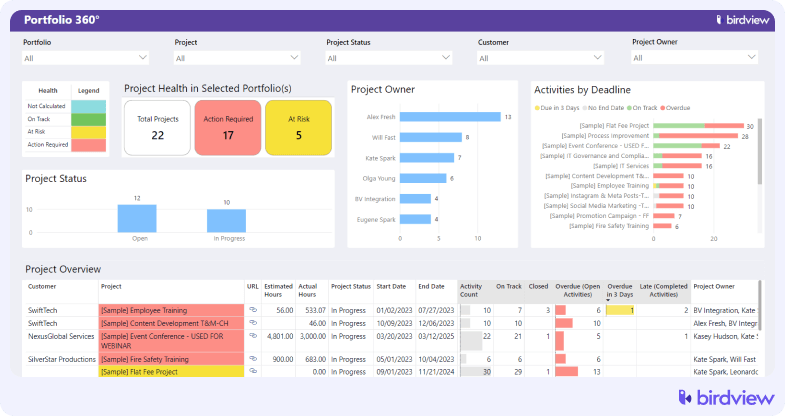
- Portfolio-level project visibility
Birdview lets leaders see all active and planned projects across the organization in one place. You can filter by team, office, client, or business unit. This helps you spot risks early and align work with strategy.
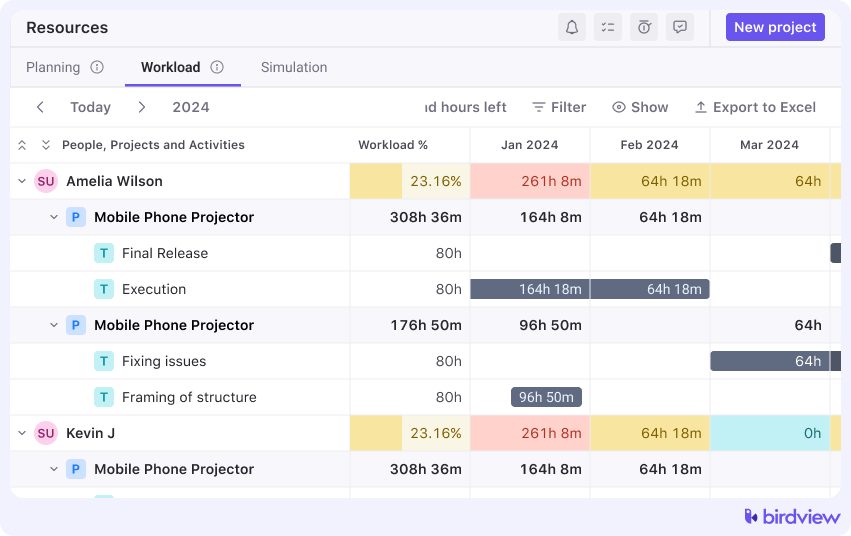
Enterprise teams can plan capacity by skills, roles, and locations. You get a clear “who‘s available when,” with the ability to balance workloads and avoid burnout.
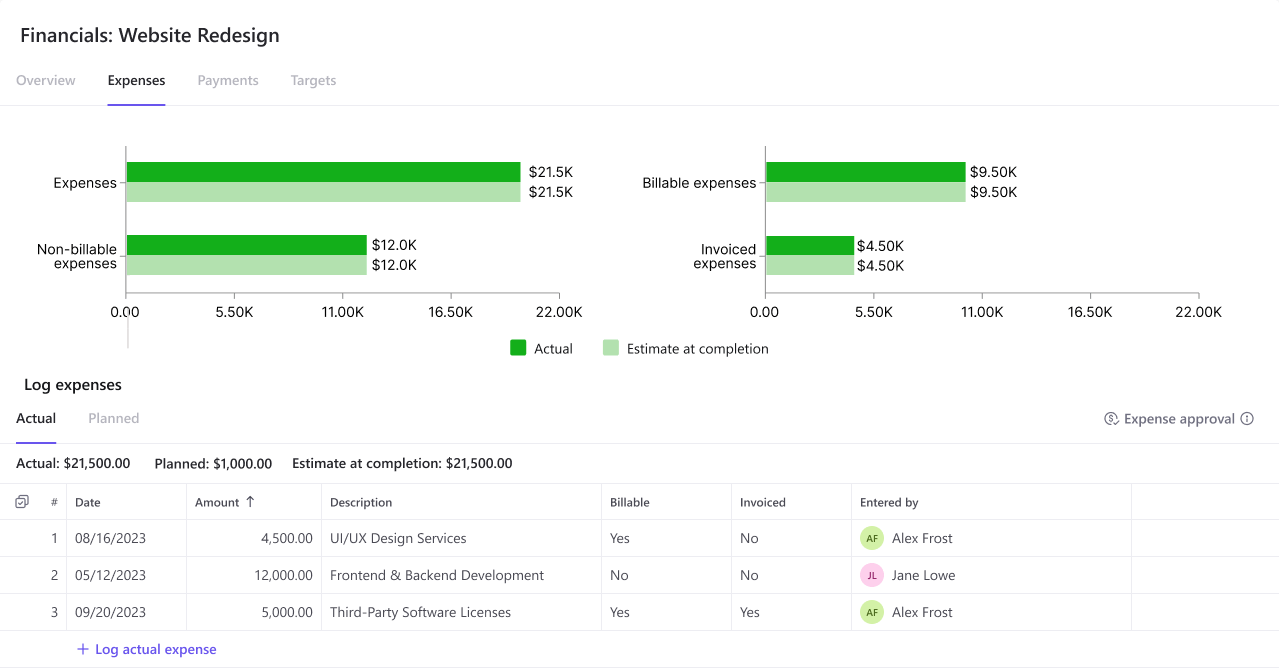
- Project budgeting and cost tracking
You can define project budgets and track actual costs in real time. That makes financial variance visible throughout delivery, not just at reporting deadlines.
- Built-in BI dashboards and executive reporting
Birdview includes ready-made dashboards for executives and PMOs. These visualizations provide insight without exporting data to separate tools.
- Security and compliance controls
Birdview is SOC 2 Type II certified and supports role-based access and audit logs. This reduces risk and meets standard enterprise security reviews.
- Scalable permissioning and governance
Admins can create detailed user roles and permissions. Combined with audit trails, this supports governance needs in complex org structures.
- Integration with core systems
Open APIs and connectors let you tie Birdview to ERP, CRM, HR, and accounting systems. This avoids data silos and supports enterprise workflows without manual exports.
Trial info: 14-day free trial, extendable to 28 days
Pros:
- Strong visibility across projects, resources, and finances
- Built-in reporting that supports executive and operational views
- SOC 2 Type II compliance supports enterprise security reviews
Cons:
- Enterprise rollouts still require process alignment and change management
- Very specialized financial workflows may need integration with ERP systems
2. Kantata
Kantata is well known in the professional services space. It focuses heavily on delivery performance, utilization, and margin control. Many large service firms use it as a central operational system.
Its AI features are positioned around supporting common PSA workflows. This includes insights into resourcing and project health. For organizations with mature delivery processes, Kantata often feels familiar and robust.
Key features: resource management, project delivery controls, financial management, utilization tracking, analytics
Trial info: demo-led evaluation
Pros:
- Strong depth in service delivery and resourcing
- AI agents focused on operational insights
Cons:
- Pricing and packaging are typically sales-driven
- Implementation can be demanding for complex structures
3. Certinia (formerly FinancialForce)
Certinia is built on Salesforce and is often chosen by enterprises already deeply invested in that ecosystem. It connects PSA workflows with CRM and customer data in a single platform.
This tight integration can be a major advantage. It allows service delivery, sales, and finance teams to work from shared data. Certinia has also been expanding its AI capabilities within Salesforce.
Key features: Salesforce-native PSA, service financial management, resource planning, billing, analytics
Trial info: demo-based evaluation, trial availability varies
Pros:
- Best fit for Salesforce-first organizations
- Strong connection between services and customer data
Cons:
- Salesforce dependency limits flexibility for some teams
- Total cost and setup effort can be high
4. Microsoft Dynamics 365 Project Operations
Microsoft Dynamics 365 Project Operations sits within the broader Dynamics ecosystem. It is designed for organizations that want project delivery tightly integrated with finance, sales, and operations.
Copilot brings AI assistance into planning and execution workflows. For Microsoft-centric enterprises, this integration often feels natural. For others, it can feel complex.
Key features: project planning, resource management, project financials, Power Platform extensibility, Copilot AI
Trial info: 30-day free trial available
Pros:
- Strong fit for Microsoft-based environments
- Flexible extension options via Power Platform
Cons:
- Configuration often requires partner support
- Feature depth depends on deployment choices
5. Oracle NetSuite PSA
NetSuite PSA is commonly adopted by enterprises that already run NetSuite ERP. The main value lies in tight financial integration rather than standalone PSA innovation.
For finance-led organizations, this alignment can simplify reporting and controls. AI capabilities come mainly from NetSuite‘s broader platform rather than PSA-specific tools.
Key features: project accounting, resource management, timesheets, expenses, reporting, ERP integration
Trial info: product tours and demos
Pros:
- Strong connection between PSA and ERP data
- Suitable for finance-driven organizations
Cons:
- Best value only when standardized on NetSuite
- User experience can feel heavy for delivery teams
6. Deltek Vantagepoint
Deltek Vantagepoint is often described as a project-based ERP rather than a pure PSA tool. It is widely used in consulting, architecture, and engineering firms.
Its strength lies in project accounting and operational control. The Ask Dela AI assistant focuses on summarization and assistance rather than advanced forecasting.
Key features: project accounting, CRM, resource planning, billing, dashboards, AI chatbot
Trial info: demo-based evaluation
Pros:
- Strong financial and operational controls
- Designed for complex, project-based organizations
Cons:
- May be more than some teams need
- Implementation can be resource-intensive
7. Planview
Planview sits at the intersection of PSA and enterprise portfolio management. It is commonly found in large organizations that need to coordinate delivery across many teams, programs, and business units simultaneously.
Its strength is portfolio-level visibility and capacity planning. The AI features focus on resource optimization and surfacing bottlenecks across the portfolio rather than day-to-day project tasks.
Key features: portfolio management, resource capacity planning, project delivery, budgeting, roadmapping, analytics, AI-assisted planning
Trial info: demo-based evaluation
Pros:
- Handles complexity well at the portfolio and program level
- Strong fit for enterprises managing multiple concurrent initiatives
Cons:
- Can be heavy for teams that only need project and resource management
- Pricing and implementation effort reflect the enterprise positioning
8. ConnectWise
ConnectWise is a PSA platform built primarily for managed service providers and technology solution companies. It combines service delivery, billing, and helpdesk functionality in one place.
Its strength is in IT service management workflows. The automation features handle ticketing, time tracking, and billing well, though it is more MSP-focused than general professional services.
Key features: ticketing, time tracking, billing, project management, resource scheduling, reporting, automation
Trial info: demo-based evaluation; trial access available on request
Pros:
- Well-suited to MSPs and IT service businesses
- Strong automation for recurring service and billing workflows
Cons:
- Less relevant for non-IT professional services teams
- Interface and workflow complexity can require significant onboarding
9. Autotask
Autotask, now part of Datto, is another PSA platform aimed squarely at managed service providers. It covers the core operational needs of an MSP from a single platform.
Its strength is in tying together service desk, project delivery, and billing for IT-focused businesses. It integrates well within the Datto ecosystem, which is a plus if you are already using Datto products.
Key features: service desk, project management, time and expense tracking, billing, CRM, reporting, integrations
Trial info: demo-based evaluation
Pros:
- Solid operational coverage for MSP workflows
- Good fit within the broader Datto product ecosystem
Cons:
- Primarily designed for IT service providers, not general professional services
- Teams outside the MSP space may find the feature set misaligned with their needs
10. Accelo
Accelo is a cloud-based platform that combines CRM, project management, service delivery, and billing. It targets small to mid-sized professional services teams rather than large enterprise deployments.
Its strength is bringing the full client lifecycle into one place. It works well for teams that want visibility from initial sale through project delivery and invoicing without stitching together separate tools.
Key features: CRM, project management, retainer management, time tracking, billing, service delivery, reporting
Trial info: demo-based evaluation
Pros:
- Covers the full client and project lifecycle in one platform
- Good option for smaller professional services teams wanting an all-in-one solution
Cons:
- Less suited to large enterprise environments with complex permissioning needs
- Resource capacity planning and revenue recognition is limited c
How to choose the best PSA software (checklist)
Here’s a practical checklist to work through when you’re evaluating PSA platforms that include AI features.
- Enterprise readiness
- Is SOC 2 Type II documentation (or equivalent) available?
- Does it support SSO/SAML, SCIM if needed, and audit logs?
- Are there data residency and retention controls you can configure?
- Financial fit
- Are your billing models supported? Time and materials, fixed fee, retainer, milestones?
- Do your revenue recognition needs align, or is there a clean ERP handoff?
- Integration fit
- Are there connectors for CRM, accounting or ERP, payroll or expense systems, and BI tools?
- Is there API coverage for custom workflows you know you’ll need?
- Implementation reality
- Do you have a role-based rollout plan? Think PMO, resourcing, finance, and delivery leads.
- Is the reporting package defined? Executive dashboards and operational KPIs need to be scoped early.
- Is there a governance model in place? Who owns data quality, rates, and skills taxonomy?
Final thoughts
The tools on this list all handle the basics. Where they differ is in ecosystem fit, AI maturity, and how much implementation effort you’ll need to get value out of them.
If you want a platform that brings together projects, resources, and financials with enterprise security and compliance already in place, Birdview PSA is built for that.
The right PSA platform must fit your ecosystem and support your billing models. It should also provide the visibility your teams need to deliver profitable work. Take the checklist, map it to your requirements, and talk to the vendors that make sense for your environment. That’s how you find the tool that actually works.