Ksenia Kartamysheva
 Government projects in Canada have real-world constraints. You deal with audits, public budgets, procurement, privacy, and long delivery cycles. A generic task tracker will not save you. It will just give you a nicer-looking spreadsheet. This guide compares seven tools that show up in the public sector and Canada-adjacent use cases. It focuses on fit, trade-offs, and what teams can actually run in practice.
Quick comparison: 7 tools at a glance
| Tool | Key features | Best for | Canadian presence |
| Birdview PSA | Project and portfolio management, capacity planning, budget visibility, and audit-ready dashboards | Government PMOs, shared services, and municipal/provincial leadership teams | Canadian company |
| Envisio | Strategy execution, performance reporting, alignment tracking | Municipal and provincial leadership teams | Strong Canadian public sector focus |
| CMiC | Construction project management, financial controls, document management | Capital and facilities programs | Office in Canada |
| Traqspera | Project delivery, time tracking, compliance reporting | Government consulting and delivery teams | Active in Canadian public sector |
| AceProject | Task tracking, scheduling, basic reporting | Small government agencies | Global vendor |
| Nutcache | Time tracking, budgets, vendor collaboration | Agencies and mixed internal external teams | Canadian company |
| Function Point | Job costing, workflows, time tracking | Communications and creative units | Canadian company |
What is government project management software?
Government project management software is built to support structured delivery in regulated environments. It goes beyond task lists and timelines. These tools help teams plan work, manage approvals, track public spending, and report progress to leadership and oversight bodies.
In government settings, projects often require formal intake, documented decisions, and clear accountability. Software needs to support those workflows. It also needs to scale across departments and handle shared resources without relying on spreadsheets.
Another key difference is longevity. Government projects and programs can run for years. Records matter. Decisions need context. The right tool helps preserve that institutional memory while still supporting day-to-day delivery.
What Canadian government organizations should consider when choosing project management software
Selecting project management software in the public sector is not just a technology decision. It is a risk, compliance, and operational decision. The right platform should make delivery easier while standing up to procurement reviews, audits, and long-term use.
There are two lenses that matter most: how well the vendor fits the Canadian public sector context, and whether the software meets baseline requirements expected in 2026.
Part one: Evaluating fit for Canadian government agencies
Start with a few practical questions before looking at feature lists.
- Where is the vendor actually based?
A real Canadian presence matters. Head office location, support teams, and product staff all affect responsiveness and accountability. A reseller or mailing address does not provide the same level of assurance.
- Where is the data hosted?
Data residency is a common requirement across federal, provincial, and municipal organizations. Keeping data within Canadian borders reduces privacy risk and simplifies security assessments. It also shortens approval cycles during procurement.
- Can the system withstand an audit?
Audits are part of government operations. The software must support traceability through audit logs, role-based access, and exportable reports. Project decisions, changes, and approvals should be easy to track without manual reconstruction.
- Is the platform accessible to all users?
Accessibility is mandatory, not optional. Many government organizations require alignment with WCAG 2.1 Level AA standards. This applies to everyday workflows, not just surface-level compliance statements. Procurement teams will ask.
Part two: Core requirements for 2026 government projects
Beyond vendor fit, government agencies should validate that the software meets a set of baseline operational requirements.
- Data residency: All project data should remain within Canadian borders, typically hosted in a Canadian cloud region.
- Accessibility: User interfaces must meet WCAG 2.1 Level AA standards to ensure usability for all employees and stakeholders.
- Bilingualism: English and French support may be required for the user interface, documentation, and technical support, depending on the organization.
- Auditability: The system should maintain full version history and change logs for project data, supporting transparency and compliance with public sector accountability requirements.
Together, these considerations help government agencies narrow their options early. Software that cannot clearly meet these expectations often introduces delays, rework, or risk later in the project lifecycle. The best tools make compliance and delivery feel like part of the same process, not competing priorities.
What to look for in the best government project management software in Canada
🔐 Privacy and security fundamentals
Role-based access, audit trails, and secure authentication are essential. You need to control who sees what and track when data is accessed or changed. This helps align with PIPEDA expectations and internal security policies. The tool should make audits easier, not stressful.
📊 Portfolio visibility for leadership
Executives and steering committees need consolidated views. Not weekly email updates. Look for dashboards that show project status, risks, dependencies, and benefits across the portfolio. Standardized reporting saves time and reduces confusion.
📅 Resource capacity planning
Specialists are shared across departments. That is common in government. A good tool shows capacity conflicts early. It helps managers see when teams are stretched and where adjustments are possible. This matters for delivery and for staff well-being.
🏛️ Governance workflows
Formal intake, approvals, stage gates, and change control are part of government work. Software should support these steps naturally. If teams work around the tool, adoption will suffer.
🤝 Vendor and cross-organization collaboration
External partners are often involved. Consultants, vendors, or agencies need limited access. The right platform allows collaboration without exposing sensitive internal data.
📑 Reporting that fits public sector reality
Reporting is not optional. Look for tools that generate executive summaries, committee reports, and audit-ready outputs without heavy manual effort.
⚙️ Implementation practicality
If setup takes half a year, that is a red flag. Government organizations need tools that can be configured gradually and show value early, even during rollout.
🍁 Canadian operational fit
Canadian support hours, procurement alignment, and bilingual support can matter. For some organizations, working with a Canadian vendor simplifies procurement and compliance.
📚 Read more: Top software solutions made in Canada
How we picked the best government project management tools
This list is based on structured research, not vendor popularity or marketing spend. We started by identifying PM platforms used in government and public sector environments with a clear operational presence in Canada.
Each tool was evaluated against consistent criteria:
- Government suitability. Ability to support regulated, multi-stakeholder projects with formal governance, reporting, and documentation needs.
- Security and data controls. Role-based access, audit trails, and enterprise-grade security features aligned with Canadian privacy expectations.
- Project and portfolio depth. Support for cross-project visibility, resource capacity planning, and leadership-level reporting. Not just task tracking.
- Real-world usability. Practical implementation effort, learning curve, and how quickly teams can start getting value.
- Transparency. Clear feature documentation, trial or demo access, and publicly available product information.
We reviewed vendor documentation, product websites, and independent software directories. We cross-checked features and trial availability where possible. The goal wasn’t to declare one tool “the best overall.” It was to highlight credible, Canada-relevant options that government organizations can realistically evaluate and pilot.
7 best government project management tools in Canada
Choosing government project management software in 2026 is about finding tools that reflect how government projects actually run. Different teams have very different needs. A central PMO does not work the same way as a facilities group or a communications team.
This comparison covers seven project management tools used by government organizations in Canada. The tools range from:
- PMO and portfolio management with strong resource capacity planning: Birdview PSA
- Strategic planning and performance tracking: Envisio
- Infrastructure and construction programs: CMiC
- Resource scheduling and time tracking for service teams: Traqspera
- Small teams and straightforward tracking: AceProject
- Time and budget visibility with vendors: Nutcache
- Creative and communications workflows: Function Point
1. Birdview PSA
Birdview PSA is a Canadian-made project and resource management platform. It was built for teams that plan work across departments, balance capacity, track financials, and report on portfolio performance. Birdview PSA is well-suited for government PMOs and shared-service teams managing multiple concurrent initiatives. You can see what projects are competing for the same people and adjust before bottlenecks become blockers.
Canada presence: Created by a Canadian team and headquartered in Toronto, Ontario.
Key features:
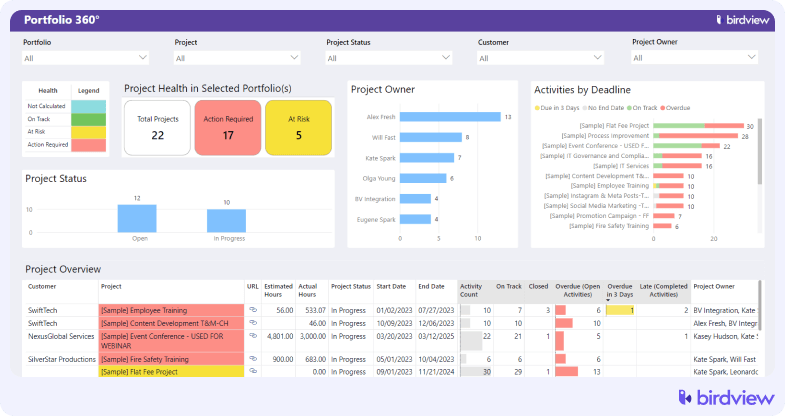
- Portfolio-level governance and oversight
Standardized project status, risks, and milestones across departments. Supports steering committees and executive oversight without relying on manual roll-ups or slide decks.
- Resource capacity planning across shared roles
Visibility into how specialists are allocated across programs and departments. Helps identify conflicts early when the same policy expert, analyst, or IT resource is assigned to multiple initiatives.
- Formal project intake and prioritization
Structured intake workflows that support approvals, documentation, and prioritization decisions. Useful when funding, mandates, or political priorities change mid-cycle.
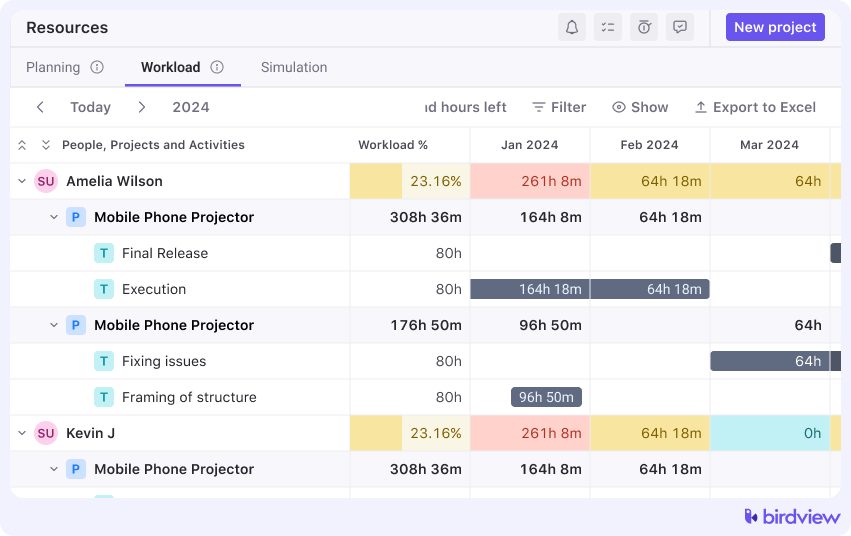
- Workload and utilization tracking
Clear views of who is overloaded and where capacity exists. Supports fair distribution of work and helps prevent long-term burnout in constrained public sector teams.
- Budget tracking and cost accountability
Planned versus actual cost tracking at the project and portfolio level. Supports transparency and financial accountability for publicly funded initiatives.
- Audit-ready reporting and documentation
Centralized project history, decisions, and approvals. Makes audits, reviews, and post-project evaluations easier to support.
- Role-based access and permissions
Control access for internal teams, executives, and external vendors. Ensures sensitive information is shared appropriately and logged.
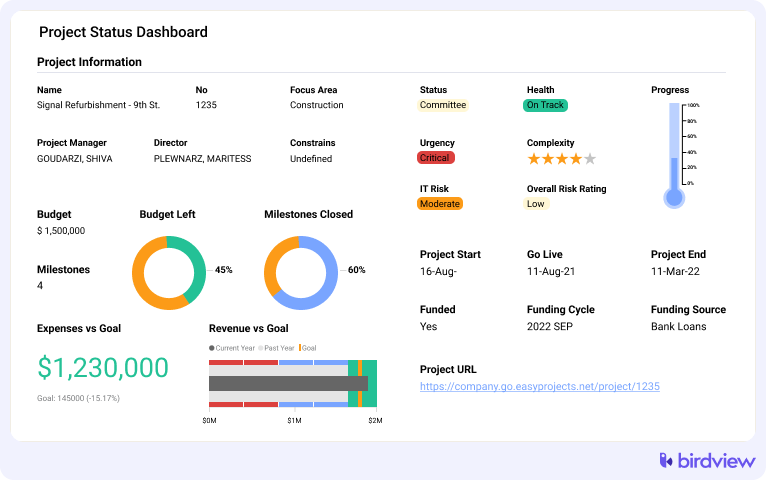
- Executive dashboards and standardized reporting
Leadership-level dashboards that reflect government reporting needs. Reduces time spent preparing committee updates and status reports.
- Integration with finance and business systems
Connects with accounting (QuickBooks integration) and enterprise systems to reduce duplicate data entry and improve reporting accuracy across departments.
“Birdview PSA delivers a robust, easy-to-use platform without busting the budget. The software is easy for my team to use to create activities and enter time. For me, it is the ease of reporting.”
Mianne Nelson, Communications Director at Polk County
Trial: A free 14-day trial is available, with the possibility of extending it to 28 days.
Pros
- Strong visibility into shared resource capacity
- Useful for portfolio-level governance and reporting
- Reduces reliance on spreadsheets for PMOs
Cons
- More structure than very small teams may need
- Requires some upfront configuration
Best for: Government PMOs managing portfolios where resource contention is real. Delivery teams coordinating policy development, IT deployments, and program improvement work that all pull from the same group of subject matter experts.
💬 Client Reviews
⭐“Great Project Management Tool”
“Birdview is an easy tool to use to manage projects with multiple users and to track time. Timely alerts and notifications are sent, and the ease of implementing changes and automation was very useful. My team used Birdview daily to manage large projects and personal tasks.” – G2 review
2. Envisio
A performance management and strategic planning platform with project tracking components. Envisio is relevant for teams that need to connect project delivery to strategic goals and communicate progress to the public or elected officials. If you’re managing a portfolio where accountability and strategic alignment matter more than detailed task scheduling, Envisio can help.
Canada presence: Office listed in Vancouver, British Columbia.
Key features: Strategic plan tracking, performance measurement, project tracking, public-facing dashboards, and integrations with data sources.
Trial: Demo available on request.
Pros
- Clear alignment between strategy and initiatives
- Strong leadership-level reporting
- Designed with public sector language and structure
Cons
- Limited task-level execution features
- Often paired with another delivery tool
Best for: Municipal or provincial leadership teams focused on strategy execution and performance reporting.
3. CMiC
A construction management and ERP platform with project management and workflow components. CMiC is relevant for infrastructure projects, building programs, and capital initiatives where project controls and financial governance matter. If you’re managing a facilities upgrade or a major construction program, CMiC is built around the workflows and financial rigor those initiatives require.
Canada presence: Office listed in Toronto, Ontario.
Key features: Project management workflows, construction financials, document management, field management, analytics and reporting, and integrations.
Trial: Demo available on request.
Pros
- Built for capital projects and infrastructure programs
- Strong financial and governance controls
- Integrated document and field management
Cons
- Overkill for non-construction teams
- Significant implementation effort
Best for: Government facilities teams managing capital projects, infrastructure programs, and construction-heavy initiatives where project controls and financial governance are critical.
4. Traqspera
A project management platform with a focus on resource scheduling and time tracking. Traqspera is relevant for teams that need to balance workload across multiple projects and track where time is going. If you’re managing a service delivery team or a shared-service group, Traqspera gives you visibility into capacity and utilization.
Canada presence: Office listed in Montreal, Quebec.
Key features: Resource scheduling, time tracking, project budgeting, task management, reporting, and integrations.
Trial: Demo available on request.
Pros
- Practical for delivery-focused teams
- Good visibility into effort and billing
- Supports compliance reporting
Cons
- Limited portfolio-level planning
- Less focus on long-term capacity forecasting
Best for: Government delivery teams and consulting units focused on execution and reporting.
5. AceProject
A straightforward project management tool with task tracking, time management, and basic reporting. AceProject is relevant for small teams that need to organize work without complex governance or resource planning. If you’re managing a handful of projects with a small group, AceProject keeps things simple.
Canada presence: Office listed in Quebec City, Quebec.
Key features: Task management, time tracking, document storage, basic reporting, and team collaboration.
Trial: Free plan available with limited features. Paid plans start at a low monthly rate.
Pros
- Simple and easy to use
- Quick to deploy
- Low overhead
Cons
- Limited governance and reporting depth
- Not built for large portfolios
Best for: Small government agencies managing straightforward projects where simplicity and cost matter more than advanced features.
6. Nutcache
A project management and time tracking tool with invoicing and expense management. Nutcache is relevant for teams working with external vendors or contractors where tracking time and costs matters. If you’re managing a project with outside help and need visibility into hours and expenses, Nutcache handles that.
Canada presence: Office listed in Quebec City, Quebec.
Key features: Time tracking, expense management, invoicing, project budgeting, task management, and reporting.
Trial: Free plan available. Paid plans start at a low monthly rate.
Pros
- Clear time and cost visibility
- Useful for vendor-heavy work
- Simple interface
Cons
- Limited portfolio management
- Less suited for formal governance
Best for: Government organizations working with external agencies or contractors.
7. Function Point
A project management platform built for creative and communications teams. Function Point is relevant for government communications departments, marketing teams, and agencies that produce high volumes of creative work. If you’re managing campaigns, publications, or design work, Function Point is structured around those workflows.
Canada presence: Office listed in Toronto, Ontario.
Key features: Creative project management, resource scheduling, time tracking, budgeting, proofing and approvals, and reporting.
Trial: Demo available on request.
Pros
- Strong for communications and creative teams
- Clear cost and effort tracking
- Structured workflows
Cons
- Narrow use case
- Not designed for enterprise portfolios
Best for: Government communications and creative teams managing campaigns, publications, and design work where proofing and approvals are part of every project.
How to choose the best government project management software in Canada
Government project management software should reduce friction, not add it. The best tool is the one your teams will actually use and that leadership can trust.
Use the checklist below to match the software to your delivery model, not a generic feature list.
- Planning horizon. Do you plan one to two weeks ahead, or do you need multi-month capacity forecasting and scenario planning for pipeline demand?
- Visibility needs. Can managers see overallocations, availability, and utilization across teams and shared roles in one place, without manual status updates?
- Scalability and governance. Will the workflow still hold when projects, roles, and teams grow, or will it turn into ongoing spreadsheet maintenance and admin overhead?
- Integrations and support. Does the software connect cleanly with your accounting, time tracking, and reporting stack, and is vendor support strong enough for rollout and ongoing change?
If you’re managing a PMO or portfolio where resource contention is real, prioritize tools with strong capacity planning and portfolio visibility. If you’re running infrastructure programs, look for platforms built around project controls and financial governance. If you’re coordinating small team work, focus on simplicity and low overhead.
The best tool is the one that fits how your teams actually work, not the one with the longest feature list.
Bringing clarity to government project delivery with Birdview PSA
Government project management is about finding software that fits how public sector work actually happens. That means formal governance, shared resources, long planning horizons, and the need to explain decisions clearly to leadership and oversight bodies.
No single platform works for every team. Facilities groups, communications units, delivery teams, and central PMOs all operate differently. The best tools are the ones that support those differences without forcing teams into workarounds.
For departments and PMOs managing multiple projects and programs, Birdview PSA is a practical option to evaluate. It helps connect work across initiatives, surface capacity risks early, and report performance across the portfolio, not just project by project.