Blog
Blog

Renewable energy engineering work has a funny way of looking simple on paper and getting messy fast in real life. One project is in early feasibility. Another is waiting on permits. A third is in commissioning mode and suddenly needs “just a few” extra site visits. Meanwhile, your best electrical engineer is booked solid, your PM is chasing timesheets, and finance is trying to figure out what margin is left after subcontractors, travel, and change requests.
That‘s the gap PSA software is supposed to close. Not with magic. Just by putting delivery, resourcing, time, and billing in the same place, you can see what‘s going on before it becomes a fire drill.
Example: A solar project slips two weeks because permitting drags. The PM reshuffles resources, pulls in a subcontractor, and suddenly commissioning needs “just three more” site visits. By the time finance notices margin drift, the costs are scattered across timesheets, invoices, and email threads.
Below is a practical shortlist of PSA tools that renewable energy engineering companies often consider in 2026, plus what to look for when you‘re picking one.
Quick comparison: 6 PSA tools for renewable energy engineering projects
| Tool | Headquarters | Key features | Best for |
| Birdview PSA | Toronto, Canada | project & portfolio management, resource planning, time tracking, billing/invoicing, reporting dashboards, integrations | teams that want project delivery + capacity planning + project financial visibility in one workspace |
| Deltek Vantagepoint | Herndon, VA, USA | project accounting, project management, CRM, resourcing, forecasting, reporting | engineering and A&E-style firms that want deeper project accounting and operational control |
| Kantata | Irvine, CA, USA | resource management, project delivery, forecasting, utilization, reporting | services organizations that live and die by resourcing and need strong forecasting |
| Certinia PSA | Austin, TX, USA | Salesforce-native PSA, staffing, time & expense, billing, services analytics | Salesforce-first organizations that want delivery and financial processes in the same ecosystem |
| BigTime | Chicago, IL, USA | time & expense, billing workflows, budgeting, reporting, utilization | firms that want tighter time-to-invoice workflows and cleaner billing operations |
| Accelo | Denver, CO, USA | quote-to-cash workflow, CRM + projects, time tracking, invoicing, automation | teams that want sales-to-delivery handoffs to feel less manual |
Decision map: match your pain to the right PSA
- If your biggest pain is resource forecasting and capacity planning → Birdview PSA or Kantata.
- If you need strong workload visibility across multiple concurrent projects → Birdview PSA or Kantata.
- If your biggest pain is keeping margin visible before it‘s too late → Birdview PSA or Deltek Vantagepoint.
- If finance needs ERP-grade project accounting and tighter operational controls → Deltek Vantagepoint.
- If you want PSA to live inside Salesforce (native) → Certinia PSA.
- If Salesforce is your CRM, but you want lighter PSA + workflow automation → Accelo or Birdview PSA.
- If your biggest pain is quote-to-cash handoffs (sales → delivery → billing) → Birdview PSA or Accelo.
- If cash flow depends on fast, clean invoicing from timesheets → BigTime.
- If you run mixed billing models (T&M + fixed fee + milestones) and need structure → Deltek Vantagepoint, Birdview PSA or Certinia PSA.
- If implementation effort must be lighter and adoption is the main risk → Birdview PSA, BigTime, or Accelo.
PSA software requirements for renewable energy engineering
Not every engineering firm runs the same way. EPC and the owner‘s engineer teams have different pressures. So do design consultancies and firms that provide field services and ongoing maintenance. Still, the “PSA must-haves” tend to cluster around the same realities.
Multi-phase project control (without overcomplicating it)
Renewables projects rarely move in a straight line. You need phases, milestones, dependencies, and a way to track progress without turning every plan update into a mini project.
Look for:
- Phase-based plans (design → permitting → procurement → construction support → commissioning)
- Baselines vs. current plans
- Simple status reporting that PMs will actually keep updated
Resource planning that matches real capacity
Skills matter. Availability matters more. If your PSA can‘t show capacity vs. demand, you‘re back to spreadsheet forecasting and hoping for the best.
Look for:
- Visibility into workload and availability by role and person
- Skills or role-based planning
- Forecasting that supports “what if” scenarios (new project wins, delays, staffing changes)
Time and expense that people will actually submit
Field engineers do not want a complicated process. Neither do busy PMs. If time capture is painful, it will be late and wrong. Then every downstream number is off.
Look for:
- Quick time entry (web and mobile)
- Approvals (and reminders)
- A clear audit trail when edits happen
Project financial visibility beyond budget vs actual
Renewables projects get hit by change orders, rework, site constraints, and vendor delays. You want early signals, not a surprise after the invoice goes out.
Look for:
- Budgeting by phase and cost category
- Margin tracking at project and portfolio level
- WIP-style views or at least “earned vs. spent” visibility if you need it
Billing that matches how you sell work
Many engineering firms run mixed billing models: fixed fee for design, time & materials for support, milestone-based billing, retainers, and passthrough expenses. Your PSA needs to keep up.
Look for:
- Flexible invoicing (T&M, fixed fee, milestone)
- Expense passthrough handling
- Clean export or integrations to accounting
Reporting that helps you answer awkward questions fast
Questions like: “Are we still making money on that wind repowering project?” or “Why is the interconnection study taking 40% longer than planned?”
Look for:
- Dashboards for PMs and leadership
- Customizable reports
- Filters by client, project type, region, PM, discipline
How we built this shortlist (criteria)
This list is not “the only six tools that matter.” It‘s a practical set of PSA options that show up often for engineering and services teams, including renewables.
Here‘s what we used as a filter:
- PSA coverage: project delivery + time/expense + billing, not only PM
- Resource planning maturity: capacity planning, forecasting, utilization visibility
- Financial clarity: budgeting, margin visibility, billing workflows
- Reporting strength: dashboards and usable exports
- Implementation reality: can it be adopted without a year-long overhaul?
- Integration options: accounting and CRM support (where needed)
- Scalability: works for a growing engineering org, not only a small team
Quick decision guide to narrow the shortlist
If you try to compare every PSA feature side by side, the process drags on. A simpler approach is to start with how your organization already works. Your existing systems and operating style usually eliminate half the options right away.
- Delivery-first PSA (project, people, margins first): Birdview PSA, Kantata
- Salesforce-first organizations: Certinia PSA
- ERP-first or accounting-driven teams: Deltek Vantagepoint
- Quote-to-cash and workflow-focused teams: Accelo
- Time and billing–centric services teams: BigTime
6 best PSA tools for renewable energy engineering companies
1. Birdview PSA
Birdview is an end-to-end PSA built for project delivery, resource planning, and financial tracking in one platform. The emphasis is on planning visibility and configurable workflows, which makes it a practical fit for teams managing multiple concurrent projects with different billing structures.
Key features:
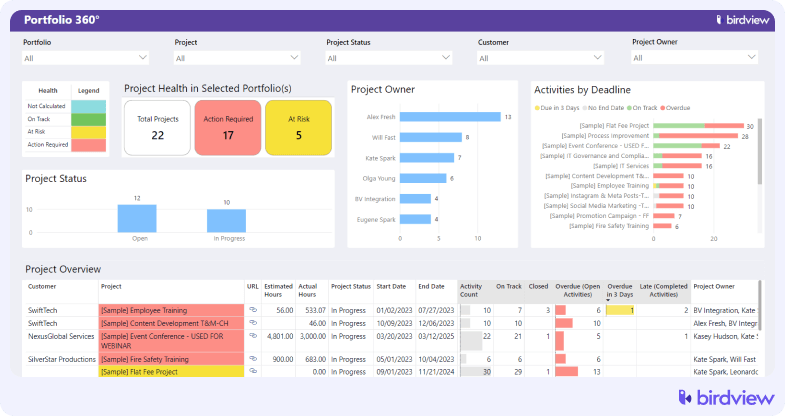
- Project and portfolio management
Plan and track multiple projects across phases and milestones in one view. Portfolio-level visibility helps teams manage feasibility, permitting, and construction work without losing context.
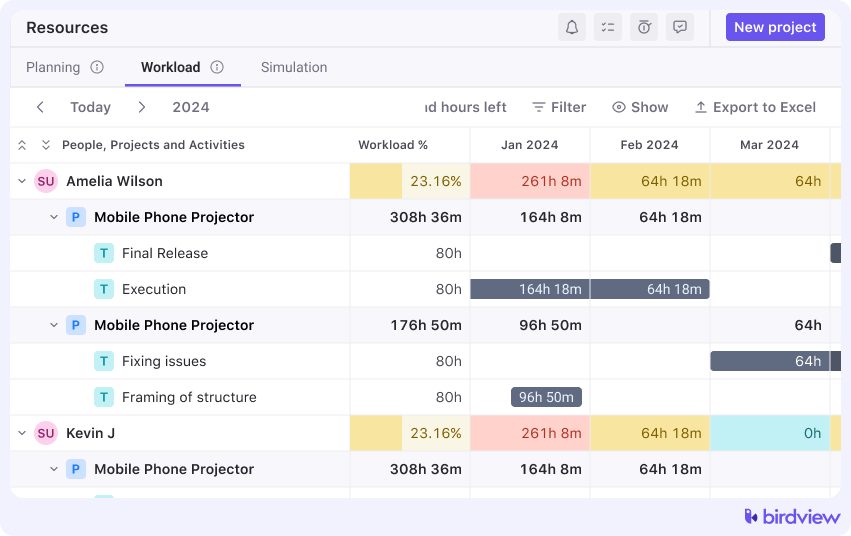
- Resource planning and workload management
See availability and capacity across weeks or months ahead. Assign work by role or skill so the right engineers are scheduled at the right project stage.
- Time and expense tracking
Log time and expenses directly against projects, with built-in approvals. Costs stay tied to the work, reducing cleanup at the end of the month and fewer missing entries from the field.
- Flexible billing and invoicing
Supports time and materials, fixed fee, and milestone billing. Useful when projects shift from advisory work into delivery or EPC-style contracts.
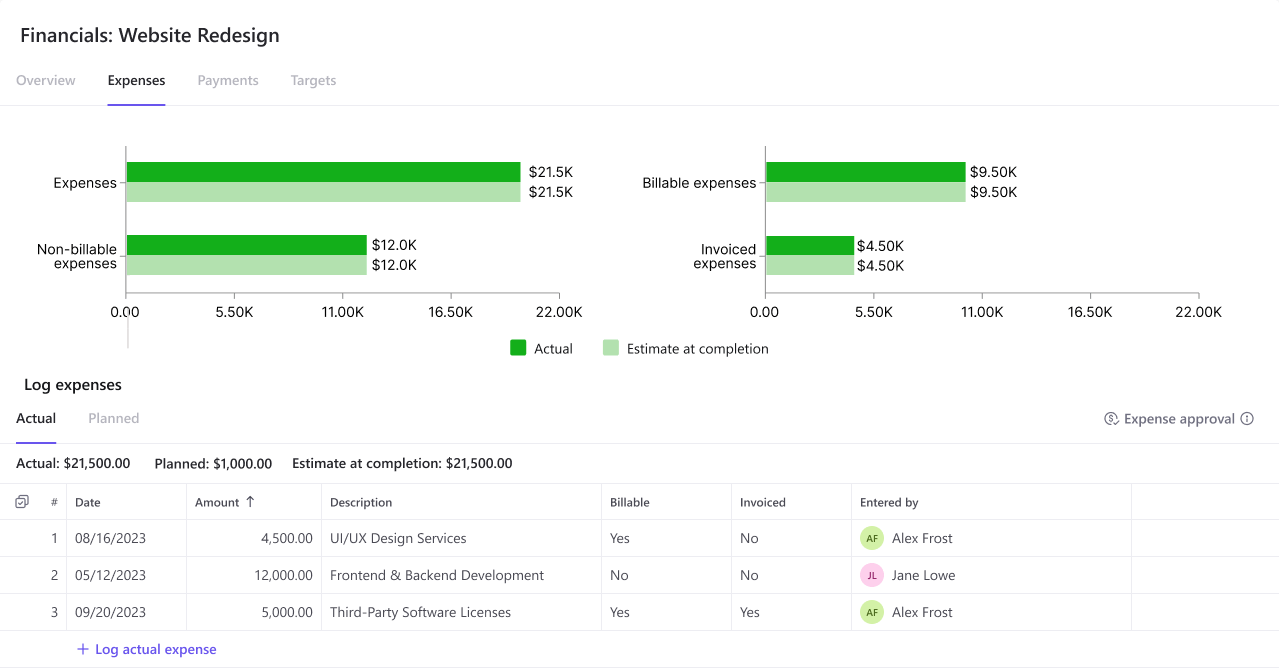
- Budget vs. actual tracking
Track budgets by phase or task and compare them to real-time actuals. PMs can spot overruns early, before margins are affected.
- Project cost and profitability reporting
View revenue, costs, and margin at both the project and portfolio level. Leaders get a clear snapshot, while PMs can drill into details as needed.
- Integrations (including QuickBooks)
Syncs with accounting tools to avoid double entry. Finance teams can keep using familiar systems while delivery teams manage work in Birdview.
Trial: 14-day free trial, extendable to 28 days
Pros
- Solid resource planning and workload visibility for engineering teams juggling parallel projects
- Practical mix of delivery tracking and financial visibility (budget, cost, margin signals)
- Clear trial access, so you can test workflows with real projects
Cons
- If you need very deep ERP-style accounting, you may still rely on accounting integrations
- Like any PSA, it takes setup discipline to get consistent time and cost data
2. Deltek Vantagepoint
Deltek has been building software for project-based firms for decades, and Vantagepoint is their flagship platform for A&E and engineering organizations. It sits closer to the ERP end of the spectrum, with deep project accounting at its core.
Key features: project accounting, budgeting and forecasting, invoicing, CRM, project management, resource planning, dashboards and analytics.
Trial: demo-led evaluation
Pros
- Strong fit for engineering-style delivery models that need deeper accounting controls
- Connects projects, finance, resourcing, and CRM in one environment
- Built for firms managing many projects at once
Cons
- Heavier implementation and admin effort than lighter PSA tools
- Can feel “system-first” if your team mainly wants fast delivery workflows
3. Kantata
Kantata (formerly Mavenlink) is focused on resource management and financial visibility for professional services organizations at scale. It’s built for teams that need serious portfolio-level oversight across many concurrent projects.
Key features: resource management, project delivery, financial management, business intelligence and reporting, forecasting, utilization tracking.
Trial: typically demo-led
Pros
- Strong resource planning and forecasting for organizations managing shared specialists
- Good visibility into utilization and delivery capacity
- Useful for scaling teams that need portfolio-level planning discipline
Cons
- Trial access may require a sales-led process, depending on your route
- If your core pain is billing complexity, you‘ll want to validate invoicing workflows carefully
4. Certinia
Certinia (formerly FinancialForce) is a Salesforce-native PSA, meaning it runs inside the Salesforce platform rather than alongside it. If your firm already manages CRM, contracts, and customer data in Salesforce, that’s a significant architectural advantage.
Key features: Salesforce-native PSA, project delivery, staffing, time and expense tracking, billing automation, revenue recognition support, analytics.
Trial: demo-based
Pros
- Strong option if Salesforce already runs your CRM and key workflows
- Helps keep delivery and customer context connected
- Works well for organizations that want governance and structured processes
Cons
- Salesforce ecosystem complexity can increase implementation effort
- Not ideal if you do not want Salesforce to be central to your PSA stack
5. BigTime
BigTime is a PSA built around the time-to-invoice workflow, with a clear focus on protecting margin through tighter controls on time, expenses, budgets, and billing.
Key features: time and expense tracking, project budgeting, resource management, invoicing, reporting and analytics, scoping and quoting.
Trial: A 14-day free trial is commonly available
Pros
- Strong time-to-invoice workflow focus, which helps protect cash flow
- Practical reporting for understanding project burn and billing readiness
- Good fit for firms where timesheets are the heartbeat of operations
Cons
- If you need deeper portfolio governance, validate how far it goes beyond delivery and billing
- Like many billing-centric tools, setup and adoption matter a lot for clean outputs
6. Accelo
Accelo is a quote-to-cash PSA that connects CRM, projects, time tracking, and invoicing in a single workflow. The goal is to reduce the friction and data loss that typically happens as work moves from sales through delivery to billing.
Key features: quote-to-cash automation, CRM, project management, time tracking, invoicing, reporting, workflow automation.
Trial: a 14-day free trial
Pros
- Helpful for teams that want a tighter link between sales work and delivery work
- Workflow automation can reduce repetitive admin tasks
- Good visibility when the goal is fewer handoff gaps
Cons
- If you need deep project accounting, you‘ll likely depend on integrations
- Tool fit depends on how much you want CRM inside your PSA
How to choose PSA software for renewable energy engineering
If you want a shortlist that holds up after week three, don‘t start with feature lists. Start with your workflows. Here‘s a checklist you can use in vendor calls and internal discussions.
- Map your delivery types. Feasibility studies, detailed design, owner‘s engineering, construction support, commissioning. List them.
- Write down your billing models. T&M, fixed fee, milestone billing, retainers, and passthrough expenses.
- Decide what “resource planning” must do. Is it enough to see the workload, or do you need forecasting by discipline and skills?
- Check how time and expense work in the field. Mobile entry, approvals, reminders, and dit history.
- Test project financial visibility. Can you see burn by phase? Can you spot margin drift early?
- Validate subcontractor and vendor cost tracking. At a minimum, can you tag costs cleanly and tie them to the right project and phase?
- Confirm change management support. Can you track scope changes and tie them to effort and budget impact?
- Make integrations non-negotiable. Accounting, CRM, payroll, BI. List what you use today and what you might adopt next.
- Run a small pilot with real data. Two real projects, real roles, real timesheets, and one real invoice cycle.
- Ask who will own the system. PSA tools need a responsible admin. Otherwise, your data quality slips quietly.
Conclusion
Choosing PSA for renewable energy engineering is not about more features. It is about adoption and visibility when projects shift. The right PSA makes time capture easy, shows capacity versus demand, and keeps margins visible early.
Use the checklist, then run a pilot with two real projects and one invoice cycle. If you want a strong starting point, Birdview PSA is a practical first test because it combines resource management, delivery tracking, and financial visibility, with Salesforce and accounting integrations.