Ksenia Kartamysheva
 - Billable revenue is often lost not because consultants fail to log time, but because disconnected systems delay time capture, utilization reporting, and invoice preparation.
- Accurate utilization reporting depends on reliable inputs, including timely time entries, realistic capacity calculations, and consistent billable classifications.
- As consulting firms grow, spreadsheet-based workflows become increasingly difficult to manage, leading to manual reconciliation, reporting delays, and billing errors.
- Professional Services Automation (PSA) software connects time tracking, resource planning, project budgets, utilization reporting, and invoicing in one system, providing real-time operational visibility.
- Firms experiencing late timesheets, manual utilization reporting, recurring budget overruns, or time-consuming invoice reconciliation should evaluate whether their current processes can continue to scale effectively.
A consulting firm can have disciplined people, busy calendars, and respectable monthly reports. It can still lose revenue in the gap between work performed and work recorded. The problem is rarely a single careless timesheet. It is the operating system around the timesheet.
In many professional-services teams, billable hours are captured in one place and project budgets live somewhere else. Utilization is calculated after finance has already closed the period. That delay matters. SPI Research’s 2023 Professional Services Maturity Benchmark ties low process maturity to material billable leakage [1]. Firms using PSA report 66.4% billable utilization against 63.5% for non-users – a 2.9-point gap, per SPI Research’s 2026 Professional Services Maturity Benchmark. By maturity level, the spread runs from 54.7% (L1) to 81.2% (L5). For a 20-person firm billing $150 per hour, that is not a rounding error. It is a hidden revenue line.
Most of this leakage looks ordinary while it is happening. A consultant waits until Friday to reconstruct Tuesday. A project manager checks budget burn from last week’s spreadsheet. Finance rebuilds the invoice from exports and corrections. Everyone is working hard, but the system is asking humans to remember, classify, reconcile, and price work after the moment to act has passed.
This article breaks down why that pattern distorts both billable-hours tracking and utilization reporting. It also covers what the distortion costs and how a PSA platform changes the control loop.
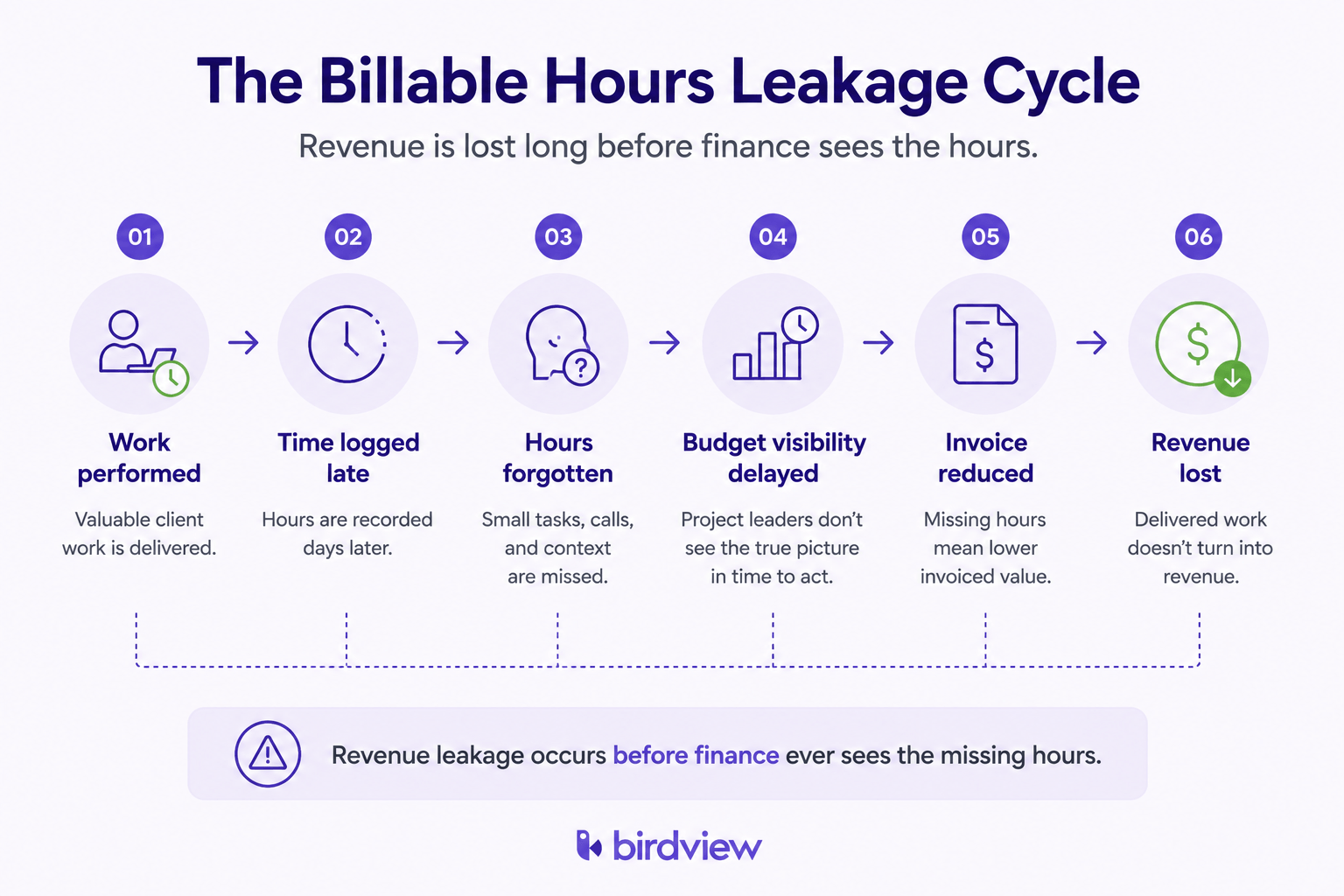
The first loss happens before finance sees the hours
Late time entry is not just an administrative nuisance. It changes the data. Harvest’s own guidance to teams points the same way – time recorded while the work happens is more complete than time reconstructed days later [2]. People do not intend to underreport. They forget small calls, split-focus work, follow-up notes, and short client interruptions that never feel large enough to remember by Friday.
Those small misses compound quickly. Suppose 25 consultants each lose one billable hour a week through late reconstruction. At $150 per hour, the yearly value adds up.
25 people x 1 hour x $150 x 52 weeks = $195,000 of work delivered but never invoiced
That number is deliberately conservative. It excludes underpriced senior time, misclassified non-billable work, write-offs, and budget overruns that were noticed too late to discuss with the client.
Timing is the root issue. A spreadsheet can store what someone types into it. It cannot prompt a consultant when a calendar block ends or compare the new entry against the project budget. It cannot notice that a supposedly non-billable category is absorbing client delivery time. By the time the spreadsheet is tidy, the commercial decision has already expired.
Utilization looks precise even when the inputs are wrong
Utilization is presented as a clean formula.
billable hours / available hours = utilization rate
Utilization math is simple. Its inputs are not.
SPI’s 2026 benchmark places industry billable utilization at 66.4% in 2025, with Level 4 firms at 80.0% and Level 5 at 81.2% [1]. The 70% threshold is SPI’s published minimum for healthy utilization. McKinsey’s operating benchmarks land in a similar zone, with enough space left for sales, learning, management, and internal work [3]. But a firm cannot manage to that range if the numerator and denominator are both improvised.
Billable work captured late or tagged inconsistently weakens the numerator. “Available hours” treated as a flat 40-hour week weakens the denominator because real capacity includes holidays, PTO, sales support, internal meetings, and role-specific non-billable commitments. A consultant may appear underutilized because the denominator is inflated. Another may appear healthy because non-billable client support was quietly counted as billable. Both errors produce confident-looking charts and bad staffing decisions.
Deltek’s 2023 Clarity research reports that many professional-services firms still cannot state utilization in real time [4]. That is the management problem. If utilization is only visible after a weekly or monthly export, leadership is steering with a rear-view mirror.
Spreadsheets create a manual control loop
A spreadsheet can be useful for a small team with simple rates and few concurrent projects. It becomes fragile when the business depends on live margin control.
A typical manual flow runs through four handoffs:
- Consultants log time in one tool.
- The project lead exports the hours.
- Finance maps entries to rates.
- Someone reconciles the result against invoices.
Each handoff creates a chance for drift:
- A stale export.
- A broken formula.
- A copied row under the wrong project.
- An old rate card.
- A budget cell that still looks green because the latest work has not been imported.
Month-end cleanup then becomes a second job. Project leads spend six to twelve hours a week chasing missing rows, correcting categories, and explaining why the invoice does not match the delivery picture. That is expensive even before you count the hours lost. A senior manager doing reconciliation is not coaching delivery, protecting scope, or opening the client conversation while there is still time.
Scale makes the breakage faster. At 10 people, one diligent operations lead can keep the process alive. At 25 people across multiple clients, the same process becomes a permanent exception queue. At 50 people, the spreadsheet is no longer a reporting tool. It is an unofficial billing system without the controls of one.
General project tools do not solve the revenue layer
Many firms try to solve the problem with the project tools they already use. ClickUp, Asana, Trello, and Monday can organize work well. They are not designed to protect the financial path from a performed hour to a paid invoice.
The details reveal the difference. A task tool may let someone start a timer or add a time field. It may not require a billable classification at entry time. It may not connect the entry to a role rate, a project budget, an invoice rule, or a utilization target. It may not warn the project manager that the remaining budget has dropped below the next planned work block.
That is why a time-tracking feature is not the same thing as a billing workflow. The feature records activity. The workflow answers harder questions.
| Operating question | Spreadsheet | General PM tool | PSA platform |
|---|---|---|---|
| Who is billable this week? | manual | partial | live |
| Which hours are invoice-ready? | manual | partial | enforced |
| Which project is burning budget fastest? | delayed | partial | live |
| Which utilization number should staffing use? | disputed | partial | governed |
| Can finance invoice without rebuilding the math? | no | usually no | yes |
Without that revenue layer, firms end up running two systems. A visible delivery board sits on top of an invisible spreadsheet economy.
Budget burn must be visible before the overrun
The most painful losses are not caused by one missed time entry. They come from projects that drift past budget while everyone thinks they are still safe.
In services firms, a substantial share of projects exceed original budgets. The overrun follows a familiar path. A senior consultant spends extra time unblocking a client. A junior team member needs more review than planned. A scope question is handled informally because the relationship is good. Each choice is defensible on its own. The problem is that nobody sees the total until the next reconciliation.
A live PSA changes the timing of that discovery. If a project has 18 delivery hours left and the next sprint plan consumes 26, the manager can act before the work is done. The conversation can happen early: we can finish this, but it requires a scope adjustment. Without live budget burn, it happens late: we already did this, and the invoice is awkward.
Birdview PSA is built around that earlier moment. It connects time, project budgets, roles, and billing logic so the budget is not a post-mortem artifact. A delivery lead can see remaining hours while the project is still movable.
Utilization is capacity management, not a monthly scorecard
Utilization becomes useful only when it influences decisions. A monthly utilization report tells leadership what happened. A live utilization view tells leadership where to move work.
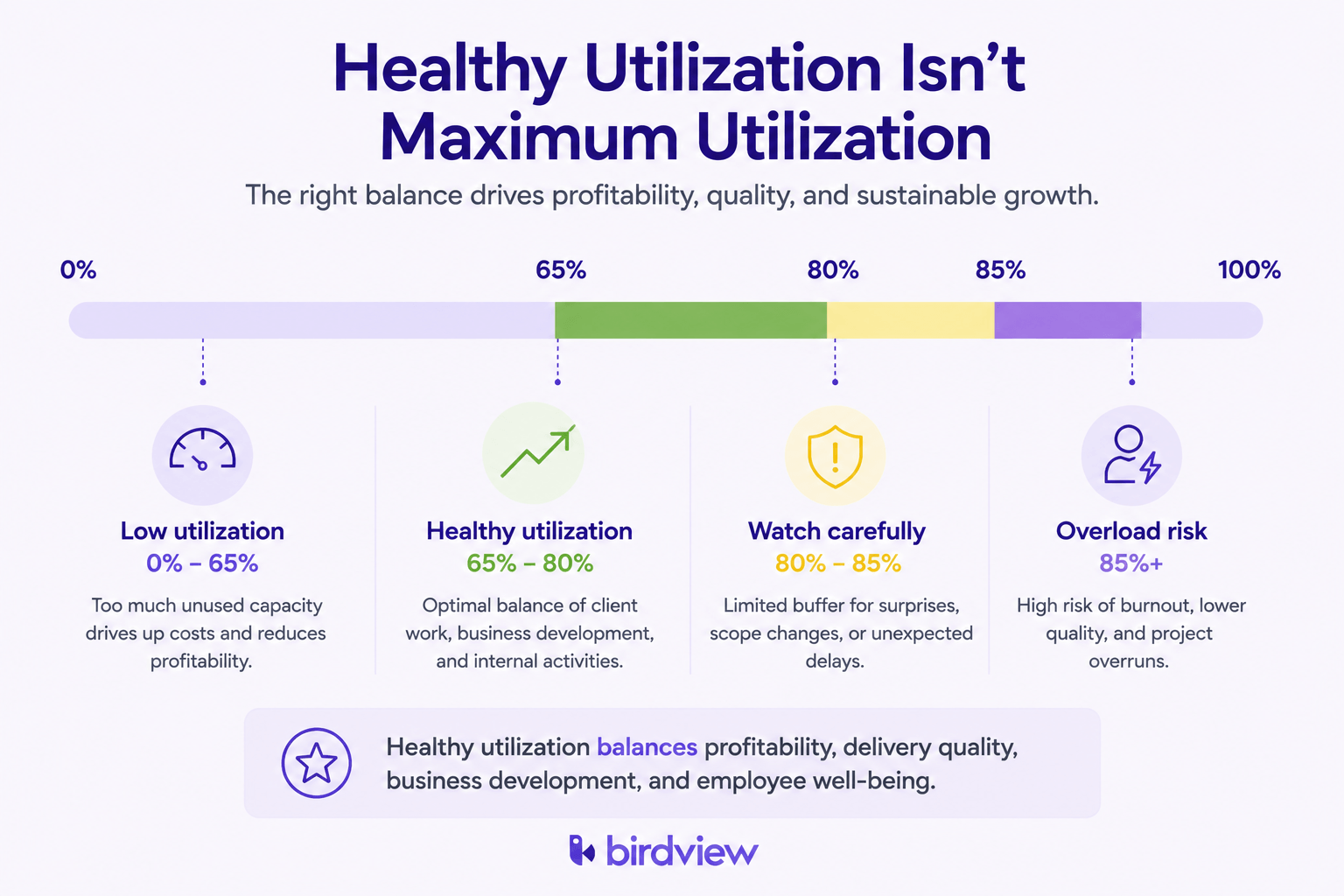
Imagine a 20-person consulting firm with 1,820 workable hours per person each year and an average bill rate of $175. At 65% utilization, the firm has about $4.14M in billable capacity. At 58%, it lands near $3.69M. Seven points of utilization difference is roughly $450,000. If the firm discovers that gap at month-end, it can explain the miss. If it sees the gap during the week, it can change assignments, pull demand forward, or protect non-billable time from swallowing delivery capacity.
There is also a ceiling. Pushing consultants above 80-85% for long periods may increase short-term billing while damaging quality, sales coverage, training, and retention. A useful utilization system does not simply push every person higher. It distinguishes healthy billable load from overload, bench time from strategic non-billable work, and client support from internal noise.
That nuance is nearly impossible in a flat spreadsheet. It requires capacity profiles, role expectations, project calendars, and current time data in the same model.
What PSA software adds that standalone trackers cannot
Standalone trackers such as Harvest are strong at capture. They help people record work. They do not, by themselves, govern the full commercial system around that work.
Professional Services Automation software is different because it treats hours as inventory. The platform connects time entry, billable and non-billable classification, role and person rates, project budgets, resource capacity, utilization reporting, and invoice preparation.
That integrated model removes the manual joins that cause the damage. The project manager is not waiting for a CSV. Finance is not guessing which rate card applies. Leadership is not deciding staffing from a report that is already stale.
Deltek’s Clarity research points to lower billing-error rates for firms using integrated systems compared with those juggling disconnected time and invoicing workflows [4]. That improvement is not magic. It is the effect of reducing handoffs.
For smaller firms, the question is not “Can we survive without PSA?” Many can, for a while. The better question is when manual control starts to cost more than the system. Many consulting firms begin experiencing these challenges as they grow beyond 20 billable staff, although project complexity, billing models, and the number of concurrent projects usually matter more than headcount alone.
How to calculate utilization without fooling yourself
Start with the formula, then make the denominator honest.
A consultant working 40 hours a week for 48 working weeks has 1,920 gross hours. But gross hours are not automatically available hours. Remove holidays, approved leave, recurring internal commitments, training, sales support, and planned bench allocation. The remaining number is the real capacity that should sit under the utilization calculation.
Then make the numerator strict:
- Log billable hours close to the work.
- Assign every entry to the correct project.
- Classify it as billable at entry time.
- Tie it to the correct rate or billing rule.
- Keep it visible to the project manager before invoice preparation.
If either side of the fraction is loose, utilization stops being a management metric. It becomes a mood indicator.
Birdview PSA’s value is in enforcing those definitions consistently. Each person can carry a capacity profile. Each project can carry budget and billing rules. Time entries can update utilization and budget burn without waiting for a manual rebuild.
A practical readiness check
Dedicated billable-hours and utilization software deserves serious evaluation when three or more of these signals appear.
- Timesheets arrive more than 48 hours after the work.
- Month-end reconciliation takes more than four hours.
- Utilization by person requires spreadsheet work.
- Overruns are discovered after the fact.
- The team has more than 15 billable people.
- Rates differ by role.
- Finance and delivery keep separate versions of budget truth.
- Invoices need manual explanation before sending.
Where companies go wrong
These symptoms get treated separately. A late-timesheet reminder here, a cleaner invoice template there, a new spreadsheet tab next month. But the symptoms share one cause: the firm does not have a live path from work performed to budget impact to invoice readiness.
The revenue gap can be closed
The 11% leakage figure from SPI is an average signal, not a destiny [1]. Firms lose that money because their systems let billable work drift out of view. They recover it by shortening the loop. Capture time when it happens, classify it correctly, compare it against budget immediately, and invoice from governed data instead of reconstructed memory.
Task tools help teams coordinate. Standalone trackers help teams remember. PSA software helps services firms manage the commercial life of the hour. That distinction matters once a firm’s margin depends on dozens of people, multiple rates, and a portfolio of active projects.
Birdview PSA brings billable-hours tracking, utilization reporting, budget burn, and invoicing into one operating layer. The result is not just cleaner reporting. It is fewer surprises, earlier scope conversations, and less revenue disappearing between delivery and billing.
If your team has outgrown spreadsheet control, review how Birdview PSA supports professional-services time tracking and utilization management at birdviewpsa.com.
FAQ
What is a healthy utilization rate for consultants? Many professional-services firms target roughly 65-80% for client-facing staff [1][3]. The exact number depends on role, sales responsibility, seniority, and delivery model. Consistently lower rates may signal unsold capacity. Consistently higher rates may signal burnout risk.
Why are spreadsheets unreliable for utilization reporting? They depend on late human reconstruction, manual classification, copied formulas, and separate budget logic. The output can look precise while the underlying entries are incomplete or stale.
When does a project tool stop being enough? When the firm reaches 15-20 billable staff, multiple concurrent projects, or variable rates. At that point, coordination is not the only problem. The firm needs governed billing and capacity data.
Does a time tracker fix billable leakage by itself? No. A tracker improves capture, but leakage also comes from classification, budget burn, rates, approvals, and invoice reconciliation. Those pieces need to be connected.
What should a firm audit first? Start with two numbers. Track the percentage of time logged within 24 hours, plus the monthly time needed to reconcile hours to invoices. If either number is weak, utilization and revenue reporting are less reliable than they look.
How does PSA software improve utilization reporting? PSA software integrates time entry, project budgets, role rates, and capacity profiles into a single model. That lets managers see utilization while staffing decisions can still change, instead of waiting for a month-end spreadsheet.
Sources
[1] SPI Research 2026 Professional Services Maturity Benchmark – https://spiresearch.com/ps-maturity-model/
[2] Harvest Help Center – Tracking Time (guidance on recording time as you work) – https://support.getharvest.com/hc/en-us/articles/360048181612-Members-Tracking-time
[3] McKinsey & Company – Professional Services Operations Benchmarks – https://www.mckinsey.com/capabilities/operations/our-insights
[4] Deltek Clarity Industry Benchmarks & Insights – https://info.deltek.com/Clarity