Blog
Blog

The workflow from a team member starting work to your company getting paid defines your financial strength. For professional services firms, a solid time tracking and billing process for professional services is the backbone of stability. As a project manager who has implemented many systems, I know one weak link causes immediate revenue loss.
Setting up an efficient process is more than buying software. It means defining a clear workflow that ensures every minute of billable effort is captured, validated, and converted into cash. It requires six steps. Each step builds on the last to create one unified, leak-proof system.
Why is accurate time tracking crucial for your service business?
In a service business, time is inventory. If it isn‘t logged accurately, it simply disappears from revenue.
Accurate time tracking helps you:
- see budget burn in real time
- prevent scope creep from going unseen
- create estimates based on real history
- avoid billing disputes by showing clear records
- forecast workload and hiring needs with more confidence
If time is logged late or inconsistently, projects can look “green” until the very last moment–and suddenly turn red once hours are tallied. Accurate, daily logging keeps you ahead of problems instead of cleaning them up later.
📚 Read more: 6 ways to simplify time tracking for service teams
1. Establish the foundation: clear project structures
Before anyone logs time, your projects must be clearly structured in your Professional Services Automation (PSA) tool. Ambiguity here guarantees inaccurate time tracking results later.
Define your essential work hierarchy
Your structure should link effort directly to the work you promised the client:
- Client / Contract – terms, pricing model, budget ceiling
- Project – a specific engagement (e.g., “Website Redesign – Phase 2”)
- Task / Activity – the level where logging happens
Tip: Standardize your task names and activity codes across the entire firm. Use a consistent selection list in your PSA tool. This simple standardization makes reporting and historical analysis much easier.
Configure financial billing rules upfront
Your system should already know how to process time before it’s logged. Pre-configure these financial parameters:
- Billing Rates: Set specific rates by resource role (e.g., Principal Consultant versus Analyst), by client, or by project. These pre-set rates are automatically applied when employees track time.
- Billable Status: Clearly define which tasks are billable (Time and Materials or T&M) and which are not (e.g., internal research or administrative duties). This status should be inherited automatically by the time entry, eliminating guesswork for your team.
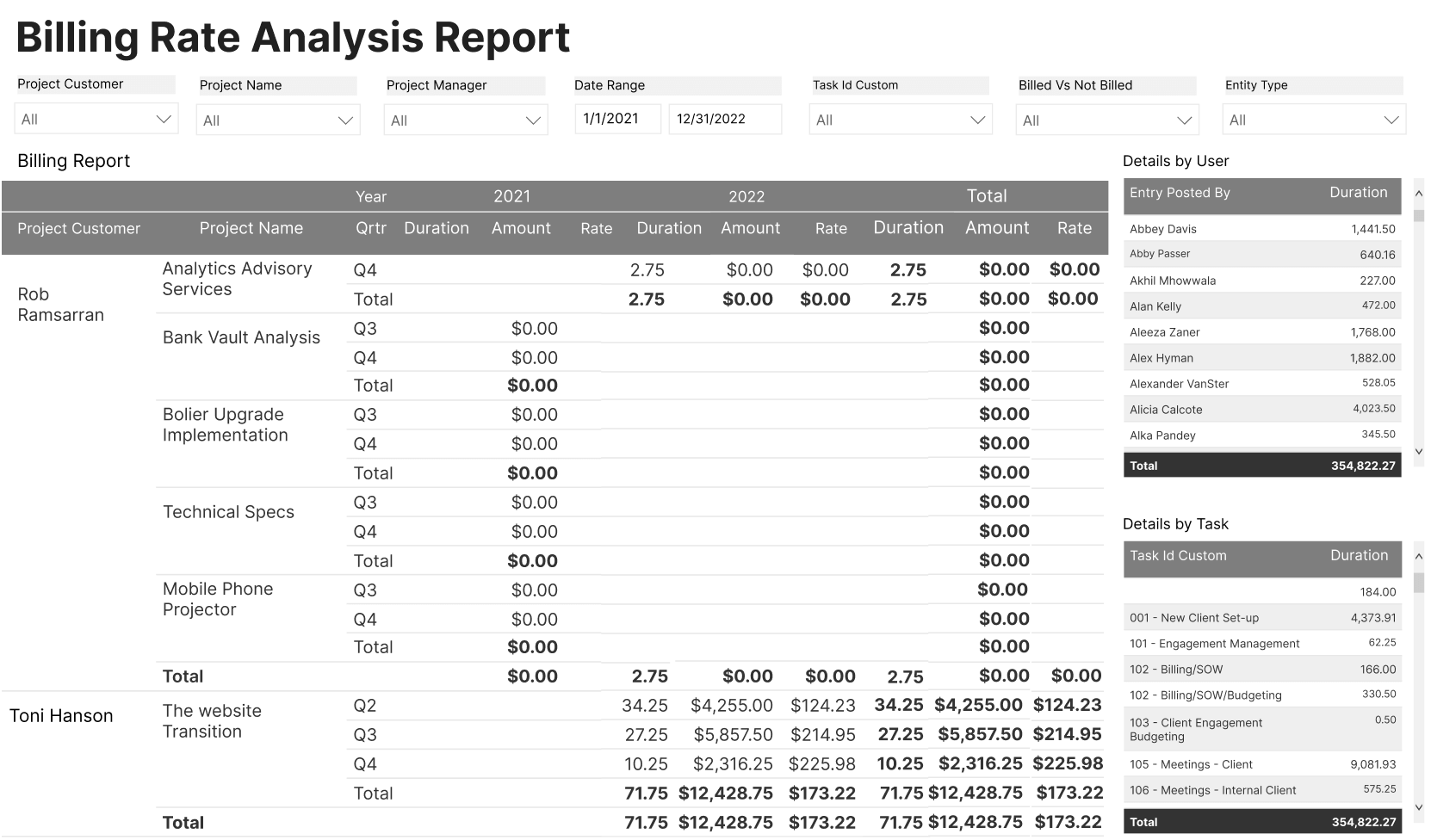
By setting up this financial logic at project initiation, you guarantee that time tracking instantly becomes accurate revenue tracking.
📚 Read more: How tracking billable and non-billable hours can increase your profits
2. Optimize the time logging experience
Inconvenience is the single biggest enemy of accurate time tracking. If the logging process is clunky, slow, or requires switching applications, your team will delay submission. This delay leads directly to inaccurate, estimated hours. The time-tracking software must make logging time a near-effortless activity.
Make real-time tracking standard
Encourage your team to track time as the work is actually happening. This is the gold standard for accuracy. It also prevents the stressful “Friday afternoon timesheet scramble.”
Provide easy logging options:
- Start/Stop Timer: The most accurate method for focused work
- Mobile App: Essential for consultants or sales teams working remotely or traveling to client sites
- Quick Entry/Calendar View: Perfect for knowledge workers who perform many short tasks throughout the day
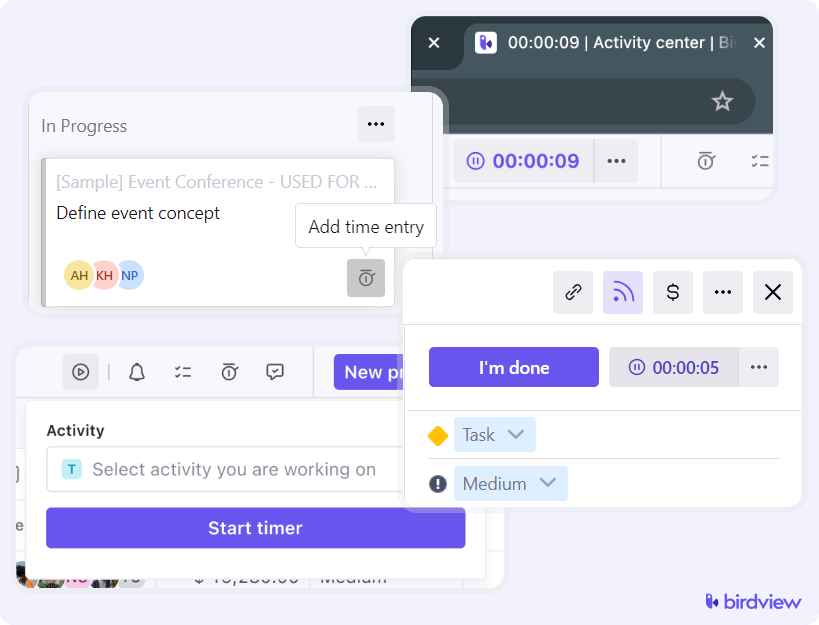
When someone clicks a task, the system should prefill the project, activity, billable status, and date. You want “log and move on,” not “fill out a small form every time.”
Example: An employee should not manually type “4 hours spent on the Acme report.” The system should instantly show: “Project X, Task: Final Report Generation, 4 hours, Billable.” This automation minimizes the cognitive load for your team.
Track both billable and non-billable time
Non-billable time matters for utilization, staffing, and overhead analysis. Make both categories clear in the timesheet so people know exactly where to log.
Your overall process needs to track both Working Time and Billable Time. A well-designed timesheet allows employees to clearly separate these two categories. Billable hours are sent to the client invoice. Non-billable hours are crucial for internal utilization reports. These reports help you accurately understand where administrative overhead costs are highest.
3. Implement rigorous timesheet approval gates
The timesheet approval stage is your first and most critical financial control point. It verifies that the work claimed was truly performed, was necessary, and adheres to the project budget.
Define your approval workflow
Clearly determine who needs to approve the time and when the approval must occur. A robust, typical flow proceeds as follows:
- Employee Submission: Timesheets are submitted daily or, more commonly, weekly. Daily submission is best for high-control or law firm environments.
- Manager Review: The project manager (PM) or team lead reviews the hours. The PM is best suited because they understand the project status and the financial constraints.
- Finance/Payroll Review: This is a final check for compliance. It focuses on ensuring hours align with labor laws or specific client contractual terms.
Arming approvers with critical data
Managers must not approve time blindly. Their approval dashboard must display key metrics that facilitate informed financial governance decisions:
- Budget Comparison View: The system must display the total Hours Logged (Actual) next to the Hours Budgeted (Planned) for that project phase. If the actuals far exceed the planned budget, the manager should reject the timesheet immediately or query the entry.
- Utilization Impact: The dashboard should show the manager how approving or rejecting the timesheet affects the team member’s weekly or monthly utilization rate.

Tip: Set strict, non-negotiable submission and approval deadlines. Use the automated reminder functions within your software relentlessly. A simple, enforced policy like, “Unapproved time by Monday at noon is not paid or billed this week,” creates necessary accountability.
4. Set up different billing rates in your PSA system
Setting up different billing rates in your PSA system ensures your invoices automatically reflect your contracts, handling various rate structures without manual workarounds. Get familiar with the common rate structures:
- Role-Based: Standard rates for roles like “Senior Consultant” or “Junior Engineer.”
- Project-Specific: A custom rate for a particular project that overrides the standard role rate.
- Client-Specific: Special rates agreed upon with a specific client across all projects.
- Resource-Specific: An override rate for a specific individual.
Use rate cards in your PSA tool to manage these different rates. This allows you to set up a hierarchy of rules for how rates are applied. When rates change, use effective dates so the new rate only applies to work performed after that date. Decide what your system should do if a time entry doesn’t match any defined rate to avoid unbilled work. Before invoicing, run test scenarios to ensure the system is calculating billable amounts correctly.
5. Automate the conversion to invoicing
This is the point where too many organizations break the seamless flow. They often manually transfer data from approved timesheets into a separate accounting program. This manual process is the primary source of revenue leakage and costly billing errors.
The power of direct-to-invoice flow
A single, integrated platform completely eliminates this need for manual data transfer. Once time is formally approved in the timesheet module, it must be instantly available and ready in the invoicing module.
Your system should handle:
- T&M: pull approved billable hours for the billing period
- Fixed Fee: pull completed milestones
- Expenses: automatically attach approved reimbursable expenses
This ensures every billable dollar appears on the invoice.
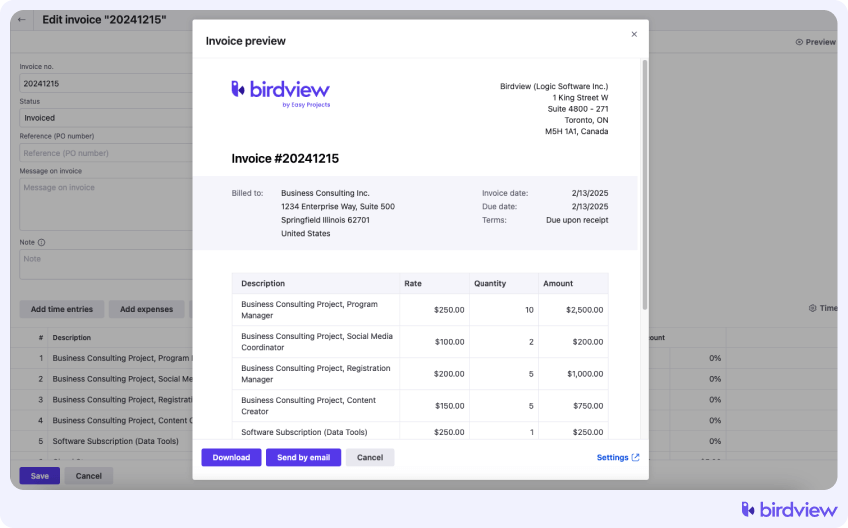
Generating professional, auditable invoices
The final invoice is a key client touchpoint. It should be clear, detailed, and professional.
Ensure your software supports:
- logo customization
- clear presentation of payment terms
- support for multiple currencies
- the ability to export a detailed time log report (with dates and specific descriptions) to accompany the summary invoice
6. Use integrated reporting for improvement
The setup process is fundamentally cyclical. Once you begin logging and billing, the data generated should feed back into your initial planning and governance processes. This feedback loop allows for continuous operational optimization.
Key reports for measuring process health
Your integrated system is a valuable source of operational and financial intelligence. Focus your attention on these key reports:
- Revenue realization: difference between logged and billed time
- Estimating variance: planned hours vs. actual hours
- Utilization: billable hours vs. total capacity
Tip: Schedule a monthly “Process Review” meeting. Do not focus on who made the mistakes. Instead, focus on where the data shows the workflow broke down. This approach fosters a crucial culture of accuracy and shared accountability.
📚 Read more: 4 essential time log and time tracking reports
How Birdview PSA supports your time tracking and billing process
A modern Professional Services Automation (PSA) platform is specifically designed to centralize and automate the service delivery lifecycle. Birdview PSA provides the necessary unified environment to execute your entire time tracking and billing process efficiently and reliably.
Seamless integration from project to time
Birdview PSA eliminates the need for manual data reconciliation by tightly linking project planning with time capture. Time entries begin directly from the assigned project tasks, meaning every logged minute automatically inherits the correct Client, Project, Task, and Billable Rate. This enforces accuracy instantly. The platform offers resources versatile logging options, including real-time timers, thus maximizing team adoption.
Automated financial governance and revenue
The PSA platform acts as the financial gatekeeper, ensuring that only verified hours move forward to billing.
- Approved time becomes invoice-ready automatically.
- Draft invoices reflect contract type (T&M or Fixed Fee).
- Birdview integrates with accounting tools like QuickBooks and NetSuite for smooth financial reconciliation.
By integrating every step, Birdview PSA transforms time tracking from an administrative chore into a strategic driver of profitability.
Process flow: Logging to cash
Here’s how the complete workflow moves through your system:
- Logging: Employee starts timer on assigned task → System auto-fills client, project, task, and billable status
- Approval: Manager reviews timesheet with budget comparison view → Approves or rejects based on budget status
- Billing: Approved time flows to invoicing module → System generates draft invoice with correct rates applied
- Reporting: Invoice data feeds into financial reports → Managers identify variances and adjust future estimates
Each step happens within one platform, eliminating manual handoffs and data transfer errors.
Conclusion: One tool, one process, predictable revenue
After managing complex projects for many years, I’ve learned the most effective strategy for financial health is avoiding the temptation of stitching together disparate tools. The goal is to establish one source of truth that governs all project variables: time, cost, and revenue.
By adopting a unified PSA platform, you guarantee that the entire journey–from an employee starting a timer on a task to that minute becoming a paid line item on a client invoice–is efficient, data-driven, and fully automated.
Moving away from unreliable manual spreadsheets and disconnected systems is more than a time-saver. It’s the way to maximize your billable revenue potential, protect your project’s financial integrity, and build a more predictable and profitable professional services operation.
See how your time tracking and billing process works inside Birdview PSA. Request a demo today.
FAQ: Time tracking and billing
Here are answers to some common questions that come up when setting up or refining a time tracking and billing process.
Q: How do I set up a complete time tracking and billing process for professional services?
A: Start by structuring your projects clearly in a PSA tool with defined hierarchies (Client > Project > Task) and pre-configured billing rates. Then optimize time logging with real-time tracking options, implement approval workflows with budget comparison views, and automate the flow from approved time to invoices. Finally, use integrated reporting to close the loop and improve future estimates.
Q: What’s the biggest mistake teams make with time tracking?
A: The most common mistake is waiting until the end of the week or month to enter time. This leads to inaccurate, “best-guess” entries that harm project budgets and client invoices.
Q: How often should my team log their hours?
A: Daily. It takes just a few minutes at the end of each day and ensures the data is far more accurate than trying to reconstruct a full week from memory.
Q: How do I get my team to log time daily?
A: Make it easy with mobile apps and timers that start directly from their task list. Set clear deadlines with consequences (e.g., “Unapproved time by Monday noon is not paid this week”). Use automated reminders. Most importantly, show them how accurate time data protects project budgets and prevents last-minute scrambles.
Q: Can I use different billing rates for the same client?
A: Yes. A good PSA system allows you to set up rate cards with different rules for the same client, such as applying different rates for specific projects or roles.
Q: How does time tracking impact project profitability?
A: It’s the most direct way to measure effort. By comparing logged hours against the project budget, you can see your true profit margin in real-time and identify scope creep before it becomes a major problem.
Q: Why is it important to lock approved time entries?
A: Locking entries creates an unchangeable financial record. It prevents accidental edits after an invoice has been sent or payroll has been processed, ensuring your data is always auditable and trustworthy.
Q: What if my team resists using time tracking software?
A: Resistance usually comes from friction in the process. Choose software with intuitive interfaces, mobile access, and auto-fill features. Train managers to lead by example. Explain the “why” – how accurate time data protects everyone’s work and prevents budget overruns that lead to layoffs or lost bonuses.