Ksenia Kartamysheva
 Managing multiple projects without a clear system leads to missed deadlines, resource conflicts, and inconsistent delivery.
A Project Management Office (PMO) helps solve this by standardizing processes, improving visibility, and aligning teams across projects.
Quick insights: The 2026 PMO
Strategic Shift: PMOs are moving from administrative support to a more strategic role in delivery, visibility, and decision-making.
AI Support: AI helps PMOs reduce manual reporting, summarize project updates, and identify risks earlier.
Beyond Tools: A successful PMO depends on accurate data, clear governance, and resource visibility, not just software.
In this guide, you’ll learn what a PMO is, how it works, when your organization needs one, and how AI is changing PMO practices in 2026.
What is a PMO?
A Project Management Office (PMO) is a team or function that defines project standards, improves visibility, and helps organizations manage projects, resources, and performance more consistently.
Its goal is to bring structure to how projects are planned, executed, reported, and delivered. A PMO can support individual projects, oversee programs, or manage a full project portfolio, depending on the organization’s needs.
Types of PMO
| Type | Description |
|---|---|
| Supportive PMO | Provides templates, guidance, and best practices |
| Controlling PMO | Enforces standards, processes, and reporting |
| Directive PMO | Directly manages projects and resources |
PMO structure
PMO structure depends on the level of control and visibility the organization needs.
Project Management Office supports individual projects with tools, templates, reporting, and delivery guidance.
Program Management Office oversees related projects and helps coordinate governance, dependencies, and outcomes across a program.
Portfolio Management Office manages the full portfolio of projects and programs, helping align initiatives with business priorities and resource capacity.
Each structure serves a different purpose, but all PMOs are designed to improve consistency, visibility, and decision-making across project work.
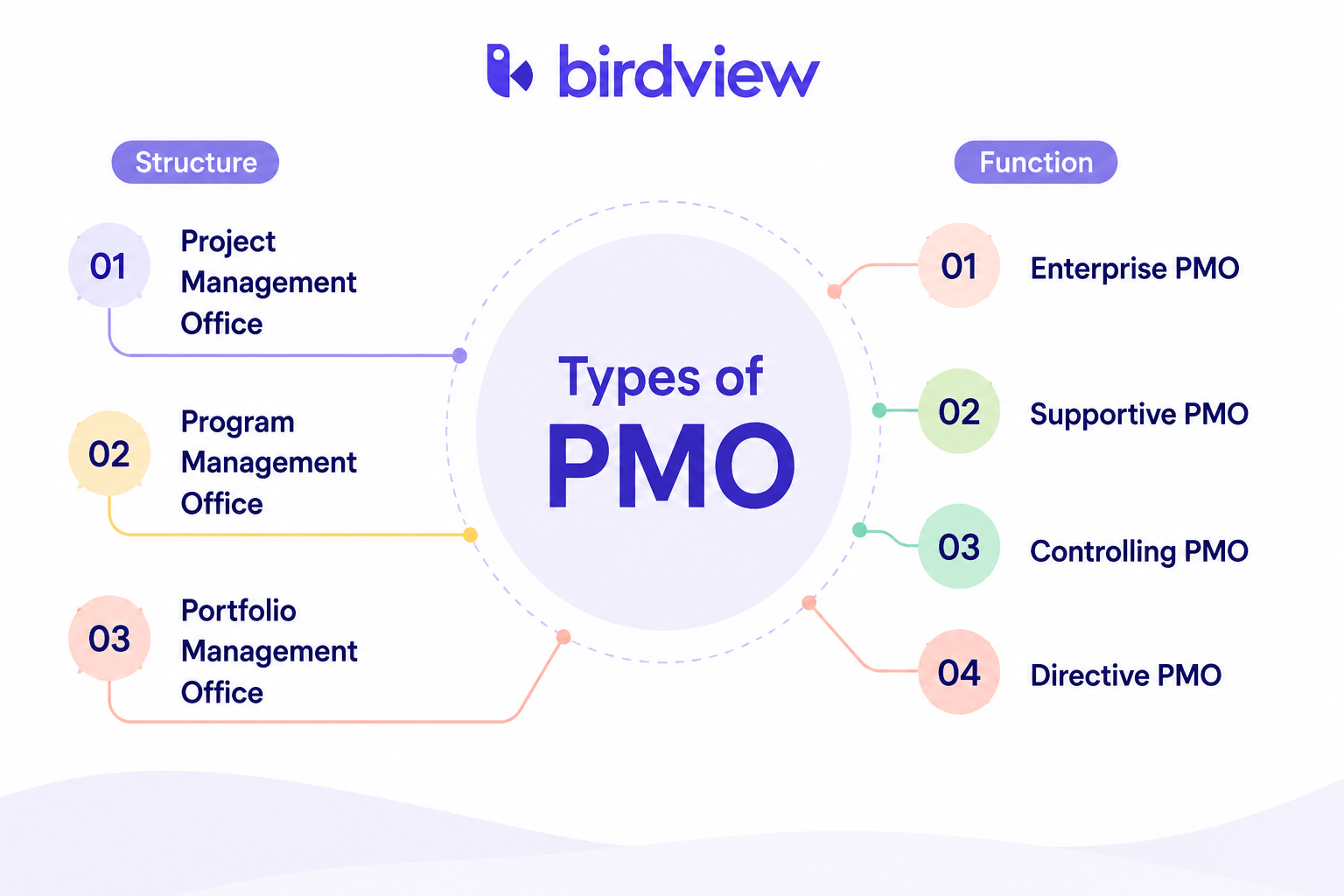
Types of PMO based on function
PMOs can vary widely in their scope, responsibilities, and level of authority. Before setting up a project management office, it is important to understand the specific needs and goals of your organization. This will help you choose the right type of PMO and avoid adding unnecessary complexity.
Below are the most common types of PMOs and how they differ in practice.
1. Enterprise PMO (EPMO)
An Enterprise Project Management Office (EPMO) operates at the highest strategic level within an organization. Unlike traditional PMOs that focus on individual projects or departments, the EPMO aligns all project, program, and portfolio activities with overall business goals.
The EPMO plays a central role in governance, decision-making, and performance tracking across the organization. It acts as a bridge between executive leadership and delivery teams, ensuring that initiatives contribute to long-term outcomes and deliver measurable value.
Key characteristics of an Enterprise PMO:
- Strategic alignment: Ensures that project portfolios are prioritized based on business goals, resource capacity, and expected ROI
- Enterprise-wide governance: Establishes consistent reporting, risk management, and delivery standards across departments
- Cross-functional coordination: Aligns teams across areas such as IT, operations, finance, and R&D
Read more: Managing cross-functional teams in organizations: best practices
- Performance visibility: Tracks KPIs and provides leadership with clear, up-to-date insights
- Change enablement: Supports large-scale transformation initiatives and organizational change
Typical functions of an Enterprise PMO:
- Managing portfolio prioritization and investment decisions
- Aligning resources with strategic initiatives
- Enforcing governance across programs and teams
- Supporting executive decision-making with data
- Driving improvements in project and delivery maturity
An EPMO is most valuable in large or complex organizations where multiple teams run projects at the same time and leadership needs a clear, unified view across the portfolio.
2. Supportive PMO
A Supportive PMO acts as a resource hub. It provides guidance, templates, best practices, and training while allowing teams to manage projects independently.
This model works well for organizations with lower project management maturity or teams that need structure without strict control.
Typical functions:
- Maintaining project templates and documentation
- Providing training and coaching
- Sharing best practices across teams
- Supporting project managers when needed
3. Controlling PMO
A Controlling PMO combines support with governance. It defines standards for how projects should be run and ensures teams follow them.
This type of PMO is useful when organizations want more consistency in reporting, processes, and delivery outcomes.
Typical functions:
- Standardizing project workflows and tools
- Enforcing reporting and documentation standards
- Monitoring compliance with processes
- Conducting performance reviews and audits
4. Directive PMO
A Directive PMO takes full ownership of project execution. Project managers report directly to the PMO, which controls delivery, budgets, timelines, and resource allocation.
This model is typically used in organizations running high-priority or complex initiatives where centralized control is required.
Typical functions:
- Assigning and managing project teams
- Controlling budgets and timelines
- Managing resource allocation across projects
- Making key decisions on priorities and delivery
Each type of PMO serves a different purpose, but all are designed to improve consistency, visibility, and decision-making across project work.
Key roles and responsibilities of a PMO
A PMO is more than just a department. It provides structure, enforces best practices, and helps organizations manage projects in a consistent and scalable way.
Below are the key roles typically found in a PMO.
PMO roles explained
PMO Director
Leads the PMO at a strategic level. Defines vision, aligns project portfolios with business goals, and reports to executive leadership. Responsible for governance, performance, and cross-functional alignment.
PMO Manager
Manages day-to-day PMO operations. Oversees processes, supports project managers, and ensures governance and reporting standards are followed.
PMO Analyst
Focuses on data and reporting. Tracks KPIs, builds dashboards, and analyzes project performance to identify risks and trends.
PMO Consultant
Advises on PMO maturity, structure, and improvements. Supports transformation initiatives, tool implementation, and process optimization.
PMO Administrator (Coordinator)
Handles operational support such as maintaining documentation, updating schedules, and supporting tools and workflows.
Additional roles (Depending on Scale)
Portfolio Manager
Oversees multiple projects or programs. Prioritizes initiatives based on strategic fit, ROI, and resource capacity.
Project Controller
Manages financial aspects of projects, including budgeting, forecasting, and cost tracking.
Resource Manager
Allocates resources across projects based on availability, skills, and workload. Helps balance utilization and avoid bottlenecks.
Tool / System Administrator
Maintains PMO tools and systems, ensuring integrations work correctly and users are supported.
PMO responsibilities
A PMO supports both execution and control by defining how projects are run and how performance is measured.
Standardization of processes
Defines project management frameworks, methodologies (Agile, Waterfall, hybrid), and templates to ensure consistency across projects.
Project governance and compliance
Establishes approval processes, reporting standards, and escalation paths while ensuring compliance with internal and external requirements.
Resource management
Manages resource allocation based on availability, skills, and priorities. Tracks capacity and utilization to improve efficiency.
Read more: Resource management in project management: Process, tools
Portfolio management
Oversees the full project portfolio, ensuring alignment with business goals and prioritization based on value and risk.
Read more: What is project portfolio management (PPM)
Performance monitoring and reporting
Defines KPIs and provides dashboards and reports to support decision-making.
Support and training
Provides guidance, training, and tools to help teams improve project delivery.
Risk and issue management
Identifies risks early, supports mitigation planning, and helps resolve issues to maintain project stability.
Benefits of a project management office (PMO)
A Project Management Office (PMO) helps organizations manage projects with more structure, visibility, and consistency. It supports better planning, improves execution, and gives leaders a clearer view of project performance.
One of the main benefits of a PMO is improving project success rates. By standardizing processes and creating clear governance, the PMO helps teams plan, execute, and report on projects in a more consistent way.
A PMO also improves resource efficiency by helping teams understand where time, people, and budget are being used. This makes it easier to avoid bottlenecks, reduce overcommitment, and assign the right people to the right work.
Risk management is another important benefit. The PMO helps identify risks earlier, define mitigation plans, and reduce disruptions before they affect delivery.
It also strengthens strategic alignment by making sure projects support business goals. Instead of treating every project as equally important, a PMO helps prioritize work based on value, urgency, capacity, and expected outcomes.
With centralized reporting and project data, a PMO improves decision-making. Leaders can see project status, risks, timelines, and performance without relying on disconnected updates or manual reports.
The PMO also increases accountability by making responsibilities, progress, and ownership more visible. As a result, teams work with clearer expectations, and stakeholders have more confidence in delivery.
When implemented well, a PMO can improve delivery reliability, customer satisfaction, and organizational performance.
How AI supports the PMO in 2026
In 2026, AI is becoming a practical support layer for PMOs. It helps reduce manual work, improve reporting, and make project data easier to understand.
Instead of collecting updates manually, AI can summarize project status, highlight risks, and surface delays based on real activity.
It can also help PMOs analyze resource usage, detect capacity conflicts, and prepare reports without exporting data into spreadsheets.
AI does not replace PMO processes or governance. It supports them by helping teams interpret project data faster and act earlier.
Examples of AI in a PMO
Status updates: AI can summarize project progress automatically from tasks, comments, and activity history.
Risk detection: AI can highlight delays, dependency issues, and resource conflicts before they become bigger problems.
Reporting: AI can help generate dashboards, summaries, and stakeholder updates with less manual work.
Best PMO techniques
A well-functioning Project Management Office (PMO) is more than a governance layer. It is a strategic function that supports consistent delivery, cross-functional alignment, and portfolio-level visibility.
To maximize its impact, a PMO should use proven techniques that improve efficiency, adaptability, and accountability.
1. Standardized methodologies
Define and apply consistent project management methodologies, such as Agile, Waterfall, or hybrid approaches. This helps teams follow structured processes and improves predictability across projects.
2. Portfolio prioritization
Use clear criteria to evaluate and prioritize projects based on business value, risk, resource requirements, and strategic fit. This helps leadership focus resources on the most important initiatives.
Read more: 4 essential steps of project portfolio optimization
3. Centralized reporting and dashboards
Give stakeholders access to dashboards that show project status, risks, timelines, and performance metrics. This improves visibility and helps surface issues earlier.
4. Capacity and resource management
Track team capacity, skills, and availability across the organization. Assign resources based on availability, workload, and project needs – not guesswork.
Read more: What is resource capacity management
5. Stage-gate governance
Use formal review points at key stages of the project lifecycle. These checkpoints help teams review scope, budget, risk, and readiness before moving forward.
6. Knowledge management
Document lessons learned, templates, workflows, and best practices in one place. This helps future projects avoid repeated mistakes and start faster.
7. Change control process
Use a structured process to review change requests and assess their impact on scope, cost, timeline, and resources. This helps reduce scope creep.
8. Stakeholder engagement
Create clear communication plans and feedback loops with key stakeholders. Regular updates help maintain trust and alignment.
9. PMO maturity assessments
Review PMO performance regularly. Maturity assessments help identify what is working, what needs improvement, and where the PMO should evolve next.
10. Tool integration
Connect PMO tools with systems such as ERP, CRM, time tracking, and reporting platforms. This reduces duplicate work and improves data accuracy.
Using a PMO in the services industry
In the services industry, projects are closely tied to client relationships, billable time, resource utilization, and profitability. That makes the role of a Project Management Office (PMO) especially important.
A PMO helps service organizations manage work more consistently across clients, teams, and engagements. It brings structure to delivery, improves visibility into resources, and helps leaders understand how projects affect financial performance.
Why a PMO matters in services
In professional services, a PMO is not just a governance function. It helps connect delivery quality with business results.
A services PMO can help teams:
- Standardize project delivery across client engagements
- Improve visibility into capacity, workload, and utilization
- Track billable and non-billable time more accurately
- Monitor budgets, margins, and project profitability
- Improve communication with clients and internal stakeholders
- Capture lessons learned and improve future delivery
This is especially important in firms where every hour, delay, and staffing decision can affect profitability.
PMOs are widely used in service-focused sectors such as:
- IT services, including software delivery, managed services, and DevOps
- Engineering and architecture firms
- Marketing and creative agencies
- Legal, financial, and consulting services
Read more: Best consulting project management software
In the services industry, a PMO is more than a back-office function. It acts as an operational layer that helps teams deliver client work with more control, transparency, and financial discipline.
How to choose the right PMO software
Choosing the right PMO software is critical to the success of your Project Management Office. The goal is not just to manage projects, but to improve visibility, standardize processes, support resource planning, and help leaders make better decisions.
Whether you are setting up a new PMO or improving an existing one, focus on the capabilities that help your organization manage projects at scale.
Project Portfolio Management
Look for software that lets you manage multiple projects in one place. It should support portfolio visibility, prioritization, and resource balancing so leadership can understand the full picture and make better decisions.
Resource Management
Strong PMO software should include resource planning, capacity tracking, and workload balancing. This helps teams assign the right people to the right work without overbooking, burnout, or underutilization.
Read more: Professional services resource management – Ultimate guide
Dashboards and Reporting
Real-time dashboards and customizable reports are essential for tracking project status, risks, KPIs, and performance. The software should make reporting easier, not create another layer of manual work.
Governance and Standardization
Choose a platform that supports standard workflows, approval processes, documentation, and compliance tracking. This helps the PMO keep projects consistent across teams.
Integrations
PMO software should connect with the tools your organization already uses, such as ERP systems, time tracking tools, financial software, Jira, Slack, Microsoft Teams, or CRM platforms.
Scalability and Flexibility
The software should support your organization as it grows. Look for flexible permissions, role-based access, and support for Agile, Waterfall, and hybrid approaches.
Financial and Budget Tracking
PMOs need visibility into budgets, costs, forecasts, and project performance. Financial tracking helps leaders understand whether projects are financially healthy.
Ease of Use
If the system is too difficult to use, teams will avoid it or create workarounds. The right PMO software should be intuitive enough for project teams and useful enough for executives.
Support and Vendor Reliability
Evaluate onboarding, support, training resources, and product roadmap. Reliable vendor support matters during implementation and long-term adoption.
How to set up a PMO that actually works
Setting up a PMO is not about adding more process. It’s about gaining control over delivery, resources, and outcomes.
Most PMOs fail not because of the structure, but because teams cannot maintain visibility as projects scale.
Here’s how to build a PMO that actually works:
- Start with the problems you need to fix
Focus on real issues: limited visibility, resource conflicts, inconsistent reporting. A PMO should solve operational gaps, not add overhead. - Define what the PMO owns
Be clear about scope. This typically includes project standards, reporting, and resource visibility. Avoid trying to control everything at once. - Standardize only what matters
Define simple, repeatable workflows for project setup, tracking, and reporting. Overly complex processes slow adoption. - Make resource planning visible
A PMO is only effective if you can see who is available and where capacity is constrained. Without this, decisions remain reactive. - Connect projects, resources, and reporting
If your team still relies on spreadsheets and exports, the PMO will struggle to scale. Visibility depends on having data in one place. - Start small and prove value
Run the PMO with a limited set of projects. Show improvements in reporting speed, delivery predictability, or resource utilization. - Scale with consistency, not complexity
Expand gradually, keeping processes consistent across teams. A PMO should reduce variation, not introduce new layers of confusion.
From PMO setup to real control
Many teams define a PMO structure but still struggle with visibility because their data is spread across tools.
As delivery scales, maintaining control manually becomes difficult.
This is where platforms like Birdview help. By connecting projects, resources, and reporting in one place, teams can move from reactive coordination to proactive planning – without relying on spreadsheets.
How Birdview PSA supports PMO workflows
Birdview PSA supports PMO workflows by connecting project portfolio management, resource planning, budgeting, time tracking, and reporting in one platform.
For PMOs, this helps reduce manual reporting, improve capacity visibility, and make project decisions based on current data instead of disconnected spreadsheets.
Birdview can support different PMO models, including centralized and enterprise PMOs, by giving teams a shared view of projects, resources, and performance.
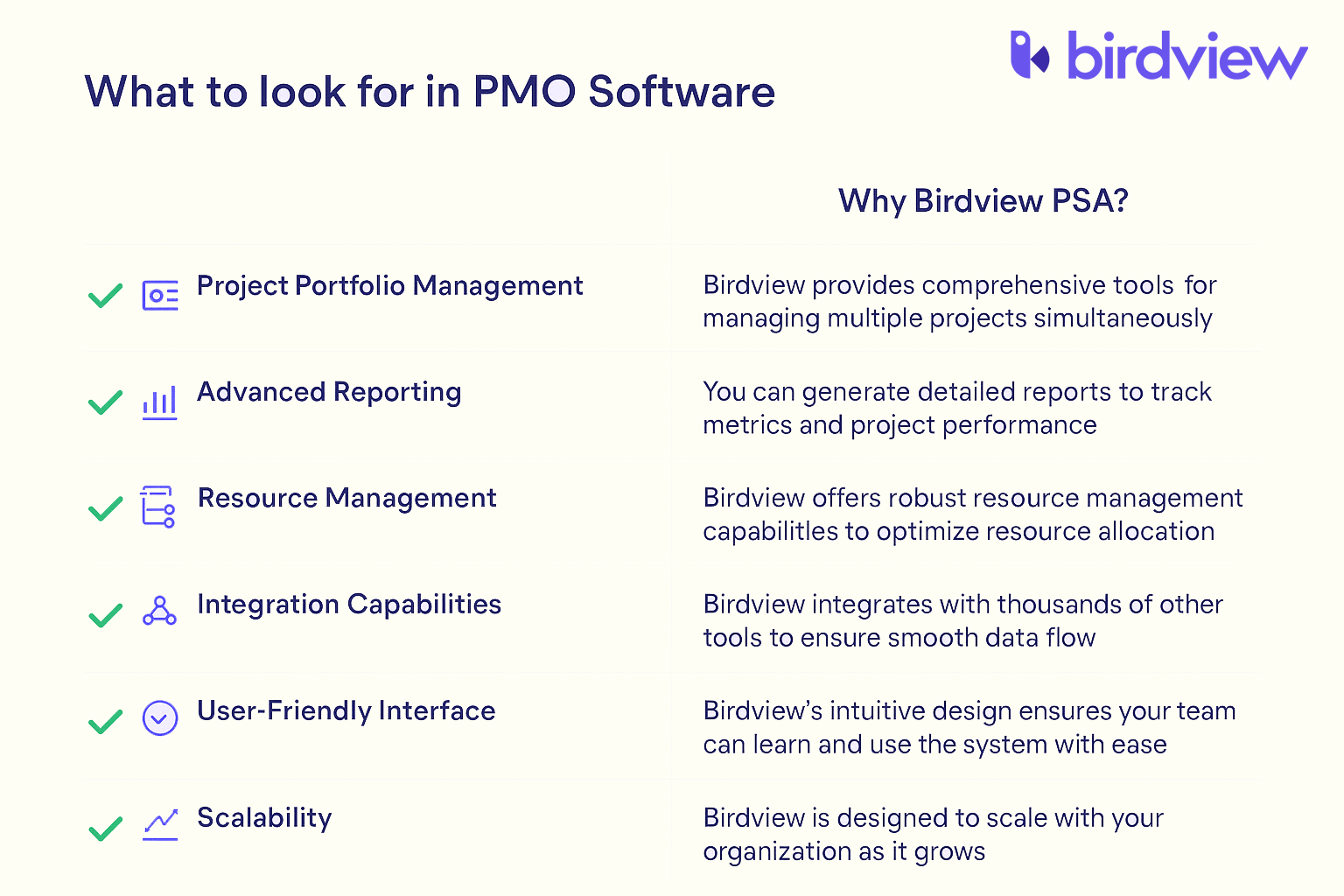
What sets Birdview PSA apart is its flexibility. It adapts to different project methodologies and organizational structures, making it suitable for both Centralized and Enterprise PMO models. With built-in automation, AI-driven forecasting, and over 5,000 integrations, Birdview helps PMOs streamline processes, improve visibility, and support better decision-making–without adding complexity.
Whether you’re managing a few internal projects or overseeing a large enterprise portfolio, Birdview PSA provides the structure, tools, and insights your PMO needs to succeed.
FAQ: Project management office
How can I start a PMO in my organization?
Start small. Define clear goals, get executive support, and focus on solving specific pain points like reporting or resource management. Grow the PMO’s role as trust builds.
What tools should a PMO use?
Use tools that support project planning, time tracking, resource allocation, and reporting. PSA software or project portfolio management platforms are ideal for service-focused teams.
How do I show the value of a PMO?
Track and report on key metrics like project success rates, budget adherence, and resource utilization. Communicate wins regularly to stakeholders.
What’s the best way to standardize processes?
Create simple, repeatable templates and workflows. Avoid over-engineering–processes should help, not slow people down.
How do you keep the PMO relevant as the business evolves?
Stay close to business strategy. Continuously adapt the PMO’s focus based on changing priorities, and gather feedback from project teams and leadership.
Tip: Balance structure with flexibility. A successful PMO provides guidance without becoming a bottleneck.
Trick: Automate routine tasks like status updates or report generation to save time and reduce manual errors.