Ksenia Kartamysheva
 Project management software for Canadian government helps public sector teams manage projects, programs, resources, reporting, and governance in one controlled system. For government teams, the decision is not only about tasks and timelines. The software also needs to support Canadian data residency, security controls, compliance processes, and clear visibility across departments.
What Canadian government teams need from project management software
Canadian government organizations require project management software that supports data residency, security, compliance, and visibility across complex initiatives.
Public sector projects often involve multiple departments, vendors, approval layers, funding rules, and reporting expectations. A simple task board can show who is doing what, but it does not always show whether the work follows the right process.
Government teams usually need:
- Structured workflows for intake, approvals, project changes, and reporting
- Role-based access so people only see the information they need
- Auditability for decisions, status changes, and approvals
- Portfolio visibility across programs, departments, and initiatives
- Reliable reporting for leadership, procurement, finance, and delivery teams
This matters because government project management is not only about finishing work. It is also about proving that work was planned, approved, delivered, and reported in a controlled way.
Why standard project management tools are often not enough
Standard project management tools are often built for speed and flexibility. Government teams also need control, traceability, and compliance support.
Data residency requirements are not supported
Many tools store data outside Canada by default. If project data includes citizen information, vendor details, internal budgets, or sensitive operational plans, the storage location matters. Teams need to know where the data lives, who can access it, and which hosting options are available.
Limited security and access control
Basic project tools often have simple permission settings. It becomes risky when multiple departments, contractors, and external partners use the same workspace.
Government teams need permission levels, restricted views, and controlled collaboration. Without them, users may see financial data, internal notes, or project details that should be limited.
No support for compliance processes
Compliance depends on how work is requested, approved, documented, changed, and reported. If approvals happen in email, status updates live in spreadsheets, and decisions are buried in chat threads, the audit trail becomes weak. When questions come later, teams spend hours reconstructing what happened.
Lack of visibility across programs
Many public sector teams manage projects separately. The result is siloed reporting. Leaders can see individual projects, but they cannot easily see capacity, risk, timelines, or budget pressure across the full portfolio.
Key requirements for project management in Canadian government
The right public sector project management software in Canada should support how government work is actually managed: planned carefully, approved formally, reported clearly, and protected properly.
| Requirement | Why it matters for government teams |
| Canadian data residency | Helps keep project and operational data in Canada when required |
| Role-based permissions | Controls who can view, edit, approve, or report on work |
| Audit trails | Creates traceability for changes, approvals, and decisions |
| Portfolio reporting | Gives leaders visibility across programs and initiatives |
| Workflow controls | Standardizes intake, approvals, change requests, and delivery steps |
| Secure collaboration | Allows internal and external users to work together with limits |
| Real-time dashboards | Reduces manual reporting and improves decision-making |
Canadian data residency
Canadian data residency means data is stored in Canadian data centers. For government and public sector teams, this can be a key requirement during procurement and security review.
Security and access control
Security should be reviewed at the user, project, portfolio, and reporting levels.
For example, a department head may need portfolio visibility, while an external contractor only needs access to assigned tasks. Finance may need budget data, while delivery teams only need schedules and workload details.
Good access control reduces risk without slowing everyone down.
Compliance and governance
Governance means the tool supports the way projects should move through the organization.
That includes intake forms, approvals, stage gates, change tracking, status updates, and reporting. When these steps are built into the system, teams spend less time chasing information manually.
Portfolio-level visibility
Government teams rarely manage one project at a time. They manage infrastructure work, digital transformation, policy initiatives, internal service improvements, and operational programs at the same time.
Portfolio-level visibility helps leaders answer practical questions:
- Which projects are delayed?
- Which teams are overloaded?
- Which initiatives are at risk?
- Which programs need more funding or staffing?
- Which work should be paused or reprioritized?
Reporting and transparency
Manual reporting creates delays and inconsistencies. On the contrary, modern reporting gives teams real-time project status, capacity data, budget views, and portfolio dashboards. This improves transparency for leadership, procurement, finance, and PMO teams.
Canadian data residency and why it matters
Canadian data residency matters because public sector organizations need stronger control over where project and operational data is stored.
This is especially important when teams manage sensitive internal work, vendor data, financial details, infrastructure plans, or citizen-related projects. Even when data residency is not the only compliance requirement, it often becomes one of the first questions in procurement.
Security and compliance considerations
Security and compliance should be evaluated before feature comparison. A tool can look useful in a demo but still fail procurement review.
Data protection standards
Ask how the vendor protects data in storage and during transfer. Also, check whether the vendor can provide security documentation, hosting details, and compliance information.
For government teams, vague security claims are not enough. Buyers need clear answers that can be shared with IT and procurement.
Access control and permissions
Permissions should support real public sector workflows. A program manager, project manager, contractor, executive, and finance user should not all have the same access.
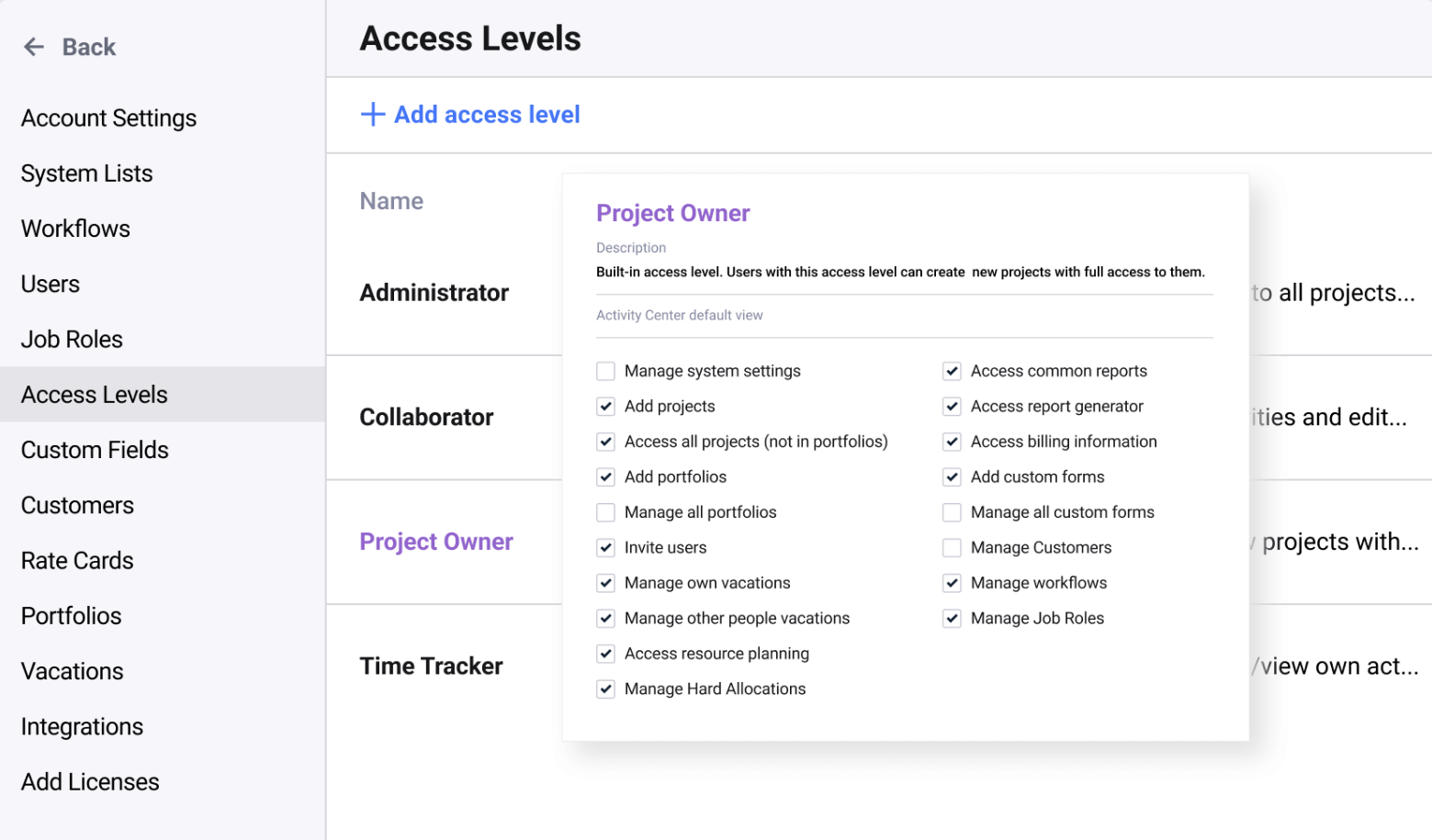
The system should make it easy to limit sensitive information while still allowing collaboration.
Audit and reporting requirements
Auditability is one of the biggest gaps in fragmented project environments.
When approvals live in email and reports are built manually, it is hard to prove what changed, who approved it, and when the decision happened. A structured system creates a clearer record.
How Canadian government teams typically manage projects today
Many government teams still manage projects through a mix of spreadsheets, legacy systems, shared folders, email approvals, and disconnected tools.
This setup usually starts for practical reasons. Teams use what is available, move quickly, and build their own tracking process. Over time, the process becomes harder to manage.
The common problems are familiar:
- No single source of truth
- Too much manual reporting
- Limited portfolio visibility
- Unclear resource capacity
- Approval history spread across email and documents
- Difficulty comparing projects across departments
For public sector teams, the risk is higher because the work often requires stronger oversight. A missed update is not just inconvenient. It can affect reporting, funding decisions, procurement timelines, and stakeholder confidence.
How modern systems support government project management
Modern systems support government project management by bringing planning, execution, resources, approvals, and reporting into one controlled environment.
Centralized visibility
A centralized system gives teams one place to see active projects, timelines, owners, risks, and status updates.
This helps PMO and leadership teams move from project-by-project tracking to portfolio-level management. They can see what is happening across departments without waiting for manual updates.
Structured workflows
Structured workflows help standardize how work enters the system, gets approved, and moves through delivery.
For example, an internal project request can follow a defined process: intake, review, prioritization, approval, planning, execution, and reporting. This reduces confusion and makes the process easier to audit.
Better reporting
Better reporting means fewer manual status decks and spreadsheet exports.
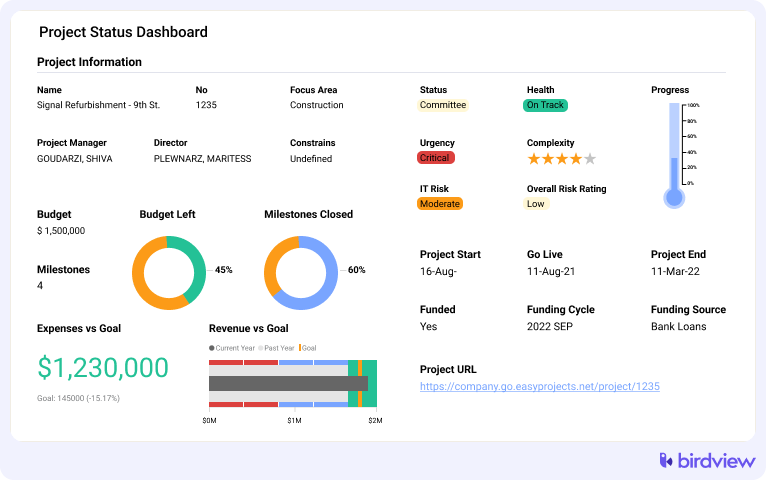
Dashboards can show project health, workload, budget status, milestone progress, and risk areas. This gives leaders a current view instead of a delayed summary.
Controlled access
Controlled access allows broad collaboration without exposing everything to everyone.
For example, Birdview PSA combines project management, portfolio visibility, resource planning, reporting, and permission-based collaboration in one environment. The value is not only task tracking. It is the ability to manage work with structure and visibility.
When government teams need to move to more structured systems
Government teams usually need a more structured system when project complexity starts to outgrow manual coordination.
The trigger is not always team size. Sometimes it is reporting pressure, compliance review, funding complexity, or the number of departments involved.
But sometimes, there are other trigger, such as:
- Project updates take too long to collect
- Leadership does not trust portfolio reports
- Teams cannot see capacity before approving new work
- Approvals are hard to trace
- Project data is stored in too many places
- Contractors or external stakeholders need controlled access
- Procurement or IT asks for stronger security documentation
When these issues appear, adding another spreadsheet usually makes the problem worse. The better move is to define the workflow first, then choose software that supports it.
Choosing the right project management software for Canadian government
Choosing the right project management software for Canadian government means balancing usability with security, governance, and reporting depth.
Start with the non-negotiables. If Canadian data residency, security documentation, role-based permissions, or audit support are required, review those before comparing task views or templates.
Before shortlisting vendors, confirm whether your organization falls under a specific public-sector software procurement threshold, since that can determine the required review, approvals, and purchasing process.
Then evaluate how the system supports daily work. A tool that passes security review but feels impossible to use will still fail in practice.
A practical evaluation should include:
- Hosting and data residency options
- Security controls and access permissions
- Audit trails and approval history
- Portfolio and program reporting
- Resource planning and workload visibility
- Collaboration with internal and external users
- Ease of adoption for non-technical teams
- Vendor support during rollout
- Integration with existing systems
The best Canadian government project management tools are not always the ones with the longest feature list. They are the ones that fit your governance model, protect your data, and give teams a reliable way to manage work across departments.
A good next step is to map your current approval, reporting, and data residency requirements before reviewing vendors. That will make demos more focused and procurement discussions much easier.
FAQ: Canadian government project management software
What is project management software for Canadian government?
Project management software for Canadian government is a system used to plan, manage, report, and control public sector projects. It helps teams coordinate work across departments while supporting requirements such as security, access control, auditability, and data residency.
Why is data residency important?
Data residency is important because many Canadian public sector teams need to know where their data is stored and how it is protected. Storing data in Canada can help reduce cross-border concerns and support internal procurement, privacy, and compliance reviews.
What compliance requirements should be considered?
Government teams should consider data protection, access control, audit trails, retention needs, approval history, vendor security documentation, and reporting requirements. The exact requirements depend on the organization, project type, and data being managed.
Can cloud software meet government standards?
Yes, cloud software can meet government standards if it provides the right hosting options, security controls, documentation, and access management. The key is to evaluate the vendor’s security model before approving the tool for public sector use.
How do you choose the right tool?
Start with mandatory requirements such as Canadian data residency, security controls, permissions, and auditability. Then compare portfolio visibility, reporting, workflows, resource planning, and ease of adoption. A tool should fit both procurement requirements and daily project work.