Arkady Katcherovski
 Resource leveling balances resource demand with availability, ensuring deadlines are met and resources are used efficiently.
When managing projects, I, as a project manager, often have to face problems or events that require more resources than are available. This situation often arises when you have to plan different tasks simultaneously that employ the same resources, for example, designers in marketing projects.
Resource leveling is my go-to strategy for addressing this. By adjusting the start and end dates of tasks, I ensure resources are distributed more evenly over time. In other cases, tasks need to be rescheduled, resource allocations changed, and the project schedule adjusted.
This approach helps me keep the project on track, maintain momentum, and prevent team burnout.
Thus, we can say that resource leveling is a project management technique used to resolve resource conflicts by adjusting the project schedule.
What is resource leveling?
Thus, resource leveling aims to balance the demand for resources with the available supply. The goal is to meet deadlines while optimizing resource usage effectively.
When resources are over-allocated or there are conflicts in the schedule, project managers must adjust timelines and reassign tasks to ensure smooth project execution.
This approach ensures that resources are allocated efficiently without overburdening team members or causing delays. This is especially valuable in the professional services industry, where projects often require multiple tasks and resource constraints. Here’s a detailed overview of resource leveling, including techniques and practical examples for professional services firms.
When two sold projects share the same senior in one week, leveling is the adjustment: dates, splits, or a different named person. It is not a hiring ticket.
Techniques for resource leveling
Resource leveling is essential for effective project management, ensuring resources are used efficiently without overloading or underutilization. It involves various techniques to balance resource demands with availability, helping to avoid bottlenecks, ensure timely project completion, and maintain a smooth workflow. Here’s an overview of some key resource leveling techniques that can significantly enhance your project management:
- Critical Path Method (CPM): This involves identifying a project’s longest sequence of tasks and adjusting start and end dates to ensure resources are not over-allocated. Tasks on the critical path are prioritized to avoid delays.
- Float Utilization: Float, or slack, is the time a task can be delayed without affecting the project deadline. By using a float, project managers can reschedule non-critical tasks to balance resource demands.
- Splitting Tasks: Dividing tasks into smaller segments allows project managers to reallocate resources more effectively. This technique is useful when a resource is only available intermittently.
- Adjusting Task Dependencies: Modifying task relationships can help balance resource loads. For example, starting a dependent task earlier if resources become available.
- Delaying Tasks: Postponing non-critical tasks to free up resources for more urgent work. This helps avoid overburdening team members and ensures critical tasks are completed on time.
- Parallel Tasks: Scheduling tasks that can be done simultaneously by different resources. This technique maximizes productivity and resource use.
Resource leveling vs. smoothing
Resource leveling and smoothing are vital techniques in project management. Here are their descriptions with examples:
Resource leveling
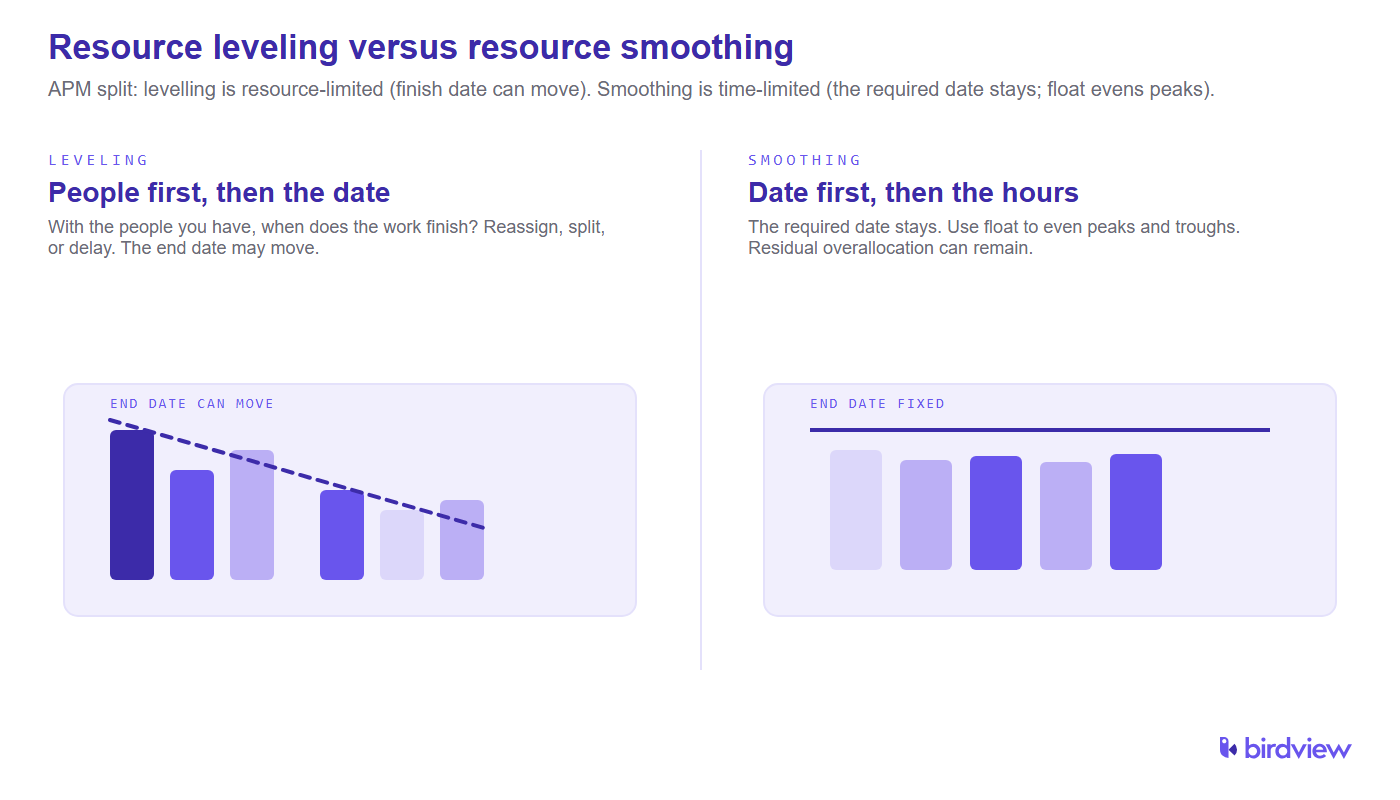
Resource leveling adjusts task start and end dates to address resource over-allocation, ensuring resources are evenly distributed over time, even if it means extending the project duration.
Example: In an IT project, if a key developer is overbooked with tasks due simultaneously, you might delay some less critical tasks to allow the developer to complete high-priority work without being overburdened.
Resource smoothing
Resource smoothing fine-tunes the schedule within existing constraints to optimize resource usage without changing the project’s end date.
Example: In a marketing campaign, if a designer is needed for multiple tasks, you can adjust task schedules to fit within their available hours, ensuring they are not overworked and deadlines are still met.
Key differences:
- Goal: Resource leveling focuses on preventing over-allocation and can change the project duration, while resource smoothing aims to optimize resource use without altering the project end date.
- Flexibility: Resource leveling is more flexible with deadlines, while resource smoothing strictly adheres to the original project timeline.
- Application: Use resource leveling when resource availability is a major issue and project deadlines can be adjusted. Use resource smoothing when maintaining the project deadline is critical, and there is some flexibility in task scheduling.
Both techniques help in efficiently managing limited resources and avoiding bottlenecks or delays.
APM puts the same split in resource-management language: smoothing is time-limited (the required date stays; peaks and troughs are evened using float), and levelling is resource-limited (it answers “with the resources available, when will the work be finished?”) [1]. APM also notes that a mix of both shows up at programme and portfolio scale [1]. For the sister explainer, see resource leveling vs resource smoothing and resource smoothing.
Resource leveling tools
Resource leveling becomes easier with practice. Here are some tips and tools to help streamline the process:
Gantt Charts: A Gantt view plots work as bars on a timeline, so the critical path is easier to see. You can line up who is doing what, when each bar starts and finishes, and how long the whole job still runs. When the plan changes, you move those bars instead of rebuilding the schedule from scratch.
Example: Use Gantt charts to spot resource overallocation by visually aligning tasks and deadlines, ensuring team members are not overburdened.
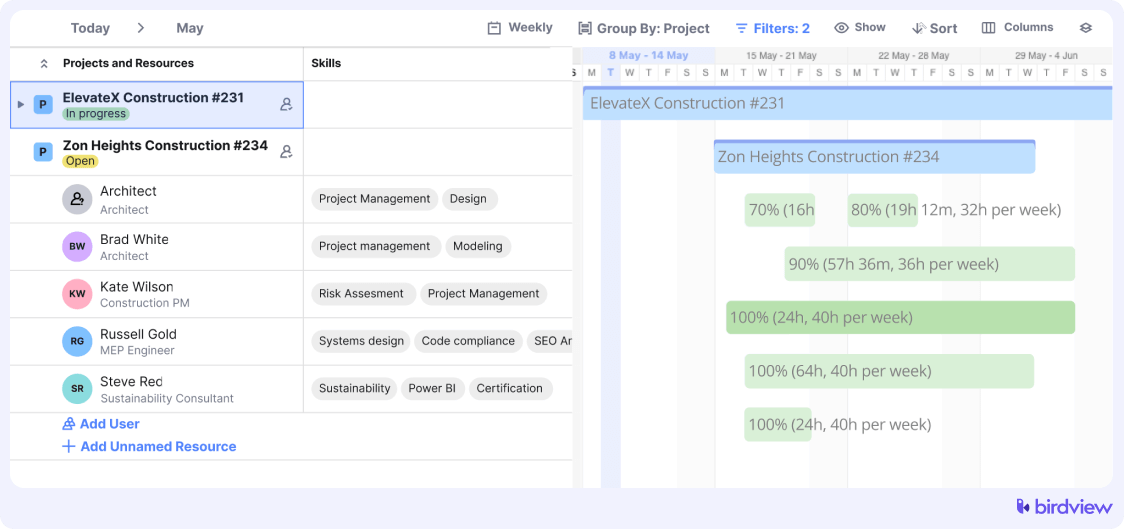
The Birdview PSA Gantt Chart integrates all project aspects. Using the critical path feature, it highlights tasks and dependencies impacting the project deadline.
Leverage project management software: Project management software with resource-leveling algorithms can help resolve overallocation conflicts. It provides visibility into team members’ schedules, preventing scheduling conflicts and double-booking ahead of time.
Example: Software like Microsoft Project, Asana, or Birdview PSA allows you to allocate tasks based on resource availability, ensuring a balanced workload.
Use previous projects: I’d like you to maintain an archive of past project plans and schedules to reference when planning similar projects. Reviewing successful and unsuccessful projects provides insights into task durations and resource requirements, aiding in accurate project planning.
Example: Refer to past marketing campaigns to estimate resource needs for a new campaign, avoiding previous pitfalls.
Leverage historical data with Birdview PSA. Harness Birdview’s powerful project portfolio management functionality to analyze and gain insights from data on previous projects. This feature helps you identify successful strategies and avoid past mistakes, leading to more accurate planning and improved project outcomes.
Realistic resource estimates: Accurate resource leveling requires clearly defined project scopes and realistic resource estimates. Teams should estimate resource needs collectively to reduce personal biases, include potential project risks, and use ranges rather than specific values for more reliable estimates.
Example: Involve the entire project team in estimating the time needed for a new software feature, considering potential risks and uncertainties.
Incorporate time buffers: Add time buffers to tasks to account for unexpected delays or issues. This proactive measure ensures that resource leveling adjustments can be made without significantly impacting the project timeline.
Example: Include extra time in the schedule for critical tasks, ensuring the project stays on track despite delays.
Regularly review and update plans: Regularly review and update project plans and resource allocations to promptly identify and resolve any resource conflicts or overallocation issues.
Example: Conduct weekly reviews of the project plan to adjust resource assignments based on current progress and upcoming tasks.
Utilize collaboration tools: Use collaboration tools to enhance communication and coordination among team members and clients. This ensures that everyone is aware of their responsibilities and any changes in resource allocations, facilitating smoother resource-leveling.
Example: Use tools like Slack, Microsoft Teams, or Birdview’s collaboration features to keep your team, clients, and stakeholders updated on project changes and resource reallocations.

By incorporating these tools and techniques, you can effectively manage resources and ensure your projects stay on track, enhancing productivity and achieving project success.
Resource leveling examples
To illustrate how resource leveling can change your team’s workflow, here are some examples for professional services projects. These examples show how resource leveling can help distribute workloads, prevent burnout, and ensure timely project delivery.
- Consulting firms:
- Scenario: A consulting firm has multiple ongoing projects, and senior consultants are over-allocated.
- Solution: The project manager uses the Critical Path Method to prioritize tasks on the critical path and adjusts non-critical tasks using float. This allows senior consultants to focus on high-priority tasks without overloading their schedules.
- Marketing agencies:
- Scenario: A marketing agency needs to launch multiple campaigns simultaneously, and designers are stretched thin.
- Solution: The agency splits design tasks into smaller parts, reassigning some to junior designers and adjusting task dependencies to ensure timely completion. Delaying non-urgent design work helps balance the workload.
- Legal services:
- Scenario: A legal firm is preparing for several court cases, and paralegals are overbooked.
- Solution: The firm delays non-critical document review tasks and uses parallel task scheduling for research activities. This ensures that paralegals can focus on urgent case preparations.
- Engineering services:
- Scenario: An engineering firm has a tight project deadline, and specialized engineers are over-allocated.
- Solution: The firm adjusts task dependencies and utilizes float to reschedule non-critical engineering tasks. They also bring in additional resources temporarily to handle the workload without affecting the project timeline.
Read more:
What is Resource Management
Resource management in project management: process, tools, benefits & technique
What is Resource Utilization and Analysis?
5 Common Resource Allocation Problems and How to Solve Them
How to apply resource leveling
Let’s look at how to apply resource leveling to a marketing company using Birdview PSA.
As a project manager at a marketing agency, balancing resources can be challenging, especially during peak campaign seasons. Here’s a step-by-step guide to applying resource leveling in our projects using Birdview PSA:
Step 1: Identify resource overallocation
Review project plans in Birdview PSA to find overallocated team members.
Example: Check if top graphic designers are scheduled for multiple campaign tasks simultaneously. Birdview PSA’s resource allocation view will highlight any allocation issues.
How: Use Birdview PSA’s resource allocation features to identify allocations quickly and easily.
Step 2: Assess task dependencies
Understand task dependencies using Birdview PSA. Identify which tasks can be rescheduled without impacting the overall timeline.
Example: If social media posts depend on the content strategy being finalized, reschedule less urgent tasks to free up writers. Birdview PSA allows you to visualize these dependencies.
How: Utilize Birdview PSA’s task dependency visualization tools to assess and adjust task sequences.
Step 3: Utilize float
Find tasks with float time in Birdview PSA and reschedule them to balance the workload.
Example: Push back the email campaign task, which has a float of three days, to allow designers to focus on urgent ad designs first. Use Birdview PSA’s float management features to identify and adjust these tasks.
How: Leverage Birdview PSA’s float calculation to identify tasks with slack time and adjust their schedules accordingly.
Step 4: Split tasks
Break larger tasks into smaller, manageable parts in Birdview PSA and distribute them among available team members.
Example: Divide a large market research task into competitor analysis and audience profiling, assigning these to different analysts. Birdview PSA’s task breakdown feature makes this easy.
How: Use Birdview PSA to create subtasks and assign them to various team members to distribute the workload evenly.
Step 5: Adjust timelines
Reschedule non-critical tasks so that critical tasks get the necessary resources first using Birdview PSA.
Example: Delay creating social media graphics to reallocate resources to an urgent video production task. Adjust timelines directly in Birdview PSA to reflect these changes.
How: Use Birdview PSA’s timeline adjustment features to reschedule tasks, ensuring critical tasks are prioritized.
Step 6: Hire temporary resources
When internal resources are stretched thin, consider bringing in freelancers or temporary staff.
Example: Hire freelance graphic designers for overflow tasks like banner ads. Birdview PSA can track these external resources and integrate their schedules into the project plan.
How: Use Birdview PSA to integrate and track the schedules of temporary or freelance resources.
Step 7: Monitor and adjust regularly
Continuously track resource allocation and project progress in Birdview PSA, making adjustments as needed.
Example: Use Birdview PSA to monitor task completion and resource usage. Adjust schedules dynamically to accommodate any changes.
How: Regularly update and monitor your project plan in Birdview PSA to ensure resource allocation remains balanced and efficient.
Example scenario
Imagine our agency is working on a major product launch for a client. Initially, the project plan shows our senior content creators are overbooked with simultaneous content creation and campaign strategy tasks.
- Identifying Overallocation: Use Birdview PSA to identify that our senior content writers are assigned to develop blog posts and social media strategies at the same time.
- Using Float: Discover that blog post creation has a float of five days and delays it, allowing writers to complete the social media strategies first in Birdview PSA.
- Splitting Tasks: Break the creative process into smaller steps such as template editing, caption writing, asset organization, and create a video content workflow, assigning simpler tasks to junior team members while senior creators focus on strategy and final approvals.
- Hiring Temporary Resources: Bring in freelance writers to help with additional content needs, tracking their work in Birdview PSA.
- Monitoring and Adjusting: Use Birdview PSA to track progress and reallocate resources as needed, keeping the project on schedule and our team balanced.
By following these steps in Birdview PSA, we can effectively apply resource leveling in our marketing projects, ensuring that our team is productive, our deadlines are met, and our clients are satisfied.
Benefits of resource leveling
- Optimized resource utilization: Ensures resources are used efficiently, reducing downtime and preventing burnout.
- Improved project scheduling: Helps maintain realistic project timelines by addressing resource conflicts early.
- Increased productivity: Balancing workloads allows team members to work more effectively, leading to higher productivity.
Enhanced project control: Provides better control over project execution, allowing for adjustments to be made proactively.
Resource leveling with Birdview PSA
Project Management software Birdview PSA enhances resource leveling by offering real-time visibility into resource allocation, making it easier to identify and resolve overallocation issues.
Birdview PSA’s portfolio management functionality lets you analyze past project data, enhancing planning accuracy and resource management efficiency.
Its integrated Gantt charts help visualize task dependencies and adjust schedules seamlessly. The platform’s collaboration tools keep your team and stakeholders updated on project changes.

Birdview PSA offers the tools to effectively track your resources from the start. Try our free 30-day trial, featuring an interactive Gantt chart for full team workload visibility.
The same live assignments feed professional services operations: leveling against a stale export is just rearranging last week’s conflict.
Read more:
Resource allocation in professional services
Resource Optimization in Project Management
Resource Capacity Planning for Project Management – Guide 2024
Professional Services Resource Management – Ultimate Guide
Why consulting firms level work when people are overallocated
Consulting firms hit overallocation when the same senior names sit on two sold projects in the same week. The hours were promised in two statements of work. The calendar cannot hold both. Leveling changes dates and named assignments against people who actually exist, instead of waiting for a hire that cannot start on Monday.
APM treats levelling as the resource-limited question: with the people you have, when does the work finish [1]. Firms run it when the roster is already over 100 percent because the conflict is already staffed.
How leveling fixes overallocation without hiring
The no-hire toolkit is already on this page: float, splits, delayed non-critical work, and parallel tasks given to people who still have hours. Hiring is a capacity decision for a later window. Step 6 (temporary staff) is overflow when the internal pool is empty, not the first move.
If the only “fix” you have is a requisition, you are not leveling. You are postponing the heatmap.
Move dates or reassign people first
Reassign first when another named person has the skill and unused hours. Move dates when the skill is scarce and float exists on the lower-priority work. Extending the project end date is the last move. That last move is what APM means by resource-limited scheduling: the finish date is the answer to the resource limit [1].
Smoothing is the other order. The end date stays; you only use float. That split is in Resource leveling vs. smoothing above.
When a resource manager should run leveling in PSA
Run it when live assignments plus capacity show a person or role over 100 percent, before the week starts, and again when a new project is staffed. Do not wait for a missed timesheet.
A PSA run only helps if the conflict is on current allocations, not on a copy of last Friday. Pair it with strategic resource capacity planning when the overload is a horizon problem, not a single-week clash.
What breaks when leveling slips delivery dates
If every conflict is resolved by pushing the end date, clients get slipped milestones, the heatmap looks “fixed,” and project managers learn to hide overload in the calendar. APM is explicit: levelling asks when the work will finish given the people you have [1]. That answer can be later than the sold date.
If the sold date cannot move, stop that leveling path. Use smoothing, sequence the work, or change who is named. Slipping delivery to protect a utilization chart is not a successful level.
Overallocation and bench in the same week
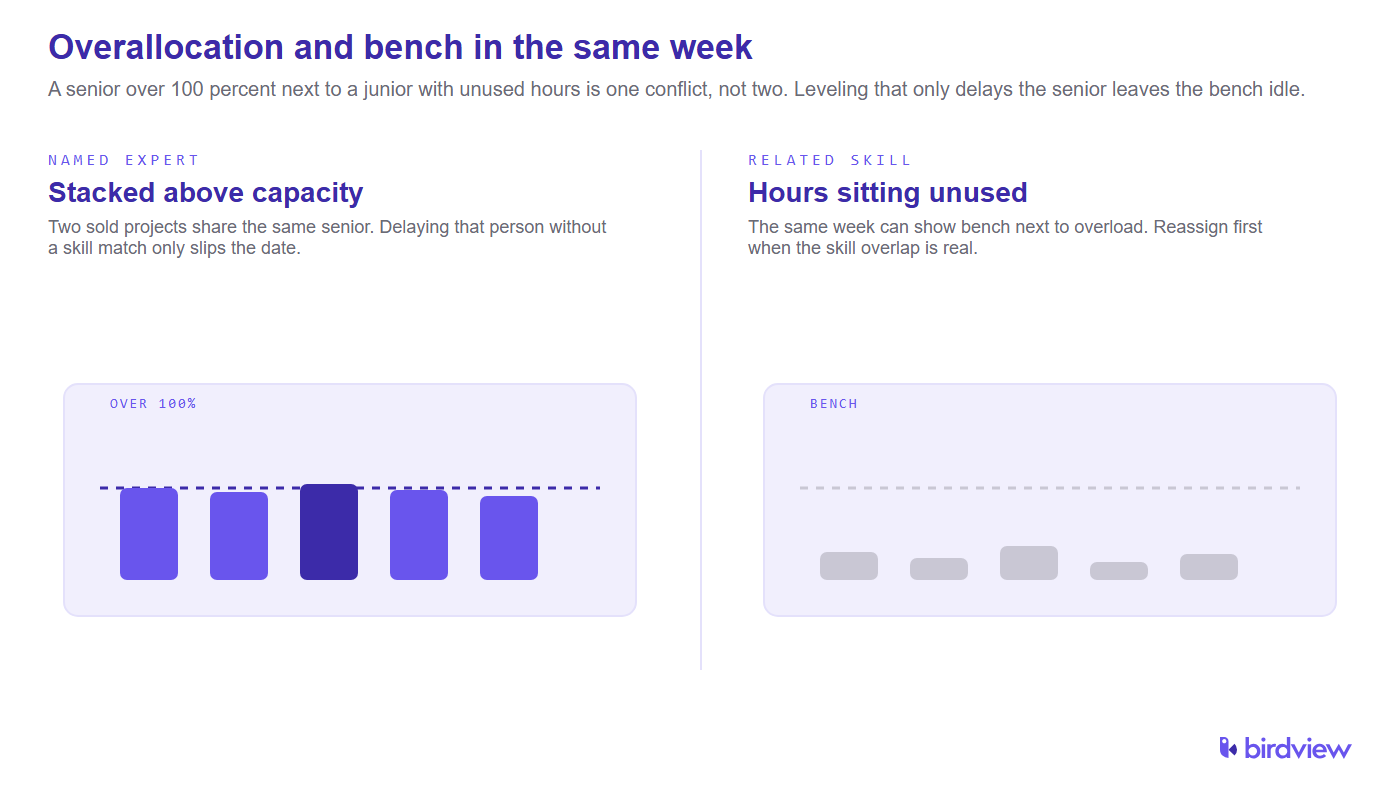
The same week can show a senior at 120 percent and a junior on the bench. Leveling that only delays the senior’s tasks, without looking at overlapping skills, leaves unused hours sitting next to a slipped date.
SPI Research’s 2026 Professional Services Maturity Benchmark (509 professional service organizations) reports Level 5 firms with 42% more billable utilization than Level 2 peers [2]. That gap is a utilization system, not a busier calendar. Leveling has to see overallocation and unused hours together.
On Birdview implementations, the loading view for a mid-size consulting week often shows both at once: one named expert stacked, another person with a related skill underloaded. That is the pattern this page is written from. See also bench management for consulting firms.
Resource leveling for a mid-size consulting portfolio
A mid-size portfolio is several concurrent engagements, not one Gantt. Level across projects: which client date is hard, which task has float, who can take a split. The marketing-agency walkthrough above is the task-level method. Portfolio leveling adds a sequence choice when two statements of work share the same senior.
APM notes that a mixture of levelling and smoothing is common at programme and portfolio scale [1]. That is the mid-size case: one client date is fixed (smooth inside it), another engagement can slip a week (level).
PSA leveling from live assignments and capacity
Yes, when assignments, remaining work, time off, and role capacity sit in one model. Birdview PSA already exposes that in the Gantt, resource allocation view, and portfolio tools on this page. A plan that is not tied to live assignments will level yesterday’s conflict.
FAQ
Why do consulting firms use resource leveling when people are overallocated?
Because the same named seniors are already promised on two live jobs. Leveling changes dates and assignments against people who exist this week. A hire request does not clear Tuesday’s heatmap.
How does resource leveling fix overallocation without hiring?
Use float, split the work, delay non-critical tasks, or hand hours to someone with unused capacity. Temporary staff is overflow after that list, not the opening move.
Does resource leveling move project dates or reassign people first?
Reassign first when the skill and unused hours exist. Move dates when the skill is scarce and float sits on lower-priority work. The end date moves last, and only when people, not the calendar, are the constraint.
When should a resource manager run resource leveling in PSA?
When live assignments plus capacity show a person or role over 100 percent, before the week starts, and again at staffing for a new project. A spreadsheet from last Friday is too late.
What breaks if you level resources and slip delivery dates?
Milestones move, clients see delay, and the heatmap looks clean while the sold date is gone. If the date cannot move, smoothing, sequencing, or a named-person change is the honest path.
Can PSA do resource leveling from live assignments and capacity?
Yes, if assignments, remaining work, time off, and role capacity are in one model. Birdview PSA already shows that in Gantt and allocation views. Leveling a static export only rearranges last week’s conflict.
Sources
- Association for Project Management. Difference between resource smoothing and resource levelling (time-limited vs resource-limited scheduling). https://www.apm.org.uk/resources/find-a-resource/difference-between-resource-smoothing-and-resource-levelling/
- SPI Research. 2026 Professional Services Maturity Benchmark (509 professional service organizations; Level 5 vs Level 2 billable utilization). https://spiresearch.com/reports/2026-ps-maturity-benchmark/