Blog
Blog

Project work rarely happens in isolation. Clients want visibility, timely updates, and a clear way to share feedback without chasing emails or sitting through unnecessary meetings. When communication breaks down, even well-planned projects start to feel harder than they should.
That is why more teams are turning to project management software with the client portal. Instead of juggling inboxes, files, and status calls, teams and clients work from the same space. Progress is easier to follow, feedback is easier to act on, and expectations are clearer on both sides.
In this article, we look at project management tools that include client portal features and compare how well they support real-world client collaboration. The goal is to help you find a tool that fits your team’s workflow and how your clients like to stay involved.
Quick comparison: 6 best project management software with client portal
| Tool | Best for (use case) | Key client portal feature | Project financials (native)? |
| Birdview PSA | Professional services needing resource + financial visibility | Dedicated client portal with granular permissions for files and approvals | Yes |
| OneDesk | Teams balancing customer support tickets and project delivery | Combined helpdesk + PM portal for ticket-to-task tracking | Limited |
| Zoho Projects | Teams wanting affordable PM inside a larger business suite | Client access for task comments, document sharing, and status updates | Yes |
| Paymo | Small teams/freelancers needing time tracking + billing | Simple client view for progress, deliverables, and invoicing visibility | Yes |
| Jira | Agile/technical teams focused on software delivery | External client access typically requires add-ons or service modules | No (native) |
| OneHub | Secure file sharing with controlled client access | Branded client portals with permissions, activity logs, and secure sharing | No (file-focused) |
What to look for in client portal project management software (2026)
Document sharing that works for clients, too
Clients should be able to access files without hunting through email threads. Look for software that supports direct document uploads or integrates smoothly with tools like SharePoint, OneDrive, or Google Drive. The goal is simple. Everyone works with the same version of a file, and updates are easy to find.
Role-based permissions you can actually control
Not every client needs full access, and not every team member should see everything. Role-based permissions let you decide who can view, comment, edit, or approve content. This keeps sensitive information protected and helps clients focus only on what is relevant to them.
Built-in feedback and approval
Chasing approvals over email slows projects down. A client portal should allow clients to leave comments, request changes, and approve deliverables directly in the system. When feedback is tied to the actual task or file, it is easier to act on and much harder to miss.
Real-time updates and notifications
Clients expect visibility, not surprises. Real-time updates show progress as it happens, whether a task is completed, a deadline shifts, or a comment is added. With clear notifications, everyone stays informed without needing constant status meetings.
Shareable dashboards and reports
Clients want to see progress without asking for custom reports every week. A good client portal includes dashboards and reports that can be shared with a click. This makes it easier for clients to track milestones, timelines, and overall project health on their own terms.
Top 6 project management software with a client portal
| Use Case | Best Tools |
| All-around project + client work | Birdview PSA, OneDesk |
| Secure file sharing + client access | OneHub |
| Affordable, simple PM with client view | Paymo, Zoho Projects |
| Technical teams with configurability | Jira |
| Teams needing strong reporting and portfolio views | Birdview PSA, Zoho Projects |
1. Birdview PSA
Headquarters: Toronto, Canada
Best for: All-around project and client work for professional services teams, especially those needing project delivery, resource planning, and financial tracking in one place
Birdview PSA is built for teams that manage projects with active client involvement. It combines project planning, resource management, and financial tracking with client-facing access, so external stakeholders can follow progress, review deliverables, and stay aligned without constant status updates. This makes it easier to manage expectations and keep projects moving forward with fewer surprises
Key features:
Client access and collaboration
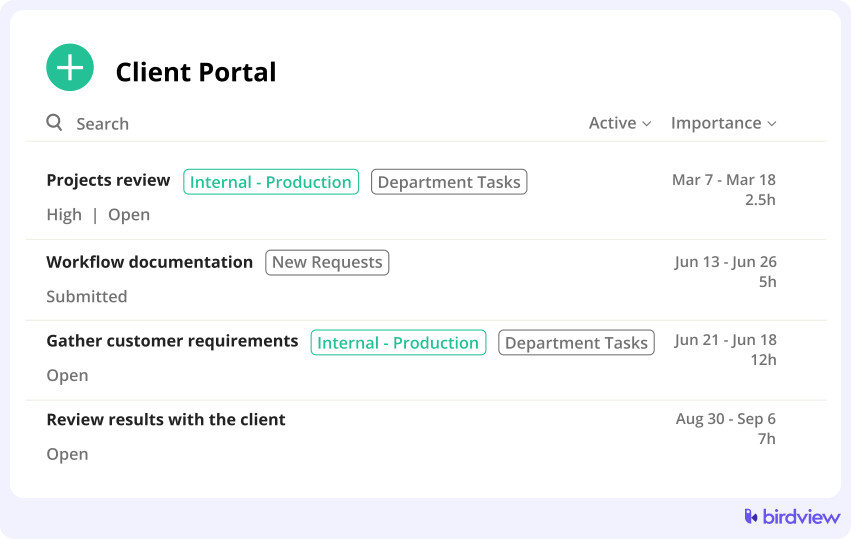
Clients can be invited into the system through the dedicated client portal with controlled permissions, allowing them to view project progress, timelines, shared files, and key updates. This keeps communication centralized and reduces reliance on email for day-to-day coordination.
Comments and approval workflows
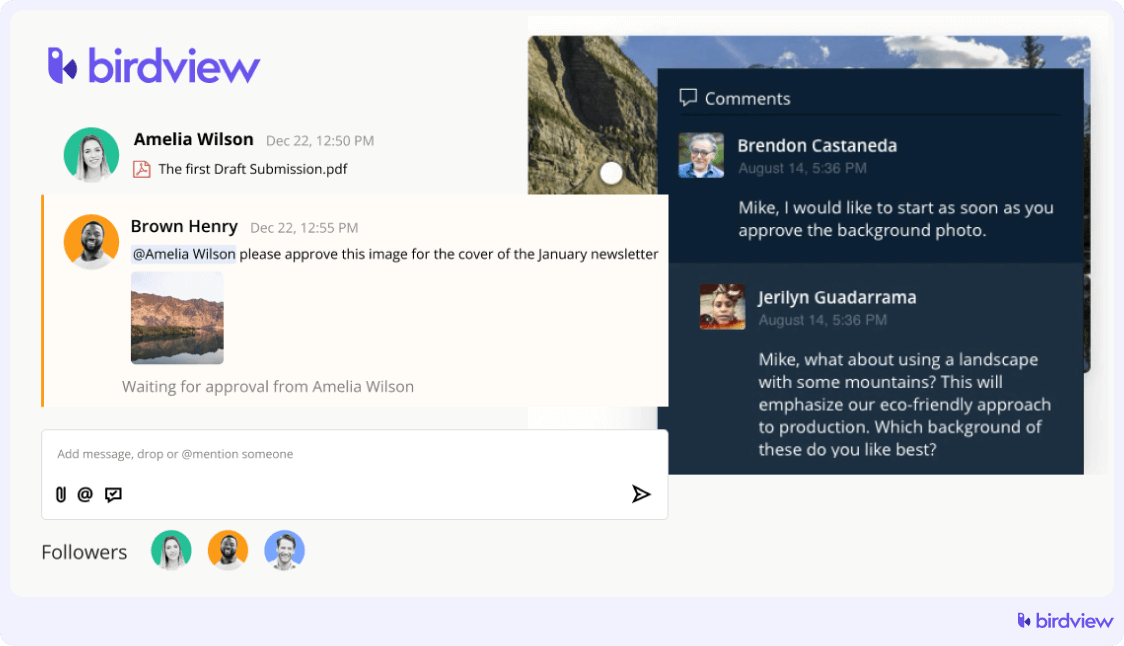
Birdview allows teams to collect client feedback directly on tasks and deliverables through comments. Approval workflows help formalize sign-off, so teams know exactly when work is reviewed and approved before moving to the next stage.
Project and portfolio management
Birdview supports detailed project planning along with portfolio-level views. Teams can manage multiple client projects at once, track dependencies, and understand how changes in one project affect others.
Resource and capacity management
Managers can plan workloads, allocate resources across projects, and adjust schedules based on availability. This helps ensure client commitments are realistic and delivery timelines are easier to maintain.
Time tracking and financial visibility
Time logs, budgets, and cost tracking connect project work to financial outcomes. Teams can monitor billable and non-billable time and understand project performance as work progresses.
Dashboards and reporting
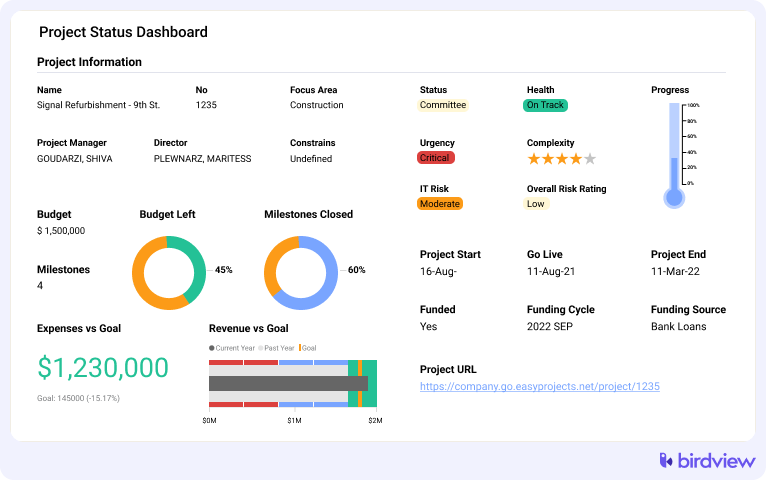
Custom dashboards and reports give both internal teams and clients clear visibility into project status, milestones, and key metrics. Reports can be shared to support regular reviews and decision-making.
Trial: A free 14-day trial is available, possibly extending the trial period to 28 days. Sign up for a trial today to learn more about Birdview PSA.
Pros:
- Good combination of project delivery, planning, and resource tracking
- Clear dashboards and real-time updates
- Client access allows external stakeholders to see relevant updates and files
- Strong reporting and analytics
Cons:
- Some features may feel overwhelming or take time to learn
- Navigation and file references sometimes require extra clicks for new users
2. OneDesk
Headquarters: Montreal, Canada
Best for: Teams that want a combined project management and helpdesk system, especially those balancing customer support and project delivery
OneDesk is an all-in-one platform that combines project management and help desk functionality. It enables teams to manage both internal tasks and customer support requests in a single tool, improving efficiency and communication. With features for task management, ticketing, and customer communication, it‘s ideal for teams juggling both project tracking and client needs.
Key features: Ticketing system, task management, customer communication, time tracking, project planning, workflow automation, customizable dashboards.
Trial: A free 14-day trial is available.
Pros:
- Combines project work and client requests
- Client portal supports comments and updates
- Useful for teams handling both projects and support
Cons:
- Interface can feel busy at times
- Client experience depends on the setup
3. Zoho Projects
Headquarters: Chennai, Tamil Nadu, India
Best for: Teams that need a flexible project planning and collaboration tool that integrates well with a larger suite of business apps
Zoho Projects is a project management software with a client portal that helps teams plan, track, and collaborate on projects of all sizes. It offers a range of tools for task management, time tracking, and team collaboration, making it a flexible solution for businesses looking to streamline their workflows and improve productivity.
Key features: Task management, time tracking, Gantt charts, workflow automation, collaboration tools, reporting, and analytics.
Trial: A free 10-day trial is available.
Pros:
- Good balance of features and pricing
- Client access for comments and visibility
- Works well within the Zoho ecosystem
Cons:
- Interface can feel complex
- Client permissions need careful setup
4. Paymo
Headquarters: Oradea, Bihor, Romania
Best for: Small to mid-sized teams and freelancers who want integrated time tracking, project management, and invoicing in one tool
Paymo is a project management tool designed for small to mid-sized teams, combining task management, time tracking, and invoicing. It helps businesses streamline project workflows, monitor team performance, and handle billing all within a single platform, making it ideal for teams that juggle multiple projects and client work.
Key features: Task management, time tracking, invoicing, project scheduling, team collaboration, and reporting.
Trial: A free 15-day trial is available.
Pros:
- Simple setup for client-facing projects
- Built-in time tracking and billing
- Clients can view progress and give feedback
Cons:
- Limited advanced reporting
- Basic client portal compared to larger tools
5. Jira
Headquarters: Sydney, Australia
Best for: Agile and technical teams that need deep workflow and issue tracking, especially software development teams
Jira is a project management software with a client portal used for software development and agile teams. It excels in issue tracking and workflow management, offering customizable boards and automation features to help teams plan, track, and release projects efficiently.
Key features: Issue tracking, agile boards (Kanban, Scrum), workflow automation, reporting and analytics, customizable workflows, and integrations with development tools.
Trial: A free 7-day trial is available.
Pros:
- Very flexible for technical teams
- Strong workflow customization
- Good internal collaboration tools
Cons:
- Client portal not native
- Requires add-ons or setup for external collaboration
6. OneHub
Headquarters: Seattle, United States
Best for: Secure file sharing and client portals focused on document collaboration and client communication
OneHub is a cloud-based file-sharing and collaboration platform designed for businesses to share and manage documents securely. Built for businesses that handle sensitive information, OneHub combines robust security features with an intuitive interface for managing documents efficiently.
Key features: File sharing, permission controls, secure data rooms, document collaboration, activity tracking, and branded portals.
Trial: A free 14-day trial is available.
Pros:
- Strong focus on secure client document sharing
- Easy for clients to access and review files
- Clear permission controls
Cons:
- Limited task and project planning features
- Less suited for complex project workflows
How to choose the best project management software with a client portal
When comparing tools, focus less on long feature lists and more on how the software supports real client collaboration. Use this checklist to guide your decision.
- The client portal is easy for clients to use and does not require training
- You can control what clients see through clear roles and permissions
- Files can be shared directly or through integrations like SharePoint or OneDrive
- Clients can leave comments and take part in approval workflows
- Project updates and changes are visible in real time
- Dashboards and reports can be shared without extra setup
- Notifications keep clients informed without overwhelming them
- Inviting and managing clients feels simple during the trial period
Manage projects and client collaboration with Birdview
Choosing the right project management software with a client portal comes down to visibility, control, and ease of collaboration. The best tools make it simple for clients to follow progress, share feedback, and approve work, while giving your team the structure they need to stay on track.
If client collaboration is a core part of how you deliver projects, it is worth looking at platforms that go beyond basic task tracking. Birdview PSA is one option that combines project management, client access, comments, approvals, and reporting in one place, making it easier to manage both the work and the client relationship.
FAQ: Project management software with a client portal
1. What features should I look for in a client portal?
Key features include secure access, customizable permissions, file sharing, task approvals, comment threads, branded client views, and real-time status updates.
2. Who benefits most from using a client portal?
Consulting firms, marketing agencies, engineering teams, IT service providers, and any business that manages client projects will benefit. It‘s especially useful for project-based work that involves regular client input.
3. Is it safe to share sensitive data through a client portal?
Yes. If the platform follows strong security protocols. Look for software that offers encryption, role-based permissions, secure file sharing, and compliance with standards like GDPR or SOC 2.
4. Can clients interact with tasks or just view them?
That depends on the software. Some platforms allow clients to comment, upload documents, or approve tasks, while others offer view-only access. Choose a solution that fits your collaboration style.
5. Will it take long for clients to learn how to use the portal?
Most modern platforms are designed to be intuitive. Choose software with a clean interface, onboarding support, and clear documentation to ensure your clients can engage confidently from day one.