Ksenia Kartamysheva
 Project templates aren’t a “nice-to-have.” In professional services, they are an operations tool that protects margins, reduces chaos, and keeps delivery consistent. Done well, reusable project templates cut setup time, standardize reporting, and make onboarding easier for both clients and new team members.
A reusable project template is a pre-built project structure with phases, tasks, roles, estimates, dependencies, and billing rules. It speeds up project setup while keeping delivery and reporting consistent across teams.
In this guide, you’ll learn what a project template is and why manual setup creates risk. You’ll also see what to include in a reusable template and how to build templates that scale across teams.
What a project template actually is (and what it isn’t)
A project template is a standardized framework that pre-defines a project’s essential structure. It includes phases, tasks, and financial settings, but it doesn’t dictate every detail of execution. It works like a launching pad rather than a rigid script, so teams start with a solid foundation instead of a blank screen.
Many service leaders misunderstand templates. They worry templates will turn creative or consultative work into a factory line. In reality, a good template acts like a skeleton that holds the project together. It ensures the critical “bones” are always there, such as kickoff, requirements gathering, and final sign-off. That consistency adds stability and predictability, which helps protect profit margins.
Why manual setup fails without project templates
Manual setup fails because it consumes billable hours with repetitive administrative tasks rather than client-focused value. When you have to rebuild schedules, task lists, and budget parameters from memory for every new engagement, you pay a hidden tax on your time. This administrative drag slows down project kick-off times and delays the point at which you can start recognizing revenue.
Saving time with project templates is critical for preventing employee burnout. According to McKinsey , about 60% of all occupations have at least 30% of constituent activities that could be automated. This indicates that the administrative burden you feel is unnecessary.
Delivery risks when you don’t use templates
The absence of templates creates delivery risks by making it impossible to generate reliable reports or guarantee a uniform client experience across different teams. Without a shared standard, every project becomes a unique entity with different naming conventions, phase structures, and data points. Process gaps often lead to a poor client onboarding process because your clients receive different experiences depending on who manages their project.
Inconsistent data leads to poor visibility
Without templates, each project is set up differently, and leadership loses visibility into real progress. Teams use their own naming conventions, phase structures, and tracking methods, which makes meaningful reporting nearly impossible.
Common issues include:
- Different interpretations of the same work (for example, “Discovery” tracked as a milestone in one project and a phase in another)
- Inconsistent data points across projects
- Inability to aggregate information at the portfolio level
Inconsistent client experience weakens trust
The absence of standardized templates often leads to uneven client onboarding and delivery experiences. Clients may receive very different levels of structure depending on who manages their project.
For example:
- One team might present a detailed Gantt chart during kickoff
- Another might rely on a basic checklist or informal plan
This inconsistency signals a lack of operational maturity. Clients expect a consistent, high-quality experience regardless of the team assigned, and inconsistency can erode trust early in the relationship.
Unclear structure increases execution risk
Without a defined project structure, teams are more likely to miss deadlines or mismanage handoffs. When roles and responsibilities are not built into the project plan from the start:
- Critical tasks can be overlooked
- Team members may assume someone else is responsible
- Internal coordination becomes reactive rather than planned
What to include in a reusable project template
A reusable project template must include the WBS, role definitions, financial estimates, and dependency logic required to launch a project immediately. A template that only lists tasks is essentially just a checklist. To be truly effective for professional services, it must also contain the operational data that drives resource management and billing.
Work breakdown structure (WBS)
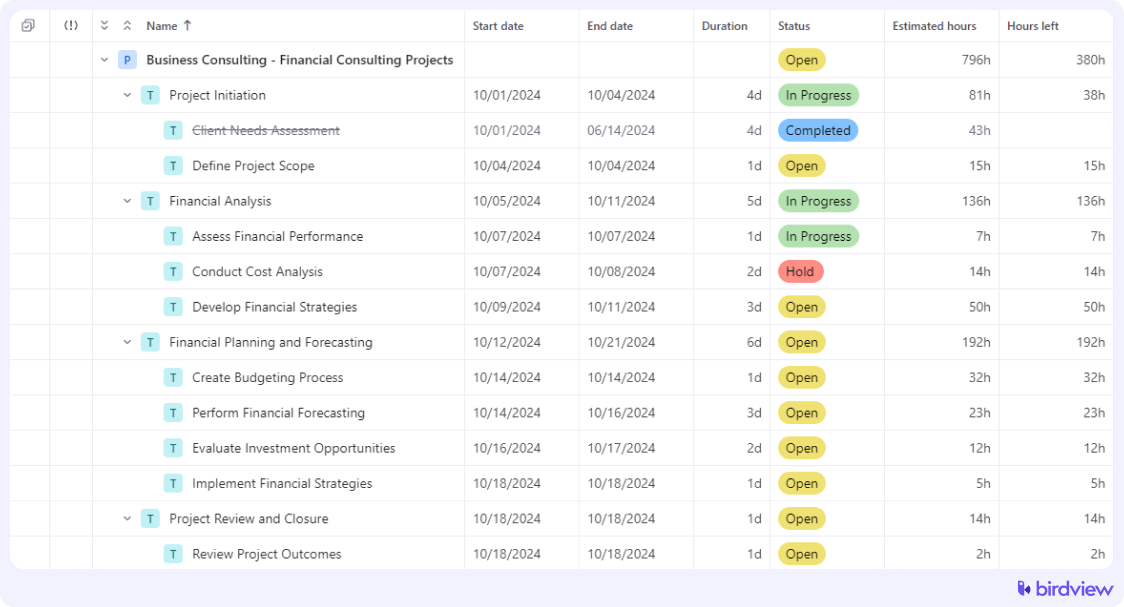
The template should define a clear Work Breakdown Structure (WBS) that includes phases, tasks, and milestones. Naming and sequencing should align with the revenue recognition method. For example, if billing depends on a milestone, that milestone must be explicitly defined. Consistent structure ensures alignment between delivery and finance.
Roles and responsibilities
Tasks should be assigned to roles rather than individuals. Default role ownership clarifies accountability from the start. Built-in handoffs between roles, such as one task opening after another is completed, reduce coordination gaps during execution.
Time and effort estimates
Templates should include baseline hours by task or phase based on historical data. Key assumptions should be documented within task descriptions so project managers can adjust plans when real-world conditions differ.
Dependencies and timing rules
Dependencies should be pre-defined so schedule changes automatically flow through the project. Templates should also include buffers for common delays, such as client approvals, to reduce last-minute rescheduling.
How to create reusable project templates: a step-by-step guide
Creating a reusable template requires you to capture the relationships, resource roles, and financial parameters that make the project function. A static list of tasks is just a checklist. A true template in your project management software is a functional model of a project that is ready to launch.
Step 1: Identify projects worth templating
Start with projects that follow repeatable workflows. Not every engagement needs a template. Focus on the projects you deliver most often, such as standard implementations, audits, or retainers, where small efficiency gains add up over time.
📚 Read more: How to plan a project
Step 2: Audit a historical project
Use a completed project that was delivered on time and on budget as your starting point. Clone it and remove steps that were client-specific or unnecessary. This grounds your template in how work actually happens, not how it looks on paper.
Step 3: Build a clear, simple structure
Reduce the task list to what teams will realistically maintain. Overly detailed templates slow adoption. Use consistent naming across templates so common tasks mean the same thing across teams and service lines.
Step 4: Add realistic estimates and buffers
Base time estimates on real project data, including meetings and coordination time. Avoid planning at full utilization. Add buffers for feedback cycles and approvals so schedules reflect real-world conditions.
Step 5: Set up placeholder resources
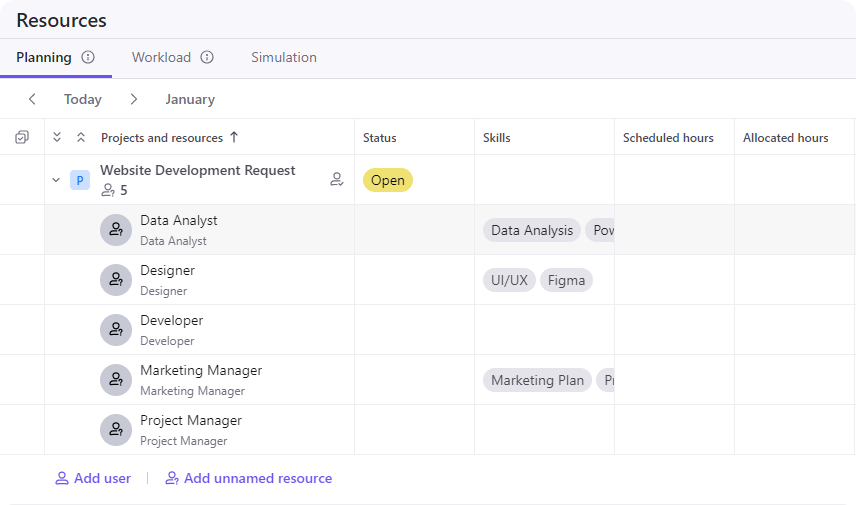
Assign tasks to roles instead of individuals. This keeps templates reusable and allows you to assess resource demand before assigning actual people, regardless of current staffing.
📚 Read more: Resource planning templates: definition, benefits, examples
Step 6: Test and refine the template
Run the template on 2-3 live projects and collect feedback from project managers and delivery teams. Adjust structure and estimates as needed. Templates should evolve based on real use, not remain static.
📚 Read more: Creating projects based on templates in Birdview
How templates improve forecasting and onboarding
Templates improve forecasting and onboarding by converting project data from a static record of the past into a predictive tool for future work. When your projects follow a standard shape, your data becomes comparable. This allows you to identify trends and predict future outcomes with far greater accuracy.
Operations leaders can accurately predict the hours required for future sales before a contract is even signed by using a consistent definition of a “standard implementation.” Templates allow you to forecast resource demand accurately by applying historical duration data to your sales pipeline. If you know that a “Type A” project always requires 40 hours of a Senior Engineer in week three, and you have five of those projects in the pipeline, you can predict exactly when you will run out of engineering capacity. This insight allows you to hire or contract ahead of the curve.
They also act as built-in training for new employees. They provide project onboarding templates that demonstrate the correct way to deliver work. Instead of shadowing a senior manager for months, a new hire can look at a template and immediately understand the sequence of events, the required deliverables, and the expected effort. This is distinct from client onboarding; it focuses on internal readiness. Connecting these templates to resource planning software enables you to book capacity well in advance of the project start date. This smooths out utilization peaks and valleys and supports training new team members by providing a clear roadmap of expectations.
How Birdview PSA supports reusable project templates
Birdview PSA simplifies project planning by turning templates into reusable, operational assets instead of static documents. All project setup happens in one place, making it easier to standardize delivery while keeping plans connected to resources and financials.
Centralized, reusable project templates
Birdview PSA provides a single space to build, save, and reuse project templates that carry essential setup details into every new project, including:
- Task and phase structure
- Budget and billing rules
- Resource roles and requirements
This ensures projects start with a consistent foundation and better visibility from day one. For repeatable client work, many teams begin with onboarding project templates in Birdview, which standardize the sequence from kickoff to go-live for every new client.
Flexible support for different ways of working
Templates can be adapted to match how different teams deliver work. You can maintain multiple template types without forcing a single methodology.
Key capabilities include:
- Support for Agile, Waterfall, and hybrid approaches
- Multiple templates for different project types
- AI-assisted task generation based on past projects
Templates connected to resources and billing
Birdview PSA links templates directly to resource planning and financials, reducing setup effort and delivery risk.
With this approach, teams can:
- Match roles to real availability
- Check capacity early
- Apply financial rules automatically
By combining structure, scheduling, and budgeting into one reusable asset, Birdview PSA helps teams spend less time on setup and more time delivering consistent results.
FAQs
Frequently asked questions regarding project templates typically cover the appropriate level of detail, service line differentiation, and financial impacts.
Q: How detailed should a project template be?
A: A project template should be detailed enough to capture the critical path and essential reporting requirements, but loose enough to accommodate client-specific nuances without requiring massive deletion of irrelevant tasks.
Q: Can I use different templates for different service lines?
A: Yes, you should create distinct project templates for different service lines, such as implementation versus advisory, to ensure the workflow matches the reality of the delivery process.
Q: How do templates help with billing?
A: Templates ensure that the correct billing method, such as time and materials versus fixed fee, and budget limits are applied from the very first day, preventing revenue leakage and invoicing disputes.