Arkady Katcherovski
 A project deliverable is any output a project must produce to be considered complete. It can be a document, software feature, report, prototype, training program, completed service, or another verifiable result.
Deliverables define what “done” means for stakeholders. The clearer they are before work starts, the easier it is to manage scope, timeline, budget, resources, and expectations.
In 2026, this clarity matters even more because project teams often work across multiple tools, departments, clients, and delivery models. When deliverables are not clearly defined, it becomes harder to control scope, track progress, and explain project status with confidence.
This guide explains what project deliverables are, how they differ from objectives, tasks, and milestones, and how to define them clearly.
What are project deliverables?
A project deliverable is a unique and verifiable product, result, or service capability that a project must produce to complete a phase, process, or the whole project.
The key word is verifiable. A deliverable should be clear enough for the team, client, sponsor, or stakeholder to confirm two things: it was produced, and it meets the agreed requirements.
Deliverables can be broad, such as a completed software implementation. They can also be specific, such as a requirements document, migration report, training guide, dashboard, prototype, or approved design file.
For example, an IT project may produce a deployed application, migration report, and user training materials. A marketing project may produce a landing page, brand guide, content calendar, or an interactive catalog to present products or services . An engineering project may produce technical drawings, a feasibility study, or a prototype. A consulting project may produce a gap analysis, process map, and recommendations deck.
The main idea is simple: a deliverable is not the work itself. It is the output created by the work.
Project deliverables vs objectives, tasks, and milestones
Project objectives, tasks, milestones, and deliverables are closely connected. But they are not the same thing.
A project objective explains the result the project should achieve. For example, the objective may be to reduce billing errors.
A deliverable is the output that helps achieve that objective. In this case, deliverables may include a revised billing process, an updated invoice template, a configured billing workflow, and a trained finance team.
A task is the activity performed to create the deliverable. For example, documenting the billing process is a task.
A milestone is a checkpoint in time. For example, “billing process approved” marks progress, but it is not the deliverable itself.
This distinction matters because projects often go wrong when teams track tasks but fail to define the actual outputs stakeholders expect. A team can complete many tasks and still miss the real deliverable. Painful, but very common.
Types of project deliverables
Project deliverables can be classified in several ways. The type helps project managers understand how the deliverable should be created, reviewed, approved, and handed off.
Tangible deliverables are physical or digital outputs that can be directly reviewed. Examples include reports, software applications, technical drawings, dashboards, documents, videos, prototypes, or completed assets.
Intangible deliverables are harder to measure but still valuable. Examples include improved skills, stronger client relationships, better process maturity, or increased brand awareness. Because these deliverables are harder to verify, they need clear acceptance criteria.
Internal deliverables are created for the project team or organization. Examples include project plans, risk registers, status reports, budget forecasts, meeting notes, and process documentation.
External deliverables are handed to the client, sponsor, end user, or another external stakeholder. Examples include final products, user manuals, training sessions, implementation reports, and handover documentation.
Interim deliverables are produced during the project. A wireframe, draft report, prototype, test plan, or discovery summary may support the next project phase.
Final deliverables represent the completed output of a project or major phase. These are usually reviewed and formally accepted by the client, sponsor, or stakeholder.
The same deliverable can belong to more than one category. For example, a training program can be external, intangible, and final if it is delivered to the client and used to build employee capability.
How to define project deliverables step by step
Defining deliverables is not just about making a list. A good deliverable needs a clear purpose, owner, deadline, and acceptance criteria.
This is where many projects start to drift. Teams describe the work they plan to do, but they do not define the outputs that work must produce.
Step 1: Start with project objectives
Before defining deliverables, clarify the project goal.
Ask three simple questions:
What problem is this project solving?
What outcome does the client or sponsor expect?
What must be produced to achieve that outcome?
For example, if the objective is to reduce client billing errors, the deliverables may include a revised billing process, an updated invoice template, a configured billing workflow, and a trained finance team.
Each deliverable should support a real project objective. If it does not, it may not belong in the project.
Step 2: Align stakeholders early
Different stakeholders often expect different things.
A sponsor may think in terms of business results. A technical lead may think in terms of system functionality. A client may think in terms of what they will receive on delivery day.
Bring stakeholders together early and ask:
When this project is complete, what exactly do you expect to receive, approve, or use?
The answer usually reveals the real deliverables.
There is no single best way to collect stakeholder expectations. For simple projects, a questionnaire or short interview may be enough. For complex projects, you may need focus groups, brainstorming, prototyping, process modeling, or more advanced methods such as Quality Function Deployment (QFD).
The more complex the project, the more structured your requirements gathering should be. Otherwise, the team may define deliverables too broadly and discover missing requirements only after work has already started.
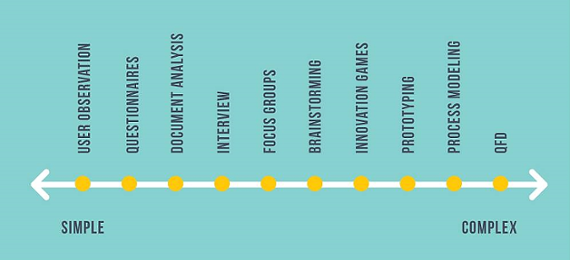
Requirement gathering methods can range from simple techniques, such as observation and questionnaires, to more complex methods, such as prototyping, process modeling, and QFD.
Document these expectations before execution begins. This reduces confusion, rework, and scope disputes later. In practice, many teams rely on structured documentation tools like Lawdistrict legal templates to formalize agreements, define expectations clearly, and ensure that project deliverables are aligned with documented requirements from the start.
Step 3: Break down the scope
A Work Breakdown Structure (WBS) helps divide project scope into smaller work packages.
Each work package should connect to at least one deliverable. If a piece of work does not support a deliverable, ask why it is included.
This step helps project managers find missing outputs and remove unnecessary work before the project becomes harder to control.
Step 4: Write acceptance criteria
A deliverable without acceptance criteria is only a description.
Acceptance criteria define the conditions a deliverable must meet before it is considered complete and acceptable. They help the project team, client, sponsor, or stakeholder agree on what “done” actually means.
For a document deliverable, acceptance criteria may include required sections, format, review process, word count, approval owner, and submission deadline.
For a software deliverable, acceptance criteria may include functional requirements, performance standards, security rules, integration requirements, test results, and user access conditions.
Avoid vague phrases like “high quality,” “professional standard,” or “easy to use.” These phrases sound good, but they are hard to verify. Replace them with specific, measurable conditions.
Instead of writing:
The report must be high quality.
Write:
The report must include an executive summary, current-state analysis, three recommendations, and an appendix. It must be approved by the project sponsor before submission.
That is much easier to review, manage, and defend if expectations change later.
For software-related deliverables, acceptance criteria often come from several types of requirements. Functional requirements describe what the system should do. Nonfunctional requirements describe how the system should perform, behave, integrate, or comply with constraints.
The diagram below shows how different requirement types can feed into a software requirements specification. This helps project managers avoid defining a software deliverable too narrowly. A finished system is not only about features. It may also depend on business rules, quality attributes, external interfaces, constraints, and user requirements.
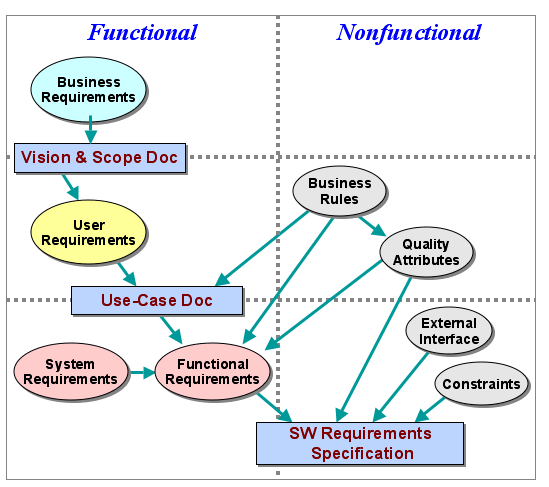
Example of functional and nonfunctional requirements that can shape a software deliverable.
The same logic applies outside software projects. If the deliverable is a training program, define who must attend, what content must be covered, how learning will be measured, and who approves completion. If the deliverable is a consulting report, define the required sections, level of analysis, format, review process, and final approver.
The goal is simple: make every deliverable clear enough that the team can produce it, the stakeholder can review it, and the project manager can control it.
Step 5: Assign owners and track progress
Each deliverable needs a clear owner, approver, due date, status, and list of dependencies.
Without ownership, deliverables become vague team responsibilities. That usually means nobody is fully accountable.
Deliverables should also be tracked in a shared system, not buried in a planning document. For small projects, a spreadsheet may be enough. For complex projects, a project management platform gives better visibility into status, ownership, dependencies, resources, and risk.
Project deliverables checklist
Use this checklist before work begins.
| Checklist item | What to define |
| Deliverable name | Clear name of the output |
| Description | What the deliverable includes and excludes |
| Objective supported | The goal this deliverable supports |
| Type | Internal, external, interim, final, tangible, or intangible |
| Owner | Person responsible for delivery |
| Approver | Person or group responsible for acceptance |
| Acceptance criteria | Conditions required for approval |
| Due date | Expected completion date |
| Dependencies | Required inputs, decisions, or resources |
| Status | Current progress state |
| Change history | Approved changes to scope, deadline, or criteria |
A deliverable is ready to manage when the team can answer three questions clearly:
What are we producing?
Who is responsible for it?
How will we know it is accepted?
If any answer is vague, the deliverable is not fully defined yet.
Managing deliverables becomes much easier when they are connected to tasks, owners, deadlines, resources, and budgets in one place. Birdview PSA helps project teams keep that visibility without relying on scattered spreadsheets.
See how Birdview PSA helps connect deliverables, owners, timelines, and budgets in one place.
Why project deliverables matter
Clear deliverables help project managers control the project from start to finish.
They set expectations because stakeholders agree on what will be produced before work begins.
They create accountability because every deliverable has an owner, approver, and deadline.
They support progress tracking because the team can report on specific outputs, not vague activity.
They protect scope because new requests can be compared against the approved deliverable list.
For example, “improve reporting” is hard to track. But “create an executive dashboard with revenue, utilization, margin, and project status data” is much easier to plan, review, and approve.
Strong deliverables also make project communication more concrete. Instead of saying, “The project is moving forward,” a project manager can say, “The discovery report is approved, the dashboard is in review, and the training guide is delayed because we are waiting for client data.”
That kind of update is much more useful.
Common mistakes in managing deliverables
The most common problem is vague wording.
A deliverable like “training completed” is not clear enough. A stronger version would define who must be trained, what content is included, how completion is measured, and who approves the result.
Another common mistake is confusing tasks with deliverables. A team may complete many activities and still fail to produce the expected output.
Projects also run into trouble when acceptance criteria are missing. Without them, the team and stakeholder may disagree about whether the deliverable is complete.
Another issue is weak ownership. If nobody owns the deliverable, it becomes everyone’s problem. In practice, that often means it belongs to nobody.
Finally, many teams struggle because they track deliverables in disconnected spreadsheets. As the project grows, status updates become outdated, dependencies are missed, and stakeholders lose visibility.
Example: deliverables for a PSA software implementation
Consider a project to implement Professional Services Automation (PSA) software in a 150-person consulting firm.
The objectives are to standardize client work, reduce billing errors, and improve visibility into project finances.
The main external deliverables may include process documentation, a configured PSA platform, a user training program, and a support guide with an escalation process.
The internal deliverables may include a project charter, risk register, weekly status reports, and project handover document.
Each deliverable should have an owner, due date, approver, and acceptance criteria.
For example, “user training program” is too vague by itself. A stronger definition would specify training modules, required attendance, assessment score, completion records, and approval rules.
This is why deliverables should never be treated as simple labels. They need enough detail to guide planning, execution, review, and acceptance.
How Birdview helps manage project deliverables
Defining deliverables is only the first step. Project managers also need to connect each deliverable to the work, people, timelines, budgets, and approvals required to complete it.
Birdview helps teams manage project delivery in one connected system. Project managers can plan work, assign owners, track deadlines,
, monitor time and budgets, and report on progress across active projects.
For professional services teams, this visibility is especially useful because deliverables are tied to client expectations, project scope, billable work, and profitability.
Instead of tracking deliverables, tasks, resources, and budgets in separate spreadsheets, teams can work from a shared view of what is in progress, what is delayed, and where risks are forming.
This helps project managers act earlier, keep stakeholders aligned, and reduce the manual reporting that usually eats half the day. This helps project managers act earlier, keep stakeholders aligned, and reduce the manual reporting that usually slows delivery teams down.
From vague goals to controlled delivery
Project deliverables turn broad goals into specific outputs that teams can plan, track, review, and approve.
When deliverables are vague, projects become harder to estimate and control. Teams miss requirements, underestimate work, and discover stakeholder expectations too late.
When deliverables are clear, project managers can define scope more accurately, assign ownership, manage resources, protect budgets, and communicate progress in concrete terms.
The strongest deliverables are connected to objectives, acceptance criteria, owners, deadlines, dependencies, and approvals. That is what gives the project a real foundation for successful delivery.
Further reading:
Frequently asked questions
What is the difference between a deliverable and a milestone?
A deliverable is something the project produces. A milestone is a checkpoint that marks progress.
For example, an approved design file is a deliverable. “Design approved” is a milestone.
What is the difference between a deliverable and a task?
A task is an activity the team performs. A deliverable is the output created by that activity.
Writing code is a task. The finished software feature is a deliverable.
What are examples of project deliverables?
Examples include requirements documents, reports, dashboards, technical drawings, prototypes, software features, training materials, process documentation, implementation plans, and client handover packages.
How do you write acceptance criteria for a deliverable?
Acceptance criteria describe what a deliverable must include, how it should work, and who must approve it.
Good acceptance criteria are specific, measurable, and agreed before work begins.
How do you track project deliverables?
Project deliverables can be tracked in a checklist, spreadsheet, or project management platform.
For complex projects, deliverables should be connected to tasks, owners, due dates, dependencies, resources, budgets, and approvals.