Ksenia Kartamysheva
 - Build requirements from the operational questions you can’t answer today (who’s available next month, which projects are over budget), not from vendor feature lists. Roughly 60% of firms we spoke with had already abandoned a tool bought the feature-list way.
- Test seven capabilities in every demo: resource forecasting, delivery structure, time tracking, live profitability, mixed-model billing, portfolio reporting, and native integrations.
- Time tracking adoption decides data quality everywhere else. Count the clicks to a submitted entry yourself; compliance typically dips two to three weeks after rollout.
- Profitability must be visible mid-project. About 55% of firms didn’t track labor costs at all, and margin you only see after invoicing closes is history, not a decision input.
- Billing software must handle T&M, fixed fee, and retainers in one system with a native accounting sync, or the excluded models move back into spreadsheets.
- Let adoption criteria break ties: collaborator license tiers (typical setup is 20 to 60 full users plus 50 to 200 collaborators), a client portal, mobile time entry, and vendor onboarding.
- For regulated buyers, data residency, SOC 2, and SSO are pass/fail checks, not scored criteria. Around 35% of firms we talked to had a hard residency requirement.
Professional services operations software combines project management, resource planning, time tracking, and financials in one system. When evaluating options, test seven capabilities: resource forecasting, project delivery structure, time capture, project-level profitability, billing flexibility, portfolio reporting, and integrations with your accounting and CRM stack. Judge each against the operational questions your firm can’t answer today, not against feature lists.
Most evaluations at this stage go wrong the same way. The team compares feature counts and per-seat prices, picks the tool with the best demo, and discovers six months later that it still can’t tell them who is available in March or whether last quarter’s biggest project made money.
The pattern is common. Across 40+ software evaluations our team sat in on between March 2025 and March 2026, roughly 60% of firms had already bought and abandoned at least one project management tool. Almost every time, they had evaluated task features when their actual problem was operations: capacity, cost, billing, and reporting.
This guide gives you a different starting point. Write down the questions your current stack can’t answer, then use the seven capabilities below as your requirements backbone.
Start with your operational questions, not a feature list
The best requirements document is not a feature matrix. It is the list of questions your current tools can’t answer.
For most operations leaders, that list looks something like this:
- Who is available next month, and at what percentage of capacity?
- Which projects are over budget right now, not at month-end close?
- What is our billable utilization this quarter?
- Which clients are we losing money on?
- How long does it take to get from approved timesheet to sent invoice?
If a question on your list has an answer today, but the answer lives in someone’s head or takes a half day of Excel work to produce, it belongs on the list too. One director of professional services at an IT consulting firm put it plainly during a discovery call: “I see 10 opportunities. I don’t know who’s available.”
Firms that skip this step buy on demo polish. That is the mechanism behind the 60% abandonment rate above: the tool looked capable, but nobody tested it against the specific questions the business needed answered. The seven capabilities below are how you run that test.
The seven capabilities to evaluate
1. Resource planning and capacity forecasting
Resource planning is the ability to see demand against capacity across every project and person, now and months ahead. It was the single most requested capability among the professional services firms we spoke with, and the most common reason spreadsheets finally break.
What good looks like: a live view of allocation per person, utilization tracking split by billable and non-billable work, and what-if forecasting so you can model winning two of your open proposals before you commit to a timeline. Birdview, for example, flags overallocation when a resource passes 100% capacity in the planning view, which turns double-booking from a silent error into a visible one.
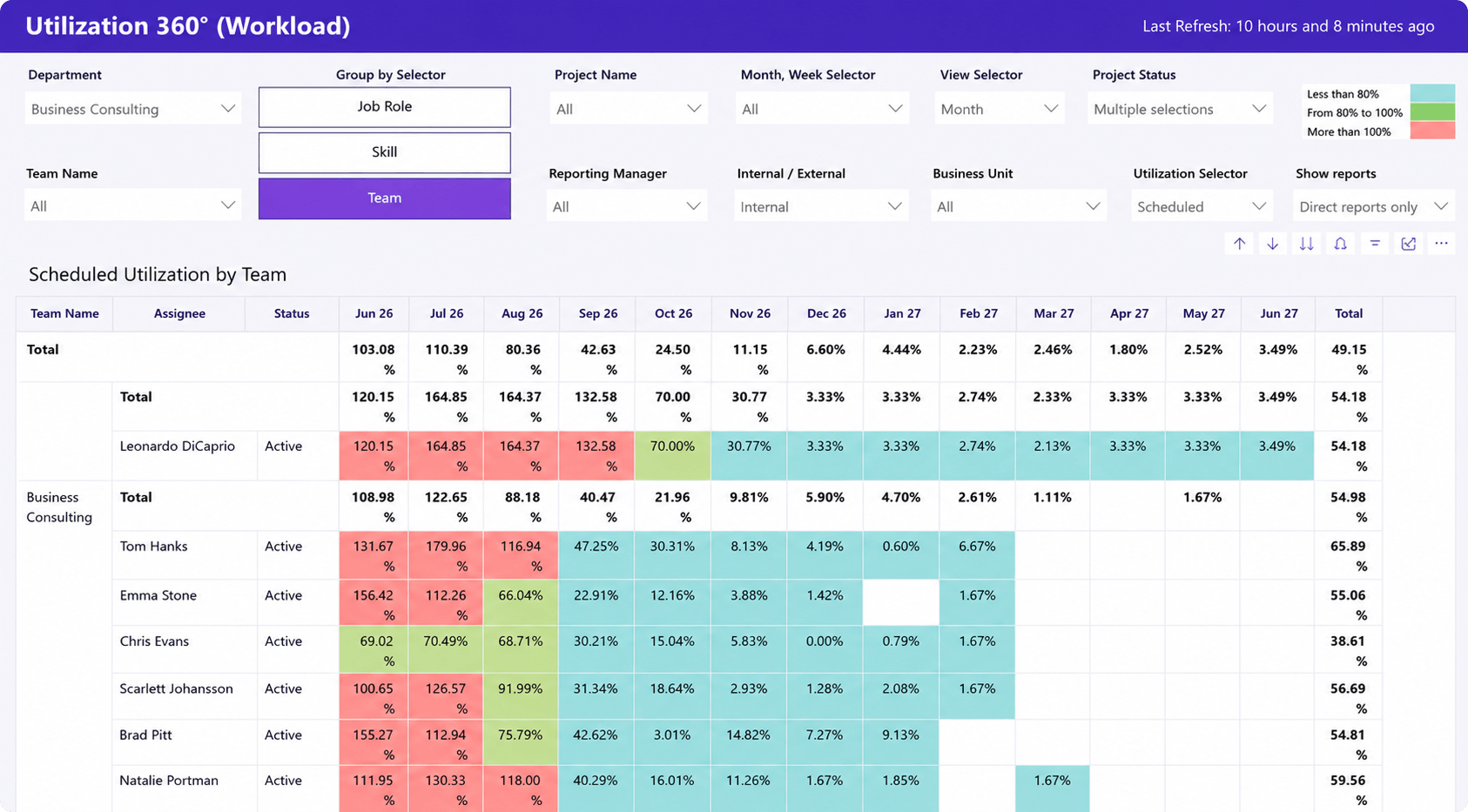
The red flag is software that lets you overload people without warning. An engineering director at a defense contractor described his previous tool this way: “It’ll let you double book people. I could load somebody up with 400% of work.” A resource plan that permits 400% allocation is not a plan, it is a spreadsheet with better fonts.
Demo question to ask: “Show me who’s available in six weeks if we win two of our current proposals.”
2. Project delivery structure
Client work needs a work breakdown structure deep enough to reflect reality: phases, sub-phases, task hierarchies, dependencies, milestones, and reusable templates. Lightweight task tools flatten this into checklists, and the structure your PMs need gets rebuilt in slide decks and side spreadsheets.
A project manager at a credit union summarized the ceiling of their previous tool in five words: “Asana works more like a checklist.” That is fine for a marketing calendar. It fails for a 9-month engagement with three phases, external dependencies, and a fixed-fee budget attached to each milestone.
What good looks like: unlimited task depth, Gantt views with real dependency logic (move one task, the downstream dates move too), cross-project dependencies, and templates that carry budgets and role assignments, not just task names.
Demo question: “Build a project from our standard template, then change one dependency. What updates automatically?”
Red flag: any tool where “template” means copying a task list by hand.
3. Time tracking your team will actually use
Time data feeds everything downstream: utilization, project cost, invoicing, and forecasting. Which means adoption is the whole game. A technically perfect system with 60% timesheet compliance produces fiction, and every report built on it inherits the fiction.
In most PSA rollouts I’ve seen, time entry compliance dips after the first two or three weeks, once the novelty wears off. What holds it up afterward is friction and enforcement: start/stop timers, mobile entry for people who work away from a desk, and approval workflows that make missing timesheets visible to managers within days rather than at month-end.
What good looks like: entry in under a minute, billable and non-billable flags built in, approvals with clear routing, and time that flows into invoicing without re-entry.
Demo question: “How many clicks from opening the app to a submitted time entry?” Count them yourself during the demo.
4. Project-level profitability
Project profitability means knowing cost, revenue, and margin per project and per client while the work is in flight. This is the capability most often missing entirely. Around 55% of the firms in our conversations did not track labor costs at all. The owner of a digital agency was blunt about the consequence: “We don’t track labor costs. We’re undercharging.”
What good looks like: cost rates and bill rates both stored in the system, budget versus actuals visible mid-project, and burn rate you can check on a Tuesday, not reconstruct in a post-mortem. If a project is going to blow its budget in week 6 of 12, you want to know in week 6.
Red flag: profitability that only becomes visible after invoicing closes. By then the margin is history, not a decision input.
Demo question: “Pull up a live project and show me its margin right now, including labor cost.”
5. Billing flexibility
Most professional services firms run mixed billing: time and materials for some clients, fixed fee for others, monthly retainers for the rest. Software that supports only one model forces the other models back into spreadsheets, which recreates the problem you were buying your way out of.
There is a second trap here: billing that doesn’t sync cleanly with your accounting system. An operations lead at a biostatistics consultancy described what happens when the PSA and QuickBooks disagree: “You end up with two different aging ARs, which is crazy.” Two versions of accounts receivable means someone reconciles them by hand every month, forever.
What good looks like: T&M, fixed fee, retainer, and hybrid billing in the same system, retainer hour pools that track drawdown, and a native two-way accounting sync.
Demo question: “Show one client with a retainer and a fixed-fee project. How does month-end invoicing work for both?”
6. Portfolio reporting and executive dashboards
Portfolio reporting replaces the monthly export-to-Excel ritual with live views across all projects. Around 70% of the firms we spoke with described manual reporting as a standing tax on their operations team. One operations lead at an energy consulting firm: “I’m just thinking of all the time logs I’ve exported from Excel and all the analysis.”
What good looks like: role-based dashboards, so a delivery manager, a finance lead, and a managing partner each see their own view without asking anyone to build it. For firms with a BI team, a supported Power BI connection matters more than the built-in reports, because your analysts will want the raw data in their own models.
Demo question: “Can my managing partner answer ‘are we on track this quarter?’ from a dashboard, without emailing anyone?”
Red flag: reports that require an export before they become useful. That is the old ritual with an extra step.
7. Integrations with the stack you keep
Operations software replaces spreadsheets and point tools, but it lives alongside your accounting system, your CRM, and your identity provider. Integration depth decides how much manual re-entry survives the purchase.
Accounting comes first. QuickBooks was the most requested integration across all our conversations, ahead of Salesforce, HubSpot, Jira, and Power BI. CRM comes second: a closed-won deal in HubSpot or Salesforce should create the delivery project automatically, carrying the budget and scope with it, so nothing falls into the sales-to-delivery gap. Add SSO (Entra ID or equivalent) if IT will be involved in the purchase, because they will ask.
Red flag: an “integration” that turns out to be CSV export and import. Ask the vendor to define the word.
Demo question: “Walk me through a deal closing in the CRM and appearing here as a project. What part of that is manual?”
Capability checklist
| Capability | What good looks like | Red flag | Demo question |
| Resource forecasting | Live capacity view, what-if scenarios | Silent double-booking allowed | “Who’s free in six weeks if we win two proposals?” |
| Delivery structure | Deep WBS, real dependencies, budgeted templates | Checklist-depth tasks | “Change a dependency, what updates?” |
| Time tracking | Sub-minute entry, timers, approvals | Desktop-only, no approval routing | “How many clicks to submit time?” |
| Profitability | Live margin with labor cost | Margin visible only after invoicing | “Show me a live project’s margin now” |
| Billing flexibility | T&M, fixed fee, retainer in one system | One billing model, manual accounting sync | “Invoice a retainer and fixed-fee client together” |
| Portfolio reporting | Role-based live dashboards, BI export | Reports require Excel export | “Can execs self-serve quarterly status?” |
| Integrations | Native accounting sync, CRM-to-project automation | “Integration” means CSV | “What’s manual between CRM and here?” |
Adoption and rollout: the criteria most evaluations skip
The software that wins on capability still fails if collaborators, clients, and field staff won’t touch it. Adoption criteria rarely make it into requirements documents, and they decide more outcomes than any feature.
Check license tiers first. Most professional services teams have a small core of heavy users and a much larger ring of light ones. In the firms we spoke with, the typical setup was 20 to 60 full users plus 50 to 200 collaborators: people who log time, comment, or check status, and who should not need (or cost) a full license. If a vendor prices everyone identically, model the real invoice before the demo impresses you.
Then check the edges of your organization. A client or guest portal lets external stakeholders see status and approve deliverables without licenses or email chains. Mobile entry keeps field staff and traveling staff inside the system instead of texting their hours to an admin. And if your operations team has no spare capacity to run an implementation, weigh vendor onboarding services as part of the evaluation, not an afterthought.
For regulated buyers, some criteria are pass/fail rather than scored: data residency, SOC 2, and SSO. Around 35% of the firms we talked to had a hard data residency requirement, most often Canadian hosting for healthcare, government, education, and financial organizations. Ask about hosting regions before you fall in love with a feature set.
These criteria also pre-answer the two objections you’ll hear internally: “it looks too complex” (role-based views and phased rollout address this) and “our team won’t adopt it” (light licenses, portal, mobile).
Who needs professional services operations software, and who doesn’t
Who this is for: firms of roughly 20 to 400 employees running billable client work across multiple concurrent projects, with mixed billing models and at least five delivery people to schedule. That is the point where spreadsheets and task tools stop answering operational questions, and where firms in our conversations typically budgeted $5K to $25K per year for a platform. SPI Research’s annual Professional Services Maturity Benchmark consistently puts average billable utilization for PS firms near 70%, and firms below that line usually have a visibility problem before they have a staffing one. Operations software is how you find out which.
Who it isn’t for: teams under about 10 people billing a single way are usually fine with a time tracker plus a task tool, and the overhead of a full platform won’t pay for itself yet. Software development teams that only need sprint tracking may be better served staying in their existing dev tool. Buying operations software before you have an operations problem just moves the spreadsheets into a more expensive container.
The evaluation, in short
Write down the questions your stack can’t answer. Test every candidate against the seven capabilities above, using the demo questions rather than the vendor’s script. Then let adoption criteria (license tiers, portal, mobile, onboarding support) break the tie, because they will decide whether the system is still in use in a year.
If you want to run that test live, bring your list of unanswerable questions to a Birdview demo and ask them on a live screen.
FAQ
What’s the difference between PSA software and project management software?
Project management software organizes tasks and timelines within projects. PSA (professional services automation) software adds the business layer around delivery: resource capacity, billable time, project cost and margin, invoicing, and portfolio reporting. If your questions are about tasks, PM software is enough. If they’re about people, money, and utilization, you need PSA.
How much does professional services operations software cost?
Mid-market firms in our 2025-2026 conversations typically budgeted $5K to $25K per year, with enterprise deployments reaching $50K or more. Price scales with user count, so tiered licensing matters: firms usually need 20 to 60 full licenses plus a larger pool of low-cost collaborator seats for people who only log time or view status.
How long does implementation take?
Plan for 4 to 8 weeks from kickoff to daily use for a mid-sized firm: configuration and data migration first, then a pilot group, then rollout. Time tracking adoption is the long pole, since compliance usually dips a few weeks in. Vendor-led onboarding shortens the timeline for teams without spare operations capacity to run it themselves.
Do we need operations software if we already use QuickBooks and a PM tool?
Not always, but check for the symptoms: someone re-enters time or invoice data between systems, nobody can state current billable utilization, and profitability per project is unknown until books close. If those apply, the QuickBooks-plus-PM-tool stack has hit its ceiling. If they don’t, keep the stack and revisit when project volume grows.