Ksenia Kartamysheva
 PSA billing integration solves a common services problem: project data lives in your PSA, but invoices live in QuickBooks or Xero. When those systems don’t sync cleanly, billing turns into spreadsheets, manual checks, and delayed invoices. Integration closes that gap by turning approved time and expenses into draft invoices automatically, so revenue doesn’t get stuck in admin work.
With a structured sync, finance doesn’t have to reconcile exports against time logs at month-end, and project managers don’t spend days answering “why doesn’t this line item match?” questions. Billing becomes part of the delivery workflow: work gets approved, draft invoices appear in accounting, and payment status stays visible without constant follow-ups.
In this guide, you’ll learn how to:
- Map which data should live in the PSA vs in accounting
- Sync approved time and expenses into draft invoices (without duplicates)
- Standardize rates, service codes, and billing structures to prevent mismatches
- Add pre-billing checks so the integration automates clean invoices, not messy ones
Why billing breaks down when systems are disconnected
Billing breaks down because manual data transfer introduces human error and creates a lag between completed work and invoicing. If your team relies on spreadsheets to move data from project management tools to finance platforms, you invite inaccuracies at every copy-paste step. As a result, disconnected systems lead to:
Human error from manual data transfer
Copying data between systems creates the classic “swivel chair” problem, where billable hours are re-entered by hand. This is where time gets transposed, missed, or recorded inaccurately.
Lag between work completed and invoicing
Disconnected tools slow down the path from approved work to issued invoices, delaying cash flow and increasing the chance that data becomes outdated before billing is finalized.
Revenue leakage from lost or outdated data
Billable time can disappear when approved timesheets rely on email threads or static exports. Any updates made after an export often never make it onto the invoice.
Inconsistent project and cost references
Finance teams are forced to double-check whether the project listed on an invoice actually matches the work logged in the PSA, adding unnecessary verification steps.
Finance teams stuck in reactive mode
Instead of focusing on forecasting and financial strategy, finance managers spend their time investigating discrepancies and reconciling mismatched data.
📚 Read more: How to set up a complete time tracking process: From logging to billing
The real cost of manual billing (missed hours, rework, and slower cash flow)
Manual billing directly reduces your firm’s profitability and operational liquidity through processing fees and delayed cash flow. The financial impact is real and immediate; paper-based and manual invoice processing costs significantly more than automated alternatives. Estimates place manual costs between $18 and $26 per invoice when labor and overhead are factored in. For a firm sending hundreds of invoices a year, this hidden tax on operations amounts to thousands of dollars that could otherwise contribute to the bottom line.
High error rates exacerbate this cost, necessitating rework that further delays payment. When an invoice is rejected by a client due to a simple mismatch in hours or a wrong billing code, the clock on payment terms resets. The finance team needs to pull the invoice, investigate the discrepancy with the project manager, correct the data, and resubmit it.
Consider a mid-sized agency with 50 active monthly invoices. If just 20% of those require manual correction due to data entry errors, your finance manager might lose two full days each month just chasing down project leads to verify hours. Such inefficiencies inflate Days Sales Outstanding (DSO). While many firms aim for DSO benchmarks between 30 and 60 days , manual disputes can easily push payments into the next quarter.
Common billing problems a PSA accounting integration eliminates
Billing issues often come from disconnected systems and manual handoffs. When project, time, and financial data live in different tools, teams spend time reconstructing information, fixing avoidable mistakes, and clarifying responsibilities. Integration removes these friction points by automating data flow and creating a more reliable billing process.
Common problems integration helps solve:
- Rebuilding invoices from spreadsheets
Finance teams often receive a “final” export of hours and still need to reformat that data into an invoice template. This repetitive work adds no value and increases the risk of copy-paste errors.
- Fixing errors after invoices are sent
In disconnected workflows, time-tracking errors are often discovered after invoices have already gone out. With integrated systems, updates made in the PSA are reflected in the invoice before it’s finalized.
- Chasing missing time and expenses
Manual processes require constant follow-ups to confirm whether all billable work and expenses were submitted. Integration ensures time and expenses are captured against the correct project and flow automatically into billing.
- Late invoicing due to unclear ownership
When it’s not obvious who should take the next step, invoices get delayed. Integration creates a clear handoff: once a project manager approves time, it moves directly to finance, removing ambiguity and delays.
What data should flow between PSA and accounting software
Your PSA should act as the source of truth for project progress and time, while the accounting system remains the authority for the General Ledger and final invoicing. Successful PSA invoicing integration requires you to map where information lives: project structure, task status, time entries, and expense logs belong in the PSA. The chart of accounts, tax rates, and final invoice generation stay in the accounting software.
| Data | Source of truth | Sync direction | Notes |
| Projects / clients | PSA (structure) + Accounting (customer record) | PSA → Accounting (mapping) | Keep IDs consistent to avoid misapplied invoices |
| Time entries | PSA | PSA → Accounting | Sync only approved time, ideally locked post-sync |
| Expenses | PSA | PSA → Accounting | Same rule: approved only; map categories/items |
| Rates / role pricing | PSA (delivery logic) + Accounting (service items) | PSA → Accounting (or matched config) | Avoid manual rate updates in two places |
| Draft invoices (line items) | Accounting | PSA → Accounting (create draft) | Accounting should own final posting/sending |
| Invoice status (sent/paid/overdue) | Accounting | Accounting → PSA | Keeps PM/AM teams aligned without chasing finance |
| Tax, GL, chart of accounts | Accounting | Accounting-only | PSA shouldn’t override financial compliance settings |
Step-by-step: PSA billing integration checklist (QuickBooks & Xero)
Streamlining billing involves a sequential process of stabilizing your data in the PSA before automating its transfer to the financial system. Many firms make the mistake of turning on an integration before fixing their underlying processes, which only serves to automate the creation of bad invoices. The following steps ensure your data is clean, structured, and ready for automation to streamline billing for professional services.
Step 1: Lock down time and expense approvals
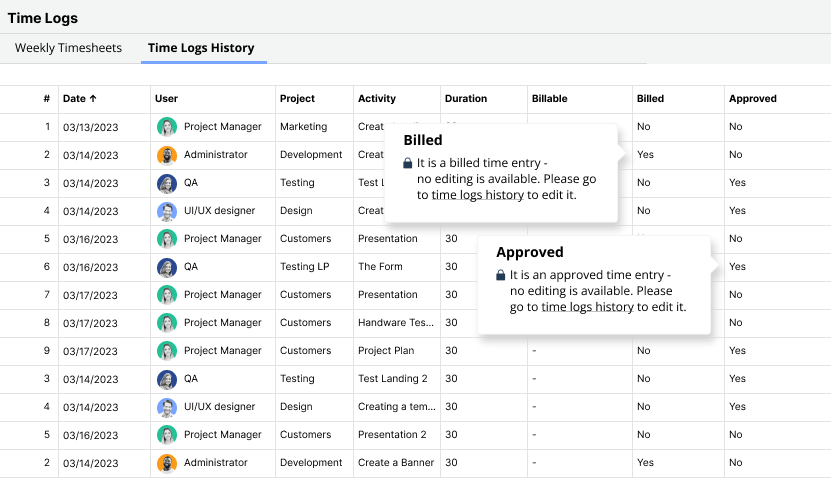
You should define exactly when time is “billable-ready” to prevent unapproved data from leaking into invoices. Establish a strict workflow where only “Approved” time entries are eligible for the integration sync.
Preventing edits after approval is equally important for maintaining an audit trail. Once a timesheet is approved and synced to finance, it needs to be locked in the PSA. If a change is required, it should be handled through a formal adjustment process rather than a quiet edit that causes the two systems to drift out of sync.
Step 2: Standardize billing structures and service codes
Standardization requires you to align your billing models, such as Time & Materials or Fixed Fee, across both platforms. Decide how each contract type translates: does a fixed fee project generate a single line item on the invoice, or does it show hours with a zero rate?
Role-based and project-based rates should be consistent in both systems to prevent mismatches. If you bill by role (e.g., “Senior Developer” vs. “Junior Designer”), ensure those service items exist in your accounting software with matching codes.
📚 Read more: Profit margins in time-and-material vs fixed-fee contracts
Step 3: Connect your PSA to QuickBooks
The integration with QuickBooks handles the handoff by ensuring line items match service codes, allowing teams to export time logs directly into the accounting environment without manual intervention. Your PSA acts as the staging ground where data is cleaned and approved, so the export to QuickBooks is simply a transfer of validated data. By the time data reaches QuickBooks, it should be final. This workflow supports PSA integration with QuickBooks by keeping the accounting file clean and uncluttered by project chatter.
Example: With Birdview PSA, the QuickBooks integration focuses on exporting validated time logs and invoices, rather than pushing raw or incomplete data into accounting. Birdview acts as the control layer where time is tracked, reviewed, and approved before anything reaches finance. Once time logs are approved in Birdview, finance teams can select up to 100 entries per export and transfer them directly to QuickBooks. During this process, Birdview matches users and customers between the two systems to ensure billing accuracy. Exported time logs are automatically marked as “Billed” in Birdview, preventing duplicate entries and maintaining a clean audit trail.
Step 4: Connect your PSA to Xero
Connecting Xero simplifies the reconciliation process by ensuring payments are tracked efficiently. Syncing invoices between PSA and accounting allows Xero to manage the accounts receivable, while the PSA retains the details of what work was performed. In this setup, Xero remains the master for tax compliance and bank reconciliation, while the PSA provides the detailed backing sheet that clients often require to approve payment. For instance, Birdview integrates with Xero via middleware such as Zapier.
Step 5: Define checks before invoices are sent
You should implement a final verification step within the PSA to catch discrepancies before they reach the accounting stage. Create a “Pre-Billing” report or view in your PSA where project managers review the draft invoice content. This allows them to catch missing hours or wrong rates early, when they are easiest to fix.
Ensure finance signs off before posting to the general ledger. The integration should ideally create invoices in a “Draft” or “Awaiting Approval” state in the accounting software, not “Approved” or “Sent.”
How Birdview supports accurate, low-friction billing
Birdview PSA acts as the bridge between delivery and finance, providing a unified platform that supports connected billing workflows. By eliminating data silos, the platform allows project teams and finance teams to view the same data without access friction or manual handoffs. The system’s native integration capabilities enable one-click exports of time logs and expenses, ensuring that the data in your financial system matches the reality of your project delivery.
- Approved-only sync: only approved time and expenses are eligible for export, reducing disputes and rework.
- Rate accuracy: supports role-, project-, and client-specific rate cards so billing reflects real pricing without manual recalculation.
- Cleaner invoices: turns time logs into invoice-ready line items, reducing manual formatting and copy-paste errors.
- Audit trail: keeps a clear history of who approved what and when, so invoices are defensible if questions come up.
FAQs about PSA billing integration (QuickBooks & Xero)
Q: Will integrating my PSA with QuickBooks overwrite my existing financial data?
A: No, a proper integration creates new draft invoices and maps data; it does not retroactively change closed books or alter historical financial records. The integration is typically additive, meaning it pushes new information in rather than overwriting what is already there.
Q: Do I need a developer to set up PSA billing integration?
A: Generally, no. Most modern platforms offer native “plug-and-play” integrations for major accounting tools like QuickBooks that require configuration rather than custom coding. You will typically need administrator access to both systems to authorize the connection, but you usually do not need to write code.
Q: Can I still edit invoices in QuickBooks or Xero after they are synced?
A: Yes, the sync typically creates a draft invoice that can be reviewed, edited, and approved within the accounting software before being sent to the client. This gives the finance team the final say and allows for minor adjustments like adding a purchase order number or adjusting formatting.
Q: What happens if a project manager changes a time entry after it has been synced?
A: Best practices involve locking approved and synced time entries. Any necessary changes should be handled via a negative entry or credit in the next billing cycle to maintain an accurate audit trail. This prevents the two systems from having conflicting data for the same period.