Blog
Blog

To connect PSA, CRM, and accounting cleanly, service firms must assign clear data ownership. CRM manages sales and client records, PSA manages project delivery and operational data, and accounting remains the authoritative source for financial transactions.
A stable service architecture connects CRM, PSA, accounting, BI, and support systems while assigning each one a clear role. When each system owns specific data and integrations move information in one direction, organizations avoid duplicate records and conflicting reports.
As service firms grow, they often accumulate disconnected tools. Teams sometimes call this a “tool zoo”: a stack of systems that overlap in functionality and duplicate data. In most cases, the problem is not the tools themselves but unclear data ownership and uncontrolled integrations.
A reference architecture solves this by defining which system owns which data and how information moves between systems, helping organizations scale operations while keeping reporting and forecasting reliable.
Why service firms end up with a “tool zoo”
Service firms rarely design their technology stack all at once. Systems are usually added gradually as teams try to solve immediate operational problems. Over time, the number of tools grows faster than the governance around them, and the architecture becomes harder to manage.
Growth introduces specialized tools
As companies scale, teams adopt new software to handle specific tasks. Sales introduces CRM systems, delivery teams implement project management or PSA tools, finance relies on accounting platforms, and support teams deploy ticketing systems. Each tool solves a real need, but when added without coordination, the overall architecture becomes fragmented.
Teams adopt systems independently
Departments often select software based on their own priorities. Sales may introduce a CRM, delivery teams deploy planning tools, and finance implements accounting systems. Without shared data standards, integrating these tools later becomes complex.
Duplicate data spreads across systems
When several platforms store similar information, duplication quickly appears. Client records, project names, and revenue numbers begin to exist in multiple systems at once, often with small inconsistencies. At that point, reconciliation becomes routine work for operations and finance teams.
Conflicting reports slow decisions
Reporting issues usually follow data duplication. Leadership dashboards may show different revenue totals, utilization figures, or project status depending on which system generated the report. When executives see conflicting numbers, trust in reporting declines, and decision-making slows.
The real problem is not the tools. It‘s the data ownership.
In many organizations, the challenge is not the tools themselves, but the absence of clear data ownership. Integration problems often appear when companies never define which system is responsible for each type of information. Without those boundaries, multiple systems may attempt to update the same records.
When data moves between systems without clear rules, the same fields can be modified in several places. Over time this leads to records constantly overwriting each other.
For example, if both the CRM and the PSA platform update client account records, even small differences between systems can quickly create inconsistencies.
The concept of a “system of record”
The idea behind a system of record is straightforward: one system acts as the authoritative source for a particular type of data. Other systems can read or reference that information, but they do not change it.
This approach prevents duplication and keeps reporting consistent. Each major data object (client account, project record, invoice, or support ticket) should belong to a single system.
Other tools may reference that information, but they should not redefine it.
A simple reference architecture for service organizations
A clean architecture for service firms uses five core systems, each responsible for a specific operational domain.
| System | Primary role | Key data owned |
| CRM | Sales management | Leads, opportunities, pipeline |
| PSA | Delivery operations | Projects, resources, time |
| Accounting | Financial records | Invoices, payments, revenue |
| BI | Analytics and reporting | Aggregated performance metrics |
| Support tools | Customer service | Tickets and support interactions |
Each system focuses on its own operational responsibility rather than overlapping with others.
Which system owns what data
Clear data ownership prevents duplication and conflicting reports. Each system in the service technology stack should manage a specific type of information. When every data object has a single authoritative source, integrations become simpler and reporting stays consistent.
| System | Data owned | Description |
| CRM | Leads, opportunities, account records, sales pipeline, deal value and probability | Stores and manages sales pipeline information and core client records. |
| PSA | Projects, work plans, resource assignments, time tracking, project budgets, delivery progress | Handles project delivery, scheduling, and resource planning activities. |
| Accounting | Invoices, payments, revenue recognition, financial records | Maintains billing data, financial transactions, and compliance records. |
| BI | Aggregated reporting, executive dashboards, historical analysis | Consolidates information from operational systems for reporting and analysis. |
| Support systems | Service tickets, support requests, customer interactions | Tracks client support activity and manages service workflows. |
How to connect these systems cleanly: 6 steps
Step 1: Define clear ownership before building integrations
The first step in a clean architecture is defining which system is authoritative for each type of data. Integrations should reflect those ownership rules.
Document which system owns client accounts, projects, invoices, and resource records.
Avoid storing the same data in multiple systems.
Prevent circular synchronization where systems overwrite each other. CRM creates the client account. PSA inherits the account when a deal closes. Accounting references the account for invoicing.
Step 2: Define the key events that trigger data movement
Integration should focus on meaningful business events rather than constant synchronization.
Events trigger data movement between systems.
Examples include:
- deal closed in CRM → project created in PSA
- approved time in PSA → invoice generated in accounting
- invoice paid in accounting → revenue status updated in BI
Event-based integrations reduce unnecessary data duplication.
Example: Birdview can automatically create projects when opportunities close and track delivery progress through execution.
📚 Read more: CRM & PSA integration to improve workflow and client management
Step 3: Keep operational data close to delivery
Operational data should live in the system used by delivery teams. When teams update information directly in the delivery system, reporting becomes more reliable.
This approach produces several benefits:
- fewer manual updates
- more accurate project schedules
- consistent budget tracking
- better resource forecasting
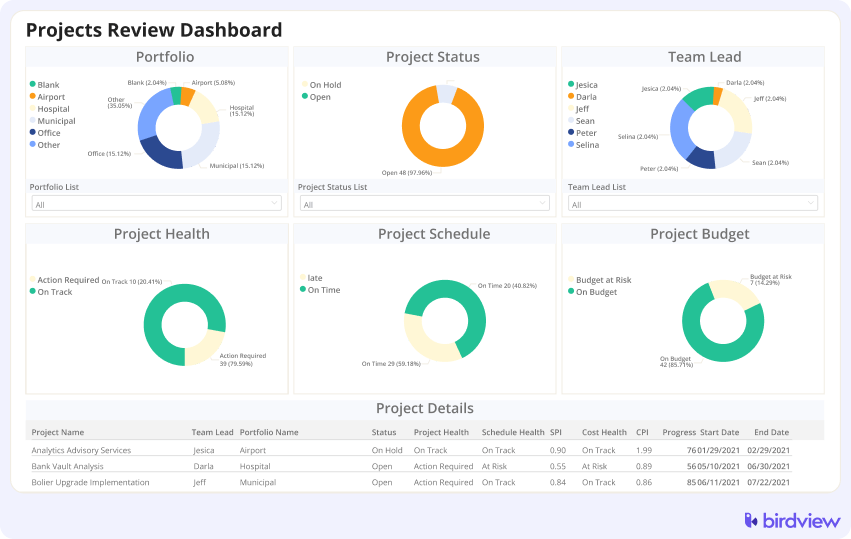
Step 4: Separate operational reporting from executive analytics
Operational dashboards belong inside PSA or project management systems. Strategic analytics should live in BI platforms.
Mixing these responsibilities creates performance problems and inconsistent reporting.
Operational systems should focus on execution visibility, including project status, workload, and deadlines.
BI platforms should focus on strategic metrics such as revenue trends, margin performance, and portfolio analysis.
Step 5: Centralize permission control logically
System permissions should align with operational responsibility. Each team should control the data relevant to its role.
Examples include:
- CRM – Sales teams manage pipeline data.
- PSA – Delivery teams manage project execution.
- Accounting – Finance teams control invoices and payments.
- Support systems – Customer service teams manage tickets.
Example: Role-based permissions allow organizations to control who can view or modify project budgets, resources, and financial data.
Step 6: Minimize integrations and simplify data flows
More integrations do not automatically produce better architecture. Excessive integrations often introduce additional complexity.
Healthy integration principles include:
- connect systems only when necessary
- keep synchronization directional
- avoid redundant automation layers
- document integration logic clearly
Simplifying integrations reduces maintenance and improves reliability.
📚 Read more: How to build a connected tech stack with PSA, CRM, accounting, and HR systems
Warning signs your architecture is becoming a tool zoo
Technology stacks rarely become complex overnight. The warning signs usually appear gradually as more tools are added and integrations evolve.
A few signals tend to appear repeatedly when architecture starts becoming difficult to manage:
- multiple versions of the same report circulating across teams
- different revenue numbers appearing in different systems
- teams relying heavily on spreadsheets to reconcile data
- uncertainty about where client or project records should be updated
When these situations begin appearing regularly, it is often a sign that system ownership and integration rules need to be reviewed.
How Birdview fits into a clean service architecture
In many service organizations, such as IT services, business consulting, engineering, etc., the PSA platform naturally becomes the operational layer that connects sales activity with financial outcomes.
Within this architecture, Birdview typically integrates several operational workflows:
- sales pipeline data originating from CRM
- project planning and resource management
- time tracking and project financial performance
- invoicing workflows connected to accounting systemsm such as QuickBooks
This structure gives leadership visibility into delivery progress, team capacity, and financial performance while allowing CRM and accounting platforms to continue managing their own specialized domains.
The result is a clearer separation between sales operations, project delivery, and financial management.
Final thoughts: clarity beats complexity
The goal of technology architecture is not adding more tools. The goal is enabling better decisions.
When each system has a clear role and data flows predictably between them, organizations spend less time reconciling information and more time delivering projects successfully.
A healthy service operations stack supports reliable reporting, efficient delivery, and clear accountability across teams.
That clarity is the foundation of scalable service operations.
FAQ: PSA integrations and service tech stacks
What is a PSA system in a service firm architecture?
In service firm architecture, the PSA platform manages project delivery operations. Teams use it to plan projects, assign resources, track time, and monitor project financials. Because of this role, PSA usually sits between CRM systems used for sales and accounting systems used for financial records.
Why is data ownership important when integrating systems?
Integrations work best when each type of data has a clear owner. If multiple systems update the same information, duplicate records and conflicting changes quickly appear. Assigning ownership to one system keeps data flows predictable and reporting consistent.
What happens when multiple systems store the same data?
When the same records exist in several systems, inconsistencies appear over time. Revenue numbers, project status, or client details may differ depending on the source. Teams then spend time reconciling reports instead of relying on a single trusted dataset.
How many systems should a typical service technology stack include?
There is no strict rule, but many service firms operate effectively with a small core stack. A common setup includes CRM for sales, PSA for delivery operations, accounting for financial records, BI for analytics, and support tools for client service.
Where should project delivery data live?
Project delivery data should live in the PSA system used by delivery teams. Keeping operational data close to execution ensures schedules, budgets, and forecasts remain accurate.
Why should BI tools handle executive analytics instead of PSA systems?
BI platforms are designed to combine data from multiple systems and analyze it over time. Separating analytics from operational tools helps maintain performance and ensures executive dashboards remain consistent.