Ksenia Kartamysheva
 Most service organizations run on at least four or five core systems: a CRM for sales, PSA software for project delivery, accounting tools for financials, and HR platforms for managing people. The problem? These systems rarely talk to each other out of the box.
When your tech stack isn’t connected, teams waste hours moving data between platforms, projects start with incomplete information, and finance chases down details that should already be synced. The fix isn’t buying more software; it’s building bridges between what you already have.
This guide walks through the practical steps to connect PSA software with your CRM, accounting, and HR systems so work flows smoothly from opportunity to invoice without manual handoffs.
Use your PSA as the operational center of your tech stack
PSA software should sit at the heart of your tech ecosystem. It’s where projects get planned, resources get assigned, time gets tracked, and delivery happens. Everything else either feeds into it or pulls from it.
Think of it this way: your CRM tells you what deals are closing, your PSA tells you how to deliver them, and your accounting system tells you whether you made money. HR keeps your resource data accurate so the PSA knows who’s available. When these systems connect properly, data flows in one direction without backtracking.
Before you start building integrations, make sure your PSA can actually support them. Check for API access, webhook support, field customization, and SSO capabilities. If your PSA doesn’t have these basics, you’ll hit walls fast.
Step 1: Map what you have and where it breaks
Start by listing every tool your team uses: CRM, HRIS, accounting software, project management apps, timesheet systems, even spreadsheets people rely on. Then identify where data gets duplicated or manually transferred.
Create a current state map that shows:
- Where each piece of data originates
- Where it needs to go next
- Who’s responsible for moving it
- Where the process breaks down
Pull in people from sales, delivery, finance, and HR for this. They’ll spot the gaps you’d miss. One company I know discovered they were manually re-entering client names into four different systems because no one had aligned naming conventions at the start.
📚 Read more: PSA software implementation: a practical guide for service organizations
Step 2: Define what the connected workflow should look like
Now sketch out how work should flow when everything’s connected. In most service organizations, it looks something like this:
- CRM to PSA: Won deals automatically become projects with customer details, contacts, and scope already populated.
- HR to PSA: Employee records, roles, skills, and availability sync so resource planning reflects reality.
- PSA to Accounting: Approved time, expenses, and invoices flow directly into your accounting system with the right codes and categories.
- PSA to BI tools: Project data feeds dashboards so leadership can see utilization, margins, and pipeline health in real time.
Draw this out as a simple diagram. You don’t need fancy software; a whiteboard or Lucidchart works fine. The goal is clarity on what connects to what.
Step 3: Prioritize based on impact, not ease
You can’t integrate everything at once, so decide what matters most. Score each potential integration on value, risk, complexity, and effort required.
High-value integrations usually involve your most frequent workflows. For most service businesses, that means CRM-to-PSA and PSA-to-accounting connections should come first. HR integrations often deliver quick wins because syncing employee data and PTO eliminates scheduling conflicts.
Build a 90-day roadmap that tackles one or two integrations at a time. Quick wins build momentum, but don’t avoid the hard stuff forever. Some integrations are difficult because they matter.
Step 4: Clean your data before connecting anything
Bad data will break even the best integration. Before you connect systems, clean up naming conventions, standardize client names, align project types and service codes, and make sure account IDs match across platforms.
Create a data dictionary that defines critical fields for every system. If your CRM calls something “Account Name” and your PSA calls it “Client,” decide which term wins and update accordingly. Same goes for financial codes. Your PSA and accounting system need to speak the same language when it comes to GL codes and expense categories.
This prep work feels tedious, but it saves you from spending months troubleshooting sync errors later.
Step 5: Connect your CRM and PSA
This integration moves sales data into delivery. When a deal closes in your CRM, the PSA should automatically create a project with customer info, contacts, scope details, and contract terms already filled in.
If your PSA and CRM offer native integration, start there. If not, you’ll need to use APIs or middleware platforms like Zapier or Make. Focus on syncing only essential fields. Overdoing it makes troubleshooting harder.
Set up a deal-to-project workflow that triggers when opportunity stage changes to “Closed Won.” Map customer accounts, primary contacts, estimated value, and any scoping notes. Optionally, you can push project status and forecasted revenue back to the CRM so sales teams stay in the loop.
📚 Read more: PSA integrations: HubSpot vs. Salesforce for automating project creation
Step 6: Link PSA with your accounting system
This connection handles the money. Your PSA should send approved time entries, expenses, project costs, and invoices to accounting. Payment status and updated billing codes can flow back.
Map your financial data fields carefully. Align GL codes between systems and decide where budget data lives. Some companies manage budgets in their PSA and push actuals to accounting; others do it the opposite way. Pick one source of truth and stick with it.
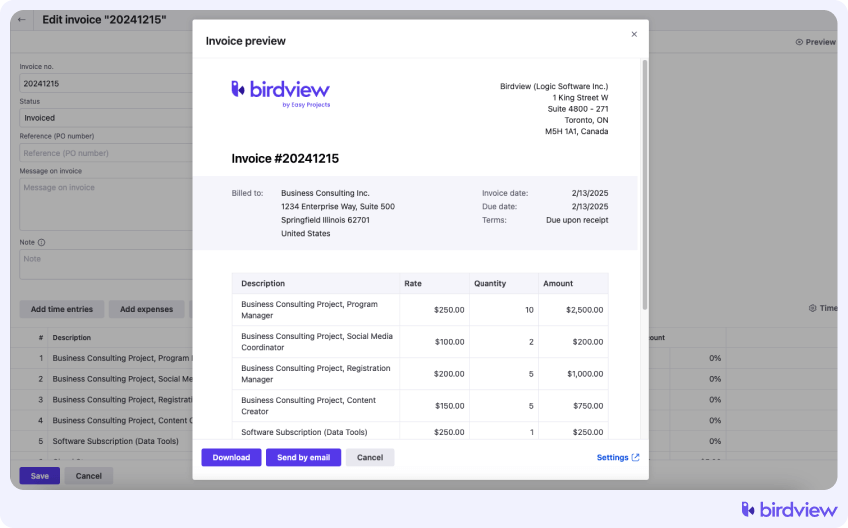
Set clear rules for invoice timing. Should invoices generate in the PSA and sync immediately, or wait for finance approval? Decide this before you automate anything. Many PSA platforms integrate smoothly with QuickBooks, Xero, and similar tools, which simplifies setup.
📚 Read more: Billing workflow: invoice your T&M and fixed-fee projects
Step 7: Sync HR data into your PSA
Your resource planning only works if it’s based on accurate people data. HR systems should push new hires, job roles, skills, certifications, department assignments, and PTO into your PSA.
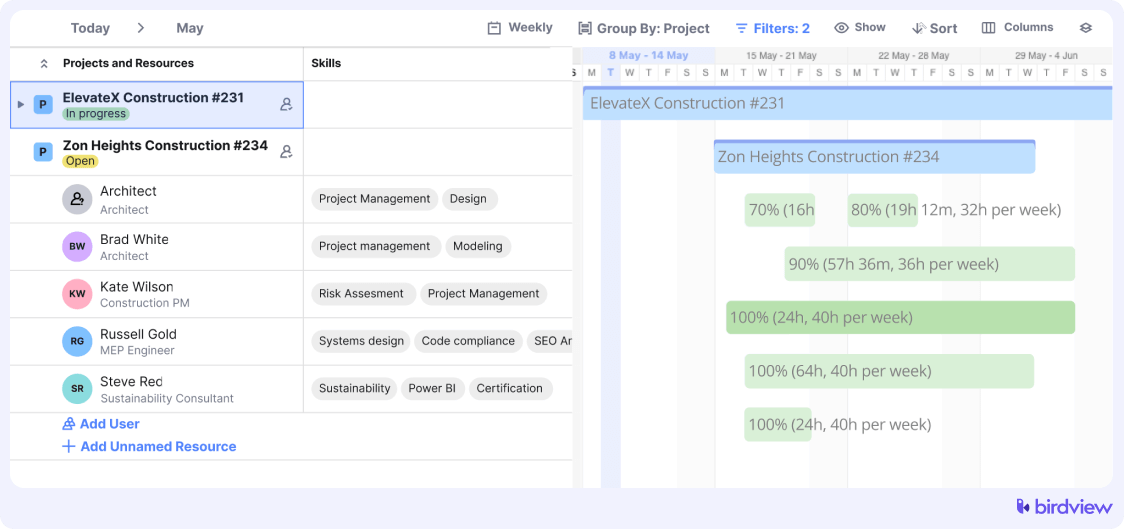
Syncing employee records prevents scheduling people who aren’t available. Automating PTO updates means project managers don’t accidentally assign someone who’s already booked vacation time.
Start with basic employee records and job roles. Once that’s stable, add skills and certifications so your PSA can suggest the right people for new projects.
📚 Read more: How to create a resource management plan
Step 8: Automate repetitive workflows with middleware
Middleware platforms let you build automations without custom coding. Use them to automate repetitive tasks. For example, auto-create projects when deals close, update CRM stages when projects hit milestones, or notify HR when utilization drops below target.
Identify five to ten workflows that happen weekly and involve more than one system. Those are your best automation candidates. Keep automations simple at first. Use Birdview’s workflow automation to simplify your work. Complex workflows are harder to debug.
Step 9: Test everything before rolling out
Set up a testing environment with real data but limited scope. Check field mapping, sync frequency, error handling, user permissions, and security. Run pilot tests with one team before going company-wide.
Keep logging and monitoring active for the first 30 to 60 days. Integrations often surface edge cases you didn’t anticipate. Track what breaks and fix it before it becomes a bigger problem.
Step 10: Train teams and update processes
Document your new workflows: how deals become projects, how PTO syncs, how invoicing works. Support adoption with short, role-specific training sessions for sales, delivery, finance, and HR.
Create a simple integration playbook that explains what changed and why. Update your SOPs so new hires onboard with the connected workflows already in place.
A real example: what a connected PSA-led tech stack looks like in practice
Here is how this looks in a service organization with Birdview PSA at the center.
- A sales rep closes a deal in the CRM. The opportunity includes client details, scope, estimated hours, and contract terms. When they mark it “Closed Won”, the integration creates a project in Birdview PSA with this information already populated.
- The project manager opens the new project in Birdview, reviews the scope, and checks availability. Resource data and PTO come from the HR system, so they can assign the right people based on skills and capacity.
- As the team logs time, entries stay in Birdview PSA. On Friday, approved timesheets sync to the accounting system with the correct billing codes and client accounts. Finance only handles exceptions.
- When the project hits a milestone, Birdview updates the deal stage in the CRM so sales can see progress. At month end, the project manager approves the invoice in Birdview, which sends it to accounting without rebuilding spreadsheets.
This is the type of connected workflow Birdview PSA is designed to support. Routine handoffs are automated, so teams can focus on delivery and clients.
When to bring in outside help
Most CRM to PSA and PSA to accounting integrations can be handled with native tools or simple middleware. In many cases, Birdview PSA provides enough configuration, integration options, and workflow automation to cover standard scenarios without custom code.
You may still need external help if you work with legacy systems, very custom processes, or strict compliance requirements. In those cases, an experienced partner can help you design and test integrations so you avoid broken data, security gaps, or workflows that do not scale.
If you use Birdview PSA, start with the vendor documentation, support team, and implementation services. They can show what is possible with existing integrations and where it makes sense to involve an external specialist.
Final thoughts on building a connected PSA, CRM, accounting, and HR stack
Building a connected tech stack is not about perfect automation. It is about removing friction so your teams can do their best work.
Start with your biggest pain points, such as the handoff between sales and delivery or monthly invoicing. Fix those flows first, then add more integrations as you learn what works for your organization.
The companies that do this well move in small steps. They clean their data, involve end users, and review integrations as systems and processes change.
Birdview PSA is built to work as the operational hub in this type of environment. It connects CRM, delivery, finance, and HR, so everyone works from the same project and client data instead of copying information between tools.
If you are still moving data manually or chasing updates across systems, you are working harder than you need to. Fix the connections, put a system like Birdview PSA at the center, and everyday work becomes much easier.