Arkady Katcherovski
 You’ve invested in PSA software – perhaps recently completed the implementation, or still finalizing it. You understand its potential to transform your professional services firm. It promises streamlined workflows, better resource management, and clearer financial insights. This should lead to increased profitability and sustainable growth. That is the exciting promise of a modern PSA software platform.
However, buying and configuring the software is only half the battle. The ultimate success and return on investment (ROI) of your PSA software hinge critically on one thing: user adoption. If your team doesn’t fully embrace and use the software as intended, the data becomes incomplete. Reverting to old habits or manual workarounds breaks workflows and stalls the benefits. You’ve likely seen this before with other software initiatives. Low adoption undermined even the best technology in those cases.
Prosci’s benchmarking research on change management effectiveness shows the same pattern in hard numbers: among respondents with excellent change management, 88% met or exceeded project objectives, versus only 13% when change management was poor, roughly a sevenfold difference in meeting objectives [1]. PSA go-live is a people-side change, not only a configuration project.
This guide covers adoption as an operating discipline: why usage is the real success measure, the usual roadblocks, nine practices that foster acceptance, and what operations should do in the first 90 days after go-live when habits are still fragile. It also covers how to respond when usage drops two months later, which metrics show the launch is sticking, and how a user-centric platform like Birdview PSA is designed to make everyday work easier than Excel.
Why user adoption is the real measure of PSA success
Implementing PSA software gets the system ready – but adoption gets your people ready. Without consistent, everyday use, even the most powerful platform won’t deliver real results. And that limits your ability to improve performance, visibility, and profitability.
When your team actually uses the software, the value becomes real: time is tracked accurately, reports reflect live progress, and workflows run without delays or manual workarounds. You get one trusted source of truth, which means faster, smarter decisions.
But when adoption is low, all that breaks down. Reports become incomplete, approvals get stuck, and people return to spreadsheets and emails. The efficiency you invested in never materializes.
Success happens when the PSA platform becomes the natural way your team works – not an extra step, but the easiest and most effective way to get things done. That’s when collaboration improves, data stays clean, and your ROI truly shows.
For how adoption sits inside the wider delivery loop, see the professional services operations complete guide. Implementation sequencing without the people plan is covered in the PSA implementation guide.
Top challenges to PSA software adoption
Even with the best intentions, several factors create roadblocks to user adoption of PSA software in professional services firms.
- Change fatigue after a long implementation: people hear “another system” and default to what already works for them.
- Unclear “what’s in it for me” by role: consultants see time entry as overhead; PMs see duplicate updates; finance sees late data.
- One training dump at go-live with no coaching afterward.
- Workflows that recreate Excel friction inside the PSA instead of removing steps.
- Low trust in migrated data, so teams keep parallel sheets “just in case.”
- Weak leadership modeling: sponsors announce the tool, then manage from inbox reports outside it.
- Shadow Excel that is faster for one person and invisible to the firm until month-end.
Addressing these roadblocks proactively through a focused adoption strategy is essential for turning potential into reality. The practices below are the countermeasures; the 90-day section later turns them into a calendar.
9 Best practices for fostering PSA adoption
Successful PSA adoption requires a user-focused approach that begins before go-live and continues afterward. Here are nine best practices:
1. Secure executive sponsorship
Ensure leadership is visibly supportive of the PSA software initiative. They should communicate why it is important, explain how it aligns with business goals, and lead by example by using key features themselves.
Tip: Have your executive sponsor kick off training sessions and send communications highlighting the importance of adoption.
2. Involve users early and often
Include representatives from each user group in the planning phases. Involve them in the process design and testing phases. Their input helps ensure the software meets their needs and increases ownership and buy-in.
Tip: Form a working group of key users who can provide feedback and become internal champions for the software.
3. Communicate the “What’s in it for me?”
Clearly articulate the direct benefits of the new PSA software for each user group and role. Focus on how it makes their jobs easier, more efficient, and less frustrating, such as simplified time entry, clearer task lists, or better workload visibility.
Tip: Use internal communications (emails, meetings, posters) to highlight specific benefits. Make these relevant to different roles in the organization.
4. Provide tailored, role-specific training
Deliver comprehensive, hands-on training customized to how each role will use the software in their daily work. Avoid one-size-fits-all sessions.
Tip: Offer separate training modules for Project Managers. Create them for Resource Managers. Include modules for Finance teams. Make them for general team members. Focus on their specific tasks within the system. Use realistic scenarios during practice sessions.
One launch training is not enough on its own. Treat the classroom session as day zero; ongoing coaching (office hours, champion desk-side help, short refreshers) is what keeps project managers and consultants logging time eight weeks later.
5. Implement a robust change management plan
Proactively manage the human side of the transition. Address concerns, provide support, celebrate early wins, and recognize users who are adapting well.
Tip: Set up mentorship programs. Early adopters or “super users” can help coach their colleagues. This internal support network is valuable.
Soft messaging alone is not enough. Harvard Business Review’s hard-side framing still finds that roughly two out of three transformation initiatives fail, largely from under-managing the operational factors of change [2].
6. Streamline workflows with the software’s capabilities
Configure the PSA software to automate and simplify existing workflows. Do this instead of just replicating manual steps. The software should make processes demonstrably more efficient for the user.
Tip: Design workflows that reduce manual data entry. Eliminate unnecessary steps compared to the old process. Show users how much time they are saving.
When teams push to keep Excel after launch, treat that as a design signal: find the sheet that is still faster, remove that friction in the PSA, then retire the sheet on a dated cutover, not with a ban alone.
7. Ensure data quality
Prioritize cleaning and accurately migrating data. Users need to trust that the information in the system is reliable for it to be useful to them.
Tip: Involve users in validating migrated data. Ensure it is relevant to their work before go-live. Address any data discrepancies promptly.
8. Provide easy access to ongoing support and resources
Make it simple for users to get help when they need it after initial training. This could include dedicated support channels. It might involve internal super users. Provide searchable knowledge bases or quick reference guides.
Tip: Set up a dedicated support channel (e.g., a specific email, a chat group, a ticketing system within the PSA if available) for questions during and immediately after the transition. Empower internal “super users” who can help their colleagues.
9. Celebrate and reinforce usage
Recognize and reward teams or individuals who are early adopters. Publicly acknowledge those who demonstrate best practices in using the PSA software. Monitor usage metrics. Address non-compliance proactively and supportively.
Tip: Publicly acknowledge teams with high time entry compliance. Celebrate consistent project updates in team meetings. Highlight successful use cases.
Leaders can reinforce usage without nagging by changing the operating rhythm: review live PSA dashboards in the same meetings where decisions are made, and stop accepting spreadsheet exports as the “official” status. Peer reinforcement through champions usually beats weekly reminder emails. For the wider cadence of reviews, see how to build an operating rhythm for professional services firms.
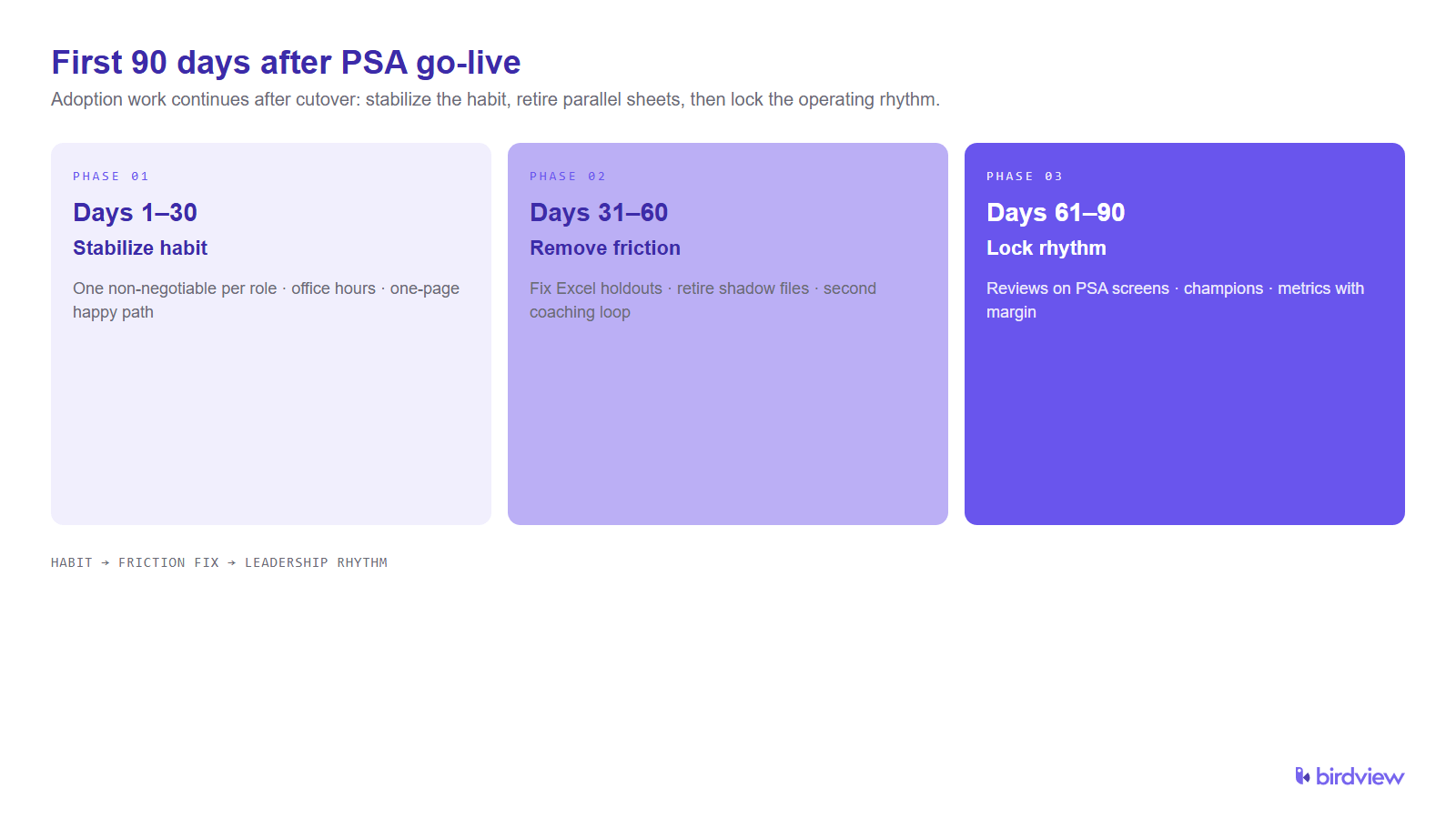
What ops should do in the first 90 days after PSA go-live
Adoption work does not end at cutover. The first quarter is when habits form or Excel quietly returns.
Days 1–30: stabilize the minimum viable habit. Pick one non-negotiable behavior per role (usually time logged same day or next morning for delivery staff; project status updated before the weekly review for PMs). Run daily or thrice-weekly open office hours with a named champion. Publish a one-page “happy path” per role, not a 40-page manual. Measure completion of the habit, not login counts alone.
Days 31–60: remove friction and retire parallel sheets. Interview the loudest Excel holdouts; fix the PSA workflow that loses. Schedule a dated retirement for the top three shadow files. Add a second coaching loop for late adopters, short, role-specific, on real projects. Keep executive sponsors visible in the tool (their own approvals and reviews).
Days 61–90: lock the operating rhythm. Move status, utilization, and billing prep conversations onto PSA screens. Appoint or confirm PSA champions per practice or office. Review adoption metrics in the same leadership forum that reviews margin. Document what “good” looks like so the next cohort of joiners inherits the habit, not the exception process.
People stop using PSA after launch when the system is harder than the workaround, when nobody looks at the data in decision meetings, or when support disappears after week one. The 90-day plan attacks all three.
What to do if PSA adoption drops two months after go-live
A dip around weeks six to ten is common: the novelty is gone, project pressure is high, and champions are busy. Treat it as an operations incident, not a personality failure.
- Measure the drop. Compare time-entry compliance, project update completeness, and active Excel shares against the first 30 days.
- Find the friction. Sit with two PMs and two consultants who slipped; ask which step they skip and why.
- Fix one seam fast. Often it is mobile time entry, approval latency, or a report that still comes from Finance’s spreadsheet.
- Restart coaching, not another all-hands. Targeted sessions beat a second full training day.
- Re-anchor leadership. Sponsors open the next portfolio review from the PSA, not from slides built offline.
- Re-empower champions. Give them protected hours and a clear escalation path into ops.
If disconnected tools are part of the relapse pattern, the cost framing in the real cost of disconnected tools helps explain why “just one sheet” is expensive firm-wide.
Which adoption metrics show PSA go-live is sticking
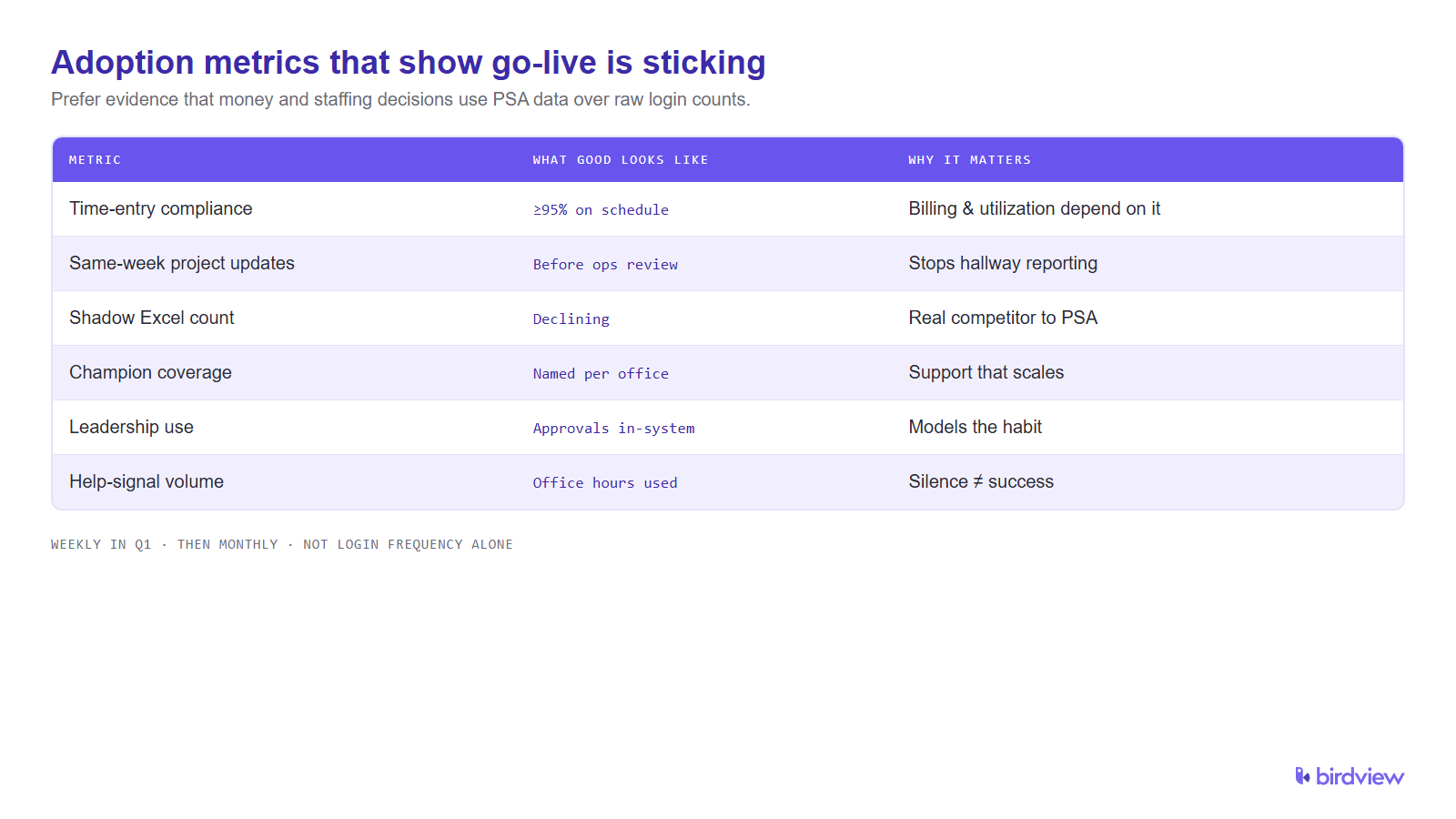
Track a short set weekly for the first quarter, then monthly:
| Metric | What “good” often looks like | Why it matters |
|---|---|---|
| Time-entry compliance | ≥95% of delivery staff with timesheets approved on schedule | Incomplete time breaks utilization, billing, and staffing |
| Same-week project updates | Active projects with status/health updated before the ops review | Stale projects recreate hallway reporting |
| Shadow Excel count | Declining number of active parallel plans/forecasts | The real competitor to PSA is the spreadsheet |
| Champion coverage | Each practice/office has a named, available champion | Support that scales without ticket pile-ups |
| Leadership use | Sponsors complete their approvals/reviews in-system | Models the habit more than email reminders |
| Help-signal volume | Questions handled in office hours without abandonment | Silence can mean workarounds, not success |
Login frequency alone is a weak signal. Prefer evidence that the firm’s money and staffing decisions use PSA data.
Avoiding common adoption mistakes
To ensure successful PSA adoption, it’s just as important to avoid the common pitfalls as it is to follow best practices.
Training alone isn’t enough. Adoption requires more than knowledge – it needs ongoing support, clear communication, and change management to truly shift habits.
Always explain the “why.” Don’t just announce the software – help users understand the purpose behind the change and how it benefits them directly.
One-size-fits-all won’t work. Users in different roles need different tools and training. Tailor the experience to their daily workflows to make it relevant and effective.
Support must continue after go-live. Questions will arise. Make sure help is easily accessible so users don’t abandon the system when challenges appear.
Watch out for manual workarounds. If people fall back to spreadsheets, find out why. Then fix the friction and reinforce proper use of the PSA.
Celebrate small wins. Recognizing early adopters publicly boosts motivation across the team and builds positive momentum.
And don’t forget data quality. Inaccurate or outdated data undermines trust – monitor it continuously and address issues promptly to maintain confidence in the system.
How Birdview PSA simplifies user adoption
At Birdview PSA, we believe software success depends not on feature count, but on ease of use. That’s why user adoption is at the core of our platform and implementation approach.
The interface is clean and intuitive, designed to simplify even complex project, resource, and financial processes – for every role, from project managers to finance teams. The system adapts to the user, not the other way around.
Personalized dashboards display only what each user needs, helping them stay focused and productive without distractions or overwhelm.
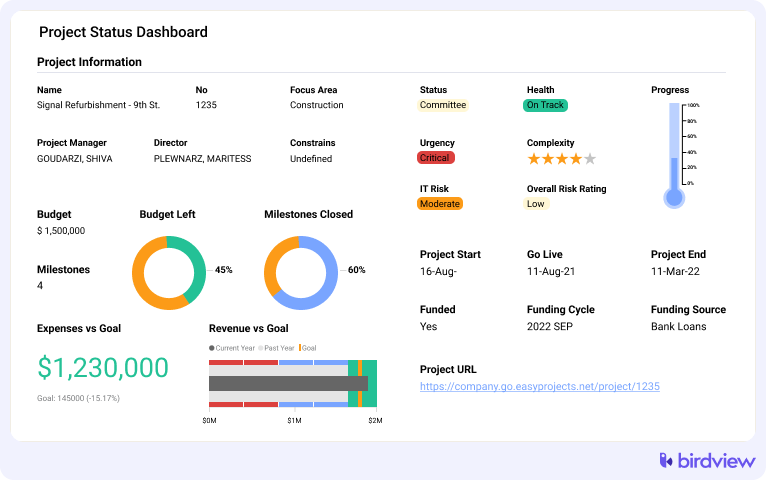
Workflows like time tracking, expense submission, and approvals are streamlined to minimize effort. Mobile access enables teams to stay connected – in the office, in the field, or remote.
During implementation, every user receives hands-on, role-specific training aligned with how they’ll actually use the system. This builds confidence from day one and encourages faster engagement.
And support doesn’t stop at go-live. We provide searchable knowledge bases, peer champions, and live assistance to keep adoption high and eliminate friction as users ramp up.
Birdview PSA is more than just software – it’s a guided experience built to make adoption simple, effective, and lasting.
Unlocking the full potential of your investment
Investing in PSA software is a strategic decision. It aims to transform your professional services firm’s operations. However, the true return on that investment is unlocked only through successful user adoption.
Birdview PSA is designed with user adoption in mind. It offers an intuitive interface. It provides configurable dashboards and workflows. It has flexible access options, including mobile. It includes tailored training as part of its implementation program. It offers dedicated ongoing support. This empowers your team. By prioritizing adoption, you ensure that your PSA software becomes the integrated operational engine it is meant to be. It drives efficiency. It improves data quality. It enables better decisions. It fuels sustainable growth.
FAQ
Why do people stop using PSA after launch?
Usually because a workaround is faster for one person, leadership still accepts reports from outside the system, or support ended after the first training week. Fix the friction, change what counts as “official” status, and restore coaching, not only reminders.
What should ops do in the first 90 days after PSA go-live for adoption?
Stabilize one habit per role in days 1–30, retire the top shadow Excel files in days 31–60, and lock leadership reviews onto PSA screens by days 61–90. Appoint champions and review a short metric set in the same forum that reviews margin.
How do you get project managers and consultants actually logging time in PSA?
Make same-day or next-morning entry the default, remove duplicate updates elsewhere, coach on real projects, and have PMs refuse to close the week without approved time. Celebrate compliance publicly; escalate chronic gaps through the delivery lead, not mass email.
Is one PSA training session enough after go-live, or do you need ongoing coaching?
One session is a start, not a finish. Ongoing coaching, office hours, champion desk-side help, short role refreshers, carries adoption through the first quarter when habits are still fragile.
How do you handle pushback when teams want to keep Excel after PSA launch?
Treat Excel as a requirements list: learn which step is faster on the sheet, make that step easier in the PSA, then set a dated retirement for the file. A ban without a better path recreates shadow systems.
How should leaders reinforce PSA usage after go-live without nagging?
Run decisions from live PSA views, stop accepting offline exports as the source of truth, and recognize teams that hit compliance. Peer champions and meeting design outperform reminder spam.
What should you do if PSA adoption drops two months after go-live?
Measure the dip, interview slipped users, fix one seam quickly, restart targeted coaching, and have sponsors reopen reviews in-system. Re-protect champion time so support is available again.
Should you appoint PSA champions to lift adoption after go-live?
Yes. Named champions per practice or office scale help without flooding tickets, translate role-specific tips, and give ops an early warning when Excel returns. Protect a few hours of their week or the role becomes symbolic only.
Which adoption metrics show PSA go-live is sticking?
Time-entry compliance, same-week project updates, declining shadow Excel count, champion coverage, leadership use in-system, and healthy office-hour traffic. Prefer these over raw login counts.
Sources
- Prosci, The Correlation Between Change Management and Project Success (updated May 2026; originally published June 2023): https://www.prosci.com/blog/the-correlation-between-change-management-and-project-success
- Harvard Business Review, The Hard Side of Change Management (Sirkin, Keenan, Jackson; October 2005): https://hbr.org/2005/10/the-hard-side-of-change-management