Leonid Kostin
 - Unbilled time is completed billable work that has not yet been invoiced, often because of delayed approvals, missing time entries, or disconnected billing processes.
- Power BI dashboards help identify where revenue is getting stuck by combining project, time tracking, approval, and billing data into a single reporting view.
- The most valuable dashboards track the entire billing workflow, including unbilled hours, pending approvals, invoice aging, billable utilization, and project profitability.
- Monitoring a small set of KPIs, such as unbilled revenue, time to invoice, approval time, and billing cycle time, helps finance and operations teams identify bottlenecks before they affect cash flow.
- Dashboards improve visibility but do not solve operational problems. Reducing unbilled time also requires consistent time tracking, standardized approval workflows, and connected business systems.
- Reliable reporting starts with connected operational data. When project management, time tracking, approvals, and billing work together, Power BI can provide accurate insights that help organizations accelerate invoicing, reduce revenue leakage, and improve project profitability.
Tracking unbilled time with Power BI means combining project, time tracking, approval, and billing data into a single reporting view. Instead of manually comparing spreadsheets or switching between systems, finance and operations teams can quickly identify completed work that has not yet been invoiced and understand where revenue is getting delayed.
For many professional services firms, unbilled time is not caused by a lack of billable work. Consultants are logging hours, projects are progressing, and clients are ready to be billed. The problem is that finance often lacks visibility into the full billing workflow. When time tracking, approvals, and invoicing are managed separately, completed work can sit unnoticed for days or weeks before an invoice is created.
A well-designed unbilled time dashboard helps solve this problem by showing the entire path from time entry to invoice. Teams can monitor approval delays, outstanding billable hours, uninvoiced work, and billing backlogs in one place. This makes it easier to reduce revenue leakage, improve cash flow, and produce more reliable financial reports.
Why unbilled time is one of the biggest sources of lost revenue
Unbilled time is work that has been completed but has not yet been approved, invoiced, or billed to the client. A Power BI dashboard helps organizations identify these gaps early, allowing finance teams to accelerate invoicing and improve cash flow before billing delays become larger financial problems.
The biggest challenge is that unbilled work rarely accumulates because someone forgot to create an invoice. More often, it builds up through a series of small operational delays. Timesheets are submitted late, approvals remain pending, project managers wait for additional information, or finance spends time reconciling data from multiple systems before invoices can be prepared.
These delays become increasingly expensive as organizations grow. A few outstanding timesheets may seem manageable when a company has ten consultants. When dozens of projects are running simultaneously, however, finance can spend hours every week identifying missing entries, validating billable hours, and confirming invoice readiness. The result is slower cash flow, less predictable revenue, and more administrative work at the end of every billing cycle.
Common causes of unbilled time
In most organizations, unbilled work accumulates because of delayed approvals, missing time entries, disconnected business systems, or inconsistent billing processes. These are operational problems rather than reporting problems. Power BI helps expose them, but reducing unbilled time requires improving the workflow behind the data.
Why unbilled time is difficult to track
Tracking unbilled work requires visibility across the entire billing process. Finance teams need to know whether time has been submitted, approved, assigned to the correct project, and prepared for invoicing. When that information is spread across multiple systems, it becomes difficult to understand where work is waiting and who needs to take action.
Time tracking and billing use different systems
Many professional services firms manage projects, time tracking, and accounting in separate applications. Consultants log hours in one system, managers approve them in another, and finance creates invoices somewhere else. Without connected reporting, teams spend valuable time reconciling data instead of preparing invoices.
Approval bottlenecks delay invoicing
Even when consultants submit their timesheets on time, invoices cannot be created until those entries are approved. Without visibility into pending approvals, finance often discovers the backlog only when invoice deadlines are approaching.
Managers lack visibility into pending billable work
Project managers typically monitor schedules and budgets but have limited visibility into work that is complete yet still waiting to be billed. An unbilled time dashboard connects project delivery with billing status, helping teams identify invoice-ready work before month end.
Spreadsheets cannot monitor a changing billing pipeline
Weekly exports and spreadsheets quickly become outdated as new time entries, approvals, and invoices are processed every day. Power BI project reporting provides a live view of the billing pipeline, making it easier to identify bottlenecks and reduce billing delays before they affect cash flow.
What should an unbilled time dashboard include?
An unbilled time dashboard should show more than the total number of uninvoiced hours. It should help finance, operations, and project managers understand where revenue is getting delayed and which projects require immediate attention.
The most useful dashboards combine financial and operational metrics that follow work from time entry through invoicing.
- Total unbilled hours
Shows the current billing backlog and how much completed work is still waiting to be invoiced.
- Unbilled value by project
Converts outstanding hours into billable value so finance can prioritize projects with the greatest financial impact.
- Aging of uninvoiced work
Groups outstanding work by age, helping teams identify older items that carry a higher risk of delayed payment or write-offs.
- Pending time approvals
Highlights submitted timesheets that are still awaiting approval before they can move to invoicing.
- Billable vs. non-billable hours
Shows whether consultants are recording time correctly and helps identify unexpected increases in non-billable work.
- Unbilled time by consultant
Identifies recurring workflow issues, such as consistently late time submissions or approval delays.
- Unbilled work by client
Highlights clients with recurring billing delays, making it easier to prioritize follow-up and forecast cash flow.
Power BI dashboard examples for tracking unbilled time
Different teams need different views of the billing process. Together, these dashboards help organizations monitor the complete workflow, from recording billable hours to measuring financial performance.
Invoice tracking dashboard
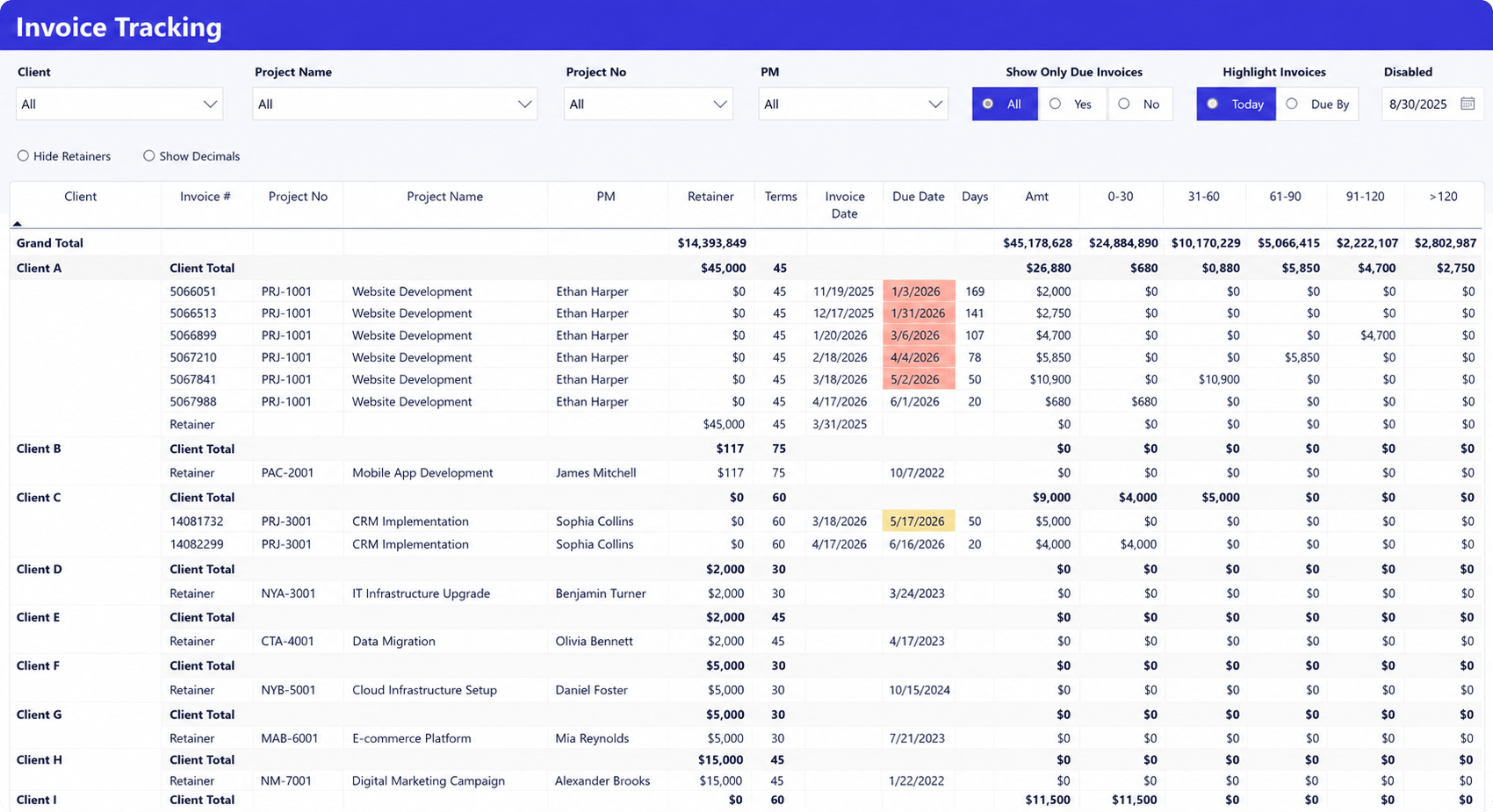
An Invoice Tracking Dashboard helps finance teams monitor outstanding invoices, aging receivables, and overall billing progress.
What it shows
- Invoice amount by client and project
- Invoice and due dates
- Outstanding balances
- Aging buckets
- Due and overdue invoices
Why it matters
Once work has been invoiced, the priority shifts to collecting payment. This dashboard helps finance identify overdue invoices, prioritize collections, and monitor cash flow.
Time awaiting approval dashboard
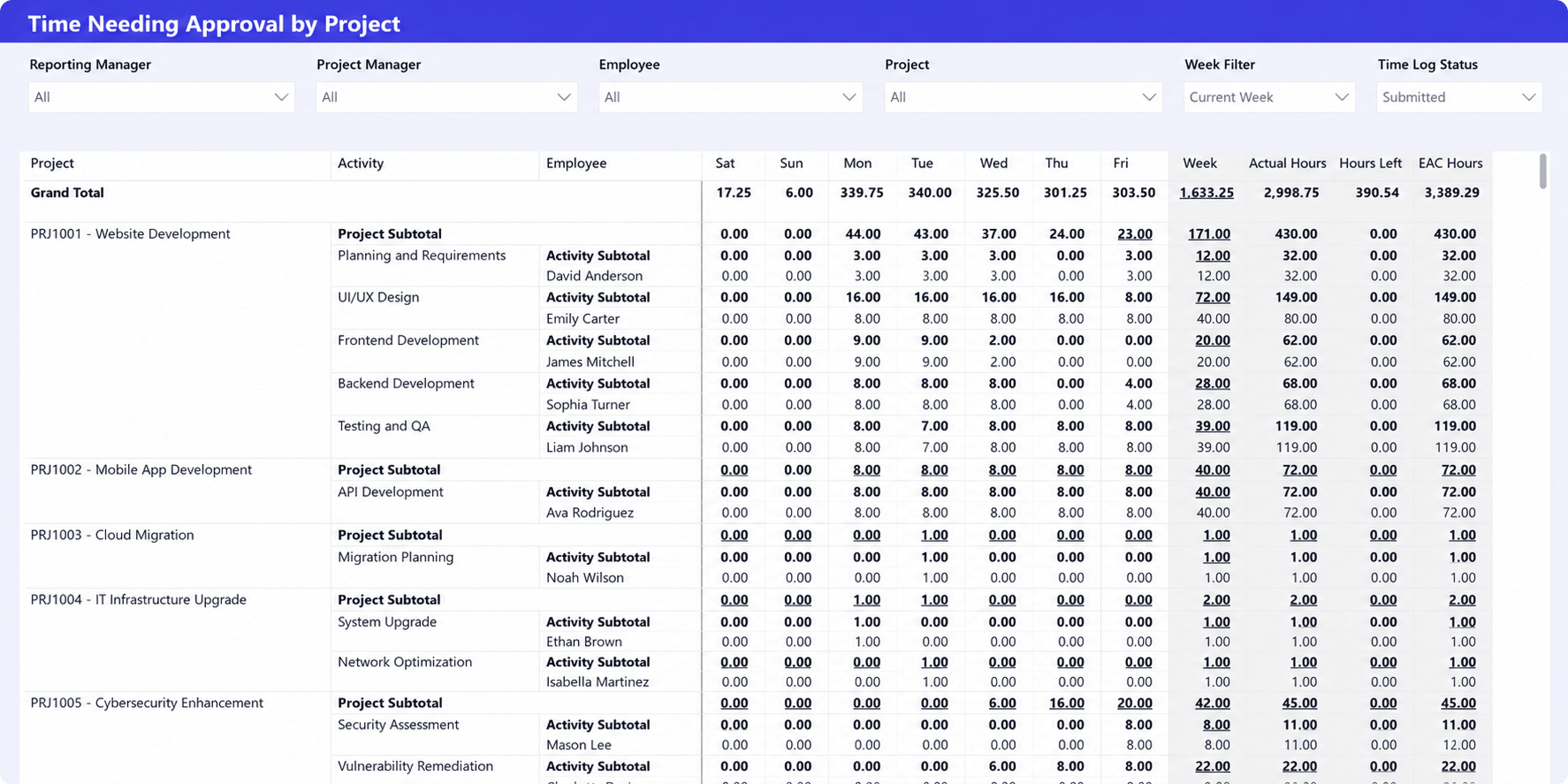
A Time Awaiting Approval Dashboard shows billable hours that have been submitted but cannot yet be invoiced because they are still waiting for approval.
What it shows
- Pending time entries
- Hours by project and employee
- Weekly approval backlog
- Approval status filters
Why it matters
Approval delays are one of the most common causes of late invoicing. This dashboard helps managers resolve bottlenecks before they affect the billing cycle.
Billable vs. non-billable dashboard
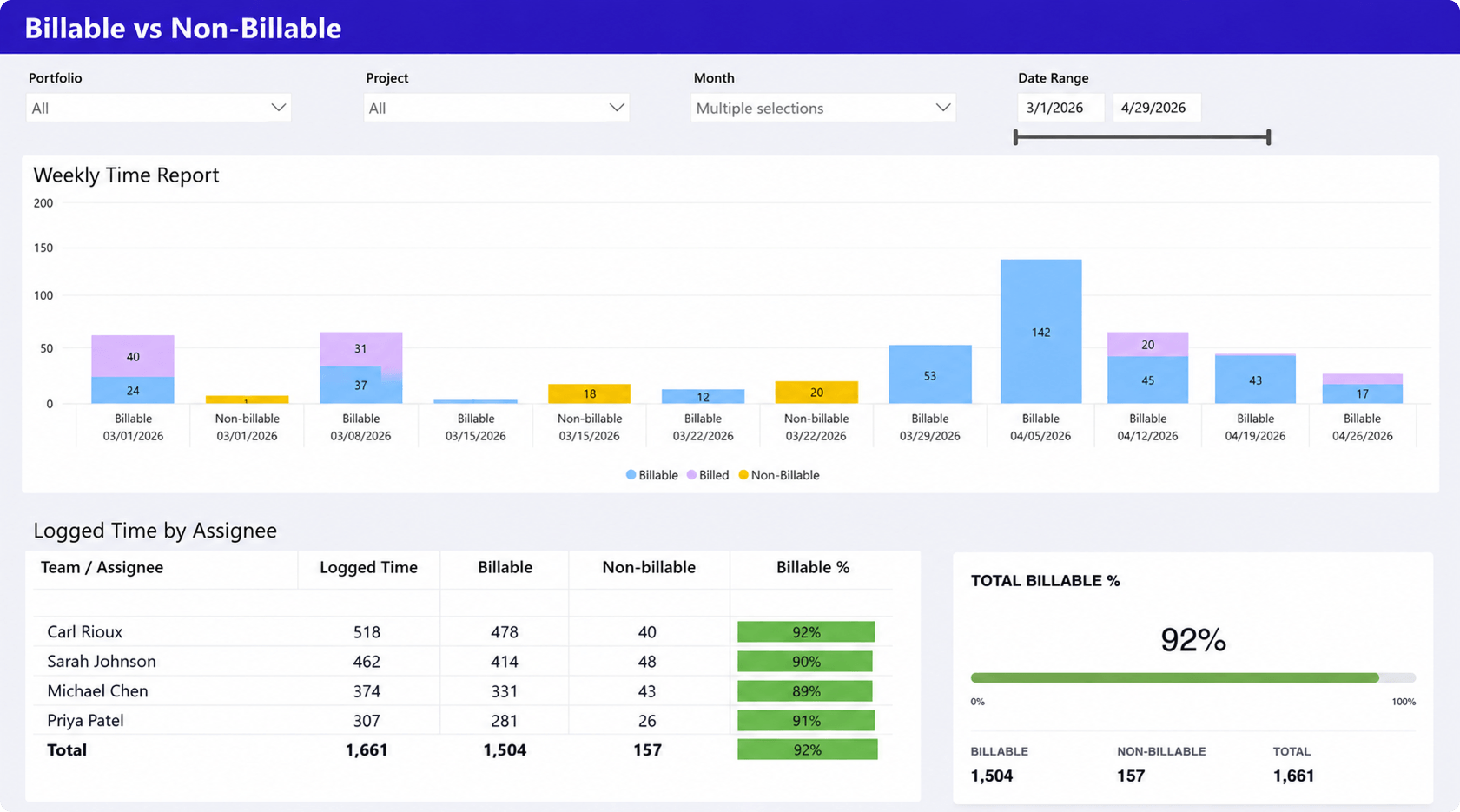
A Billable vs. Non-Billable Dashboard shows how consultants spend their time and whether enough work is being recorded as billable.
What it shows
- Billable and non-billable hours
- Billable percentage by consultant
- Weekly trends
- Project and portfolio filters
Why it matters
Incorrect time classification reduces invoice value and affects utilization and profitability. This dashboard helps identify unusual trends before they impact revenue.
Revenue, cost & profit dashboard
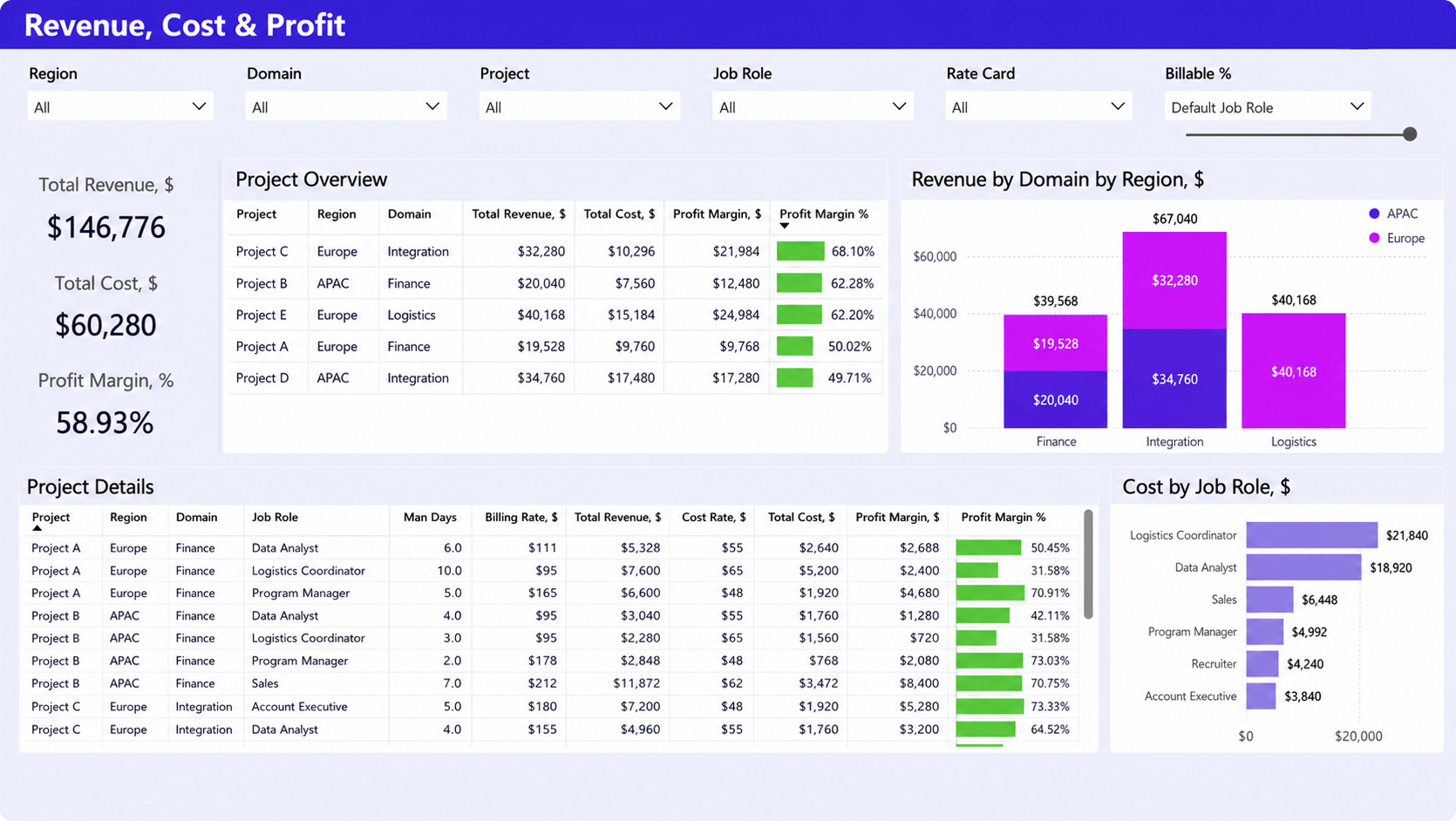
A Revenue, Cost & Profit Dashboard connects billing performance with project profitability.
What it shows
- Revenue, cost, and profit margin
- Profitability by project
- Revenue by business area
- Detailed project financials
Why it matters
Delayed billing ultimately affects project profitability and cash flow. This dashboard helps leaders evaluate the financial impact of billing performance across the business.
The KPIs finance and operations teams should monitor
Monitoring a small set of KPIs helps finance and operations teams identify billing bottlenecks before they affect cash flow. Rather than tracking dozens of metrics, focus on the indicators that measure both the size of the billing backlog and the efficiency of the billing process.
The most important KPIs include:
- Total unbilled hours to measure the current billing backlog.
- Unbilled revenue to understand the financial value of outstanding work.
- Average approval time to identify delays in the approval workflow.
- Time to invoice to measure how quickly completed work becomes an invoice.
- Invoice readiness to identify projects that can be billed immediately.
- Realization rate to compare recorded billable work with recognized revenue.
- Billing cycle time to monitor the efficiency of the entire billing process.
No single KPI tells the full story. Reviewing these metrics together helps teams identify where work is slowing down, prioritize corrective action, and measure whether process improvements are reducing billing delays.
Why dashboards alone won’t eliminate unbilled time
A Power BI dashboard helps identify where billable work is getting stuck, but it cannot fix the operational processes causing the delays. If time entries are submitted late, approvals are inconsistent, or billing systems are disconnected, those issues will continue to appear in the reports.
The most common causes of unbilled work include:
- Inconsistent time tracking
- Delayed approvals
- Unclear billing rules
- Disconnected project, time tracking, and finance systems
Reducing unbilled time requires both visibility and process improvements. Dashboards show where bottlenecks occur, while standardized workflows help prevent them from happening again.
How leading service firms reduce unbilled time
Organizations that consistently invoice on time usually follow the same operational practices. Their goal is not simply to build better reports, but to make the billing process predictable from the moment work is completed.
Standardize time entry policies
Late or incomplete timesheets create problems that ripple through the entire billing process. Establishing clear expectations for when time should be submitted helps finance work with complete and reliable data.
Many organizations require consultants to submit time daily or at the end of each week rather than waiting until month end. This reduces the amount of missing information finance must chase before invoices can be prepared.
Automate approval workflows
Approval delays are one of the easiest bottlenecks to improve. Automated notifications, approval queues, and escalation rules help managers review submitted time more consistently.
Instead of discovering outstanding approvals during invoice preparation, managers can resolve them throughout the week, allowing finance to begin billing sooner.
Connect time tracking with billing
Manual transfers between time tracking, project management, and accounting systems increase the risk of errors and slow the billing process.
Connecting these workflows allows approved time to flow directly into invoice preparation, reducing manual reconciliation and giving finance greater confidence in the underlying data.
Monitor unbilled work continuously
Many firms review billing only at the end of the month. By then, approval delays and missing time entries have already accumulated, making them more difficult to resolve.
Reviewing an unbilled time dashboard throughout the week allows finance and operations teams to identify issues while they are still small. Smaller backlogs are easier to manage and typically result in faster invoice generation.
Review billing readiness every week
A short weekly review between finance, operations, and project managers helps ensure that completed work moves quickly toward invoicing.
These meetings do not need to be lengthy. Reviewing projects with the highest unbilled value, outstanding approvals, and aging billable work is often enough to keep the billing pipeline moving and reduce month-end pressure.
Reliable unbilled time reporting starts with connected operational data
Power BI can only report on the data it receives. If project management, time tracking, approvals, and billing are disconnected, dashboards will reflect those gaps instead of providing a complete picture of the billing pipeline.
Organizations that reduce unbilled time most effectively combine connected operational workflows with real-time reporting. Project teams record their time, managers approve it, finance prepares invoices from approved entries, and Power BI provides visibility across the entire process. This reduces manual reconciliation and gives finance more confidence in billing data.
A Professional Services Automation (PSA) platform supports this approach by bringing project management, time tracking, approvals, billing, and invoicing into one operational system. Power BI then becomes the reporting layer rather than the place where teams piece information together.
For example, Birdview PSA integrates these operational workflows with Power BI reporting, allowing finance and operations teams to monitor unbilled hours, invoice readiness, approval status, and project financials from a single source of truth.
See your billing pipeline more clearly
If your team spends more time reconciling reports than preparing invoices, review how your operational data flows between systems. Connecting project management, time tracking, billing, and Power BI reporting can help reduce billing delays and improve visibility across the entire billing pipeline.
FAQ
What is unbilled time?
Unbilled time is billable work that has been completed but has not yet been invoiced. The delay may be caused by missing timesheets, pending approvals, incomplete billing information, or manual invoicing processes.
How often should unbilled time be reviewed?
Most service firms review unbilled work at least weekly. High-volume consulting organizations often monitor approval backlogs and invoice readiness daily to prevent month-end billing delays.
Which KPIs help reduce billing delays?
Some of the most useful KPIs include total unbilled hours, unbilled revenue, average approval time, time to invoice, invoice readiness, realization rate, and billing cycle time. Together, these metrics provide visibility into both financial performance and operational bottlenecks.
Why does unbilled time lead to revenue leakage?
The longer billable work remains uninvoiced, the greater the risk of delayed payments, billing disputes, forgotten time entries, or write-offs. Monitoring unbilled work continuously helps organizations invoice sooner and recover revenue that might otherwise be lost.
How can organizations shorten the time from approved work to invoice?
Organizations typically reduce billing delays by standardizing time entry, automating approval workflows, connecting time tracking with billing, reviewing invoice readiness regularly, and using dashboards to monitor the billing pipeline throughout the month instead of waiting for month-end reporting.