Blog
Blog

Reactive resource management creates a chaotic environment that directly erodes profit margins and accelerates employee burnout. We have all been there: the late-night scramble to find a senior developer for a project that starts Monday, or the uncomfortable conversation with a client explaining why the team isn’t ready. The fix is visibility. You need to see upcoming demand, real availability, and conflicts before they explode. This guide covers the basics, the common mistakes, and a simple 30/60/90-day workflow you can run every week.
What resource forecasting is
Resource forecasting predicts the type and amount of staffing you will need for future work. Then it compares that demand against real availability, not theoretical capacity.
Use this simple formula: Forecast = (confirmed work + weighted pipeline) mapped onto availability.
What you get when it works:
- Fewer last-minute staffing scrambles.
- Less burnout, fewer weekend “save the project” sprints.
- More accurate start dates for clients.
- Better hiring timing, with fewer bad “panic hires.”
- Lower bench time, without chasing 100% utilization.
Why reactive resource management hurts margins and people
Without predictive visibility, agencies are forced into a damaging “hire and fire” dynamic. When you hire frantically to meet a sudden capacity break, you often compromise on candidate quality or pay a premium for speed. Conversely, when the workload dips and no one monitors the 90-day horizon, you carry expensive overhead that drains profitability.
According to SPI Research’s 2025 Professional Services Maturity Benchmark , billable utilization rates have dropped to roughly 68.9%, a clear signal that firms lacking proactive planning are losing billable hours to administrative drag and bench time. Furthermore, a study by Gallup on employee burnout indicates that unmanageable workloads are a primary driver of turnover, costing agencies their most valuable asset: their people.
Core concepts: capacity availability, demand
Resource capacity planning
Resource capacity planning is the foundational process of comparing the theoretical maximum work your organization can handle against current commitments. It provides the baseline for all decision-making. However, simply counting heads is not enough. Effective planning requires a nuanced understanding of three distinct metrics: capacity, demand, and availability.
Capacity vs. availability
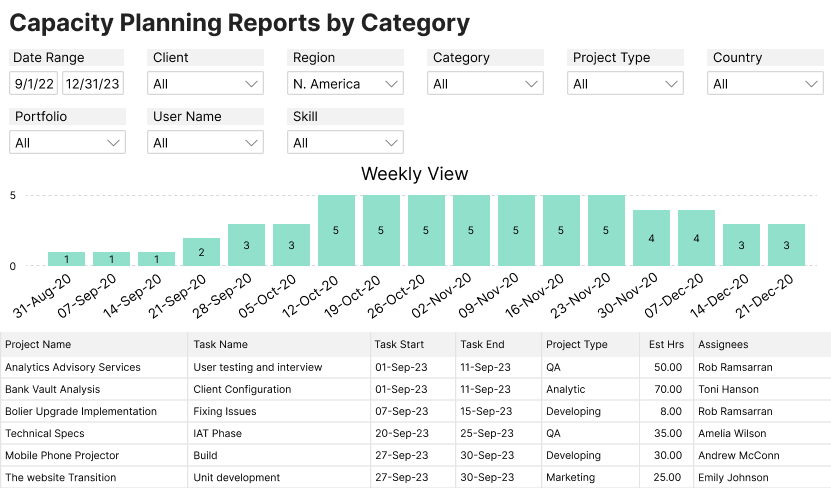
Capacity is a raw calculation of headcount multiplied by contract hours (e.g., 10 employees x 40 hours = 400 hours). It assumes a perfect world with no interruptions. Availability, however, is the realistic time remaining after friction is removed. Availability is capacity minus leave, holidays, administrative tasks, and non-billable obligations. Confusing these two concepts is the single biggest cause of overbooking.
Demand
Demand aggregates confirmed project work and weighted sales pipeline opportunities. It represents what the market is asking of your team. The goal of forecasting is to overlay demand onto availability (not capacity) to see the true picture of your delivery health.
📚 Read more: Capacity planning and resource planning: What is the difference?
Demand forecasting for professional services
Demand forecasting for professional services requires a unified view of confirmed contracts and potential pipeline work. Many teams struggle because they view these elements in isolation. Sales tracks demand in a CRM, while Delivery tracks capacity in a spreadsheet. To bridge this gap, you must overlay weighted pipeline data onto your resource schedule. If your demand forecast shows 500 hours of engineering work required in July, but your availability forecast shows only 400 hours, you have a clear signal to hire or contract out 60 days in advance.
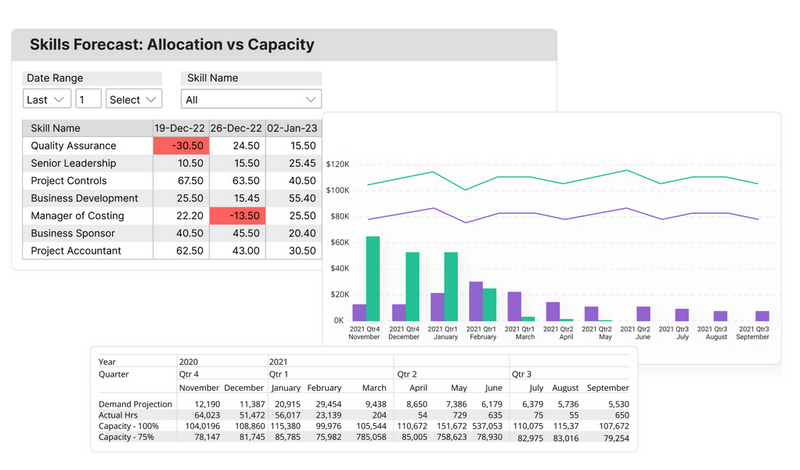
The complexity multiplies when resources are shared across multiple projects. A designer might be booked for 10 hours on Project A, 15 hours on Project B, and 5 hours on internal marketing. Without a centralized system to aggregate these allocations, project managers inevitably double-book talent. Effective forecasting requires a matrix view that shows total allocations per person across all active and tentative projects, highlighting conflicts instantly.
📚 Read more: How do you forecast your team’s capacity?
Common forecasting mistakes and how to fix them
The most frequent forecasting errors stem from relying on optimistic assumptions rather than historical data and realistic availability constraints. These mistakes often result in artificial variance between the plan and reality, frustrating finance and delivery teams alike.
Forecasting based on best-case sales scenarios
Sales teams are naturally optimistic, often predicting that every deal in the pipeline will close next week. If operations teams staff up based on unweighted sales projections, they end up with expensive idle talent when deals slip or fall through. A reliable forecast uses probability weighting (e.g., a 50% likely deal counts for half the hours) to provide a realistic view of incoming work.
Treating availability as real capacity
Assuming a 40-hour contract equals 40 hours of project output guarantees burnout. Humans require time for context switching, email, Slack, internal meetings, and professional development. If you forecast 40 hours of billable work for an employee, you are effectively guaranteeing overtime. Best practices suggest factoring in 15-20% for administrative friction.
Aiming for 100% utilization
This is a dangerous trap that removes all buffer for error. If a project runs over by two hours, or an employee gets sick for a day, the entire schedule collapses like dominoes. According to industry standards cited by sources like Promethean Research, healthy service firms typically aim for 75-80% billable utilization to account for the natural variability of complex work.
Ignoring internal work in forecasts
Agencies often overlook internal initiatives in their forecasts. Projects like re-branding, software migration, or mentorship programs take real hours. If these aren’t booked as “internal projects” in the forecast, they will cannibalize client work, causing deadlines to slip. A forecast that only includes billable hours is an incomplete picture of the agency’s workload.
📚 Read more: Resource forecasting in project management
How to forecast resources with a 30/60/90-day workflow
A reliable forecasting workflow operates on a tiered 30-60-90-day framework. This approach adjusts the level of granularity based on how far out you are looking, preventing the paralysis of trying to plan every minute three months in advance.
1. The 30-day tactical view
Focus on execution for the immediate future. Hard bookings and specific task assignments are locked in. This view answers “who is doing what this week.” Project managers own this layer, ensuring that hours allocated match the tasks remaining. At this stage, variance should be minimal.
2. The 60-day operational view
Incorporate tentative projects and soft bookings. This is the “air traffic control” layer where you spot approaching conflicts. Use placeholders for roles (e.g., “Senior Developer needed”) rather than assigning specific names. This alerts the team to the demand without locking down a specific person who might be needed elsewhere.
3. The 90-day strategic view
Look at aggregate demand vs. capacity. This informs business decisions like hiring, contracting, or approving extended leave. This view should be discussed in monthly executive reviews to align sales targets with delivery reality. It moves the conversation from “Sarah is busy” to “The Design department is at 110% capacity.”
📚 Read more: A practical guide to adaptive 30/60/90-day capacity forecasting with PSA
Using forecasts to guide hiring and pipeline decisions
Strategic forecasting allows operations leaders to justify hiring requests with hard data rather than anecdotal evidence. By analyzing the 90-day aggregate view, organizations can smooth out the “bench management” cycle, knowing exactly when to engage contractors versus when to open a full-time requisition.
Effective staffing forecasts distinguish between temporary spikes and sustained growth. If your forecast shows a temporary spike in demand (e.g., a massive 6-week implementation project), the data supports hiring a contractor. This keeps your permanent payroll safe. If the forecast shows sustained demand for a specific skill set, such as a 30% increase in data engineering work over two quarters, you have clear evidence. This provides the financial justification to hire a full-time employee.
This visibility also empowers operations leaders to push back on unrealistic sales timelines. If the data shows zero capacity for onboarding a new enterprise client until March, you can set realistic start dates before a deal is closed. This protects your delivery team’s reputation and prevents the “sales sold it, now you figure it out” resentment.
When to adjust your resource forecasts
Forecasts require immediate calibration whenever project timelines shift, scopes creep, or new deals close. A resource plan is a living document, and failing to update it renders the data useless for decision-making.
You must actively manage forecasting workload and staffing needs on a weekly basis. Operations teams should treat the resource forecast as a dynamic map that is updated weekly during status checks, not a static snapshot saved at the beginning of the quarter.
Key triggers for adjustments:
- Projects stall due to client delays. If a project pauses for two weeks, those allocated hours must slide to the right, potentially creating a conflict with future bookings.
- Unplanned employee leave or sudden attrition. These situations require an instant reshuffling of resources to maintain project continuity and meet commitments.
How Birdview dashboards support practical resource forecasting
Birdview PSA‘s dashboards are designed to replace disconnected spreadsheets with dynamic, real-time visual forecasting that connects directly to your project financials.
- Demand vs. capacity views
Birdview allows you to visualize total demand against your team’s capacity in a single graph. You can filter this by department, role, or skill set, instantly identifying which teams are over-allocated and which have bench time. This high-level view is essential for executive decision-making and hiring planning.
- Scenario planning
The platform supports scenario views, allowing you to model “what if” situations. You can test the impact of a potentially large project on your existing schedule without disrupting the live view. This helps you answer questions like, “Do we need to hire if we win the Acme Corp deal?” before you even sign the contract.
- Early warning signals
Birdview provides visual indicators when utilization exceeds healthy limits. Rather than finding out a team member is burned out after they resign, managers can see over-allocation in the forecast weeks in advance and redistribute work to balance the load.
- Integrated financial impact
Unlike standalone scheduling tools, Birdview shows the revenue and margin impact of your resource plan. You can see how swapping a senior consultant for a junior associate affects the project’s profitability in real-time, ensuring that resourcing decisions support the firm’s financial health.
Predictable delivery starts with Birdview PSA
Birdview PSA eliminates the chaos of disconnected spreadsheets by centralizing resource data into a clear, reliable operational view. Operations leaders gain the ability to see exactly who is working on what, and who will be available in the coming months, without chasing down updates from individual project managers.
The platform’s resource planning capabilities allow for visual management of availability, skills, and workload heatmaps in a single interface. By using role-based placeholders and scenario planning, teams can forecast tentative pipeline work alongside confirmed projects. This ensures that hiring decisions are based on data-backed trends rather than guesswork.
Unlike standalone scheduling tools, Birdview connects resource plans directly to project financials. This integration reveals the immediate revenue and margin impact of staffing decisions, helping firms balance workload with profitability. To see these capabilities in action, you can start forecasting your team‘s capacity for free today.
FAQs
Successful resource management relies on distinguishing between immediate task assignment and long-term capacity planning. Here are answers to common questions about setting up a process that works for your agency.
Q: What is the difference between short-term and long-term resource forecasting?
A: Short-term forecasting (0–30 days) focuses on tactical execution, assigning specific named individuals to immediate tasks to ensure coverage. Long-term forecasting (60–90+ days) focuses on strategic capacity planning, using role-based placeholders to identify hiring needs and aggregate availability trends against the sales pipeline.
Q: How do we forecast resources for tentative projects that haven’t closed?
A: Use “soft bookings” or placeholders weighted by the deal’s probability. For a project that is 75% likely to close, reserve the estimated capacity as a tentative allocation. This signals to the delivery team that the time may be needed, preventing them from booking that capacity for other internal work, without locking it down completely.
Q: How often should we update our resource forecast?
A: Weekly updates are essential for operational accuracy. Project managers should review and adjust immediate resource allocations during weekly status meetings to reflect reality. Broader strategic reviews, focusing on hiring and pipeline capacity, should occur monthly to guide executive decision-making.
Q: What is the difference between billable utilization and productive utilization?
A: Billable utilization tracks time spent on work that generates revenue. Productive utilization includes billable time plus valuable internal work (like business development, training, or product innovation). Forecasting should account for both to ensure you aren’t penalizing staff for doing necessary non-billable work.