Blog
Blog

A resource management system helps you plan people, skills, and capacity across projects. It shows workload, utilization, and what is coming next. The best tools connect resourcing to time, cost, and project profitability. PSA platforms unify resources, projects, time tracking, and financials in one place.
As professional services teams grow, staffing gets harder to manage. What worked with a spreadsheet and quick chats breaks once projects and headcount scale. You are balancing competing client priorities, limited capacity, and shifting scopes. Strong resource planning keeps delivery predictable and protects margins.
There are clear early warning signs that your resource management is failing:
- You see missed deadlines even though everyone seems busy.
- Teams suffer from uneven workloads and burnout, while other specialists wait for assignments.
- Staffing new work feels like a reactive, frantic search, not a planned decision.
This is the point where spreadsheets, shared calendars, and basic task management tools stop working. They show the present but offer little foresight. They also separate resource data from project delivery data. A dedicated resource management system brings clarity, control, and a sustainable planning rhythm to a growing organization.
Before we talk about tools, we need a shared definition. “Resource management” gets used loosely, and that creates confusion. So let‘s start with what a resource management system is, and what it is not.
What is a resource management system?
Put simply, a resource management system is a tool designed to help organizations plan, allocate, and track the people, time, and skills required to execute projects effectively. It acts as the central hub for understanding your capacity and demand.
The system manages several types of resources, most importantly:
- People, roles, and skills: Who is available, what are their capabilities, and what is their cost?
- Time and capacity: How many hours can each person or role contribute, considering vacations, training, and non-billable time?
- Costs and budgets: How does allocating a specific resource impact a project’s cost and margin?
These systems are built to answer critical, practical questions, such as:
- Who, with the necessary skills,s is available next month, and for what percentage of their time?
- Can the organization realistically take on this large new project without delaying current commitments?
- How do current project commitments affect our overall future capacity and profitability forecast?
It is crucial to understand what a resource management system is not. It is not just task assignment, which happens at a detailed project level. It is not just time tracking, although that data is essential. And it is not just a scheduling calendar; it is a dynamic planning tool connected to strategic goals.
Why resource management becomes essential as teams scale
When you manage a few projects with a small team, staffing can be informal. As project volume and headcount grow, decisions get made with incomplete capacity and skills data. The result is predictable: recurring bottlenecks, constant re-planning, and risky commitments to new work.
Early tools start to break down fast. Spreadsheets go stale, task tools show work but not true capacity, and calendars miss workload intensity and skill fit. This is usually the point where the organization needs a real planning system.
📚 Read more: Capacity planning and resource planning: What is the difference?
How resource management fits into the services lifecycle
Resource decisions touch every phase of how professional services teams operate. Resource management starts at the beginning:
- Project intake and prioritization: Before you commit, the system must confirm if you have the capacity and skills available to execute the proposed work.
- Estimation and staffing: This is where you move from a sales proposal to a practical plan. You allocate specific roles or individuals and estimate the project’s total resource cost.
- Delivery and workload balancing: During execution, you monitor utilization, prevent bottlenecks, and rebalance workloads to keep the project on track and prevent individual burnout.
- Forecasting and financial tracking: The resource allocations drive your revenue forecast and are tracked against actual time spent to understand real-time profitability.
Resource planning directly connects to three key organizational outcomes:
- Delivery predictability: Knowing that you have the right people allocated means you can trust your delivery dates.
- Profitability: By ensuring the right-cost resources are on the right projects, you protect your margins.
- Team sustainability: By preventing overloads and underloads, you foster a healthier work environment and retain key talent.
Professional services teams have more complex needs than typical product teams because resources are the primary source of revenue. The resource plan is the financial plan, making accuracy and connectivity non-negotiable.
📚 Read more: How to create a resource management plan
Why resource management systems matter
Poor resource visibility has a real cost. Underutilization means you’re paying for capacity you’re not using. Overutilization leads to burnout, quality issues, and eventually attrition. Both hurt profitability, just in different ways.
The ripple effects touch everything. Revenue projections become guesswork if you don’t know your true capacity. Hiring decisions get delayed or rushed. Clients sense when you’re stretched thin, even if you’re hitting deadlines.
Resource management systems create the foundation for proactive planning. Leadership can make informed decisions about growth, hiring, and which opportunities to pursue. Teams get sustainable workloads instead of constant firefighting.
This is where PSA platforms (professional services automation) come in. They connect resource planning with project delivery and financial tracking. Instead of managing those things separately, you see how resourcing decisions affect timelines and margins in real time. For growing agencies and consultancies, that unified view becomes essential.
6 core capabilities of an effective resource management system
Not all resource management systems offer the same capabilities. Here’s what actually matters.
Resource planning and capacity visibility
You need to plan at both the role level and the individual level. Early in a project, you might allocate “senior developer, 20 hours per week.” As delivery approaches, that becomes “Sarah, 20 hours per week.” The system should handle both.
Short-term planning (the next few weeks) needs precision. Long-term planning (the next few quarters) needs flexibility. Understanding true availability means accounting for time off, existing commitments, and non-project work that still takes time.
Workload management and scheduling
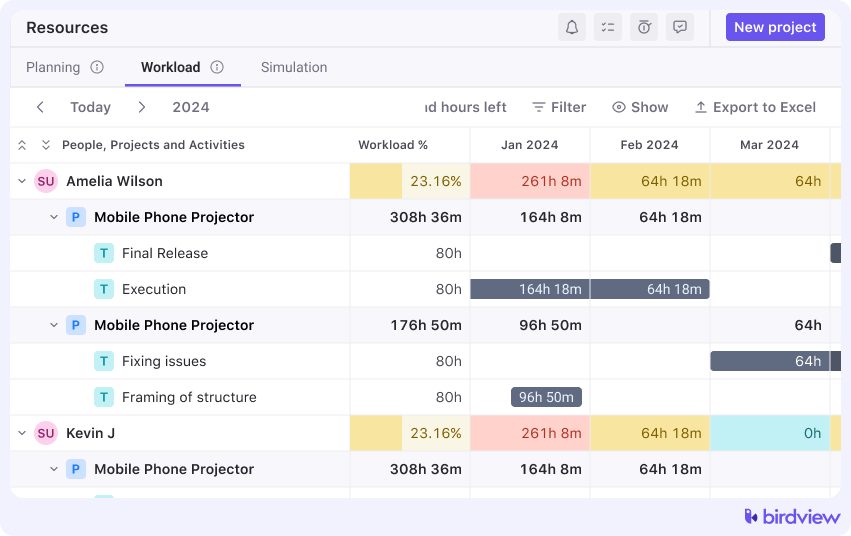
Visual workload views show you instantly who’s overloaded and who has capacity. You can spot bottlenecks before they become problems. When priorities change or scope shifts, you can rebalance work without disrupting everything else.
This isn’t about micromanaging tasks. It’s about seeing patterns and making adjustments at the right level.
Resource utilization tracking
Utilization matters, but only when you track it responsibly. The goal isn’t to maximize everyone at 100%. That’s how you burn people out. The goal is to understand whether you’re using capacity effectively over time.
Track billable versus non-billable work. Look at trends rather than weekly snapshots. Use the data to inform planning, not to judge individuals. In practice, this means setting realistic utilization targets (maybe 70-80% for client work) and building in time for internal projects, training, and recovery.
Forecasting and scenario planning
What happens if you win this pitch? Can you deliver that proposal without hiring? What if two people leave next quarter? Forecasting tools let you model different scenarios before committing.
This shifts you from reactive to proactive. You’re planning beyond current projects. You’re anticipating demand instead of just responding to it.
📚 Read more: Using historical data for better resource planning
Time tracking and data accuracy
Resource plans rely on accurate data. The system must integrate time tracking seamlessly to compare planned effort vs. actual hours spent. This reduces the reliance on manual, error-prone reporting and gives project managers the real-time data needed to course-correct.
Financial visibility for services teams
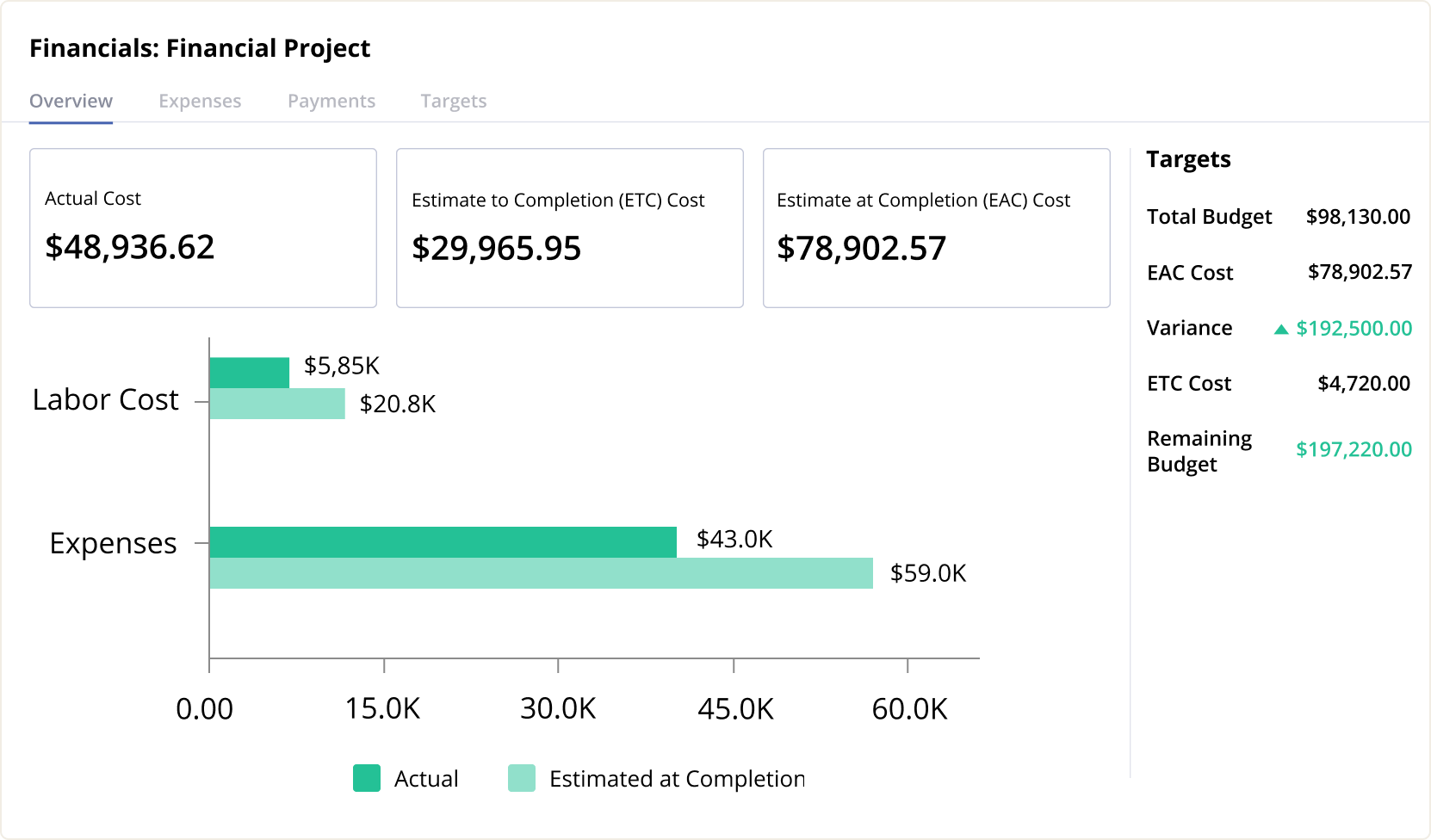
Since people are your revenue engine, the system must connect resource allocation to cost and revenue. This allows you to understand margins at the project, client, and portfolio level. For a client-based organization, this is arguably the most important feature, as it links operational efficiency directly to financial success.
6 key benefits of using a resource management system
Let’s get concrete about what changes when you implement one of these systems properly.
- More predictable delivery. You commit to deadlines based on actual capacity, not optimistic guessing. When you can see everyone’s workload and availability, you stop overpromising and underdelivering.
- Healthier workloads. You spot imbalances before they become crises. Someone heading toward 70 hours this week? You can adjust now instead of dealing with burnout later. This isn’t just good for people (though it is). It’s good for quality and retention.
- Better forecasting. You know when you’ll need to hire, not after you’re already underwater. You can model different growth scenarios and understand their resource implications before committing.
- Higher profitability. Visibility into utilization and margins helps you identify where you’re spending too much to deliver too little. You can adjust staffing, scope, or pricing based on real data.
- Faster response to change. Client changes their mind? Project gets delayed? You can see immediately what that means for the rest of your portfolio and adjust accordingly.
- Stronger client relationships. When you’re not constantly scrambling, you can focus on doing great work instead of just keeping your head above water. Clients notice the difference.
Resource management systems versus standalone tools
When exploring the market, professional services teams often encounter three main types of tools. Understanding the differences is critical for long-term success.
Standalone resource tools
These are dedicated systems focused solely on scheduling and capacity. They are excellent for specific, complex resource challenges but often require heavy integration with separate project, time, and finance tools. Their strength is deep resource planning; their limit is a lack of financial context.
📚 Read more: Resource scheduling in project management: An essential guide
Project management tools with basic resourcing
Many generalist project management tools now include a basic resource feature, typically a simple view of who is assigned how many tasks. These are sufficient for small teams or internal projects, but quickly become inadequate for client-facing work that requires financial tracking, complex utilization, and long-term pipeline visibility.
Professional Services Automation (PSA) platforms
PSA platforms like Birdview PSA are built from the ground up to solve the unique operational challenge of service-based businesses. They unify resources, projects, time, and finance into one ecosystem. Teams typically outgrow lighter solutions when:
- Financial visibility becomes non-negotiable (e.g., managing project profitability).
- The planning horizon extends past the current quarter.
- The business needs to scale resources globally or across multiple business units.
For growing professional services teams, the connectivity and depth of a PSA platform are often essential for scalable operations.
How to choose the right resource management system
Selecting the correct system requires careful self-assessment and a clear view of your growth trajectory.
Before looking at tools, ask:
- What percentage of our resource planning involves forecasting future demand from the sales pipeline?
- Do we need to track resource costs and project margins, or just utilization?
- How critical is skill-based matching for our projects?
- What is our desired planning horizon (one month, three months, one year)?
Here are some of the features that you need to look for in a resource management system:
- Multi-level resource planning (Roles vs. Individuals)
Look for a system that allows you to start planning with placeholders or job roles before you know exactly who will do the work. This lets you build accurate project estimates and understand demand early in the sales cycle. As the project moves to delivery, you should be able to easily swap these placeholders for specific team members.
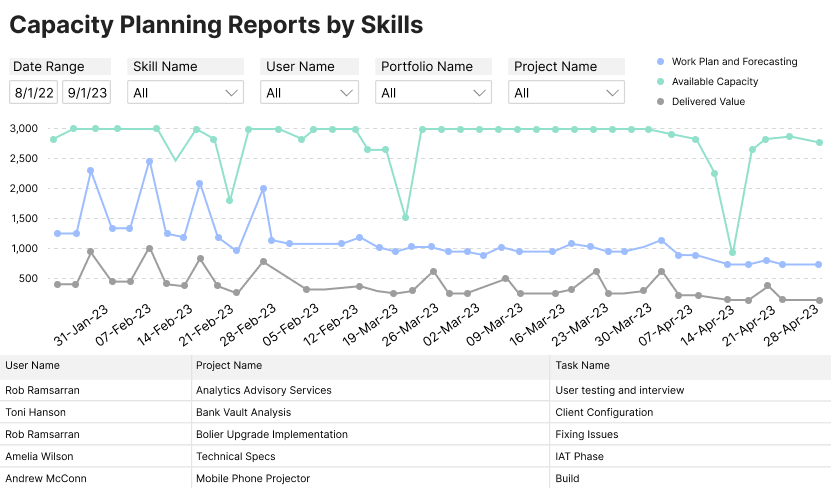
- Intelligent skills-based matching
A manual search for the right person is slow and error-prone. The best systems include a skills and certifications catalog. This allows you to filter your resource pool not just by availability, but by the specific expertise required for a successful delivery.
- Soft and hard allocations
The system must support soft allocations (tentative bookings for projects in the pipeline) and hard allocations (firm bookings for signed contracts). This distinction is critical for maintaining an accurate view of “committed” vs. “forecasted” capacity.
- Native project financials and rate cards
In professional services, resources are linked to money. Your system should allow you to set up internal cost rates and external billing rate cards for different roles or individuals. This ensures that every resource allocation decision automatically updates your projected project profitability and margins.
- Integrated Business Intelligence (BI) and reporting
Static dashboards are not enough. You need the ability to drill down into billable vs. non-billable utilization, project cost variance, and revenue forecasts. A built-in BI engine allows you to generate custom reports that provide a true “bird‘s-eye view” of portfolio health.
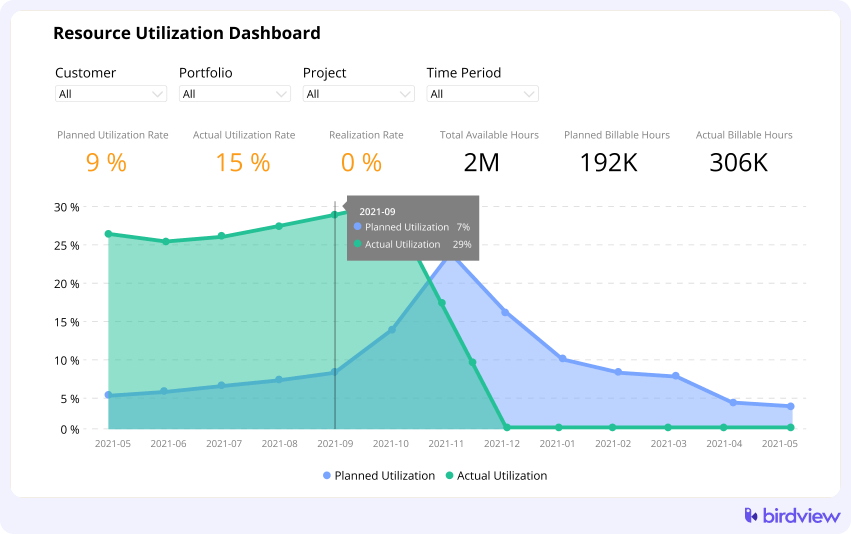
Professional services teams often prioritize PSA-based platforms because they minimize the risk of data misalignment. For instance, in Birdview PSA, the resource plan immediately impacts the financial forecast, creating a single, reliable version of the truth for both operations and finance.
Top 6 resource management systems and tools
Different tools serve different needs. Your best choice depends on your size, complexity, and how far ahead you need to plan.
1. Birdview PSA
Category: PSA-based resource management platform
Best for: Professional services teams managing resources, projects, and financials together
Birdview approaches resource management as part of a complete services operation. You can plan at the role level or individual level, see workload and capacity across teams, and understand how resource decisions affect delivery timelines and margins.
The financial connection is what sets PSA systems apart. When you’re assigning someone to a project, you’re not just filling a slot. You’re making a decision that affects costs, utilization, and profitability. Birdview surfaces that information so you can make smarter assignments.
This approach works well for growing agencies, consultancies, and other services businesses that need to balance delivery, capacity, and financial performance without managing three separate systems.
Key features:
- Resource Scheduler to map out tentative projects, scenario plan, and reduce risk before committing to deadlines
- Unavailable time and available hours, so you can work around your team’s schedules for more accurate capacity planning
- Roles to organize your team based on their skillset or function, so you can strategically assign the right people to the right job (and ensure they’re available at the right time)
- User rates to track the cost rates and billable rates for each person on the project, enabling you to calculate costs, monitor profitability, and generate invoices
- Native time tracking to record, manage, and analyze the hours spent on each project
- Reporting to unlock financial and utilization insights that help you optimize your revenue, profitability, and budget health
2. Float
Category: Visual resource scheduling tool
Best for: Teams that prioritize simplicity and visual planning
Float focuses on making resource scheduling visual and intuitive. The drag-and-drop interface makes it easy to see who’s working on what and adjust assignments quickly. It’s designed to reduce the friction of resource planning without overwhelming users with complexity.
The simplicity is both a strength and a limitation. Float works well for teams that need clear visibility into scheduling and availability. For teams that need deeper financial tracking, utilization analysis, or tight integration with project financials, Float may feel limited.
Key features:
- Drag-and-drop resource scheduling
- Capacity planning
- Time off management
- Project timelines
- Workload visualization
- Budget tracking
3. Smartsheet
Category: Spreadsheet-based work management platform
Best for: Teams comfortable with spreadsheets who need more structure and collaboration
Smartsheet bridges the gap between spreadsheets and dedicated resource management tools. If your team is used to managing resources in Excel or Google Sheets, Smartsheet offers familiar functionality with added collaboration, automation, and visualization features.
The platform works well for teams that want to evolve beyond basic spreadsheets without completely changing their workflow. However, it still requires significant manual setup and maintenance, and lacks the specialized resource management features of purpose-built tools.
Key features:
- Grid-based resource planning
- Gantt charts and timelines
- Resource allocation views
- Automated workflows
- Collaboration and sharing
- Reporting dashboards
4. Mosaic
Category: AI-driven resource planning and forecasting
Best for: Teams focused on high-level capacity insights
Mosaic uses AI to help with planning and forecasting, particularly around demand patterns and staffing needs. The interface is clean, and the insights can be valuable for strategic capacity planning.
Limitations tend to show up around integrations and execution-level control. It’s stronger on the planning side than the day-to-day operational side. Some teams use it alongside other tools for that reason.
Key features:
- AI-assisted capacity planning
- Demand forecasting
- Resource scheduling
- Utilization tracking
- Staffing insights
- Project pipeline visibility
5. Resource Guru
Category: Lightweight scheduling and availability management
Best for: Small teams needing simple availability tracking
Resource Guru offers calendar-style scheduling with a focus on simplicity. You can see who’s available, book them to projects, and track leave. The interface is straightforward.
For small teams without complex project structures or financial tracking needs, this can be enough. As teams grow and projects become more intricate, they typically outgrow what Resource Guru offers and need something more robust.
Key features:
- Calendar-based scheduling
- Resource booking
- Leave management
- Availability tracking
- Clash detection
- Basic utilization reports
6. Hive
Category: Project management tool with resource feature
Best for: Teams needing basic resourcing alongside task management
Hive is primarily a project management platform with some resource scheduling capabilities. You can assign people to tasks and see basic capacity views.
For professional services teams that need deeper resource planning, utilization tracking, and financial visibility, Hive’s resource features are usually too limited. It’s built for managing tasks more than managing a services business.
Key features:
- Task assignment
- Workload views
- Time tracking
- Basic capacity planning
- Team collaboration
- Project templates
Common mistakes teams make with resource management
Even with the right system, teams still make predictable mistakes. Here are the big ones.
- Planning only at the task level: Strategic planning should happen at the project or phase level first. Detailed task assignment should be left to the project manager closer to execution.
- Treating utilization as a target: Aiming for 100% utilization is a recipe for disaster. It leaves zero buffer for sick days or scope changes. Focus on a sustainable target, like 80%.
- Ignoring the future pipeline: Always incorporate probability-weighted demand from the sales pipeline to inform future hiring.
- Separating resource planning from financial outcomes: If the resource manager and the finance team use different tools, you risk major profit leaks.
Help your team build sustainable, scalable delivery with Birdview PSA
Resource management is the foundation upon which all sustainable professional services growth is built. The goal is not merely to track people, but to provide the visibility required to make smarter decisions about your most valuable asset.
The shift to a dedicated system signals a change in mindset, from reactive staffing to a proactive strategy. Tools like Birdview PSA are designed to foster this clarity, helping you move confidently from simply selling time to consistently delivering value at scale.
FAQs about resource management systems
- When should teams invest in a resource management system?
Usually, when the team grows beyond 20–30 billable employees, manages more than 15 concurrent projects, or when resource issues start affecting revenue.
- What‘s the difference between scheduling and capacity planning?
Scheduling is assigning a specific person to a specific task for a defined period. Capacity planning is understanding what roles and skill sets you will need in the future.
- Why do spreadsheets fail at scale?
Spreadsheets are static and disconnected. They cannot automatically link resource effort to project budgets or handle real-time utilization analysis across a large portfolio.
- Do professional services teams need PSA software?
If your primary revenue comes from selling human time and expertise, PSA software provides a connected view of capacity, delivery, and financials that general tools cannot match.
- Can I use a resource management system to decide when to hire?
Yes. This is one of the most valuable uses for a platform like Birdview PSA. By looking at your capacity forecast alongside your sales pipeline, you can identify “capacity gaps” months in advance. Instead of waiting for a project to fail because you are short-staffed, you can see exactly which roles you need to hire and when they need to start.