Ksenia Kartamysheva
 Teams rarely struggle because they don’t understand capacity or utilization. They struggle because the data is too late, too scattered, or too hard to act on.
One team is overloaded. Another has unused capacity. By the time utilization reports are ready, the problem has already affected delivery, timelines, or margins.
Capacity utilization helps teams understand how much work they can take on, how resources are actually used, and where workload needs to change before it becomes a problem.
In this guide, you’ll learn how to calculate and interpret utilization, how to improve it in real projects, and how AI-assisted insights help teams spot risks earlier.
Quick summary: capacity utilization in 2026
Capacity utilization is moving from a reporting metric to a planning signal.
Teams no longer need to look only at what happened last month. With better resource data, time tracking, and AI-assisted insights, they can understand workload risks earlier and adjust plans before delivery suffers.
Key points:
- Capacity utilization shows how much available capacity is being used
- Low utilization may signal underused resources or weak demand
- High utilization may signal overload, burnout risk, or delivery pressure
- The goal is not always 100% utilization
- AI-assisted insights can help teams identify workload risks earlier
- The most useful utilization data connects projects, resources, time, and demand
What is capacity utilization?
Capacity utilization measures how much of a company’s available capacity is actually being used. It compares actual output with potential output if all available resources were fully engaged.
For professional services firms, capacity utilization usually measures how employee time is spent on client work, project delivery, or other productive activities. A low utilization rate may suggest that people are underused. A very high utilization rate may mean teams are stretched too thin.
In manufacturing, capacity utilization compares actual production output with maximum production capacity. In project-based businesses, the same idea applies to people, time, workload, and delivery capacity.
For project managers, capacity utilization is not just a percentage. It helps answer practical questions:
- Do we have enough capacity to take on more work?
- Are some people overloaded while others are underused?
- Are we planning based on real availability or assumptions?
- Are utilization levels helping or hurting delivery?
📚 Read more: Resource underutilization: Causes and solutions explained
Capacity vs utilization: what’s the difference?
Capacity and utilization are closely related, but they are not the same.
| Capacity | Utilization |
| Available work hours | Used work hours |
| Supply | Usage |
| Planning metric | Performance metric |
| Shows what the team can handle | Shows how much capacity is being used |
Capacity answers: how much work can we take on?
Utilization answers: how much of our available capacity are we actually using?
A team can have enough total capacity on paper, but still struggle if the wrong people are overloaded or the right skills are not available.
Capacity utilization formula
To calculate capacity utilization, use this formula:
Capacity utilization = Actual output / Potential output × 100
Where:
Actual output is the amount of work, service, or production completed during a specific period.
Potential output is the maximum amount of work, service, or production that could be completed with available capacity.
In manufacturing, this may be measured in units produced. In project-based businesses, it is often more useful to measure capacity utilization through hours.
For project teams, the formula can also look like this:
Capacity utilization = Used resource hours / Available resource hours × 100
For example, if a consulting team has 1,000 available delivery hours in a month and uses 780 hours on project work, capacity utilization is: 780 / 1,000 × 100 = 78%
This means the team used 78% of its available capacity during that period.
For professional services firms, this approach is often more practical than counting completed projects, because projects vary in size, complexity, and effort.
📚 Read more: What is the utilization rate? How to track & calculate
How to calculate capacity utilization? Step-by-step guide
Step 1: Determine actual output
Start by identifying how much work was actually completed or used during the period.
In a project-based team, this is often measured in used resource hours, billable hours, delivered work, or completed project work.
For example, a consulting team used 780 hours on planned project work during the month. That is the team’s actual output for this calculation.
Step 2: Find potential output
Next, identify the team’s available capacity for the same period.
For example, if the team had 1,000 available working hours after accounting for time off, internal meetings, and non-working days, then the potential output is 1,000 hours.
Step 3: Calculate capacity utilization
Now divide actual output by potential output, then multiply by 100.
Capacity utilization = 780 / 1,000 × 100 = 78%
This means the team used 78% of its available capacity.
Step 4: Analyze the result
A 78% utilization rate may be healthy if the remaining capacity is reserved for internal work, support, training, sales support, or unexpected demand.
The next step is not simply to increase utilization. The real question is whether the unused capacity is planned, productive, and aligned with business needs, or whether it points to weak demand, poor allocation, or a mismatch between available skills and active project work.
Interpreting capacity utilization results
Low utilization rate
If the rate is much lower than your target range, it may mean resources are underused, demand is lower than expected, or work is not being allocated efficiently.
In professional services, low utilization can also mean that people are spending time on internal work, training, sales support, or non-billable activities. That is not always bad. The issue is whether this time is planned and useful, or simply invisible.
High utilization rate
If the rate is close to or above 100%, it may mean the team is operating at or beyond capacity. This can increase the risk of burnout, delays, lower quality, and missed deadlines.
High utilization often looks good in reports, but it can hide delivery risk. If your best people are constantly at 95–110%, the organization may be relying on overload instead of healthy capacity planning.
Healthy range
Many organizations use 85–100% as a general reference point for capacity utilization. However, the ideal range depends on the industry, team structure, type of work, and business model.
In professional services, some unused capacity is often necessary for internal work, training, sales support, planning, and unexpected demand. The goal is not always maximum utilization. The goal is sustainable utilization.
Effects of low and high capacity utilization
| Low capacity utilization | High capacity utilization |
|---|---|
| Wasted resources | Resource strain |
| Higher cost per unit or hour | Higher employee stress |
| Lower profitability | Lower quality or more rework |
| Missed revenue opportunities | Burnout and delivery delays |
| Idle time across teams | Less flexibility for urgent work |
Both low and high utilization create risk. Low utilization can reduce profitability, while high utilization can damage delivery quality and team sustainability. The goal is not maximum utilization, but balanced utilization.
Industry benchmarks for capacity utilization rates
Capacity utilization benchmarks vary by industry. Use them as a reference point, not as a universal rule.
| Industry | Common range | Notes |
| Manufacturing | 80–90% | Higher utilization is common, but overload can affect quality and maintenance |
| Professional services | Depends on billable targets | Varies by role, internal work, and client demand |
| Technology teams | 60–75% | Lower utilization may be normal due to planning, support, learning, and innovation |
Benchmarks help you understand whether your utilization rate is unusually high or low compared with similar organizations.
Context matters. A healthy utilization target for a consulting team will not be the same as a production facility, an internal IT team, or a creative agency.
Why capacity utilization breaks in real projects
Capacity utilization rarely fails because of the formula. It fails because real work changes faster than plans.
Resources are shared across projects. Priorities shift. New client requests appear unexpectedly. People get pulled into urgent work. A project that looked fully staffed on Monday may be at risk by Friday.
Many teams calculate utilization after the fact using spreadsheets or delayed reports. By the time issues are visible, teams are already overloaded or underused.
This creates several common problems:
- Project managers negotiate resources manually
- Leadership sees utilization too late
- Resource conflicts are discovered during delivery
- Teams rely on memory, meetings, or spreadsheets
- Overload becomes normal instead of visible
For project managers, utilization is not just a reporting metric. It is an early signal that shows where the workload needs to be adjusted before delivery or profitability is affected.
How project managers can improve utilization in practice
Improving utilization is less about hitting a target percentage and more about managing workload continuously.
Start by identifying who is overloaded and who has available capacity. Then compare planned allocation with actual time spent to see where plans no longer reflect reality.
A team member may be assigned at 80% on paper but spend 110% of their time on real work because of meetings, support requests, rework, or urgent client needs. Another person may appear fully booked but have available capacity because assigned work is delayed.
Project managers can improve utilization by focusing on a few practical habits:
1. Review workload regularly
Monthly utilization reviews are often too late. Weekly reviews help spot risks before they affect delivery.
Compare planned allocation with actual time
Planned capacity tells you what should happen. Actual time shows what is happening. Both views are needed.
2. Avoid overloading key specialists
High utilization for senior specialists can create hidden risk. If the same people are always overbooked, delivery becomes fragile.
3. Separate billable and non-billable work
Not all utilization has the same business impact. Client work, internal work, support, training, and admin should be visible separately.
4. Balance workload across projects
The goal is not to maximize every person’s utilization. The goal is to keep workload balanced enough to protect delivery, quality, and margins.
The role of automation and AI in capacity utilization
Automation helps teams move from delayed reporting to real-time workload visibility.
Instead of updating spreadsheets manually, project managers can track capacity, allocation, and utilization as project conditions change. This makes it easier to understand who is available, who is overloaded, and where resource conflicts are likely to appear.
AI-assisted insights can support this process by summarizing workload patterns, highlighting unusual changes, and helping managers identify potential capacity gaps earlier.
AI can help identify:
- overloaded team members
- unused capacity
- resource conflicts across projects
- upcoming capacity gaps
- projects at risk due to staffing constraints
- unusual changes in workload or time allocation
AI does not replace resource planning decisions. It helps teams see patterns faster and act earlier with better information.
This is especially useful when teams manage many projects, roles, and changing priorities at the same time.
The biggest mistake in utilization tracking
The biggest mistake is treating utilization as a KPI instead of a signal.
High utilization may look efficient, but it often hides overload. Low utilization may look inefficient, but it can reflect planned bench time, internal work, training, or capacity reserved for upcoming demand.
If leaders only reward high utilization, teams may start hiding the real picture. People stay busy, but not always on the right work. Managers overcommit. Delivery risk grows quietly.
Utilization should help teams ask better questions:
- Is this workload sustainable?
- Are we using the right people on the right work?
- Are we protecting margin or creating delivery risk?
- Do we have enough capacity for upcoming demand?
- Are we using resources effectively across projects?
The goal is not the highest possible utilization. The goal is the right level of utilization for sustainable delivery.
What affects capacity utilization in project teams
Capacity utilization depends on more than available hours. It is affected by how work is planned, assigned, and adjusted as priorities change.
The most common factors are:
- Resource allocation: the same people are often shared across multiple projects
- Workload visibility: managers may see overload too late
- Planning accuracy: estimates and actual work often diverge
- Changing demand: new work, scope changes, and client requests shift capacity quickly
- Process bottlenecks: unclear ownership or dependencies create idle time and delays
Capacity utilization breaks when these factors are not visible early enough. That is why teams need to review workload regularly, not only calculate utilization after the fact.
How to balance capacity utilization
Balancing capacity utilization means making the best use of resources without overloading people or leaving them idle.
Risks of overutilization
Pushing resources too hard can create serious problems.
- Burnout
Overloaded employees are more likely to experience stress, fatigue, and reduced engagement. - Quality issues
When teams rush work, quality can suffer. This may lead to rework, missed expectations, or client dissatisfaction. - Delivery delays
When key people are overbooked, small issues can quickly become bottlenecks. - Lower margins
Overload often creates hidden costs through overtime, rework, delays, or inefficient staffing.
Risks of underutilization
Underusing resources can also hurt performance.
- Wasted costs
Idle time still costs money, especially when employees are not assigned to productive or billable work. - Missed opportunities
Unused capacity could be directed toward new client work, internal improvements, or future demand. - Weak planning signals
If underutilization is not visible, leaders may not understand whether the issue is demand, skills, staffing, or allocation.
What healthy utilization looks like
Healthy utilization means workload is balanced, visible, and realistic. It leaves enough room for internal work, unexpected demand, and project changes.
For professional services teams, this usually means avoiding both extremes: constant overload and persistent unused capacity.
How to improve capacity utilization
Improving capacity utilization does not always require more hiring, more tools, or major operational changes. Many teams can improve utilization by making workload more visible and adjusting planning habits.
- Balance workload across teams
Avoid overloading one person, role, or department while others have unused capacity. Review workload across projects, not only within individual teams. - Plan based on real availability
A person’s calendar may look open, but that does not mean they have real capacity. Availability should include current assignments, meetings, internal work, time off, and non-billable responsibilities. - Track billable and non-billable time
For services firms, utilization becomes more useful when teams separate billable client work from internal activities. This helps managers understand whether time is supporting revenue, delivery, or internal operations. - Review utilization trends, not snapshots
A single utilization number can be misleading. Trends show whether overload or underuse is becoming a pattern. - Adjust staffing before delivery is affected
If utilization data shows risk, adjust early. Move work, shift timelines, rebalance assignments, or bring in additional support before delays happen. - Align capacity with pipeline
Sales and delivery should share capacity visibility. Otherwise, teams may sell work they cannot staff or hold capacity for work that never closes. - Prevent bottlenecks early
Bottlenecks in project environments are often caused by overloaded roles or shared resources. If the same specialist is assigned to multiple projects, even small delays can cascade into delivery risks.
Types of capacity utilization
Capacity utilization can be measured in different ways depending on the resource being managed. For project-based teams, the most relevant types are:
Workforce capacity utilization
Workforce utilization shows how employee time is used across billable and non-billable work. This is one of the most important types for professional services and project teams.
It can include:
- billable utilization
- non-billable utilization
- productive utilization
- idle capacity
- overtime utilization
- specialist utilization
Project capacity utilization
Project utilization shows how resources are allocated across projects and whether teams are balanced or overloaded.
It helps project managers understand whether resources are assigned realistically and whether overlapping projects are creating conflicts.
Time capacity utilization
Time utilization tracks how working time is distributed across tasks, projects, internal work, and support activities.
This helps teams understand where time is actually going, not just where it was planned to go.
Financial capacity utilization
Financial utilization connects resource usage with cost and revenue. It helps teams understand how utilization affects profitability, margins, and revenue potential.
Other types, such as machine, space, energy, or production line utilization, are more relevant in manufacturing or facility-based environments.
Capacity utilization use cases
Capacity utilization helps different roles make better planning, staffing, and profitability decisions. The value depends on what each role is trying to control: capacity, workload, revenue, or delivery risk.
Executive leadership
Use case: strategic planning and profitability
Executives use capacity utilization to understand whether the organization can take on more work, improve margins, or needs additional resources.
For professional services teams, utilization directly affects revenue, client delivery, and profitability. If teams are overloaded, delivery risk increases. If teams are underused, the business may be leaving revenue on the table.
Key questions:
- Are we using our resources effectively?
- Can we take on more client work?
- Should we hire, rebalance, or adjust demand?
- How does utilization affect margins?
Operations managers
Use case: resource allocation and process efficiency
Operations managers use capacity utilization to balance workloads across teams and reduce idle time. Their goal is to keep work moving without overloading people or creating bottlenecks.
Key questions:
- Where are resources overloaded?
- Where do we have unused capacity?
- Which teams need support?
- How can we reduce idle time and improve productivity?
Project managers
Use case: project planning and staffing
Project managers use capacity utilization to assign people based on real availability, not assumptions. This helps them avoid overbooking, protect deadlines, and keep projects profitable.
For billable work, they also track the balance between billable and non-billable hours to understand how resource usage affects project margins.
Key questions:
- Do we have enough capacity to meet deadlines?
- Are any team members overbooked or underused?
- Are assignments realistic based on availability?
- How should we adjust schedules to stay on track?
Resource managers and workforce planners
Resource managers and workforce planners use capacity utilization to understand future staffing needs. They identify when workloads are too heavy for the current team, which roles are in short supply, and where additional hiring or reallocation may be needed.
Sales and account managers
Sales teams use capacity utilization to understand how much new work the delivery team can realistically take on. This helps avoid overpromising to clients and selling work that cannot be staffed.
Capacity planning vs capacity utilization
Capacity planning and capacity utilization are related, but they answer different questions.
| Aspect | Capacity planning | Capacity utilization |
| Main question | What resources will we need? | How much of our capacity is being used? |
| Focus | Future demand | Current usage |
| Time frame | Forward-looking | Current or recent period |
| Use | Staffing, hiring, scheduling | Workload balance, efficiency, risk |
| Outcome | Resource plan | Utilization rate |
Capacity planning helps teams prepare for future demand. Capacity utilization helps teams understand how current resources are being used.
Strong resource management needs both. Planning without utilization data is guesswork. Utilization without planning is reactive.
📚 Read more: Capacity planning and resource planning: What is the difference?
Capacity utilization vs billable utilization
Capacity utilization and billable utilization are related, but they measure different things.
Capacity utilization shows how much available capacity is being used. It helps teams understand workload, resource availability, and whether people are overloaded or underused.
Billable utilization shows how much time is spent on revenue-generating client work. It helps professional services firms understand how employee time contributes to revenue and margins.
A team can have high capacity utilization but weak billable utilization. For example, people may be busy with internal meetings, admin, rework, sales support, or non-billable client requests. In that case, the team is working hard, but not all of that effort supports revenue.
A team can also have lower capacity utilization for a valid reason. Some capacity may be reserved for training, planning, support, internal projects, or upcoming demand.
That is why service firms should track both metrics. Capacity utilization helps managers understand how much capacity is being used. Billable utilization helps them understand how much of that work supports revenue.
Tools for capacity utilization tracking
Capacity tracking tools help teams understand how resources are used across projects and identify workload risks earlier.
Instead of relying on spreadsheets and delayed reports, teams can track capacity, workload, and utilization in real time.
A good capacity tracking tool should help teams:
- see who is available
- identify overloaded resources
- track planned vs actual workload
- separate billable and non-billable work
- forecast future capacity gaps
- connect utilization with project delivery
Tools like Birdview PSA connect resource planning, time tracking, project work, and reporting in one place. This makes it easier to monitor utilization and adjust workloads as projects evolve.
For project-based teams, this matters because utilization is not static. Work changes every week. A connected system helps managers see those changes earlier.
From manual tracking to AI-supported capacity management
| Aspect | Manual tracking | PSA with AI-assisted insights |
| Data accuracy | High risk of manual errors | Connected data with fewer duplicate updates |
| Updates | Delayed weekly or monthly | Near real-time workload visibility |
| Risk detection | Manual review and analysis | Earlier signals on overload and gaps |
| Forecasting | Static or spreadsheet-based | Based on current project and resource data |
| Decision-making | Reactive | More proactive |
Most teams already track utilization. The real difference is whether they can act on it early enough.
How Birdview PSA supports capacity utilization tracking
Birdview PSA helps teams track capacity and utilization by connecting resource planning, project schedules, time tracking, and reporting.
Resource loading report
The resource loading report shows how much work each team member has assigned. It helps managers spot who is overloaded and who has available capacity.
This makes it easier to rebalance work before delivery is affected.
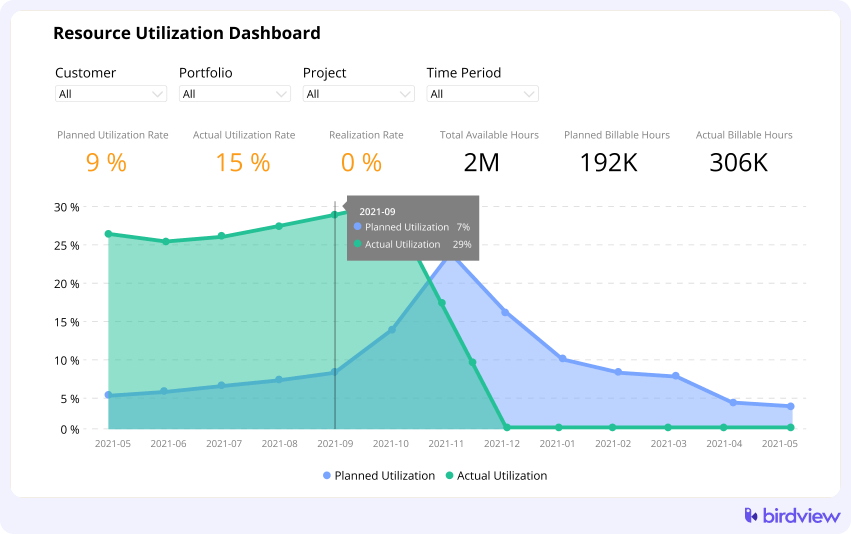
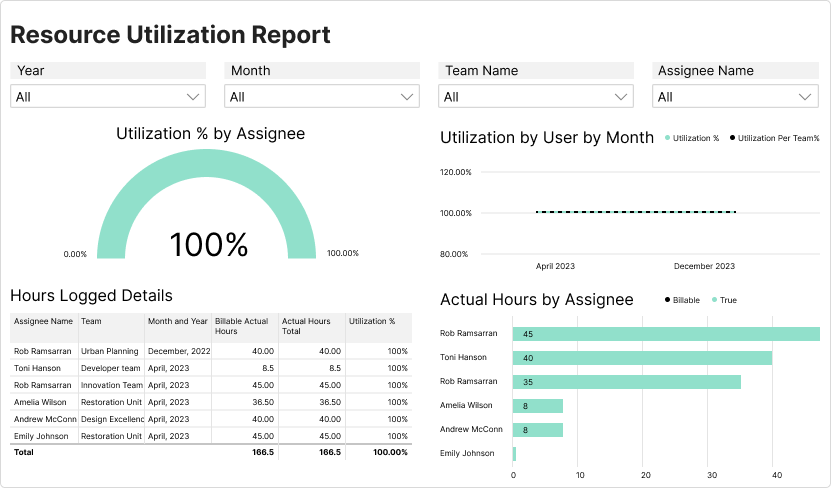
Resource utilization dashboard
The resource utilization dashboard gives managers a visual view of workload and utilization across teams.
Instead of checking separate spreadsheets, managers can see utilization patterns in one place and take action faster.
Time tracking and reporting
Birdview PSA connects time tracking with resource planning. Teams can track billable and non-billable hours and understand how time is used across projects.
This helps managers compare planned work with actual time spent.
AI-assisted capacity insights
Birdview PSA can use AI-assisted insights to help teams identify capacity risks earlier. By summarizing project, workload, and resource data, it helps managers see where delivery may be affected by overload, underuse, or staffing gaps.
For example, if a project depends on a specialist who is already heavily allocated, AI-supported signals can help surface that risk before it turns into a schedule or budget issue.
These insights do not replace resource planning decisions. They give managers better visibility into patterns that are easy to miss when capacity data is spread across spreadsheets, schedules, and reports.
With more current information, teams can adjust assignments, review timelines, or plan future capacity with more confidence.

Integrations
Birdview PSA integrates with tools such as Jira, Salesforce, Outlook, and other business systems. This helps reduce manual updates and keeps project and resource data more connected.
Benefits of using Birdview PSA for capacity tracking
| Benefit | Description |
| Real-time workload visibility | Birdview PSA offers a live view of your team’s workload, allowing you to see exactly how much work each team member is handling. Managers can quickly adjust workloads to balance tasks and keep projects on schedule. |
| Optimize Resource Allocation | Birdview PSA helps you identify underused or overworked team members and allows you to move resources where needed. |
| Improve Forecasting Accuracy | Using past data and project timelines, Birdview PSA supports forecasting future capacity requirements, helping you plan for hiring or adjustments and make better decisions based on accurate forecasts. |
| Eliminate Burnout Risks | Birdview PSA tracks workloads and resource allocation, making it easy to spot imbalances and prevent team members from getting overworked, helping reduce burnout and keep your team productive. |
| Manage Multiple Projects Simultaneously | Birdview PSA’s project portfolio management feature lets you allocate resources across different projects, ensuring your team’s capacity is maximized and maintaining balance across ongoing projects. |
For project managers, the value is not just tracking utilization. It is being able to act on it before overload, underuse, or resource conflicts affect delivery.
Final takeaway
Capacity utilization is useful only when teams use it to make better planning decisions. A percentage alone does not solve overload, idle time, staffing gaps, or delivery risk.
For project-based teams, the real value comes from connecting utilization with workload, time tracking, project schedules, and future demand. When this data is visible in one place, managers can rebalance work earlier and protect delivery timelines.
The goal is not maximum utilization. The goal is to understand where capacity is being used, where it is available, and where workload needs to change before it affects delivery or margins.
Birdview PSA helps teams connect project work, resource planning, time tracking, reporting, and AI-assisted insights, so utilization becomes easier to monitor and act on across active projects.
FAQ: capacity utilization
Why is capacity utilization important for project teams?
It helps teams understand whether resources are overloaded, underused, or allocated realistically across active projects. This directly affects delivery timelines, team performance, and profitability.
Is 100% utilization always good?
No. Constant 100% utilization often leads to burnout, delays, and lower quality. Most teams need some buffer for internal work, planning, and unexpected changes.
What is a good capacity utilization rate?
Many teams use 75–90% as a practical range, depending on the type of work. The right target depends on your business model, team structure, and how much non-billable work is required.
How often should teams review utilization?
Weekly or biweekly. Reviewing utilization only at the end of the month is too late to prevent overload or underuse.
What causes poor capacity utilization?
Common causes include disconnected tools, unclear priorities, shared resources across projects, inaccurate time tracking, and a lack of real-time visibility.
How can teams improve utilization without overloading people?
By balancing workloads, tracking planned vs actual time, separating billable and non-billable work, and adjusting assignments early when risks appear.
How does capacity utilization affect profitability?
Low utilization reduces revenue potential, while high utilization can increase delivery risks and hidden costs. Balanced utilization helps maintain healthy margins.
How can AI help with capacity utilization?
AI-assisted insights can summarize workload patterns, highlight overload or unused capacity, and help teams identify resource risks earlier.
Can AI replace resource managers?
No. AI supports decision-making, but resource planning still requires human judgment, context, and prioritization.