Leonid Kostin
 - Service delivery dashboards help managed services teams combine workload, capacity, performance, and client data into a single operational view that supports faster decision-making.
- Resource utilization, capacity planning, forecasting, client delivery, and service profitability dashboards provide visibility into the factors that most directly affect service quality and business performance.
- Capacity and demand forecasting dashboards help leaders identify staffing shortages, workload spikes, and resource constraints before they affect client commitments.
- Service delivery performance improves when workload distribution, SLA compliance, utilization, and client outcomes are monitored continuously rather than through periodic reporting.
- Many reporting challenges stem from fragmented systems, disconnected resource planning processes, and spreadsheet-based reporting rather than a lack of available data.
- The most effective dashboards connect operational metrics with business outcomes, helping organizations improve staffing decisions, forecasting accuracy, profitability, and client satisfaction.
- Ops leaders should keep widgets that name an owner and a decision this week. Historical galleries that nobody acts on are noise.
- Weekly is the default cadence for a PSA firm. Daily is for load and SLA exceptions. Monthly is for margin and billing lag.
A service delivery dashboard is a reporting view that combines workload, resource capacity, delivery performance, client commitments, and operational metrics in one place. It helps service delivery leaders understand whether teams can meet demand, where risks are emerging, and how operational performance affects client outcomes.
For most managed services teams, the challenge is not a lack of data. The challenge is that information lives in multiple systems and arrives too late to support decisions. A good service delivery dashboard turns disconnected operational data into visibility that managers can actually use.
Consulting ops leaders ask a narrower question than “do we have dashboards.” They ask which tiles actually change a staffing call, which ones are noise, how often to look, and what a COO should see that a project manager should not. The eight dashboard types below stay the catalog. The added sections name the consulting widgets, the cadence, and the split between those two seats.
Why service delivery visibility matters
Managed services teams need visibility into workload, delivery performance, resource capacity, and client commitments to ensure services are delivered consistently and efficiently.
Many service organizations reach a point where reporting no longer keeps pace with operations. Team leads maintain spreadsheets, project managers track work in one system, and executives receive static reports that are already outdated when they arrive.
This creates several common problems:
- Fragmented reporting across multiple systems
- Overloaded teams that are difficult to identify early
- Missed client commitments caused by limited visibility
- Reactive staffing decisions driven by urgent requests
- Manual reporting processes that consume management time
One pattern appears repeatedly in growing service organizations. Managers know there is a capacity problem, but they cannot prove where it exists or how severe it is. Without visibility, resource conflicts often become visible only after delivery performance starts slipping.
What makes a good service delivery dashboard?
A good service delivery dashboard helps managers identify risks, monitor performance, and make faster operational decisions. Rather than simply reporting historical data, it should provide visibility into current operations and future capacity needs.
Key characteristics include:
- Real-time operational visibility into active work, workloads, and resource availability.
- Delivery performance monitoring through service-level metrics, completion rates, and delivery trends.
- Resource capacity tracking to identify overloaded teams and future staffing gaps.
- Client service insights that connect operational performance to client outcomes.
- Executive reporting that summarizes utilization, demand, capacity, and overall service health.
The most effective dashboards combine these elements to provide a complete view of service delivery performance.
AFP’s FP&A dashboard guidance is the same cut, written for a one-page capture of KPIs: include only the information relevant to the decisions senior managers will make, keep metrics strategic and measurable, and stop overloading the view until nobody can find the number that matters [1]. A dashboard that “flattens” several analyses into one space is useful when the viewer can see how utilization, remaining work, and margin move together. A snapshot with no change-over-time is the failure mode AFP flags as snapshot tendency.
8 service delivery dashboards every managed services team should use
Different dashboards answer different operational questions. Together, they create a complete picture of service delivery performance.
Treat the eight as a catalog, not a mandate to ship eight Power BI files on day one. A consulting PSA firm still needs the same questions (portfolio, utilization, capacity, client delivery, forecast, profit, executive). The widget list later in this article is how those questions collapse onto one ops screen.
Portfolio summary dashboard
What it shows
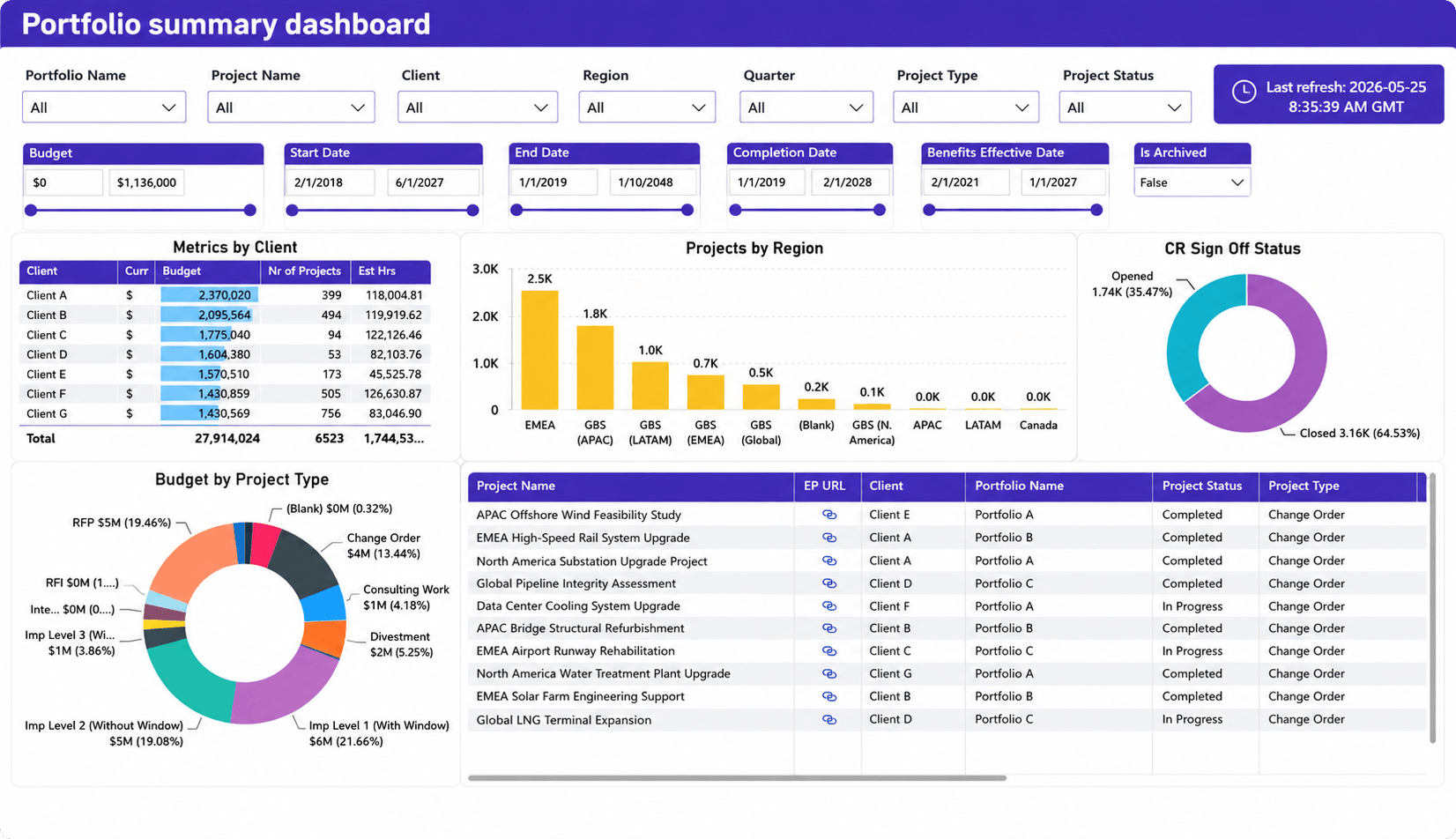
- Budget and portfolio performance
- Active projects across clients and regions
- Project status distribution
- Delivery portfolio health
- Client-level metrics
- Open versus closed work
- Workload distribution across service areas
Why it matters
A service delivery overview dashboard acts as an operational command center for service leaders. Instead of reviewing separate reports for projects, clients, resources, and financial performance, managers can see the overall health of service operations in a single view.
This type of dashboard is particularly valuable for organizations managing multiple clients, regions, or service teams. Leaders can quickly identify which portfolios require attention, where delivery performance is declining, and whether workload is distributed appropriately across the organization.
One common challenge in growing service organizations is the lack of portfolio-level visibility. Teams often understand the status of individual projects but struggle to see how all client work affects overall capacity and delivery performance. A portfolio summary dashboard helps bridge that gap by connecting operational activity to broader business performance.
Resource utilization dashboard
What it shows
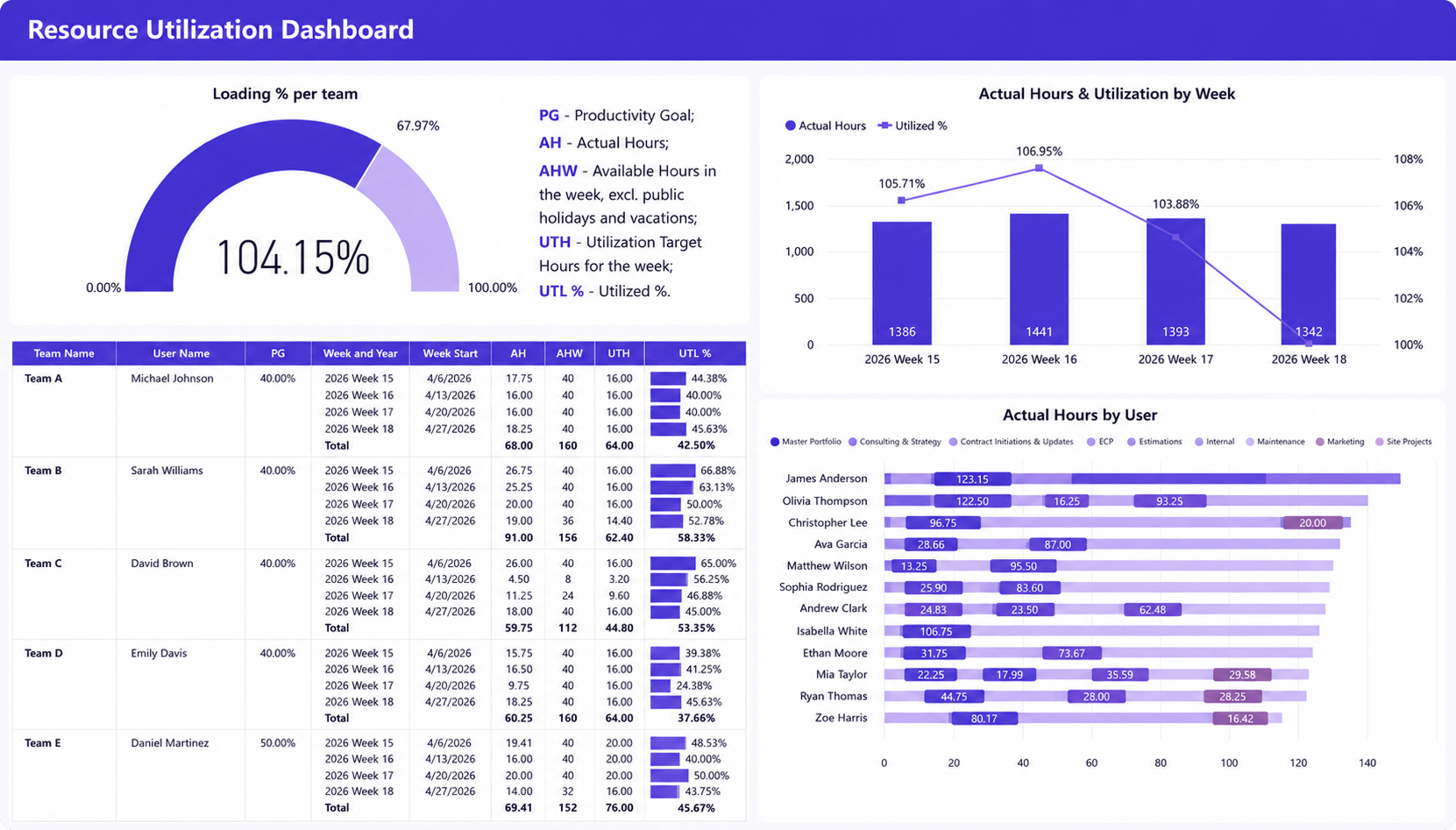
- Team and individual utilization rates
- Actual hours worked versus utilization targets
- Weekly workload and utilization trends
- Resource loading percentages
- Distribution of work across employees and teams
Why it matters
Resource utilization is one of the most important indicators of service delivery performance. This dashboard helps managers understand whether resources are being used effectively, where workload imbalances exist, and how current staffing levels align with delivery demand.
By combining utilization targets, actual hours, and workload distribution in a single view, leaders can quickly identify overloaded team members, underutilized capacity, and emerging resource constraints. This visibility supports better staffing decisions and helps prevent both burnout and idle capacity before they impact client commitments.
High utilization is not always a positive sign. Many service organizations celebrate utilization improvements until teams become overloaded and service quality begins to decline. When utilization remains above target for extended periods, response times often increase, project delays become more common, and employee turnover risk grows. This dashboard helps managers identify those trends early enough to take corrective action.
On a service delivery dashboard, utilization has to sit next to named remaining work, not in a lonely donut. SPI Research’s 2026 Professional Services Maturity Benchmark (509 professional service organizations) reports that Level 5 firms show 42% more billable utilization than Level 2 peers [2]. That gap is a maturity reading, not a target to paste on every person. The resource utilization dashboard tile earns its place when it answers “who is over 100% this week, and which project is eating them.”
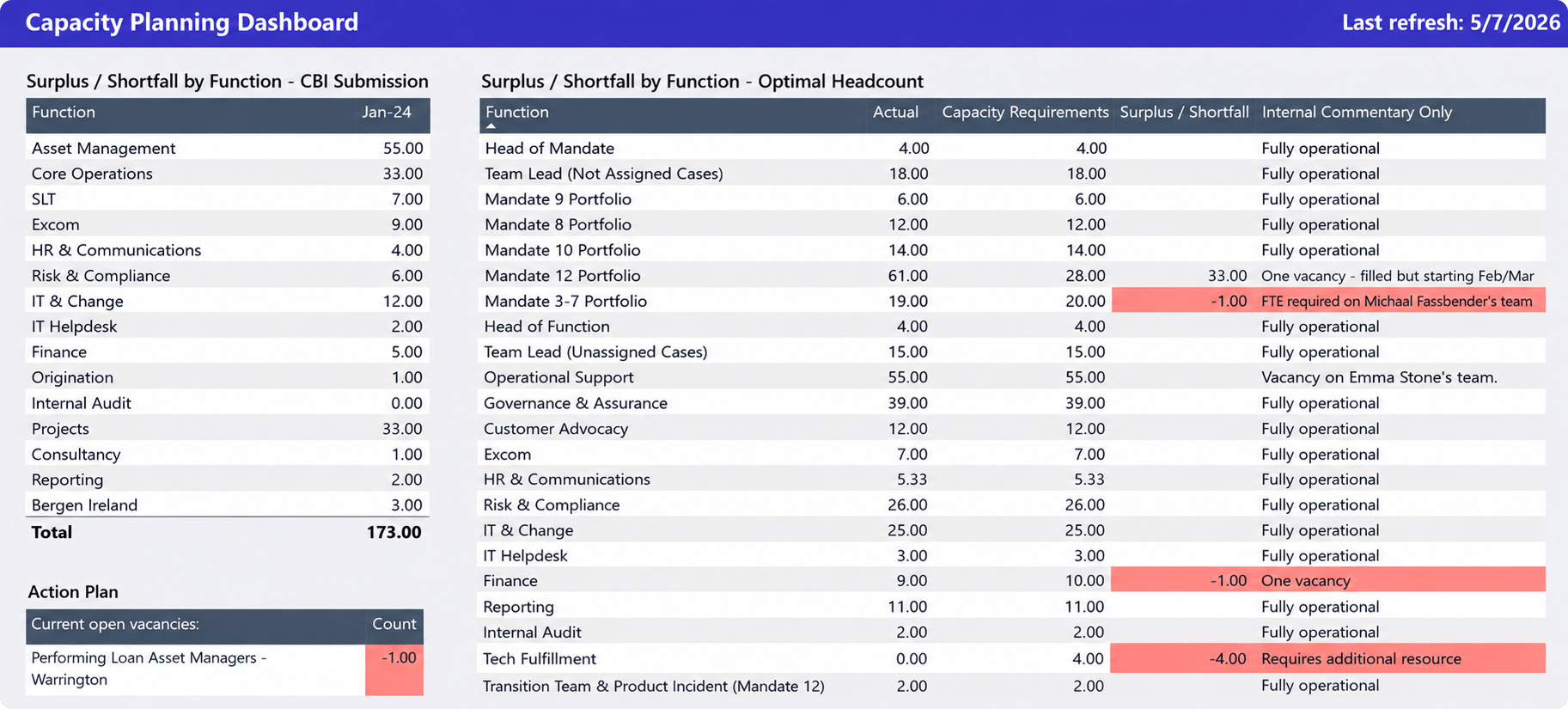
Capacity planning dashboard
What it shows
- Resource surpluses and shortages by team or function
- Current staffing levels versus capacity requirements
- Headcount gaps across departments
- Open vacancies and hiring needs
- Areas where future demand exceeds available resources
Why it matters
Capacity planning is most effective when staffing decisions are made before delivery issues appear. This dashboard helps service delivery leaders compare current resource capacity against expected demand and identify where shortages are likely to occur.
By highlighting headcount gaps, staffing surpluses, and resource constraints across teams, managers can proactively plan hiring, redistribute work, or adjust delivery commitments before capacity problems affect service quality. This visibility is particularly valuable for organizations managing multiple clients, service lines, or delivery teams where resource shortages in one area can quickly impact overall operational performance.
For example, a managed services organization may discover that cloud engineers are fully allocated for the next two months while infrastructure specialists still have available capacity. Without this visibility, sales teams may continue accepting work that the delivery organization cannot realistically support. Capacity dashboards allow leaders to make staffing and hiring decisions before those constraints affect clients.
Capacity on the ops dashboard is a forward bar, not a headcount table. Show committed work versus named people for the next four to eight weeks. A vacancy count without dates is HR reporting. A skill that is fully booked while another sits idle is the staffing call.
Service team utilization dashboard
What it shows
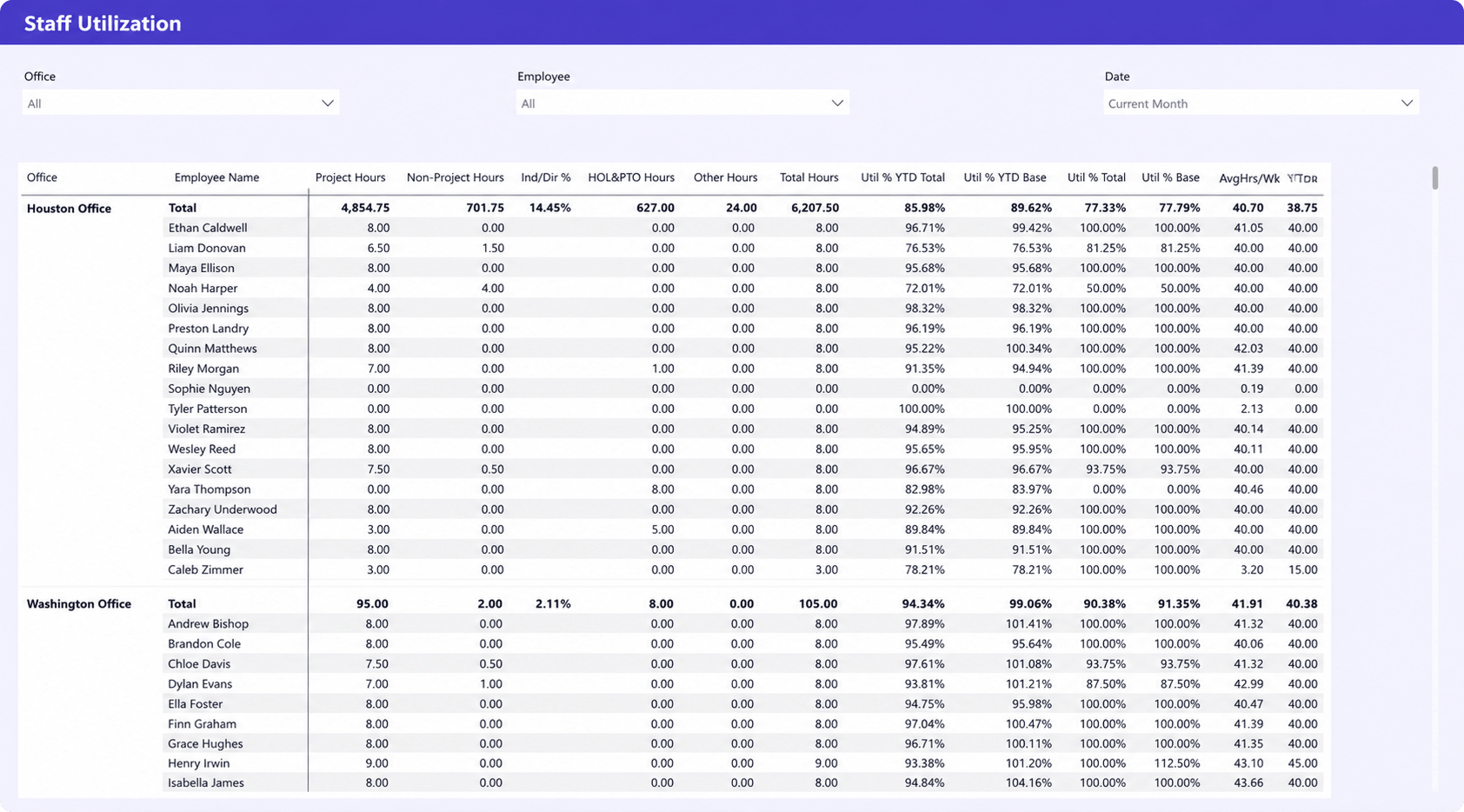
- Team and employee utilization rates
- Project and non-project hours
- Individual productivity metrics
- Total hours worked and average weekly hours
- Utilization performance across offices and teams
Why it matters
Service delivery performance ultimately depends on how effectively teams use their available capacity. This dashboard provides visibility into individual and team-level utilization, helping managers understand workload distribution, productivity trends, and resource effectiveness across the organization.
By combining utilization metrics with project and non-project hours, leaders can identify top-performing teams, uncover uneven workload distribution, and detect potential burnout risks before they impact service quality. The dashboard also helps managers understand how different offices or teams contribute to overall delivery performance, making it easier to balance workloads and improve operational efficiency.
Many service organizations discover that a small group of experienced employees handles a disproportionate share of delivery work. While this may appear efficient in the short term, it often creates bottlenecks and increases operational risk. Team performance dashboards help leaders identify those patterns and distribute work more effectively across the organization.
Client delivery dashboard
What it shows
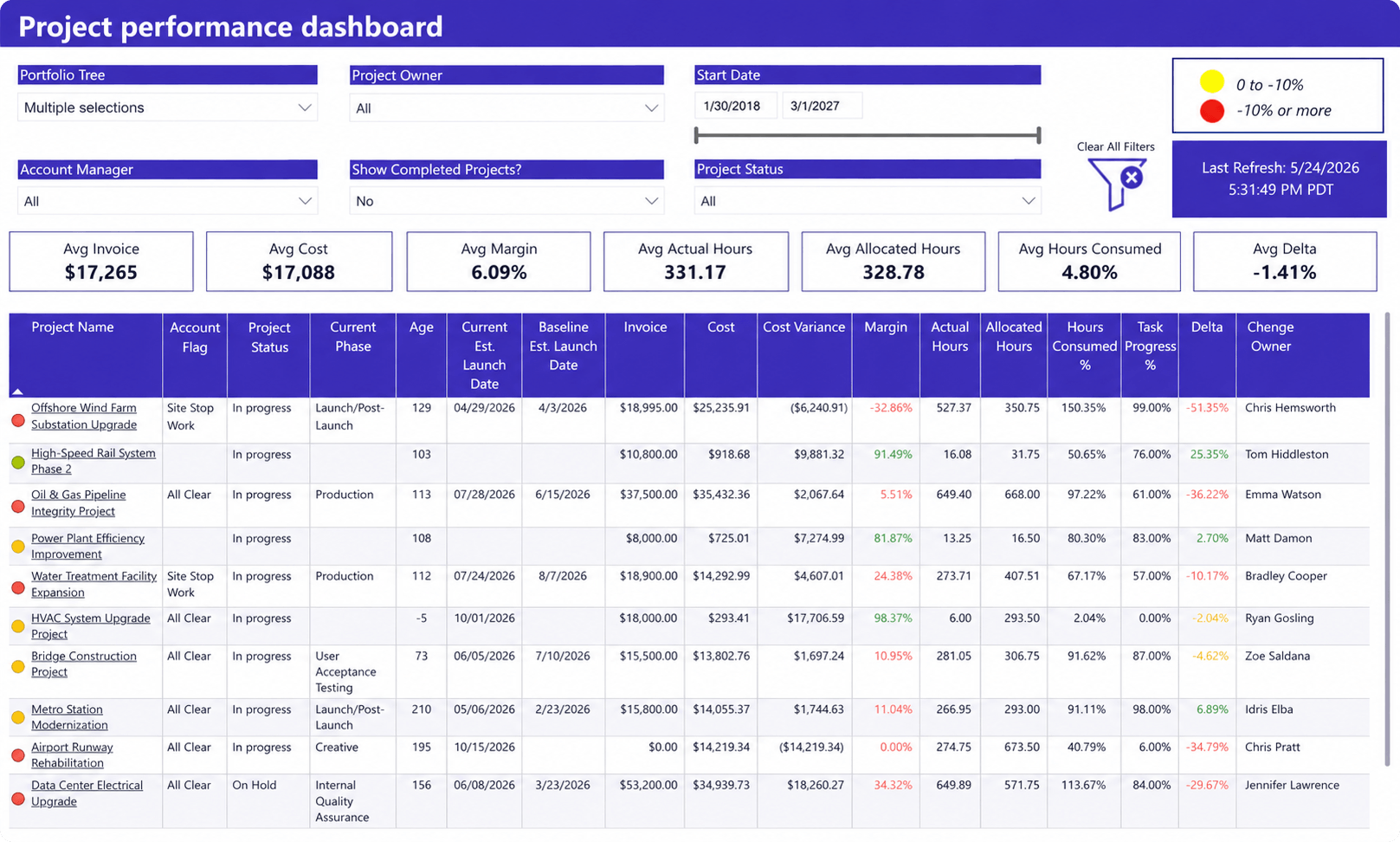
- Client project status and delivery health
- Project progress and completion metrics
- Budget, invoice, and margin performance
- Cost variance against project plans
- Actual versus allocated hours
- Delivery risks across active client engagements
Why it matters
Successful client relationships depend on consistent delivery performance. This dashboard gives service delivery leaders a consolidated view of project execution, financial performance, and delivery health across client engagements.
By combining project status, budget performance, margins, resource consumption, and progress indicators in a single report, managers can quickly identify projects that are falling behind schedule, exceeding budgets, or consuming more effort than expected. This visibility helps teams address delivery risks early, improve client communication, and ensure service commitments are met before issues impact client satisfaction.
Client concerns rarely appear without warning. Delayed milestones, declining margins, growing effort consumption, and schedule slippage are often visible long before a formal escalation occurs. A client delivery dashboard helps account managers and service leaders identify those warning signs and take action before they affect the relationship.
Project health on this screen is the red/amber/green row a PM can defend in standup: baseline versus actual dates, remaining hours versus remaining calendar, and budget burn versus elapsed time. Traffic lights with no driver (scope change, missing time, a blocked client) are decoration. Pair each red project with one cause field.
Demand forecasting dashboard
What it shows
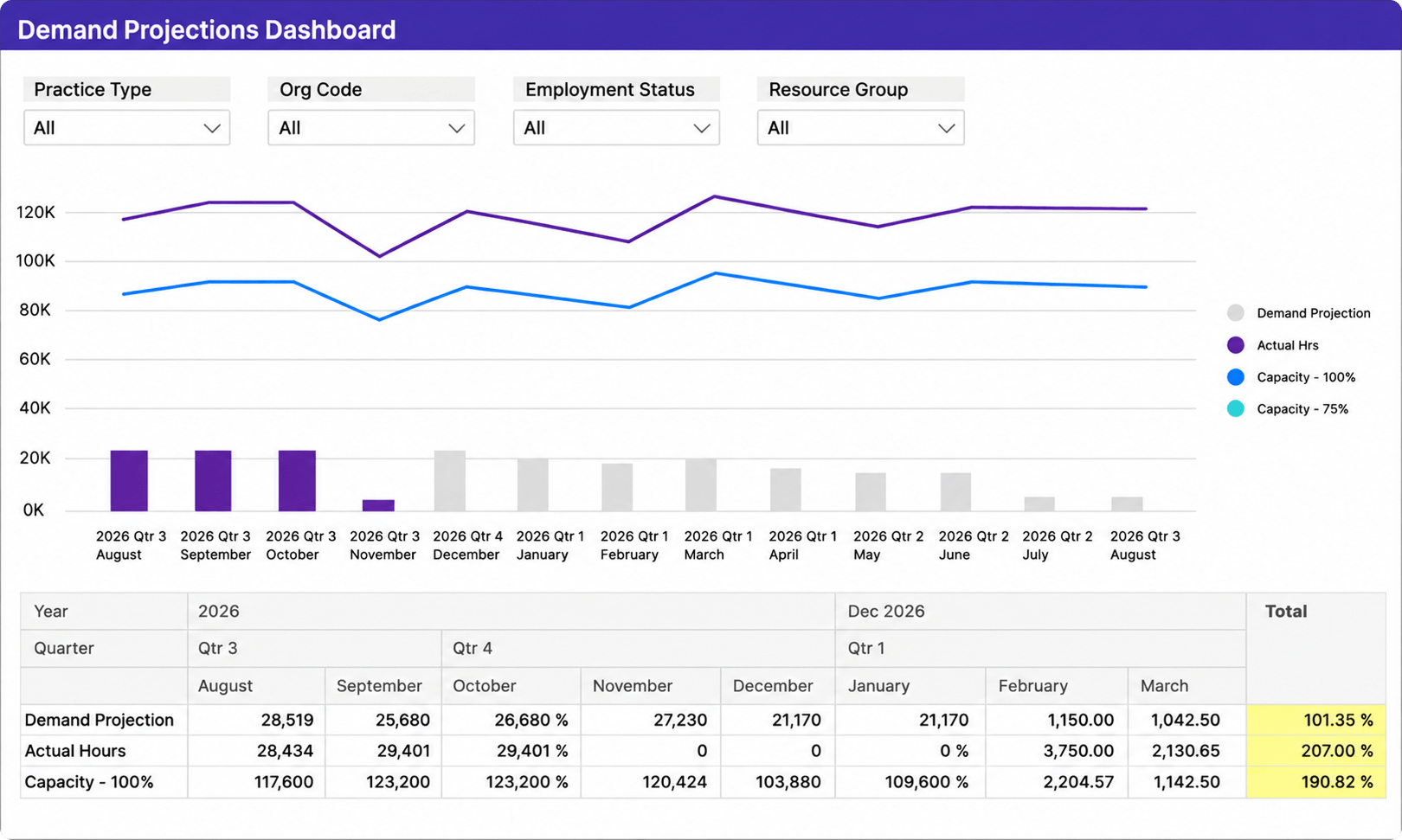
- Forecasted resource demand over future periods
- Projected workload versus available capacity
- Actual hours compared to forecasted demand
- Capacity trends across teams and resource groups
- Potential resource shortages before they affect delivery
Why it matters
Forecasting is one of the most effective ways to prevent delivery issues before they occur. This dashboard helps service delivery leaders compare future demand against available capacity, making it easier to identify staffing risks, resource shortages, and upcoming workload spikes.
By combining demand projections, actual utilization, and capacity planning metrics, managers can make more informed hiring, staffing, and allocation decisions. Instead of reacting to capacity problems after delivery performance declines, teams can proactively prepare for future demand and maintain consistent service levels as workloads change.
Forecasting is also one of the most common challenges for growing service organizations. Many teams still rely on spreadsheets to estimate future demand. The problem is that staffing availability, project schedules, and client priorities can change weekly. Forecasting dashboards provide a more reliable way to evaluate future workload and identify risks before they become operational problems.
Service profitability dashboard
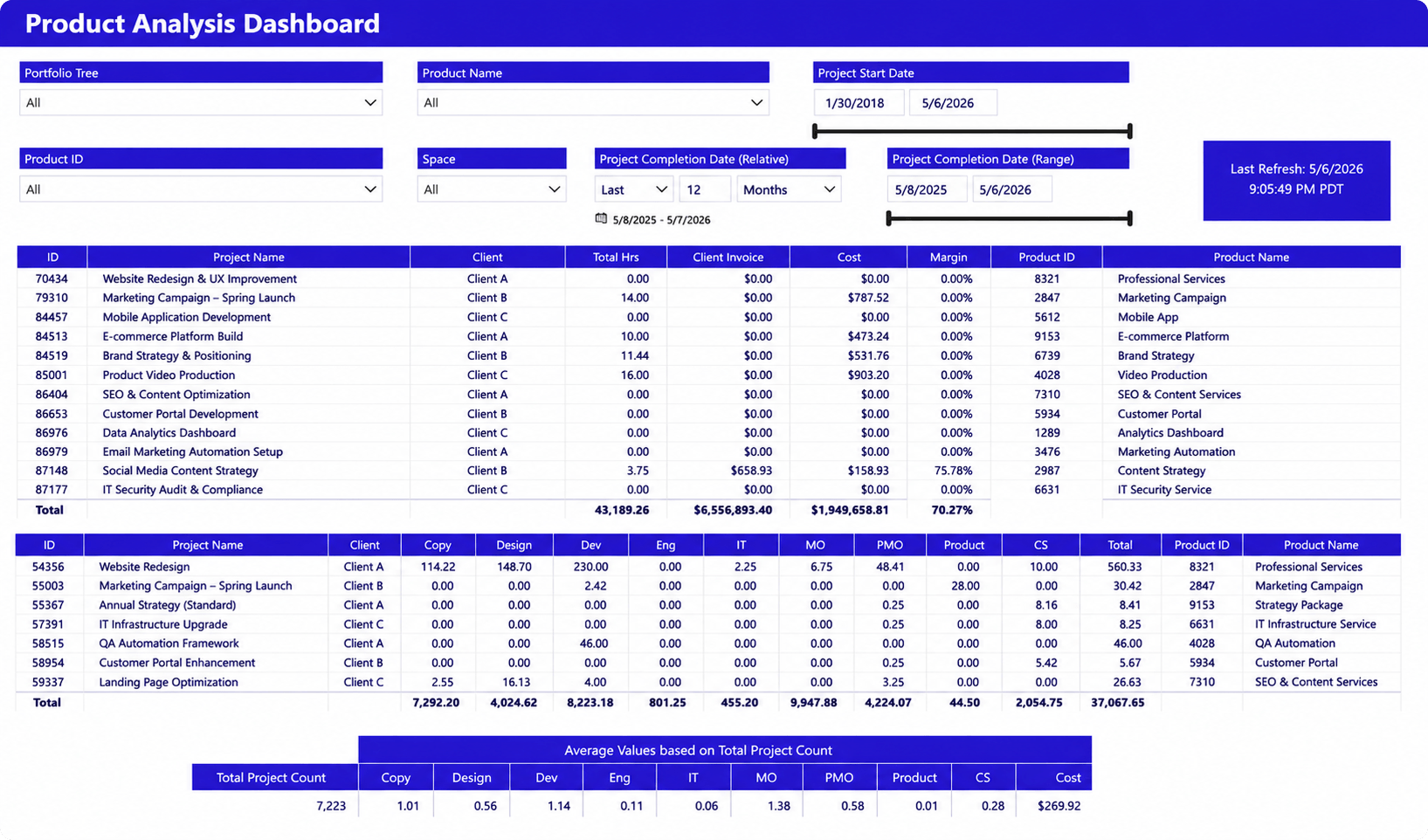
What it shows
- Revenue and invoice performance by service offering
- Project and service margins
- Labor costs and effort distribution
- Client profitability trends
- Resource contribution across service lines
Why it matters
Strong delivery performance does not always translate into strong financial performance. Organizations can meet client commitments while still losing profitability through inefficient staffing, underestimated effort, or excessive non-billable work.
This dashboard helps service leaders connect operational activity to financial outcomes. By comparing revenue, labor costs, utilization, and margins, managers can understand which services generate the greatest value and where profitability is being eroded.
This visibility is particularly important for organizations managing multiple service offerings, retainers, or recurring engagements. Understanding which work generates profit is often just as important as understanding which work gets completed.
Margin on a delivery dashboard is work-in-progress margin from logged hours and cost rates, not last quarter’s closed books. Billing lag sits beside it: approved billable hours with no invoice, and the age of that bucket. A green utilization tile with a fat unbilled pile is leakage in slow motion. SPI’s 2026 benchmark reports Level 5 firms at 250% higher project margins than Level 2 peers [2]. The dashboard’s job is to show which live projects are walking away from that gap this week. Sister formulas live on project financial KPIs.
Executive operations dashboard
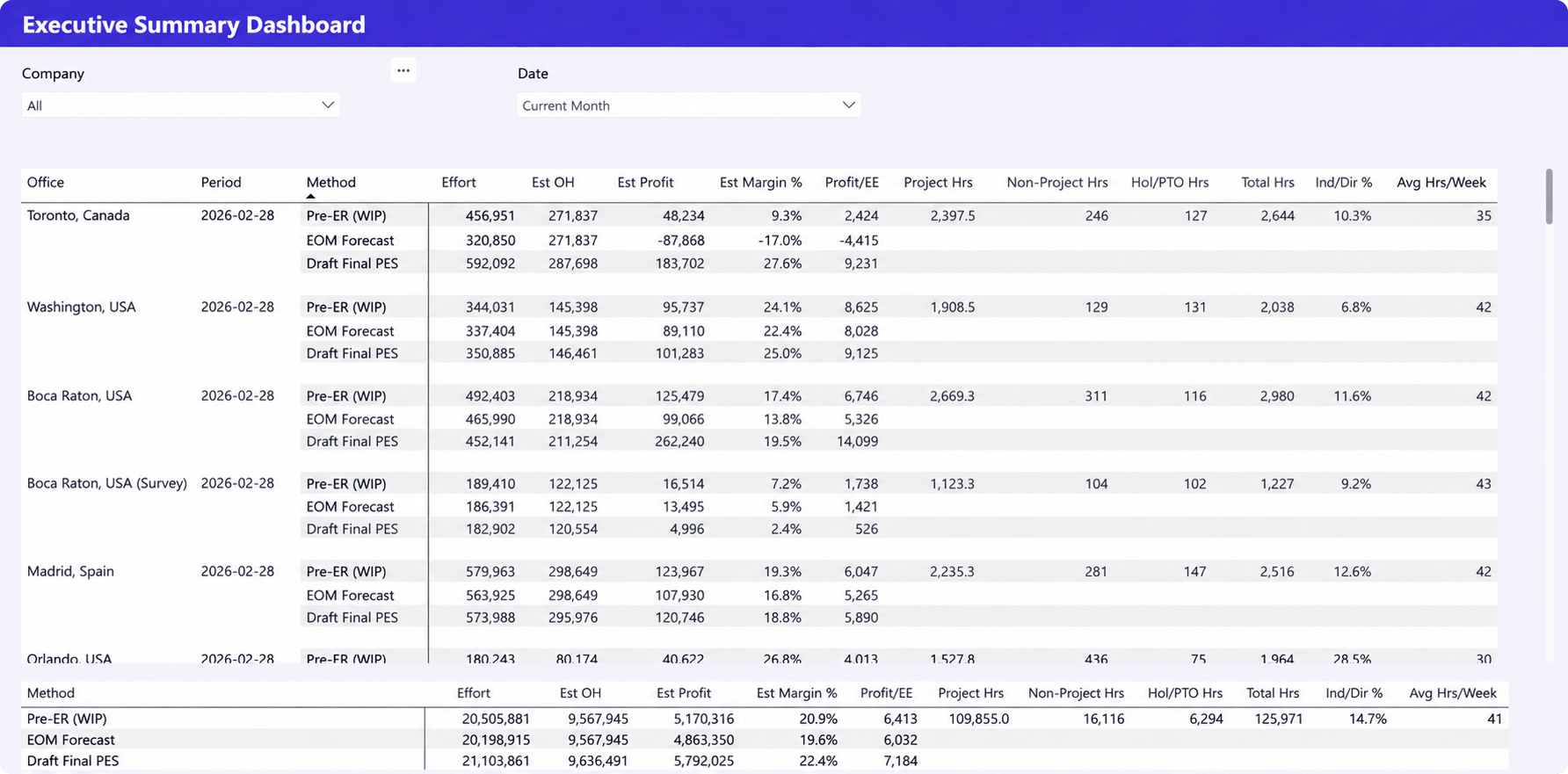
What it shows
- Revenue, profit, and margin forecasts
- Project and non-project effort across offices and teams
- Resource utilization and available capacity
- Hours worked, PTO, and workforce productivity metrics
- Financial and operational performance in a single view
Why it matters
Executives need visibility into both operational performance and business outcomes. This dashboard combines delivery, resource, and financial metrics to provide a high-level view of organizational health without requiring leaders to review multiple reports.
By bringing together profitability forecasts, resource utilization, project effort, and workforce capacity, the dashboard helps leadership teams understand whether current operations can support future demand. It also provides early visibility into profitability risks, capacity constraints, and performance trends, enabling more informed decisions about hiring, resource allocation, and business growth.
One of the most common executive challenges is balancing growth with delivery capacity. Winning additional business creates little value if teams cannot deliver it profitably. Executive dashboards help leadership understand how delivery performance, utilization, capacity, and financial results influence one another, making strategic planning decisions significantly more data-driven.
A COO still should not inherit the PM’s 40-row project grid. Roll the same live fields up: count of red projects, capacity four weeks out, WIP margin, billing lag. The split of those two seats is spelled out after the catalog.
The most important service delivery KPIs
The most effective service delivery dashboards focus on a small number of metrics that help managers identify delivery risks, capacity constraints, and workload issues before they affect clients.
Sister page service delivery KPIs is the formula sheet (nine KPIs, four questions). This page is the screen those numbers land on. If a KPI cannot drive a widget with an owner, it stays off the default view.
Service-level performance
Measures how consistently teams meet client commitments through metrics such as response times, resolution times, and SLA compliance. Persistent declines often indicate workload or staffing issues.
Resource utilization
Measures how effectively available capacity is being used. High utilization can improve efficiency, but consistently overloaded teams often experience declining service quality and reduced flexibility.
Capacity availability
Shows how much additional work the organization can realistically absorb. This KPI helps leaders make better staffing, prioritization, and hiring decisions.
Forecast accuracy
Compares expected workload with actual demand. Poor forecast accuracy often leads to resource shortages, missed deadlines, or excess capacity.
Resource saturation
Measures future workload allocation. Saturation metrics help managers identify upcoming bottlenecks and staffing gaps before they affect delivery performance.
Work completion rates
Tracks how efficiently teams convert planned work into completed work. Declining completion rates can signal growing backlogs, shifting priorities, or resource constraints.
Client satisfaction indicators
Measures the outcome of service delivery efforts through metrics such as retention, escalations, renewals, and customer feedback. When reviewed alongside operational KPIs, these indicators help identify delivery issues before they impact client relationships.
Why managed services reporting often breaks down
Many service organizations struggle with visibility despite having plenty of data. The issue is rarely the dashboard itself. More often, reporting is slowed down by disconnected systems, manual processes, and limited visibility into future resource needs.
Common reporting challenges include:
- Data lives in multiple systems. Project data, resource plans, financial information, and client records are often stored in separate tools, making it difficult to create a complete picture of service delivery performance.
- Resource planning and delivery reporting are disconnected. Teams may track capacity in one system and delivery performance in another, making it difficult to understand how staffing decisions affect client commitments.
- Capacity planning is reactive. Many organizations only identify resource shortages after utilization increases, workloads become unbalanced, or service levels begin to decline.
- Reports are manually compiled. Exporting data from multiple systems into spreadsheets creates reporting delays and increases the risk of outdated or inconsistent information.
The most effective service delivery dashboards solve these challenges by bringing operational, resource, and performance data together in a single reporting environment. This gives leaders a clearer view of current performance and helps them make better decisions about staffing, capacity, and client commitments.
How dashboards improve service delivery performance
The value of a dashboard comes from helping managers make better decisions, not simply displaying data. When service delivery leaders have visibility into workload, capacity, and performance, they can respond to issues before they affect clients.
Key benefits include:
- Faster issue identification. Workload imbalances, delivery risks, and bottlenecks become visible earlier.
- Better staffing decisions. Capacity and utilization data help managers allocate resources more effectively and avoid overloading teams.
- Improved forecasting. Visibility into future demand supports more accurate hiring, staffing, and planning decisions.
- More consistent service delivery. Teams are better equipped to meet commitments when workload and performance are continuously monitored.
- Greater leadership visibility. Executives gain access to operational insights without relying on manual reporting and status updates.
Effective dashboards help organizations move from reactive management to proactive decision-making, improving both service quality and operational efficiency.
Reliable service delivery dashboards require reliable operational data
The best service delivery dashboards combine resource, workload, project, and financial data to provide a complete view of operational performance.
Many reporting challenges stem from disconnected systems and spreadsheet-based processes. As organizations grow, maintaining accurate reporting across multiple tools becomes increasingly difficult.
Platforms such as Birdview PSA can serve as a centralized data source for Power BI by connecting project delivery, resource planning, time tracking, and operational reporting. The result is more reliable visibility and better decision-making.
A dashboard is only as valuable as the data behind it. Improving reporting often starts with improving the quality and consistency of operational data.
Live delivery metrics are the test, not a prettier export. If remaining work, named assignments, approved time, and billing status sit in the PSA, the dashboard can refresh without a Friday spreadsheet. Birdview already joins those objects for Power BI. What it cannot invent: an SLA clock you never logged, or a change order nobody wrote down. In implementations we run, the first live tiles we wire are remaining work versus named capacity. A 24-tile SLA mosaic comes later, if it comes at all.
Metrics that matter versus metrics that are noise
Andrew Likierman’s HBR warning is blunt: leave measurement to people fluent in spreadsheets and you get a mass of numbers that give little insight and can push decisions that hurt the company [3]. That is the noise problem on a service delivery dashboard.
Actionable tiles share four traits. They have a formula, a system of record, an owner, and a decision this week. Utilization next to remaining work is actionable. Average hours by office with no named person is not. SLA compliance that drops when a queue is overloaded is actionable. A vanity “tickets closed this year” counter is not.
AFP’s first dashboard tip is the prune rule: include only what senior managers will decide from [1]. If a widget cannot change staffing, scope, or billing this cycle, park it on a monthly appendix. Do not let it occupy the default screen.
Noise we see on consulting ops walls: raw ticket volume with no aging, login counts, “percent of projects green” with no definition of green, and utilization with the bench and the heroes averaged into one firm-wide number. Cut those before you add another chart.
Must-have widgets on a consulting service delivery dashboard
Consulting delivery is project-shaped. Managed services delivery is often queue-shaped. The eight dashboard types above still apply. The default consulting screen is smaller.
Must-have widgets:
- Portfolio heat: count of projects by health, with the red list named.
- Utilization versus remaining work for the people on those projects this week.
- Capacity four to eight weeks out by skill, not by department label.
- WIP margin and billing lag on the same row.
- Milestone slippage on in-flight work (average and worst case).
Optional, second row: SLA/response only if you sell retainers with clocks; CSAT only if you actually send the pulse.

If a widget cannot name the project, the person, and the decision, it is a poster. Build the five above before you commission a sixth Power BI file.
Daily, weekly, or monthly cadence for PSA firms
Daily is for exceptions: people over 100% load, SLA clocks about to breach, projects that flipped red since yesterday. That is a 10-minute stand-up screen, not a board pack.
Weekly is the ops default. Same five widgets, same owners, decisions written down: move a person, cut scope, raise a change order, or leave it. If the numbers only move when someone rebuilds Excel, you do not have a dashboard. You have a ritual.
Monthly is for lagging reads: closed-project margin, billing lag trend, forecast accuracy versus last month’s demand. Do not drag those into Monday’s staffing meeting. They drown the leading tiles.
A 15-project firm can live on weekly. Past that, daily exception tiles earn their keep because Friday’s export is already stale on Tuesday.
What a COO should see versus a project manager
Same data model. Different grain.
COO screen: how many projects are red, where capacity breaks in the next month, WIP margin, billing lag, and whether the firm can take the next deal. No 40-row grid. No individual timesheet exceptions unless a pattern repeats.
PM screen: this project’s remaining hours, baseline dates, budget burn, unbilled on this engagement, and who is assigned this week. That seat should not need the firm-wide utilization donut to run standup.
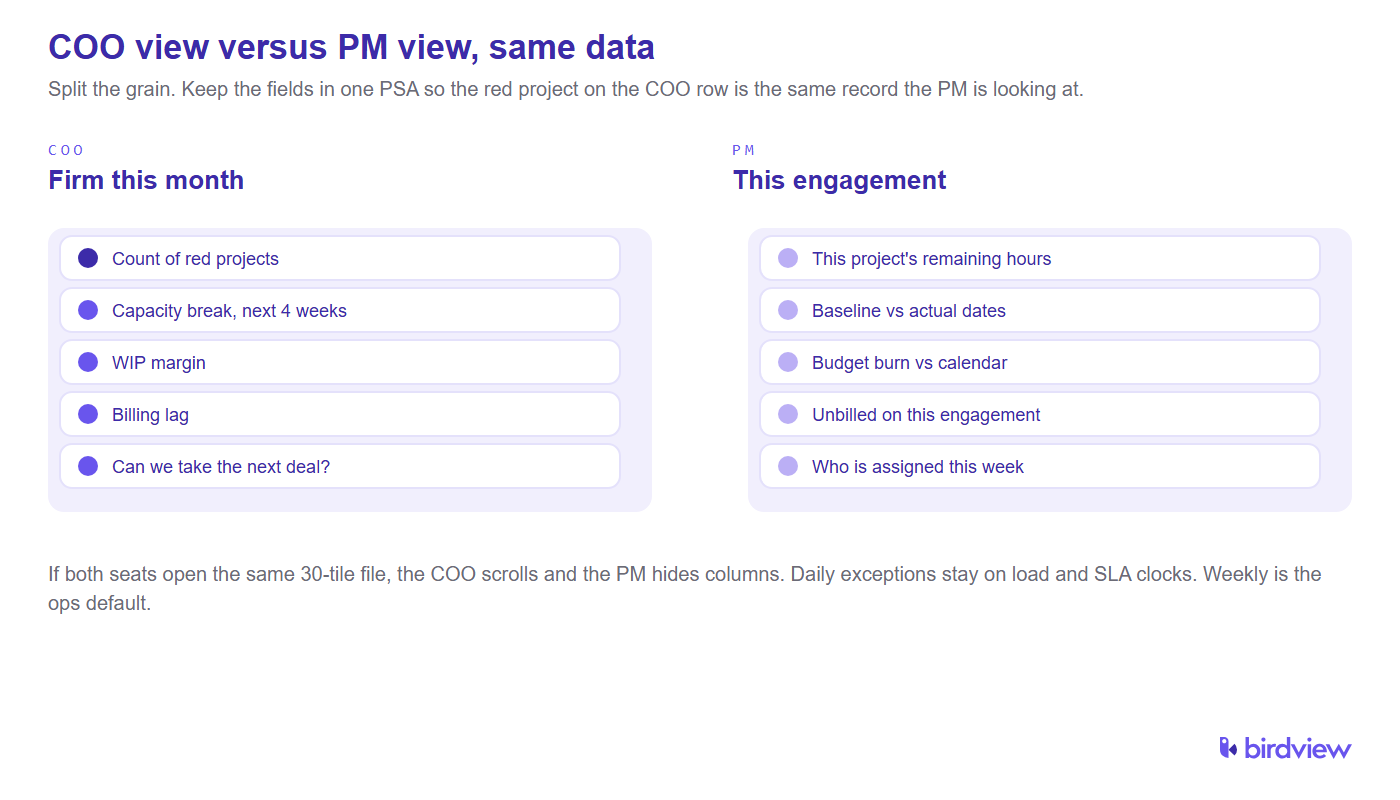
If both seats open the same 30-tile file, the COO scrolls and the PM hides columns. Split the views. Keep the fields in one PSA so the red project on the COO row is the same record the PM is looking at.
FAQ
What is a service delivery dashboard?
A service delivery dashboard is a reporting tool that combines operational metrics, workload data, resource information, and delivery performance indicators into a single view. It helps managers monitor service health and make informed operational decisions.
Which KPIs should managed services teams track?
The most important service delivery KPIs typically include utilization, capacity availability, service-level performance, completion rates, forecast accuracy, workload distribution, and client satisfaction indicators.
How do dashboards support SLA management?
Dashboards provide visibility into response times, resolution times, compliance percentages, escalation rates, and performance trends. This helps teams identify risks before service-level commitments are missed.
How do dashboards improve resource planning?
Resource planning dashboards connect workload demand with available capacity. This helps managers identify staffing gaps, prevent overload situations, and allocate resources more effectively.
What data should be included in service delivery reporting?
Service delivery reporting should include workload data, resource utilization, capacity forecasts, service-level performance, work completion trends, client delivery metrics, and operational performance indicators. The goal is to connect operational activity with business outcomes.
Can PSA power a service delivery dashboard with live delivery metrics?
Yes, when remaining work, named assignments, approved time, and billing status live in the same PSA model, the dashboard can refresh without a weekly export. Birdview can feed those fields to Power BI. It will not invent an SLA clock or a change order you never recorded.
Sources
- Association for Financial Professionals. 3 Tips for Building an FP&A Dashboard (16 Dec 2016). https://www.financialprofessionals.org/training-resources/resources/articles/Details/3-tips-for-building-an-fp-a-dashboard
- SPI Research. 2026 Professional Services Maturity Benchmark (509 professional service organizations; Level 5 vs Level 2 billable utilization and project margins). https://spiresearch.com/reports/2026-ps-maturity-benchmark/
- Andrew Likierman. The Five Traps of Performance Measurement. Harvard Business Review, October 2009. https://hbr.org/2009/10/the-five-traps-of-performance-measurement